


Mentions inbox
The mentions inbox lists the messages that mention the user, newest first, like an activity view.
What you'll build
- A bell button that opens the inbox in the side panel
- One row per mention, with the mention highlighted
- A button to load older mentions
- Opening a mention at its message in the channel
Preview
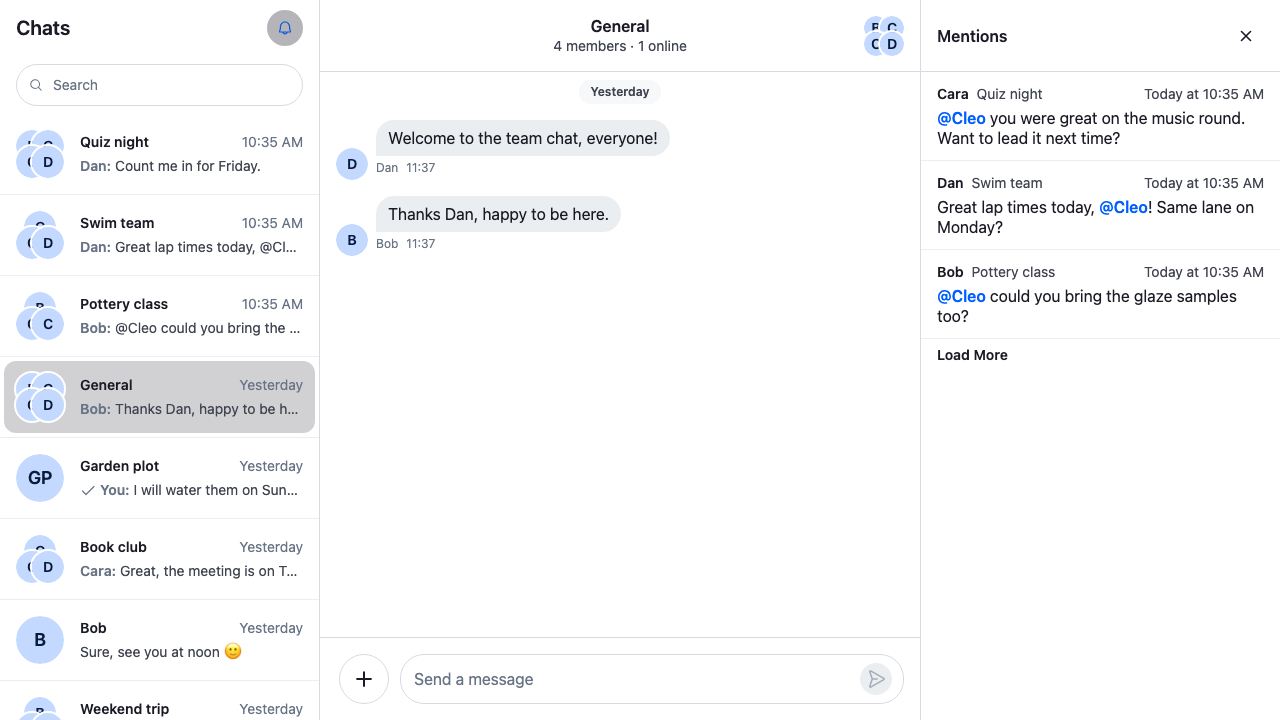
Approach: Replace one part and Compose. Choosing where to start explains the approaches.
Starts from: the base app, with its side panel. The page shows only what the recipe adds: the panel's body and the button that opens it.
Best practices
- Find the mentions with a
MessageSearchSourceand a message filter onmentioned_users.id. The source pages the results, keeps them in itsstatestore, and loads the channels they come from that the client doesn't hold yet, so the inbox doesn't callclient.search()itself. - Give the source no search text: turn on
allowEmptySearchString, so the filter alone picks the messages, and setdebounceMsto0, since nothing is typed. - Load the next page from a
LoadMoreButtonat the end of the list. A list in a side panel is short, and a button keeps the user in control of when more arrives. - Open a mention the way the SDK's message search results do: open the channel, add it to the channel lists, and call
MessagePaginator.jumpToMessage(), which highlights the message, loading the page around it and watching the channel when needed. - Render the mentions as a list of buttons, not a
listbox, so a screen reader announces each one by its text. Keep the text inline, since a button can't hold paragraphs or links. - Show the empty and the error state in the panel. The error state offers to try again.
Build the inbox
MentionsInbox is the side panel's body. It creates the source once, searches when it mounts, and when it unmounts cancels a search still under way and deactivates the source, which lets go of the channels the results kept in memory.
createMentionsSource()creates aMessageSearchSourcewhosemessageSearchFilterskeep the messages with the user's id inmentioned_users. The source adds the filter that keeps the search to the user's own channels.MessageSearchSource.search('')loads the first page, andMessageSearchSource.search()with no text loads the next one.- Each mention renders the author, the channel's name from
useChannelDisplayName(), the time withMessageTimestamp, and the text withrenderText().getRenderTextMentionEntities()turns the message'smentioned_usersinto the mentionsrenderText()highlights, with the samestr-chat__message-mentionclass as the message list. - Search returns the server's form of a message,
MessageResponse.MessageTimestamptakes aLocalMessage, because it reads the message'sstatus, soformatMessage()turns the result into one.getRenderTextMentionEntities()accepts either form, and the item passes it the same formatted message. allowedTagNameskeeps the rendered text inline and turns links into plain text, since it sits inside the mention's button.LoadMoreButtondisables itself while the next page loads, which would drop focus to the page, soMentionsInboxgivesautoFocusto the first mention of the new page.- Try again gives way to the loading indicator, so focus falls back to the page. The recipe accepts that for an error state the user rarely sees.
import { useEffect, useMemo, useState } from "react";
import type { MouseEvent } from "react";
import { formatMessage, MessageSearchSource } from "stream-chat";
import type {
  MessageResponse,
  SearchSourceState,
  StreamChat,
} from "stream-chat";
import {
  Button,
  getRenderTextMentionEntities,
  LoadingIndicator,
  LoadMoreButton,
  MessageTimestamp,
  renderText,
  useChannelDisplayName,
  useChatContext,
  useStateStore,
  useWorkspaceNavigation,
} from "stream-chat-react";
import "./MentionsInbox.css";

/** The messages that mention the user, newest first, a few at a time. */
const createMentionsSource = (client: StreamChat) =>
  new MessageSearchSource(client, {
    // There's no search text: the filter alone picks the messages.
    allowEmptySearchString: true,
    // Nothing is typed, so the source queries right away.
    debounceMs: 0,
    messageSearchFilters: {
      "mentioned_users.id": { $contains: client.userId ?? "" },
    },
    pageSize: 3,
  });

const sourceSelector = ({
  hasNext,
  isLoading,
  items,
  lastQueryError,
}: SearchSourceState<MessageResponse>) => ({
  hasNext,
  isLoading,
  items,
  lastQueryError,
});

type MentionsState = ReturnType<typeof sourceSelector>;

/** The first page failed, so there is nothing to list. A failed later page keeps what loaded. */
const failedToLoad = ({ items, lastQueryError }: MentionsState) =>
  !!lastQueryError && !items?.length;

/** The first page hasn't arrived yet: a source has no `items` before its first query ends. */
const isFirstLoad = ({ items }: MentionsState) => !items;

// Inline formatting, emoji and mentions only, and no links: the text sits inside the item's button.
const allowedTagNames = ["em", "strong", "code", "del", "emoji", "mention"];

/** Opens the message's channel in the layout and scrolls to the message. */
const useOpenMention = () => {
  const { channelManager, client } = useChatContext();
  const { openChannel } = useWorkspaceNavigation();

  return (message: MessageResponse, event: MouseEvent) => {
    // Message search stores every result's channel.
    const channel = message.cid ? channelManager.get(message.cid) : undefined;
    if (!channel || channel.pendingDisposal) return;
    openChannel(channel, { event });
    channelManager.ingestChannel(channel);
    // Highlights the message, loading the page around it and watching the channel when needed.
    channel.messagePaginator
      .jumpToMessage(message.id, { watchChannel: true })
      .catch((error: Error) =>
        client.notifications.addError({
          message: "Failed to load the channel",
          options: { originalError: error },
          origin: { emitter: "MentionsInbox" },
        }),
      );
  };
};

type MentionProps = {
  /** Takes focus when it renders, as the first item of a page Load more fetched. */
  autoFocus?: boolean;
  message: MessageResponse;
};

/** One mention: who wrote it, where and when, and the text with the mention highlighted. */
const Mention = ({ autoFocus, message }: MentionProps) => {
  const { channelManager } = useChatContext();
  const openMention = useOpenMention();
  const channel = message.cid ? channelManager.get(message.cid) : undefined;
  const channelName = useChannelDisplayName(channel);
  // Search returns the server's message; the SDK's components take the client's form of it.
  const localMessage = useMemo(() => formatMessage(message), [message]);

  return (
    <li>
      <button
        autoFocus={autoFocus}
        className="cookbook-mention"
        data-message-id={message.id}
        onClick={(event) => openMention(message, event)}
        type="button"
      >
        <span className="cookbook-mention__header">
          <span className="cookbook-mention__author">
            {message.user?.name ?? message.user?.id}
          </span>
          <span className="cookbook-mention__channel">{channelName}</span>
          <MessageTimestamp
            calendar
            customClass="cookbook-mention__time"
            message={localMessage}
          />
        </span>
        <span className="cookbook-mention__text">
          {renderText(localMessage.text, {
            allowedTagNames,
            messageMentionEntities: getRenderTextMentionEntities(localMessage),
          })}
        </span>
      </button>
    </li>
  );
};

/**
 * The side panel's body: the messages that mention the user. It searches once when it opens, and
 * Load more fetches the next page.
 */
export const MentionsInbox = () => {
  const { client } = useChatContext();
  const [source] = useState(() => createMentionsSource(client));
  const state = useStateStore(source.state, sourceSelector);
  // The index of the first item Load more fetches, which takes focus from the button it disables.
  const [focusIndex, setFocusIndex] = useState<number>();

  useEffect(() => {
    source.activate();
    void source.search("");
    // Closing the panel drops a scheduled search and aborts the one in flight.
    return () => {
      source.cancelScheduledQuery();
      source.deactivate();
    };
  }, [source]);

  if (failedToLoad(state)) {
    return (
      <div className="cookbook-mentions__note" role="alert">
        <p>Couldn’t load your mentions.</p>
        <Button
          appearance="outline"
          onClick={() => void source.search("")}
          size="sm"
          variant="secondary"
        >
          Try again
        </Button>
      </div>
    );
  }
  if (isFirstLoad(state)) return <LoadingIndicator />;
  if (!state.items?.length) {
    return (
      <p className="cookbook-mentions__note">No one has mentioned you yet.</p>
    );
  }

  return (
    <div className="cookbook-mentions">
      <ul className="cookbook-mentions__list">
        {state.items.map((message, index) => (
          <Mention
            autoFocus={index === focusIndex}
            key={message.id}
            message={message}
          />
        ))}
      </ul>
      {state.hasNext && (
        <LoadMoreButton
          isLoading={state.isLoading}
          onClick={() => {
            setFocusIndex(state.items?.length);
            void source.search();
          }}
        />
      )}
    </div>
  );
};@layer stream-overrides {
.cookbook-mentions {
display: flex;
flex-direction: column;
padding-block-end: var(--str-chat__spacing-md);
}
.cookbook-mentions__list {
margin: 0;
padding: 0;
list-style: none;
}
.cookbook-mention {
display: flex;
flex-direction: column;
gap: var(--str-chat__spacing-xxs);
width: 100%;
padding: var(--str-chat__spacing-sm) var(--str-chat__spacing-md);
border: 0;
border-block-end: 1px solid var(--str-chat__border-core-subtle);
background: none;
color: var(--str-chat__text-primary);
font: var(--str-chat__font-body-default);
text-align: start;
cursor: pointer;
}
.cookbook-mention:hover {
background: var(--str-chat__background-utility-hover);
}
.cookbook-mention:focus-visible {
outline: 2px solid var(--str-chat__accent-primary);
outline-offset: -2px;
}
.cookbook-mention__header {
display: flex;
align-items: baseline;
gap: var(--str-chat__spacing-xs);
color: var(--str-chat__text-secondary);
font: var(--str-chat__font-caption-default);
}
.cookbook-mention__author {
color: var(--str-chat__text-primary);
font: var(--str-chat__font-caption-emphasis);
}
.cookbook-mention__time {
margin-inline-start: auto;
}
.cookbook-mentions__note {
display: flex;
flex-direction: column;
align-items: flex-start;
gap: var(--str-chat__spacing-sm);
margin: 0;
padding: var(--str-chat__spacing-md);
color: var(--str-chat__text-secondary);
font: var(--str-chat__font-body-default);
}
.cookbook-mentions__note p {
margin: 0;
}
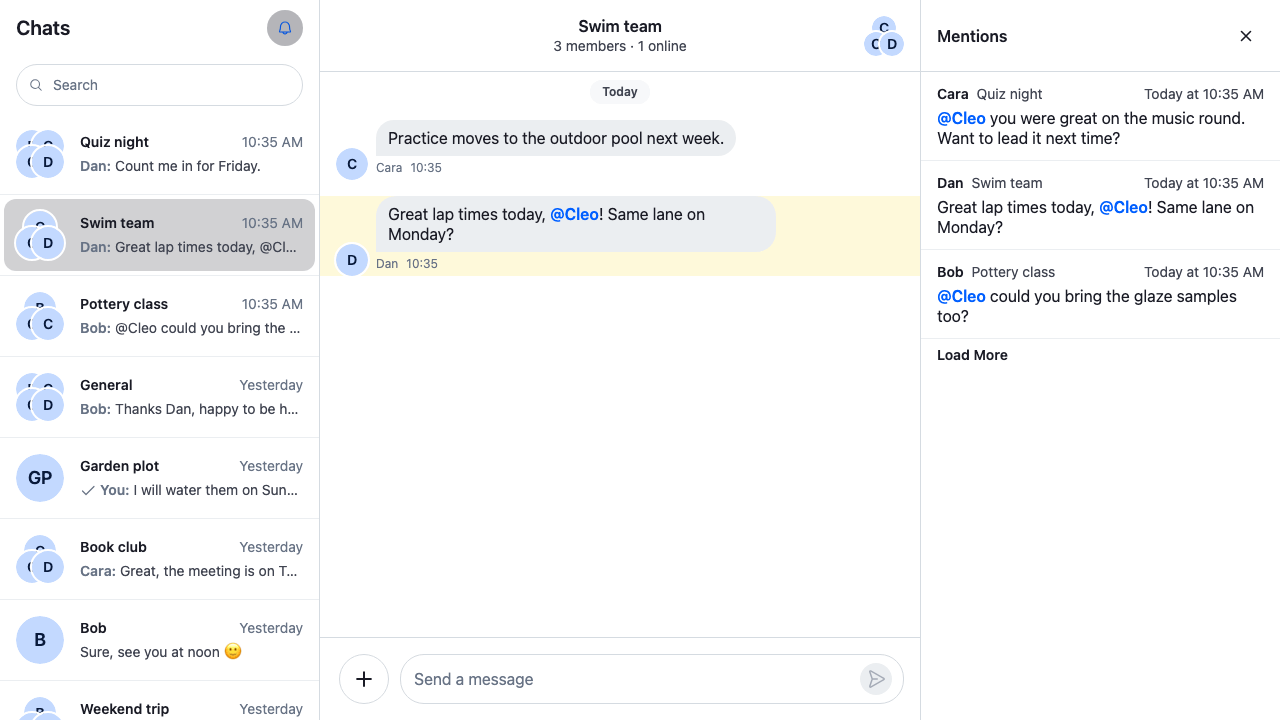
}Picking a mention opens its channel in the channel slot and scrolls to the message, which the message list highlights. The side panel stays open, so the user can go through the mentions one by one:
A mention opened in its channel
Open it from the channel list header
ChannelNavigation renders the header above the channel list under the ChannelListHeader key of ComponentContext. The new header renders the default ChannelListHeader and a bell button beside it. The button calls useSidePanel().openSidePanel() with MentionsInbox as the body, or useSidePanel().closeSidePanel() when the mentions are already open, which useSidePanel().openId tells. aria-expanded tells assistive technology whether the panel is open, and aria-controls points to the panel while it is.
The header is the place the user returns to from any channel, as an activity view sits in an app's sidebar.
import type { PropsWithChildren } from "react";
import {
  Button,
  ChannelListHeader,
  useComponentContextIcons,
  WithComponents,
} from "stream-chat-react";
import { useSidePanel } from "./SidePanel";
import { MentionsInbox } from "./MentionsInbox";
import "./MentionsButton.css";

const MENTIONS_PANEL_ID = "mentions";

/** The default channel list header, with a button beside it that opens and closes the mentions. */
const ChannelListHeaderWithMentions = () => {
  const { IconBell } = useComponentContextIcons();
  const { closeSidePanel, openId, openSidePanel } = useSidePanel();
  const isOpen = openId === MENTIONS_PANEL_ID;

  const toggle = () =>
    isOpen
      ? closeSidePanel()
      : openSidePanel({
          body: <MentionsInbox />,
          id: MENTIONS_PANEL_ID,
          title: "Mentions",
        });

  return (
    <div className="cookbook-channel-list-header">
      <div className="cookbook-channel-list-header__title">
        <ChannelListHeader />
      </div>
      <Button
        appearance="ghost"
        aria-controls={isOpen ? "cookbook-side-panel" : undefined}
        aria-expanded={isOpen}
        aria-label="Mentions"
        circular
        className="cookbook-mentions-button"
        onClick={toggle}
        size="md"
        variant="secondary"
      >
        <IconBell />
      </Button>
    </div>
  );
};

// Declared once, so WithComponents gets the same object on every render.
const overrides = { ChannelListHeader: ChannelListHeaderWithMentions };

/** Adds the Mentions button to the channel list header. */
export const WithMentionsButton = ({ children }: PropsWithChildren) => (
  <WithComponents overrides={overrides}>{children}</WithComponents>
);@layer stream-overrides {
/* The default header and the button share a row. */
.cookbook-channel-list-header {
display: flex;
align-items: center;
padding-inline-end: var(--str-chat__spacing-md);
}
.cookbook-channel-list-header__title {
flex: 1;
min-width: 0;
}
/* While the mentions are open, the button looks pressed. */
.cookbook-mentions-button[aria-expanded="true"] {
background: var(--str-chat__background-utility-selected);
color: var(--str-chat__accent-primary);
}
}The bell button, pressed

ChannelListHeaderWithMentions opens the side panel, so WithMentionsButton goes inside SidePanelProvider. Wrap ChatView in it, as the base app does with a recipe's wrapper.
How it works
Example
Cara writes "@Cleo you were great on the music round." in Quiz night, mentioning the user:
- The composer sends the message with the user's id in
mentioned_users. - The user clicks the bell.
useSidePanel().openSidePanel()showsMentionsInboxin the side panel. MentionsInboxactivates its source and callsMessageSearchSource.search(''). The source searches the messages withmentioned_users.idcontaining the user's id, newest first, three at a time, and loads Quiz night and the other result channels the client doesn't hold yet, without watching them.- Cara's message is first in the list, with @Cleo highlighted.
LoadMoreButtonshows under the list whilesource.state.hasNextistrue. - The user picks the mention.
useWorkspaceNavigation().openChannel()opens Quiz night, andMessagePaginator.jumpToMessage()scrolls to Cara's message and highlights it. It sends a request only when the message isn't loaded or the channel isn't watched.
- The results are a snapshot. A mention that arrives while the inbox is open doesn't join the list; closing and opening the inbox searches again.
- The source keeps to messages of type
regular, so mentions in thread replies aren't listed. Addtype: { $in: ["regular", "reply"] }tomessageSearchFiltersto list them, and open a reply in its thread. - The source keeps the search to the channels the user is a member of. A channel the user has left drops out of the inbox the next time it opens.
mentioned_usersholds the users the composer picked from its suggestions. Typing "@Cleo" without picking Cleo leavesmentioned_usersempty, and the message isn't a mention.
Related
- Search sources explains
MessageSearchSource, its options and its state. - Mentions explains how the composer records mentions and how the message list highlights them.
- renderText function explains
renderText()and its options. - Message paginators explains
MessagePaginator.jumpToMessage(). - Navigation explains
useWorkspaceNavigation()and whereuseWorkspaceNavigation().openChannel()opens a channel. - Search dialog searches channels, people and messages from a dialog.
- Threads view lists the user's threads in a view of their own.