


Inline message editing
This recipe edits a message where it sits in the message list, instead of in the composer at the bottom of the channel.
What you'll build
- Editing a message in place in the message list
- An editor card with Cancel and Save buttons
- Inline editing of replies in a thread
- The composer's unsent text left as it was
Preview
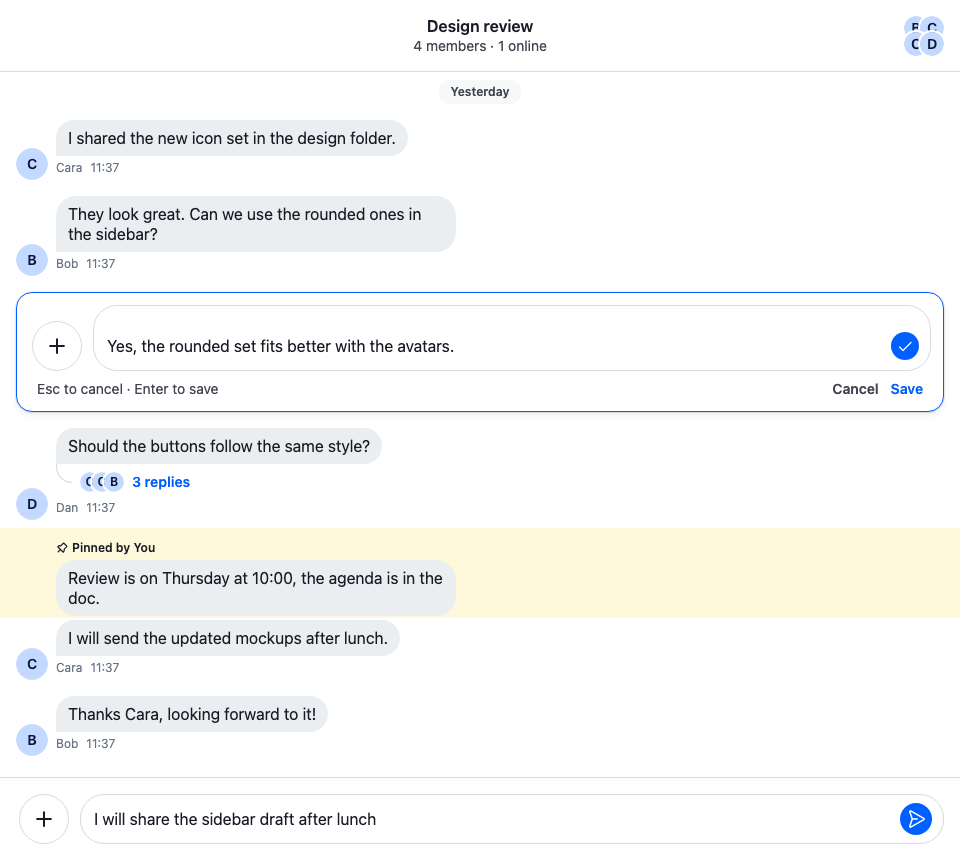
Approach: Replace one part. Choosing where to start explains the approaches.
Starts from: the base app. The page shows only what the recipe adds.
By default, Edit Message loads the message into the composer the user types in, channel.messageComposer or thread.messageComposer, and the edit replaces what was there until the user saves or cancels. An inline editor uses an edit composer instead: a second composer whose composition context is the message. Editing a message in an edit composer introduces it, and Message composer compares the two.
Best practices
- Keep the edit composer outside the message's component. The message list re-renders and remounts messages, and an edit held there would be lost with them.
- Edit one message at a time, and clear the previous edit composer when the user starts another edit.
- Keep the
edittype on the replaced action, so the base filter still shows it only to users who can edit the message. - Save with
useMessageComposerSubmitFn(), so your Save button does what the checkmark and the Enter key do. - Let Esc close an open suggestion list or command first, and cancel the edit only after that.
An Edit action that opens the editor
The default Edit action loads the message into the channel's or thread's composer. This one hands the message to startEditing, from the recipe's own context (next step), and keeps the rest of the default action set:
import type { MessageActionSetItem } from "stream-chat-react";
import {
  ContextMenuButton,
  defaultMessageActionSet,
  MessageActions,
  useComponentContextIcons,
  useContextMenuContext,
  useMessageContext,
  useThreadContext,
} from "stream-chat-react";
import { useInlineEdit } from "./InlineEditContext";

const InlineEditAction = () => {
  const { IconEdit } = useComponentContextIcons();
  const { closeMenu } = useContextMenuContext();
  const { message } = useMessageContext();
  const isInThread = !!useThreadContext();
  const { startEditing } = useInlineEdit();

  return (
    <ContextMenuButton
      Icon={IconEdit}
      onClick={() => {
        startEditing(message, isInThread);
        closeMenu();
      }}
    >
      Edit Message
    </ContextMenuButton>
  );
};

// Declared once: the base filter recomputes whenever it gets a new list. The item keeps the
// `edit` type, so the menu still shows it only to users who can edit the message. The "more"
// button has no type, hence the `in` check.
const messageActionSet: MessageActionSetItem[] = defaultMessageActionSet.map(
  (item) =>
    "type" in item && item.type === "edit"
      ? { ...item, Component: InlineEditAction }
      : item,
);

export const InlineEditMessageActions = () => (
  <MessageActions messageActionSet={messageActionSet} />
);
Custom message actions replaces and adds actions the same way.
An edit composer for the message
InlineEditProvider holds the edit in progress: the message's id, whether it was opened in a thread's list, and the edit composer. startEditing creates the composer with the message as both its composition and its compositionContext. The composer then holds the message as editedMessage, and MessageComposer.update() saves it.
import type { PropsWithChildren } from "react";
import {
  createContext,
  useCallback,
  useContext,
  useEffect,
  useMemo,
  useRef,
  useState,
} from "react";
import type { LocalMessage, MessageComposerState } from "stream-chat";
import { MessageComposer as MessageComposerController } from "stream-chat";
import { useChatContext } from "stream-chat-react";

/** The message being edited, the list it is edited in, and the composer that holds the edit. */
export type InlineEdit = {
  composer: MessageComposerController;
  isInThread: boolean;
  messageId: string;
};

type InlineEditContextValue = {
  edit: InlineEdit | null;
  startEditing: (message: LocalMessage, isInThread: boolean) => void;
};

const InlineEditContext = createContext<InlineEditContextValue>({
  edit: null,
  startEditing: () => undefined,
});

export const useInlineEdit = () => useContext(InlineEditContext);

const editedMessageSelector = (state: MessageComposerState) => ({
  editedMessage: state.editedMessage,
});

/** Owns the edit composer: at most one message is edited at a time. */
export const InlineEditProvider = ({ children }: PropsWithChildren) => {
  const { client } = useChatContext();
  const [edit, setEdit] = useState<InlineEdit | null>(null);
  // The edit in progress, read when a new one starts, so its composer is emptied exactly once.
  const editRef = useRef(edit);
  useEffect(() => {
    editRef.current = edit;
  }, [edit]);

  const startEditing = useCallback(
    (message: LocalMessage, isInThread: boolean) => {
      // The composition context is the message, so this composer edits only that message.
      const composer = new MessageComposerController({
        client,
        composition: message,
        compositionContext: message,
      });
      editRef.current?.composer.clear();
      setEdit({ composer, isInThread, messageId: message.id });
    },
    [client],
  );

  // Saving or cancelling empties the composer, which ends the edit.
  useEffect(() => {
    if (!edit) return;
    return edit.composer.state.subscribeWithSelector(
      editedMessageSelector,
      ({ editedMessage }) => {
        if (!editedMessage)
          setEdit((current) => (current === edit ? null : current));
      },
    );
  }, [edit]);

  const value = useMemo(() => ({ edit, startEditing }), [edit, startEditing]);

  return (
    <InlineEditContext.Provider value={value}>
      {children}
    </InlineEditContext.Provider>
  );
};
The edit doesn't live in the message's component. The list can remount a message, for example when the user switches channels and comes back, and the edit is still there.
The editor in place of the message
InlineEditor gives the edit composer to a MessageComposer with MessageComposerControllerProvider. Every part of that composer, the textarea, the checkmark and the Enter key among them, works on the edit composer instead of the channel's. The composer's own "Edit Message" preview is left out, because the editor already stands where the message was.
The stylesheet draws the editor as a white card with the accent border of an active field, so it stands apart from the message list and the bubbles around it. Inside the card, the composer drops the bottom bar's background, top border and padding.
A custom MessageUI renders the editor for the message being edited, and the default MessageUI for every other message:
import type { KeyboardEvent } from "react";
import type { MessageComposer as MessageComposerController } from "stream-chat";
import {
  MessageComposer,
  MessageComposerControllerProvider,
  useMessageComposerSubmitFn,
  WithComponents,
} from "stream-chat-react";
import "./InlineEditor.css";

// The editor stands where the message was, so the composer's "Edit Message" preview of it is left
// out.
const overrides = { EditedMessagePreview: () => null };

const InlineEditorFooter = ({ onCancel }: { onCancel: () => void }) => {
  // Saves the edit, as the composer's checkmark and the Enter key do.
  const submit = useMessageComposerSubmitFn();

  return (
    <div className="cookbook-inline-editor__footer">
      <span className="cookbook-inline-editor__hint">
        Esc to cancel · Enter to save
      </span>
      <button
        className="cookbook-inline-editor__button"
        onClick={onCancel}
        type="button"
      >
        Cancel
      </button>
      <button
        className="cookbook-inline-editor__button cookbook-inline-editor__button--save"
        onClick={() => void submit()}
        type="button"
      >
        Save
      </button>
    </div>
  );
};

export const InlineEditor = ({
  composer,
}: {
  composer: MessageComposerController;
}) => {
  // Clearing the composer ends the edit and closes the editor.
  const cancel = composer.clear;

  // Runs before the textarea's own handler, so an open suggestion list or command takes Esc first.
  const handleKeyDownCapture = (event: KeyboardEvent<HTMLDivElement>) => {
    if (event.key !== "Escape") return;
    const { command, suggestions } = composer.textComposer;
    if (command || suggestions) return;
    event.preventDefault();
    cancel();
  };

  return (
    <div
      className="cookbook-inline-editor"
      onKeyDownCapture={handleKeyDownCapture}
    >
      <MessageComposerControllerProvider messageComposerController={composer}>
        <WithComponents overrides={overrides}>
          <MessageComposer focus />
          <InlineEditorFooter onCancel={cancel} />
        </WithComponents>
      </MessageComposerControllerProvider>
    </div>
  );
};@layer stream-overrides {
/* A raised card with the accent border of an active field, so the editor stands apart from the
list and the bubbles around it. */
.cookbook-inline-editor {
display: flex;
flex-direction: column;
gap: var(--str-chat__spacing-xs);
margin-inline: var(--str-chat__spacing-md);
padding: var(--str-chat__spacing-sm);
border: 1px solid var(--str-chat__border-utility-active);
border-radius: var(--str-chat__radius-xl);
background: var(--str-chat__background-core-elevation-1);
box-shadow: var(--str-chat__box-shadow-1);
}
/* The card frames the composer, so the bottom bar's background, top border and padding go. */
.cookbook-inline-editor .str-chat__message-composer-container {
padding: 0;
border: 0;
background: transparent;
}
.cookbook-inline-editor__footer {
display: flex;
align-items: center;
justify-content: flex-end;
gap: var(--str-chat__spacing-sm);
padding-inline: var(--str-chat__spacing-xs);
font: var(--str-chat__font-caption-default);
}
.cookbook-inline-editor__hint {
margin-inline-end: auto;
color: var(--str-chat__text-secondary);
}
.cookbook-inline-editor__button {
padding: 0;
border: 0;
background: none;
color: var(--str-chat__text-secondary);
font: var(--str-chat__font-caption-emphasis);
cursor: pointer;
}
.cookbook-inline-editor__button--save {
color: var(--str-chat__text-link);
}
}import type { PropsWithChildren } from "react";
import {
MessageUI,
useMessageContext,
useThreadContext,
WithComponents,
} from "stream-chat-react";
import { InlineEditMessageActions } from "./InlineEditAction";
import { InlineEditor } from "./InlineEditor";
import { InlineEditProvider, useInlineEdit } from "./InlineEditContext";
const InlineEditingMessageUI = () => {
const { message } = useMessageContext();
const isInThread = !!useThreadContext();
const { edit } = useInlineEdit();
// The same message can show in the channel and in its thread; only the list it was opened in
// shows the editor.
const isEditedHere =
edit?.messageId === message.id && edit.isInThread === isInThread;
return isEditedHere ? (
<InlineEditor composer={edit.composer} />
) : (
<MessageUI />
);
};
// Declared once, so WithComponents gets the same object on every render.
const overrides = {
MessageActions: InlineEditMessageActions,
MessageUI: InlineEditingMessageUI,
};
export const WithInlineMessageEditing = ({ children }: PropsWithChildren) => (
<InlineEditProvider>
<WithComponents overrides={overrides}>{children}</WithComponents>
</InlineEditProvider>
);Wrap ChatView in WithInlineMessageEditing. Above ChatView, it applies in the channel and in the thread beside it:
<Chat client={client}>
  <WithInlineMessageEditing>
    <ChatView>{/* the base app's views */}</ChatView>
  </WithInlineMessageEditing>
</Chat>
The screenshot at the top of this page shows the result.
Save, cancel and Esc
The editor ends the edit the way the composer does, by emptying the edit composer:
- Save, the checkmark and Enter call the function from
useMessageComposerSubmitFn(). While the composer holdseditedMessage, it callsMessageComposer.update(), which empties the composer before the request goes out and shows the new text in the message list at once. - Cancel and Esc call
MessageComposer.clear(). Nothing is sent.
InlineEditProvider sees editedMessage become null and drops the edit, and the message shows again in place of the editor. MessageComposer.update() never throws: a failed request leaves the new text on the message, marks it failed, and publishes an error notification. Editing explains the save.
The textarea's own key handler uses Esc to close the suggestion list or leave a command. The editor listens in the capture phase, before that handler, and leaves Esc to the textarea while composer.textComposer.suggestions or composer.textComposer.command is set.
Editing in a thread
The same components edit a reply in the thread beside the channel. InlineEditAction and InlineEditingMessageUI each read !!useThreadContext(), which is true in a thread's list. The action passes it to startEditing, and the message UI shows the editor only when it matches edit.isInThread. So the editor shows only in the list the edit was opened in, so a reply that also shows in the channel isn't edited in two places at once.
The edit composer finds its thread from the message. A reply carries parent_id, so MessageComposer.update() goes through the thread when the client holds it, and thread.messagePaginator shows the new text. What the user was typing in thread.messageComposer stays there too.
Cleaning up the edit composer
MessageComposer treats a composer supplied with MessageComposerControllerProvider as yours:
- It registers the composer's subscriptions while it's mounted and removes them when it unmounts.
- It doesn't save a draft of it, because
MessageComposer.createDraft()skips edits. - It doesn't clear it on unmount. Clearing it is up to you.
InlineEditProvider does that clean-up. Starting another edit clears the previous edit composer, so two messages are never edited at once. Saving or cancelling empties the composer, the provider drops the edit, and the composer is left for garbage collection. The effect's clean-up removes the provider's subscription to the old composer.
While an edit composer is rendered, the SDK also keeps it in client.messageComposerCache under its tag, message_<message id>, which keeps the message's channel in the client. The cache holds up to 64 composers and drops the oldest when it's full. client.disconnectUser() empties it.
How it works
Example
The user picks Edit Message on their message in Design review, with "I will share the sidebar draft after lunch" in the composer at the bottom:
InlineEditActioncallsstartEditingwith the message.InlineEditProvidercreates an edit composer for it and stores it with the message's id.- The list re-renders the messages.
InlineEditingMessageUIfinds the message being edited and rendersInlineEditorin its place, and the defaultMessageUIfor the others. InlineEditorsupplies the edit composer withMessageComposerControllerProvider.useMessageComposerController()picks a supplied composer before the channel's, so the textarea shows the message's text, andchannel.messageComposerstill holds the half-written message.- The user changes the text and presses Enter.
MessageComposer.update()empties the edit composer and sends the update. The message shows the new text, marked "Edited". InlineEditProvidersees that the edit composer is empty and drops the edit. The message shows again, and the composer at the bottom still holds "I will share the sidebar draft after lunch".
A message that changes on the server during an edit, for example by a new reaction, reloads the edit composer from the server's copy, and unsaved changes are lost. See Message composer.
Related
- Sending, editing and deleting: the default edit and the edit composer.
- Message composer: editing in the channel's composer or in an edit composer, and
MessageComposer.update(),MessageComposer.clear()andMessageComposer.restore(). - Message composer UI: how the UI picks a supplied composer.
- MessageComposer: the props of
MessageComposer, and a smaller inline editor. - Actions: how the message action set and its base filter work.
- Custom message actions: replacing and adding actions.
- Custom composer: a composer layout of your own, which an inline editor can use too.