


Attachments
An attachment is a file, or other content, that goes out with a message: an image, a video, an audio file, a voice recording or any other file, or content you build without an upload. While the user writes the message, the composer keeps its attachments in the attachment manager, messageComposer.attachmentManager. Previews of links in the text are kept apart, by the link previews manager.
What it holds
The attachment manager's state is in attachmentManager.state. Its one field, attachments, is the list of local attachments. A local attachment is the attachment the message will carry, plus a localMetadata field that the composer uses while the message is written. attachmentManager.attachments reads the current list.
Each attachment has a type. For a file the user adds, the attachment manager sets it from the MIME type, and fills in the fields below. The URL fields are set when the upload finishes:
type |
Uploaded | What it is | Fields |
|---|---|---|---|
image |
yes | A file whose MIME type starts with image/, except Photoshop files. |
image_url, fallback (the file name), original_width and original_height when they're known |
video |
yes | A file whose MIME type contains video/. |
asset_url, title (the file name) |
audio |
yes | A file whose MIME type contains audio/. |
asset_url, title |
file |
yes | Any other file. | asset_url, title |
voiceRecording |
yes | A recording made in the app. | asset_url, title, custom.duration, custom.waveform_data |
any other, such as product |
no | An attachment of your own, added with AttachmentManager.upsertAttachments(). |
Whichever you set. Data of your own goes in custom, typed by adding its fields to CustomAttachmentData, as Data conventions explains. |
Every type also gets custom.file_size and custom.mime_type, and thumb_url when the upload returns a thumbnail.
Here is what each one looks like in attachmentManager.attachments once its upload has finished:
import type { LocalImageAttachment } from "stream-chat";

const image: LocalImageAttachment = {
  type: "image",
  image_url: "https://us-east.stream-io-cdn.com/1234/images/beach.jpg",
  fallback: "beach.jpg",
  original_width: 1600,
  original_height: 1200,
  custom: { file_size: 482133, mime_type: "image/jpeg" },
  localMetadata: {
    id: "4f1c2a90-6b3e-4d55-9a1e-0c7b2f8d3e11",
    file: new File([], "beach.jpg", { type: "image/jpeg" }),
    uploadState: "finished",
  },
};
import type { LocalVideoAttachment } from "stream-chat";
const video: LocalVideoAttachment = {
type: "video",
asset_url: "https://us-east.stream-io-cdn.com/1234/attachments/trip.mp4",
thumb_url: "https://us-east.stream-io-cdn.com/1234/images/trip-thumb.jpg",
title: "trip.mp4",
custom: { file_size: 8204311, mime_type: "video/mp4" },
localMetadata: {
id: "9b7e1d24-3c8f-4a61-b2d0-5e6f7a8b9c01",
file: new File([], "trip.mp4", { type: "video/mp4" }),
uploadState: "finished",
},
};import type { LocalAudioAttachment } from "stream-chat";
const audio: LocalAudioAttachment = {
type: "audio",
asset_url: "https://us-east.stream-io-cdn.com/1234/attachments/podcast.mp3",
title: "podcast.mp3",
custom: { file_size: 3411002, mime_type: "audio/mpeg" },
localMetadata: {
id: "2c4d6e8f-1a3b-4c5d-8e9f-0a1b2c3d4e5f",
file: new File([], "podcast.mp3", { type: "audio/mpeg" }),
uploadState: "finished",
},
};import type { LocalFileAttachment } from "stream-chat";
const file: LocalFileAttachment = {
type: "file",
asset_url: "https://us-east.stream-io-cdn.com/1234/attachments/agenda.pdf",
title: "agenda.pdf",
custom: { file_size: 120577, mime_type: "application/pdf" },
localMetadata: {
id: "7a8b9c0d-1e2f-4a3b-9c4d-5e6f7a8b9c0d",
file: new File([], "agenda.pdf", { type: "application/pdf" }),
uploadState: "finished",
},
};import type { LocalVoiceRecordingAttachment } from "stream-chat";
const recording: LocalVoiceRecordingAttachment = {
type: "voiceRecording",
asset_url: "https://us-east.stream-io-cdn.com/1234/attachments/recording.mp3",
title: "recording.mp3",
custom: {
duration: 4.2,
file_size: 33602,
mime_type: "audio/mp3",
waveform_data: [0.12, 0.4, 0.85, 0.6, 0.3, 0.1],
},
localMetadata: {
id: "5d6e7f80-9a1b-4c2d-8e3f-4a5b6c7d8e9f",
file: new File([], "recording.mp3", { type: "audio/mp3" }),
uploadState: "finished",
},
};A Giphy attachment comes from the /giphy command: the server adds it to the message, and the attachment manager never uploads one. This is how a sent message carries it:
import type { GiphyAttachment } from "stream-chat";

const size = (width: string, height: string, url: string) => ({
  frames: "24",
  height,
  size: "301233",
  url,
  width,
});

const giphy: GiphyAttachment = {
  type: "giphy",
  custom: {},
  title: "hello",
  title_link: "https://giphy.com/gifs/hello-3o7TKSjRrfIPjeiVyM",
  thumb_url: "https://media.giphy.com/media/3o7TKSjRrfIPjeiVyM/giphy.gif",
  giphy: {
    original: size(
      "480",
      "270",
      "https://media.giphy.com/media/3o7TKSjRrfIPjeiVyM/giphy.gif",
    ),
    fixed_height: size(
      "356",
      "200",
      "https://media.giphy.com/media/3o7TKSjRrfIPjeiVyM/200.gif",
    ),
    fixed_height_downsampled: size(
      "356",
      "200",
      "https://media.giphy.com/media/3o7TKSjRrfIPjeiVyM/200_d.gif",
    ),
    fixed_height_still: size(
      "356",
      "200",
      "https://media.giphy.com/media/3o7TKSjRrfIPjeiVyM/200_s.gif",
    ),
    fixed_width: size(
      "200",
      "113",
      "https://media.giphy.com/media/3o7TKSjRrfIPjeiVyM/200w.gif",
    ),
    fixed_width_downsampled: size(
      "200",
      "113",
      "https://media.giphy.com/media/3o7TKSjRrfIPjeiVyM/200w_d.gif",
    ),
    fixed_width_still: size(
      "200",
      "113",
      "https://media.giphy.com/media/3o7TKSjRrfIPjeiVyM/200w_s.gif",
    ),
  },
};
A shared location isn't an attachment: it goes out in the message's shared_location field, as Location explains.
localMetadata holds:
| Field | What it holds |
|---|---|
id |
The attachment's id in the composer. AttachmentManager.removeAttachments() and AttachmentManager.upsertAttachments() find attachments by it. |
file |
The file to upload. Only attachments that are uploaded have one. |
previewUri |
A local address of the file, such as a Blob URL, for showing it before it's uploaded. |
uploadState |
Where the upload is, as Uploads explains. |
uploadProgress |
How far the upload is, from 0 to 100, while progress tracking is on. |
uploadConfirmationPending |
true when the whole file is sent but the server hasn't confirmed it yet. Show progress without a percentage then. |
uploadPermissionCheck |
Why the upload was blocked: { uploadBlocked, reason }, where reason names the upload setting that refused it. |
Fields of your own can go into localMetadata too. They stay in the composer and are never sent.
Adding and removing attachments
A file the user adds goes through two attachment middleware pipelines, which work like the text middleware:
prepareruns before the upload, inattachmentManager.preUploadMiddlewareExecutor. It checks the file against the app's upload settings and can block it. To accept only some files, add apreparefunction that discards the others.postProcessruns after the upload, inattachmentManager.postUploadMiddlewareExecutor, and sets the attachment's URL.
Composer middleware lists the built-in functions. The last column says which pipelines a call runs.
What an attachment picker and its previews need, and the call for each:
| To… | Call | What happens | Attachment middleware |
|---|---|---|---|
| add files the user picked, dropped or pasted | AttachmentManager.uploadFiles(files) |
Adds each file and uploads it at once, up to the file limit. Does nothing while attachmentManager.isUploadEnabled is false, as Uploads explains. |
prepare, then postProcess |
| add one file | AttachmentManager.uploadFile(file) |
Adds the file and uploads it at once. It doesn't check attachmentManager.isUploadEnabled or the file limit: check them first. |
prepare, then postProcess |
| upload an attachment again, such as a failed one, or one you built | AttachmentManager.uploadFile(attachment) |
Uploads it in place, as Retrying a failed upload explains. It doesn't check attachmentManager.isUploadEnabled: check it first. |
prepare, then postProcess |
| remove attachments | AttachmentManager.removeAttachments(localIds) |
Removes them by localMetadata.id and cancels their uploads. |
none |
| add an attachment that needs no upload, such as one built from a URL | AttachmentManager.upsertAttachments(attachments) |
Adds them, or merges them into the ones with the same localMetadata.id. One without a localMetadata.id gets a new one on every call. |
none |
An attachment with nothing to upload, such as a product of your own or a giphy, needs only a localMetadata.id, with no file and no uploadState. The composer sends it as it is, counts it as something to send in messageComposer.hasSendableData, and doesn't count it toward the file limit, messageComposer.attachments.maxNumberOfFilesPerMessage. Set the id yourself, so that you can update the attachment or remove it later:
import type { LocalAttachment } from "stream-chat";

const product: LocalAttachment = {
  type: "product",
  title: "Desk lamp",
  image_url: "https://shop.example.com/images/desk-lamp.jpg",
  custom: {},
  localMetadata: { id: crypto.randomUUID() },
};

channel.messageComposer.attachmentManager.upsertAttachments([product]);
Uploads
Only files go through an upload: the image, video, audio, file and voiceRecording attachments. An upload puts the file on a CDN, so that the message can carry a link to it, in five steps:
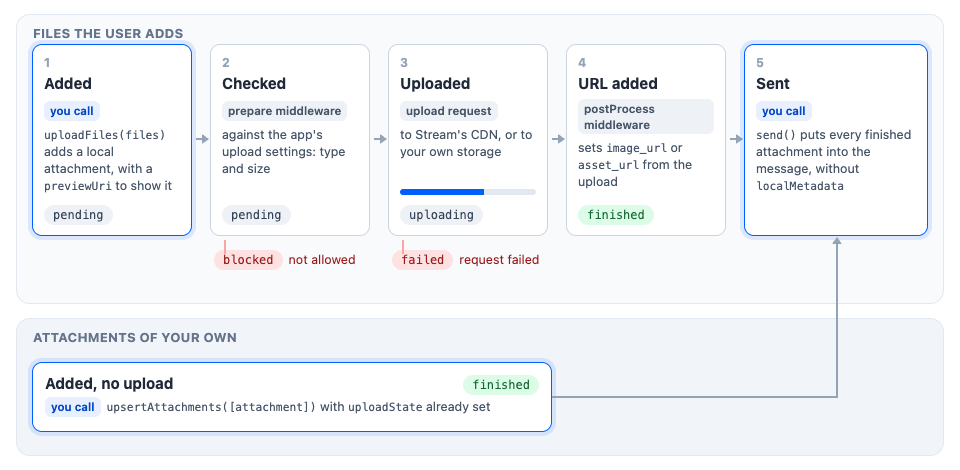
- The file is added. Call
AttachmentManager.uploadFiles(files). The attachment manager creates a local attachment for each file, sets itstypefrom the MIME type, and gives it apreviewUri, so a UI can show the file at once. ItsuploadStateispending. - The file is checked. The
preparemiddleware compares the file with the app's upload settings, such as the allowed types and size. A file they don't allow becomesblockedand is never uploaded. - The file is uploaded, to Stream's CDN, or to your own storage, as Uploading to your own CDN explains. Its
uploadStateisuploading, andlocalMetadata.uploadProgressfollows it. - The URL is added to the attachment. The
postProcessmiddleware writes the URL the upload returned intoimage_urlorasset_url, andthumb_urlwhen there is one. TheuploadStatebecomesfinished. If the upload fails, it becomesfailed. - The message is sent. Call
MessageComposer.send(). It puts every finished upload, and every attachment with nothing to upload, into the message, without itslocalMetadata. While an upload is still running, the send is refused by default. WithmessageComposer.attachments.pendingUploadsEnabledturned on inclient.config, the message appears in the list at once with the upload's progress, and its request goes out once the uploads finish. See Sending with pending uploads.
An attachment of your own skips steps 1 to 4. You add it with AttachmentManager.upsertAttachments(), with only a localMetadata.id, as Adding and removing attachments shows, and step 5 sends it with the rest. To drop a file at any step, call AttachmentManager.removeAttachments([id]), which also cancels its upload.
Each attachment's localMetadata.uploadState tells where its upload is:
pending: added, not uploading yet.uploading: on its way.localMetadata.uploadProgressgoes from 0 to 100 while thetrackUploadProgresssetting is on, which is the default.finished: uploaded, with its URL set.failed: the request failed, and anapi:attachment:upload:failednotification was published.blocked: refused before uploading, because the app's upload settings don't allow its type or size. Avalidation:attachment:upload:blockednotification was published.
These getters count and list the attachments in each state:
uploadState |
Count | Attachments |
|---|---|---|
pending |
attachmentManager.pendingUploadsCount |
AttachmentManager.getUploadsByState("pending") |
uploading |
attachmentManager.uploadsInProgressCount |
AttachmentManager.getUploadsByState("uploading") |
finished |
attachmentManager.successfulUploadsCount |
attachmentManager.successfulUploads |
failed |
attachmentManager.failedUploadsCount |
AttachmentManager.getUploadsByState("failed") |
blocked |
attachmentManager.blockedUploadsCount |
AttachmentManager.getUploadsByState("blocked") |
attachmentManager.isUploadEnabled says whether a file can be added now. It's true only when all of these hold:
messageComposer.attachments.enabledinclient.configistrue.- The channel type's
uploadssetting, set in the Stream Dashboard or through the server API, allows uploads, unlessmessageComposer.attachments.customCdninclient.configistrue. - The user has the
upload-filecapability, ormessageComposer.attachments.customCdninclient.configistrue. - The message has fewer files than the file limit (
messageComposer.attachments.maxNumberOfFilesPerMessageinclient.config, 10 by default). Uploaded and uploading files count; pending, failed and blocked ones don't.
attachmentManager.availableUploadSlots says how many more files fit under the limit.
Retrying a failed upload
AttachmentManager.uploadFile() also takes an attachment already in the composer, and uploads it again in place. The attachment keeps its localMetadata.id, its fields, such as a voice recording's custom.waveform_data and custom.duration, and its position in attachmentManager.attachments. The retry runs the attachment middleware again, so your own prepare and postProcess middleware runs on the retry too. It uploads localMetadata.file. If a prepare middleware of yours replaced the file on the first try, for example with a compressed image, it now runs on that replaced file, so make it skip a file it already changed.
AttachmentManager.uploadFile() also uploads an attachment you build yourself, with fields you set before the upload. The SDK's voice recorder works this way: it builds a voiceRecording attachment with custom.waveform_data and custom.duration, and uploads it with AttachmentManager.uploadFile(). Give the attachment's localMetadata the file and an uploadState, such as 'pending': a file without an uploadState doesn't compile. The attachment manager adds it and uploads localMetadata.file, and the attachment keeps the fields you set.
AttachmentManager.uploadFile() doesn't check attachmentManager.isUploadEnabled, so a retry button of your own checks it first. A failed attachment doesn't count toward the file limit, so retrying it needs room under the limit, and attachmentManager.isUploadEnabled is false when there's none. AttachmentManager.uploadFile() always resolves to the attachment, so read its localMetadata.uploadState to know whether the upload worked:
import type { LocalUploadAttachment, MessageComposer } from "stream-chat";

const retryUpload = async (
  composer: MessageComposer,
  attachment: LocalUploadAttachment,
) => {
  const { attachmentManager } = composer;
  if (!attachmentManager.isUploadEnabled) return false;
  const result = await attachmentManager.uploadFile(attachment);
  return result.localMetadata.uploadState === "finished";
};
An attachment without localMetadata.file or localMetadata.id has nothing to upload. AttachmentManager.uploadFile() returns it unchanged and publishes an error notification.
Uploading to your own CDN
By default, files go to Stream's CDN. To upload them to your own storage, register an upload request. It resolves with the file's URL, and it can report progress and stop when the user removes the file. Set customCdn: true when the files never reach Stream, so that Stream's uploads setting and the upload-file capability no longer apply:
import type { UploadRequestFn } from "stream-chat";

const uploadToMyStorage: UploadRequestFn = async (file, options) => {
  const body = new FormData();
  body.append("file", file as Blob);

  const response = await fetch("https://uploads.example.com/files", {
    body,
    method: "POST",
    signal: options?.abortSignal,
  });
  const { url } = await response.json();

  return { file: url };
};

client.config.set({
  messageComposer: {
    attachments: { customCdn: true, doUploadRequest: uploadToMyStorage },
  },
});
Sending attachments
When the message is built, the finished uploads and the attachments with nothing to upload go into the message's attachments, in the composer's order. localMetadata is left out, so the server receives each attachment without it. Blocked attachments, and by default failed ones, aren't sent.
By default a message can't be sent while one of its uploads is running: MessageComposer.send() publishes a validation:attachment:upload:in-progress warning and returns 'nothing-to-send'. With messageComposer.attachments.pendingUploadsEnabled turned on in client.config, the message appears in the list at once and its request waits for the uploads. If one of them fails, the message fails. See Sending with pending uploads.
A draft saves the finished uploads and the attachments with nothing to upload. When a draft or a message to edit is loaded into the composer, its files come back as finished, and its other attachments with only a localMetadata.id, so they're sent again.
Settings
Set them for every composer in client.config, under messageComposer.attachments:
client.config.set({
  messageComposer: {
    attachments: { maxNumberOfFilesPerMessage: 5, trackUploadProgress: false },
  },
});
To change a setting for one composer only, set it on that composer's attachment manager, for example channel.messageComposer.attachmentManager.maxNumberOfFilesPerMessage = 3. doUploadRequest and trackUploadProgress are the exception: every upload in a channel reads them from the channel's composer, so set them in client.config.
| Setting | Default | What it does |
|---|---|---|
enabled |
true |
false turns off attachments. Combined with the channel type's uploads setting, unless customCdn is set. |
maxNumberOfFilesPerMessage |
10 |
How many files a message can have. Attachments with nothing to upload don't count. |
acceptedFiles |
[], every type |
The file types a file picker should offer. stream-chat doesn't check it. |
trackUploadProgress |
true |
Sets localMetadata.uploadProgress during uploads. |
pendingUploadsEnabled |
false |
Lets a message be sent while its uploads run, as Sending attachments explains. |
doUploadRequest |
Stream's upload | Uploads to your own storage, as Uploading to your own CDN explains. |
customCdn |
false |
true when doUploadRequest stores files outside Stream, as Uploading to your own CDN explains. |