


Channel invites
A channel can invite a user before they join it. This recipe gives those invitations a section of their own in the channel list.
What you'll build
- An Invitations section above the channels
- Each invitation with its channel and who sent it
- Accept and Decline buttons for each invitation
- New invitations shown as they arrive
Preview
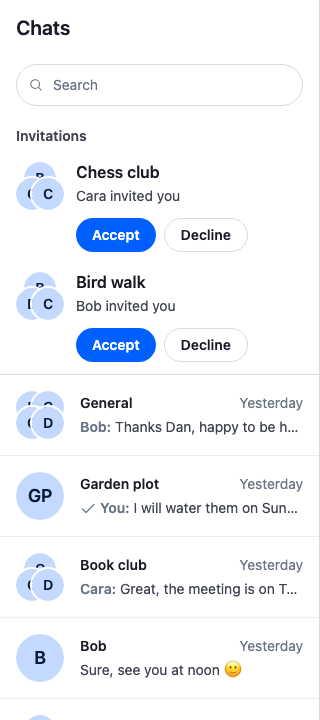
Approach: Replace one part and Change behaviour in the state layer. Choosing where to start explains the approaches.
Starts from: the base app. The page shows only what the recipe adds.
The SDK has no invitation UI. Another member invites the user with Channel.inviteMembers(), and the user answers with Channel.acceptInvite() or Channel.rejectInvite(). Channel invites explains the invite itself.
Best practices
- Keep invitations apart from the channels. A channel the user hasn't joined yet doesn't belong among the conversations they're in.
- Say who sent each invitation, so the user knows whether to trust it.
- Name the channel in each button's accessible name, such as "Accept invitation to Bird walk". Several rows each have an Accept button, and a screen reader user who tabs to one hears which channel it answers.
- Keep the buttons out of the channel list's
role="listbox", which may hold only its rows. The invitations are a plain list in a section of their own, named by its heading. - Keep the focus on the pressed button while the request runs. The button reads "Joining…" and sets
aria-busyandaria-disabled, notdisabled, which would take the focus away. - Load more invitations when the user asks, or once they've answered every loaded one. The section sits above the channel list and takes the height its rows need, so it loads a few at a time, with the SDK's "Load more" button at its end.
Create the paginators
A query for the user's channels, members: { $in: [userId] }, also returns the channels the user is invited to, and the ones they declined. Two paginators split them:
| Paginator | Filters added to yours | Holds |
|---|---|---|
| Channels | joined: true |
The channels the user joined, by latest message. |
| Invites | invite: "pending" |
The invitations the user hasn't answered yet. |
Query Channels explains both filters.
The server reads joined from the user's membership. When an event asks whether a channel still belongs in a paginator, ChannelPaginator.matchesFilter() checks the filters on the client, and reads a field it has no rule for from the channel's data, which has no joined. Every channel would fail the check, and the first event ChannelManager.ingestChannel() routes for a channel, such as message.new or notification.channel_mutes_updated, would drop it from the list. JoinedChannelPaginator adds that rule: a member who wasn't invited, or accepted the invite, has joined, read from channel.state.membership.invited and channel.state.membership.invite_accepted_at. It goes first with ChannelPaginator.setFilterResolvers(), because the last default rule takes every field it reaches, so a rule added after it never runs.
useChannelInvites() registers the channels paginator on client.channelManager with ChannelManager.insertPaginator(), which lets the manager's events keep it current. The invites paginator stays off the manager: ChannelNavigation renders a ChannelList for every registered paginator, and the invitations need buttons that a channel list's rows can't hold. So it follows two events from client.on() itself:
notification.invited: a new invite. The paginator loads its first page again withChannelPaginator.toTail(), withreset: "yes"andkeepPreviousItems: true, so the rows stay on screen until the page arrives. A paginator runs one query at a time, so an invite that arrives while it loads setsreloadWhenIdle, and the hook reloads once that load ends. A reload already under way when the user answers can bring the row back until the next reload, because the server answers from before the change.member.updatedfor the user, withevent.member.invite_accepted_atorevent.member.invite_rejected_atset: the user answered an invite, on this device or another.ChannelPaginator.removeItem()removes the channel's row by itscid.
The invites query watches its channels, as client.queryChannels() does by default. That is why an answer arrives as member.updated: the server sends notification.invite_accepted and notification.invite_rejected only to clients that aren't watching the channel, and member.updated only to clients that are, as Events lists. Don't query the invites with watch: false: the client would then receive no member.updated for the channel, and an accepted channel would never join the channel list.
On unmount, the hook disposes both paginators with ChannelPaginator.dispose(); a remount creates new ones:
import { useEffect, useState } from "react";
import { ChannelPaginator } from "stream-chat";
import type {
  Channel,
  ChannelFilters,
  ChannelMemberResponse,
  ChannelPaginatorOptions,
  SortParamRequest,
} from "stream-chat";
import { useChatContext } from "stream-chat-react";

/** The user joined the channel: they weren't invited, or they accepted the invite. */
const hasJoined = (channel: Channel) => {
  const { invite_accepted_at, invited } = channel.state.membership;
  return !invited || !!invite_accepted_at;
};

/** The member answered their invite, on this device or another. */
const hasAnswered = ({
  invite_accepted_at,
  invite_rejected_at,
}: ChannelMemberResponse) => !!(invite_accepted_at || invite_rejected_at);

/**
 * A channel paginator that checks the `joined` filter on the channel's membership, as the server
 * does, when an event asks whether a channel belongs in the list.
 */
class JoinedChannelPaginator extends ChannelPaginator {
  constructor(options: ChannelPaginatorOptions) {
    super(options);
    // First in the list: the last default resolver takes every field it reaches.
    this.setFilterResolvers([
      { matchesField: (field) => field === "joined", resolve: hasJoined },
      ...this._filterFieldToDataResolvers,
    ]);
  }
}

// The channel with the latest message first.
const byLastMessage: SortParamRequest[] = [
  { direction: -1, field: "last_message_at" },
];
// The newest channel first.
const byCreatedAt: SortParamRequest[] = [
  { direction: -1, field: "created_at" },
];

/**
 * Registers the channel list's paginator on `client.channelManager`, limited to channels the user
 * joined, and returns a second paginator with the channels the user is invited to. `filters`
 * scope both to the user's channels; pass a stable object. Returns `undefined` until both exist.
 */
export const useChannelInvites = (filters: ChannelFilters) => {
  const { client } = useChatContext();
  const [invites, setInvites] = useState<ChannelPaginator>();

  useEffect(() => {
    const channels = new JoinedChannelPaginator({
      client,
      filters: { ...filters, joined: true },
      id: "channels",
      requestOptions: { presence: true, state: true },
      sort: byLastMessage,
    });
    const invites = new ChannelPaginator({
      client,
      filters: { ...filters, invite: "pending" },
      id: "invites",
      paginatorOptions: { pageSize: 5 },
      sort: byCreatedAt,
    });
    client.channelManager.insertPaginator({ paginator: channels });

    // A paginator runs one query at a time, so an invite that arrives during a load is noted, and
    // loaded once that load ends. The reload keeps the rows on screen until its page arrives.
    let reloadWhenIdle = false;
    const reload = () => {
      if (invites.isLoading) {
        reloadWhenIdle = true;
        return;
      }
      reloadWhenIdle = false;
      void invites.toTail({ keepPreviousItems: true, reset: "yes" });
    };
    const offLoadEnd = invites.state.subscribeWithSelector(
      ({ isLoading }) => ({ isLoading }),
      ({ isLoading }) => {
        if (!isLoading && reloadWhenIdle) reload();
      },
    );

    // `ChannelNavigation` renders a channel list for every paginator on the manager, so the
    // invites stay off it and follow the events themselves. The invites query watches its
    // channels, so a watched channel's answer arrives as `member.updated`, not as a
    // notification. A new invite arrives as `notification.invited`.
    const { unsubscribe } = client.on((event) => {
      if (event.type === "notification.invited") reload();
      if (
        event.type === "member.updated" &&
        event.member.user_id === client.userId &&
        hasAnswered(event.member)
      )
        invites.removeItem({ id: event.cid });
    });
    setInvites(invites);

    return () => {
      unsubscribe();
      offLoadEnd();
      client.channelManager.removePaginator(channels);
      channels.dispose();
      invites.dispose();
      setInvites(undefined);
    };
  }, [client, filters]);

  return invites;
};
The channels paginator takes the place of the one your app registers for ChannelNavigation; register no other.
Render the invitations
Invitations renders the invites paginator: a heading, one row per channel in paginator.state.items, and the SDK's LoadMoreButton while paginator.state.hasMoreTail is true. It loads the first page itself with ChannelPaginator.toTail(), and the next page when the user answered every loaded invitation while paginator.state.hasMoreTail is still true. It shows nothing until the first page arrives, or when there are no invitations, heading included. A reload after a new invite keeps the rows, so the section stays on screen and the focus stays where it is.
Each row shows the channel's avatar and name from useChannelPreviewInfo(), the name of the member who created the channel, channel.data.created_by.name, and the two buttons. Accept calls Channel.acceptInvite() and Decline Channel.rejectInvite(). When the request succeeds, the row leaves the section with ChannelPaginator.removeItem(), and useAriaLiveAnnouncer() tells screen readers "Joined Bird walk" or "Declined the invitation to Bird walk". If the focus is in a row as it leaves, whatever removed it, the focus moves to the next row's Accept button, or else the previous row's. When the last row leaves, the focus is lost, also while the next page loads. When the request fails, the buttons work again, and client.notifications.addError() says so in the channel list's notifications, which origin.context.panel: "channel-list" routes there:
import { useEffect, useId, useLayoutEffect, useRef, useState } from "react";
import type {
  Channel,
  ChannelPaginator,
  ChannelPaginatorState,
} from "stream-chat";
import {
  Button,
  ChannelAvatar,
  LoadMoreButton,
  useAriaLiveAnnouncer,
  useChannelPreviewInfo,
  useChatContext,
  useStateStore,
} from "stream-chat-react";
import "./Invitations.css";

type Answer = "accept" | "decline";

const invitesSelector = ({
  hasMoreTail,
  isLoading,
  items,
}: ChannelPaginatorState) => ({
  hasMoreTail,
  isLoading,
  items,
});

/**
 * The section has nothing to show but more to load: the first page was never loaded, or the user
 * answered every loaded invitation while more remain on the server.
 */
const needsPage = (items: Channel[] | undefined, hasMoreTail: boolean) =>
  items === undefined || (items.length === 0 && hasMoreTail);

/**
 * One invitation: the channel, who invited the user, and Accept and Decline. Each button's name
 * includes the channel's name, so a screen reader tells the rows apart. While the request runs,
 * both buttons stay focusable but do nothing, and the pressed one reads "Joining…" or
 * "Declining…". Once the server answers, the row leaves the section. If the focus is in the row
 * then, it moves to the next row's first button, or else the previous row's.
 */
const Invitation = ({
  channel,
  paginator,
}: {
  channel: Channel;
  paginator: ChannelPaginator;
}) => {
  const { client } = useChatContext();
  const announce = useAriaLiveAnnouncer();
  const { displayImage, displayTitle, groupChannelDisplayInfo } =
    useChannelPreviewInfo({
      channel,
    });
  const [answering, setAnswering] = useState<Answer>();
  const rowRef = useRef<HTMLLIElement>(null);
  const inviter = channel.data?.created_by?.name;

  // Runs as the row leaves, while it is still on the page, whatever removed it.
  useLayoutEffect(() => {
    const row = rowRef.current;
    return () => {
      if (!row?.contains(document.activeElement)) return;
      const neighbour = row.nextElementSibling ?? row.previousElementSibling;
      neighbour?.querySelector("button")?.focus();
    };
  }, []);

  const answer = async (choice: Answer) => {
    if (answering) return;
    setAnswering(choice);
    try {
      if (choice === "accept") await channel.acceptInvite();
      else await channel.rejectInvite();
      // An accepted channel joins the channel list through the `member.updated` event that
      // follows, which removes the row too if it arrives first.
      paginator.removeItem({ item: channel });
      announce(
        choice === "accept"
          ? `Joined ${displayTitle}`
          : `Declined the invitation to ${displayTitle}`,
      );
    } catch (error) {
      setAnswering(undefined);
      client.notifications.addError({
        message: `Couldn’t answer the invitation to ${displayTitle}`,
        origin: {
          context: { error, panel: "channel-list" },
          emitter: "Invitation",
        },
      });
    }
  };

  return (
    <li className="cookbook-invitation" ref={rowRef}>
      <ChannelAvatar
        aria-hidden="true"
        displayMembers={groupChannelDisplayInfo.members}
        imageUrl={displayImage}
        size="xl"
        userName={displayTitle}
      />
      <div className="cookbook-invitation__body">
        <p className="cookbook-invitation__title">{displayTitle}</p>
        {inviter && (
          <p className="cookbook-invitation__by">{inviter} invited you</p>
        )}
        <div className="cookbook-invitation__actions">
          {/* aria-disabled, not disabled: a disabled button would lose focus. */}
          <Button
            appearance="solid"
            aria-busy={answering === "accept"}
            aria-disabled={!!answering}
            aria-label={
              answering === "accept"
                ? `Joining ${displayTitle}…`
                : `Accept invitation to ${displayTitle}`
            }
            onClick={() => answer("accept")}
            size="sm"
            variant="primary"
          >
            {answering === "accept" ? "Joining…" : "Accept"}
          </Button>
          <Button
            appearance="outline"
            aria-busy={answering === "decline"}
            aria-disabled={!!answering}
            aria-label={
              answering === "decline"
                ? `Declining invitation to ${displayTitle}…`
                : `Decline invitation to ${displayTitle}`
            }
            onClick={() => answer("decline")}
            size="sm"
            variant="secondary"
          >
            {answering === "decline" ? "Declining…" : "Decline"}
          </Button>
        </div>
      </div>
    </li>
  );
};

/**
 * The channels the user is invited to, as a list of invitations under an "Invitations" heading.
 * Loads its first page on mount, and each further page when the user clicks "Load more", or when
 * the user answered every loaded invitation while more remain. Shows nothing until the first page
 * arrives, or when there are no invitations.
 */
export const Invitations = ({ paginator }: { paginator: ChannelPaginator }) => {
  const { hasMoreTail, isLoading, items } = useStateStore(
    paginator.state,
    invitesSelector,
  );
  const titleId = useId();

  useEffect(() => {
    if (needsPage(items, hasMoreTail)) void paginator.toTail();
  }, [hasMoreTail, items, paginator]);

  if (!items?.length) return null;

  return (
    <section aria-labelledby={titleId} className="cookbook-invitations">
      <h2 className="cookbook-invitations__title" id={titleId}>
        Invitations
      </h2>
      <ul className="cookbook-invitations__list">
        {items.map((channel) => (
          <Invitation
            channel={channel}
            key={channel.cid}
            paginator={paginator}
          />
        ))}
      </ul>
      {hasMoreTail && (
        <div className="cookbook-invitations__more">
          <LoadMoreButton
            isLoading={isLoading}
            onClick={() => void paginator.toTail()}
          />
        </div>
      )}
    </section>
  );
};@layer stream-overrides {
/* Sits between the search bar and the channel list, at the height its rows need, and
separated from the channels by a line. */
.cookbook-invitations {
border-bottom: 1px solid var(--str-chat__border-core-default);
}
.cookbook-invitations__title {
margin: 0;
padding: var(--str-chat__spacing-sm) var(--str-chat__spacing-md)
var(--str-chat__spacing-xs);
color: var(--str-chat__text-secondary);
font: var(--str-chat__font-caption-emphasis);
}
.cookbook-invitations__list {
margin: 0;
padding: 0;
list-style: none;
}
/* The avatar beside the channel's name, who invited the user, and the two buttons. */
.cookbook-invitation {
display: flex;
align-items: flex-start;
gap: var(--str-chat__spacing-sm);
padding: var(--str-chat__spacing-xs) var(--str-chat__spacing-md)
var(--str-chat__spacing-sm);
}
.cookbook-invitation__body {
display: flex;
flex: 1;
flex-direction: column;
gap: var(--str-chat__spacing-xxs);
min-width: 0;
}
.cookbook-invitation__title {
margin: 0;
overflow: hidden;
color: var(--str-chat__text-primary);
font: var(--str-chat__font-body-emphasis);
text-overflow: ellipsis;
white-space: nowrap;
}
.cookbook-invitation__by {
margin: 0;
color: var(--str-chat__text-secondary);
font: var(--str-chat__font-caption-default);
}
.cookbook-invitation__actions {
display: flex;
gap: var(--str-chat__spacing-xs);
margin-top: var(--str-chat__spacing-xs);
}
.cookbook-invitations__more {
display: flex;
padding: 0 var(--str-chat__spacing-md) var(--str-chat__spacing-xs);
}
}Put the section above the channel list
ChannelNavigation renders the channel list header, its Search slot, the channel lists, and the notifications, in that order. SearchWithInvitations takes the Search slot: it renders the app's Search, then the invitations while no search is open, so they sit right above the channel list and leave the rest of ChannelNavigation as it is. WithChannelInvites creates the paginators and registers the slot with WithComponents. It reads Search from useComponentContext() outside its own WithComponents, so an app that overrides Search keeps its own, and the SDK's is the fallback. The slot gets no props, so the invites paginator and that Search reach it through a context:
import { createContext, useContext, useMemo } from "react";
import type { ComponentType, PropsWithChildren } from "react";
import type {
  ChannelFilters,
  ChannelPaginator,
  SearchControllerState,
} from "stream-chat";
import {
  Search as DefaultSearch,
  useChatContext,
  useComponentContext,
  useStateStore,
  WithComponents,
} from "stream-chat-react";
import { Invitations } from "./Invitations";
import { useChannelInvites } from "./useChannelInvites";

const InvitesContext = createContext<{
  invites?: ChannelPaginator;
  Search: ComponentType;
}>({ Search: DefaultSearch });

const searchSelector = ({ isActive }: SearchControllerState) => ({ isActive });

/**
 * The app's search, then the invitations while no search is open. `ChannelNavigation` renders its
 * `Search` slot right above the channel list, so the invitations sit there too.
 */
const SearchWithInvitations = () => {
  const { invites, Search } = useContext(InvitesContext);
  const { searchController } = useChatContext();
  const { isActive } = useStateStore(searchController.state, searchSelector);

  return (
    <>
      <Search />
      {!isActive && invites && <Invitations paginator={invites} />}
    </>
  );
};

// Declared once, so WithComponents gets the same object on every render.
const overrides = { Search: SearchWithInvitations };

/**
 * Shows the channels the user is invited to above the channel list, and keeps them out of the
 * list until the user accepts. `filters` scope both to the user's channels; pass a stable object.
 * Keeps the app's own `Search` override, if it has one.
 */
export const WithChannelInvites = ({
  children,
  filters,
}: PropsWithChildren<{ filters: ChannelFilters }>) => {
  const invites = useChannelInvites(filters);
  // Read outside this component's own WithComponents, where `Search` is still the app's.
  const { Search = DefaultSearch } = useComponentContext();
  const value = useMemo(() => ({ invites, Search }), [invites, Search]);

  return (
    <InvitesContext.Provider value={value}>
      <WithComponents overrides={overrides}>{children}</WithComponents>
    </InvitesContext.Provider>
  );
};
Wrap your channels view in it, inside Chat. Declare the filters outside the component, so the paginators aren't created again on every render:
import type { ChannelFilters } from "stream-chat";
import {
  ChannelHeader,
  ChannelNavigation,
  Chat,
  MessageComposer,
  MessageList,
} from "stream-chat-react";
import { ChannelSlot, ChatView } from "stream-chat-react/slot-layout";
import type { LayoutDescriptor } from "stream-chat-react/slot-layout";
import { WithChannelInvites } from "./WithChannelInvites";

const filters: ChannelFilters = {
  members: { $in: [userId] },
  type: "messaging",
};

const layouts: LayoutDescriptor[] = [{ id: "channels", slots: ["channel"] }];

const channelsView = (
  <>
    <ChannelNavigation />
    <ChannelSlot slot="channel">
      <ChannelHeader />
      <MessageList />
      <MessageComposer />
    </ChannelSlot>
  </>
);

export const App = () => (
  <Chat client={client}>
    <WithChannelInvites filters={filters}>
      <ChatView layouts={layouts} views={{ channels: channelsView }} />
    </WithChannelInvites>
  </Chat>
);
Accept and decline
The user presses Accept on Bird walk. The button reads "Joining…" and keeps the focus, and both of the row's buttons do nothing until the server answers:
Joining after Accept
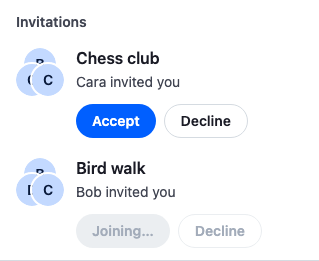
The screenshots on this page come from a read-only demo app: Accept and Decline send no request there, so the button keeps reading "Joining…". In your app the request goes out, the row leaves the section when it succeeds, and Bird walk joins the channel list when the server's member.updated event arrives. The client receives that event because the invites query watches Bird walk. A declined channel leaves the section the same way, and joins no list.
How it works
Example
Bob invites the user to Bird walk, and the user accepts:
- Bob calls
Channel.inviteMembers()for the user. The user is now a member of Bird walk, withchannel.state.membership.invitedset totrue. The user's client, which isn't watching Bird walk yet, receivesnotification.invited, and may also receivenotification.added_to_channel. - If
notification.added_to_channelarrives,client.channelManagerroutes it to its paginators. Bird walk matches the channels paginator'smembersfilter, buthasJoined()is false, so it stays out of the channel list. useChannelInvites()seesnotification.invitedand loads the invites paginator's first page again. Its query, withinvite: "pending", returns and watches Bird walk, which shows under Invitations with "Bob invited you".- The user presses Accept.
Channel.acceptInvite()sends the request, and the button reads "Joining…". - The request succeeds.
Invitationremoves Bird walk from the invites paginator, and screen readers hear "Joined Bird walk". The focus moves to the Accept button of the next invitation, or the previous one. With no other invitation, the section hides. - The server sends
member.updatedto the clients watching Bird walk, as Events lists, withevent.member.invite_accepted_atset. The client applies it tochannel.state.membership, andclient.channelManagerroutes the channel again.hasJoined()is now true, so Bird walk joins the channel list, at its place bylast_message_at. useChannelInvites()sees the samemember.updatedand callsChannelPaginator.removeItem()for Bird walk. The row is gone already, so nothing changes; had the event arrived first, it would have removed the row.
Declining runs the same way: Channel.rejectInvite() stores only the returned channel in channel.data. The member.updated event that follows sets channel.state.membership.invite_rejected_at, on a client that watches the channel, so hasJoined() stays false and the channel joins no list. The user is still a member of a declined channel, which is why the channel list needs joined: true: without it, the query for the user's channels returns the declined channels too.
An invite answered on another device reaches this one as member.updated only, since this client watches the channel and the server sends the notification.invite_* events only to clients that don't, as Events lists, and useChannelInvites() removes its row. A new invite reaches it as notification.invited, and the section loads again with it.
Related
- Channel invites: inviting users, accepting and rejecting, and querying invites by status.
- Query Channels: the
joinedandinvitefilters. - Events: which clients receive
member.updatedand thenotification.invite_*events. - Channel list paginators: how events move channels between paginators.
- Channel and ChannelState:
Channel.acceptInvite(),Channel.rejectInvite()andChannel.inviteMembers(). - ChannelManager and ChannelPaginator:
ChannelPaginator.toTail(),ChannelPaginator.removeItem()and registering paginators. - Pinned and archived channels: a channel list split into sections, each with its own paginator.