


Read-receipt avatars
This recipe shows read receipts in the message list as member avatars.
What you'll build
- A small avatar under each member's last read message
- Avatars that move down as members read on
Preview
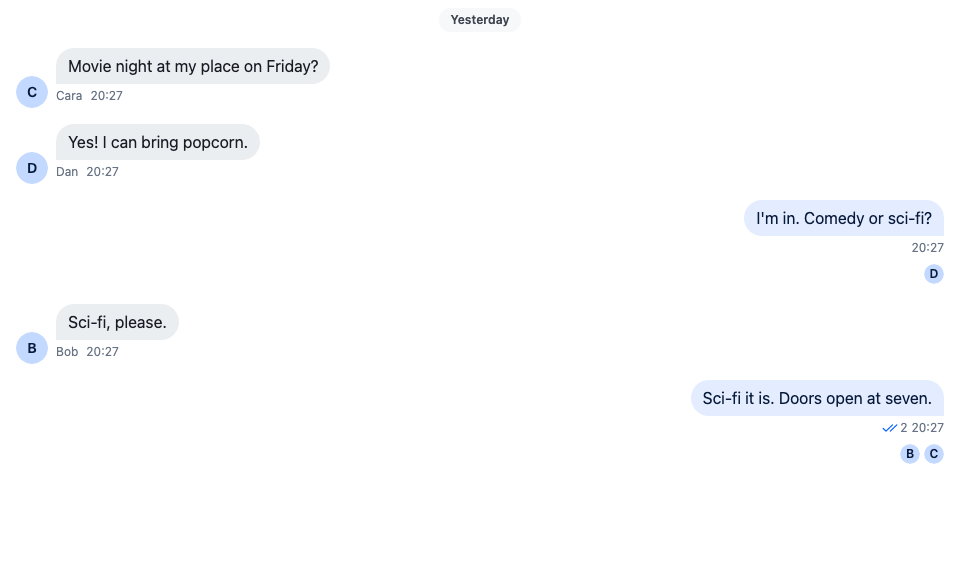
Approach: Compose. Choosing where to start explains the approaches.
Starts from: the base app. The page shows only what the recipe adds.
Best practices
- Read the avatars from
channel.messageReceiptsTracker.snapshotStore. ItsreadersByMessageIdalready lists each member once, at the message their read position is on, which is exactly where the avatar goes. - Don't use the message's
readByfromMessageContextfor this. It lists everyone who has read the message, so a member who read the newest message would show under every message above it too. - Leave the user out. The tracker counts the user's own read position as well.
- Keep the default message UI and add the row after it, so the bubble, the actions and the status keep working as they do.
- Leave the row off thread replies. Read positions belong to channel messages. The thread's parent message is a channel message, so it keeps its row.
Add the avatars under each message
ReadReceiptAvatars reads the readers of the message it renders under, and MessageWithReadReceipts puts it after the SDK's MessageUI. The MessageUI key of the component context then renders that pair for every message:
import type { PropsWithChildren } from "react";
import type { MessageReceiptsSnapshot } from "stream-chat";
import {
  Avatar,
  MessageUI,
  useChannel,
  useChatContext,
  useIsRenderedAsThreadParent,
  useMessageContext,
  useStateStore,
  useThreadContext,
  WithComponents,
} from "stream-chat-react";
import "./ReadReceiptAvatars.css";

// The tracker groups members by the message their read position is on.
const readersSelector = ({ readersByMessageId }: MessageReceiptsSnapshot) => ({
  readersByMessageId,
});

/** The avatars of the other members whose last read message is this one. */
const ReadReceiptAvatars = () => {
  const channel = useChannel();
  const { client } = useChatContext();
  const { message } = useMessageContext();
  const isThreadParent = useIsRenderedAsThreadParent();
  const isThreadReply = !!useThreadContext() && !isThreadParent;
  const { readersByMessageId } = useStateStore(
    channel.messageReceiptsTracker.snapshotStore,
    readersSelector,
  );

  // Read positions belong to the channel's main list, so thread replies show none. The thread
  // parent is a channel message and keeps its readers.
  if (isThreadReply) return null;

  const readers = (readersByMessageId[message.id] ?? []).filter(
    (user) => user.id !== client.userId,
  );
  if (!readers.length) return null;

  return (
    <ul aria-label="Seen by" className="cookbook-read-receipts">
      {readers.map((user) => (
        <li className="cookbook-read-receipts__reader" key={user.id}>
          <Avatar
            imageUrl={user.image}
            size="xs"
            userName={user.name ?? user.id}
          />
        </li>
      ))}
    </ul>
  );
};

/** The SDK's message UI, with the reader avatars under it. */
const MessageWithReadReceipts = () => (
  <>
    <MessageUI />
    <ReadReceiptAvatars />
  </>
);

// Declared once, so WithComponents gets the same object on every render.
const overrides = { MessageUI: MessageWithReadReceipts };

export const WithReadReceiptAvatars = ({ children }: PropsWithChildren) => (
  <WithComponents overrides={overrides}>{children}</WithComponents>
);@layer stream-overrides {
.cookbook-read-receipts {
display: flex;
justify-content: flex-end;
gap: var(--str-chat__spacing-xxs);
margin: 0;
padding-block: var(--str-chat__spacing-xxs);
padding-inline: var(--str-chat__spacing-md);
list-style: none;
}
.cookbook-read-receipts__reader {
display: flex;
}
}The screenshot at the top of this page shows the result.
Wrap the channel in WithReadReceiptAvatars:
import type { Channel as StreamChannel } from "stream-chat";
import { Channel, MessageComposer, MessageList } from "stream-chat-react";
import { WithReadReceiptAvatars } from "./ReadReceiptAvatars";

export const ReadReceiptsChannel = ({
  channel,
}: {
  channel: StreamChannel;
}) => (
  <WithReadReceiptAvatars>
    <Channel channel={channel}>
      <MessageList />
      <MessageComposer />
    </Channel>
  </WithReadReceiptAvatars>
);
How it works
Example
Three members have read a group chat. One of them stopped at the user's question and the other two read up to the newest message. The first member's avatar sits under the question; the other two sit under the newest message. When the first member opens the channel and reads on, their avatar moves down to the newest message.
channel.messageReceiptsTrackerkeeps every member's read position: the last message they read, built fromchannel.state.read. ItssnapshotStorepublishesreadersByMessageId, which maps a message id to the members whose position is on that message. A member appears under one message only.ReadReceiptAvatarssubscribes to that store withuseStateStore, so it re-renders when a member reads further. Their avatar then leaves the old message and shows under the new one.useChannel()returns the channel the message list belongs to, anduseMessageContext()the message being rendered.client.userIdfilters the user out, since the user's own read position is on the newest message they saw.- The
MessageUIkey of the component context is whatMessagerenders for each message.MessageWithReadReceiptsrenders the SDK'sMessageUIunchanged and adds the row after it, inside the same list item. useThreadContext()returns the thread when the message renders in a thread's list.useIsRenderedAsThreadParent()returnstruefor the thread's parent message, which the list renders above the replies. Replies have no read positions of their own, so the row isn't rendered under them. The parent is a channel message and keeps its row.
The double check and the reader count of the default MessageStatus stay on the user's own messages. To show who read a message instead of where each member stopped, see Message info.
Related
- Read state, unread and receipts explains read positions and how the SDK turns them into receipts.
- Message receipts tracker lists
readersByMessageIdand every method ofchannel.messageReceiptsTracker. - Message info lists who read a message and who only received it, in the side panel.
- ComponentContext lists the
MessageUIkey and the other components you can replace. - Custom message replaces the whole message UI instead of adding to it.