


Reactions for a custom message
This recipe adds reactions to the message UI from Action bar for a custom message.
What you'll build
- Thumbs-up and thumbs-down buttons in the action bar
- A click that adds a reaction, and another that removes it
- Reactions with their counts under each message
Preview
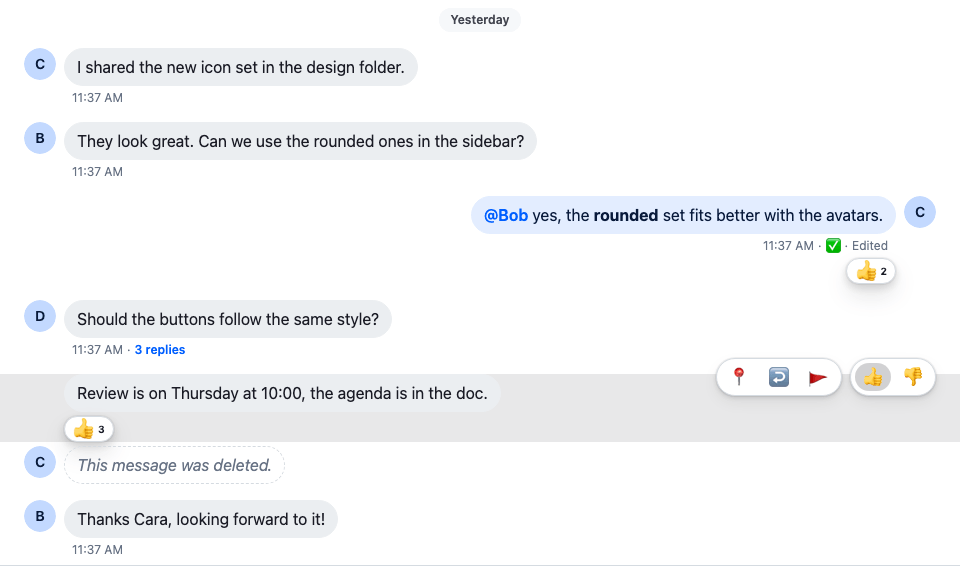
Approach: Replace one part. Choosing where to start explains the approaches.
Starts from: the base app, plus Action bar for a custom message. The page shows only what the recipe adds.
Best practices
- Register the reactions once, as
reactionOptionswithWithComponents.MessageReactions, the reactions dialog and your own components read them from there. - Keep the reaction types stable. Each key is the
typestored on the server, so renaming one hides the reactions already given. - React through
handleReaction(type, event). It adds or removes the reaction, and the message shows the change before the server answers. - Show the reaction buttons only to users with the
send-reactioncapability, whichuseMessagePermissions(message)reads ascanReact. - Give each reaction button an
aria-labelwith the reaction's name, and hide the emoji from screen readers.
Register the reactions
The whole files are in the complete example at the end.
Define the reactions and register them as reactionOptions in WithCustomMessageUi, next to the message UI. Each key is the reaction type stored on the server; Reactions explains the format:
import type { PropsWithChildren } from "react";
import type { ReactionOptions } from "stream-chat-react";
import { emojiToUnicode, WithComponents } from "stream-chat-react";
import { CustomMessageUi } from "./CustomMessageUi";

const reactionOptions: ReactionOptions = {
  quick: {
    "+1": {
      Component: () => <>👍</>,
      name: "Thumbs up",
      unicode: emojiToUnicode("👍"),
    },
    "-1": {
      Component: () => <>👎</>,
      name: "Thumbs down",
      unicode: emojiToUnicode("👎"),
    },
  },
};

// Declared once, so WithComponents gets the same object on every render.
const overrides = { MessageUI: CustomMessageUi, reactionOptions };

export const WithCustomMessageUi = ({ children }: PropsWithChildren) => (
  <WithComponents overrides={overrides}>{children}</WithComponents>
);
Quick reactions
Give CustomMessageUiActions a button for each quick reaction, in a group of its own. It reads the registered options with useComponentContext(). handleReaction(type, event) adds the reaction, or removes it if the user already reacted with it, and the message shows the change before the server answers. canReact is the send-reaction capability. Import useComponentContext from stream-chat-react:
const CustomMessageUiActions = () => {
  const {
    handleDelete,
    handleFlag,
    handleOpenThread,
    handlePin,
    handleReaction,
    message,
  } = useMessageContext();
  // Pinning and replying work on the channel list, so the thread's messages, the parent
  // included, offer neither, as in the SDK's default message actions.
  const isInThread = !!useThreadContext();
  const { canDelete, canFlag, canPin, canReact, canReply } =
    useMessagePermissions(message);
  const { reactionOptions } = useComponentContext();
  const quickReactions =
    reactionOptions && "quick" in reactionOptions ? reactionOptions.quick : {};
  // The reactions the user has given show as pressed; pressing one again removes it.
  const ownReactionTypes = new Set(
    message.own_reactions?.map(({ type }) => type),
  );

  return (
    <div className="cookbook-message-ui__actions">
      <div className="cookbook-message-ui__actions-group">
        {canPin && !isInThread && (
          <button
            aria-label={message.pinned ? "Unpin" : "Pin"}
            onClick={handlePin}
            title={message.pinned ? "Unpin" : "Pin"}
            type="button"
          >
            <span aria-hidden="true">{message.pinned ? "📍" : "📌"}</span>
          </button>
        )}
        {canDelete && (
          <button
            aria-label="Delete"
            onClick={() => void handleDelete()}
            title="Delete"
            type="button"
          >
            <span aria-hidden="true">🗑️</span>
          </button>
        )}
        {canReply && !isInThread && (
          <button
            aria-label="Open thread"
            onClick={handleOpenThread}
            title="Open thread"
            type="button"
          >
            <span aria-hidden="true">↩️</span>
          </button>
        )}
        {canFlag && (
          <button
            aria-label="Flag message"
            onClick={handleFlag}
            title="Flag message"
            type="button"
          >
            <span aria-hidden="true">🚩</span>
          </button>
        )}
      </div>
      {canReact && (
        <div className="cookbook-message-ui__actions-group">
          {Object.entries(quickReactions).map(([type, { Component, name }]) => (
            <button
              aria-label={`React with ${name}`}
              aria-pressed={ownReactionTypes.has(type)}
              key={type}
              onClick={(event) => void handleReaction(type, event)}
              title={`React with ${name}`}
              type="button"
            >
              <span aria-hidden="true">
                <Component />
              </span>
            </button>
          ))}
        </div>
      )}
    </div>
  );
};@layer stream-overrides {
.cookbook-message-ui__actions-group button[aria-pressed="true"] {
background: var(--str-chat__background-utility-selected);
}
}Each quick reaction button has aria-pressed, true when the user has already given that reaction, so a screen reader announces it as pressed. message.own_reactions holds the user's own reactions. The rule added to CustomMessageUi.css marks those buttons as selected.
Reactions on a message
Render MessageReactions, imported from stream-chat-react, under the metadata. It reads the message from MessageContext and the reactions on offer from reactionOptions, shows each reaction with its count, and opens the reactions dialog when clicked:
export const CustomMessageUi = () => {
  const { isMyMessage, message } = useMessageContext();

  const messageUiClassNames = ["cookbook-message-ui"];
  const isDeleted = isMessageDeleted(message);

  if (isMyMessage()) {
    messageUiClassNames.push("cookbook-message-ui--mine");
  } else {
    messageUiClassNames.push("cookbook-message-ui--other");
  }

  return (
    <div className={messageUiClassNames.join(" ")}>
      <Avatar
        className="cookbook-message-ui__avatar"
        imageUrl={message.user?.image}
        size="md"
        userName={message.user?.name || message.user?.id}
      />
      <div className="cookbook-message-ui__content">
        {isDeleted ? (
          <div className="cookbook-message-ui__deleted">
            This message was deleted.
          </div>
        ) : (
          <>
            <div className="cookbook-message-ui__text">
              <MessageText />
            </div>
            <CustomMessageUiMetadata />
            <MessageReactions />
          </>
        )}
      </div>
      {!isDeleted && <CustomMessageUiActions />}
    </div>
  );
};
Complete example
WithCustomMessageUi.tsx is the one from Register the reactions. The whole component and its stylesheet:
import type { LocalMessage, UserResponse } from "stream-chat";
import { convertTimestampToDate } from "stream-chat";
import {
  Avatar,
  isMessageDeleted,
  MessageReactions,
  MessageText,
  useChatContext,
  useComponentContext,
  useMessageContext,
  useMessagePermissions,
  useThreadContext,
} from "stream-chat-react";
import "./CustomMessageUi.css";

const statusIconMap = {
  delivered: { icon: "✅", label: "Delivered" },
  read: { icon: "👁️", label: "Read" },
  sending: { icon: "🛫", label: "Sending" },
  sent: { icon: "✉️", label: "Sent" },
  unknown: { icon: "❓", label: "Status unknown" },
};

type MessageStatusParams = {
  deliveredTo: UserResponse[];
  message: LocalMessage;
  ownUserId: string;
  readBy: UserResponse[];
  isInThread: boolean;
};

const getMessageStatus = ({
  deliveredTo,
  message,
  ownUserId,
  readBy,
  isInThread,
}: MessageStatusParams): keyof typeof statusIconMap => {
  const [firstReader] = readBy;
  const [firstDeliveredUser] = deliveredTo;

  const justReadByMe = readBy.length === 1 && firstReader?.id === ownUserId;
  const read = readBy.length > 0 && !justReadByMe && !isInThread;

  const deliveredOnlyToMe =
    deliveredTo.length === 1 && firstDeliveredUser?.id === ownUserId;
  const delivered =
    deliveredTo.length > 0 && !deliveredOnlyToMe && !read && !isInThread;

  const sent =
    message.status === "received" && !delivered && !read && !isInThread;
  const sending = message.status === "sending";

  if (read) return "read";
  if (delivered) return "delivered";
  if (sent) return "sent";
  if (sending) return "sending";
  return "unknown";
};

const CustomMessageUiMetadata = () => {
  const {
    deliveredTo = [],
    handleOpenThread,
    isMyMessage,
    message,
    readBy = [],
  } = useMessageContext();
  const { client } = useChatContext();
  // Read and delivery cursors sit on channel messages, so a thread list's `readBy` / `deliveredTo`
  // say nothing about its replies, and the parent gets none. As in the SDK's `MessageStatus`, a
  // message shown in a thread is never read, delivered or sent here.
  const isInThread = !!useThreadContext();

  const createdAt = convertTimestampToDate(message.created_at);
  const editedAt = convertTimestampToDate(message.message_text_updated_at);
  const status =
    statusIconMap[
      getMessageStatus({
        deliveredTo,
        message,
        ownUserId: client.user?.id ?? "",
        readBy,
        isInThread,
      })
    ];

  return (
    <div className="cookbook-message-ui__metadata">
      <span>
        {createdAt?.toLocaleTimeString([], {
          hour: "numeric",
          minute: "2-digit",
        })}
      </span>
      {isMyMessage() && (
        <span aria-label={status.label} role="img" title={status.label}>
          {status.icon}
        </span>
      )}
      {editedAt && <span title={editedAt.toLocaleString()}>Edited</span>}
      {!isInThread && message.reply_count > 0 && (
        <span>
          <button
            className="cookbook-message-ui__reply-count"
            onClick={handleOpenThread}
            type="button"
          >
            {message.reply_count}{" "}
            {message.reply_count > 1 ? "replies" : "reply"}
          </button>
        </span>
      )}
    </div>
  );
};

const CustomMessageUiActions = () => {
  const {
    handleDelete,
    handleFlag,
    handleOpenThread,
    handlePin,
    handleReaction,
    message,
  } = useMessageContext();
  // Pinning and replying work on the channel list, so the thread's messages, the parent
  // included, offer neither, as in the SDK's default message actions.
  const isInThread = !!useThreadContext();
  const { canDelete, canFlag, canPin, canReact, canReply } =
    useMessagePermissions(message);
  const { reactionOptions } = useComponentContext();
  const quickReactions =
    reactionOptions && "quick" in reactionOptions ? reactionOptions.quick : {};
  // The reactions the user has given show as pressed; pressing one again removes it.
  const ownReactionTypes = new Set(
    message.own_reactions?.map(({ type }) => type),
  );

  return (
    <div className="cookbook-message-ui__actions">
      <div className="cookbook-message-ui__actions-group">
        {canPin && !isInThread && (
          <button
            aria-label={message.pinned ? "Unpin" : "Pin"}
            onClick={handlePin}
            title={message.pinned ? "Unpin" : "Pin"}
            type="button"
          >
            <span aria-hidden="true">{message.pinned ? "📍" : "📌"}</span>
          </button>
        )}
        {canDelete && (
          <button
            aria-label="Delete"
            onClick={() => void handleDelete()}
            title="Delete"
            type="button"
          >
            <span aria-hidden="true">🗑️</span>
          </button>
        )}
        {canReply && !isInThread && (
          <button
            aria-label="Open thread"
            onClick={handleOpenThread}
            title="Open thread"
            type="button"
          >
            <span aria-hidden="true">↩️</span>
          </button>
        )}
        {canFlag && (
          <button
            aria-label="Flag message"
            onClick={handleFlag}
            title="Flag message"
            type="button"
          >
            <span aria-hidden="true">🚩</span>
          </button>
        )}
      </div>
      {canReact && (
        <div className="cookbook-message-ui__actions-group">
          {Object.entries(quickReactions).map(([type, { Component, name }]) => (
            <button
              aria-label={`React with ${name}`}
              aria-pressed={ownReactionTypes.has(type)}
              key={type}
              onClick={(event) => void handleReaction(type, event)}
              title={`React with ${name}`}
              type="button"
            >
              <span aria-hidden="true">
                <Component />
              </span>
            </button>
          ))}
        </div>
      )}
    </div>
  );
};

export const CustomMessageUi = () => {
  const { isMyMessage, message } = useMessageContext();

  const messageUiClassNames = ["cookbook-message-ui"];
  const isDeleted = isMessageDeleted(message);

  if (isMyMessage()) {
    messageUiClassNames.push("cookbook-message-ui--mine");
  } else {
    messageUiClassNames.push("cookbook-message-ui--other");
  }

  return (
    <div className={messageUiClassNames.join(" ")}>
      <Avatar
        className="cookbook-message-ui__avatar"
        imageUrl={message.user?.image}
        size="md"
        userName={message.user?.name || message.user?.id}
      />
      <div className="cookbook-message-ui__content">
        {isDeleted ? (
          <div className="cookbook-message-ui__deleted">
            This message was deleted.
          </div>
        ) : (
          <>
            <div className="cookbook-message-ui__text">
              <MessageText />
            </div>
            <CustomMessageUiMetadata />
            <MessageReactions />
          </>
        )}
      </div>
      {!isDeleted && <CustomMessageUiActions />}
    </div>
  );
};@layer stream-overrides {
.cookbook-message-ui {
position: relative;
display: flex;
align-items: flex-start;
gap: var(--str-chat__spacing-xs);
padding-inline: var(--str-chat__spacing-xl);
font: var(--str-chat__font-body-default);
}
.cookbook-message-ui--mine {
flex-direction: row-reverse;
}
.cookbook-message-ui__avatar {
flex-shrink: 0;
}
.cookbook-message-ui__content {
display: flex;
flex-direction: column;
align-items: flex-start;
gap: var(--str-chat__spacing-xxs);
max-width: 70%;
}
.cookbook-message-ui--mine .cookbook-message-ui__content {
align-items: flex-end;
}
.cookbook-message-ui__text {
padding: var(--str-chat__spacing-xs) var(--str-chat__spacing-sm);
border: 1px solid var(--str-chat__chat-border-incoming);
border-radius: var(--str-chat__message-bubble-radius-group-bottom);
background: var(--str-chat__chat-bg-incoming);
color: var(--str-chat__chat-text-incoming);
}
.cookbook-message-ui--mine .cookbook-message-ui__text {
border-color: var(--str-chat__chat-border-outgoing);
background: var(--str-chat__chat-bg-outgoing);
color: var(--str-chat__chat-text-outgoing);
}
/* Markdown wraps the text in paragraphs; the bubble's padding already spaces it. */
.cookbook-message-ui__text p {
margin: 0;
}
.cookbook-message-ui__metadata {
display: none;
align-items: baseline;
gap: var(--str-chat__spacing-xxs);
padding-inline: var(--str-chat__spacing-xs);
color: var(--str-chat__chat-text-timestamp);
font: var(--str-chat__font-metadata-default);
}
.cookbook-message-ui__metadata > * + *::before {
content: "·";
margin-inline-end: var(--str-chat__spacing-xxs);
}
.str-chat__li--bottom .cookbook-message-ui__metadata,
.str-chat__li--single .cookbook-message-ui__metadata {
display: flex;
}
.str-chat__li--top .cookbook-message-ui__avatar,
.str-chat__li--middle .cookbook-message-ui__avatar {
visibility: hidden;
}
.cookbook-message-ui:hover,
.cookbook-message-ui:focus-within {
background: var(--str-chat__background-utility-hover);
}
.cookbook-message-ui__actions {
position: absolute;
top: calc(-1 * var(--str-chat__spacing-md));
display: flex;
gap: var(--str-chat__spacing-xs);
/* Hidden but still in the tab order, so focusing a button shows the actions. */
opacity: 0;
pointer-events: none;
}
.cookbook-message-ui:hover .cookbook-message-ui__actions,
.cookbook-message-ui:focus-within .cookbook-message-ui__actions {
opacity: 1;
pointer-events: auto;
}
.cookbook-message-ui--mine .cookbook-message-ui__actions {
left: var(--str-chat__spacing-xl);
}
.cookbook-message-ui--other .cookbook-message-ui__actions {
right: var(--str-chat__spacing-xl);
}
.cookbook-message-ui__actions-group {
display: flex;
gap: var(--str-chat__spacing-xxs);
padding: var(--str-chat__spacing-xxs);
border: 1px solid var(--str-chat__border-core-default);
border-radius: var(--str-chat__radius-max);
background: var(--str-chat__background-core-elevation-1);
box-shadow: var(--str-chat__box-shadow-2);
}
.cookbook-message-ui__actions-group:empty {
display: none;
}
.cookbook-message-ui__actions-group button {
padding: var(--str-chat__spacing-xxs) var(--str-chat__spacing-xs);
border: 0;
border-radius: var(--str-chat__radius-max);
background: none;
font: var(--str-chat__font-body-default);
cursor: pointer;
}
.cookbook-message-ui__actions-group button:hover {
background: var(--str-chat__background-utility-hover);
}
.cookbook-message-ui__actions-group button[aria-pressed="true"] {
background: var(--str-chat__background-utility-selected);
}
.cookbook-message-ui__reply-count {
padding: 0;
border: 0;
background: none;
color: var(--str-chat__chat-text-link);
font: var(--str-chat__font-metadata-emphasis);
cursor: pointer;
}
.cookbook-message-ui__deleted {
padding: var(--str-chat__spacing-xs) var(--str-chat__spacing-sm);
border: 1px dashed var(--str-chat__border-core-default);
border-radius: var(--str-chat__message-bubble-radius-group-bottom);
color: var(--str-chat__text-tertiary);
font: var(--str-chat__font-body-default);
font-style: italic;
}
}The screenshot at the top of this page shows the result: the user's message and Cara's "Review is on Thursday…" have thumbs-up reactions, and the action bar over Cara's hovered message has the two quick reactions.
How it works
Example
The user moves the pointer over Cara's message and reacts with thumbs up:
WithCustomMessageUiregistersreactionOptionswith two quick reactions,+1and-1, next to theMessageUIoverride.- The action bar shows. The user has the
send-reactioncapability, socanReactistrue, andCustomMessageUiActionsrenders a button for each quick reaction it reads withuseComponentContext(). - The user clicks thumbs up.
handleReaction("+1", event)adds the reaction, and the message shows it before the server answers.message.own_reactionsnow holds+1, so the button'saria-pressedistrueand the stylesheet marks it as selected. MessageReactionsunder the metadata shows 👍 with its count. Clicking it opens the reactions dialog.- The user clicks thumbs up in the action bar again, and
handleReactionremoves the reaction.
Related
- How reactions work, the reactions on offer and the reactions dialog: Reactions.
- The SDK's reaction components and their props: Reaction components.
handleReactionand the message's other handlers: MessageContext.- The message UI this recipe extends: Custom message and Action bar for a custom message.