


Hide history for new members
This recipe builds a dialog that asks how much of the conversation history a new member sees when they're added to a channel. The options behind it, and what the new member sees, are explained in History visibility for new members.
What you'll build
- An Add members button in the channel header
- History choices: none, from today or from the beginning
- A custom date and time to start the history from
Preview
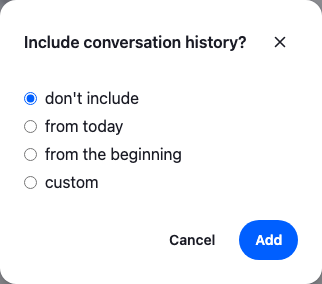
Approach: Compose. Choosing where to start explains the approaches.
Starts from: the base app. The page shows only what the recipe adds.
Minimal dialog to control history visibility when adding members
On Add, the dialog calls Channel.addMembers() with the option that matches the choice:
- don't include: no history →
hide_history: true - from today: only today →
hide_history_beforeset to the start of today - from the beginning: everything → no option
- custom: from a date and time the user picks →
hide_history_beforeset to thatDate
hide_history_before is a Date, and it must be in the past.
The dialog is a GlobalModal from the SDK with Prompt inside it. The modal handles the overlay, the focus and closing on Escape, and Prompt lays out the title, the body and the buttons. Dialogs explains both.
import type { ChannelUpdateOptions } from "stream-chat";
import { useId, useState } from "react";
import { Button, GlobalModal, Prompt, useChannel } from "stream-chat-react";
import "./AddMembersButton.css";

type HistoryMode = "none" | "today" | "all" | "custom";

const historyOptions: { label: string; mode: HistoryMode }[] = [
  { label: "don't include", mode: "none" },
  { label: "from today", mode: "today" },
  { label: "from the beginning", mode: "all" },
  { label: "custom", mode: "custom" },
];

// The addMembers options for a choice, or undefined when the custom date isn't valid.
const getHistoryOptions = (
  mode: HistoryMode,
  customInput: string,
): ChannelUpdateOptions | undefined => {
  if (mode === "all") return {};
  if (mode === "none") return { hide_history: true };

  if (mode === "today") {
    const startOfToday = new Date();
    startOfToday.setHours(0, 0, 0, 0);
    return { hide_history_before: startOfToday };
  }

  const cutoff = new Date(customInput);
  if (Number.isNaN(cutoff.getTime()) || cutoff > new Date()) return undefined;
  return { hide_history_before: cutoff };
};

export const AddMembersButton = ({ memberIds }: { memberIds: string[] }) => {
  const channel = useChannel();
  const [open, setOpen] = useState(false);
  const [mode, setMode] = useState<HistoryMode>("none");
  const [customInput, setCustomInput] = useState("");
  const [adding, setAdding] = useState(false);
  const errorId = useId();

  const options = getHistoryOptions(mode, customInput);
  // The error waits until the user has typed a date.
  const showCustomError = mode === "custom" && customInput !== "" && !options;

  // Every time the dialog opens, it starts from the most private choice.
  const openDialog = () => {
    setMode("none");
    setCustomInput("");
    setOpen(true);
  };
  const close = () => setOpen(false);

  const handleAdd = async () => {
    if (!options || adding) return;
    setAdding(true);
    try {
      await channel.addMembers({ members: memberIds, ...options });
      close();
    } catch (error) {
      console.error("Could not add the members", error);
    } finally {
      setAdding(false);
    }
  };

  return (
    <>
      <Button
        appearance="outline"
        className="cookbook-add-members"
        onClick={openDialog}
        size="sm"
        variant="secondary"
      >
        Add members
      </Button>
      <GlobalModal onClose={close} open={open}>
        <Prompt.Root>
          <Prompt.Header close={close} title="Include conversation history?" />
          <Prompt.Body>
            <div
              aria-label="Conversation history"
              className="cookbook-history-options"
              role="radiogroup"
            >
              {historyOptions.map((option) => (
                <label className="cookbook-history-option" key={option.mode}>
                  <input
                    checked={mode === option.mode}
                    name="history"
                    onChange={() => setMode(option.mode)}
                    type="radio"
                    value={option.mode}
                  />
                  <span>{option.label}</span>
                </label>
              ))}
            </div>
            {mode === "custom" && (
              <div className="cookbook-history-custom">
                <input
                  aria-describedby={showCustomError ? errorId : undefined}
                  aria-invalid={showCustomError}
                  aria-label="Show history from"
                  className="cookbook-history-custom__input"
                  onChange={(event) => setCustomInput(event.target.value)}
                  type="datetime-local"
                  value={customInput}
                />
                {showCustomError && (
                  <div className="cookbook-history-custom__error" id={errorId}>
                    Enter a valid date and time in the past
                  </div>
                )}
              </div>
            )}
          </Prompt.Body>
          <Prompt.Footer>
            <Prompt.FooterControls>
              <Prompt.FooterControlsButtonSecondary onClick={close}>
                Cancel
              </Prompt.FooterControlsButtonSecondary>
              <Prompt.FooterControlsButtonPrimary
                disabled={!options || adding}
                onClick={handleAdd}
              >
                Add
              </Prompt.FooterControlsButtonPrimary>
            </Prompt.FooterControls>
          </Prompt.Footer>
        </Prompt.Root>
      </GlobalModal>
    </>
  );
};@layer stream-overrides {
.cookbook-history-options {
display: grid;
gap: var(--str-chat__spacing-xs);
}
.cookbook-history-option {
display: flex;
align-items: center;
gap: var(--str-chat__spacing-xs);
color: var(--str-chat__text-primary);
font: var(--str-chat__font-body-default);
cursor: pointer;
}
.cookbook-history-option input {
accent-color: var(--str-chat__control-radio-button-bg-selected);
}
.cookbook-history-custom {
margin-top: var(--str-chat__spacing-sm);
}
.cookbook-history-custom__input {
box-sizing: border-box;
width: 100%;
padding: var(--str-chat__spacing-xs) var(--str-chat__spacing-sm);
border: 1px solid var(--str-chat__border-core-default);
border-radius: var(--str-chat__radius-max);
background: var(--str-chat__background-core-surface-card);
color: var(--str-chat__input-text-default);
font: var(--str-chat__font-body-default);
}
.cookbook-history-custom__error {
margin-top: var(--str-chat__spacing-xxs);
color: var(--str-chat__accent-error);
font: var(--str-chat__font-caption-default);
}
}The rules sit in the stream-overrides layer, so they win over the SDK's own rules once the SDK's stylesheet is in an earlier layer, as Theming → CSS layers sets up. They take their colors, spacing and type from the SDK's tokens, so they follow your theme; the radios take the SDK's selected radio color, --str-chat__control-radio-button-bg-selected. The trigger is the SDK's Button, so it looks like the header's other buttons.
The dialog also handles the details a form needs:
- The radios sit in a
radiogroupwith a label, so screen readers announce them as one choice. - The custom date's error shows only once the user has entered a date, and
aria-describedbyandaria-invalidtie it to the input. - Add is disabled while the request runs, so a second click doesn't add the members twice.
- Each time the dialog opens, it starts again from "don't include".
Render AddMembersButton inside a channel with the ids of the users to add. useChannel() gives it the channel. Adding members needs the update-channel-members capability. This header keeps the SDK's ChannelHeader and passes the button through its EndContent prop, together with the close button that prop renders by default:
import {
  ChannelHeader,
  WorkspaceNavigationCloseButton,
} from "stream-chat-react";
import { AddMembersButton } from "./AddMembersButton";

/**
 * The SDK's header, with Add members before its close button. Call it once, outside any
 * component, so the header and its button keep their identity across renders.
 */
export const createChannelHeaderWithAddMembers = (memberIds: string[]) => {
  const HeaderEnd = () => (
    <>
      <AddMembersButton memberIds={memberIds} />
      <WorkspaceNavigationCloseButton />
    </>
  );

  const ChannelHeaderWithAddMembers = () => (
    <ChannelHeader EndContent={HeaderEnd} />
  );
  return ChannelHeaderWithAddMembers;
};
Create the header once, outside your components, and render it where the channel's header goes, in place of ChannelHeader:
const ChannelHeaderWithAddMembers = createChannelHeaderWithAddMembers([userId]);Best practices
- Default to the most private choice, "don't include", unless your app has a reason to share history.
- Pass a
Date, not a string, and check that it's in the past before callingaddMembers. - Phrase the choices as answers to the dialog's question, so the user can tell how much history the new member gets.
- Handle a failed request.
addMembersrejects when the user may not add members or the date isn't valid. The dialog above logs the error and stays open; show the user a message in your app. - Leave the rule to the server when the user shouldn't choose: one function that always passes the same options, as on History visibility for new members.
Mapping to the raw API
The dialog's choices are the options of a single call. For example, this adds a user with the last seven days of history:
const cutoff = new Date();
cutoff.setDate(cutoff.getDate() - 7);

await channel.addMembers({
  members: [userId],
  hide_history_before: cutoff,
});
The same object also takes message, a message that announces the change in the channel; without it, the member is added silently. The second argument of Channel.addMembers() is the request options.
How it works
Example
The user adds Dan to Book club and picks "from today":
- The user clicks Add members in the channel header. The dialog opens on "don't include", the most private choice.
- The user picks "from today".
getHistoryOptions()returnshide_history_beforeset to the start of today. - The user clicks Add.
Channel.addMembers()runs with Dan's id and that option, and Add stays disabled until it returns. - The request succeeds and the dialog closes. Dan is a member of Book club, and the server hides the messages sent before today from him.
When the request fails, the dialog logs the error and stays open. With "custom", Add stays disabled until the date is valid and in the past.
Related
- History visibility for new members: the options behind the dialog, and what the new member sees.
- Dialogs:
GlobalModalandPrompt. - Channel UI: the channel header and its
EndContentprop. - Channel details and members: the channel's members.
- Channel header: a channel header of your own.