


Action bar for a custom message
The Custom message recipe builds a message UI that shows a message but offers no way to act on it. This recipe adds actions to it.
What you'll build
- An action bar over the hovered message
- Pin, Delete, Open thread and Flag buttons
- A reply count that opens the message's thread
Preview
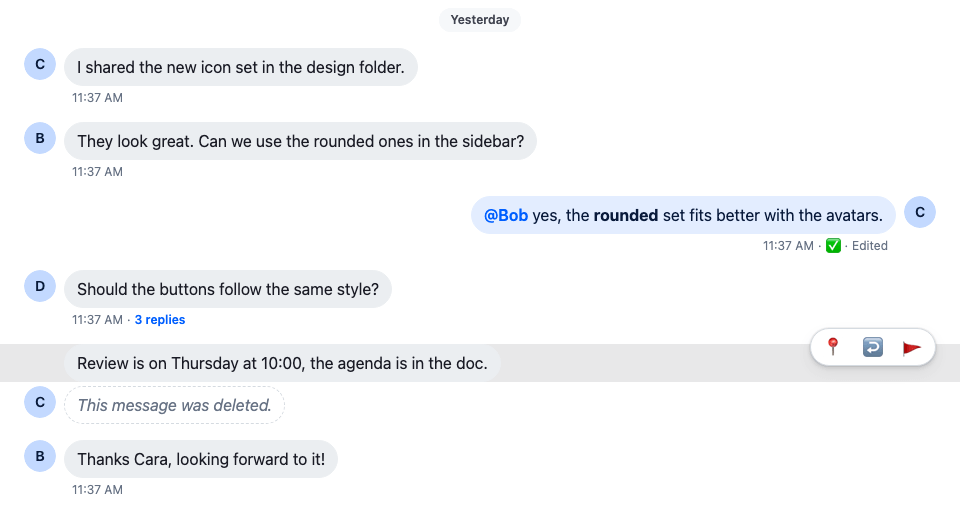
Approach: Replace one part. Choosing where to start explains the approaches.
Starts from: the base app, plus the complete example of Custom message. The page shows only what the recipe adds.
Best practices
- Run actions through the handlers in
useMessageContext(), such ashandlePinandhandleDelete. They update the message before the server answers. - Show only the actions the user may take.
useMessagePermissions(message)reads the user's capabilities in the channel. - Hide the action bar so it still takes focus. Keyboard users reach the buttons with Tab, and
:focus-withinshows them. - Give each icon button an
aria-label, and hide its emoji from screen readers. - Leave the actions off a deleted message, which has nothing to act on.
Action bar
WithCustomMessageUi.tsx stays as it is. The samples below add to CustomMessageUi.tsx and CustomMessageUi.css.
MessageContext has a handler for each action, such as handleDelete, handleFlag, handleOpenThread and handlePin. Wire some of them to buttons that show while the pointer is over the message, or while focus is inside it. Each button gets an aria-label, and its emoji is aria-hidden, so screen readers announce the action instead of the emoji.
Show each button only to users who may use it. useMessagePermissions(message) reads the user's capabilities in the channel: canDelete, canFlag, canPin and canReply. The default actions menu hides them on its own, but this bar renders its own buttons, so it checks them itself; Actions explains what the default filter does. The SDK offers neither Pin nor Reply on a message shown in a thread, the parent message included, so those buttons stay out of a thread too. useThreadContext() returns the thread when the message renders inside Thread, and undefined in a channel. Import useMessagePermissions from stream-chat-react with the other hooks, and render the actions in CustomMessageUi, except on a deleted message:
const CustomMessageUiActions = () => {
  const { handleDelete, handleFlag, handleOpenThread, handlePin, message } =
    useMessageContext();
  // Pinning and replying work on the channel list, so the thread's messages, the parent
  // included, offer neither, as in the SDK's default message actions.
  const isInThread = !!useThreadContext();
  const { canDelete, canFlag, canPin, canReply } =
    useMessagePermissions(message);

  return (
    <div className="cookbook-message-ui__actions">
      <div className="cookbook-message-ui__actions-group">
        {canPin && !isInThread && (
          <button
            aria-label={message.pinned ? "Unpin" : "Pin"}
            onClick={handlePin}
            title={message.pinned ? "Unpin" : "Pin"}
            type="button"
          >
            <span aria-hidden="true">{message.pinned ? "📍" : "📌"}</span>
          </button>
        )}
        {canDelete && (
          <button
            aria-label="Delete"
            onClick={() => void handleDelete()}
            title="Delete"
            type="button"
          >
            <span aria-hidden="true">🗑️</span>
          </button>
        )}
        {canReply && !isInThread && (
          <button
            aria-label="Open thread"
            onClick={handleOpenThread}
            title="Open thread"
            type="button"
          >
            <span aria-hidden="true">↩️</span>
          </button>
        )}
        {canFlag && (
          <button
            aria-label="Flag message"
            onClick={handleFlag}
            title="Flag message"
            type="button"
          >
            <span aria-hidden="true">🚩</span>
          </button>
        )}
      </div>
    </div>
  );
};

export const CustomMessageUi = () => {
  const { isMyMessage, message } = useMessageContext();

  const messageUiClassNames = ["cookbook-message-ui"];
  const isDeleted = isMessageDeleted(message);

  if (isMyMessage()) {
    messageUiClassNames.push("cookbook-message-ui--mine");
  } else {
    messageUiClassNames.push("cookbook-message-ui--other");
  }

  return (
    <div className={messageUiClassNames.join(" ")}>
      <Avatar
        className="cookbook-message-ui__avatar"
        imageUrl={message.user?.image}
        size="md"
        userName={message.user?.name || message.user?.id}
      />
      <div className="cookbook-message-ui__content">
        {isDeleted ? (
          <div className="cookbook-message-ui__deleted">
            This message was deleted.
          </div>
        ) : (
          <>
            <div className="cookbook-message-ui__text">
              <MessageText />
            </div>
            <CustomMessageUiMetadata />
          </>
        )}
      </div>
      {!isDeleted && <CustomMessageUiActions />}
    </div>
  );
};@layer stream-overrides {
.cookbook-message-ui {
position: relative;
display: flex;
align-items: flex-start;
gap: var(--str-chat__spacing-xs);
padding-inline: var(--str-chat__spacing-xl);
font: var(--str-chat__font-body-default);
}
.cookbook-message-ui:hover,
.cookbook-message-ui:focus-within {
background: var(--str-chat__background-utility-hover);
}
.cookbook-message-ui__actions {
position: absolute;
top: calc(-1 * var(--str-chat__spacing-md));
display: flex;
gap: var(--str-chat__spacing-xs);
/* Hidden but still in the tab order, so focusing a button shows the actions. */
opacity: 0;
pointer-events: none;
}
.cookbook-message-ui:hover .cookbook-message-ui__actions,
.cookbook-message-ui:focus-within .cookbook-message-ui__actions {
opacity: 1;
pointer-events: auto;
}
.cookbook-message-ui--mine .cookbook-message-ui__actions {
left: var(--str-chat__spacing-xl);
}
.cookbook-message-ui--other .cookbook-message-ui__actions {
right: var(--str-chat__spacing-xl);
}
.cookbook-message-ui__actions-group {
display: flex;
gap: var(--str-chat__spacing-xxs);
padding: var(--str-chat__spacing-xxs);
border: 1px solid var(--str-chat__border-core-default);
border-radius: var(--str-chat__radius-max);
background: var(--str-chat__background-core-elevation-1);
box-shadow: var(--str-chat__box-shadow-2);
}
.cookbook-message-ui__actions-group:empty {
display: none;
}
.cookbook-message-ui__actions-group button {
padding: var(--str-chat__spacing-xxs) var(--str-chat__spacing-xs);
border: 0;
border-radius: var(--str-chat__radius-max);
background: none;
font: var(--str-chat__font-body-default);
cursor: pointer;
}
.cookbook-message-ui__actions-group button:hover {
background: var(--str-chat__background-utility-hover);
}
}.cookbook-message-ui gets position: relative, so the actions are placed against the message. The actions are hidden with opacity: 0 rather than display: none, so the buttons stay in the tab order: pressing Tab moves focus onto the first one, :focus-within then shows them, and keyboard users reach every action. pointer-events: none keeps the hidden buttons from catching clicks. Add the new rules after the existing ones.
Thread and reply count
When a message gets replies, its reply_count grows. Add a button to the metadata that shows the count and opens the thread. A message in a thread's own list has no thread to open, so the button stays out of it. The button sits in a span, so the separator before it isn't part of the button:
const CustomMessageUiMetadata = () => {
  const {
    deliveredTo = [],
    handleOpenThread,
    isMyMessage,
    message,
    readBy = [],
  } = useMessageContext();
  const { client } = useChatContext();
  // Read and delivery cursors sit on channel messages, so a thread list's `readBy` / `deliveredTo`
  // say nothing about its replies, and the parent gets none. As in the SDK's `MessageStatus`, a
  // message shown in a thread is never read, delivered or sent here.
  const isInThread = !!useThreadContext();

  const createdAt = convertTimestampToDate(message.created_at);
  const editedAt = convertTimestampToDate(message.message_text_updated_at);
  const status =
    statusIconMap[
      getMessageStatus({
        deliveredTo,
        message,
        ownUserId: client.user?.id ?? "",
        readBy,
        isInThread,
      })
    ];

  return (
    <div className="cookbook-message-ui__metadata">
      <span>
        {createdAt?.toLocaleTimeString([], {
          hour: "numeric",
          minute: "2-digit",
        })}
      </span>
      {isMyMessage() && (
        <span aria-label={status.label} role="img" title={status.label}>
          {status.icon}
        </span>
      )}
      {editedAt && <span title={editedAt.toLocaleString()}>Edited</span>}
      {!isInThread && message.reply_count > 0 && (
        <span>
          <button
            className="cookbook-message-ui__reply-count"
            onClick={handleOpenThread}
            type="button"
          >
            {message.reply_count}{" "}
            {message.reply_count > 1 ? "replies" : "reply"}
          </button>
        </span>
      )}
    </div>
  );
};@layer stream-overrides {
.cookbook-message-ui__reply-count {
padding: 0;
border: 0;
background: none;
color: var(--str-chat__chat-text-link);
font: var(--str-chat__font-metadata-emphasis);
cursor: pointer;
}
}The screenshot at the top of this page shows the result: the action bar over Cara's hovered message, which is pinned, so its first button unpins it, and a 3 replies button under Dan's message.
How it works
Example
The user moves the pointer over Cara's pinned message and unpins it:
:hoveron the message shows the action bar.useMessagePermissions(message)says which buttons the user may use, and the message isn't in a thread, so Unpin, Open thread and Flag show. Delete shows only to users who may delete Cara's message.- The user clicks Unpin, which calls
handlePin. The message shows as unpinned at once, and goes back if the request fails. The button's label is now Pin. - Under Dan's message,
message.reply_countis 3, so the metadata shows a 3 replies button. The user clicks it, andhandleOpenThreadopens the thread in the layout.
What each handler does:
handlePinpins the message, or unpins it if it's pinned. The message shows its new state at once, and goes back if the request fails. The Pin indicator recipe changes how a pinned message looks.handleDeletedeletes the message. The message list shows it as deleted before the server answers.handleOpenThreadopens the message's thread through the layout, so withChatViewit opens in the thread slot. Without a layout it does nothing; see Navigation.handleFlagflags the message for moderation.
Related
- Add reactions to this message UI: Reactions for a custom message.
- Change the default message's actions instead of building your own: Custom message actions.
- What each default action does: Message actions.
- The full actions menu, with the user's capabilities applied: Actions.
- The message UI this recipe extends: Custom message.
- The handlers and the message they act on: MessageContext.
- Where
handleOpenThreadopens the thread: Navigation.