# Action bar for a custom message
The [Custom message](https://getstream.io/chat/docs/sdk/react/ui-cookbooks/message-list/custom-message/) recipe builds a message UI that shows a message but offers no way to act on it. This recipe adds actions to it.
>
> **Note:** **What you'll build**
>
> - An action bar over the hovered message
> - Pin, Delete, Open thread and Flag buttons
> - A reply count that opens the message's thread
>
---
**Preview**
---
**Approach:** Replace one part. [Choosing where to start](https://getstream.io/chat/docs/sdk/react/ui-cookbooks/overview/#choosing-where-to-start) explains the approaches.
**Starts from:** [the base app](https://getstream.io/chat/docs/sdk/react/ui-cookbooks/overview/#the-base-app), plus the [complete example of Custom message](https://getstream.io/chat/docs/sdk/react/ui-cookbooks/message-list/custom-message/#complete-example). The page shows only what the recipe adds.
## Best practices
- Run actions through the handlers in `useMessageContext()`, such as `handlePin` and `handleDelete`. They update the message before the server answers.
- Show only the actions the user may take. `useMessagePermissions(message)` reads the user's capabilities in the channel.
- Hide the action bar so it still takes focus. Keyboard users reach the buttons with Tab, and `:focus-within` shows them.
- Give each icon button an `aria-label`, and hide its emoji from screen readers.
- Leave the actions off a deleted message, which has nothing to act on.
## Action bar
`WithCustomMessageUi.tsx` stays as it is. The samples below add to `CustomMessageUi.tsx` and `CustomMessageUi.css`.
`MessageContext` has a handler for each action, such as `handleDelete`, `handleFlag`, `handleOpenThread` and `handlePin`. Wire some of them to buttons that show while the pointer is over the message, or while focus is inside it. Each button gets an `aria-label`, and its emoji is `aria-hidden`, so screen readers announce the action instead of the emoji.
Show each button only to users who may use it. `useMessagePermissions(message)` reads the user's capabilities in the channel: `canDelete`, `canFlag`, `canPin` and `canReply`. The default actions menu hides them on its own, but this bar renders its own buttons, so it checks them itself; [Actions](https://getstream.io/chat/docs/sdk/react/ui/components/actions/#message-actions) explains what the default filter does. The SDK offers neither Pin nor Reply on a message shown in a thread, the parent message included, so those buttons stay out of a thread too. `useThreadContext()` returns the thread when the message renders inside `Thread`, and `undefined` in a channel. Import `useMessagePermissions` from `stream-chat-react` with the other hooks, and render the actions in `CustomMessageUi`, except on a deleted message:
```tsx label="React" title="src/CustomMessageUi.tsx" add="1-56,92"
const CustomMessageUiActions = () => {
const { handleDelete, handleFlag, handleOpenThread, handlePin, message } =
useMessageContext();
// Pinning and replying work on the channel list, so the thread's messages, the parent
// included, offer neither, as in the SDK's default message actions.
const isInThread = !!useThreadContext();
const { canDelete, canFlag, canPin, canReply } =
useMessagePermissions(message);
return (
);
};
```
```css label="CSS" title="src/CustomMessageUi.css" add="3,11-65"
@layer stream-overrides {
.cookbook-message-ui {
position: relative;
display: flex;
align-items: flex-start;
gap: var(--str-chat__spacing-xs);
padding-inline: var(--str-chat__spacing-xl);
font: var(--str-chat__font-body-default);
}
.cookbook-message-ui:hover,
.cookbook-message-ui:focus-within {
background: var(--str-chat__background-utility-hover);
}
.cookbook-message-ui__actions {
position: absolute;
top: calc(-1 * var(--str-chat__spacing-md));
display: flex;
gap: var(--str-chat__spacing-xs);
/* Hidden but still in the tab order, so focusing a button shows the actions. */
opacity: 0;
pointer-events: none;
}
.cookbook-message-ui:hover .cookbook-message-ui__actions,
.cookbook-message-ui:focus-within .cookbook-message-ui__actions {
opacity: 1;
pointer-events: auto;
}
.cookbook-message-ui--mine .cookbook-message-ui__actions {
left: var(--str-chat__spacing-xl);
}
.cookbook-message-ui--other .cookbook-message-ui__actions {
right: var(--str-chat__spacing-xl);
}
.cookbook-message-ui__actions-group {
display: flex;
gap: var(--str-chat__spacing-xxs);
padding: var(--str-chat__spacing-xxs);
border: 1px solid var(--str-chat__border-core-default);
border-radius: var(--str-chat__radius-max);
background: var(--str-chat__background-core-elevation-1);
box-shadow: var(--str-chat__box-shadow-2);
}
.cookbook-message-ui__actions-group:empty {
display: none;
}
.cookbook-message-ui__actions-group button {
padding: var(--str-chat__spacing-xxs) var(--str-chat__spacing-xs);
border: 0;
border-radius: var(--str-chat__radius-max);
background: none;
font: var(--str-chat__font-body-default);
cursor: pointer;
}
.cookbook-message-ui__actions-group button:hover {
background: var(--str-chat__background-utility-hover);
}
}
```
`.cookbook-message-ui` gets `position: relative`, so the actions are placed against the message. The actions are hidden with `opacity: 0` rather than `display: none`, so the buttons stay in the tab order: pressing Tab moves focus onto the first one, `:focus-within` then shows them, and keyboard users reach every action. `pointer-events: none` keeps the hidden buttons from catching clicks. Add the new rules after the existing ones.
## Thread and reply count
When a message gets replies, its `reply_count` grows. Add a button to the metadata that shows the count and opens the thread. A message in a thread's own list has no thread to open, so the button stays out of it. The button sits in a `span`, so the separator before it isn't part of the button:
```tsx label="React" title="src/CustomMessageUi.tsx" add="4,42-53"
const CustomMessageUiMetadata = () => {
const {
deliveredTo = [],
handleOpenThread,
isMyMessage,
message,
readBy = [],
} = useMessageContext();
const { client } = useChatContext();
// Read and delivery cursors sit on channel messages, so a thread list's `readBy` / `deliveredTo`
// say nothing about its replies, and the parent gets none. As in the SDK's `MessageStatus`, a
// message shown in a thread is never read, delivered or sent here.
const isInThread = !!useThreadContext();
const createdAt = convertTimestampToDate(message.created_at);
const editedAt = convertTimestampToDate(message.message_text_updated_at);
const status =
statusIconMap[
getMessageStatus({
deliveredTo,
message,
ownUserId: client.user?.id ?? "",
readBy,
isInThread,
})
];
return (
);
};
```
```css label="CSS" title="src/CustomMessageUi.css"
@layer stream-overrides {
.cookbook-message-ui__reply-count {
padding: 0;
border: 0;
background: none;
color: var(--str-chat__chat-text-link);
font: var(--str-chat__font-metadata-emphasis);
cursor: pointer;
}
}
```
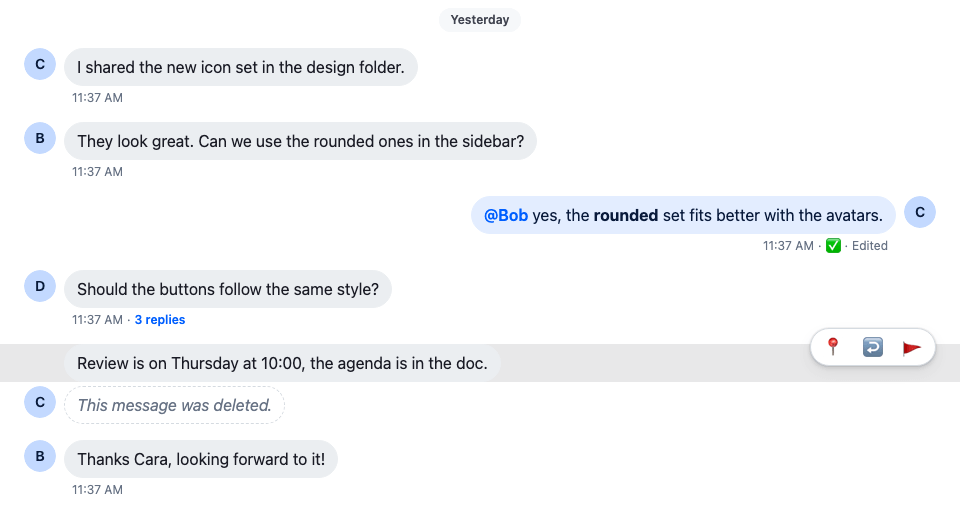
The screenshot at the top of this page shows the result: the action bar over Cara's hovered message, which is pinned, so its first button unpins it, and a 3 replies button under Dan's message.
## How it works
>
> **Info:** **Example**
>
> The user moves the pointer over Cara's pinned message and unpins it:
>
> 1. `:hover` on the message shows the action bar. `useMessagePermissions(message)` says which buttons the user may use, and the message isn't in a thread, so Unpin, Open thread and Flag show. Delete shows only to users who may delete Cara's message.
> 2. The user clicks Unpin, which calls `handlePin`. The message shows as unpinned at once, and goes back if the request fails. The button's label is now Pin.
> 3. Under Dan's message, `message.reply_count` is 3, so the metadata shows a 3 replies button. The user clicks it, and `handleOpenThread` opens the thread in the layout.
>
What each handler does:
- `handlePin` pins the message, or unpins it if it's pinned. The message shows its new state at once, and goes back if the request fails. The [Pin indicator](https://getstream.io/chat/docs/sdk/react/ui-cookbooks/message-list/pin-indicator/) recipe changes how a pinned message looks.
- `handleDelete` deletes the message. The message list shows it as deleted before the server answers.
- `handleOpenThread` opens the message's thread through the layout, so with `ChatView` it opens in the thread slot. Without a layout it does nothing; see [Navigation](https://getstream.io/chat/docs/sdk/react/ui/layout/navigation/).
- `handleFlag` flags the message for moderation.
## Related
- Add reactions to this message UI: [Reactions for a custom message](https://getstream.io/chat/docs/sdk/react/ui-cookbooks/message-actions/reactions/).
- Change the default message's actions instead of building your own: [Custom message actions](https://getstream.io/chat/docs/sdk/react/ui-cookbooks/message-actions/custom-message-actions/).
- What each default action does: [Message actions](https://getstream.io/chat/docs/sdk/react/features/messaging/message-actions/).
- The full actions menu, with the user's capabilities applied: [Actions](https://getstream.io/chat/docs/sdk/react/ui/components/actions/#message-actions).
- The message UI this recipe extends: [Custom message](https://getstream.io/chat/docs/sdk/react/ui-cookbooks/message-list/custom-message/).
- The handlers and the message they act on: [MessageContext](https://getstream.io/chat/docs/sdk/react/component-reference/message/messagecontext/).
- Where `handleOpenThread` opens the thread: [Navigation](https://getstream.io/chat/docs/sdk/react/ui/layout/navigation/).
---
For the most recent version of this documentation, visit [https://getstream.io/chat/docs/sdk/react/ui-cookbooks/message-actions/action-bar/](https://getstream.io/chat/docs/sdk/react/ui-cookbooks/message-actions/action-bar/).