


Pinned and archived channels
A user who belongs to many channels keeps a few close at hand and puts finished ones away. This recipe splits the channel list into sections, each with its own channel paginator.
What you'll build
- Pinned, Channels and Archived sections in one list
- Channels that move section when pinned or archived
- A collapsible Archived section, loaded when opened
- A Load more button for each section
Preview
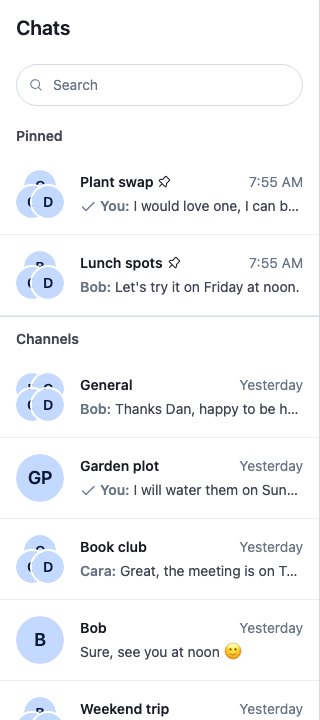
Approach: Compose and Change behaviour in the state layer. Choosing where to start explains the approaches.
Starts from: the base app. The page shows only what the recipe adds.
The sections share one scroll: the user scrolls the whole column, not each section. Each section loads its first page, and then more only when the user asks: a "Load more" button at the end of the section loads its next page. Scrolling loads nothing, so scrolling never pushes a section further down the column.
Best practices
- Give each section its own
ChannelPaginator, filtered onpinnedandarchived. The server applies the filters to every page, and the client applies the same filters when a channel changes, so a pinned or archived channel moves to its section without a reload. - Register the paginators on
client.channelManagerwithChannelManager.setPaginators(), beside the ones already there, and on unmount remove only your own. Only a registered paginator follows events. - Keep each channel in one section. A pinned channel matches the Channels paginator too, so set an ownership rule with
ChannelManager.setOwnershipResolver(), or the channel shows twice. Pass a function that decides only among the section paginators, so every other registered paginator keeps the channels it matches. - Use one sectioned list per client.
client.channelManagerholds a single ownership rule, so a second copy of the sections would replace the first one's rule. - Register the paginators above the part that hides them during a search, so a search doesn't throw away what they loaded.
- Give the column one scroll container, and load each section's next page on a click, with a button at the section's end. A section that loaded on scroll would grow under the user and push every section below it further away.
- Load the Archived section only when it opens. A closed archive sends no query, but its paginator follows events, so it can hold a channel before its first page loads.
- Ask for only the messages the rows need. A row previews the latest message, so a short
message_limitkeeps each page light; the open channel loads its own messages. - Name each section by its title, and give each section's rows a listbox named by the same title, so a screen reader announces "Pinned" or "Channels" rather than a generic list. Put only the rows in the listbox and the load-more button after it: a listbox may hold only options.
- Show a failed query in its section, with a way to ask again. Otherwise Channels and an open Archived keep showing their loading indicator, and Pinned, hidden while it has no channels, gives no sign of the failure.
Create the section paginators
useChannelSections() creates three paginators from one table and registers them on client.channelManager, after any paginators already there, in the order the sections show:
- Pinned matches
{ archived: false, pinned: true }, sorted bypinned_at, the most recently pinned channel first, 10 channels a page. - Channels matches
{ archived: false }, sorted bylast_message_at, 10 channels a page. - Archived matches
{ archived: true }, sorted bylast_message_at. Its page size is 5, so the open archive stays short until the user asks for more.
filters scope all three to the user's channels, for example { members: { $in: [userId] }, type: "messaging" }. A pinned channel matches both Pinned and Channels. The table's order is also the ownership rule: a channel that matches several sections belongs to the first, so a pinned channel stays in Pinned only, for events and for the pages each paginator loads. Archived matches no channel the other two match, so its place in the table changes no ownership. The rule ranks only the sections. Of the paginators a channel matches, it drops the sections after the first and keeps every paginator that isn't a section, so another paginator registered on client.channelManager keeps its channels.
The page size goes to the ChannelPaginator constructor as paginatorOptions.pageSize: it is the size of the first page and of each page a click on "Load more" adds. Each paginator also passes requestOptions: { message_limit: 5, presence: true, state: true }, the options every page query sends:
presenceandstate, as the base app's paginator sends them, keep members' online status current.message_limitis the number of messages each channel comes with. The default is 25, but a row shows only the latest message, so 5 is enough. It isn't 1, because the preview skips some messages, such as system messages, and would show nothing if the only message loaded were one of them. Opening a channel loads its own page of messages.
The paginators' ids are sections-pinned, sections-inbox and sections-archived: fixed ids, which firstSectionOwns uses to tell the sections from other paginators. On unmount the hook removes only its own paginators. ChannelManager.setOwnershipResolver() sets one rule for the whole manager, and the manager doesn't expose the previous one, so the hook replaces it while mounted and resets it to the default on unmount. That is why the recipe supports one sectioned list per client; an app with ownership rules of its own merges them into one rule.
import { useEffect, useState } from "react";
import { ChannelPaginator } from "stream-chat";
import type {
  ChannelFilters,
  PaginatorOwnershipResolver,
  SortParamRequest,
} from "stream-chat";
import { useChatContext } from "stream-chat-react";

type SectionKey = "archived" | "inbox" | "pinned";

export type ChannelSections = Record<SectionKey, ChannelPaginator>;

// The most recently pinned channel first.
const byPinnedAt: SortParamRequest[] = [{ direction: -1, field: "pinned_at" }];
// The channel with the latest message first.
const byLastMessage: SortParamRequest[] = [
  { direction: -1, field: "last_message_at" },
];

// The sections in the order they show. A channel that matches several shows only in the first of
// them: a pinned channel matches the inbox too, and shows under Pinned. `pageSize` is the number of
// channels one query asks for, the first page and each click on a section's load-more button:
// pinned channels and the inbox 10 at a time, the archive, opened less often, 5.
const sectionDefinitions: {
  extraFilters: ChannelFilters;
  key: SectionKey;
  pageSize: number;
  sort: SortParamRequest[];
}[] = [
  {
    extraFilters: { archived: false, pinned: true },
    key: "pinned",
    pageSize: 10,
    sort: byPinnedAt,
  },
  {
    extraFilters: { archived: false },
    key: "inbox",
    pageSize: 10,
    sort: byLastMessage,
  },
  {
    extraFilters: { archived: true },
    key: "archived",
    pageSize: 5,
    sort: byLastMessage,
  },
];

// Presence keeps members' online status current. A row previews only the latest message, so each
// channel comes with its newest 5 messages instead of the default 25: a few rather than one, since
// the preview skips some messages, such as system messages. Opening a channel loads its own page.
const requestOptions = { message_limit: 5, presence: true, state: true };

// Fixed ids, which `firstSectionOwns` uses to tell the sections from other paginators. The manager
// holds one ownership rule, so there is one set of sections.
const sectionId = (key: SectionKey) => `sections-${key}`;
const sectionIds = sectionDefinitions.map(({ key }) => sectionId(key));
const isSection = (id: string) => sectionIds.includes(id);

// Of the sections a channel matches, only the first owns it. Paginators that aren't sections keep
// every channel they match.
const firstSectionOwns: PaginatorOwnershipResolver = ({
  matchingPaginators,
}) => {
  const owner = sectionIds.find((id) =>
    matchingPaginators.some((p) => p.id === id),
  );
  return matchingPaginators
    .filter(({ id }) => !isSection(id) || id === owner)
    .map(({ id }) => id);
};

/**
 * Creates the three paginators of a sectioned channel list and registers them on
 * `client.channelManager`, beside any paginators already there: the user's pinned channels, the
 * rest of their channels, and their archive. It also sets the manager's ownership rule: a channel
 * that matches several sections shows only in the first, and every other paginator keeps its
 * matches. The manager holds a single rule, so use one sectioned list per client. On unmount the
 * hook removes its paginators and resets the rule to the default. `filters` scope all three to the
 * user's channels; pass a stable object. Returns `undefined` until they are registered.
 */
export const useChannelSections = (filters: ChannelFilters) => {
  const { client } = useChatContext();
  const [sections, setSections] = useState<ChannelSections>();

  useEffect(() => {
    const entries = sectionDefinitions.map(
      ({ extraFilters, key, pageSize, sort }) =>
        [
          key,
          new ChannelPaginator({
            client,
            filters: { ...filters, ...extraFilters },
            id: sectionId(key),
            paginatorOptions: { pageSize },
            requestOptions,
            sort,
          }),
        ] as const,
    );
    const paginators = entries.map(([, paginator]) => paginator);

    const { channelManager } = client;
    channelManager.setPaginators([...channelManager.paginators, ...paginators]);
    channelManager.setOwnershipResolver(firstSectionOwns);
    setSections(Object.fromEntries(entries) as ChannelSections);

    return () => {
      channelManager.setPaginators(
        channelManager.paginators.filter(
          (paginator) => !paginators.includes(paginator),
        ),
      );
      // The manager doesn't expose the rule it had before, so the default takes its place.
      channelManager.setOwnershipResolver();
      setSections(undefined);
    };
  }, [client, filters]);

  return sections;
};pinned, archived and pinned_at belong to the user's membership of the channel, channel.state.membership: another member's pins and archive don't change the user's lists. Channel list paginators explains registering, ownership and the filters the client matches.
Render the sections
ChannelNavigation renders one ChannelList for each registered paginator, one under the other, with no title. For titled sections in one scroll, SectionedChannelNavigation takes its place. It renders the same header, search bar and notifications, and between them one scroll container holding the three sections. It is meant to sit inside ChatView, which gives it the theme scope; it leaves out what ChannelNavigation adds outside one, the theme scope of its own and the Windows flag-emoji class.
The sections don't use ChannelList. A ChannelList always renders its own scroll container and loads its next page when that container scrolls to its end, so three of them would give the column three scroll areas. Instead each section renders its rows from ChannelPaginator.state with the SDK's ChannelListItem, and the SDK's LoadMoreButton at its end:
import type {
  MouseEvent,
  PropsWithChildren,
  ReactNode,
  RefObject,
} from "react";
import { useEffect, useId, useMemo, useRef, useState } from "react";
import type {
  ChannelFilters,
  ChannelPaginator,
  ChannelPaginatorState,
  SearchControllerState,
} from "stream-chat";
import {
  Button,
  ChannelListContextProvider,
  ChannelListItem,
  ChannelListHeader as DefaultChannelListHeader,
  NotificationList as DefaultNotificationList,
  Search as DefaultSearch,
  LoadingChannels,
  LoadingIndicator,
  LoadMoreButton,
  useChannelListKeyboardNavigation,
  useChatContext,
  useComponentContext,
  useComponentContextIcons,
  useStateStore,
} from "stream-chat-react";
import type { ChannelSections } from "./useChannelSections";
import { useChannelSections } from "./useChannelSections";
import "./SectionedChannelNavigation.css";

const searchSelector = ({ isActive }: SearchControllerState) => ({ isActive });
const sectionSelector = ({
  hasMoreTail,
  isLoading,
  items,
  lastQueryError,
}: ChannelPaginatorState) => ({
  hasMoreTail,
  isLoading,
  items,
  lastQueryError,
});

type SectionState = ReturnType<typeof sectionSelector>;

/**
 * Has no page loaded yet: the paginator holds no items, or holds only channels events put there
 * before it ever queried.
 */
const needsFirstPage = (paginator: ChannelPaginator) =>
  paginator.items === undefined || !paginator.isInitialized;

/** Found no channels and has no further page to load. */
const isEmpty = ({ hasMoreTail, items }: SectionState) =>
  items?.length === 0 && !hasMoreTail;

/** The last query failed, and the section has no channels to show. */
const failedWithoutChannels = ({ items, lastQueryError }: SectionState) =>
  !!lastQueryError && !items?.length;

/** Reports each failed query as an error notification, as `ChannelList` does. */
const useQueryErrorNotification = (lastQueryError: Error | undefined) => {
  const { client } = useChatContext();

  useEffect(() => {
    if (!lastQueryError) return;
    client.notifications.addError({
      message: lastQueryError.message,
      origin: {
        context: { reason: "channel query error" },
        emitter: "SectionedChannelNavigation",
      },
    });
  }, [client, lastQueryError]);
};

/**
 * Returns the paginator's state, reports its failed queries, and loads the first page while
 * `enabled` and the paginator has none: on mount, after a reset, or while it holds only event
 * items. Every later page waits for the user's click. A first page that failed waits for the
 * user's "Try again" too, or, in Archived, for the user to open the section again.
 */
const useSectionState = (paginator: ChannelPaginator, enabled = true) => {
  const state = useStateStore(paginator.state, sectionSelector);
  useQueryErrorNotification(state.lastQueryError);

  useEffect(() => {
    if (enabled && needsFirstPage(paginator)) void paginator.toTail();
  }, [enabled, paginator, state.items]);

  return state;
};

/** Nothing has focus: the page body holds it, as after the focused button turned disabled. */
const hasLostFocus = () =>
  document.activeElement === null || document.activeElement === document.body;

/**
 * Returns the load-more click handler, which loads the paginator's next page. The button is
 * disabled while the page loads, which takes focus off it. The keyboard hook then moves focus to
 * the first row the page adds; when it adds none, this puts focus back on the button, or on the
 * last row once the button is gone. One of them is always there: with neither, the section shows
 * its empty state instead of the rows.
 */
const useRestoreFocusAfterPage = (
  navigationRef: RefObject<HTMLElement | null>,
  paginator: ChannelPaginator,
  isLoading: boolean,
) => {
  const pageRequestedRef = useRef(false);

  useEffect(() => {
    if (isLoading || !pageRequestedRef.current) return;
    pageRequestedRef.current = false;
    if (!hasLostFocus()) return;
    const focusTargets = navigationRef.current?.querySelectorAll<HTMLElement>(
      '[role="option"], .cookbook-channel-section__more button',
    );
    focusTargets?.[focusTargets.length - 1]?.focus();
  }, [isLoading, navigationRef]);

  const onLoadMore = () => {
    // The checks `toTail()` makes before it queries: only a query that starts ends in a focus move.
    if (paginator.isLoading || !paginator.hasMoreTail) return;
    pageRequestedRef.current = true;
    void paginator.toTail();
  };

  return onLoadMore;
};

/** The SDK's "Load more" button, shown only while the paginator has another page. */
const SectionLoadMore = ({
  onClick,
  state,
}: {
  onClick: () => void;
  state: SectionState;
}) =>
  state.hasMoreTail ? (
    <div className="cookbook-channel-section__more">
      <LoadMoreButton isLoading={state.isLoading} onClick={onClick} />
    </div>
  ) : null;

/**
 * Says the section's channels didn't load, with a button that queries the first page again. The
 * button goes away once the query starts, so it first moves focus to the section's title.
 */
const SectionLoadError = ({ paginator }: { paginator: ChannelPaginator }) => {
  const retry = (event: MouseEvent<HTMLButtonElement>) => {
    event.currentTarget.closest("section")?.querySelector("h2")?.focus();
    void paginator.toTail();
  };

  return (
    <div className="cookbook-channel-section__error">
      <p className="cookbook-channel-section__error-text">
        Couldn’t load channels
      </p>
      <Button
        appearance="outline"
        onClick={retry}
        size="sm"
        variant="secondary"
      >
        Try again
      </Button>
    </div>
  );
};

/**
 * A section's channels as a listbox named by the section title, holding only the SDK's rows, and
 * the section's load-more button after it. The keyboard hook sits on the wrapper around both and
 * finds the rows and the button inside it: the arrow keys reach the button, and a click moves focus
 * to the first row it loads.
 */
const ChannelRows = ({
  paginator,
  state,
  titleId,
}: {
  paginator: ChannelPaginator;
  state: SectionState;
  titleId: string;
}) => {
  const navigationRef = useRef<HTMLDivElement>(null);
  const { onClickCapture, onKeyDown } =
    useChannelListKeyboardNavigation(navigationRef);
  const onLoadMore = useRestoreFocusAfterPage(
    navigationRef,
    paginator,
    state.isLoading,
  );

  return (
    <div
      onClickCapture={onClickCapture}
      onKeyDown={onKeyDown}
      ref={navigationRef}
    >
      <div aria-labelledby={titleId} role="listbox">
        {state.items?.map((channel) => (
          <ChannelListItem channel={channel} key={channel.cid} />
        ))}
      </div>
      <SectionLoadMore onClick={onLoadMore} state={state} />
    </div>
  );
};

/**
 * A section of one paginator, named by its title. Its `ChannelListContext` holds that paginator, as
 * `ChannelNavigation` gives each of its lists one: the rows' action notifications use it to show in
 * the channel-list panel.
 */
const Section = ({
  children,
  paginator,
  title,
  titleId,
}: PropsWithChildren<{
  paginator: ChannelPaginator;
  title: ReactNode;
  titleId: string;
}>) => {
  const value = useMemo(() => ({ paginator }), [paginator]);

  return (
    <ChannelListContextProvider value={value}>
      <section aria-labelledby={titleId} className="cookbook-channel-section">
        <h2
          className="cookbook-channel-section__title"
          id={titleId}
          tabIndex={-1}
        >
          {title}
        </h2>
        {children}
      </section>
    </ChannelListContextProvider>
  );
};

/** The user's pinned channels. Shows nothing while it loads or has none, unless a query failed. */
const PinnedSection = ({ paginator }: { paginator: ChannelPaginator }) => {
  const titleId = useId();
  const state = useSectionState(paginator);
  const failed = failedWithoutChannels(state);
  if (!failed && !state.items?.length) return null;

  return (
    <Section paginator={paginator} title="Pinned" titleId={titleId}>
      {failed ? (
        <SectionLoadError paginator={paginator} />
      ) : (
        <ChannelRows paginator={paginator} state={state} titleId={titleId} />
      )}
    </Section>
  );
};

/** The rest of the user's channels. */
const InboxSection = ({ paginator }: { paginator: ChannelPaginator }) => {
  const titleId = useId();
  const state = useSectionState(paginator);

  return (
    <Section paginator={paginator} title="Channels" titleId={titleId}>
      {failedWithoutChannels(state) ? (
        <SectionLoadError paginator={paginator} />
      ) : needsFirstPage(paginator) ? (
        <LoadingChannels />
      ) : isEmpty(state) ? (
        <p className="cookbook-channel-section__empty">No channels</p>
      ) : (
        <ChannelRows paginator={paginator} state={state} titleId={titleId} />
      )}
    </Section>
  );
};

/**
 * The archive, collapsed until the user opens it. Opening it loads the first page, also when an
 * event already put a channel in the paginator.
 */
const ArchivedSection = ({ paginator }: { paginator: ChannelPaginator }) => {
  const { IconArchive, IconChevronDown } = useComponentContextIcons();
  const [open, setOpen] = useState(false);
  const titleId = useId();
  const bodyId = useId();
  const state = useSectionState(paginator, open);

  const toggle = (
    <button
      aria-controls={bodyId}
      aria-expanded={open}
      className="cookbook-channel-section__toggle"
      onClick={() => setOpen(!open)}
      type="button"
    >
      <IconArchive />
      Archived
      <IconChevronDown className="cookbook-channel-section__chevron" />
    </button>
  );

  return (
    <Section paginator={paginator} title={toggle} titleId={titleId}>
      <div id={bodyId}>
        {open &&
          (failedWithoutChannels(state) ? (
            <SectionLoadError paginator={paginator} />
          ) : needsFirstPage(paginator) ? (
            <LoadingIndicator />
          ) : isEmpty(state) ? (
            <p className="cookbook-channel-section__empty">
              No archived channels
            </p>
          ) : (
            <ChannelRows
              paginator={paginator}
              state={state}
              titleId={titleId}
            />
          ))}
      </div>
    </Section>
  );
};

// One scroll container for every section, in the order of `useChannelSections()`. The archive,
// used least and opened by the user, comes last: opening it or loading more of it pushes none of
// the channels the user works in out of view. The cost is that it sits after every loaded channel.
const Sections = ({ sections }: { sections: ChannelSections }) => (
  <div className="cookbook-channel-sections">
    <PinnedSection paginator={sections.pinned} />
    <InboxSection paginator={sections.inbox} />
    <ArchivedSection paginator={sections.archived} />
  </div>
);

/**
 * `ChannelNavigation` with the channel list split into Pinned, Channels and a collapsible Archived
 * section that share one scroll, meant to sit inside `ChatView`, which gives it the theme scope.
 * Each section loads its next page only when the user clicks its button. `filters` scope every
 * section to the user's channels; pass a stable object.
 */
export const SectionedChannelNavigation = ({
  filters,
}: {
  filters: ChannelFilters;
}) => {
  const {
    ChannelListHeader = DefaultChannelListHeader,
    NotificationList = DefaultNotificationList,
    Search = DefaultSearch,
  } = useComponentContext();
  const { searchController } = useChatContext();
  const { isActive } = useStateStore(searchController.state, searchSelector);
  // Registered here rather than in the sections, so a search keeps what they loaded.
  const sections = useChannelSections(filters);

  return (
    <div className="str-chat__channel-list">
      <ChannelListHeader />
      <Search />
      {!isActive && sections && <Sections sections={sections} />}
      <NotificationList panel="channel-list" />
    </div>
  );
};@layer stream-overrides {
/* The one scroll of the column: every section sits in it, one after another, and takes the
height its rows need. */
.cookbook-channel-sections {
flex: 1;
min-height: 0;
overflow-y: auto;
}
.cookbook-channel-section + .cookbook-channel-section {
border-top: 1px solid var(--str-chat__border-core-default);
}
.cookbook-channel-section__title {
margin: 0;
padding: var(--str-chat__spacing-sm) var(--str-chat__spacing-md)
var(--str-chat__spacing-xs);
color: var(--str-chat__text-secondary);
font: var(--str-chat__font-caption-emphasis);
}
.cookbook-channel-section__toggle {
display: flex;
align-items: center;
gap: var(--str-chat__spacing-xs);
width: 100%;
padding: 0;
border: 0;
background: none;
color: inherit;
font: inherit;
cursor: pointer;
}
.cookbook-channel-section__toggle:hover {
color: var(--str-chat__text-primary);
}
.cookbook-channel-section__chevron {
margin-inline-start: auto;
transition: transform 150ms ease;
}
.cookbook-channel-section__toggle[aria-expanded="false"]
.cookbook-channel-section__chevron {
transform: rotate(-90deg);
}
/* The load-more button, at the start of the row. The SDK centres the button inside its own
wrapper; this row's display: flex shrinks that wrapper to the button, which puts it at the
start. The row's start padding and the button's own padding add up to the title's padding, so
the label lines up with the section title, and the focus ring stays inside the column. */
.cookbook-channel-section__more {
display: flex;
padding-inline: var(--str-chat__spacing-xs) var(--str-chat__spacing-md);
}
.cookbook-channel-section__more .str-chat__button {
padding-inline: var(--str-chat__spacing-xs);
color: var(--str-chat__text-secondary);
font: var(--str-chat__font-caption-emphasis);
text-transform: none;
}
.cookbook-channel-section__more .str-chat__button:hover {
color: var(--str-chat__text-primary);
}
.cookbook-channel-section__empty {
margin: 0;
padding: var(--str-chat__spacing-xs) var(--str-chat__spacing-md)
var(--str-chat__spacing-md);
color: var(--str-chat__text-tertiary);
font: var(--str-chat__font-caption-default);
}
/* A failed query: the message, and the button that asks again, under the section title. */
.cookbook-channel-section__error {
display: flex;
align-items: center;
justify-content: space-between;
gap: var(--str-chat__spacing-xs);
padding: var(--str-chat__spacing-xs) var(--str-chat__spacing-md)
var(--str-chat__spacing-md);
}
.cookbook-channel-section__error-text {
margin: 0;
color: var(--str-chat__text-secondary);
font: var(--str-chat__font-caption-default);
}
}- One scroll.
.cookbook-channel-sectionsis the only scroll container in the column. Each section takes the height its rows need, so the user scrolls through Pinned, Channels and Archived in one motion. Scrolling loads nothing. - First pages.
useSectionState()reads a section's paginator state and loads its first page withChannelPaginator.toTail(): Pinned and Channels on mount, Archived when it opens. Pinned shows nothing while it loads or has no channels, title included. While Channels loads its first page, it shows the SDK'sLoadingChannelsplaceholder. A pinned channel shows only in Pinned, so when every channel on the first page of Channels is pinned, Channels shows its title and a lone "Load more" button; the recipe accepts that rather than load the next page on its own. - Failed queries.
useSectionState()selectspaginator.state.lastQueryErrortoo, and reports a failed query withclient.notifications.addError(). A search hides the sections, so when they come back after a search, the notification can show again for the same error, as it does in the SDK'sChannelList. When the query failed and the section has no channels,failedWithoutChannels(), the section shows "Couldn’t load channels" and the SDK'sButtonlabelled "Try again". The button moves focus to the section's title, which hastabIndex={-1}, and callsChannelPaginator.toTail()for the first page again. In Pinned the focus can still be lost, since Pinned hides while it has no channels, including while the retry loads. A failed first page is not retried on its own, except that Archived queries again when the user opens it again. A failed query still marks the paginator initialized, so a channel that an event adds replaces the error, and "Load more" still recovers the rest. A failed next page leaves the rows and the "Load more" button as they were. - Load more.
SectionLoadMorerenders the SDK'sLoadMoreButtonwhilepaginator.state.hasMoreTailis true. Each click callsChannelPaginator.toTail()once, for one page. While that page loads, the button is disabled and shows a spinner in place of its label; once the last page is in, it hides. The button's label and accessible name are both "Load more"..cookbook-channel-section__morekeeps it subtle: the button sits at the start of the row, its label lines up with the section title, its focus ring stays inside the column, and it uses the secondary text colour. - Archived's title is a button with
aria-expanded, andArchivedSectionalone keeps its open state. Opening the section loads the first page, so the archive loads only when the user looks at it, and shows "No archived channels" when there are none. An event can put a channel into the Archived paginator before it ever queried.needsFirstPage()covers that case along with a paginator that holds nothing:paginator.itemsis undefined, orpaginator.isInitializedis false. Then opening loads the first page as well, and the section shows its loading indicator, not the event items, until the first page replaces them. - Where Archived sits. Archived comes last, after Channels. It is the least-used section and grows only when the user opens it or loads more of it, so placing it last means neither pushes a channel the user works in out of view. The cost is that it sits after every channel Channels has loaded: events that add rows to Channels, and each page loaded there, push it further down.
- Rows and keyboard.
ChannelRowsrenders each section's channels in arole="listbox"named by the section title, with the SDK'sChannelListItemas the options, and the load-more button after the listbox, since a listbox may hold only options. Both sit in a wrapperdiv, which gets the handlers ofuseChannelListKeyboardNavigation(), the hookChannelListuses. The hook finds the rows and the button inside the wrapper, so the keys work as inChannelList: Up, Down, Home and End move between the rows and the button, and Left and Right between a row and its action buttons. Each section has a wrapper of its own, so the arrow keys stay inside the section. Tab visits every row in turn, each followed by its action buttons, and leaves the section after the last row or the button. - Focus after Load more.
useChannelListKeyboardNavigation()'sonClickCapturenotes a click on the button, and once the new page renders, it moves focus to the first row the page added. The button is disabled while the page loads, which takes focus off it, souseRestoreFocusAfterPage()puts focus back when the page brings no new row: on the button if it's still there, or on the last row once it's gone. ItsonLoadMorehandler marks a page as requested only whenChannelPaginator.toTail()will query, that is whenpaginator.isLoadingis false andpaginator.hasMoreTailis true. - Notifications.
Sectiongives each section aChannelListContextof its own, with that section's paginator, asChannelNavigationgives its lists one. The row actions use it to show their notifications, such as "Channel pinned", in the channel-list panel.
The open archive
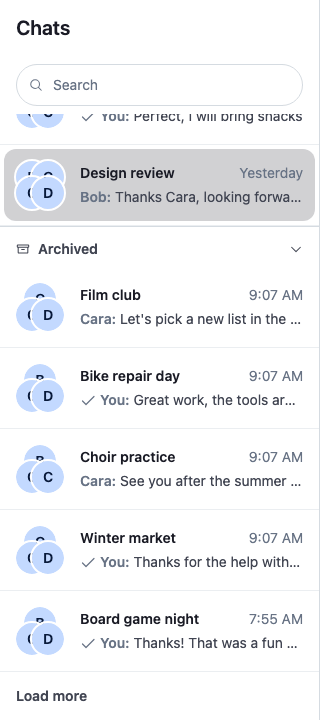
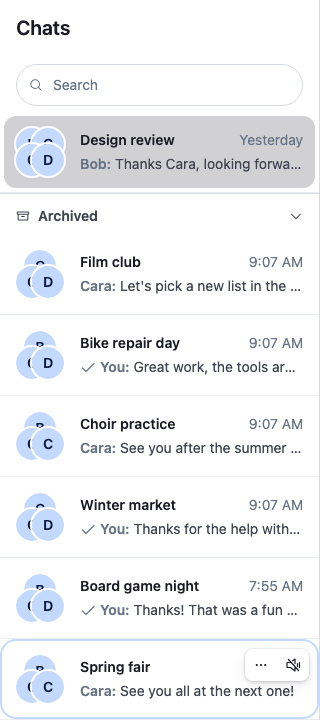
After a click on "Load more", the next page, Spring fair, joins the archive, and focus moves to it. It was the last page, so the button is gone:
After Load more
Use it in place of ChannelNavigation in your channels view. Declare the filters outside the component, so the paginators aren't created again on every render:
const filters: ChannelFilters = {
  members: { $in: [userId] },
  type: "messaging",
};

const channelsView = (
  <>
    <SectionedChannelNavigation filters={filters} />
    <ChannelSlot slot="channel">
      <ChannelHeader />
      <MessageList />
      <MessageComposer />
    </ChannelSlot>
  </>
);
Pin and archive from the row
The rows need no change: every row's menu already has Pin or Unpin, and Archive or Unarchive, for a channel the user is a member of. They call Channel.pin(), Channel.unpin(), Channel.archive() and Channel.unarchive(). A pinned row shows a pin icon beside its title.
The menu on a row
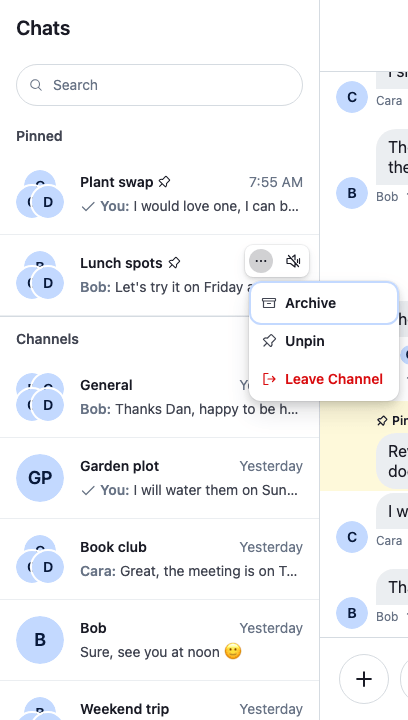
Nothing moves when the user clicks. The channel moves when the server's member.updated event arrives, a moment later. The screenshots on this page come from a read-only demo app: the menu sends no request there, so the channel stays where it is. In your app the request goes out, and the event moves the channel.
To change the row actions, for example to put Pin next to Mute, set your own component on the ChannelListItemActionButtons key; Channel-list row actions shows how.
How it works
Example
The user archives "Lunch spots", which they pinned earlier:
- The user opens the row's menu and picks Archive.
Channel.archive()sends the request. The row stays where it is. - The server sets
archived_aton the user's membership and sendsmember.updated. The client applies it tochannel.state.membership, thenclient.channelManagerroutes it withChannelManager.ingestChannel(). - "Lunch spots" no longer matches Pinned or Channels, which both ask for
archived: false, and it matches Archived. It leaves the Pinned section and joins the Archived paginator, at its place bylast_message_at. - The Pinned section has one channel left, so it stays. Had "Lunch spots" been the only pinned channel, the whole section, title included, would hide.
- The user opens Archived. The Archived paginator already holds "Lunch spots" but has never queried, so the section shows its loading indicator and loads its first page with
ChannelPaginator.toTail(). The first page replaces the channels events put in, so "Lunch spots" shows at its place bylast_message_at, on the first page or a later one, still pinned. The user picks Unarchive, and after the nextmember.updatedit goes back to Pinned.
The Archived paginator is registered while its section is closed, so it follows events before its first page loads. A channel the user archives while the section is closed is already in it when the section opens. The section's own ChannelPaginator.toTail() call then loads the first page, which replaces the channels events put in; the channel shows at its place by last_message_at, on the first page or a later one.
Each section reads the paginator's state with useStateStore() and a selector declared once at module level: paginator.state.items for the rows, paginator.state.hasMoreTail and paginator.state.isLoading for the load-more button and its spinner, and paginator.state.lastQueryError for the error and its notification. An event that moves a channel changes paginator.state.items of both paginators involved, so both sections render again, and nothing else does.
Related
- Channel list paginators: registering paginators, ownership rules, and how events move channels between them.
- Channel lists: the row actions and what changes when each one's event arrives.
- What channels and threads hold: the user's membership, with
pinned_atandarchived_at. - Channel-list row actions: changing the actions on the row.
- Custom channel preview: changing how each row looks.
- Empty and loading states: the states a
ChannelListshows while it loads or has nothing.