


Attachment actions
An attachment can carry actions: buttons the message shows under the attachment, such as a Giphy preview's Send, Shuffle and Cancel. This recipe adds actions of its own to images, as a demo of how far attachments stretch rather than a common use case.
What you'll build
- Love and Loathe buttons under every sent image
- A click that reacts to the message, and another that undoes it
- Pressed buttons for reactions the user has given
Preview
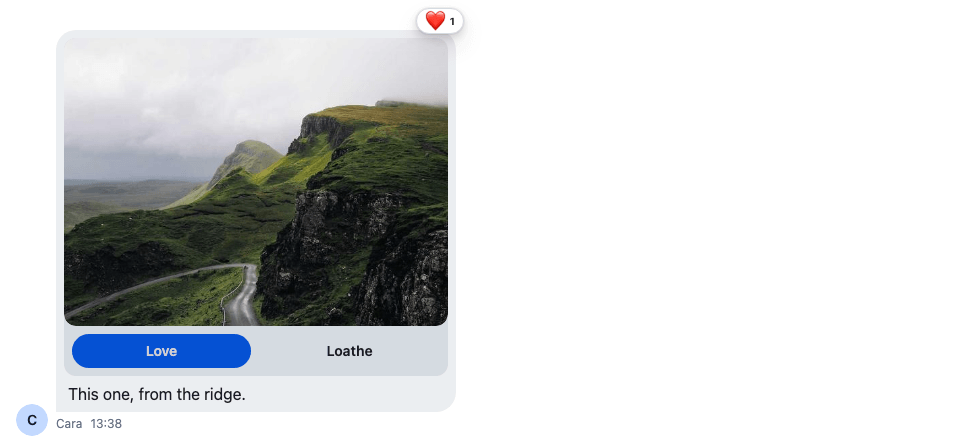
Approach: Replace one part and Change behaviour in the state layer. Choosing where to start explains the approaches.
Starts from: the base app. The page shows only what the recipe adds.
These are actions on attachments in the message list. The menu that adds attachments in the composer is a different thing, the attachment selector's action set, explained in Attachment Selector.
The recipe has two parts:
- The composer adds the actions to each image when the message is sent, with a composition middleware.
- The message list renders them with an
AttachmentActionsof your own. A click reacts to the message, which the server stores like any reaction, instead of sending the action withChannel.sendAction().
Best practices
- Add the actions in a composition middleware, in the composer setup function. Every composer then adds them, in channels and threads alike, and both
messageandlocalMessageget them. - Replace
AttachmentActionsthrough theAttachmentcomponent, and render the default for other attachments, so Giphy previews keep their buttons. - Handle your own actions in your component. The default
AttachmentActionssends a click to the server withChannel.sendAction(), which only handles built-in actions such as Giphy's. - Expect actions on a single image only. A message with several images shows them as a gallery, without actions.
- Pick reaction types the reaction list knows. The message shows only the types in its reaction options:
haha,like,love,sad,wowandfireby default.
Custom actions
An action is an Action from stream-chat: name, text and type, and optionally value and style. Each button's value here is the reaction it posts:
import type { Action } from "stream-chat";

export const voteActions: Action[] = [
  { name: "vote", text: "Love", type: "button", value: "love" },
  { name: "vote", text: "Loathe", type: "button", value: "sad" },
];
Custom AttachmentActions
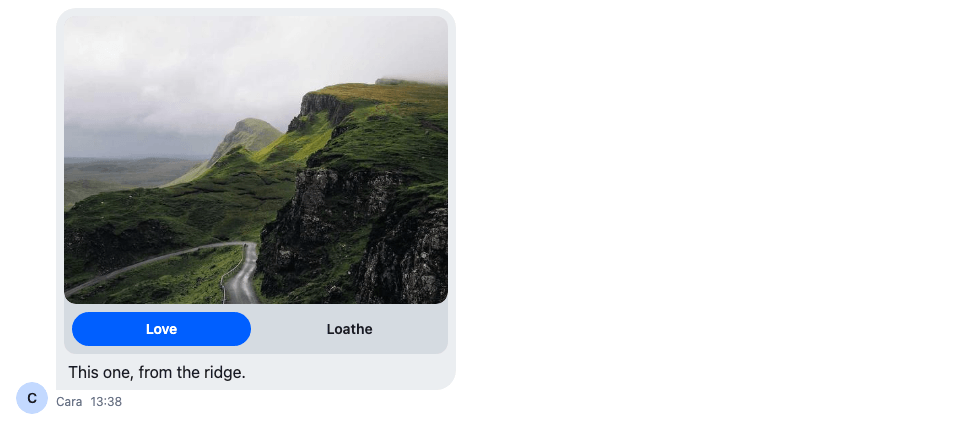
AttachmentActions receives the attachment's fields, including type, and its actions. For images, this one renders an SDK Button per action, a solid one for "Love" and an outlined one for "Loathe", and each click reacts through handleReaction from useMessageContext(). Every other attachment gets the default:
import type { AttachmentActionsProps } from "stream-chat-react";
import {
  AttachmentActions,
  Button,
  useMessageContext,
} from "stream-chat-react";
import "./VoteAttachmentActions.css";

export const VoteAttachmentActions = (props: AttachmentActionsProps) => {
  const { actions, type } = props;
  const { handleReaction, message } = useMessageContext();

  if (type !== "image") return <AttachmentActions {...props} />;

  const ownReactionTypes = new Set(
    message.own_reactions?.map((reaction) => reaction.type),
  );

  return (
    <div className="cookbook-vote-actions">
      {actions.map((action) => (
        <Button
          appearance={action.value === "love" ? "solid" : "outline"}
          aria-pressed={!!action.value && ownReactionTypes.has(action.value)}
          className="cookbook-vote-actions__button"
          key={action.value}
          onClick={(event) => {
            if (action.value) void handleReaction(action.value, event);
          }}
          size="sm"
          variant={action.value === "love" ? "primary" : "secondary"}
        >
          {action.text}
        </Button>
      ))}
    </div>
  );
};@layer stream-overrides {
.cookbook-vote-actions {
display: flex;
gap: var(--str-chat__spacing-xs);
padding: var(--str-chat__spacing-xs);
}
.cookbook-vote-actions__button {
flex: 1;
}
}The rules sit in the stream-overrides layer, so they win over the SDK's own rules once the SDK's stylesheet is in an earlier layer, as Theming → CSS layers sets up. They take their spacing from the SDK's tokens, and the buttons take their colors from the SDK's Button, so both follow your theme.
handleReaction toggles: a second click on "Love" removes the user's love reaction. It updates the message at once and undoes the change if the request fails. aria-pressed tells screen readers which buttons are on: a button is pressed while message.own_reactions, the user's own reactions to the message, holds its reaction type.
The buttons before a click
Custom Attachment
Attachment renders the attachments of a message and takes its parts as props. Pass it the new actions, and register the result as the Attachment override:
import type { PropsWithChildren } from "react";
import type { AttachmentProps } from "stream-chat-react";
import { Attachment, WithComponents } from "stream-chat-react";
import { VoteAttachmentActions } from "./VoteAttachmentActions";

export const VoteAttachment = (props: AttachmentProps) => (
  <Attachment {...props} AttachmentActions={VoteAttachmentActions} />
);

// Declared once, so WithComponents gets the same object on every render.
const overrides = { Attachment: VoteAttachment };

export const WithVoteAttachments = ({ children }: PropsWithChildren) => (
  <WithComponents overrides={overrides}>{children}</WithComponents>
);
Attachments and uploads lists the other parts Attachment takes.
Enrich attachments before message submission
The composition chain builds the message when the user sends it. A middleware inserted after stream-io/message-composer-middleware/attachments, which adds the uploaded files, finds the images there and adds the actions:
import { isImageAttachment } from "stream-chat";
import type {
  Attachment,
  MessageComposerMiddlewareState,
  MessageCompositionMiddleware,
  MiddlewareHandlerParams,
} from "stream-chat";
import { voteActions } from "./voteActions";

const addVoteActions = (attachments: Attachment[] = []) =>
  attachments.map((attachment) =>
    isImageAttachment(attachment)
      ? { ...attachment, actions: voteActions }
      : attachment,
  );

export const voteActionsMiddleware: MessageCompositionMiddleware = {
  id: "my-app/vote-actions",
  handlers: {
    compose: ({
      forward,
      next,
      state,
    }: MiddlewareHandlerParams<MessageComposerMiddlewareState>) => {
      if (!state.message.attachments?.some(isImageAttachment)) return forward();

      return next({
        ...state,
        localMessage: {
          ...state.localMessage,
          attachments: addVoteActions(state.localMessage.attachments),
        },
        message: {
          ...state.message,
          attachments: addVoteActions(state.message.attachments),
        },
      });
    },
  },
};
Install it in the composer setup function, with a teardown that removes it. installVoteActions() returns a function that clears the setup function again:
import type { StreamChat } from "stream-chat";
import { voteActionsMiddleware } from "./voteActionsMiddleware";

/** Adds the vote actions to every composer's images; returns a function that stops it. */
export const installVoteActions = (client: StreamChat) => {
  client.config.setSetupFunction("messageComposer", ({ composer }) => {
    composer.compositionMiddlewareExecutor.insert({
      middleware: [voteActionsMiddleware],
      position: { after: "stream-io/message-composer-middleware/attachments" },
      unique: true,
    });

    return () =>
      composer.compositionMiddlewareExecutor.remove(voteActionsMiddleware.id);
  });

  return () => client.config.setSetupFunction("messageComposer", null);
};
There is one setup function per kind of object, so put all your composer setup in this one function. Composer middleware explains the chain, the ids, and why both copies of the message change.
Implementation
The app below puts the pieces together. It imports installVoteActions and WithVoteAttachments from the files above.
import { useEffect } from "react";
import { ChannelPaginator } from "stream-chat";
import type { ChannelFilters, SortParamRequest } from "stream-chat";
import {
  ChannelHeader,
  ChannelNavigation,
  Chat,
  MessageComposer,
  MessageList,
  useCreateChatClient,
} from "stream-chat-react";
import { ChannelSlot, ChatView } from "stream-chat-react/slot-layout";
import type { LayoutDescriptor } from "stream-chat-react/slot-layout";
import { installVoteActions } from "./installVoteActions";
import { WithVoteAttachments } from "./VoteAttachment";
import "stream-chat-react/dist/css/index.css";
import "./App.css";

const apiKey = "YOUR_API_KEY";
const userId = "YOUR_USER_ID";
const userToken = "YOUR_USER_TOKEN";

const filters: ChannelFilters = {
  members: { $in: [userId] },
  type: "messaging",
};
const sort: SortParamRequest[] = [{ direction: -1, field: "last_message_at" }];
const layouts: LayoutDescriptor[] = [
  { id: "channels", slots: ["channel", "thread"] },
];

const ChannelsView = () => (
  <>
    <ChannelNavigation />
    <ChannelSlot slot="channel">
      <ChannelHeader />
      <MessageList />
      <MessageComposer />
    </ChannelSlot>
  </>
);

const App = () => {
  const client = useCreateChatClient({
    apiKey,
    tokenOrProvider: userToken,
    userData: { id: userId },
  });

  useEffect(() => {
    if (!client) return;

    const paginator = new ChannelPaginator({
      client,
      filters,
      id: "my-channels",
      sort,
    });
    client.channelManager.insertPaginator({ paginator });
    const uninstallVoteActions = installVoteActions(client);

    return () => {
      client.channelManager.removePaginator(paginator);
      uninstallVoteActions();
    };
  }, [client]);

  if (!client) return <div>Connecting...</div>;

  return (
    <Chat client={client}>
      <WithVoteAttachments>
        <ChatView layouts={layouts} views={{ channels: <ChannelsView /> }} />
      </WithVoteAttachments>
    </Chat>
  );
};

export default App;html,
body,
#root {
height: 100%;
}
body {
margin: 0;
}How it works
Example
Cara sends a photo, and the user clicks Love under it:
- Cara's composer builds the message.
voteActionsMiddlewareruns after the SDK's attachments middleware, finds the image, and addsvoteActionsto it, in bothmessageandlocalMessage. - The message reaches the user's message list with the actions on its image.
Attachmentrenders the image withVoteAttachmentActions, which shows a Love and a Loathe button. - The user clicks Love.
handleReaction("love", event)adds the user'slovereaction, and the message shows it at once.message.own_reactionsnow holdslove, so the Love button'saria-pressedistrue. - The user clicks Love again, and
handleReactionremoves the reaction.
Clicking Loathe does the same with the sad reaction. A Giphy preview's actions still render with the default AttachmentActions, which sends them with Channel.sendAction().
Related
- Composer middleware: the composition chain, its ids, and why both copies of the message change.
- Attachments and uploads: the parts
Attachmenttakes. - Reactions: how reactions work, and the reactions on offer.
- Attachment Selector: the attachment selector's action set in the composer, a different thing.
- Reactions for a custom message: reaction buttons on a custom message UI.