


Search dialog
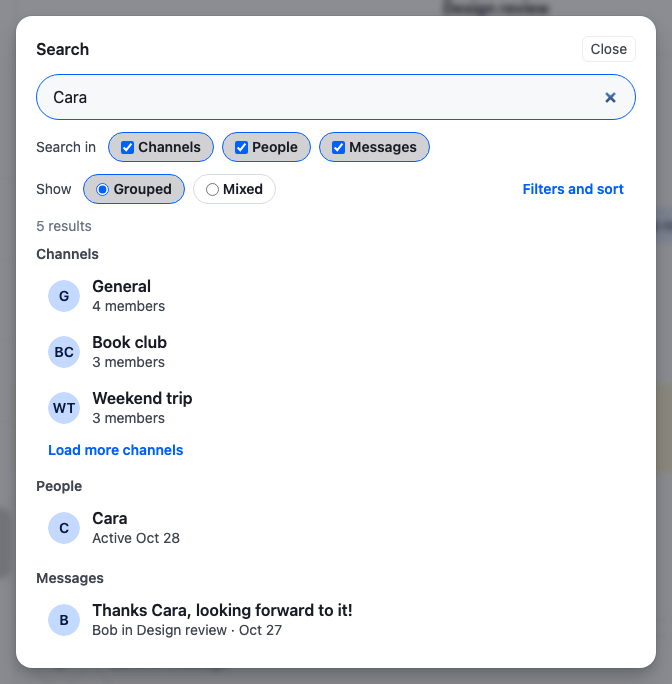
This recipe replaces the search bar above the channel list with a search dialog that opens over the app.
What you'll build
- A search button that opens the dialog, also on ⌘K
- One search across channels, people and messages
- Filters and sorts for each kind of result
- Results grouped by kind or mixed in one list
- Opening the picked channel, message or person
Preview
Approach: Replace one part and Change behaviour in the state layer. Choosing where to start explains the approaches.
Starts from: the base app. The page shows only what the recipe adds.
Best practices
- Give the dialog its filters and sorts when you create the sources, as filter generators that are on or off. Switching one at runtime is then a call on the source's filter builder.
- After changing a source's filters or sort, search again. A source applies the change from its next query, and doesn't query on its own.
- Empty the sources when the dialog closes with
SearchController.exit(), so a closed dialog holds no results. The sources the user turned on stay on for the next time it opens. - Label the dialog with its heading, give every control a label, and render the results as lists of buttons, so a screen reader announces each result by its text.
Create the search controller
The controller holds three sources. Each one starts with the filter generators and sort the dialog offers, and searches at most three results per page:
import {
  ChannelSearchSource,
  MessageSearchSource,
  SearchController,
  UserSearchSource,
} from "stream-chat";
import type { SearchSource, SortParamRequest, StreamChat } from "stream-chat";

/**
 * The values the message filters read: the author's id, and the first and last day, `YYYY-MM-DD`, as
 * days in the user's time zone.
 */
export type MessageFilterContext = {
  authorId?: string;
  sentFrom?: string;
  sentTo?: string;
};

export type DialogMessageSearchSource = MessageSearchSource<{
  messageSearchContext: MessageFilterContext;
}>;

export const channelSorts = {
  activity: [{ direction: -1, field: "last_message_at" }],
  members: [{ direction: -1, field: "member_count" }],
  newest: [{ direction: -1, field: "created_at" }],
} satisfies Record<string, SortParamRequest[]>;

export const userSorts = {
  active: [{ direction: -1, field: "last_active" }],
  name: [{ direction: 1, field: "name" }],
} satisfies Record<string, SortParamRequest[]>;

export const messageSorts = {
  newest: [{ direction: -1, field: "created_at" }],
  oldest: [{ direction: 1, field: "created_at" }],
} satisfies Record<string, SortParamRequest[]>;

/** The first moment of a day in the user's time zone, `YYYY-MM-DD`, as an ISO date. */
const startOfLocalDay = (day: string) => new Date(`${day}T00:00`).toISOString();

/** The last moment of a day in the user's time zone, `YYYY-MM-DD`, as an ISO date. */
const endOfLocalDay = (day: string) => {
  const nextDay = new Date(`${day}T00:00`);
  nextDay.setDate(nextDay.getDate() + 1);
  return new Date(nextDay.getTime() - 1).toISOString();
};

// A few results per source; Load more fetches the next few.
const pageSize = 3;

export const createSearchController = (client: StreamChat) =>
  new SearchController({
    client,
    // Every source the user turns on searches at once.
    config: { keepSingleActiveSource: false },
    sources: [
      new ChannelSearchSource(
        client,
        { pageSize, sort: channelSorts.activity },
        {
          initialFilterConfig: {
            // Replaces the built-in `name` generator: a channel matches by its name or a member's.
            name: {
              enabled: true,
              generate: ({ searchQuery }) =>
                searchQuery
                  ? {
                      $or: [
                        { name: { $autocomplete: searchQuery } },
                        { "member.user.name": { $autocomplete: searchQuery } },
                      ],
                    }
                  : null,
            },
            hideArchived: {
              enabled: true,
              generate: () => ({ archived: false }),
            },
            groupsOnly: {
              enabled: false,
              generate: () => ({ member_count: { $gt: 2 } }),
            },
          },
        },
      ),
      new UserSearchSource(client, { pageSize, sort: userSorts.name }),
      new MessageSearchSource<{ messageSearchContext: MessageFilterContext }>(
        client,
        { messageSearchSort: messageSorts.newest, pageSize },
        {
          messageSearch: {
            initialFilterConfig: {
              // Replaces the built-in `text` generator: a message matches when a word in it starts
              // with the search text.
              text: {
                enabled: true,
                generate: ({ searchQuery }) =>
                  searchQuery ? { text: { $autocomplete: searchQuery } } : null,
              },
              author: {
                enabled: true,
                generate: ({ authorId }) =>
                  authorId ? { "user.id": authorId } : null,
              },
              withAttachments: {
                enabled: false,
                generate: () => ({ attachments: { $exists: true } }),
              },
              // A field takes one operator per condition, so the two ends of the range are two
              // conditions under `$and`.
              sentBetween: {
                enabled: true,
                generate: ({ sentFrom, sentTo }) => {
                  const range = [
                    ...(sentFrom
                      ? [{ created_at: { $gte: startOfLocalDay(sentFrom) } }]
                      : []),
                    ...(sentTo
                      ? [{ created_at: { $lte: endOfLocalDay(sentTo) } }]
                      : []),
                  ];
                  return range.length ? { $and: range } : null;
                },
              },
            },
          },
        },
      ),
    ],
  });

/** The dialog's three sources, typed, from the controller `Chat` holds. */
export const getDialogSources = (searchController: SearchController) => {
  const find = <T extends SearchSource>(
    type: string,
    isType: (source: SearchSource) => source is T,
  ) => {
    const source = searchController.getSource(type);
    return source && isType(source) ? source : undefined;
  };
  return {
    channels: find(
      "channels",
      (source): source is ChannelSearchSource =>
        source instanceof ChannelSearchSource,
    ),
    messages: find(
      "messages",
      (source): source is DialogMessageSearchSource =>
        source instanceof MessageSearchSource,
    ),
    users: find(
      "users",
      (source): source is UserSearchSource =>
        source instanceof UserSearchSource,
    ),
  };
};

/**
 * Runs the current search text again in one source, from the first page. A new `sort` or filter
 * applies from the next query, and the source doesn't query on its own when they change.
 */
export const searchAgain = (
  searchController: SearchController,
  source: SearchSource,
) => {
  if (searchController.searchQuery)
    void source.search(searchController.searchQuery);
};
Pass it to Chat as searchController, once per client. Chat registers and disposes only a controller it creates itself, so the app releases its own with SearchController.dispose() on unmount, and takes its subscriptions again with SearchController.registerSubscriptions() on mount:
import { useEffect, useMemo } from "react";
import { Chat } from "stream-chat-react";
import { createSearchController } from "./searchController";

export const App = () => {
  const searchController = useMemo(
    () => createSearchController(client),
    [client],
  );

  // A controller passed to `Chat` belongs to the app, so the app releases it. Registering again on
  // mount takes back what an earlier dispose() released, as after StrictMode's remount.
  useEffect(() => {
    searchController.registerSubscriptions();
    return () => searchController.dispose();
  }, [searchController]);

  return (
    <Chat client={client} searchController={searchController}>
      {/* ChatView, as below */}
    </Chat>
  );
};
config: { keepSingleActiveSource: false }lets several sources be active at once. By default,SearchController.activateSource()turns the other sources off.- Each entry of
initialFilterConfigis a filter generator.enabledsets whether its part of the filter is sent, andgeneratereturns that part from the search text and the filter builder's context. A generator named like a built-in one replaces it, so the channel source'snamegenerator also finds channels by a member's name. - The message source's
textgenerator matches words that start with the search text, with$autocomplete, as the channel and user sources do. sentBetweenreadssentFromandsentTofrom the context. They're days in the user's time zone, so the range runs from the start of the first local day to the end of the last one, converted to UTC for the query. A field takes one operator per condition, so the two ends of the range are two conditions under$and.- The sort maps hold the orders the dialog offers. The filters panel sets one of them as the source's
sort, or asmessageSearchSorton the message source. Messages always sort bycreated_atfirst, so for messages only its direction changes. getDialogSources()finds the three sources on the controllerChatholds, typed, so the dialog can reach their filter builders.
Example
The user types "Cara". The channel source finds Design review, General, Weekend trip and Book club, whose members include Cara, and loads the first three. The user source finds Cara, and the message source finds "Thanks Cara, looking forward to it!".
Open the dialog from the channel list
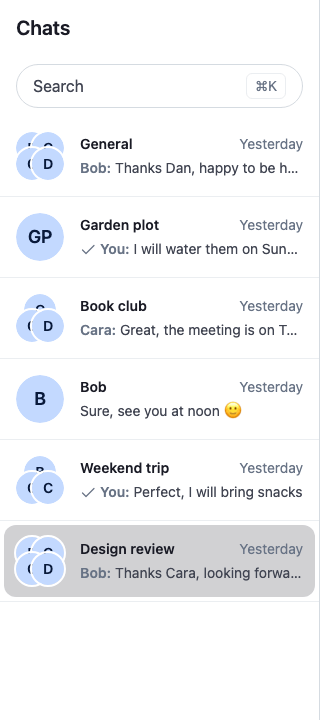
ChannelNavigation renders the search under the Search key. This button takes its place: it looks like a search field, opens the dialog, and opens it on ⌘K or Ctrl+K from anywhere in the app:
import { useEffect, useState } from "react";
import type { PropsWithChildren } from "react";
import { WithComponents } from "stream-chat-react";
import { SearchDialog } from "./SearchDialog";
import "./SearchDialogButton.css";

const isMac = /Mac|iPhone|iPad/.test(navigator.userAgent);

const SearchDialogButton = () => {
  const [open, setOpen] = useState(false);

  // ⌘K on a Mac, Ctrl+K elsewhere, opens the dialog from anywhere in the app.
  useEffect(() => {
    const handleKeyDown = (event: KeyboardEvent) => {
      // `key` is missing on the keydown Chrome fires when it autofills a field.
      if (
        (isMac ? event.metaKey : event.ctrlKey) &&
        event.key?.toLowerCase() === "k"
      ) {
        event.preventDefault();
        setOpen(true);
      }
    };
    window.addEventListener("keydown", handleKeyDown);
    return () => window.removeEventListener("keydown", handleKeyDown);
  }, []);

  return (
    <div className="cookbook-search-trigger">
      <button
        aria-haspopup="dialog"
        aria-keyshortcuts={isMac ? "Meta+K" : "Control+K"}
        className="cookbook-search-trigger__button"
        onClick={() => setOpen(true)}
        type="button"
      >
        <span>Search</span>
        <kbd className="cookbook-search-trigger__shortcut">
          {isMac ? "⌘K" : "Ctrl K"}
        </kbd>
      </button>
      <SearchDialog onClose={() => setOpen(false)} open={open} />
    </div>
  );
};

// Declared once, so WithComponents gets the same object on every render.
const overrides = { Search: SearchDialogButton };

/** Replaces the search above the channel list with a button that opens the search dialog. */
export const WithSearchDialog = ({ children }: PropsWithChildren) => (
  <WithComponents overrides={overrides}>{children}</WithComponents>
);@layer stream-overrides {
.cookbook-search-trigger {
padding: var(--str-chat__spacing-xs) var(--str-chat__spacing-md);
}
/* Looks like a search field, so it sits where the search bar was. */
.cookbook-search-trigger__button {
display: flex;
align-items: center;
justify-content: space-between;
width: 100%;
padding: var(--str-chat__spacing-xs) var(--str-chat__spacing-md);
border: 1px solid var(--str-chat__border-core-default);
border-radius: var(--str-chat__radius-full);
background: var(--str-chat__background-core-elevation-1);
color: var(--str-chat__text-secondary);
font: var(--str-chat__font-body-default);
cursor: pointer;
}
.cookbook-search-trigger__button:hover {
background: var(--str-chat__background-utility-hover);
}
.cookbook-search-trigger__shortcut {
padding: var(--str-chat__spacing-xxxs) var(--str-chat__spacing-xs);
border: 1px solid var(--str-chat__border-core-subtle);
border-radius: var(--str-chat__radius-sm);
color: var(--str-chat__text-tertiary);
font: var(--str-chat__font-caption-default);
}
}The search button with ⌘K
Wrap ChannelNavigation, or the ChatView that renders it, in WithSearchDialog:
<WithSearchDialog>
  <ChatView layouts={layouts} views={views} />
</WithSearchDialog>
The rules sit in the stream-overrides layer, so they win over the SDK's own rules once the SDK's stylesheet is in an earlier layer, as Theming → CSS layers sets up. They take their colors, spacing and type from the SDK's tokens, so they follow your theme. The same goes for the stylesheets below.
Build the dialog
The dialog is a GlobalModal. It holds the search input, a switch for each source, the choice between grouped and mixed results, and the button that opens the filters:
import { useEffect, useId, useRef, useState } from "react";
import type { KeyboardEvent } from "react";
import type {
  SearchControllerState,
  SearchSource,
  SearchSourceState,
} from "stream-chat";
import { GlobalModal, useChatContext, useStateStore } from "stream-chat-react";
import { searchAgain } from "./searchController";
import { SearchFilters } from "./SearchFilters";
import { SearchResults } from "./SearchResults";
import type { ResultsLayout } from "./SearchResults";
import "./SearchDialog.css";

const sourceLabels: Record<string, string> = {
  channels: "Channels",
  messages: "Messages",
  users: "People",
};

const controllerSelector = ({
  searchQuery,
  sources,
}: SearchControllerState) => ({
  searchQuery,
  sources,
});

const isActiveSelector = ({ isActive }: SearchSourceState) => ({ isActive });

const SourceToggle = ({ source }: { source: SearchSource }) => {
  const { searchController } = useChatContext();
  const { isActive } = useStateStore(source.state, isActiveSelector);
  // The last active source can't be turned off.
  const isLastActive = isActive && searchController.activeSources.length === 1;

  return (
    <label className="cookbook-search-dialog__chip">
      <input
        checked={isActive}
        disabled={isLastActive}
        onChange={(event) => {
          if (event.target.checked) {
            searchController.activateSource(source.type);
            // Activating a source doesn't search it, so run the current text in it.
            searchAgain(searchController, source);
          } else {
            searchController.deactivateSource(source.type);
          }
        }}
        type="checkbox"
      />
      {sourceLabels[source.type] ?? source.type}
    </label>
  );
};

/** Moves the focus between the search input and the results with the arrow keys. */
const moveFocus = (
  event: KeyboardEvent<HTMLDivElement>,
  input: HTMLInputElement | null,
) => {
  if (event.key !== "ArrowDown" && event.key !== "ArrowUp") return;
  const results = [
    ...event.currentTarget.querySelectorAll<HTMLElement>(
      "[data-search-result]",
    ),
  ];
  const index = results.indexOf(event.target as HTMLElement);
  if (!results.length || (index === -1 && event.target !== input)) return;
  event.preventDefault();
  const next =
    event.key === "ArrowDown"
      ? Math.min(index + 1, results.length - 1)
      : index - 1;
  (next < 0 ? input : results[next])?.focus();
};

type SearchDialogProps = {
  onClose: () => void;
  open: boolean;
};

export const SearchDialog = ({ onClose, open }: SearchDialogProps) => {
  const { searchController } = useChatContext();
  const { searchQuery, sources } = useStateStore(
    searchController.state,
    controllerSelector,
  );
  const [layout, setLayout] = useState<ResultsLayout>("grouped");
  const [filtersOpen, setFiltersOpen] = useState(false);
  const inputRef = useRef<HTMLInputElement>(null);
  const id = useId();

  // No source is active the first time the dialog opens, so it turns them all on. Later, the
  // sources stay as the user left them: SearchController.exit() doesn't turn them off. The dialog
  // doesn't call SearchController.activate(): that marks search as open, and ChannelNavigation
  // would hide the channel lists behind the dialog.
  useEffect(() => {
    if (!open || searchController.activeSources.length) return;
    searchController.sources.forEach((source) =>
      searchController.activateSource(source.type),
    );
  }, [open, searchController]);

  const close = () => {
    // Empties the text and every source's results, and cancels the queries in flight.
    searchController.exit();
    onClose();
  };

  return (
    <GlobalModal aria-labelledby={`${id}-title`} onClose={close} open={open}>
      <div
        className="cookbook-search-dialog"
        onKeyDown={(event) => moveFocus(event, inputRef.current)}
      >
        <div className="cookbook-search-dialog__header">
          <h2 className="cookbook-search-dialog__title" id={`${id}-title`}>
            Search
          </h2>
          <button
            aria-keyshortcuts="Escape"
            className="cookbook-search-dialog__close"
            onClick={close}
            type="button"
          >
            Close
          </button>
        </div>
        {/* The dialog's content mounts a render after the modal opens, so the input takes the
            focus itself. */}
        <input
          aria-label="Search channels, people and messages"
          autoFocus
          className="cookbook-search-dialog__input"
          onChange={(event) => {
            const text = event.target.value;
            if (text) void searchController.search(text);
            // An empty text doesn't search, so clear the results instead.
            else searchController.exit();
          }}
          placeholder="Search channels, people and messages"
          ref={inputRef}
          type="search"
          value={searchQuery ?? ""}
        />
        <div className="cookbook-search-dialog__toolbar">
          <fieldset className="cookbook-search-dialog__options">
            <legend className="cookbook-search-dialog__legend">
              Search in
            </legend>
            {sources.map((source) => (
              <SourceToggle key={source.type} source={source} />
            ))}
          </fieldset>
          <fieldset className="cookbook-search-dialog__options">
            <legend className="cookbook-search-dialog__legend">Show</legend>
            {(["grouped", "mixed"] as const).map((value) => (
              <label className="cookbook-search-dialog__chip" key={value}>
                <input
                  checked={layout === value}
                  name={`${id}-layout`}
                  onChange={() => setLayout(value)}
                  type="radio"
                  value={value}
                />
                {value === "grouped" ? "Grouped" : "Mixed"}
              </label>
            ))}
          </fieldset>
          <button
            aria-controls={`${id}-filters`}
            aria-expanded={filtersOpen}
            className="cookbook-search-dialog__filters-button"
            onClick={() => setFiltersOpen((isOpen) => !isOpen)}
            type="button"
          >
            Filters and sort
          </button>
        </div>
        {filtersOpen && <SearchFilters id={`${id}-filters`} />}
        {searchQuery ? (
          <SearchResults close={close} layout={layout} />
        ) : (
          <p className="cookbook-search-dialog__hint">
            Type to search. ↑ and ↓ move between results, Enter opens one.
          </p>
        )}
      </div>
    </GlobalModal>
  );
};@layer stream-overrides {
.cookbook-search-dialog {
display: flex;
flex-direction: column;
gap: var(--str-chat__spacing-sm);
width: 640px;
max-width: calc(100vw - 2 * var(--str-chat__spacing-md));
max-height: calc(100vh - 2 * var(--str-chat__spacing-xl));
padding: var(--str-chat__spacing-lg);
border-radius: var(--str-chat__radius-xl);
background: var(--str-chat__background-core-elevation-1);
box-shadow: var(--str-chat__box-shadow-4);
color: var(--str-chat__text-primary);
}
.cookbook-search-dialog__header {
display: flex;
align-items: center;
justify-content: space-between;
}
.cookbook-search-dialog__title {
margin: 0;
font: var(--str-chat__font-heading-sm);
}
.cookbook-search-dialog__close {
padding: var(--str-chat__spacing-xxxs) var(--str-chat__spacing-xs);
border: 1px solid var(--str-chat__border-core-subtle);
border-radius: var(--str-chat__radius-sm);
background: none;
color: var(--str-chat__text-secondary);
font: var(--str-chat__font-caption-default);
cursor: pointer;
}
.cookbook-search-dialog__input {
width: 100%;
padding: var(--str-chat__spacing-sm) var(--str-chat__spacing-md);
border: 1px solid var(--str-chat__border-core-default);
border-radius: var(--str-chat__radius-full);
background: var(--str-chat__background-core-surface-subtle);
color: var(--str-chat__text-primary);
font: var(--str-chat__font-body-default);
}
.cookbook-search-dialog__input:focus-visible {
border-color: var(--str-chat__accent-primary);
outline: none;
}
.cookbook-search-dialog__toolbar {
display: flex;
flex-wrap: wrap;
align-items: center;
gap: var(--str-chat__spacing-sm) var(--str-chat__spacing-lg);
}
.cookbook-search-dialog__options {
display: flex;
align-items: center;
gap: var(--str-chat__spacing-xs);
margin: 0;
padding: 0;
border: 0;
}
/* A legend can't sit in a flex row, so it floats at its start. */
.cookbook-search-dialog__legend {
float: left;
margin-inline-end: var(--str-chat__spacing-xxs);
padding: 0;
color: var(--str-chat__text-secondary);
font: var(--str-chat__font-caption-default);
}
.cookbook-search-dialog__chip {
display: flex;
align-items: center;
gap: var(--str-chat__spacing-xxs);
padding: var(--str-chat__spacing-xxs) var(--str-chat__spacing-sm);
border: 1px solid var(--str-chat__border-core-default);
border-radius: var(--str-chat__radius-full);
font: var(--str-chat__font-caption-emphasis);
cursor: pointer;
}
.cookbook-search-dialog__chip:has(input:checked) {
border-color: var(--str-chat__accent-primary);
background: var(--str-chat__background-utility-selected);
}
.cookbook-search-dialog__chip input {
margin: 0;
accent-color: var(--str-chat__accent-primary);
}
.cookbook-search-dialog__filters-button {
margin-inline-start: auto;
padding: var(--str-chat__spacing-xxs) var(--str-chat__spacing-sm);
border: 0;
border-radius: var(--str-chat__radius-full);
background: none;
color: var(--str-chat__text-link);
font: var(--str-chat__font-caption-emphasis);
cursor: pointer;
}
.cookbook-search-dialog__filters-button[aria-expanded="true"] {
background: var(--str-chat__background-utility-selected);
}
.cookbook-search-dialog__hint {
margin: 0;
color: var(--str-chat__text-secondary);
font: var(--str-chat__font-caption-default);
}
}GlobalModalrenders the dialog on the modal manager thatChatcreates, with an overlay, and keeps the focus inside it. Escape and a click on the overlay callonClose.aria-labelledbynames the dialog after its heading. The modal renders its content a render after it opens, so the input takes the focus withautoFocus.- The first time the dialog opens, no source is active yet, so the dialog turns every source on with
SearchController.activateSource(). After that, the sources stay as the user left them. The dialog doesn't callSearchController.activate(): it marks search as open insearchController.state.isActive, andChannelNavigationthen hides the channel lists behind the dialog. - Typing calls
SearchController.search(), which passes the text to every active source. Each source waits for the user to stop typing before it queries, and until then the results show that it's searching. An empty text doesn't search, so the input empties the results withSearchController.exit()instead. - A switch calls
SearchController.activateSource()orSearchController.deactivateSource(). Activating a source doesn't search it, sosearchAgain()runs the current text in it. The last active source can't be turned off, so its switch is disabled. - Closing calls
SearchController.exit(), which empties the text and every source's results and cancels the queries in flight. The sources stay active, and their filters and sorts stay as the user set them, for the next time the dialog opens. - ↑ and ↓ move the focus from the input through the results and back. Tab reaches every control, and Enter or Space opens the focused result.
Show the results
Each source keeps its results in its state store. The results component subscribes to the three stores and shows the active sources' results in one of two layouts:
import { useId } from "react";
import type { MouseEvent, PropsWithChildren } from "react";
import { convertTimestampToDate } from "stream-chat";
import type {
  Channel,
  ChannelStateData,
  MessageResponse,
  SearchControllerState,
  SearchSource,
  SearchSourceState,
  TimestampNS,
  UserResponse,
} from "stream-chat";
import {
  Avatar,
  useChannelDisplayName,
  useChatContext,
  useStateStore,
  useWorkspaceNavigation,
} from "stream-chat-react";
import { getDialogSources } from "./searchController";
import "./SearchResults.css";

export type ResultsLayout = "grouped" | "mixed";

const sourceLabels: Record<string, string> = {
  channels: "Channels",
  messages: "Messages",
  users: "People",
};

const tagLabels: Record<string, string> = {
  channels: "Channel",
  messages: "Message",
  users: "Person",
};

type Result =
  | { item: Channel; type: "channels" }
  | { item: MessageResponse; type: "messages" }
  | { item: UserResponse; type: "users" };

const resultKey = ({ item, type }: Result) =>
  `${type}:${type === "channels" ? item.cid : item.id}`;

// The time a mixed list sorts by: a channel's last message, a person's last activity, a message's
// creation. The SDK keeps timestamps as nanosecond numbers.
const resultTime = (result: Result) => {
  const timestamp =
    result.type === "channels"
      ? result.item.data?.last_message_at
      : result.type === "users"
        ? result.item.last_active
        : result.item.created_at;
  return convertTimestampToDate(timestamp)?.getTime() ?? 0;
};

const formatDate = (timestamp?: TimestampNS | null) =>
  convertTimestampToDate(timestamp)?.toLocaleDateString(undefined, {
    day: "numeric",
    month: "short",
  });

// The avatar repeats the row's name, so it's hidden from assistive technology. Avatar renders
// role="button" by default, which a result row mustn't announce.
const decorative = { "aria-hidden": true, role: "presentation" } as const;

const memberCountSelector = ({ memberCount }: ChannelStateData) => ({
  memberCount,
});

const sourceSelector = ({
  hasNext,
  isActive,
  isLoading,
  items,
  lastQueryError,
  searchQuery,
}: SearchSourceState) => ({
  hasNext,
  isActive,
  isLoading,
  items,
  lastQueryError,
  searchQuery,
});

const searchQuerySelector = ({ searchQuery }: SearchControllerState) => ({
  searchQuery,
});

/** Opens what a result points to, then closes the dialog. */
const useOpenResult = (close: () => void) => {
  const { channelManager, client } = useChatContext();
  const { openChannel } = useWorkspaceNavigation();

  const reportError = (error: Error) =>
    client.notifications.addError({
      message: "Failed to load the channel",
      options: { originalError: error },
      origin: { emitter: "SearchDialog" },
    });

  return async ({ item, type }: Result, event: MouseEvent) => {
    close();
    if (type === "channels") {
      openChannel(item, { event });
      // Channel search doesn't watch its results, so watch the channel to receive its events.
      item.watch().catch(reportError);
      channelManager.ingestChannel(item);
      return;
    }
    if (type === "messages") {
      // Message search stores every result's channel.
      const channel = item.cid ? channelManager.get(item.cid) : undefined;
      if (!channel) return;
      openChannel(channel, { event });
      channelManager.ingestChannel(channel);
      // Loads the page around the message, scrolls to it and watches the channel.
      channel.messagePaginator
        .jumpToMessage(item.id, { watchChannel: true })
        .catch(reportError);
      return;
    }
    // A person opens the user's direct conversation with them, if there is one: a channel with only
    // the two of them and no name of its own.
    try {
      const channels = await client.queryChannelsAndHydrate(
        {
          filter_conditions: {
            $and: [
              { members: { $in: [client.userId ?? ""] } },
              { members: { $in: [item.id] } },
            ],
            member_count: 2,
            type: "messaging",
          },
        },
        { withResponse: false },
      );
      const directMessage = channels.find(
        (channel) => !("name" in (channel.data?.custom ?? {})),
      );
      if (!directMessage) {
        client.notifications.addInfo({
          message: `No conversation with ${item.name ?? item.id} yet`,
          origin: { emitter: "SearchDialog" },
        });
        return;
      }
      openChannel(directMessage, { event });
      channelManager.ingestChannel(directMessage);
    } catch (error) {
      reportError(error as Error);
    }
  };
};

type ResultRowProps = {
  onOpen: (result: Result, event: MouseEvent) => void;
  result: Result;
  showTag?: boolean;
};

/**
 * Opens the result. The avatar sits beside the button, since a button can't contain the SDK's
 * Avatar, a `div`; the button's `::after` covers the whole row, so a click on the avatar opens the
 * result too.
 */
const ResultButton = ({
  children,
  onOpen,
  result,
  showTag,
}: PropsWithChildren<ResultRowProps>) => (
  <button
    className="cookbook-search-result__button"
    data-search-result
    onClick={(event) => void onOpen(result, event)}
    type="button"
  >
    <span className="cookbook-search-result__text">{children}</span>
    {showTag && (
      <span className="cookbook-search-result__tag">
        {tagLabels[result.type]}
      </span>
    )}
  </button>
);

const ChannelResult = ({
  channel,
  ...row
}: ResultRowProps & { channel: Channel }) => {
  const name = useChannelDisplayName(channel) ?? channel.id ?? "";
  const { memberCount } = useStateStore(channel.state, memberCountSelector);
  return (
    <>
      <Avatar {...decorative} size="md" userName={name} />
      <ResultButton {...row}>
        <span className="cookbook-search-result__title">{name}</span>
        <span className="cookbook-search-result__detail">
          {memberCount} members
        </span>
      </ResultButton>
    </>
  );
};

const UserResult = ({
  user,
  ...row
}: ResultRowProps & { user: UserResponse }) => (
  <>
    <Avatar
      {...decorative}
      imageUrl={user.image}
      size="md"
      userName={user.name ?? user.id}
    />
    <ResultButton {...row}>
      <span className="cookbook-search-result__title">
        {user.name ?? user.id}
      </span>
      <span className="cookbook-search-result__detail">
        {user.last_active ? `Active ${formatDate(user.last_active)}` : "Person"}
      </span>
    </ResultButton>
  </>
);

const MessageResult = ({
  message,
  ...row
}: ResultRowProps & { message: MessageResponse }) => {
  const { channelManager } = useChatContext();
  const channel = message.cid ? channelManager.get(message.cid) : undefined;
  const channelName = useChannelDisplayName(channel);
  const author = message.user?.name ?? message.user?.id ?? "";
  return (
    <>
      <Avatar
        {...decorative}
        imageUrl={message.user?.image}
        size="md"
        userName={author}
      />
      <ResultButton {...row}>
        <span className="cookbook-search-result__title">{message.text}</span>
        <span className="cookbook-search-result__detail">
          {author}
          {channelName && ` in ${channelName}`} ·{" "}
          {formatDate(message.created_at)}
        </span>
      </ResultButton>
    </>
  );
};

const ResultRow = (props: ResultRowProps) => {
  const { result } = props;
  return (
    <li className="cookbook-search-result">
      {result.type === "channels" && (
        <ChannelResult {...props} channel={result.item} />
      )}
      {result.type === "users" && <UserResult {...props} user={result.item} />}
      {result.type === "messages" && (
        <MessageResult {...props} message={result.item} />
      )}
    </li>
  );
};

/**
 * What one source has loaded, as results. A source waits for a pause in typing before it queries,
 * so until its own `searchQuery` is the controller's, it's still searching.
 */
const useSourceResults = (
  source: SearchSource | undefined,
  searchQuery: string,
) => {
  const state = useStateStore(source?.state, sourceSelector);
  const results = (state?.items ?? []).map(
    (item) => ({ item, type: source?.type }) as Result,
  );
  const isSearching =
    !!state && (state.isLoading || state.searchQuery !== searchQuery);
  return { ...state, isSearching, results, source };
};

type SourceResults = ReturnType<typeof useSourceResults>;

// Hidden while a source is searching, so it never loads the next page of the previous text.
const hasMore = ({ hasNext, isSearching, items }: SourceResults) =>
  !!items?.length && hasNext && !isSearching;

const GroupedResults = ({
  groups,
  onOpen,
}: {
  groups: SourceResults[];
  onOpen: ResultRowProps["onOpen"];
}) => {
  const headingId = useId();
  return groups.map((group) => {
    const type = group.source?.type ?? "";
    return (
      <section
        aria-labelledby={`${headingId}-${type}`}
        className="cookbook-search-results__group"
        key={type}
      >
        <h3
          className="cookbook-search-results__heading"
          id={`${headingId}-${type}`}
        >
          {sourceLabels[type]}
        </h3>
        {group.lastQueryError ? (
          <p className="cookbook-search-results__note">This search failed.</p>
        ) : group.results.length ? (
          <ul className="cookbook-search-results__list">
            {group.results.map((result) => (
              <ResultRow
                key={resultKey(result)}
                onOpen={onOpen}
                result={result}
              />
            ))}
          </ul>
        ) : (
          <p className="cookbook-search-results__note">
            {group.isSearching ? "Searching…" : "No results"}
          </p>
        )}
        {hasMore(group) && (
          <button
            className="cookbook-search-results__more"
            onClick={() => void group.source?.search()}
            type="button"
          >
            Load more {sourceLabels[type].toLowerCase()}
          </button>
        )}
      </section>
    );
  });
};

const MixedResults = ({
  groups,
  onOpen,
}: {
  groups: SourceResults[];
  onOpen: ResultRowProps["onOpen"];
}) => {
  const results = groups
    .flatMap((group) => group.results)
    .sort((a, b) => resultTime(b) - resultTime(a));
  const loadable = groups.filter(hasMore);
  return (
    <>
      {results.length ? (
        <ul aria-label="Results" className="cookbook-search-results__list">
          {results.map((result) => (
            <ResultRow
              key={resultKey(result)}
              onOpen={onOpen}
              result={result}
              showTag
            />
          ))}
        </ul>
      ) : (
        <p className="cookbook-search-results__note">
          {groups.some((group) => group.isSearching)
            ? "Searching…"
            : "No results"}
        </p>
      )}
      {!!loadable.length && (
        <button
          className="cookbook-search-results__more"
          onClick={() =>
            loadable.forEach((group) => void group.source?.search())
          }
          type="button"
        >
          Load more
        </button>
      )}
    </>
  );
};

type SearchResultsProps = {
  close: () => void;
  layout: ResultsLayout;
};

export const SearchResults = ({ close, layout }: SearchResultsProps) => {
  const { searchController } = useChatContext();
  const { searchQuery = "" } = useStateStore(
    searchController.state,
    searchQuerySelector,
  );
  const sources = getDialogSources(searchController);
  const groups = [
    useSourceResults(sources.channels, searchQuery),
    useSourceResults(sources.users, searchQuery),
    useSourceResults(sources.messages, searchQuery),
  ].filter((group) => group.isActive);
  const onOpen = useOpenResult(close);
  const resultCount = groups.reduce(
    (count, group) => count + group.results.length,
    0,
  );
  const isSearching = groups.some((group) => group.isSearching);

  return (
    <div className="cookbook-search-results">
      <p className="cookbook-search-results__status" role="status">
        {isSearching ? "Searching…" : `${resultCount} results`}
      </p>
      {layout === "grouped" ? (
        <GroupedResults groups={groups} onOpen={onOpen} />
      ) : (
        <MixedResults groups={groups} onOpen={onOpen} />
      )}
    </div>
  );
};@layer stream-overrides {
/* The results scroll; the input and the options above them stay in place. */
.cookbook-search-results {
flex: 1;
min-height: 0;
overflow-y: auto;
}
.cookbook-search-results__status {
margin: 0 0 var(--str-chat__spacing-xs);
color: var(--str-chat__text-tertiary);
font: var(--str-chat__font-caption-default);
}
.cookbook-search-results__group + .cookbook-search-results__group {
margin-top: var(--str-chat__spacing-sm);
}
.cookbook-search-results__heading {
margin: 0 0 var(--str-chat__spacing-xxs);
color: var(--str-chat__text-secondary);
font: var(--str-chat__font-caption-emphasis);
}
.cookbook-search-results__list {
margin: 0;
padding: 0;
list-style: none;
}
.cookbook-search-results__note {
margin: 0;
padding: var(--str-chat__spacing-xs) var(--str-chat__spacing-sm);
color: var(--str-chat__text-tertiary);
font: var(--str-chat__font-caption-default);
}
.cookbook-search-results__more {
padding: var(--str-chat__spacing-xxs) var(--str-chat__spacing-sm);
border: 0;
background: none;
color: var(--str-chat__text-link);
font: var(--str-chat__font-caption-emphasis);
cursor: pointer;
}
.cookbook-search-result {
position: relative;
display: flex;
align-items: center;
gap: var(--str-chat__spacing-sm);
padding: var(--str-chat__spacing-xs) var(--str-chat__spacing-sm);
border-radius: var(--str-chat__radius-lg);
color: var(--str-chat__text-primary);
}
.cookbook-search-result:hover {
background: var(--str-chat__background-utility-hover);
}
.cookbook-search-result__button {
display: flex;
flex: 1;
align-items: center;
gap: var(--str-chat__spacing-sm);
min-width: 0;
padding: 0;
border: 0;
background: none;
color: inherit;
text-align: start;
cursor: pointer;
}
/* Covers the whole row, avatar included, so a click anywhere on it opens the result. */
.cookbook-search-result__button::after {
position: absolute;
inset: 0;
border-radius: var(--str-chat__radius-lg);
content: "";
}
.cookbook-search-result__button:focus-visible {
outline: none;
}
.cookbook-search-result__button:focus-visible::after {
outline: 2px solid var(--str-chat__accent-primary);
outline-offset: -2px;
}
.cookbook-search-result__text {
display: flex;
flex: 1;
flex-direction: column;
min-width: 0;
}
.cookbook-search-result__title {
overflow: hidden;
font: var(--str-chat__font-body-emphasis);
text-overflow: ellipsis;
white-space: nowrap;
}
.cookbook-search-result__detail {
color: var(--str-chat__text-secondary);
font: var(--str-chat__font-caption-default);
}
.cookbook-search-result__tag {
flex: 0 0 72px;
padding: var(--str-chat__spacing-xxxs) var(--str-chat__spacing-xs);
border-radius: var(--str-chat__radius-full);
background: var(--str-chat__background-utility-selected);
color: var(--str-chat__text-secondary);
font: var(--str-chat__font-metadata-emphasis);
text-align: center;
}
}Grouped shows a section per active source, with a heading and the source's own Load more. BaseSearchSource.search() with no text loads that source's next page, while hasNext in the source's state says there is one.
A source waits for a pause in typing before it queries, so for a moment its results are still for the previous text. Until searchQuery in the source's state is the controller's searchQuery, the source counts as searching: its section and the status line say "Searching…" instead of "No results" or a count, and Load more is hidden, so it never loads the next page of the previous text.
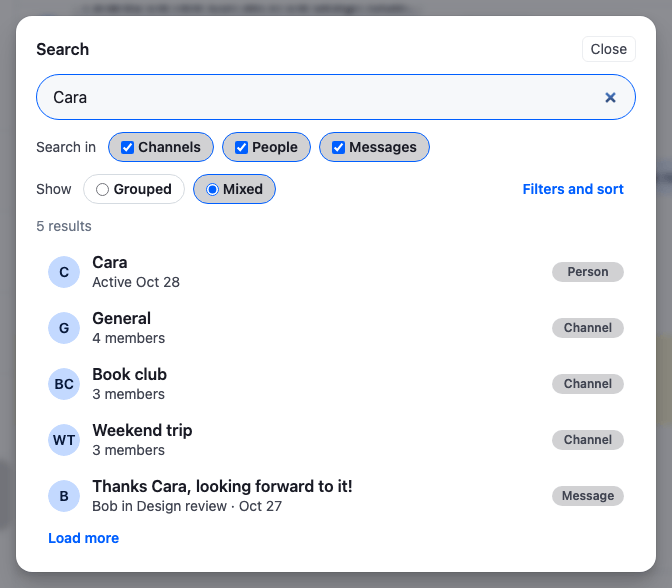
Mixed merges the results into one list, newest first, and tags each row with its kind at its end. A channel sorts by its last message, a person by their last activity, and a message by when it was sent. Load more loads the next page of every source that has one, and the new results take their place in the list.
Mixed results
Picking a result closes the dialog, then opens what the result points to with openChannel from useWorkspaceNavigation(). The click event is passed on, so ⌘/ctrl-click can open it beside the current channel:
- A channel is watched with
Channel.watch(), since channel search doesn't watch its results, and added to the channel lists it matches withChannelManager.ingestChannel(). - A message opens its channel, which the message source stored with the result, and
MessagePaginator.jumpToMessage()loads the page around the message, scrolls to it and watches the channel. - A person opens the user's direct conversation with them:
client.queryChannelsAndHydrate()looks for a channel with only the two of them and no name of its own. When there isn't one, the dialog says so withclient.notifications.addInfo(). To start a conversation instead, create it withclient.channel("messaging", { members })and callChannel.watch(), as the SDK's default user result does.
The status line above the results has role="status", so a screen reader announces "Searching…" and then the number of results. The avatars repeat the row's text, so they're hidden from assistive technology. Avatar renders a div, which a button mustn't contain, so each avatar sits beside its row's button, and the button's ::after covers the whole row, so a click on the avatar opens the result too.
Filter and sort each source
The filters panel changes the sources' filter generators and sorts while the user searches:
import { useMemo, useState } from "react";
import type { SearchSource, SortParamRequest } from "stream-chat";
import { useChatContext, useStateStore } from "stream-chat-react";
import {
  channelSorts,
  getDialogSources,
  messageSorts,
  searchAgain,
  userSorts,
} from "./searchController";
import type { MessageFilterContext } from "./searchController";
import "./SearchFilters.css";

type Generators = Record<string, { enabled: boolean }>;

const enabledSelector = (config: Generators) => ({
  groupsOnly: !!config.groupsOnly?.enabled,
  hideArchived: !!config.hideArchived?.enabled,
  withAttachments: !!config.withAttachments?.enabled,
});

const messageContextSelector = ({
  authorId,
  sentFrom,
  sentTo,
}: MessageFilterContext) => ({
  authorId,
  sentFrom,
  sentTo,
});

/** The key of the sort a source uses, from one of the sort maps. */
const sortKeyOf = <K extends string>(
  sorts: Record<K, SortParamRequest[]>,
  sort: SortParamRequest[] | undefined,
) => (Object.keys(sorts) as K[]).find((key) => sorts[key] === sort);

/** Everyone in the user's loaded channels, for the "From" select. */
const usePeople = () => {
  const { channelManager, client } = useChatContext();
  return useMemo(() => {
    const people = new Map<string, string>();
    for (const channel of channelManager.values()) {
      for (const member of Object.values(channel.state.members)) {
        if (member.user && member.user.id !== client.userId) {
          people.set(member.user.id, member.user.name ?? member.user.id);
        }
      }
    }
    return [...people].sort(([, a], [, b]) => a.localeCompare(b));
  }, [channelManager, client]);
};

export const SearchFilters = ({ id }: { id: string }) => {
  const { client, searchController } = useChatContext();
  const { channels, messages, users } = getDialogSources(searchController);
  const people = usePeople();

  const channelFilters = useStateStore(
    channels?.filterBuilder.filterConfig,
    enabledSelector,
  );
  const messageFilters = useStateStore(
    messages?.messageSearchFilterBuilder.filterConfig,
    enabledSelector,
  );
  const messageContext = useStateStore(
    messages?.messageSearchFilterBuilder.context,
    messageContextSelector,
  );

  // A source's sort isn't in a store, so the selects keep their own copy, read from the source.
  const [channelSort, setChannelSort] = useState<string>(
    () => sortKeyOf(channelSorts, channels?.sort) ?? "activity",
  );
  const [userSort, setUserSort] = useState<string>(
    () => sortKeyOf(userSorts, users?.sort) ?? "name",
  );
  const [messageSort, setMessageSort] = useState<string>(
    () => sortKeyOf(messageSorts, messages?.messageSearchSort) ?? "newest",
  );

  // Every change applies from the next query, so search again from the first page.
  const change = (source: SearchSource, apply: () => void) => {
    apply();
    searchAgain(searchController, source);
  };

  return (
    <div className="cookbook-search-filters" id={id}>
      {channels && (
        <fieldset className="cookbook-search-filters__group">
          <legend className="cookbook-search-filters__legend">Channels</legend>
          <div className="cookbook-search-filters__controls">
            <label className="cookbook-search-filters__field">
              Sort by
              <select
                className="cookbook-search-filters__select"
                onChange={(event) => {
                  const key = event.target.value as keyof typeof channelSorts;
                  setChannelSort(event.target.value);
                  change(channels, () => {
                    channels.sort = channelSorts[key];
                  });
                }}
                value={channelSort}
              >
                <option value="activity">Recent activity</option>
                <option value="newest">Newest</option>
                <option value="members">Most members</option>
              </select>
            </label>
            <label className="cookbook-search-filters__check">
              <input
                checked={!channelFilters?.hideArchived}
                onChange={(event) =>
                  change(channels, () =>
                    event.target.checked
                      ? channels.filterBuilder.disableFilter("hideArchived")
                      : channels.filterBuilder.enableFilter("hideArchived"),
                  )
                }
                type="checkbox"
              />
              Include archived
            </label>
            <label className="cookbook-search-filters__check">
              <input
                checked={!!channelFilters?.groupsOnly}
                onChange={(event) =>
                  change(channels, () =>
                    event.target.checked
                      ? channels.filterBuilder.enableFilter("groupsOnly")
                      : channels.filterBuilder.disableFilter("groupsOnly"),
                  )
                }
                type="checkbox"
              />
              Groups only
            </label>
          </div>
        </fieldset>
      )}

      {users && (
        <fieldset className="cookbook-search-filters__group">
          <legend className="cookbook-search-filters__legend">People</legend>
          <div className="cookbook-search-filters__controls">
            <label className="cookbook-search-filters__field">
              Sort by
              <select
                className="cookbook-search-filters__select"
                onChange={(event) => {
                  const key = event.target.value as keyof typeof userSorts;
                  setUserSort(event.target.value);
                  change(users, () => {
                    users.sort = userSorts[key];
                  });
                }}
                value={userSort}
              >
                <option value="name">Name</option>
                <option value="active">Recently active</option>
              </select>
            </label>
          </div>
        </fieldset>
      )}

      {messages && (
        <fieldset className="cookbook-search-filters__group">
          <legend className="cookbook-search-filters__legend">Messages</legend>
          <div className="cookbook-search-filters__controls">
            <label className="cookbook-search-filters__field">
              Order
              <select
                className="cookbook-search-filters__select"
                onChange={(event) => {
                  const key = event.target.value as keyof typeof messageSorts;
                  setMessageSort(event.target.value);
                  change(messages, () => {
                    messages.messageSearchSort = messageSorts[key];
                  });
                }}
                value={messageSort}
              >
                <option value="newest">Newest first</option>
                <option value="oldest">Oldest first</option>
              </select>
            </label>
            <label className="cookbook-search-filters__field">
              From
              <select
                className="cookbook-search-filters__select"
                onChange={(event) =>
                  change(messages, () =>
                    messages.messageSearchFilterBuilder.updateContext({
                      authorId: event.target.value || undefined,
                    }),
                  )
                }
                value={messageContext?.authorId ?? ""}
              >
                <option value="">Anyone</option>
                <option value={client.userId}>You</option>
                {people.map(([userId, name]) => (
                  <option key={userId} value={userId}>
                    {name}
                  </option>
                ))}
              </select>
            </label>
            <label className="cookbook-search-filters__field">
              Sent from
              <input
                className="cookbook-search-filters__date"
                onChange={(event) =>
                  change(messages, () =>
                    messages.messageSearchFilterBuilder.updateContext({
                      sentFrom: event.target.value || undefined,
                    }),
                  )
                }
                type="date"
                value={messageContext?.sentFrom ?? ""}
              />
            </label>
            <label className="cookbook-search-filters__field">
              Sent until
              <input
                className="cookbook-search-filters__date"
                onChange={(event) =>
                  change(messages, () =>
                    messages.messageSearchFilterBuilder.updateContext({
                      sentTo: event.target.value || undefined,
                    }),
                  )
                }
                type="date"
                value={messageContext?.sentTo ?? ""}
              />
            </label>
            <label className="cookbook-search-filters__check">
              <input
                checked={!!messageFilters?.withAttachments}
                onChange={(event) =>
                  change(messages, () =>
                    event.target.checked
                      ? messages.messageSearchFilterBuilder.enableFilter(
                          "withAttachments",
                        )
                      : messages.messageSearchFilterBuilder.disableFilter(
                          "withAttachments",
                        ),
                  )
                }
                type="checkbox"
              />
              With attachments
            </label>
          </div>
        </fieldset>
      )}
    </div>
  );
};@layer stream-overrides {
/* One row per source: its name, then its controls. */
.cookbook-search-filters {
display: flex;
flex-direction: column;
gap: var(--str-chat__spacing-sm);
padding: var(--str-chat__spacing-sm) var(--str-chat__spacing-md);
border-radius: var(--str-chat__radius-lg);
background: var(--str-chat__background-core-surface-subtle);
}
.cookbook-search-filters__group {
margin: 0;
padding: 0;
border: 0;
}
/* A legend can't be a flex item, so it floats, and the controls wrap beside it. */
.cookbook-search-filters__legend {
float: left;
width: 80px;
padding: 0;
font: var(--str-chat__font-caption-emphasis);
}
.cookbook-search-filters__controls {
display: flex;
flex-wrap: wrap;
align-items: center;
gap: var(--str-chat__spacing-xs) var(--str-chat__spacing-md);
}
.cookbook-search-filters__field,
.cookbook-search-filters__check {
display: flex;
align-items: center;
gap: var(--str-chat__spacing-xxs);
color: var(--str-chat__text-secondary);
font: var(--str-chat__font-caption-default);
}
.cookbook-search-filters__select,
.cookbook-search-filters__date {
padding: var(--str-chat__spacing-xxxs) var(--str-chat__spacing-xs);
border: 1px solid var(--str-chat__border-core-default);
border-radius: var(--str-chat__radius-md);
background: var(--str-chat__background-core-elevation-1);
color: var(--str-chat__text-primary);
font: var(--str-chat__font-caption-default);
}
.cookbook-search-filters__check {
cursor: pointer;
}
.cookbook-search-filters__check input {
margin: 0;
accent-color: var(--str-chat__accent-primary);
}
}The filters and sort panel
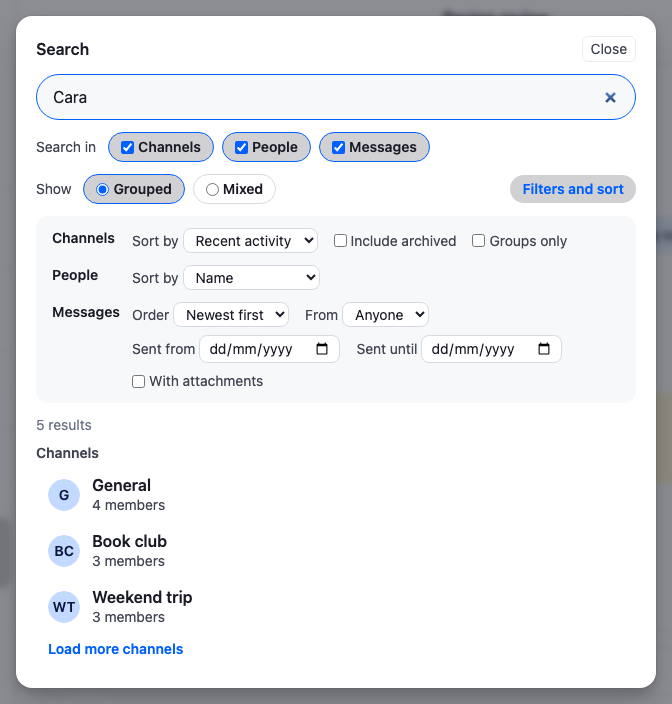
- Include archived and Groups only turn the channel source's
hideArchivedandgroupsOnlygenerators off and on withFilterBuilder.disableFilter()andFilterBuilder.enableFilter(), onchannelSource.filterBuilder. With attachments does the same with the message source'swithAttachmentsgenerator, onmessageSource.messageSearchFilterBuilder. - From, Sent from and Sent until set values in the message filter builder's context with
FilterBuilder.updateContext(). TheauthorandsentBetweengenerators read them on the next query. The dates are days in the user's time zone. - Sort by sets
channelSource.sortoruserSource.sort, and Order setsmessageSource.messageSearchSort, to one of the sort maps. - The checkboxes and the context fields read their values with
useStateStore(), fromfilterBuilder.filterConfigandfilterBuilder.context, so they show the source's current settings. A sort isn't in a store, so the selects keep their own copy, read from the source when the panel opens.
A source applies a new filter or sort from its next query, and doesn't query when it changes. searchAgain() calls BaseSearchSource.search() with the current text, which counts as a new search: the source drops its results and loads the first page again with the new settings. Calling it with no text would load the next page with them instead, after results the old settings found.
How it works
createSearchController()creates the channel, user and message sources with the dialog's filter generators and sorts, and lets them be active together.Chatholds the controller, anduseChatContext()gives it to the dialog.- The button above the channel list, or ⌘K, opens the dialog. The first time, the dialog activates every source.
- Each keystroke passes the text to the active sources through
SearchController.search(). Each source waits for a pause in typing, queries, and publishes its results in itsstatestore, which the results component renders grouped or mixed. - A switch, a filter or a sort changes one source and runs the current text in it again, from the first page.
- Picking a result closes the dialog, empties the search with
SearchController.exit(), and opens the channel, the message or the direct conversation in the layout.
Related
- Search sources explains the controller, the built-in sources, filter generators and the source's state.
- Dialogs explains
GlobalModaland the modal manager. - Search customization changes the SDK's own search bar and results instead of replacing them.
- Message paginators explains
MessagePaginator.jumpToMessage(). - Navigation explains
useWorkspaceNavigation()and whereopenChannelopens a channel. - Search explains how search works across the layers.