


Thread list UI
The thread list is the column of threads the user takes part in, shown in the threads view. Each thread list item shows one thread's channel, parent message and latest reply. Use this page to know what <ThreadList/> loads and renders, what each thread list item shows and reads, and which parts you can replace. An open thread is on Thread UI. The props are in the ThreadList and ThreadListItem references.
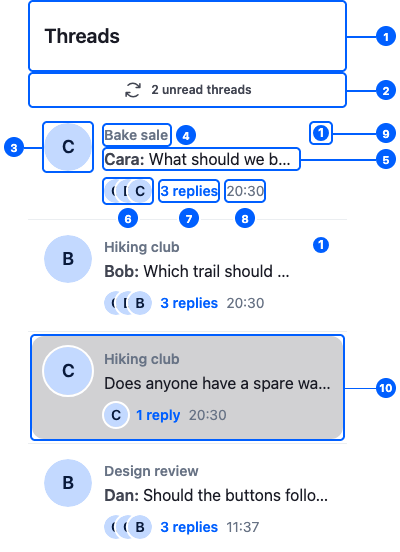
This is the default thread list, with the Hiking club thread open. Its parts, numbered on the first item:
| Part | Explained in |
|---|---|
| 1. The header | Header |
| 2. The unseen threads banner | The unseen threads banner |
| 3. The latest reply author's avatar | Thread list items |
| 4. The channel's title | Thread list items |
| 5. The parent message, summarized | Thread list items |
| 6. The participants' avatars | Thread list items |
| 7. The reply count | Thread list items |
| 8. The latest reply's time | Thread list items |
| 9. The unread count | Thread list items |
| 10. The open thread, selected | Thread list items |
The ThreadList component
<ThreadList/> renders the threads of client.threads, the thread manager. What it does, and when:
| When | <ThreadList/> |
|---|---|
| It mounts | Reloads the list |
| The page is visible | Activates client.threads, so the list follows new replies |
| The page is hidden, or it unmounts | Deactivates client.threads |
client.threads.paginator.state changes |
Renders a <ThreadListItem/> for each thread, in the server's order: unread threads first, then by latest reply |
| The user scrolls to the end | Loads the next page |
| The user clicks an item | Opens the thread with openThread(thread) from useWorkspaceNavigation(). Without a layout, this does nothing; see Navigation. |
| The user ⌘/ctrl-clicks an item | Asks the layout to open the thread beside the current one, where the layout has room |
The list is virtualized with react-virtuoso; its virtuosoProps prop passes props to it. Below the items, it renders the notifications published to the thread list.
Header
<ThreadListHeader/> shows the "Threads" title. <ThreadList/> renders it above the items, without props. It takes the same StartContent and EndContent props as <ChannelListHeader/>. Register a component under the ThreadListHeader key that renders <ThreadListHeader/> with StartContent or EndContent, as Channel list UI → Header shows. To show content only while a thread is open, return null from it while openThreads from useWorkspaceNavigation() is empty.
Thread list items
Each thread list item is a <ThreadListItem/>. It provides its thread to the components inside and renders ThreadListItemUI, the item's look, which reads the thread's stores:
| The item shows | Read from |
|---|---|
| The latest reply author's avatar | thread.messagePaginator.aggregateState: latestMessage |
| The channel's title | thread.state: channel |
| The parent message, summarized | thread.state: parentMessage |
| Up to 3 participants' avatars | thread.state: participants |
| The reply count | thread.state: replyCount |
| The latest reply's time | thread.messagePaginator.aggregateState: latestMessage |
| The unread count, when there is one | thread.state: read[userId].unreadMessageCount |
| Selected | isThreadActive(thread.id) from useWorkspaceNavigation(): the thread is open |
| Highlighted for 2 seconds | the thread has just come into the list from the unseen threads banner |
Anything rendered inside an item retrieves its thread with useThreadListItemContext(). ThreadListItemUI renders a button: it takes the button's props, and accessibleLabelConfig, which configures the item's accessible name; see the ThreadListItem reference.
The unseen threads banner
A thread that isn't in the loaded list can get a reply, for example an older thread someone answers. The thread manager records it in client.threads.state as unseen, and the list shows a banner above the items: "2 unread threads". Clicking it reloads the list, which brings those threads in at their new position. While it reloads, the banner reads "Loading...".
Loading, empty and error states
<ThreadList/> shows a state of its own while the first page loads, when it fails, while the next page loads, and when it has no threads. List states UI lists each state's default and <WithComponents/> key, and explains what happens when a query fails.
Replacing parts
Register replacements with <WithComponents/>. Overriding components explains how overrides apply.
Component to override (<WithComponents/> key) |
Replaces |
|---|---|
ThreadListItem |
The whole item. Gets thread. |
ThreadListItemUI |
The item's look |
ThreadListUnseenThreadsBanner |
The unseen threads banner |
FirstPageLoadingIndicator, ListLoadErrorIndicator, ThreadListLoadingIndicator, ThreadListEmptyPlaceholder |
The loading, error and empty states |
ThreadListHeader |
The list header. Register a component that renders <ThreadListHeader/> to keep the default and add content |
The defaults of ThreadListUnseenThreadsBanner, ThreadListEmptyPlaceholder and ThreadListLoadingIndicator aren't exported, so a replacement for one of them can't render the default inside it.
Here is a ThreadsSidebar component that keeps the default item and shows the thread's title above it, when the thread has one:
import type { ThreadState } from "stream-chat";
import type { ThreadListItemUIProps } from "stream-chat-react";
import {
  ThreadList,
  ThreadListItemUI,
  useStateStore,
  useThreadListItemContext,
  WithComponents,
} from "stream-chat-react";

const titleSelector = ({ title }: ThreadState) => ({ title });

const ItemWithTitle = (props: ThreadListItemUIProps) => {
  const thread = useThreadListItemContext();
  const { title } = useStateStore(thread?.state, titleSelector) ?? {};

  return (
    <div className="thread-list-item-with-title">
      {title && (
        <span className="thread-list-item-with-title__title">{title}</span>
      )}
      <ThreadListItemUI {...props} />
    </div>
  );
};

const overrides = { ThreadListItemUI: ItemWithTitle };

export const ThreadsSidebar = () => (
  <WithComponents overrides={overrides}>
    <ThreadList />
  </WithComponents>
);