


Message info
This recipe shows who has read the user's own messages, and who has only received them.
What you'll build
- An Info action in the message menu
- A Message info side panel with read and delivery times
- Lists that update while the panel is open
Preview
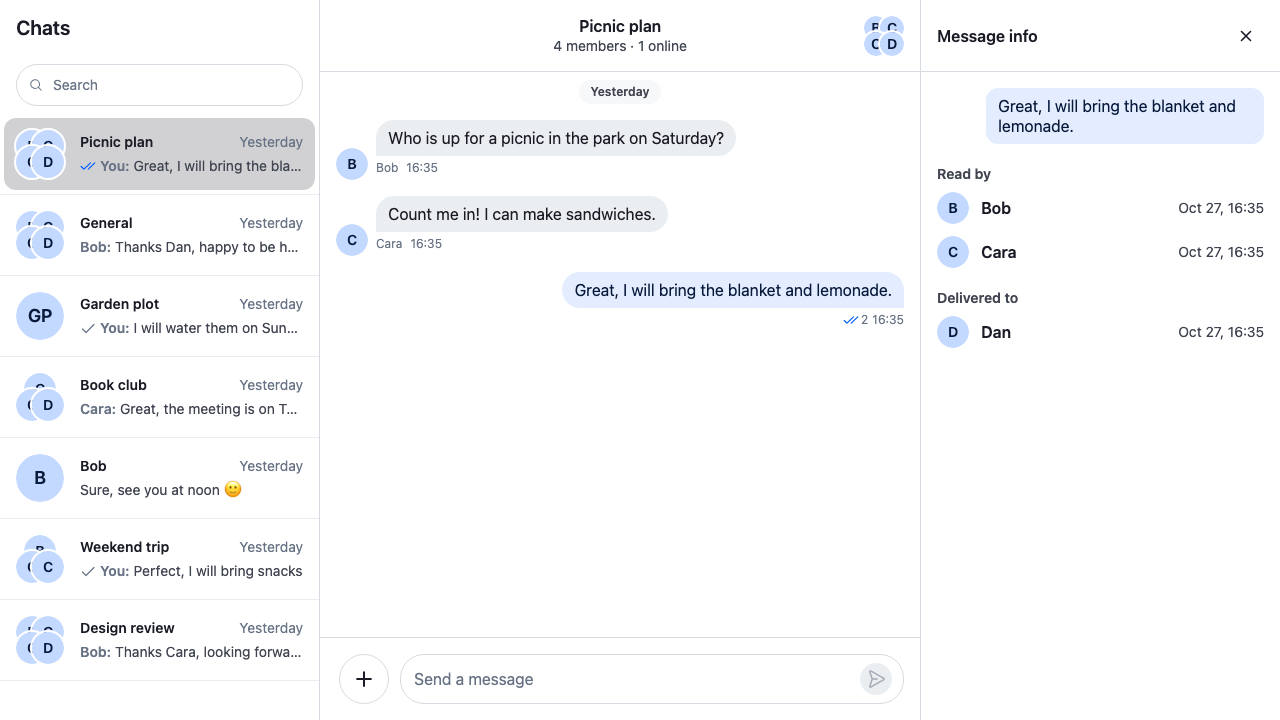
Approach: Compose. Choosing where to start explains the approaches.
Starts from: the base app, with its side panel. The page shows only what the recipe adds: the panel's body and the action that opens it.
Best practices
- Ask
channel.messageReceiptsTrackerwho read or received a message. It already turns every member's read state into answers per message, so the panel never compares timestamps itself. - Subscribe to
channel.messageReceiptsTracker.snapshotStoreand tochannel.state, so the lists and the times update while the panel is open. - Keep only the message's id, and read the message from
channel.messagePaginator. A copy taken when the panel opens never shows an edit. - Leave the user out of both lists. The tracker counts the user's own read position too. Sending a message doesn't move it; it moves when the message list marks the channel read, so the user shows up in Read by once that happens.
- Offer Info only on the user's own messages in the channel. Threads have no receipts yet.
Build the panel's body
The body reads the channel from the layout's channel slot, and the message and its receipts from that channel:
channel.messagePaginator.getItem()returns the message, as the channel holds it now;MessageReceiptsTracker.readersForMessage()returns the members who have read the message;MessageReceiptsTracker.deliveredNotReadForMessage()returns the members who have received it and not read it;channel.state.readgives each member's times:last_readfor Read by andlast_delivered_atfor Delivered to.
While another channel is open in the channel slot, MessageInfo closes the side panel. The section headings use the side panel's cookbook-side-panel__section-title class.
import { useEffect, useId } from "react";
import type {
  Channel,
  ChannelStateData,
  LocalMessage,
  MessageReceiptsSnapshot,
  PaginatorState,
  UserResponse,
} from "stream-chat";
import { convertTimestampToDate } from "stream-chat";
import { Avatar, useChatContext, useStateStore } from "stream-chat-react";
import { useSlotChannel } from "stream-chat-react/slot-layout";
import { useSidePanel } from "./SidePanel";
import "./MessageInfoPanel.css";

const revisionSelector = ({ revision }: MessageReceiptsSnapshot) => ({
  revision,
});
const readSelector = ({ read }: ChannelStateData) => ({ read });
const itemsSelector = ({ items }: PaginatorState<LocalMessage>) => ({ items });

// Day and 24-hour time, like the message list's timestamps. The panel's own text is English, so
// its dates are too. An app in another language passes its language here.
const timeFormat = new Intl.DateTimeFormat("en-US", {
  day: "numeric",
  hour: "2-digit",
  hourCycle: "h23",
  minute: "2-digit",
  month: "short",
});

type Receipt = { at?: Date; user: UserResponse };

const ReceiptList = ({
  receipts,
  title,
}: {
  receipts: Receipt[];
  title: string;
}) => {
  const headingId = useId();

  return (
    <section
      aria-labelledby={headingId}
      className="cookbook-message-info__section"
    >
      <h3 className="cookbook-side-panel__section-title" id={headingId}>
        {title}
      </h3>
      {receipts.length ? (
        <ul className="cookbook-message-info__list">
          {receipts.map(({ at, user }) => (
            <li className="cookbook-message-info__row" key={user.id}>
              <Avatar
                imageUrl={user.image}
                size="md"
                userName={user.name ?? user.id}
              />
              <span className="cookbook-message-info__name">
                {user.name ?? user.id}
              </span>
              {at && (
                <time
                  className="cookbook-message-info__time"
                  dateTime={at.toISOString()}
                >
                  {timeFormat.format(at)}
                </time>
              )}
            </li>
          ))}
        </ul>
      ) : (
        <p className="cookbook-message-info__empty">Nobody yet</p>
      )}
    </section>
  );
};

type ReceiptsProps = { channel: Channel; messageId: string };

/** The message and its receipts, read from the channel, so an edit or a new receipt shows. */
const Receipts = ({ channel, messageId }: ReceiptsProps) => {
  const { client } = useChatContext();
  const tracker = channel.messageReceiptsTracker;
  // Re-renders whenever the channel's messages change, so an edited text shows.
  useStateStore(channel.messagePaginator.state, itemsSelector);
  // Re-renders whenever someone's read or delivered position moves.
  useStateStore(tracker.snapshotStore, revisionSelector);
  // The times come from each member's read state.
  const { read } = useStateStore(channel.state, readSelector);

  const message = channel.messagePaginator.getItem(messageId);
  if (!message) return null;

  const ref = { msgId: message.id, timestamp: message.created_at };
  const isOther = (user: UserResponse) => user.id !== client.userId;

  const readBy = tracker
    .readersForMessage(ref)
    .filter(isOther)
    .map((user) => ({
      at: convertTimestampToDate(read[user.id]?.last_read),
      user,
    }));
  const deliveredTo = tracker
    .deliveredNotReadForMessage(ref)
    .filter(isOther)
    .map((user) => ({
      at: convertTimestampToDate(read[user.id]?.last_delivered_at),
      user,
    }));

  return (
    <div className="cookbook-message-info">
      <p className="cookbook-message-info__message">{message.text}</p>
      <ReceiptList receipts={readBy} title="Read by" />
      <ReceiptList receipts={deliveredTo} title="Delivered to" />
    </div>
  );
};

type MessageInfoProps = {
  /** The channel the message belongs to. */
  cid: string;
  messageId: string;
};

/**
 * The side panel's body for a message's receipts. It shows while the message's channel is open in
 * the `channel` slot, and closes the side panel when the user opens another channel.
 */
export const MessageInfo = ({ cid, messageId }: MessageInfoProps) => {
  const channel = useSlotChannel({ slot: "channel" });
  const { closeSidePanel } = useSidePanel();
  const isMessageChannelOpen = channel?.cid === cid;

  useEffect(() => {
    if (!isMessageChannelOpen) closeSidePanel();
  }, [closeSidePanel, isMessageChannelOpen]);

  if (!channel || !isMessageChannelOpen) return null;
  return <Receipts channel={channel} messageId={messageId} />;
};@layer stream-overrides {
.cookbook-message-info {
display: flex;
flex-direction: column;
gap: var(--str-chat__spacing-lg);
padding: var(--str-chat__spacing-md);
}
.cookbook-message-info__message {
align-self: flex-end;
max-width: 85%;
margin: 0;
padding: var(--str-chat__spacing-xs) var(--str-chat__spacing-sm);
border-radius: var(--str-chat__radius-lg);
background: var(--str-chat__chat-bg-outgoing);
color: var(--str-chat__chat-text-outgoing);
font: var(--str-chat__font-body-default);
}
.cookbook-message-info__list {
display: grid;
gap: var(--str-chat__spacing-sm);
margin: 0;
padding: 0;
list-style: none;
}
.cookbook-message-info__row {
display: flex;
align-items: center;
gap: var(--str-chat__spacing-sm);
}
.cookbook-message-info__name {
flex: 1;
min-width: 0;
font: var(--str-chat__font-body-emphasis);
}
.cookbook-message-info__time,
.cookbook-message-info__empty {
margin: 0;
color: var(--str-chat__text-secondary);
font: var(--str-chat__font-caption-default);
}
}Add the Info action
The action is one more item in the message action set, placed just above Delete. It renders nothing on other people's messages and on thread replies. On click it opens the side panel with the message's ids and closes the menu. A thread open beside the channel stays open:
import type { PropsWithChildren } from "react";
import type { MessageActionSetItem } from "stream-chat-react";
import {
  ContextMenuButton,
  defaultMessageActionSet,
  MessageActions,
  useComponentContextIcons,
  useContextMenuContext,
  useMessageContext,
  WithComponents,
} from "stream-chat-react";
import { useSidePanel } from "./SidePanel";
import { MessageInfo } from "./MessageInfoPanel";

const MessageInfoAction = () => {
  const { IconInfo } = useComponentContextIcons();
  const { closeMenu } = useContextMenuContext();
  const { isMyMessage, message } = useMessageContext();
  const { openSidePanel } = useSidePanel();

  // Only the user's own messages, and only in the channel: threads have no receipts yet.
  if (!isMyMessage() || message.parent_id) return null;

  return (
    <ContextMenuButton
      Icon={IconInfo}
      onClick={() => {
        // Only the ids: the panel reads the message from the channel, so it stays current.
        openSidePanel({
          body: <MessageInfo cid={message.cid} messageId={message.id} />,
          id: `message-info:${message.id}`,
          title: "Message info",
        });
        closeMenu();
      }}
    >
      Info
    </ContextMenuButton>
  );
};

// Declared once: the base filter recomputes whenever it gets a new list. Info goes just above
// Delete, so the destructive action stays last.
const infoAction: MessageActionSetItem = {
  Component: MessageInfoAction,
  placement: "dropdown",
  type: "info",
};
const messageActionSet = defaultMessageActionSet.flatMap((item) =>
  "type" in item && item.type === "delete" ? [infoAction, item] : [item],
);

const MessageActionsWithInfo = () => (
  <MessageActions messageActionSet={messageActionSet} />
);

const overrides = { MessageActions: MessageActionsWithInfo };

export const WithMessageInfoAction = ({ children }: PropsWithChildren) => (
  <WithComponents overrides={overrides}>{children}</WithComponents>
);
The "more" button has no type, so the check reads type only on items that have one. Custom message actions explains the action set.
Wrap ChatView in the action. The base app's channels view already renders the side panel:
// Inside Chat and SidePanelProvider:
<WithMessageInfoAction>
  <ChatView layouts={layouts} views={{ channels: <ChannelsView /> }} />
</WithMessageInfoAction>
How it works
Example
The user sends "Great, I will bring the blanket and lemonade." in Picnic plan, with Bob, Cara and Dan:
- Dan's, Bob's and Cara's apps receive the message and report it delivered. The server sends
message.delivered, which moves theirlast_delivered_atinchannel.state.read. - Bob and Cara open the channel. Their
last_readmoves past the message. - The user picks Info in the message's menu.
useSidePanel().openSidePanel()showsMessageInfofor the message in the side panel, in place of anything it showed. MessageReceiptsTracker.readersForMessage()returns Bob and Cara, and the user as well if the message list has marked the channel read since the message was sent; the panel leaves the user out either way.MessageReceiptsTracker.deliveredNotReadForMessage()returns Dan.- Dan opens the channel later. His read position moves, the tracker publishes a new snapshot, and Dan moves from Delivered to into Read by while the panel is open.
- The tracker compares the message's
created_atwith each member's read and delivered positions, so a member who read a later message counts as having read this one too. - The time under Read by is
last_read: when the member last read the channel, which can be later than when they first saw this message. The server keeps one read position per member and channel, not a time per message. Delivered to showslast_delivered_atthe same way. - With delivery events off for the channel type, nobody is ever only delivered: delivered follows read, and Delivered to stays empty. Read state, unread and receipts lists the switches.
- The body re-renders when
channel.messagePaginatorpublishes new messages, so an edited text shows while the panel is open. - Opening another channel closes the side panel, and it stays closed when the user comes back to the message's channel.
Related
- Read state, unread and receipts: how delivery and read receipts work end to end.
- Message receipts tracker: every method of
channel.messageReceiptsTrackerand its limits. - Channel and channel state: the fields of each
channel.state.readentry. - Actions: the message action set.
- Workspace with ChatView: views and slots.
- Custom message actions: more actions of your own.