


GIF picker
The SDK has no GIF picker. This recipe builds one.
What you'll build
- A GIF button next to the composer's input
- A GIF picker with search, trending GIFs and a scrolling grid
- The picked GIF previewed above the input
- Sent GIFs shown like ones sent with /giphy
Preview
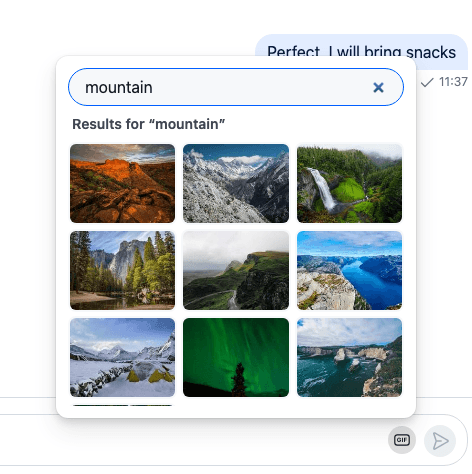
Approach: Replace one part and Compose. Choosing where to start explains the approaches.
Starts from: the base app. The page shows only what the recipe adds.
The recipe replaces two ComponentContext keys: AdditionalMessageComposerActions, the area after the input, gets the GIF button, and AttachmentPreviewList gets a preview for a giphy attachment. The search is a BaseSearchSource of its own, the same kind the Search dialog uses, and the GIF goes into the composer's attachment manager without an upload.
Best practices
- Put the button in
AdditionalMessageComposerActionsand render the default part next to it, so the emoji picker stays. It's the one place in the default composer meant for extra controls, and the layout doesn't change. - Search with a search source.
BaseSearchSourcealready debounces the text, cancels a request that a newer one replaces, and pages by offset, so the picker only renders its state. - Send the GIF by URL as a
giphyattachment withthumb_url,titleandattachment.giphy. Nothing is uploaded, and the message list renders it with its<Giphy/>component. - Give the attachment only a
localMetadata.id. With no file and nouploadState, the composer sends it as it is. - Don't set
title_linkorog_scrape_urlon it. Either one makes it a link preview, which the composer leaves out of its previews. - Keep the API key out of the code. Read it from the environment, and in production proxy the requests through your own server. Giphy also asks apps to show its attribution next to results, so the picker shows "Powered by GIPHY" under the grid while the results come from Giphy.
A GIF search source
A GIF is an id, a title and its renditions. attachment.giphy holds seven renditions, typed as Images in stream-chat, so toImages() turns whatever the source returns into that shape:
import type {
  GiphyVersions,
  ImageData,
  Images,
  LocalAttachment,
} from "stream-chat";

/** One GIF the picker offers: its id, a title for screen readers, and its renditions. */
export type Gif = {
  id: string;
  images: Images;
  title: string;
};

/**
 * The renditions in the shape `attachment.giphy` takes: the seven versions the SDK knows, with
 * every field a string. A missing field becomes an empty string.
 */
export const toImages = (
  versions: Partial<Record<GiphyVersions, Partial<ImageData>>>,
): Images => {
  const imageData = (version: GiphyVersions): ImageData => {
    const {
      frames = "",
      height = "",
      size = "",
      url = "",
      width = "",
    } = versions[version] ?? {};
    return { frames, height, size, url, width };
  };
  return {
    fixed_height: imageData("fixed_height"),
    fixed_height_downsampled: imageData("fixed_height_downsampled"),
    fixed_height_still: imageData("fixed_height_still"),
    fixed_width: imageData("fixed_width"),
    fixed_width_downsampled: imageData("fixed_width_downsampled"),
    fixed_width_still: imageData("fixed_width_still"),
    original: imageData("original"),
  };
};

/**
 * The attachment the composer adds for a GIF. It has nothing to upload, so it needs only an id.
 * The message list loads a rendition from `attachment.giphy`, and `thumb_url` when that rendition is missing.
 */
export const toGiphyAttachment = (gif: Gif): LocalAttachment => ({
  custom: {},
  giphy: gif.images,
  localMetadata: { id: crypto.randomUUID() },
  thumb_url: gif.images.fixed_height.url,
  title: gif.title,
  type: "giphy",
});
fetchGiphyPage() asks Giphy's API for one page: its search for a search text, its trending GIFs for an empty one. The signal lets the source cancel the request:
import type { GiphyVersions, ImageData } from "stream-chat";
import type { Gif } from "./gif";
import { toImages } from "./gif";

/** The part of a Giphy API GIF object the picker reads. */
type GiphyGif = {
  id: string;
  images: Partial<Record<GiphyVersions, Partial<ImageData>>>;
  title: string;
};

export type GifPage = { limit: number; offset: number };

/**
 * One page of Giphy's search results, or of its trending GIFs when `searchQuery` is empty.
 * `signal` cancels the request when a newer query starts.
 */
export const fetchGiphyPage = async ({
  apiKey,
  page,
  searchQuery,
  signal,
}: {
  apiKey: string;
  page: GifPage;
  searchQuery: string;
  signal?: AbortSignal;
}): Promise<Gif[]> => {
  const params = new URLSearchParams({
    api_key: apiKey,
    limit: String(page.limit),
    offset: String(page.offset),
    rating: "g",
  });
  if (searchQuery) params.set("q", searchQuery);
  const endpoint = searchQuery ? "search" : "trending";

  const response = await fetch(
    `https://api.giphy.com/v1/gifs/${endpoint}?${params}`,
    {
      signal,
    },
  );
  if (!response.ok) throw new Error(`Giphy answered ${response.status}`);
  const { data } = (await response.json()) as { data: GiphyGif[] };

  return data.map(({ id, images, title }) => ({
    id,
    images: toImages(images),
    title,
  }));
};
GifSearchSource extends BaseSearchSource. Its BaseSearchSource.query() returns one page as { items }, so the source pages by offset: it moves gifSource.offset forward by the number of items, and gifSource.hasNext stays true while a page comes back full. allowEmptySearchString makes an empty search text a query too, the one for trending GIFs:
import { BaseSearchSource } from "stream-chat";
import type { SearchQueryOptions, SearchSourceOptions } from "stream-chat";
import { searchCatalogue } from "./catalogue";
import type { Gif } from "./gif";
import { fetchGiphyPage } from "./giphy";

/**
 * Searches GIFs: Giphy's search, or its trending GIFs while the search text is empty. Without an
 * API key, it searches the local catalogue instead.
 */
export class GifSearchSource extends BaseSearchSource<Gif> {
  readonly type = "gifs";
  private readonly apiKey?: string;

  constructor({
    apiKey,
    ...options
  }: SearchSourceOptions & { apiKey?: string } = {}) {
    // An empty search text is a query too: it loads the trending GIFs.
    super({ allowEmptySearchString: true, ...options });
    this.apiKey = apiKey;
  }

  protected async query(
    searchQuery: string,
    { signal }: SearchQueryOptions = {},
  ) {
    const page = { limit: this.pageSize, offset: this.offset ?? 0 };
    const items = this.apiKey
      ? await fetchGiphyPage({ apiKey: this.apiKey, page, searchQuery, signal })
      : searchCatalogue(searchQuery, page);
    return { items };
  }

  protected filterQueryResults(items: Gif[]) {
    return items;
  }
}searchCatalogue(), the source's answer without an API key, is in Without an API key. Search sources explains the contract the source implements.
The GIF button and the picker
AdditionalMessageComposerActions is the area after the composer's input. The override renders the SDK's default first, which holds the emoji picker, then the GIF button. The button opens the picker with DialogAnchor, above itself:
import { useId, useState } from "react";
import type { TextComposerState } from "stream-chat";
import {
  AdditionalMessageComposerActions,
  Button,
  createIcon,
  DialogAnchor,
  useDialog,
  useDialogIsOpen,
  useMessageComposerController,
  useStateStore,
} from "stream-chat-react";
import type { Gif } from "./gif";
import { toGiphyAttachment } from "./gif";
import { GifPicker } from "./GifPicker";

const IconGif = createIcon(
  "IconGif",
  <>
    <rect
      fill="none"
      height="13"
      rx="3"
      stroke="currentColor"
      strokeWidth="1.5"
      width="18"
      x="1"
      y="3.5"
    />
    <text
      fill="currentColor"
      fontFamily="inherit"
      fontSize="7.5"
      fontWeight="700"
      textAnchor="middle"
      x="10"
      y="12.7"
    >
      GIF
    </text>
  </>,
);

const commandSelector = ({ command }: TextComposerState) => ({ command });

/** The GIF button: opens the picker above itself; picking a GIF adds it to the composer. */
export const GifButton = () => {
  // The channel's and the thread's composer each have a button, so each needs its own dialog.
  const dialogId = `gif-picker-${useId()}`;
  const dialog = useDialog({ id: dialogId });
  const isOpen = useDialogIsOpen(dialogId);
  const [button, setButton] = useState<HTMLButtonElement | null>(null);
  const messageComposer = useMessageComposerController();
  const { command } = useStateStore(
    messageComposer.textComposer.state,
    commandSelector,
  );

  // A command takes the whole composer, as the default actions next to the input assume.
  if (command) return null;

  const pick = (gif: Gif) => {
    messageComposer.attachmentManager.upsertAttachments([
      toGiphyAttachment(gif),
    ]);
    dialog.close();
  };

  return (
    <>
      <Button
        appearance="ghost"
        aria-expanded={isOpen}
        aria-label="Add a GIF"
        circular
        className="cookbook-gif-button"
        onClick={() => dialog.toggle()}
        ref={setButton}
        size="sm"
        variant="secondary"
      >
        <IconGif />
      </Button>
      <DialogAnchor
        aria-label="Choose a GIF"
        id={dialogId}
        offset={8}
        placement="top-end"
        referenceElement={button}
        // Out of the tab order, so opening the picker focuses its search field.
        tabIndex={-1}
        trapFocus
      >
        <GifPicker onPick={pick} />
      </DialogAnchor>
    </>
  );
};

/** The area after the composer's input: the SDK's default, which holds the emoji picker, and the GIF button. */
export const ComposerActionsWithGifButton = () => (
  <>
    <AdditionalMessageComposerActions />
    <GifButton />
  </>
);
useDialog() and DialogAnchor take the same id, so they resolve to the same dialog manager. The id comes from useId(), because the channel's composer and the thread's each render a button. trapFocus keeps the focus in the picker while it's open. DialogAnchor gives the focus back to the button when the picker closes, and closes it on Escape and on a click outside. The picker's root is out of the tab order, tabIndex={-1}, so opening it focuses the search field rather than the picker itself. Dialogs lists the DialogAnchor props.
The button hides itself while a command is active, as the default part does: a command such as /giphy takes the whole composer.
Register the button and the preview from Adding the GIF to the composer:
import type { PropsWithChildren } from "react";
import { WithComponents } from "stream-chat-react";
import { GifAttachmentPreviewList } from "./GifAttachmentPreview";
import { ComposerActionsWithGifButton } from "./GifButton";

// Declared once, so WithComponents gets the same object on every render.
const overrides = {
  AdditionalMessageComposerActions: ComposerActionsWithGifButton,
  AttachmentPreviewList: GifAttachmentPreviewList,
};

export const WithGifPicker = ({ children }: PropsWithChildren) => (
  <WithComponents overrides={overrides}>{children}</WithComponents>
);
Wrap the channel in WithGifPicker. The base app passes WithGifPicker as the recipe's wrapper, around the whole chat view; GifChannel is the same wrapper around a channel of your own:
import type { Channel as StreamChannel } from "stream-chat";
import { Channel, MessageComposer, MessageList } from "stream-chat-react";
import { WithGifPicker } from "./WithGifPicker";

export const GifChannel = ({ channel }: { channel: StreamChannel }) => (
  <WithGifPicker>
    <Channel channel={channel}>
      <MessageList />
      <MessageComposer />
    </Channel>
  </WithGifPicker>
);
A thread's composer inside WithGifPicker gets the button too.
Search, trending and loading more
The picker creates its source when it opens, so every opening starts with the trending GIFs. It reads the source's state with useStateStore and a selector at module scope:
import type { KeyboardEvent } from "react";
import { useEffect, useRef, useState } from "react";
import type { SearchSourceState } from "stream-chat";
import { useStateStore } from "stream-chat-react";
import type { Gif } from "./gif";
import { GifSearchSource } from "./GifSearchSource";
import "./GifPicker.css";

// The grid's column count, the same as `grid-template-columns` in GifPicker.css.
const COLUMNS = 3;

// With a key the results come from Giphy, which asks apps to credit it next to them. Without one
// they come from the recipe's own catalogue, which needs no credit.
const GIPHY_API_KEY: string | undefined = import.meta.env.VITE_GIPHY_API_KEY;

const sourceSelector = ({
  hasNext,
  isLoading,
  items,
  lastQueryError,
  searchQuery,
}: SearchSourceState<Gif>) => ({
  hasNext,
  isLoading,
  items,
  lastQueryError,
  searchQuery,
});

/**
 * A search field over a grid of GIFs: trending while the field is empty, results for its text
 * otherwise. The next page loads when the end of the grid scrolls into view. The arrow keys move
 * from the field into the grid and around it, and Enter picks the focused GIF.
 */
export const GifPicker = ({ onPick }: { onPick: (gif: Gif) => void }) => {
  // One source per opened picker, so every opening starts with the trending GIFs.
  const [source] = useState(
    () =>
      new GifSearchSource({
        apiKey: GIPHY_API_KEY,
        debounceMs: 300,
        pageSize: 12,
      }),
  );
  const { hasNext, isLoading, items, lastQueryError, searchQuery } =
    useStateStore(source.state, sourceSelector);
  const [text, setText] = useState("");
  const [focusedIndex, setFocusedIndex] = useState(0);
  const inputRef = useRef<HTMLInputElement>(null);
  const gridRef = useRef<HTMLUListElement>(null);
  const scrollerRef = useRef<HTMLDivElement>(null);
  const endRef = useRef<HTMLDivElement>(null);

  useEffect(() => {
    source.activate();
    void source.search("");
    return () => source.cancelScheduledQuery();
  }, [source]);

  // Loads the next page once the end of the grid is in view. It waits while the typed text hasn't
  // been searched yet: the next page and a new search share one debounce, so loading a page then
  // would drop the new search.
  useEffect(() => {
    const end = endRef.current;
    if (!end || !items?.length || !hasNext || text !== searchQuery) return;
    const observer = new IntersectionObserver(
      ([entry]) => {
        if (entry.isIntersecting) void source.search();
      },
      { root: scrollerRef.current, rootMargin: "0px 0px 120px 0px" },
    );
    observer.observe(end);
    return () => observer.disconnect();
  }, [hasNext, items, searchQuery, source, text]);

  const focusTile = (index: number) => {
    const tiles =
      gridRef.current?.querySelectorAll<HTMLButtonElement>("button");
    const tile = tiles?.[Math.max(0, Math.min(index, tiles.length - 1))];
    tile?.focus();
  };

  const handleInputKeyDown = (event: KeyboardEvent<HTMLInputElement>) => {
    if (event.key !== "ArrowDown" || !items?.length) return;
    event.preventDefault();
    focusTile(0);
  };

  const handleGridKeyDown = (event: KeyboardEvent<HTMLUListElement>) => {
    const steps: Record<string, number> = {
      ArrowDown: COLUMNS,
      ArrowLeft: -1,
      ArrowRight: 1,
      ArrowUp: -COLUMNS,
    };
    const step = steps[event.key];
    if (step === undefined) return;
    event.preventDefault();
    const next = focusedIndex + step;
    if (next < 0) inputRef.current?.focus();
    else focusTile(next);
  };

  const status = lastQueryError
    ? "Couldn't load GIFs."
    : items?.length === 0
      ? `No GIFs for “${searchQuery}”.`
      : !items && isLoading
        ? "Loading…"
        : undefined;

  return (
    <div className="cookbook-gif-picker">
      <input
        aria-label="Search GIFs"
        className="cookbook-gif-picker__input"
        onChange={(event) => {
          setText(event.target.value);
          setFocusedIndex(0);
          void source.search(event.target.value);
        }}
        onKeyDown={handleInputKeyDown}
        placeholder="Search GIFs"
        ref={inputRef}
        type="search"
        value={text}
      />
      <div className="cookbook-gif-picker__heading">
        {searchQuery ? `Results for “${searchQuery}”` : "Trending"}
      </div>
      <div className="cookbook-gif-picker__scroller" ref={scrollerRef}>
        {/* Always rendered, so screen readers announce a status when its text changes. */}
        <p aria-live="polite" className="cookbook-gif-picker__status">
          {status}
        </p>
        {!!items?.length && (
          <ul
            aria-label="GIFs"
            className="cookbook-gif-picker__grid"
            onKeyDown={handleGridKeyDown}
            ref={gridRef}
          >
            {items.map((gif, index) => (
              <li key={gif.id}>
                <button
                  // Giphy titles are often empty.
                  aria-label={gif.title || "GIF"}
                  className="cookbook-gif-picker__tile"
                  onClick={() => onPick(gif)}
                  onFocus={() => setFocusedIndex(index)}
                  // One tile in the tab order: the arrow keys move between the others.
                  tabIndex={index === focusedIndex ? 0 : -1}
                  type="button"
                >
                  <img
                    alt=""
                    className="cookbook-gif-picker__image"
                    loading="lazy"
                    src={gif.images.fixed_width_downsampled.url}
                  />
                </button>
              </li>
            ))}
          </ul>
        )}
        {isLoading && !!items?.length && (
          <p className="cookbook-gif-picker__status">Loading more…</p>
        )}
        <div ref={endRef} />
      </div>
      {!!GIPHY_API_KEY && (
        <p className="cookbook-gif-picker__attribution">Powered by GIPHY</p>
      )}
    </div>
  );
};@layer stream-overrides {
.cookbook-gif-picker {
display: flex;
flex-direction: column;
gap: var(--str-chat__spacing-xs);
width: 360px;
padding: var(--str-chat__spacing-sm);
border-radius: var(--str-chat__radius-lg);
background: var(--str-chat__background-core-elevation-1);
box-shadow: var(--str-chat__box-shadow-3);
color: var(--str-chat__text-primary);
}
.cookbook-gif-picker__input {
width: 100%;
padding: var(--str-chat__spacing-xs) var(--str-chat__spacing-md);
border: 1px solid var(--str-chat__border-core-default);
border-radius: var(--str-chat__radius-full);
background: var(--str-chat__background-core-surface-subtle);
color: var(--str-chat__text-primary);
font: var(--str-chat__font-body-default);
}
.cookbook-gif-picker__input:focus-visible {
border-color: var(--str-chat__accent-primary);
outline: none;
}
.cookbook-gif-picker__heading {
padding-inline: var(--str-chat__spacing-xxs);
color: var(--str-chat__text-secondary);
font: var(--str-chat__font-caption-emphasis);
}
.cookbook-gif-picker__scroller {
height: 264px;
overflow-y: auto;
}
.cookbook-gif-picker__grid {
display: grid;
grid-template-columns: repeat(3, 1fr);
gap: var(--str-chat__spacing-xxs);
margin: 0;
padding: 0;
list-style: none;
}
.cookbook-gif-picker__tile {
display: block;
width: 100%;
padding: 0;
border: 2px solid transparent;
border-radius: var(--str-chat__radius-md);
background: var(--str-chat__background-core-surface-subtle);
overflow: hidden;
cursor: pointer;
}
.cookbook-gif-picker__tile:hover,
.cookbook-gif-picker__tile:focus-visible {
border-color: var(--str-chat__accent-primary);
outline: none;
}
.cookbook-gif-picker__image {
display: block;
width: 100%;
aspect-ratio: 4 / 3;
object-fit: cover;
}
.cookbook-gif-picker__status {
margin: 0;
padding: var(--str-chat__spacing-sm);
color: var(--str-chat__text-secondary);
font: var(--str-chat__font-caption-default);
text-align: center;
}
/* The status stays in the page while it has nothing to say, so it takes no room then. */
.cookbook-gif-picker__status:empty {
padding: 0;
}
.cookbook-gif-picker__attribution {
margin: 0;
color: var(--str-chat__text-tertiary);
font: var(--str-chat__font-caption-default);
text-align: end;
}
}- Trending. On open,
GifSearchSource.search('')queries with an empty text, whichallowEmptySearchStringallows. - Search. Every change in the field calls
GifSearchSource.search()with the text. The source waits 300 ms after the last keystroke, clears the old results and cancels a request still in flight.searchQueryis the text of the results on screen, so the heading never names text that hasn't been searched yet. - Loading more. An
IntersectionObserverwatches an empty element after the grid. When it scrolls into view,GifSearchSource.search()with no text loads the next page atgifSource.offset, and the source appends it togifSource.items. It does nothing while a page is loading or after the last one. - Attribution. With an API key, a "Powered by GIPHY" line, text only, sits under the grid, as Giphy asks. The local catalogue needs no credit, so without a key the line isn't rendered.
- Keyboard. ArrowDown in the field moves the focus to the first GIF. In the grid, the arrow keys move by one GIF or by one row, ArrowUp from the first row goes back to the field, and Enter or Space picks the focused GIF. Only the focused GIF is in the tab order, so Tab leaves the grid in one step.
The observer waits while the typed text differs from searchQuery. A new search and the next page go through the same debounce, so loading a page in that moment would replace the search that's still waiting.
Adding the GIF to the composer
Picking a GIF calls AttachmentManager.upsertAttachments() with toGiphyAttachment(gif) from src/gif.ts, and closes the picker. The attachment sets the fields the message list's <Giphy/> component reads:
type: 'giphy', which sends it to<Giphy/>instead of the image gallery;title, its accessible name: "Animated GIF: Snowy peaks";attachment.giphy, the renditions.<Giphy/>loads the one thatgiphyVersionon<Attachment/>names,fixed_heightby default, and takes the image's width and height from it;thumb_url, the image<Giphy/>loads whenattachment.giphylacks that rendition.toGiphyAttachment()sets it to thefixed_heightURL.
A GIF attachment, as the message carries it:
{
  "type": "giphy",
  "title": "Snowy peaks",
  "thumb_url": "https://picsum.photos/id/29/267/200",
  "giphy": {
    "fixed_height": {
      "url": "https://picsum.photos/id/29/267/200",
      "width": "267",
      "height": "200",
      "frames": "1",
      "size": ""
    }
  },
  "custom": {}
}
The other six renditions under giphy have the same fields. Nothing is uploaded, so localMetadata holds only an id, with no file and no uploadState. The composer sends such an attachment as it is, also after an edit or from a draft. The localMetadata.id is new for every pick, so the preview can remove it.
The composer's AttachmentPreviewList has no preview for a giphy attachment and sends it to its UnsupportedAttachmentPreview, which reads "Unsupported attachment". This one shows the GIF with a remove button, and passes every other attachment to the default:
import { isGiphyAttachment } from "stream-chat";
import type { UnsupportedAttachmentPreviewProps } from "stream-chat-react";
import {
  AttachmentPreviewList,
  RemoveAttachmentPreviewButton,
  UnsupportedAttachmentPreview,
} from "stream-chat-react";
import "./GifAttachmentPreview.css";

const GifOrUnsupportedPreview = (props: UnsupportedAttachmentPreviewProps) => {
  const { attachment, removeAttachments } = props;

  if (!isGiphyAttachment(attachment)) {
    return <UnsupportedAttachmentPreview {...props} />;
  }

  return (
    <div className="cookbook-gif-preview">
      <img
        alt={attachment.title || "GIF"}
        className="cookbook-gif-preview__image"
        src={attachment.thumb_url}
      />
      <span className="cookbook-gif-preview__badge">GIF</span>
      <RemoveAttachmentPreviewButton
        aria-label="Remove GIF"
        onClick={() => removeAttachments([attachment.localMetadata.id])}
      />
    </div>
  );
};

export const GifAttachmentPreviewList = () => (
  <AttachmentPreviewList
    UnsupportedAttachmentPreview={GifOrUnsupportedPreview}
  />
);@layer stream-overrides {
.cookbook-gif-preview {
position: relative;
width: 96px;
height: 72px;
border-radius: var(--str-chat__radius-lg);
background: var(--str-chat__background-core-surface-subtle);
}
.cookbook-gif-preview__image {
display: block;
width: 100%;
height: 100%;
border-radius: var(--str-chat__radius-lg);
object-fit: cover;
}
.cookbook-gif-preview__badge {
position: absolute;
inset-block-end: var(--str-chat__spacing-xxs);
inset-inline-start: var(--str-chat__spacing-xxs);
padding: 0 var(--str-chat__spacing-xxs);
border-radius: var(--str-chat__radius-sm);
background: var(--str-chat__background-core-surface-card);
color: var(--str-chat__text-primary);
font: var(--str-chat__font-caption-emphasis);
}
}The GIF in the composer

On send, the composer's attachments middleware puts the attachment into the message without its localMetadata, and the message list renders it with <Giphy/>, which adds a "GIPHY" badge to every giphy attachment.
Without an API key
GifSearchSource.query() has one switch: with an API key it calls Giphy, without one it searches a local catalogue. The picker passes import.meta.env.VITE_GIPHY_API_KEY, so the key comes from the environment, for example a .env.local file that isn't committed:
VITE_GIPHY_API_KEY=YOUR_GIPHY_API_KEYWithout the variable, the picker offers still photos from picsum.photos, with a title and a few tags each. The search matches each word of the text against them, so it works without a Giphy key, and the screenshots on this page come from it. Every page goes through the same source, debounce and offset paging as Giphy's:
import type { Gif } from "./gif";
import { toImages } from "./gif";
import type { GifPage } from "./giphy";

/** A picsum.photos still at a given size. */
const still = (photoId: number, width: number, height: number) => ({
  frames: "1",
  height: String(height),
  size: "",
  url: `https://picsum.photos/id/${photoId}/${width}/${height}`,
  width: String(width),
});

/** Every rendition of the same still, in the sizes Giphy uses. */
const stillImages = (photoId: number) =>
  toImages({
    fixed_height: still(photoId, 267, 200),
    fixed_height_downsampled: still(photoId, 267, 200),
    fixed_height_still: still(photoId, 267, 200),
    fixed_width: still(photoId, 200, 150),
    fixed_width_downsampled: still(photoId, 200, 150),
    fixed_width_still: still(photoId, 200, 150),
    original: still(photoId, 800, 600),
  });

type CatalogueEntry = Gif & { tags: string[] };

const entry = (
  photoId: number,
  title: string,
  tags: string[],
): CatalogueEntry => ({
  id: `picsum-${photoId}`,
  images: stillImages(photoId),
  tags,
  title,
});

/** The GIFs the picker offers without an API key: still photos, matched by title and tags. */
export const catalogue: CatalogueEntry[] = [
  entry(1016, "Red canyon", ["canyon", "mountain", "rock", "desert", "travel"]),
  entry(29, "Snowy peaks", ["mountain", "snow", "winter", "travel"]),
  entry(1039, "Waterfall", ["waterfall", "water", "mountain", "nature"]),
  entry(1043, "Green valley", ["valley", "mountain", "nature"]),
  entry(28, "Forest path", ["forest", "tree", "nature"]),
  entry(1018, "Green hills", ["hill", "mountain", "travel", "nature"]),
  entry(225, "Cup of tea", ["tea", "drink", "cozy"]),
  entry(312, "Honey jar", ["honey", "food", "sweet"]),
  entry(488, "Salad bowl", ["salad", "food", "lunch"]),
  entry(1080, "Strawberries", ["strawberry", "fruit", "food", "sweet"]),
  entry(237, "Puppy", ["dog", "puppy", "animal", "cute"]),
  entry(1025, "Dog in a blanket", ["dog", "animal", "cozy", "cute"]),
  entry(1015, "River bend", ["river", "water", "mountain", "travel"]),
  entry(1036, "Snowy camp", ["camp", "snow", "mountain", "winter"]),
  entry(13, "Pebble beach", ["beach", "sea", "water", "travel"]),
  entry(1084, "Walrus", ["walrus", "animal", "sea"]),
  entry(433, "Bear", ["bear", "animal", "nature"]),
  entry(1074, "Big cat", ["cat", "animal"]),
  entry(1002, "Earth from space", ["space", "earth", "wow"]),
  entry(1022, "Northern lights", ["sky", "mountain", "night", "wow", "winter"]),
  entry(1069, "Jellyfish", ["jellyfish", "sea", "animal"]),
  entry(102, "Raspberries", ["raspberry", "fruit", "food"]),
  entry(1050, "Sea cliffs", ["sea", "water", "mountain", "rock", "travel"]),
  entry(15, "Forest waterfall", ["waterfall", "water", "mountain", "forest"]),
];

/** One page of the catalogue: every entry for an empty query, else those matching it. */
export const searchCatalogue = (
  searchQuery: string,
  { limit, offset }: GifPage,
) => {
  const words = searchQuery.toLowerCase().split(/\s+/).filter(Boolean);
  const matches = catalogue.filter(({ tags, title }) => {
    const text = [title, ...tags].join(" ").toLowerCase();
    return words.every((word) => text.includes(word));
  });
  return matches.slice(offset, offset + limit).map(({ id, images, title }) => ({
    id,
    images,
    title,
  }));
};
A catalogue entry takes the same shape as a Giphy GIF, so the picker, the attachment and the message list don't know which one they got. To use another provider, replace fetchGiphyPage() with a function that returns Gif[] for a page.
How it works
Example
The user opens the Weekend trip channel and sends a GIF:
- The user clicks the GIF button.
useDialog()opens the picker in aDialogAnchorabove it, and the focus moves to the search field. - The picker creates a
GifSearchSourceand callsGifSearchSource.search(''). Itsquery()returns the first page of trending GIFs, anduseStateStorerenders them. - The user types "mountain". After 300 ms the source runs the search, and the heading reads "Results for “mountain”".
- The user scrolls to the end of the grid. The observer calls
GifSearchSource.search(), and the next page is appended. - The user presses ArrowDown and Enter.
AttachmentManager.upsertAttachments()adds agiphyattachment, with only alocalMetadata.id, and the picker closes, giving the focus back to the button. AttachmentPreviewListrenders the attachment withGifOrUnsupportedPreview.- The user sends. The attachments middleware puts the attachment into the message, and the message list renders it with
<Giphy/>.
The button and the preview are ComponentContext keys, so the channel's and the thread's composers get both. The picker keeps nothing between openings, and the composer owns the attachment once it's added.
Related
- Commands and Giphy: the
/giphycommand and its preview. - Search sources: the source contract, its state and when it queries.
- Search dialog: another picker built on search sources.
- Dialogs: dialog managers,
useDialog()andDialogAnchor. - MessageComposerContext: another part added to
AdditionalMessageComposerActions. - Product card: an attachment added without an upload, with its own picker and preview.
- Attachment previews: the composer's other previews.
- Image gallery: how the message list renders images, in a grid and a lightbox of your own.
- Giphy preview: the preview the
/giphycommand shows before sending, with Send, Shuffle and Cancel buttons of your own. - Attachments: the composer's attachment manager.