


Composer middleware
Writing a message takes a lot of processing: mentions, commands, link previews, uploads, polls and more. No single way of doing it fits every app. So a message composer builds its processing from middleware, small handlers that run one after another in chains. You compose the pipeline your app needs by adding, reordering or replacing those handlers.
Example
An app wants every message sent from a channel to carry the platform it was sent from, in message.custom.sent_from:
- The app adds a middleware to the composition chain, the chain that builds the message when the user sends it.
- The user sends "Hi". The chain runs, and the app's middleware adds
sent_from: "web"to the message. - The message goes out with
custom: { sent_from: "web" }.
Adding middleware shows the code.
Middleware and chains
A middleware is an object with an id and a handler for each event it handles. An event is something that happens in the composer and starts processing, such as onChange when the text changes or compose when the user sends. A handler receives the state the event works on, such as the text and the cursor, and four functions. It returns the result of calling one of them:
next(state)passes a changed state to the next middleware.forward()passes the state on unchanged.complete(state)stops the chain. The state it's given is the result.discard()stops the chain and drops the result. For a message, nothing is sent andMessageComposer.send()returns'nothing-to-send'. For a text change, the change isn't applied.
The state is a value made for one run of the chain, not the composer's own state. The composer builds it when the event happens, each handler passes on a new one, and the composer uses the one the chain ends with. The text composer saves it as its new state, and the composition chain sends it as the message. A discarded result changes nothing.
The composer keeps one chain of middleware for each kind of processing: text, composition, drafts, polls and uploads, as the table below shows. Each chain lives in a middleware executor, the object that holds the middleware in order, runs them for an event, and has the methods to add, reorder or replace them. When an event happens, the executor runs the chain's handlers for that event one after another, and skips any middleware without one. Each handler receives the state the one before it passed on, and the composer uses the state the chain ends with.
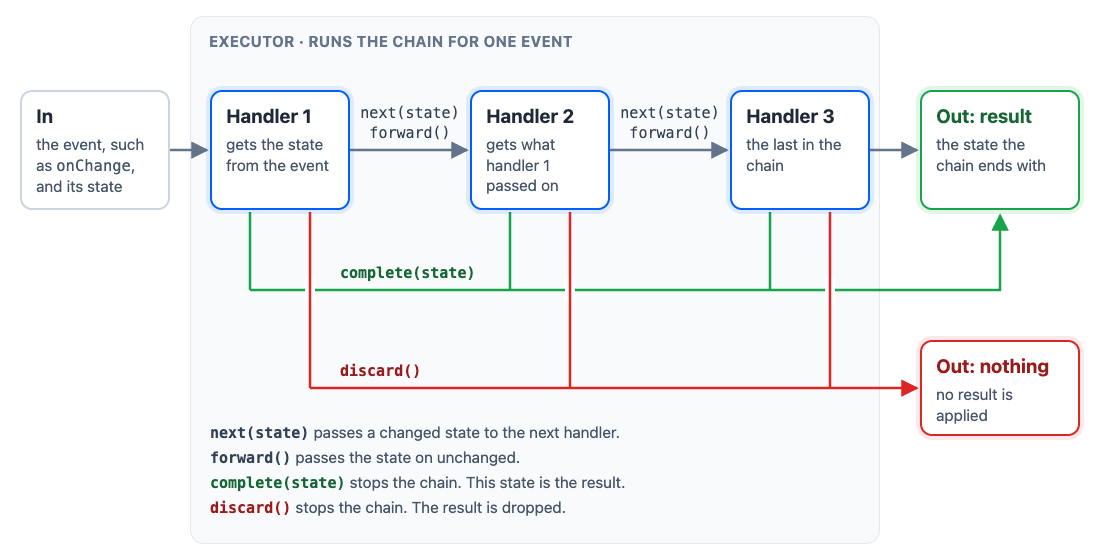
Example
When the user types "Hi @an", the text chain runs onChange: the pre-validation middleware forwards, the mentions middleware finds the @ trigger and completes with suggestions for "an", and the commands middleware never runs for that change.
A handler can be async. When the same chain starts again before an earlier run finished, for example on the next keystroke, the earlier run's result is dropped. The upload chains are the exception: they run once per file, side by side, and keep every result.
Chains in a composer
| Chain | Executor | Events | State | Runs when |
|---|---|---|---|---|
| Composition | composer.compositionMiddlewareExecutor |
compose |
{ message, localMessage, sendOptions } |
MessageComposer.send() or MessageComposer.update() builds the message |
| Drafts | composer.draftCompositionMiddlewareExecutor |
compose |
{ draft } |
MessageComposer.createDraft() builds the draft |
| Text | composer.textComposer.middlewareExecutor |
onChange, onSuggestionItemSelect |
the text composer's state, plus change.selectedSuggestion for a picked suggestion and effects |
the text changes (onChange), or the user picks a suggestion (onSuggestionItemSelect) |
| Before upload | composer.attachmentManager.preUploadMiddlewareExecutor |
prepare |
{ attachment } |
a file is added, before it uploads |
| After upload | composer.attachmentManager.postUploadMiddlewareExecutor |
postProcess |
{ attachment, error, response } |
an upload finishes or fails |
| Poll fields | composer.pollComposer.stateMiddlewareExecutor |
handleFieldChange, handleFieldBlur |
{ nextState, previousState, targetFields, injectedFieldErrors } |
a poll field changes (handleFieldChange) or loses focus (handleFieldBlur) |
| Poll creation | composer.pollComposer.compositionMiddlewareExecutor |
compose |
{ data, errors } |
MessageComposer.createPoll() builds the poll to be sent |
Built-in chains lists the middleware each chain starts with.
Adding middleware
Add middleware in the composer setup function. This one adds the middleware from the example at the top to every channel composer:
import type {
  MessageComposerMiddlewareState,
  MessageCompositionMiddleware,
  MiddlewareHandlerParams,
} from "stream-chat";

// Types `sent_from` in `message.custom`.
declare module "stream-chat" {
  interface CustomMessageData {
    sent_from?: string;
  }
}

const sentFromMiddleware: MessageCompositionMiddleware = {
  id: "my-app/sent-from",
  handlers: {
    compose: ({
      next,
      state,
    }: MiddlewareHandlerParams<MessageComposerMiddlewareState>) =>
      // Change both copies of the message: `message` is what the server receives,
      // `localMessage` is what the message list shows until the server answers.
      next({
        ...state,
        localMessage: {
          ...state.localMessage,
          // custom fields go under property `custom`
          custom: { ...state.localMessage.custom, sent_from: "web" },
        },
        message: {
          ...state.message,
          // custom fields go under property `custom`
          custom: { ...state.message.custom, sent_from: "web" },
        },
      }),
  },
};

// Runs for every composer, existing and created later: when the composer starts its
// subscriptions, and again when the setup function or the `messageComposer` config changes.
// There is one setup function for all composers: calling this again replaces it, so put all
// your composer setup here.
client.config.setSetupFunction("messageComposer", ({ composer }) => {
  // 'channel', 'thread' or 'message' (an edit composer).
  if (composer.contextType !== "channel") return;

  composer.compositionMiddlewareExecutor.insert({
    middleware: [sentFromMiddleware],
    // Add `sent_from` before the message is validated.
    position: {
      before: "stream-io/message-composer-middleware/data-validation",
    },
    // Removes a middleware with the same id first, so running the setup again adds no copy.
    unique: true,
  });

  // The teardown: runs before the setup runs again, and when the composer's subscriptions end.
  return () =>
    composer.compositionMiddlewareExecutor.remove(sentFromMiddleware.id);
});
Custom fields go under custom, as Data conventions explains.
To read the composer's data in a middleware, build the middleware per composer:
import type {
  MessageComposer,
  MessageComposerMiddlewareState,
  MessageCompositionMiddleware,
  MiddlewareHandlerParams,
} from "stream-chat";

// Builds one middleware for one composer, so its handler can read that composer's data.
const createSignatureMiddleware = (
  composer: MessageComposer,
): MessageCompositionMiddleware => ({
  id: "my-app/signature",
  handlers: {
    compose: ({
      forward,
      next,
      state,
    }: MiddlewareHandlerParams<MessageComposerMiddlewareState>) => {
      // Reads this composer's data: no signature on an edit, or on a message without text.
      if (composer.editedMessage || !state.message.text) return forward();

      // Add the signature to both copies of the message.
      const text = `${state.message.text}\n\nSent from the support desk`;
      return next({
        ...state,
        localMessage: { ...state.localMessage, text },
        message: { ...state.message, text },
      });
    },
  },
});

client.config.setSetupFunction("messageComposer", ({ composer }) => {
  // A middleware of its own for each composer the setup runs for.
  const signatureMiddleware = createSignatureMiddleware(composer);

  composer.compositionMiddlewareExecutor.insert({
    middleware: [signatureMiddleware],
    // After the text is added, so `state.message.text` is set.
    position: {
      after: "stream-io/message-composer-middleware/text-composition",
    },
    unique: true,
  });

  return () =>
    composer.compositionMiddlewareExecutor.remove(signatureMiddleware.id);
});
Ordering and replacing middleware
Every executor has the same methods, and a getter that reads its chain:
| Method | What it does |
|---|---|
MiddlewareExecutor.use(middleware) |
Adds one middleware or a list at the end. |
MiddlewareExecutor.insert({ middleware, position, unique }) |
Adds a list before or after another middleware: position is { before: id } or { after: id }. |
MiddlewareExecutor.replace(middleware) |
Puts each middleware in the place of the one with the same id. One with a new id goes at the end. |
MiddlewareExecutor.remove(id) |
Removes the middleware with that id, or with any id in a list. |
MiddlewareExecutor.setOrder(ids) |
Rebuilds the chain from the listed ids, in that order. |
MiddlewareExecutor.installedMiddleware |
Getter: the chain as it is now, in order. Read-only; change the chain with the methods above. |
Two things to watch for:
- The id in
positionmust exist.MiddlewareExecutor.insert({ middleware, position })addsmiddlewarenext to another middleware in the chain.positionnames that other middleware by its id, as{ after: id }or{ before: id }. Use an id that's in the chain. Copy it from Built-in chains, or checkMiddlewareExecutor.installedMiddlewarefirst. MiddlewareExecutor.setOrder(ids)keeps only the ids you list.idsholds the ids of the chain's middleware in the order you want, and the chain is rebuilt from them. Any middleware whose id isn't inidsis removed. For example, callingsetOrder()on the text chain with only the commands and mentions ids, in that order, runs commands before mentions. It also removes the pre-validation and command effects middleware. List every id, the built-in ones too.
const executor = channel.messageComposer.textComposer.middlewareExecutor;

const hasMentions = executor.installedMiddleware.some(
  ({ id }) => id === "stream-io/text-composer/mentions-middleware",
);
Messages with a poll
When a new message in a channel holds a poll, the built-in poll-only middleware sends the poll as a message of its own. It completes the chain with a message that carries only poll_id. The text, attachments and quoted message stay in the composer, ready to send as the next message. The poll-only middleware changes only a new message in a channel. When the user edits a message that has a poll, the edit keeps the poll, and the rest of the chain runs as for any message.
Wherever your composition middleware sits in the chain, it can't change the poll message:
- If it sits after the poll-only middleware, it doesn't run.
- If it sits before, what it adds is dropped, because the poll-only middleware replaces the request with one that has only
poll_id.
Example
The setup function in Adding middleware adds sentFromMiddleware, which sets custom.sent_from. The user creates a poll, types "Which day works?" and sends:
- The poll-only middleware completes the chain with a message that carries only the poll.
sentFromMiddlewaredoesn't run, so the poll message has nocustom.sent_from. - "Which day works?" stays in the composer. The user sends it,
sentFromMiddlewareruns, and that message hascustom.sent_from.
What to do depends on what the poll message needs:
| You want | Do this |
|---|---|
| The poll message without your data | Nothing. |
| The poll sent with the text and attachments | Remove the poll-only middleware, as Creating and sending the poll shows. Your middleware then runs for it. |
| Your data on the poll message, sent on its own | Replace the poll-only middleware with a version that adds your data, as the sample below does. |
Here is an addSentFromToPollMessages function that keeps the poll-only behaviour and adds custom.sent_from to the poll message. MiddlewareExecutor.replace() puts the new middleware in the place of the built-in one, because it has the same id. Call it in the setup function from Adding middleware, and call the function it returns in that setup function's teardown:
import type { MessageComposer } from "stream-chat";
import {
  createPollOnlyCompositionMiddleware,
  POLL_ONLY_COMPOSITION_MIDDLEWARE_ID,
} from "stream-chat";

// Types `sent_from` in `message.custom`, as in Adding middleware.
declare module "stream-chat" {
  interface CustomMessageData {
    sent_from?: string;
  }
}

/** Keeps sending a poll on its own, with `sent_from`. Returns a function that undoes it. */
export const addSentFromToPollMessages = (composer: MessageComposer) => {
  const executor = composer.compositionMiddlewareExecutor;
  const pollOnly = createPollOnlyCompositionMiddleware(composer);

  executor.replace([
    {
      id: POLL_ONLY_COMPOSITION_MIDDLEWARE_ID,
      handlers: {
        compose: (params) =>
          pollOnly.handlers.compose({
            ...params,
            // The poll message carries only the poll; add the field to both copies.
            complete: (state) =>
              params.complete({
                ...state,
                localMessage: {
                  ...state.localMessage,
                  custom: { ...state.localMessage.custom, sent_from: "web" },
                },
                message: {
                  ...state.message,
                  custom: { ...state.message.custom, sent_from: "web" },
                },
              }),
          }),
      },
    },
  ]);

  return () =>
    executor.replace([createPollOnlyCompositionMiddleware(composer)]);
};
Keeping the content after a send
The configuration parameter messageComposer.retainCompositionOnSubmit lets the composer keep its content after a send. The function is invoked during MessageComposer.send() to determine whether the composer keeps its content or clears. It receives the composer and returns true to keep the content.
By default, it returns true when a new message in a channel carries a poll, while the poll-only middleware is installed. The poll goes out alone, and the text, attachments and quoted message stay for the next message.
To keep the content in other cases, you need two parts:
- Middleware of your own that leaves part of the content out of the message. The function doesn't decide what's sent; middleware does.
- The function, extended to return
truefor those sends, so the part your middleware left out stays in the composer.
With messageComposer.attachments.pendingUploadsEnabled on, uploads still running at the send stay in the composer and go with the next message.
Without the middleware, true keeps content that was already sent, and the user sends it again. Keep the default's case too, or a poll sent on its own empties the composer:
import { DEFAULT_COMPOSER_CONFIG, type MessageComposer } from "stream-chat";

// Your own check: whether your middleware sends only part of this composer's content.
declare const sendsPartOfTheContent: (composer: MessageComposer) => boolean;

client.config.set({
  messageComposer: {
    retainCompositionOnSubmit: (composer: MessageComposer) =>
      DEFAULT_COMPOSER_CONFIG.retainCompositionOnSubmit(composer) ||
      sendsPartOfTheContent(composer),
  },
});
Effect handlers
Some changes to the text also have to change other parts of the composer. When the user picks a command, for example, the composer takes a snapshot of its attachments, poll and other content, and empties itself. A text middleware can't make such a change while the chain runs. A later middleware may still discard the change, or the next keystroke may start a new run that replaces it. The composer would then be emptied for a change that never happened.
So a middleware doesn't make such a change itself. It adds an effect to state.effects: an object with a type, and any data its handler needs. When the chain's result is applied, the composer saves the text state, then runs the handler registered for each effect's type. A result that's discarded or replaced is never applied, so its effects never run.
When the user picks /giphy from the suggestions, for example, state.effects holds one effect:
import type { MessageComposerEffect } from "stream-chat";

const effects: MessageComposerEffect[] = [
  {
    type: "command.activate",
    // The picked command, from channel.config.availableCommands.
    command: {
      args: "[text]",
      description: "Post a random gif to the channel",
      name: "giphy",
      set: "fun_set",
    },
    // The text and cursor that command.clear puts back: empty for a picked command.
    stateToRestore: { selection: { end: 0, start: 0 }, text: "" },
  },
];
The composer keeps one handler for each effect type. After it saves the text state, it goes through state.effects in order. For each effect, it calls the handler registered for the effect's type with two arguments: the effect and the composer. An effect whose type has no handler is skipped, without an error. Handlers run one after another and aren't awaited, so an async handler's work finishes later, on its own.
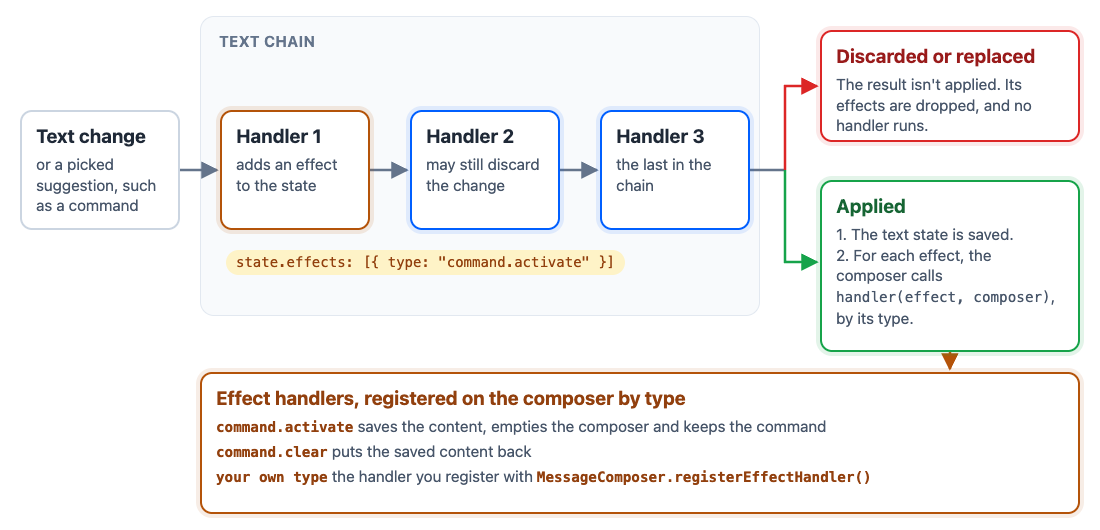
The composer has two built-in effects, which make commands work:
| Effect type | Added by | Its handler |
|---|---|---|
command.activate |
the command effects middleware, in the text chain, when the user picks a command from the suggestions | Saves the composer's content, empties the composer and keeps the command. |
command.clear |
TextComposer.clearCommand() itself, without running the text chain |
Puts the saved content back. |
Your own effects come from your text middleware, as below.
Use effects in a text middleware of your own when a change should also do something outside the text, such as logging a picked mention or opening a panel. Register a handler with MessageComposer.registerEffectHandler(type, handler), and add effects of that type in the middleware. Registering a handler for a built-in type replaces the built-in one.
import type {
  MiddlewareHandlerParams,
  TextComposerMiddleware,
  TextComposerMiddlewareExecutorState,
} from "stream-chat";

// An effect of your own: a `type` no other effect uses, and the data its handler needs.
type MentionPickedEffect = { type: "my-app/mention.picked"; userId: string };

const mentionEffectsMiddleware: TextComposerMiddleware = {
  id: "my-app/mention-effects",
  handlers: {
    // Nothing to do while the user types.
    onChange: ({ forward }) => forward(),
    onSuggestionItemSelect: ({
      forward,
      next,
      state,
    }: MiddlewareHandlerParams<TextComposerMiddlewareExecutorState>) => {
      // Only a suggestion picked from the `@` list is a mention.
      const selected = state.change?.selectedSuggestion;
      if (state.suggestions?.trigger !== "@" || !selected) return forward();

      // Record the effect instead of acting on the pick here: the pick may still be
      // discarded by a later middleware, or replaced by a newer run.
      const effect: MentionPickedEffect = {
        type: "my-app/mention.picked",
        userId: selected.id,
      };
      // Keep the effects earlier middleware added.
      return next({ ...state, effects: [...(state.effects ?? []), effect] });
    },
  },
};

client.config.setSetupFunction("messageComposer", ({ composer }) => {
  // The composer calls this with each effect of this type, once the pick is applied.
  // Registering the type again replaces the handler.
  composer.registerEffectHandler<MentionPickedEffect>(
    "my-app/mention.picked",
    (effect) => console.log(`Mentioned ${effect.userId}`),
  );

  // Before the mentions middleware, which completes the chain when a mention is picked.
  composer.textComposer.middlewareExecutor.insert({
    middleware: [mentionEffectsMiddleware],
    position: { before: "stream-io/text-composer/mentions-middleware" },
    unique: true,
  });

  return () =>
    composer.textComposer.middlewareExecutor.remove(
      mentionEffectsMiddleware.id,
    );
});
Pitfalls
- Change both
messageandlocalMessage.messageis what the server receives, andlocalMessageis what the list shows until the server's copy replaces it. Change onlymessage, and the list shows the old content until the server answers. Change onlylocalMessage, and the change never reaches the server and disappears when its answer arrives. - A poll is sent on its own. For a new message in a channel, the poll-only middleware sends only the poll, and your composition middleware may not run for it. Messages with a poll explains what that changes and what to do.
- Return what
next,forward,completeordiscardreturns. A handler that returns nothing breaks the chain, and callingnexttwice throws. - Don't change
statein place. Spread it into a new object, as the examples do. - One setup function per configuration key. A second
client.config.setSetupFunction("messageComposer", …)replaces the first.
Built-in chains
Every composer starts with the chains below. Each table lists the middleware in the order it runs.
Composition
| Middleware id | What it does |
|---|---|
stream-io/message-composer-middleware/user-data-injection |
Adds the current user to localMessage. The id is exported as USER_DATA_INJECTION_MIDDLEWARE_ID. |
stream-io/message-composer-middleware/poll-only |
In a channel composer that holds a poll and isn't editing a message, completes the chain with a message that carries only the poll. The id is exported as POLL_ONLY_COMPOSITION_MIDDLEWARE_ID. |
stream-io/message-composer-middleware/text-composition |
Adds the text, and the mentions still present in it. |
stream-io/message-composer-middleware/attachments |
Adds the finished uploads and the attachments with nothing to upload. Discards the message while an upload is running, unless pending uploads are allowed. |
stream-io/message-composer-middleware/command-string-injection |
Puts the active command back in front of the text, unless the text already starts with it. See Commands. |
stream-io/message-composer-middleware/link-previews |
Adds the loaded link previews as attachments, unless one of them is still loading. |
stream-io/message-composer-middleware/shared-location |
Adds the location to share. |
stream-io/message-composer-middleware/own-state |
Adds the quoted message, the poll and "also send in channel". |
stream-io/message-composer-middleware/custom-data |
Adds the custom data set with CustomDataManager.setMessageData(). |
stream-io/message-composer-middleware/data-validation |
Discards an empty message, one longer than text.maxLengthOnSend, and one whose command can't be sent. |
stream-io/message-composer-middleware/data-cleanup |
Merges in the message being edited, if there is one, and sets the message type. |
Drafts
| Middleware id | What it does |
|---|---|
stream-io/message-composer-middleware/draft-text-composition |
Adds the text, cut to text.maxLengthOnSend, and its mentions. |
stream-io/message-composer-middleware/draft-attachments |
Adds the finished uploads and the attachments with nothing to upload. Running uploads don't stop the draft. |
stream-io/message-composer-middleware/draft-command-string-injection |
Puts the active command back in front of the draft's text. |
stream-io/message-composer-middleware/draft-link-previews |
Adds the loaded link previews. |
stream-io/message-composer-middleware/draft-own-state |
Adds the quoted message, the poll and "also send in channel". |
stream-io/message-composer-middleware/draft-custom-data |
Adds the custom message data. |
stream-io/message-composer-middleware/draft-data-validation |
Discards a draft with no content, or with no change since it loaded. |
Text
| Middleware id | What it does |
|---|---|
stream-io/text-composer/pre-validation-middleware |
Cuts the text to text.maxLengthOnEdit. |
stream-io/text-composer/mentions-middleware |
Opens mention suggestions after @, and inserts a picked mention. See Mentions. |
stream-io/text-composer/active-command-guard |
While a command is active, completes the middleware chain, so no other command is suggested. |
stream-io/text-composer/commands-middleware |
Opens command suggestions after /, and sets a picked or typed command. |
stream-io/text-composer/command-string-extraction |
Takes the active command's name out of the text. |
stream-io/text-composer/command-effects-middleware |
Adds the command.activate effect when a command is picked. See Effect handlers. |
The four command middlewares in these chains work together. A composer that shows the command in the text, with no chip, removes all four, as A UI without a command chip shows.
Uploads
Before upload, the chain runs once per file. A discard() leaves the file out.
| Middleware id | What it does |
|---|---|
stream-io/attachment-manager-middleware/file-upload-config-check |
Marks the file blocked when the app's upload settings refuse it. |
stream-io/attachment-manager-middleware/blocked-upload-notification |
Publishes a notification for a blocked file. |
After upload, a discard() removes the attachment.
| Middleware id | What it does |
|---|---|
stream-io/attachment-manager-middleware/upload-error |
Publishes a notification for a failed upload, unless it was cancelled. |
stream-io/attachment-manager-middleware/post-upload-enrichment |
Sets the attachment's URL and thumbnail from the upload response. |
Polls
For poll fields, a discard() leaves the poll composer's state as it was.
| Middleware id | What it does |
|---|---|
stream-io/poll-composer-state-processing |
Processes and validates the changed fields, and saves the errors. createPollComposerStateMiddleware({ processors, validators }) builds it with processors and validators of your own; put it in with MiddlewareExecutor.replace(). |
For poll creation, a discard() creates no poll.
| Middleware id | What it does |
|---|---|
stream-io/poll-composer-composition |
Discards a poll that can't be created yet. |