


Saved items and reminders
This recipe lists the messages the user saved for later and the ones they set a reminder on, in one place, like a "Later" view.
What you'll build
- A bookmark button that opens the list in the side panel
- Reminders, the next one due first, with overdue ones marked
- Messages saved for later, the most recent first
- Opening an item at its message in the channel
- Marking a reminder done and removing a saved message
Preview
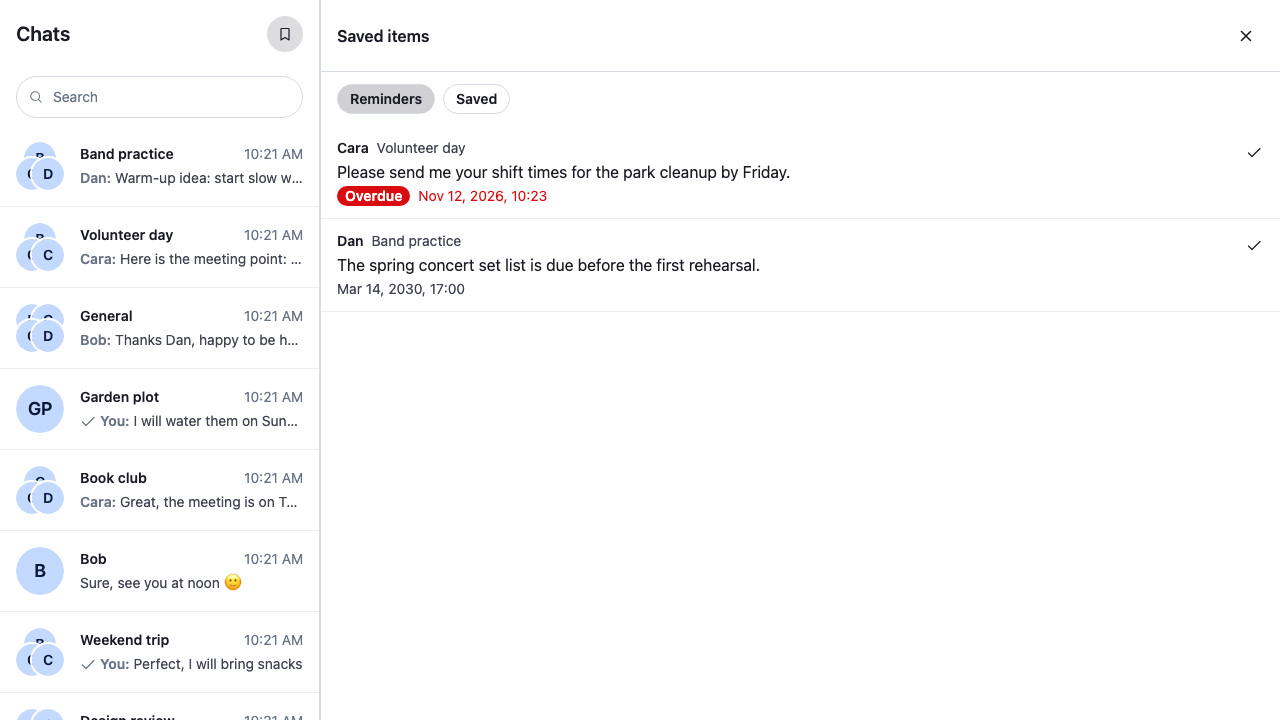
Approach: Replace one part and Compose. Choosing where to start explains the approaches.
Starts from: the base app, with its side panel. The page shows only what the recipe adds: the panel's body and the button that opens it.
Reminders need the channel type's user_message_reminders setting on, which you turn on in the Stream Dashboard or through the server API. Turning it on or off explains the server setting and the client's channel.userMessageReminders.enabled in client.config. The cookbook's demo app has the setting off for messaging channels: there the message menu offers neither Remind me nor Save for later, and the list stays empty. The screenshots on this page come from an app with the setting on.
Best practices
- Load the list with
client.reminders.paginator, the reminder paginator the client already has. Every page it loads also goes intoclient.reminders.state, where each message'sReminderkeeps its time left current, so the panel never queries reminders or runs timers itself. - Show one kind at a time. The client has one reminder paginator, so the filters take turns with it: setting
ReminderPaginator.filtersandReminderPaginator.sortempties it, and the next query loads the first page of the new kind. - Read whether a reminder is overdue from its
Reminder, throughuseMessageReminder(). ItstimeLeftMsgoes negative when the time passes, and its timer refreshes it, so an item turns overdue while the panel is open. - Load the next page from a
<LoadMoreButton/>at the end of the list, and move focus to the first new item. - Render the items as a list of buttons, not a
listbox, and keep each item's action a separate button beside it. Name the action after what it acts on, such as "Mark done: Cara in Volunteer day". - Show the empty and the error state in the panel. The error state offers to try again.
Build the panel's body
<SavedItems/> is the side panel's body. It shows the Reminders filter first, and loads the kind the user picks:
showKind()setsclient.reminders.paginator.filtersto the reminders with aremind_attime, sorted by it, or to those without one, newest first. ThenReminderManager.queryNextReminders()loads the first page, and each Load more loads the next.client.reminders.paginator.stategivesitems,isLoading,hasMoreTailandlastQueryError. The items are reminder records from the server, each with itsmessageandchannel.- Each item reads the message's
ReminderwithuseMessageReminder(), and itstimeLeftMswithuseStateStore().isOverdue()marks the item oncetimeLeftMsis zero or less. - The record's
remind_atis in unix nanoseconds, as the API sends it;nsToDate()turns it into aDatefor the label. - The reminder's channel may not be loaded, so
channelNameOf()reads the name from the record's copy of the channel. - Picking an item opens the channel the way the mentions inbox does:
client.channel()returns the channel,useWorkspaceNavigation().openChannel()opens it, andMessagePaginator.jumpToMessage()scrolls to the message and highlights it, loading the page around it and watching the channel when needed. A failure shows as a notification in the channel: the notification'sorigin.context.panelis"channel", which routes it there. - Mark done, on a reminder, and Remove, on a saved message, both call
client.reminders.deleteReminder(). A reminder has no done state, so marking it done deletes it. The paginator's list changes only on its own queries, so the action then removes the item withReminderPaginator.removeItem().
import { useEffect, useState } from "react";
import type { MouseEvent } from "react";
import { nsToDate } from "stream-chat";
import type {
  PaginatorState,
  ReminderManager,
  ReminderResponseData,
  ReminderState,
} from "stream-chat";
import {
  Button,
  LoadingIndicator,
  LoadMoreButton,
  useChatContext,
  useComponentContextIcons,
  useMessageReminder,
  useStateStore,
  useWorkspaceNavigation,
} from "stream-chat-react";
import "./SavedItems.css";

/** Which of the user's saved messages the panel lists. */
type Kind = "reminders" | "saved";

const KINDS: { kind: Kind; label: string }[] = [
  { kind: "reminders", label: "Reminders" },
  { kind: "saved", label: "Saved" },
];

/**
 * Points the client's one reminder paginator at one kind and loads its first page. Setting
 * `filters` or `sort` empties the paginator, so the new kind starts from its first page.
 */
const showKind = (reminders: ReminderManager, kind: Kind) => {
  const { paginator } = reminders;
  if (kind === "reminders") {
    // Reminders have a time: the next one due first, so overdue ones lead.
    paginator.filters = { remind_at: { $exists: true } };
    paginator.sort = [{ direction: 1, field: "remind_at" }];
  } else {
    // Saved for later has no time: the most recently saved first.
    paginator.filters = { remind_at: { $exists: false } };
    paginator.sort = [{ direction: -1, field: "created_at" }];
  }
  void reminders.queryNextReminders();
};

const paginatorSelector = ({
  hasMoreTail,
  isLoading,
  items,
  lastQueryError,
}: PaginatorState<ReminderResponseData>) => ({
  hasMoreTail,
  isLoading,
  items,
  lastQueryError,
});

type ListState = ReturnType<typeof paginatorSelector>;

/** The first page failed, so there is nothing to list. A failed later page keeps what loaded. */
const failedToLoad = ({ items, lastQueryError }: ListState) =>
  !!lastQueryError && !items?.length;

/** The first page hasn't arrived yet: the paginator has no `items` before its first query ends. */
const isFirstLoad = ({ items }: ListState) => !items;

const timeLeftSelector = ({ timeLeftMs }: ReminderState) => ({ timeLeftMs });

/** The reminder's time has passed. `timeLeftMs` goes negative then, and is `null` without a time. */
const isOverdue = (timeLeftMs: number | null | undefined) =>
  timeLeftMs != null && timeLeftMs <= 0;

// Date and 24-hour time. The panel's own text is English, so its dates are too.
const timeFormat = new Intl.DateTimeFormat("en-US", {
  day: "numeric",
  hour: "2-digit",
  hourCycle: "h23",
  minute: "2-digit",
  month: "short",
  year: "numeric",
});

/**
 * The channel's name from the query's copy of it. The reminder's channel may not be loaded, so
 * there's no `Channel` to name with `useChannelDisplayName()`.
 */
const channelNameOf = ({ channel }: ReminderResponseData) => {
  const name =
    channel && "name" in channel.custom ? channel.custom.name : undefined;
  return typeof name === "string" ? name : channel?.id;
};

/** Opens the message's channel in the layout and scrolls to the message. */
const useOpenSavedMessage = () => {
  const { channelManager, client } = useChatContext();
  const { openChannel } = useWorkspaceNavigation();

  return (item: ReminderResponseData, event: MouseEvent) => {
    if (!item.channel) return;
    // The channel the client holds, or a new instance for one it hasn't loaded yet. It replaces a
    // channel that is being disposed, so the one it returns can always be opened.
    const channel = client.channel(item.channel.type, item.channel.id);
    openChannel(channel, { event });
    channelManager.ingestChannel(channel);
    // Highlights the message, loading the page around it and watching the channel when needed.
    channel.messagePaginator
      .jumpToMessage(item.message_id, { watchChannel: true })
      .catch((error: Error) =>
        client.notifications.addError({
          message: "Failed to load the channel",
          options: { originalError: error },
          origin: { context: { panel: "channel" }, emitter: "SavedItems" },
        }),
      );
  };
};

/** Deletes the reminder, then drops it from the list, which only changes on its own queries. */
const useRemoveSavedMessage = () => {
  const { client } = useChatContext();

  return async (messageId: string) => {
    try {
      await client.reminders.deleteReminder(messageId);
      client.reminders.paginator.removeItem({ id: messageId });
    } catch (error) {
      client.notifications.addError({
        message: "Failed to remove the saved message",
        options: { originalError: error as Error },
        origin: { context: { panel: "channel" }, emitter: "SavedItems" },
      });
    }
  };
};

type SavedItemProps = {
  /** Takes focus when it renders, as the first item of a page Load more fetched. */
  autoFocus?: boolean;
  item: ReminderResponseData;
};

/** One saved message: who wrote it, where, its text, and its time when it has one. */
const SavedItem = ({ autoFocus, item }: SavedItemProps) => {
  const { IconBookmarkRemove, IconCheckmark } = useComponentContextIcons();
  const openSavedMessage = useOpenSavedMessage();
  const removeSavedMessage = useRemoveSavedMessage();
  // The manager's `Reminder` for the message, whose timer keeps `timeLeftMs` current.
  const reminder = useMessageReminder(item.message_id);
  const { timeLeftMs } = useStateStore(reminder?.state, timeLeftSelector) ?? {};
  const overdue = isOverdue(timeLeftMs);

  const author = item.message?.user?.name ?? item.message?.user?.id;
  const channelName = channelNameOf(item);
  const remindAt =
    item.remind_at != null ? nsToDate(item.remind_at) : undefined;
  const actionLabel = remindAt ? "Mark done" : "Remove";

  return (
    <li className="cookbook-saved-item" data-overdue={overdue || undefined}>
      <button
        autoFocus={autoFocus}
        className="cookbook-saved-item__open"
        data-message-id={item.message_id}
        onClick={(event) => openSavedMessage(item, event)}
        type="button"
      >
        <span className="cookbook-saved-item__header">
          <span className="cookbook-saved-item__author">{author}</span>
          <span className="cookbook-saved-item__channel">{channelName}</span>
        </span>
        <span className="cookbook-saved-item__text">{item.message?.text}</span>
        {remindAt && (
          <span className="cookbook-saved-item__due">
            {overdue && (
              <span className="cookbook-saved-item__overdue">Overdue</span>
            )}
            <time dateTime={remindAt.toISOString()}>
              {timeFormat.format(remindAt)}
            </time>
          </span>
        )}
      </button>
      <Button
        appearance="ghost"
        aria-label={`${actionLabel}: ${author} in ${channelName}`}
        circular
        className="cookbook-saved-item__action"
        onClick={() => void removeSavedMessage(item.message_id)}
        size="sm"
        title={actionLabel}
        variant="secondary"
      >
        {remindAt ? <IconCheckmark /> : <IconBookmarkRemove />}
      </Button>
    </li>
  );
};

/**
 * The side panel's body: the user's reminders or the messages they saved for later, one kind at a
 * time from the client's reminder paginator. Load more fetches the next page.
 */
export const SavedItems = () => {
  const { client } = useChatContext();
  const { reminders } = client;
  const state = useStateStore(reminders.paginator.state, paginatorSelector);
  const [kind, setKind] = useState<Kind>("reminders");
  // The index of the first item Load more fetches, which takes focus from the button it disables.
  const [focusIndex, setFocusIndex] = useState<number>();

  useEffect(() => {
    setFocusIndex(undefined);
    showKind(reminders, kind);
  }, [kind, reminders]);

  const renderList = () => {
    if (failedToLoad(state)) {
      return (
        <div className="cookbook-saved-items__note" role="alert">
          <p>Couldn’t load your saved messages.</p>
          <Button
            appearance="outline"
            onClick={() => showKind(reminders, kind)}
            size="sm"
            variant="secondary"
          >
            Try again
          </Button>
        </div>
      );
    }
    if (isFirstLoad(state)) return <LoadingIndicator />;
    if (!state.items?.length) {
      return (
        <p className="cookbook-saved-items__note">
          {kind === "reminders"
            ? "No reminders. Pick Remind me in a message’s menu to set one."
            : "Nothing saved. Pick Save for later in a message’s menu to keep one here."}
        </p>
      );
    }
    return (
      <>
        <ul className="cookbook-saved-items__list">
          {state.items.map((item, index) => (
            <SavedItem
              autoFocus={index === focusIndex}
              item={item}
              key={item.message_id}
            />
          ))}
        </ul>
        {state.hasMoreTail && (
          <LoadMoreButton
            isLoading={state.isLoading}
            onClick={() => {
              setFocusIndex(state.items?.length);
              void reminders.queryNextReminders();
            }}
          />
        )}
      </>
    );
  };

  return (
    <div className="cookbook-saved-items">
      <div
        aria-label="Show"
        className="cookbook-saved-items__kinds"
        role="group"
      >
        {KINDS.map(({ kind: option, label }) => (
          <Button
            appearance="outline"
            aria-pressed={kind === option}
            className="cookbook-saved-items__kind"
            key={option}
            onClick={() => setKind(option)}
            size="xs"
            variant="secondary"
          >
            {label}
          </Button>
        ))}
      </div>
      {renderList()}
    </div>
  );
};@layer stream-overrides {
.cookbook-saved-items {
display: flex;
flex-direction: column;
padding-block-end: var(--str-chat__spacing-md);
}
.cookbook-saved-items__kinds {
display: flex;
gap: var(--str-chat__spacing-xs);
padding: var(--str-chat__spacing-sm) var(--str-chat__spacing-md);
}
.cookbook-saved-items__list {
margin: 0;
padding: 0;
list-style: none;
}
.cookbook-saved-item {
display: flex;
align-items: flex-start;
gap: var(--str-chat__spacing-xs);
padding-inline-end: var(--str-chat__spacing-sm);
border-block-end: 1px solid var(--str-chat__border-core-subtle);
}
.cookbook-saved-item:hover {
background: var(--str-chat__background-utility-hover);
}
.cookbook-saved-item__open {
display: flex;
flex: 1;
flex-direction: column;
gap: var(--str-chat__spacing-xxs);
min-width: 0;
padding: var(--str-chat__spacing-sm) var(--str-chat__spacing-md);
border: 0;
background: none;
color: var(--str-chat__text-primary);
font: var(--str-chat__font-body-default);
text-align: start;
cursor: pointer;
}
.cookbook-saved-item__open:focus-visible {
outline: 2px solid var(--str-chat__accent-primary);
outline-offset: -2px;
}
.cookbook-saved-item__action {
margin-block-start: var(--str-chat__spacing-sm);
}
.cookbook-saved-item__header {
display: flex;
align-items: baseline;
gap: var(--str-chat__spacing-xs);
color: var(--str-chat__text-secondary);
font: var(--str-chat__font-caption-default);
}
.cookbook-saved-item__author {
color: var(--str-chat__text-primary);
font: var(--str-chat__font-caption-emphasis);
}
.cookbook-saved-item__due {
display: flex;
align-items: center;
gap: var(--str-chat__spacing-xs);
color: var(--str-chat__text-secondary);
font: var(--str-chat__font-caption-default);
}
/* An overdue reminder's time reads as a warning. */
.cookbook-saved-item[data-overdue] .cookbook-saved-item__due {
color: var(--str-chat__accent-error);
}
.cookbook-saved-item__overdue {
padding: 0 var(--str-chat__spacing-xs);
border-radius: var(--str-chat__radius-max);
background: var(--str-chat__accent-error);
color: var(--str-chat__text-on-accent);
font: var(--str-chat__font-caption-emphasis);
}
.cookbook-saved-items__note {
display: flex;
flex-direction: column;
align-items: flex-start;
gap: var(--str-chat__spacing-sm);
margin: 0;
padding: var(--str-chat__spacing-md);
color: var(--str-chat__text-secondary);
font: var(--str-chat__font-body-default);
}
.cookbook-saved-items__note p {
margin: 0;
}
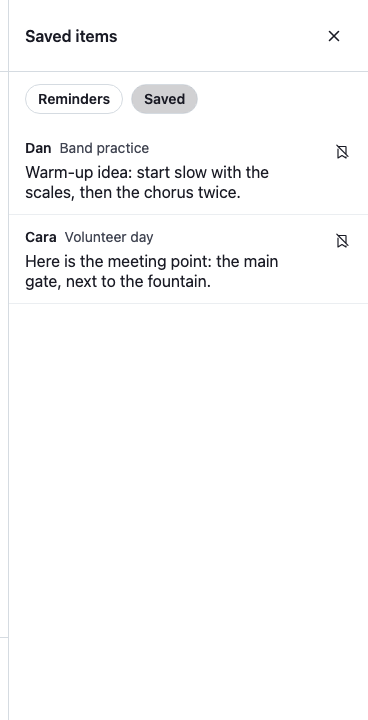
}Switching to Saved lists the messages saved for later, with no time. Their action is Remove:
The Saved filter
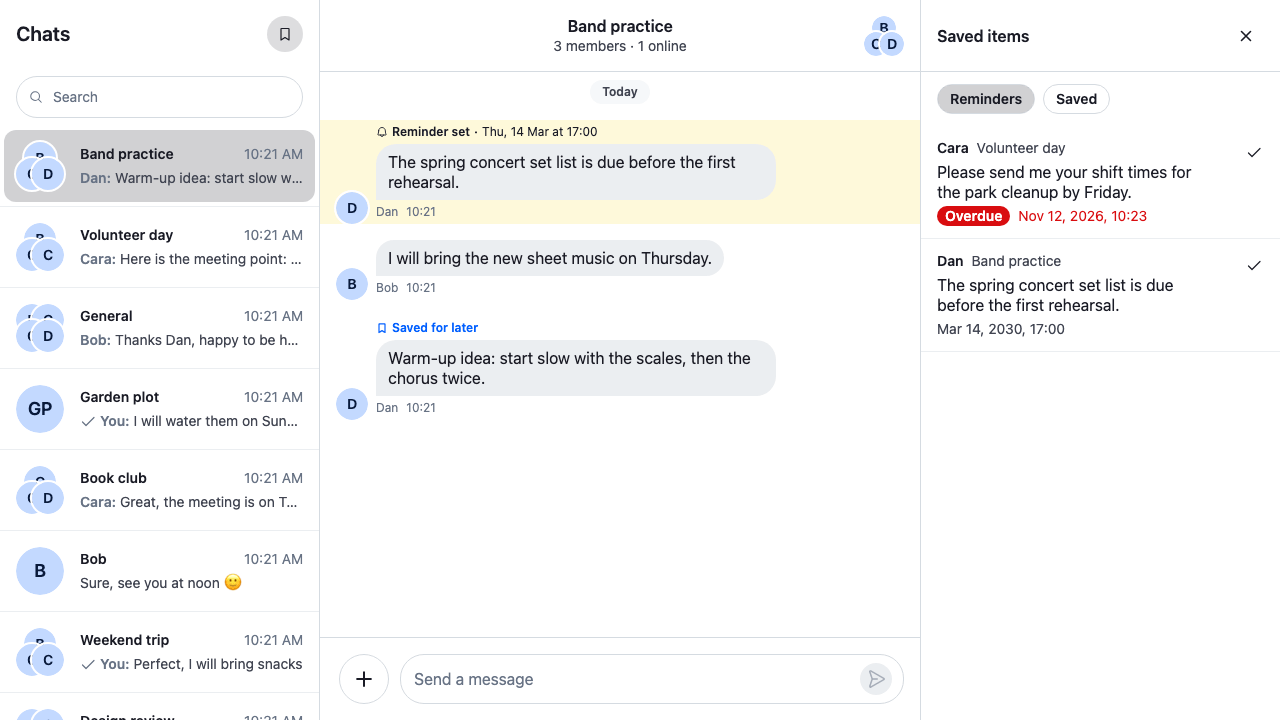
Picking an item opens its channel in the channel slot and scrolls to the message, which the message list highlights. The side panel stays open, so the user can go through the items one by one:
A reminder opened in its channel
Open it from the channel list header
<ChannelNavigation/> renders the header above the channel list under the ChannelListHeader key of ComponentContext. <WithSavedItemsButton/> registers <ChannelListHeaderWithSavedItems/> under that key. <ChannelListHeaderWithSavedItems/> renders the default <ChannelListHeader/> with a bookmark button, <SavedItemsButton/>, as its EndContent prop, so the button sits at the end of the header, after the title.
The button calls useSidePanel().openSidePanel() with <SavedItems/> as the body, or useSidePanel().closeSidePanel() when the saved items are already open, which useSidePanel().openId tells. aria-expanded tells assistive technology whether the panel is open, and <Button/> shows itself pressed while it is, so the button needs no CSS of its own. aria-controls points to the panel while it's open.
import type { PropsWithChildren } from "react";
import {
  Button,
  ChannelListHeader,
  useComponentContextIcons,
  WithComponents,
} from "stream-chat-react";
import { useSidePanel } from "./SidePanel";
import { SavedItems } from "./SavedItems";

const SAVED_ITEMS_PANEL_ID = "saved-items";

/** Opens and closes the saved items. */
const SavedItemsButton = () => {
  const { IconBookmark } = useComponentContextIcons();
  const { closeSidePanel, openId, openSidePanel } = useSidePanel();
  const isOpen = openId === SAVED_ITEMS_PANEL_ID;

  const toggle = () =>
    isOpen
      ? closeSidePanel()
      : openSidePanel({
          body: <SavedItems />,
          id: SAVED_ITEMS_PANEL_ID,
          title: "Saved items",
        });

  return (
    <Button
      appearance="ghost"
      aria-controls={isOpen ? "cookbook-side-panel" : undefined}
      aria-expanded={isOpen}
      aria-label="Saved items"
      circular
      onClick={toggle}
      size="md"
      variant="secondary"
    >
      <IconBookmark />
    </Button>
  );
};

/** The default channel list header, with the button at its end. */
const ChannelListHeaderWithSavedItems = () => (
  <ChannelListHeader EndContent={SavedItemsButton} />
);

// Declared once, so WithComponents gets the same object on every render.
const overrides = { ChannelListHeader: ChannelListHeaderWithSavedItems };

/** Adds the Saved items button to the channel list header. */
export const WithSavedItemsButton = ({ children }: PropsWithChildren) => (
  <WithComponents overrides={overrides}>{children}</WithComponents>
);
The bookmark button, pressed
<SavedItemsButton/> opens the side panel, so <WithSavedItemsButton/> goes inside <SidePanelProvider/>. Wrap <ChatView/> in it, as the base app does with a recipe's wrapper.
How it works
Example
Dan writes "The spring concert set list is due before the first rehearsal." in Band practice:
- The user opens the message's menu, picks Remind me, then a time.
client.reminders.upsertReminder()creates the reminder, and the message shows "Reminder set". - The user clicks the bookmark.
useSidePanel().openSidePanel()shows<SavedItems/>in the side panel. showKind()pointsclient.reminders.paginatorat the reminders with a time, sorted by it, andReminderManager.queryNextReminders()loads the first page. The manager adds every loaded reminder toclient.reminders.state.- Dan's message is in the list with its due time. When the time passes, the reminder's timer moves its
timeLeftMsbelow zero, and the item shows Overdue. - The user picks the item.
useWorkspaceNavigation().openChannel()opens Band practice, andMessagePaginator.jumpToMessage()scrolls to Dan's message and highlights it. - The user picks Mark done.
client.reminders.deleteReminder()deletes the reminder, andReminderPaginator.removeItem()takes it out of the list.
- The list is a snapshot of what the paginator loaded. A reminder the user sets while the panel is open joins
client.reminders.statebut not the list; switching filters, or closing and opening the panel, loads it again. - The client has one reminder paginator, so another screen that sets its filters changes this list too. Give each screen its turn, as the two filters here do.
- When a reminder comes due, the server sends
notification.reminder_due. The SDK doesn't act on it; Alerting when a reminder is due adds an alert.
Related
- Reminders and save for later explains how reminders work end to end.
- Reminder manager lists
client.reminders, its paginator, state and timers. - How pagination works explains a paginator's state.
- Mentions inbox builds another side-panel list that opens a message.