# Saved items and reminders
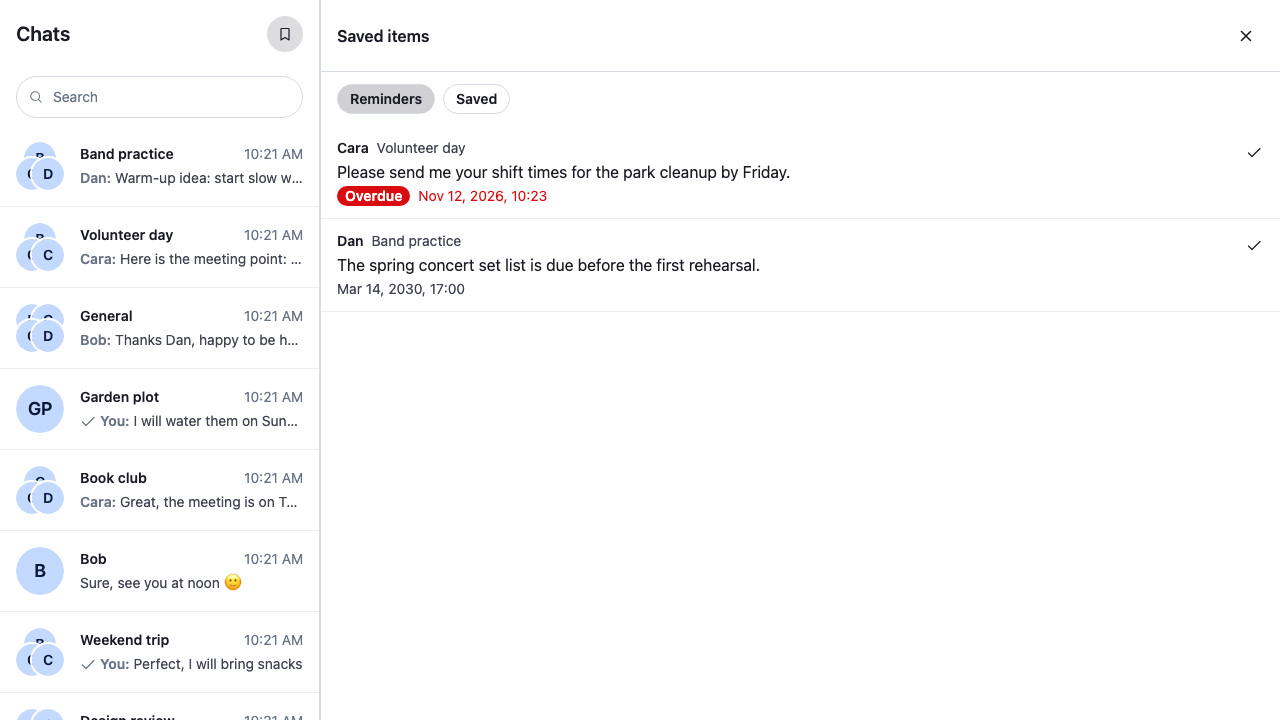
This recipe lists the messages the user saved for later and the ones they set a reminder on, in one place, like a "Later" view.
>
> **Note:** **What you'll build**
>
> - A bookmark button that opens the list in the side panel
> - Reminders, the next one due first, with overdue ones marked
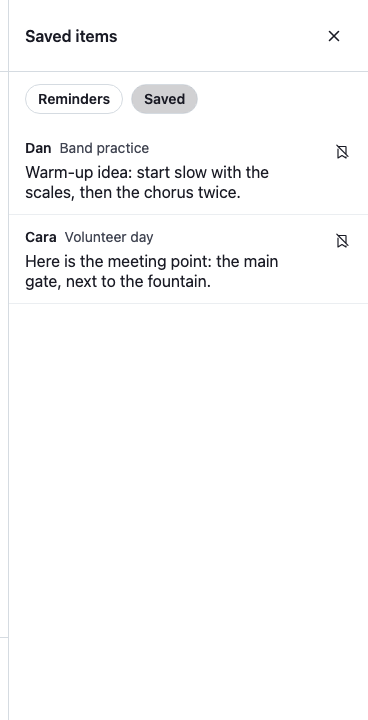
> - Messages saved for later, the most recent first
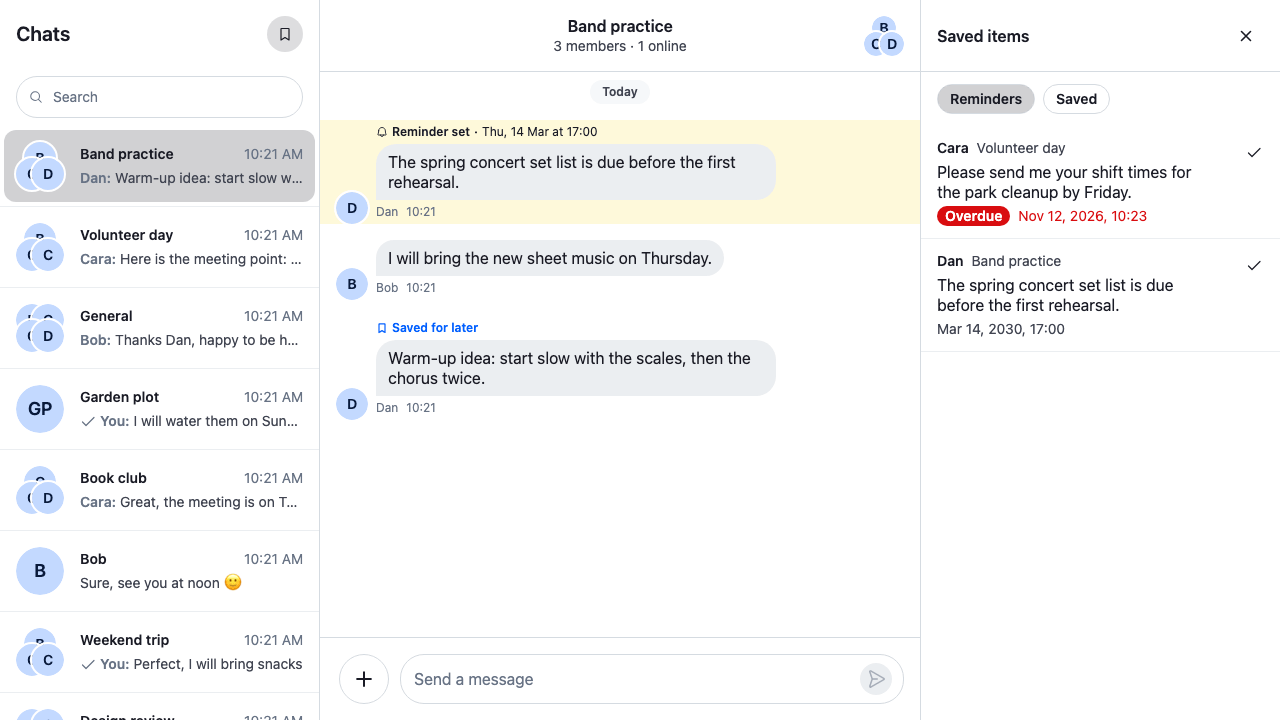
> - Opening an item at its message in the channel
> - Marking a reminder done and removing a saved message
>
---
**Preview**
---
**Approach:** Replace one part and Compose. [Choosing where to start](https://getstream.io/chat/docs/sdk/react/ui-cookbooks/overview/#choosing-where-to-start) explains the approaches.
**Starts from:** [the base app](https://getstream.io/chat/docs/sdk/react/ui-cookbooks/overview/#the-base-app), with its [side panel](https://getstream.io/chat/docs/sdk/react/ui-cookbooks/overview/#the-side-panel). The page shows only what the recipe adds: the panel's body and the button that opens it.
Reminders need the channel type's `user_message_reminders` setting on, which you turn on in the [Stream Dashboard](https://getstream.io/signin/?product=chat) or through the server API. [Turning it on or off](https://getstream.io/chat/docs/sdk/react/features/messaging/reminders-and-save-for-later/#turning-it-on-or-off) explains the server setting and the client's `channel.userMessageReminders.enabled` in `client.config`. The cookbook's demo app has the setting off for `messaging` channels: there the message menu offers neither Remind me nor Save for later, and the list stays empty. The screenshots on this page come from an app with the setting on.
## Best practices
- Load the list with `client.reminders.paginator`, the reminder paginator the client already has. Every page it loads also goes into `client.reminders.state`, where each message's `Reminder` keeps its time left current, so the panel never queries reminders or runs timers itself.
- Show one kind at a time. The client has one reminder paginator, so the filters take turns with it: setting `ReminderPaginator.filters` and `ReminderPaginator.sort` empties it, and the next query loads the first page of the new kind.
- Read whether a reminder is overdue from its `Reminder`, through `useMessageReminder()`. Its `timeLeftMs` goes negative when the time passes, and its timer refreshes it, so an item turns overdue while the panel is open.
- Load the next page from a `` at the end of the list, and move focus to the first new item.
- Render the items as a list of buttons, not a `listbox`, and keep each item's action a separate button beside it. Name the action after what it acts on, such as "Mark done: Cara in Volunteer day".
- Show the empty and the error state in the panel. The error state offers to try again.
## Build the panel's body
`` is the side panel's body. It shows the Reminders filter first, and loads the kind the user picks:
- `showKind()` sets `client.reminders.paginator.filters` to the reminders with a `remind_at` time, sorted by it, or to those without one, newest first. Then `ReminderManager.queryNextReminders()` loads the first page, and each Load more loads the next.
- `client.reminders.paginator.state` gives `items`, `isLoading`, `hasMoreTail` and `lastQueryError`. The items are reminder records from the server, each with its `message` and `channel`.
- Each item reads the message's `Reminder` with `useMessageReminder()`, and its `timeLeftMs` with `useStateStore()`. `isOverdue()` marks the item once `timeLeftMs` is zero or less.
- The record's `remind_at` is in unix nanoseconds, as the API sends it; `nsToDate()` turns it into a `Date` for the label.
- The reminder's channel may not be loaded, so `channelNameOf()` reads the name from the record's copy of the channel.
- Picking an item opens the channel the way the [mentions inbox](https://getstream.io/chat/docs/sdk/react/ui-cookbooks/search/mentions-inbox/) does: `client.channel()` returns the channel, `useWorkspaceNavigation().openChannel()` opens it, and `MessagePaginator.jumpToMessage()` scrolls to the message and highlights it, loading the page around it and watching the channel when needed. A failure shows as a notification in the channel: the notification's `origin.context.panel` is `"channel"`, which routes it there.
- Mark done, on a reminder, and Remove, on a saved message, both call `client.reminders.deleteReminder()`. A reminder has no done state, so marking it done deletes it. The paginator's list changes only on its own queries, so the action then removes the item with `ReminderPaginator.removeItem()`.
```tsx label="React" title="src/SavedItems.tsx"
import { useEffect, useState } from "react";
import type { MouseEvent } from "react";
import { nsToDate } from "stream-chat";
import type {
PaginatorState,
ReminderManager,
ReminderResponseData,
ReminderState,
} from "stream-chat";
import {
Button,
LoadingIndicator,
LoadMoreButton,
useChatContext,
useComponentContextIcons,
useMessageReminder,
useStateStore,
useWorkspaceNavigation,
} from "stream-chat-react";
import "./SavedItems.css";
/** Which of the user's saved messages the panel lists. */
type Kind = "reminders" | "saved";
const KINDS: { kind: Kind; label: string }[] = [
{ kind: "reminders", label: "Reminders" },
{ kind: "saved", label: "Saved" },
];
/**
* Points the client's one reminder paginator at one kind and loads its first page. Setting
* `filters` or `sort` empties the paginator, so the new kind starts from its first page.
*/
const showKind = (reminders: ReminderManager, kind: Kind) => {
const { paginator } = reminders;
if (kind === "reminders") {
// Reminders have a time: the next one due first, so overdue ones lead.
paginator.filters = { remind_at: { $exists: true } };
paginator.sort = [{ direction: 1, field: "remind_at" }];
} else {
// Saved for later has no time: the most recently saved first.
paginator.filters = { remind_at: { $exists: false } };
paginator.sort = [{ direction: -1, field: "created_at" }];
}
void reminders.queryNextReminders();
};
const paginatorSelector = ({
hasMoreTail,
isLoading,
items,
lastQueryError,
}: PaginatorState) => ({
hasMoreTail,
isLoading,
items,
lastQueryError,
});
type ListState = ReturnType;
/** The first page failed, so there is nothing to list. A failed later page keeps what loaded. */
const failedToLoad = ({ items, lastQueryError }: ListState) =>
!!lastQueryError && !items?.length;
/** The first page hasn't arrived yet: the paginator has no `items` before its first query ends. */
const isFirstLoad = ({ items }: ListState) => !items;
const timeLeftSelector = ({ timeLeftMs }: ReminderState) => ({ timeLeftMs });
/** The reminder's time has passed. `timeLeftMs` goes negative then, and is `null` without a time. */
const isOverdue = (timeLeftMs: number | null | undefined) =>
timeLeftMs != null && timeLeftMs <= 0;
// Date and 24-hour time. The panel's own text is English, so its dates are too.
const timeFormat = new Intl.DateTimeFormat("en-US", {
day: "numeric",
hour: "2-digit",
hourCycle: "h23",
minute: "2-digit",
month: "short",
year: "numeric",
});
/**
* The channel's name from the query's copy of it. The reminder's channel may not be loaded, so
* there's no `Channel` to name with `useChannelDisplayName()`.
*/
const channelNameOf = ({ channel }: ReminderResponseData) => {
const name =
channel && "name" in channel.custom ? channel.custom.name : undefined;
return typeof name === "string" ? name : channel?.id;
};
/** Opens the message's channel in the layout and scrolls to the message. */
const useOpenSavedMessage = () => {
const { channelManager, client } = useChatContext();
const { openChannel } = useWorkspaceNavigation();
return (item: ReminderResponseData, event: MouseEvent) => {
if (!item.channel) return;
// The channel the client holds, or a new instance for one it hasn't loaded yet. It replaces a
// channel that is being disposed, so the one it returns can always be opened.
const channel = client.channel(item.channel.type, item.channel.id);
openChannel(channel, { event });
channelManager.ingestChannel(channel);
// Highlights the message, loading the page around it and watching the channel when needed.
channel.messagePaginator
.jumpToMessage(item.message_id, { watchChannel: true })
.catch((error: Error) =>
client.notifications.addError({
message: "Failed to load the channel",
options: { originalError: error },
origin: { context: { panel: "channel" }, emitter: "SavedItems" },
}),
);
};
};
/** Deletes the reminder, then drops it from the list, which only changes on its own queries. */
const useRemoveSavedMessage = () => {
const { client } = useChatContext();
return async (messageId: string) => {
try {
await client.reminders.deleteReminder(messageId);
client.reminders.paginator.removeItem({ id: messageId });
} catch (error) {
client.notifications.addError({
message: "Failed to remove the saved message",
options: { originalError: error as Error },
origin: { context: { panel: "channel" }, emitter: "SavedItems" },
});
}
};
};
type SavedItemProps = {
/** Takes focus when it renders, as the first item of a page Load more fetched. */
autoFocus?: boolean;
item: ReminderResponseData;
};
/** One saved message: who wrote it, where, its text, and its time when it has one. */
const SavedItem = ({ autoFocus, item }: SavedItemProps) => {
const { IconBookmarkRemove, IconCheckmark } = useComponentContextIcons();
const openSavedMessage = useOpenSavedMessage();
const removeSavedMessage = useRemoveSavedMessage();
// The manager's `Reminder` for the message, whose timer keeps `timeLeftMs` current.
const reminder = useMessageReminder(item.message_id);
const { timeLeftMs } = useStateStore(reminder?.state, timeLeftSelector) ?? {};
const overdue = isOverdue(timeLeftMs);
const author = item.message?.user?.name ?? item.message?.user?.id;
const channelName = channelNameOf(item);
const remindAt =
item.remind_at != null ? nsToDate(item.remind_at) : undefined;
const actionLabel = remindAt ? "Mark done" : "Remove";
return (
);
};
/**
* The side panel's body: the user's reminders or the messages they saved for later, one kind at a
* time from the client's reminder paginator. Load more fetches the next page.
*/
export const SavedItems = () => {
const { client } = useChatContext();
const { reminders } = client;
const state = useStateStore(reminders.paginator.state, paginatorSelector);
const [kind, setKind] = useState("reminders");
// The index of the first item Load more fetches, which takes focus from the button it disables.
const [focusIndex, setFocusIndex] = useState();
useEffect(() => {
setFocusIndex(undefined);
showKind(reminders, kind);
}, [kind, reminders]);
const renderList = () => {
if (failedToLoad(state)) {
return (
Couldn’t load your saved messages.
);
}
if (isFirstLoad(state)) return ;
if (!state.items?.length) {
return (
{kind === "reminders"
? "No reminders. Pick Remind me in a message’s menu to set one."
: "Nothing saved. Pick Save for later in a message’s menu to keep one here."}
);
};
```
```css label="CSS" title="src/SavedItems.css"
@layer stream-overrides {
.cookbook-saved-items {
display: flex;
flex-direction: column;
padding-block-end: var(--str-chat__spacing-md);
}
.cookbook-saved-items__kinds {
display: flex;
gap: var(--str-chat__spacing-xs);
padding: var(--str-chat__spacing-sm) var(--str-chat__spacing-md);
}
.cookbook-saved-items__list {
margin: 0;
padding: 0;
list-style: none;
}
.cookbook-saved-item {
display: flex;
align-items: flex-start;
gap: var(--str-chat__spacing-xs);
padding-inline-end: var(--str-chat__spacing-sm);
border-block-end: 1px solid var(--str-chat__border-core-subtle);
}
.cookbook-saved-item:hover {
background: var(--str-chat__background-utility-hover);
}
.cookbook-saved-item__open {
display: flex;
flex: 1;
flex-direction: column;
gap: var(--str-chat__spacing-xxs);
min-width: 0;
padding: var(--str-chat__spacing-sm) var(--str-chat__spacing-md);
border: 0;
background: none;
color: var(--str-chat__text-primary);
font: var(--str-chat__font-body-default);
text-align: start;
cursor: pointer;
}
.cookbook-saved-item__open:focus-visible {
outline: 2px solid var(--str-chat__accent-primary);
outline-offset: -2px;
}
.cookbook-saved-item__action {
margin-block-start: var(--str-chat__spacing-sm);
}
.cookbook-saved-item__header {
display: flex;
align-items: baseline;
gap: var(--str-chat__spacing-xs);
color: var(--str-chat__text-secondary);
font: var(--str-chat__font-caption-default);
}
.cookbook-saved-item__author {
color: var(--str-chat__text-primary);
font: var(--str-chat__font-caption-emphasis);
}
.cookbook-saved-item__due {
display: flex;
align-items: center;
gap: var(--str-chat__spacing-xs);
color: var(--str-chat__text-secondary);
font: var(--str-chat__font-caption-default);
}
/* An overdue reminder's time reads as a warning. */
.cookbook-saved-item[data-overdue] .cookbook-saved-item__due {
color: var(--str-chat__accent-error);
}
.cookbook-saved-item__overdue {
padding: 0 var(--str-chat__spacing-xs);
border-radius: var(--str-chat__radius-max);
background: var(--str-chat__accent-error);
color: var(--str-chat__text-on-accent);
font: var(--str-chat__font-caption-emphasis);
}
.cookbook-saved-items__note {
display: flex;
flex-direction: column;
align-items: flex-start;
gap: var(--str-chat__spacing-sm);
margin: 0;
padding: var(--str-chat__spacing-md);
color: var(--str-chat__text-secondary);
font: var(--str-chat__font-body-default);
}
.cookbook-saved-items__note p {
margin: 0;
}
}
```
Switching to Saved lists the messages saved for later, with no time. Their action is Remove:
---
**The Saved filter**
---
Picking an item opens its channel in the `channel` slot and scrolls to the message, which the message list highlights. The side panel stays open, so the user can go through the items one by one:
---
**A reminder opened in its channel**
---
## Open it from the channel list header
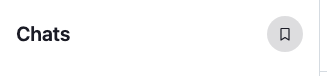
`` renders the header above the channel list under the `ChannelListHeader` key of `ComponentContext`. `` registers `` under that key. `` renders the default `` with a bookmark button, ``, as its [`EndContent` prop](https://getstream.io/chat/docs/sdk/react/ui/components/channel-list-ui/#header), so the button sits at the end of the header, after the title.
The button calls `useSidePanel().openSidePanel()` with `` as the body, or `useSidePanel().closeSidePanel()` when the saved items are already open, which `useSidePanel().openId` tells. `aria-expanded` tells assistive technology whether the panel is open, and `` shows itself pressed while it is, so the button needs no CSS of its own. `aria-controls` points to the panel while it's open.
```tsx title="src/SavedItemsButton.tsx"
import type { PropsWithChildren } from "react";
import {
Button,
ChannelListHeader,
useComponentContextIcons,
WithComponents,
} from "stream-chat-react";
import { useSidePanel } from "./SidePanel";
import { SavedItems } from "./SavedItems";
const SAVED_ITEMS_PANEL_ID = "saved-items";
/** Opens and closes the saved items. */
const SavedItemsButton = () => {
const { IconBookmark } = useComponentContextIcons();
const { closeSidePanel, openId, openSidePanel } = useSidePanel();
const isOpen = openId === SAVED_ITEMS_PANEL_ID;
const toggle = () =>
isOpen
? closeSidePanel()
: openSidePanel({
body: ,
id: SAVED_ITEMS_PANEL_ID,
title: "Saved items",
});
return (
);
};
/** The default channel list header, with the button at its end. */
const ChannelListHeaderWithSavedItems = () => (
);
// Declared once, so WithComponents gets the same object on every render.
const overrides = { ChannelListHeader: ChannelListHeaderWithSavedItems };
/** Adds the Saved items button to the channel list header. */
export const WithSavedItemsButton = ({ children }: PropsWithChildren) => (
{children}
);
```
---
**The bookmark button, pressed**
---
`` opens the side panel, so `` goes inside ``. Wrap `` in it, as the base app does with a recipe's wrapper.
## How it works
>
> **Info:** **Example**
>
> Dan writes "The spring concert set list is due before the first rehearsal." in Band practice:
>
> 1. The user opens the message's menu, picks Remind me, then a time. `client.reminders.upsertReminder()` creates the reminder, and the message shows "Reminder set".
> 2. The user clicks the bookmark. `useSidePanel().openSidePanel()` shows `` in the side panel.
> 3. `showKind()` points `client.reminders.paginator` at the reminders with a time, sorted by it, and `ReminderManager.queryNextReminders()` loads the first page. The manager adds every loaded reminder to `client.reminders.state`.
> 4. Dan's message is in the list with its due time. When the time passes, the reminder's timer moves its `timeLeftMs` below zero, and the item shows Overdue.
> 5. The user picks the item. `useWorkspaceNavigation().openChannel()` opens Band practice, and `MessagePaginator.jumpToMessage()` scrolls to Dan's message and highlights it.
> 6. The user picks Mark done. `client.reminders.deleteReminder()` deletes the reminder, and `ReminderPaginator.removeItem()` takes it out of the list.
>
- The list is a snapshot of what the paginator loaded. A reminder the user sets while the panel is open joins `client.reminders.state` but not the list; switching filters, or closing and opening the panel, loads it again.
- The client has one reminder paginator, so another screen that sets its filters changes this list too. Give each screen its turn, as the two filters here do.
- When a reminder comes due, the server sends `notification.reminder_due`. The SDK doesn't act on it; [Alerting when a reminder is due](https://getstream.io/chat/docs/sdk/react/features/messaging/reminders-and-save-for-later/#alerting-when-a-reminder-is-due) adds an alert.
## Related
- [Reminders and save for later](https://getstream.io/chat/docs/sdk/react/features/messaging/reminders-and-save-for-later/) explains how reminders work end to end.
- [Reminder manager](https://getstream.io/chat/docs/sdk/react/reference/state/reminder-manager/) lists `client.reminders`, its paginator, state and timers.
- [How pagination works](https://getstream.io/chat/docs/sdk/react/state/loading-data/how-pagination-works/) explains a paginator's state.
- [Mentions inbox](https://getstream.io/chat/docs/sdk/react/ui-cookbooks/search/mentions-inbox/) builds another side-panel list that opens a message.
---
For the most recent version of this documentation, visit [https://getstream.io/chat/docs/sdk/react/ui-cookbooks/panels/saved-items-and-reminders/](https://getstream.io/chat/docs/sdk/react/ui-cookbooks/panels/saved-items-and-reminders/).