


User details
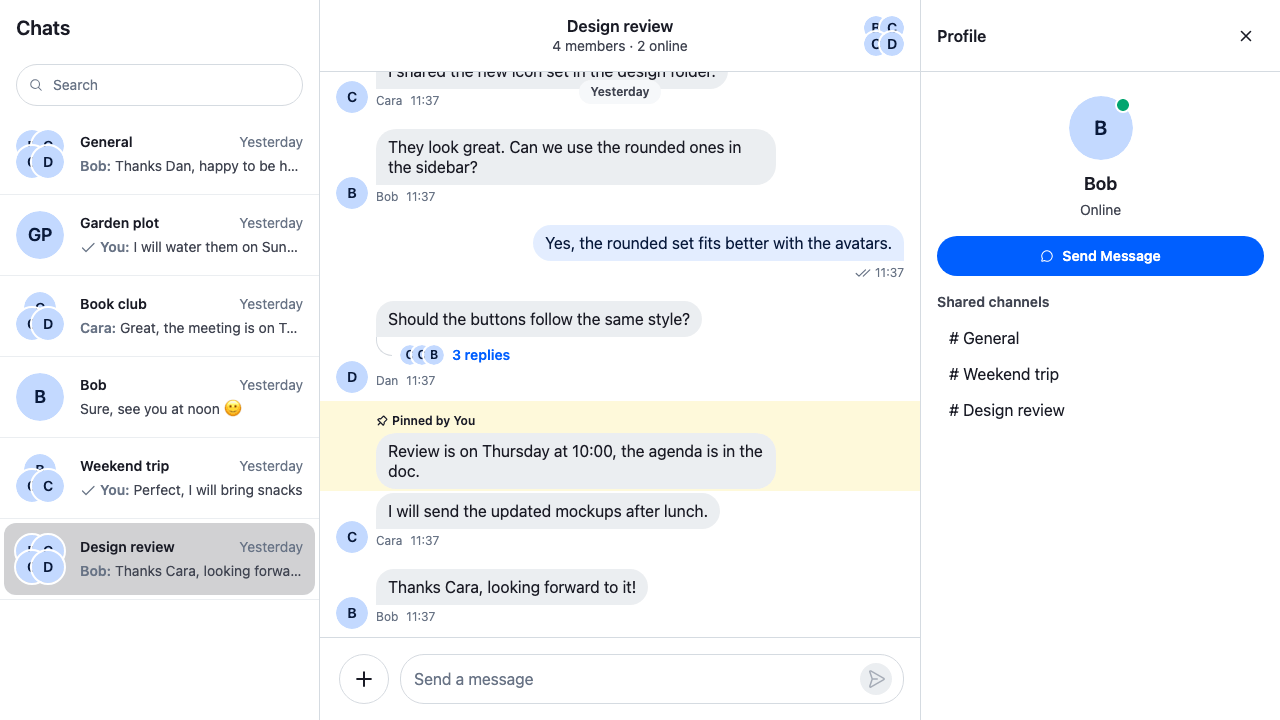
This recipe opens a person's profile in the side panel when the user clicks their avatar in a message, or a mention of them.
What you'll build
- Opening a profile from an avatar or a mention
- The person's online status or last active time
- The channels the user shares with them
- A Send message button for the direct conversation
Preview
Approach: Compose. Choosing where to start explains the approaches.
Starts from: the base app, with its side panel. The page shows the message list the recipe puts in the base app's channels view, and the profile's body.
Best practices
- Open the profile from the hooks
MessageListalready has:onUserClickfor a sender's avatar andonMentionsClickfor a mention. They reach every message without replacingMessageUI. - Open it with
useSidePanel().openUserProfile(). It binds the SDK'suserProfilekind with the user's id into the side panel's slot, soChatViewkeeps track of it, and opening a channel or a thread doesn't replace it. - Keep only the user's id. The body reads the user from the client and stays current.
- Find the existing direct conversation with a query, rather than
Channel.watch()on a channel built from the two members:watch()creates the channel when there is none. - Take shared channels from the channel lists the client has loaded. Listing every channel two people share needs a query of its own.
Open the profile from the message lists
MessageListWithUserDetails is the SDK's MessageList with two handlers, onUserClick and onMentionsClick, which open the clicked person's profile with useSidePanel().openUserProfile().
onMentionsClick runs for a click anywhere in the text of a message that mentions someone, and gets the event and the message. The mention that was clicked carries the user's id in data-user-id, so the handler opens a profile only for a click on one.
import { useMemo } from "react";
import { MessageList } from "stream-chat-react";
import type { MessageListProps } from "stream-chat-react";
import { useSidePanel } from "./SidePanel";

/**
 * A message list whose avatars and user mentions open the user's profile in the side panel.
 * Opening another user replaces the one shown.
 */
export const MessageListWithUserDetails = () => {
  const { openUserProfile } = useSidePanel();

  const handlers = useMemo(
    (): Pick<MessageListProps, "onMentionsClick" | "onUserClick"> => ({
      // Runs for a click anywhere in a message that mentions someone: only a click on a user
      // mention, which carries the user's id, opens a profile.
      onMentionsClick: (event) => {
        const mention = (event.target as HTMLElement).closest<HTMLElement>(
          "[data-user-id]",
        );
        if (mention?.dataset.userId) openUserProfile(mention.dataset.userId);
      },
      onUserClick: (_event, user) => openUserProfile(user.id),
    }),
    [openUserProfile],
  );

  return <MessageList {...handlers} />;
};
Use it in place of both message lists in the base app's channels view, the channel's and the thread's, and pass UserDetailsPanel to SidePanel as its UserProfile prop, the component it renders for a profile under the title row:
<>
  <ChannelNavigation />
  <ChannelSlot slot="channel">
    <ChannelHeader />
    <MessageListWithUserDetails />
    <MessageComposer />
  </ChannelSlot>
  <ThreadSlot slot="thread">
    <ActiveThread />
    <ThreadHeader />
    <MessageListWithUserDetails />
    <MessageComposer />
  </ThreadSlot>
  <SidePanel UserProfile={UserDetailsPanel} />
</>
The profile's body
The body reads the user from client.state.users, which the client keeps current, and renders again on each user.presence.changed and user.updated event for that user. user.online says whether they're online. Otherwise user.last_active says when they last were: it's a nanosecond timestamp, so convertTimestampToDate turns it into a date, as Data conventions explains.
The shared channels are the named channels in the user's channel lists with both of them in channel.state.members. Each one opens with useWorkspaceNavigation().openChannel(). The heading uses the side panel's cookbook-side-panel__section-title class.
The code labels the button "Send message". The SDK's Button capitalizes each word of its label, so the button reads Send Message, as the screenshot shows.
import { useEffect, useState } from "react";
import { convertTimestampToDate } from "stream-chat";
import type { Channel, ChannelManagerState, UserResponse } from "stream-chat";
import {
  Avatar,
  Button,
  useChannelDisplayName,
  useChatContext,
  useComponentContextIcons,
  useStateStore,
  useWorkspaceNavigation,
} from "stream-chat-react";
import { findDirectConversation } from "./directConversation";
import "./UserDetailsPanel.css";

/**
 * The user as the client knows them, kept current: the client updates `client.state.users` on
 * every presence change and profile update of a user it has loaded, and the panel re-reads it then.
 */
const useUser = (userId: string): UserResponse | undefined => {
  const { client } = useChatContext();
  const [user, setUser] = useState(() => client.state.users[userId]);

  useEffect(() => {
    setUser(client.state.users[userId]);
    const update = (event: { user?: { id: string } }) => {
      if (event.user?.id !== userId) return;
      // A copy, so the panel renders again; nothing until the client has loaded the user.
      const loaded = client.state.users[userId];
      if (loaded) setUser({ ...loaded });
    };
    const presence = client.on("user.presence.changed", update);
    const updated = client.on("user.updated", update);
    return () => {
      presence.unsubscribe();
      updated.unsubscribe();
    };
  }, [client, userId]);

  return user;
};

const paginatorsSelector = ({ paginators }: ChannelManagerState) => ({
  paginators,
});

/**
 * The channels the user's channel lists hold, each once, kept current as the lists load and
 * change. They're the channels the client has loaded for the user, so finding them sends no query.
 */
const useListedChannels = (): Channel[] => {
  const { channelManager } = useChatContext();
  const { paginators } = useStateStore(
    channelManager.state,
    paginatorsSelector,
  );
  const [channels, setChannels] = useState<Channel[]>([]);

  useEffect(() => {
    const update = () =>
      setChannels([
        ...new Set(paginators.flatMap((paginator) => paginator.items ?? [])),
      ]);
    update();
    const unsubscribers = paginators.map((paginator) =>
      paginator.state.subscribe(update),
    );
    return () => unsubscribers.forEach((unsubscribe) => unsubscribe());
  }, [paginators]);

  return channels;
};

// The panel's own text is English, so its dates are too. An app in another language passes its
// language here.
const lastActiveFormat = new Intl.DateTimeFormat("en-US", {
  dateStyle: "medium",
  timeStyle: "short",
});

const presenceText = (user: UserResponse) => {
  if (user.online) return "Online";
  // A nanosecond timestamp, like every timestamp on the user.
  const lastActive = convertTimestampToDate(user.last_active);
  return lastActive
    ? `Last active ${lastActiveFormat.format(lastActive)}`
    : "Offline";
};

/** A channel the user and the other person are both in, as a button that opens it. */
const SharedChannel = ({ channel }: { channel: Channel }) => {
  const { openChannel } = useWorkspaceNavigation();
  const name = useChannelDisplayName(channel);

  return (
    <li>
      <button
        className="cookbook-user-details__channel"
        onClick={(event) => openChannel(channel, { event })}
        type="button"
      >
        <span aria-hidden="true">#</span> {name}
      </button>
    </li>
  );
};

/**
 * The side panel's body for a profile: the person's name, avatar and presence, the named channels
 * in the user's channel lists that both of them are in, and a Send message button that opens the
 * user's direct conversation with them.
 */
export const UserDetailsPanel = ({ userId }: { userId: string }) => {
  const { IconMessageBubble } = useComponentContextIcons();
  const { channelManager, client } = useChatContext();
  const { openChannel } = useWorkspaceNavigation();
  const user = useUser(userId);
  const listedChannels = useListedChannels();
  const [isOpening, setIsOpening] = useState(false);
  const [note, setNote] = useState<string>();

  const name = user?.name ?? userId;
  const isMe = userId === client.userId;
  // Named channels both of them are in, from the channel lists: the direct conversation has no name.
  const sharedChannels = listedChannels.filter(
    (channel) =>
      !!channel.state.members[userId] &&
      !!client.userId &&
      !!channel.state.members[client.userId] &&
      "name" in (channel.data?.custom ?? {}),
  );

  const sendMessage = async () => {
    setIsOpening(true);
    setNote(undefined);
    try {
      const conversation = await findDirectConversation(client, userId);
      if (!conversation) {
        setNote(`No direct conversation with ${name} yet.`);
        return;
      }
      channelManager.ingestChannel(conversation);
      openChannel(conversation);
    } catch {
      setNote("Couldn't open the conversation. Try again.");
    } finally {
      setIsOpening(false);
    }
  };

  return (
    <div className="cookbook-user-details">
      <div className="cookbook-user-details__identity">
        {/* The name is written out below, so the avatar is decorative. */}
        <Avatar
          aria-hidden
          imageUrl={user?.image}
          isOnline={!!user?.online}
          role="presentation"
          size="2xl"
          userName={name}
        />
        <p className="cookbook-user-details__name">{name}</p>
        {user && (
          <p className="cookbook-user-details__presence">
            {presenceText(user)}
          </p>
        )}
      </div>
      {!isMe && (
        <Button
          appearance="solid"
          disabled={isOpening}
          onClick={sendMessage}
          size="md"
          variant="primary"
        >
          <IconMessageBubble />
          Send message
        </Button>
      )}
      {note && (
        <p className="cookbook-user-details__note" role="status">
          {note}
        </p>
      )}
      {!isMe && !!sharedChannels.length && (
        <section className="cookbook-user-details__section">
          <h3 className="cookbook-side-panel__section-title">
            Shared channels
          </h3>
          <ul className="cookbook-user-details__channels">
            {sharedChannels.map((channel) => (
              <SharedChannel channel={channel} key={channel.cid} />
            ))}
          </ul>
        </section>
      )}
    </div>
  );
};@layer stream-overrides {
.cookbook-user-details {
display: flex;
flex-direction: column;
gap: var(--str-chat__spacing-md);
padding: var(--str-chat__spacing-xl) var(--str-chat__spacing-md);
}
.cookbook-user-details__identity {
display: flex;
flex-direction: column;
align-items: center;
gap: var(--str-chat__spacing-xxs);
text-align: center;
}
.cookbook-user-details__name {
margin: var(--str-chat__spacing-xs) 0 0;
font: var(--str-chat__font-heading-md);
}
.cookbook-user-details__presence,
.cookbook-user-details__note {
margin: 0;
color: var(--str-chat__text-secondary);
font: var(--str-chat__font-caption-default);
}
.cookbook-user-details__note {
text-align: center;
}
.cookbook-user-details__channels {
margin: 0;
padding: 0;
list-style: none;
}
.cookbook-user-details__channel {
width: 100%;
padding: var(--str-chat__spacing-xs) var(--str-chat__spacing-sm);
border: 0;
border-radius: var(--str-chat__radius-lg);
background: none;
color: var(--str-chat__text-primary);
font: var(--str-chat__font-body-default);
text-align: start;
cursor: pointer;
}
.cookbook-user-details__channel:hover {
background: var(--str-chat__background-utility-hover);
}
.cookbook-user-details__channel:focus-visible {
outline: 2px solid var(--str-chat__accent-primary);
outline-offset: -2px;
}
}Opening the direct conversation
Send message looks for the channel with only the user and the other person and no name of its own. The query reads only: it creates nothing, and it watches the channel it finds. ChannelManager.ingestChannel() puts that channel in the channel lists whose filters it matches, and openChannel() opens it in the channel's slot. The profile stays open beside it.
import type { StreamChat } from "stream-chat";

/**
 * The user's direct conversation with another user, if they have one: a channel with only the two
 * of them and no name of its own. The query only reads: it creates nothing, and it watches what it
 * finds, so the conversation opens with its history and receives events.
 */
export const findDirectConversation = async (
  client: StreamChat,
  userId: string,
) => {
  const channels = await client.queryChannelsAndHydrate({
    // Exactly the two of them: both are members, and there are two members. The server doesn't
    // take `$eq` on `members`.
    filter_conditions: {
      $and: [
        { members: { $in: [client.userId ?? ""] } },
        { members: { $in: [userId] } },
      ],
      member_count: 2,
      type: "messaging",
    },
  });
  return channels.find((channel) => !("name" in (channel.data?.custom ?? {})));
};
When there is no direct conversation yet, the panel says so. Starting a conversation builds one that's created on its first message.
How it works
- The default
MessageUIattachesonUserClickto the sender's avatar, and<MessageText/>attachesonMentionsClickto the text of a message with mentions.<MessageList/>passes both handlers to every message it renders, the thread's parent message included. WithonMentionsClickset, Enter or Space on the focused text of a message with mentions calls the handler. The event's target is then the text, not a mention, so the handler opens no profile. The avatar can't take focus. Offer keyboard users another way in, such as a member list. useSidePanel().openUserProfile()clears any other content of the side panel and binds{ kind: "userProfile", source: { userId } }into its slot withuseChatViewNavigation().open(). Opening another person replaces the binding, and the panel'skeystarts it afresh.SidePanelreads the binding withuseSlotEntity({ kind: "userProfile", slot: SIDE_PANEL_SLOT })and rendersUserDetailsPanelwith the user's id, and focus moves to the panel's title. The close button callsuseSidePanel().closeSidePanel(), which releases the slot withuseChatViewNavigation().release(), and focus goes back to the element that opened it. The avatar can't take focus, so after a click on it focus goes to the channel's composer instead.- A channel opened from the profile replaces the one in the
channelslot and closes the threads opened from it. The side panel's slot holds another kind, so the profile stays.
Example
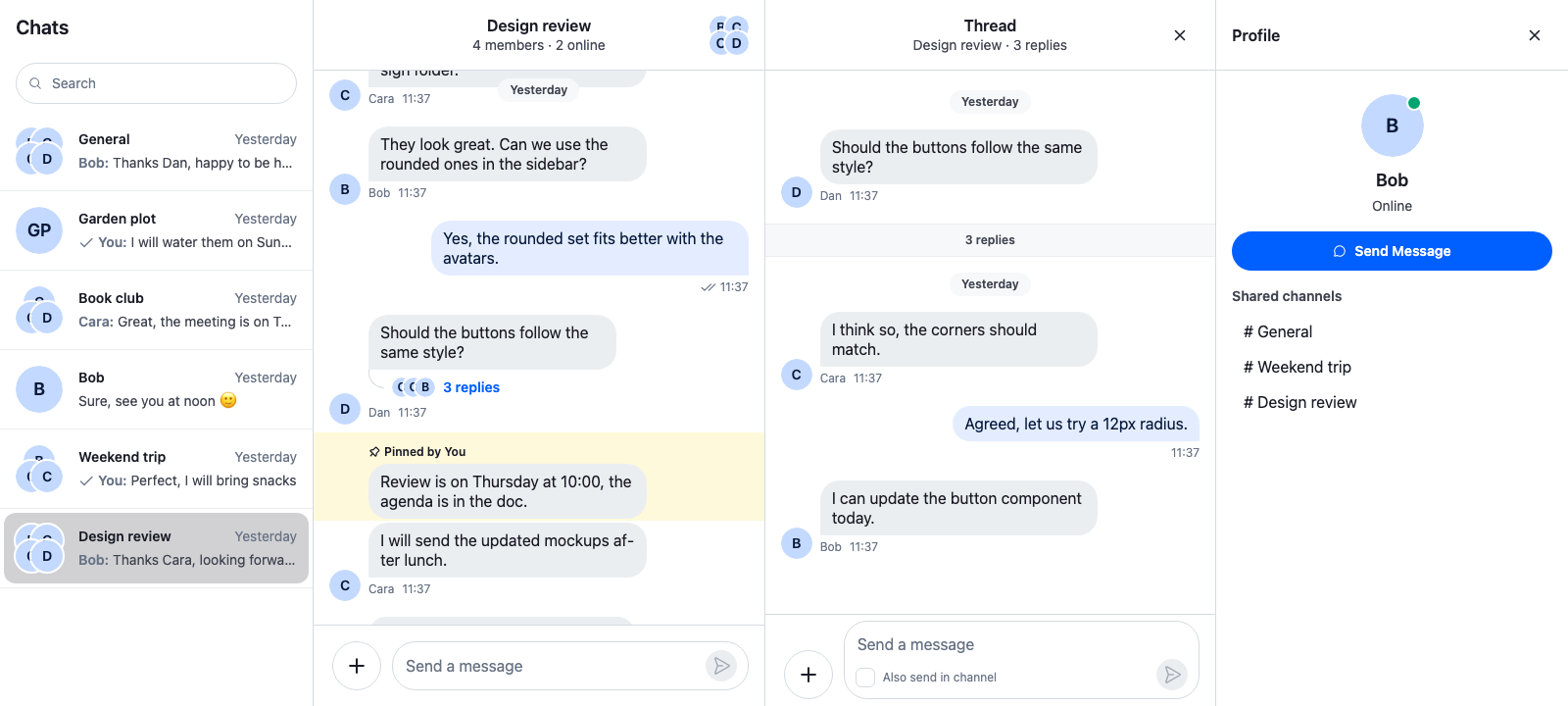
The user opens a thread in Design review, then clicks Bob's avatar in the channel. Bob's profile opens in the side panel, to the right of the thread, and the thread stays open. Clicking Send Message opens the direct conversation with Bob in the channel's place, the thread closes, and the profile stays open.
The profile beside an open thread
Related
- Workspace with ChatView explains views, slots and where an opened channel or thread lands.
- Slot layout lists the binding kinds,
useChatViewNavigationanduseSlotEntity. - Mentions covers
onMentionsClickandonMentionsHover. - Members and online status shows who in a channel is online.
- Starting a conversation finds or starts a conversation with the people the user picks.
- Channel and thread side by side sets the width of the thread beside the channel.