


Location on your own map
A shared location shows as a card with a map placeholder that links out to a map site. This recipe puts a real map in its place, drawn with react-leaflet and OpenStreetMap tiles. What location sharing does and how a live location stays current is on Location sharing.
What you'll build
- An OpenStreetMap map in every location message
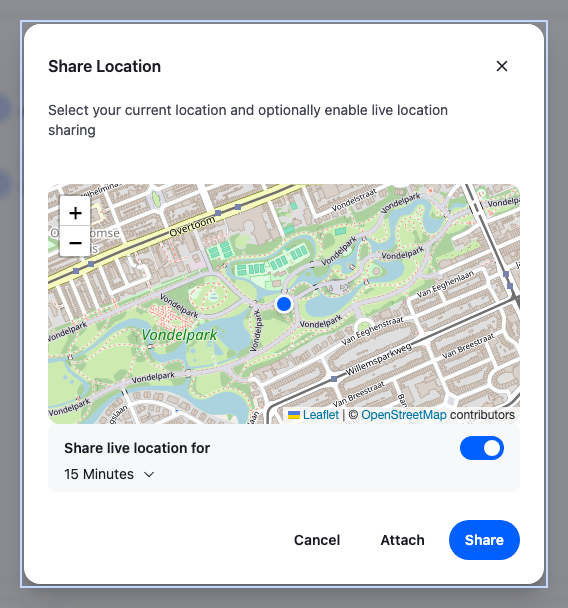
- A map in the Share Location dialog
- A map in the composer's location preview
- Live sharing for 15 minutes, 1 hour or 3 hours
- A live location's map that follows its position
Preview
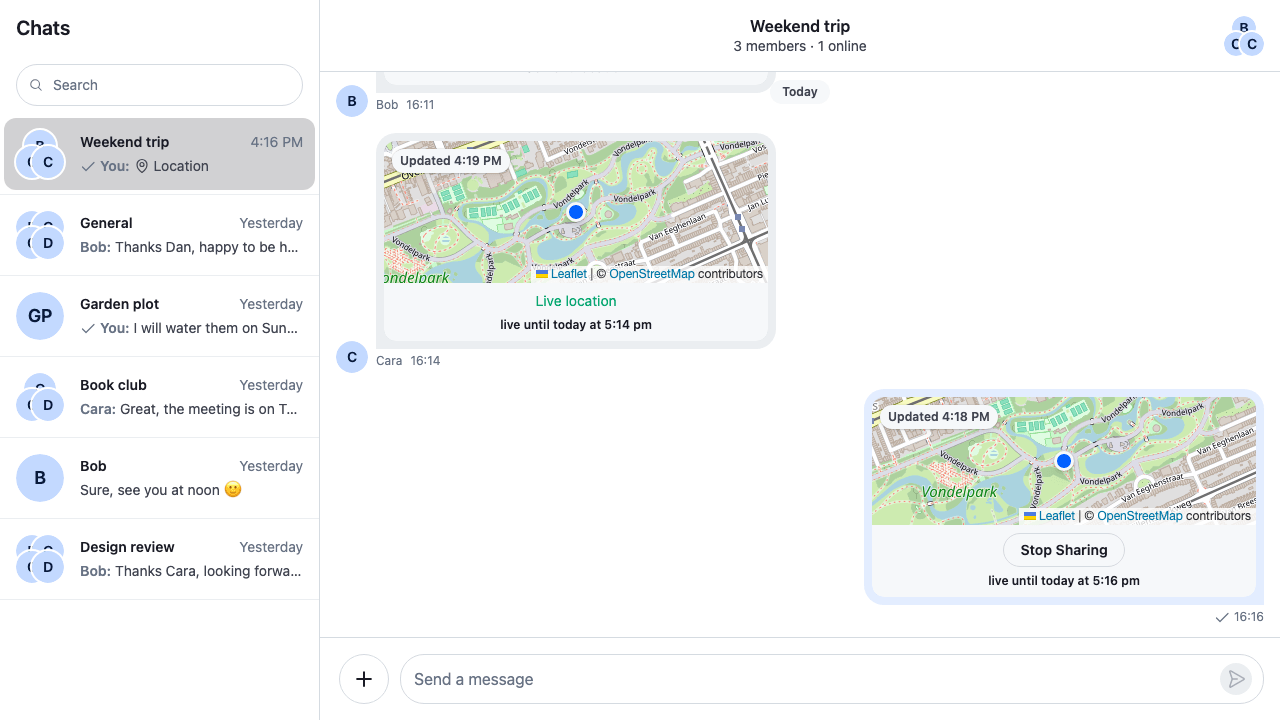
Approach: Replace one part. Choosing where to start explains the approaches.
Starts from: the base app. The page shows only what the recipe adds.
The ShareLocationDialog key gets the SDK's dialog with a GeolocationMap of its own, and the Attachment key gets the SDK's Attachment with a Geolocation that has one. The dialog, sharing, the live states and Stop sharing stay the SDK's. The code plugs into the app every UI Cookbook recipe starts from; see the UI Cookbooks overview.
Best practices
- Show the OpenStreetMap attribution on every map, linking to its copyright page. The tile usage policy requires it.
- Give each map a name for screen readers, and keep the marker out of the tab order when activating it does nothing.
- Use a div marker, or set
L.Icon.Defaultto imported image URLs. Leaflet's default pin breaks under a bundler. - In a message, turn off scroll-wheel zoom so the wheel keeps scrolling the list.
- Contain Leaflet's stacking in the map, so its panes don't cover the chat's menus and dialogs.
- Handle the dialog's three states: finding the position, an error with a way to try again, and the map.
Turning location sharing on
Location sharing is on by default: the attachment menu offers Location when client.config's messageComposer.location.enabled is true, its default, and the channel type allows shared_locations. The cookbook's demo app allows it for messaging channels, so the base app needs no setting. Location is offered in channels only, not in threads. Turning it on or off lists both sides.
A live location's position moves only while a LiveLocationManager reports it. Mount one with useLiveLocationSharingManager, as Live locations need the manager shows. The cookbook leaves it out: the demo app doesn't allow shared locations, so the manager's first request, client.getUserLiveLocations(), fails, and the cookbook sends nothing anyway.
A map component
The dialog and the messages draw the same map: OpenStreetMap tiles, a marker on the position, and the attribution in the corner. LocationMap takes the position, a label for screen readers and an optional badge over the map. compact is for a map inside a message: no zoom buttons, and the mouse wheel scrolls the list instead of zooming. thumbnail is for the composer's preview: compact too, and the attribution leaves out Leaflet's name, so OpenStreetMap's credit fits on one line.
import "leaflet/dist/leaflet.css";
import { divIcon } from "leaflet";
import type { ReactNode } from "react";
import { useEffect } from "react";
import {
AttributionControl,
MapContainer,
Marker,
TileLayer,
useMap,
} from "react-leaflet";
import "./LocationMap.css";
const TILE_URL = "https://tile.openstreetmap.org/{z}/{x}/{y}.png";
const TILE_ATTRIBUTION =
'© <a href="https://www.openstreetmap.org/copyright">OpenStreetMap</a> contributors';
// Leaflet's default pin builds its image URLs from where leaflet.css was loaded, which a bundler
// changes, so the pin shows as a broken image. A div marker needs no images and takes the theme's colors.
const markerIcon = divIcon({
className: "cookbook-location-map__marker",
iconSize: [20, 20],
});
/** `MapContainer` reads `center` only when it mounts; this keeps a moving position in view. */
const FollowPosition = ({
latitude,
longitude,
}: {
latitude: number;
longitude: number;
}) => {
const map = useMap();
useEffect(() => {
map.panTo([latitude, longitude]);
}, [map, latitude, longitude]);
return null;
};
export type LocationMapProps = {
/** Names the map for screen readers, for example "Map of Bob's location". */
label: string;
latitude: number;
longitude: number;
/** Shown over the map's top corner. */
badge?: ReactNode;
/** A small map inside a message: no zoom buttons, and the mouse wheel scrolls the list. */
compact?: boolean;
/**
* A thumbnail, as in the composer's preview: compact, and the attribution leaves out Leaflet's
* name, so OpenStreetMap's credit fits on one line.
*/
thumbnail?: boolean;
};
/** An OpenStreetMap map centred on one position, with a marker on it. */
export const LocationMap = ({
badge,
compact = false,
label,
latitude,
longitude,
thumbnail = false,
}: LocationMapProps) => (
<div aria-label={label} className="cookbook-location-map" role="region">
<MapContainer
attributionControl={!thumbnail}
center={[latitude, longitude]}
className="cookbook-location-map__map"
scrollWheelZoom={!compact && !thumbnail}
zoom={15}
zoomControl={!compact && !thumbnail}
>
<TileLayer attribution={TILE_ATTRIBUTION} url={TILE_URL} />
{thumbnail && <AttributionControl prefix={false} />}
{/* Not focusable: the marker does nothing when activated. */}
<Marker
icon={markerIcon}
keyboard={false}
position={[latitude, longitude]}
/>
<FollowPosition latitude={latitude} longitude={longitude} />
</MapContainer>
{badge && <div className="cookbook-location-map__badge">{badge}</div>}
</div>
);@layer stream-overrides {
.cookbook-location-map {
position: relative;
/* Leaflet stacks its panes and controls up to z-index 1000; this keeps them under the chat's
menus and dialogs. */
isolation: isolate;
overflow: hidden;
height: 100%;
min-height: 120px;
}
.cookbook-location-map__map {
width: 100%;
height: 100%;
background: var(--str-chat__background-core-surface-subtle);
}
.cookbook-location-map__marker {
border: 3px solid var(--str-chat__background-core-surface-card);
border-radius: var(--str-chat__radius-max);
background: var(--str-chat__accent-primary);
box-shadow: var(--str-chat__box-shadow-2);
}
.cookbook-location-map__badge {
position: absolute;
z-index: 1000;
inset-block-start: var(--str-chat__spacing-xs);
inset-inline-start: var(--str-chat__spacing-xs);
padding: var(--str-chat__spacing-xxs) var(--str-chat__spacing-xs);
border-radius: var(--str-chat__radius-max);
background: var(--str-chat__background-core-surface-card);
color: var(--str-chat__text-secondary);
font: var(--str-chat__font-metadata-emphasis);
box-shadow: var(--str-chat__box-shadow-1);
}
}Import leaflet/dist/leaflet.css where the map is used: Leaflet positions its tiles and controls with it. Leaflet's default marker builds its image URLs from the location of that stylesheet, which a bundler changes, so the pin renders as a broken image. A divIcon needs no images and takes its colors from the theme's tokens. To keep Leaflet's own pin instead, import its images and pass them to L.Icon.Default.mergeOptions().
MapContainer reads center only when it mounts, so FollowPosition pans the map when the position changes, as a live location's does. The wrapper is a named region, the marker isn't focusable, and isolation: isolate keeps Leaflet's panes and controls, stacked up to z-index: 1000, under the chat's menus.
A map in the Share Location dialog
<ShareLocationDialog/> starts a position watch, navigator.geolocation.watchPosition(), when it opens, and clears the watch when it closes. It passes what the watch reports to the component in its GeolocationMap prop, as ShareGeolocationMapProps:
| Prop | Value |
|---|---|
latitude, longitude |
The latest position, once one arrives. |
loadingLocation |
true while the dialog waits for a position. |
geolocationPositionError |
The browser's error, such as a blocked permission. It's also set, with the code TIMEOUT, when no position arrives within 10 seconds. |
restartLocationWatching |
Stops the dialog's current watch and starts a new one. loadingLocation turns true, and the previous error and position stay set until the new watch reports. |
Once a watch has delivered a position, a later TIMEOUT from that watch keeps the position and sets no error. Any other error clears the position and sets geolocationPositionError.
This GeolocationMap shows a status line while it waits, the error with a Try again button, and the map once it has a position. shareDurations sets the live-sharing choices, in milliseconds:
import type {
  ShareGeolocationMapProps,
  ShareLocationDialogProps,
} from "stream-chat-react";
import { Button, ShareLocationDialog } from "stream-chat-react";
import { LocationMap } from "./LocationMap";
import "./ShareLocationDialogWithMap.css";

const MINUTE = 60 * 1000;
const HOUR = 60 * MINUTE;

// Declared once: the dialog filters out durations shorter than a minute whenever it gets a new list.
const shareDurations = [15 * MINUTE, HOUR, 3 * HOUR];

/** The browser's reason, in words the user can act on. */
const describeError = (error: GeolocationPositionError) =>
  error.code === error.PERMISSION_DENIED
    ? "Location access is blocked. Allow it for this site in your browser, then try again."
    : "Your location isn't available right now.";

const DialogMap = ({
  geolocationPositionError,
  latitude,
  loadingLocation,
  longitude,
  restartLocationWatching,
}: ShareGeolocationMapProps) => {
  // After Try again, the previous error stays set until the new watch reports.
  if (geolocationPositionError && !loadingLocation) {
    return (
      <div className="cookbook-share-location-map__status" role="alert">
        <p>{describeError(geolocationPositionError)}</p>
        <Button
          appearance="outline"
          onClick={restartLocationWatching}
          size="sm"
          variant="secondary"
        >
          Try again
        </Button>
      </div>
    );
  }

  // Before the first position arrives, the dialog may not report loading yet.
  if (loadingLocation || latitude == null || longitude == null) {
    return (
      <div className="cookbook-share-location-map__status" role="status">
        Finding your location…
      </div>
    );
  }

  return (
    <div className="cookbook-share-location-map">
      <LocationMap
        label="Map of your location"
        latitude={latitude}
        longitude={longitude}
      />
    </div>
  );
};

export const ShareLocationDialogWithMap = (props: ShareLocationDialogProps) => (
  <ShareLocationDialog
    {...props}
    GeolocationMap={DialogMap}
    shareDurations={shareDurations}
  />
);@layer stream-overrides {
.cookbook-share-location-map {
overflow: hidden;
height: 240px;
border-radius: var(--str-chat__radius-lg);
}
.cookbook-share-location-map__status {
display: flex;
flex-direction: column;
align-items: center;
justify-content: center;
gap: var(--str-chat__spacing-sm);
height: 240px;
padding: var(--str-chat__spacing-md);
border-radius: var(--str-chat__radius-lg);
background: var(--str-chat__background-core-surface-subtle);
color: var(--str-chat__text-secondary);
font: var(--str-chat__font-body-default);
text-align: center;
}
.cookbook-share-location-map__status p {
margin: 0;
}
}Sharing live for 15 minutes
When location access is blocked
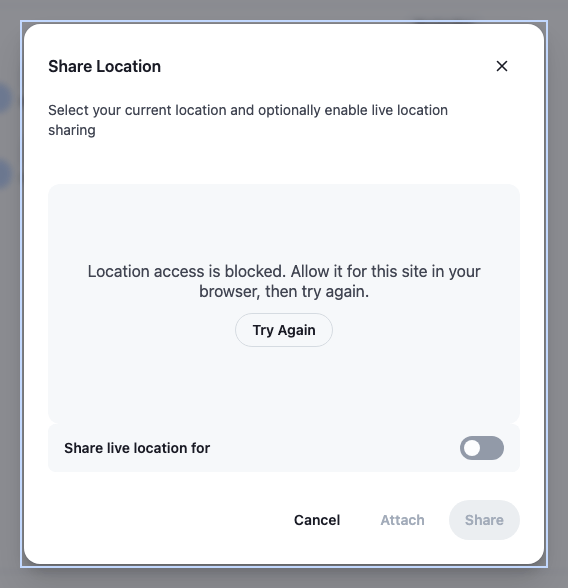
The dialog renders its GeolocationMap before the first position arrives, sometimes before it reports loading, so a missing position counts as loading too. A GeolocationPositionError with PERMISSION_DENIED means the user, or the browser, blocked access, and only the browser's site settings bring it back; other codes are worth a retry. The live switch, Attach and Share stay disabled until there is a position. The dialog drops durations shorter than one minute.
The location's preview in the composer
Attach in the dialog puts the location into messageComposer.locationComposer, and the composer shows it above the input until the message is sent. The location item of the composer's preview set renders it with <GeolocationPreview/>, which shows a pin by default. Its PreviewImage prop takes a component of your own, which gets the location.
<LocationPreviewWithMap/> renders <GeolocationPreview/> with a small map as its PreviewImage, and previewSetWithMap is the default preview set with it in the location item's place. The other previews stay as they are. As the default item does, it offers no remove button while a message is being edited, since an edited message keeps its location. Custom previews describes the preview set.
import type {
  LiveLocationPreview,
  LocationComposerState,
  MessageComposerState,
  StaticLocationPreview,
} from "stream-chat";
import {
  defaultMessageComposerPreviewSet,
  GeolocationPreview,
  MessageComposerPreviews,
  useMessageComposerController,
  useStateStore,
} from "stream-chat-react";
import { LocationMap } from "./LocationMap";
import "./LocationPreviewWithMap.css";

const locationSelector = ({ location }: LocationComposerState) => ({
  location,
});
const editedMessageSelector = ({ editedMessage }: MessageComposerState) => ({
  editedMessage,
});

/** A small map in place of the preview's pin. */
const PreviewMap = ({
  location,
}: {
  location: LiveLocationPreview | StaticLocationPreview;
}) => (
  <div className="cookbook-location-preview-map">
    <LocationMap
      label="Map of the location you are sharing"
      latitude={location.latitude}
      longitude={location.longitude}
      thumbnail
    />
  </div>
);

const LocationPreviewWithMap = () => {
  const messageComposer = useMessageComposerController();
  const { location } = useStateStore(
    messageComposer.locationComposer.state,
    locationSelector,
  );
  const { editedMessage } = useStateStore(
    messageComposer.state,
    editedMessageSelector,
  );

  if (!location) return null;

  return (
    <GeolocationPreview
      location={location}
      PreviewImage={PreviewMap}
      // An edited message keeps its location, so only a new message's location can be removed.
      remove={
        editedMessage ? undefined : messageComposer.locationComposer.initState
      }
    />
  );
};

// The default previews, with the location item rendering the preview with a map.
const previewSetWithMap = defaultMessageComposerPreviewSet.map((item) =>
  item.type === "location"
    ? { ...item, Component: LocationPreviewWithMap }
    : item,
);

export const MessageComposerPreviewsWithMap = () => (
  <MessageComposerPreviews messageComposerPreviewSet={previewSetWithMap} />
);@layer stream-overrides {
.cookbook-location-preview-map {
flex-shrink: 0;
overflow: hidden;
width: 200px;
height: 120px;
border-radius: var(--str-chat__radius-md);
}
}<MessageComposerPreviewsWithMap/> goes under the MessageComposerPreviews key, registered in Putting it together:
A live location in the composer
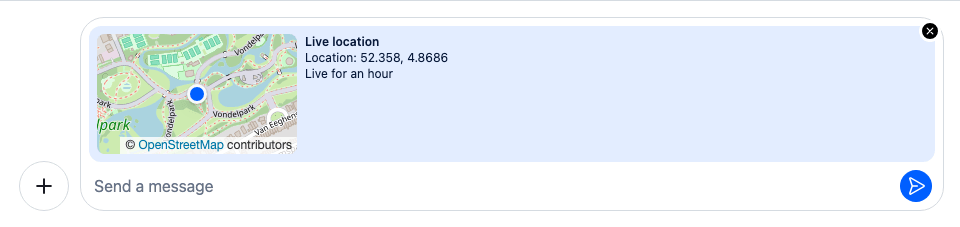
The preview takes the background of the user's own bubbles, --str-chat__chat-bg-outgoing, but not their text color. With a dark bubble color, as in this theme, its text is hard to read. The status under a message's map has the opposite problem: it sits on a light surface but inherits the bubble's text color, which is white in the user's own messages. LocationColors.css gives both their own text color, from the tokens:
@layer stream-overrides {
  /* The composer's location preview takes the background of the user's own bubbles, so its text
     takes their text color too. */
  .str-chat__location-preview {
    color: var(--str-chat__chat-text-outgoing);
  }

  /* The status under the map sits on a light surface of its own, inside a bubble whose text can be
     light, so it sets its own text color. */
  .str-chat__message-attachment-geolocation__status {
    color: var(--str-chat__text-primary);
  }
}
A map in the message
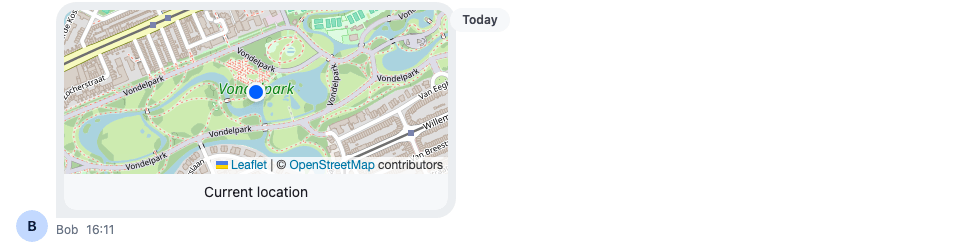
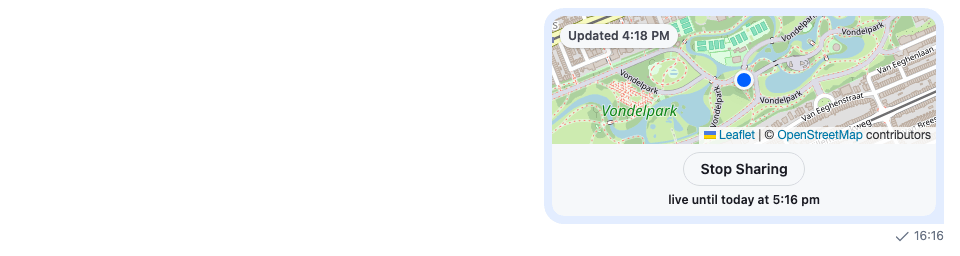
A message's location is message.shared_location, not one of message.attachments. Attachment renders it with Geolocation, which draws the card: the map area, and the status below it, "Current location" for a static location, "Live until" and the end time for a live one, with Stop sharing on the user's own, and "Location sharing ended" once it's over. Its GeolocationMap prop replaces the placeholder in the map area.
GeolocationMap gets only latitude and longitude. To show when a live location last moved, this one reads the whole location, location.updated_at and location.end_at, from a context that GeolocationWithMap provides around Geolocation:
import { createContext, useContext } from "react";
import type { SharedLocationResponseData } from "stream-chat";
import { convertTimestampToDate } from "stream-chat";
import type {
  AttachmentProps,
  GeolocationMapProps,
  GeolocationProps,
} from "stream-chat-react";
import {
  Attachment,
  Geolocation,
  useTranslationContext,
} from "stream-chat-react";
import { LocationMap } from "./LocationMap";

/**
 * `Geolocation` gives its map only the coordinates. The rest of the location (whose it is, when it
 * last moved) reaches the map through this context.
 */
const SharedLocationContext = createContext<
  SharedLocationResponseData | undefined
>(undefined);

/** "Updated 10:42 AM", for a live location: when its position last changed. */
const useLastUpdate = (location?: SharedLocationResponseData) => {
  const { userLanguage } = useTranslationContext();
  const updatedAt = location?.end_at
    ? convertTimestampToDate(location.updated_at)
    : null;
  if (!updatedAt) return undefined;
  const time = new Intl.DateTimeFormat(userLanguage || undefined, {
    timeStyle: "short",
  }).format(updatedAt);
  return `Updated ${time}`;
};

const MessageMap = ({ latitude, longitude }: GeolocationMapProps) => {
  const location = useContext(SharedLocationContext);
  const lastUpdate = useLastUpdate(location);

  return (
    <LocationMap
      badge={lastUpdate}
      compact
      label={
        location?.end_at ? "Map of a live location" : "Map of a shared location"
      }
      latitude={latitude}
      longitude={longitude}
    />
  );
};

const GeolocationWithMap = (props: GeolocationProps) => (
  <SharedLocationContext.Provider value={props.location}>
    <Geolocation {...props} GeolocationMap={MessageMap} />
  </SharedLocationContext.Provider>
);

export const AttachmentWithMaps = (props: AttachmentProps) => (
  <Attachment {...props} Geolocation={GeolocationWithMap} />
);
A static location
The user's own live location
An ended live location
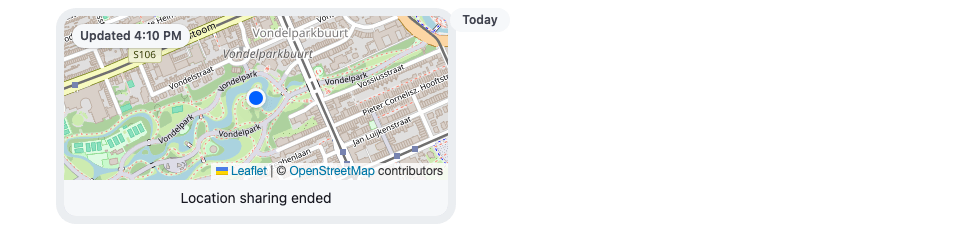
Geolocation passes the map component its props only, so MessageMap is declared once, outside any component; a component created while rendering would remount the map, and reload its tiles, on every render. A live location's message is updated with each new position, and its card re-renders: FollowPosition pans to the new position, and the badge shows the new location.updated_at. Geolocation decides when a live location has ended from location.end_at, and Stop sharing calls Channel.stopLiveLocationSharing().
The status takes its text color from LocationColors.css, above. The card keeps the SDK's size, --str-chat__attachment-max-width wide and 200px high, and the map fills the part above the status.
Putting it together
Register the three parts under their keys, and wrap <ChatView/>, or a single <Channel/>, in <WithLocationMaps/>:
import type { PropsWithChildren } from "react";
import { WithComponents } from "stream-chat-react";
import { AttachmentWithMaps } from "./GeolocationWithMap";
import { MessageComposerPreviewsWithMap } from "./LocationPreviewWithMap";
import { ShareLocationDialogWithMap } from "./ShareLocationDialogWithMap";
import "./LocationColors.css";

// Declared once, so WithComponents gets the same object on every render.
const overrides = {
  Attachment: AttachmentWithMaps,
  MessageComposerPreviews: MessageComposerPreviewsWithMap,
  ShareLocationDialog: ShareLocationDialogWithMap,
};

export const WithLocationMaps = ({ children }: PropsWithChildren) => (
  <WithComponents overrides={overrides}>{children}</WithComponents>
);
How it works
Example
The user shares their live location in the Weekend trip channel:
- The user opens the attachment menu and picks Location.
AttachmentSelectoropens theShareLocationDialogfromComponentContext,ShareLocationDialogWithMap. - The dialog calls
navigator.geolocation.watchPosition(). Until the browser answers,DialogMapshows "Finding your location…"; then it shows the map, centred on the position. - The user turns on "Share live location for" and picks 1 hour from
shareDurations, then selects Share.LocationComposer.setData()stores the position anddurationMs, andMessageComposer.sendLocation()sends it withChannel.sendSharedLocation(). - The message arrives with
message.shared_location.Attachmentrenders it withGeolocationWithMap, which provides the location toMessageMapand rendersGeolocation. Geolocationpasses the coordinates toMessageMap, and shows Stop sharing and "Live until" below the map, since the location is the user's own andlocation.end_atis in the future.- The user's
LiveLocationManager, mounted as on the Location sharing page, sends a new position. The message is updated, the map pans to it, and the badge shows the new time. - An hour later,
Geolocationswitches to "Location sharing ended". The map stays on the last position, and the badge says when it was.
All three parts wrap the SDK's own component and change only the map, so the dialog's switch, durations and buttons, the preview's text and remove button, and the card's status and Stop sharing, behave as before.
Related
- Location sharing: sharing, live locations and the settings that turn it on.
- Location:
messageComposer.locationComposerand sending a location. - Attachments: the
Attachmentprops, includingGeolocation. - Attachment Selector: the menu that opens the dialog.
- Location hooks:
useLiveLocationSharingManager. - Custom composer: a composer layout of your own, with the default previews.
- Product card: an attachment type of your own.