


System message
A system message is a message of type system. It reports an event in the channel rather than something a user wrote, for example a member joining or a moderation command. MessageList and VirtualizedMessageList render it with the MessageSystem override instead of the message UI. This recipe replaces it.
What you'll build
- A system message on a quiet card
- The event in emphasis, with who triggered it
- The time of the event
Preview
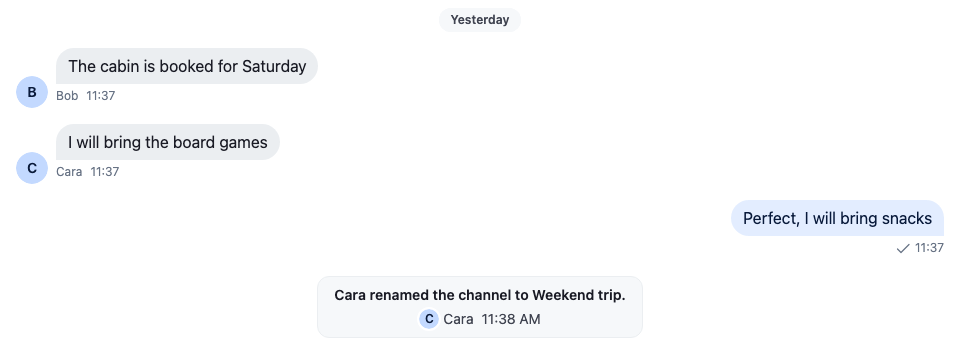
Approach: Replace one part. Choosing where to start explains the approaches.
Starts from: the base app. The page shows only what the recipe adds.
Best practices
- Keep system messages visually distinct from user messages, but quieter.
- Show the message's text: it says what happened.
- Show who triggered the event only where your app's privacy rules allow it. The sender is
message.user. - Replace
MessageSystemfor a different layout. For a different look only, stylestr-chat__message--system. - Test with every event your app turns into a system message, such as members being added and removed, and moderation commands.
Default system message component
The default is <EventComponent/>. It renders the message's text in a centered line. With the list's unsafeHTML prop set, it renders the message's html instead, and falls back to the text when the message has no html:
The default system message
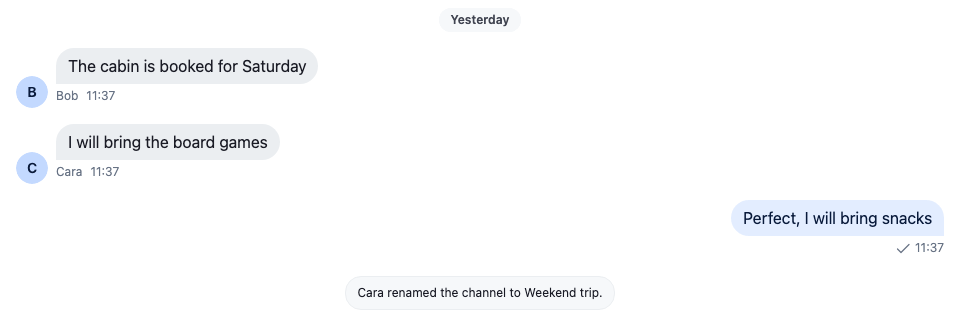
A system message comes from the server. Your backend sends one with type: "system", as System messages shows, and adding or removing members can create one, as Channel members shows.
Custom system message component
This component shows the text, the user who triggered the event, and the time, on a quiet card in the middle of the list:
import type { PropsWithChildren } from "react";
import { convertTimestampToDate } from "stream-chat";
import type { EventComponentProps } from "stream-chat-react";
import { Avatar, WithComponents } from "stream-chat-react";
import "./CustomSystemMessage.css";

const CustomSystemMessage = ({ message }: EventComponentProps) => {
  const { created_at, text, user } = message;
  const date = convertTimestampToDate(created_at);
  const userName = user?.name || user?.id;

  return (
    <div className="cookbook-system-message">
      <div className="cookbook-system-message__text">{text?.trim()}</div>
      <div className="cookbook-system-message__meta">
        {user && (
          <span className="cookbook-system-message__actor">
            <Avatar imageUrl={user.image} size="xs" userName={userName} />
            {userName}
          </span>
        )}
        {date && (
          <time dateTime={date.toISOString()}>
            {date.toLocaleTimeString([], {
              hour: "numeric",
              minute: "2-digit",
            })}
          </time>
        )}
      </div>
    </div>
  );
};

// Declared once, so WithComponents gets the same object on every render.
const overrides = { MessageSystem: CustomSystemMessage };

export const WithCustomSystemMessages = ({ children }: PropsWithChildren) => (
  <WithComponents overrides={overrides}>{children}</WithComponents>
);@layer stream-overrides {
.cookbook-system-message {
display: flex;
flex-direction: column;
align-items: center;
gap: var(--str-chat__spacing-xxs);
width: fit-content;
max-width: 360px;
margin: var(--str-chat__spacing-xs) auto;
padding: var(--str-chat__spacing-xs) var(--str-chat__spacing-md);
border: 1px solid var(--str-chat__border-core-subtle);
border-radius: var(--str-chat__radius-lg);
background: var(--str-chat__background-core-surface-subtle);
color: var(--str-chat__chat-text-system);
font: var(--str-chat__font-caption-default);
text-align: center;
}
.cookbook-system-message__text {
color: var(--str-chat__text-primary);
font: var(--str-chat__font-caption-emphasis);
}
.cookbook-system-message__meta,
.cookbook-system-message__actor {
display: flex;
align-items: center;
gap: var(--str-chat__spacing-xs);
}
.cookbook-system-message__actor {
gap: var(--str-chat__spacing-xxs);
}
}The rules sit in the stream-overrides layer, so they win over the SDK's own rules once the SDK's stylesheet is in an earlier layer, as Theming → CSS layers sets up. They take their colors, spacing and type from the SDK's tokens, so they follow your theme; the card's text uses --str-chat__chat-text-system, the color the SDK gives system text such as date separators.
Wrap the channel in it, so every message list inside renders system messages with CustomSystemMessage:
import type { Channel as StreamChannel } from "stream-chat";
import { Channel, MessageComposer, MessageList } from "stream-chat-react";
import { WithCustomSystemMessages } from "./CustomSystemMessage";

export const ChannelWithSystemMessages = ({
  channel,
}: {
  channel: StreamChannel;
}) => (
  <WithCustomSystemMessages>
    <Channel channel={channel}>
      <MessageList />
      <MessageComposer />
    </Channel>
  </WithCustomSystemMessages>
);To see it, mute a user with the /mute command followed by an @mention. The command has to be enabled for the channel type in the Dashboard.
How it works
- The list renders
MessageSystemfor every message of typesystem, and passes the message asmessage. Unlike a message UI, it renders outsideMessageContext, so the message comes from its props. created_atis a nanosecond number, soconvertTimestampToDateturns it into a date; Data conventions explains why. The component shows the date's hour and minute in the user's locale, with a numeric hour, as the SDK's own message timestamps do.message.useris the user the server sent the message as. A system message your backend sends without a user has none, so only the time is shown under the text.
When unsafeHTML is set on <MessageList/> or <VirtualizedMessageList/>, the list passes it to MessageSystem too. Without it, the prop is absent. To render a system message's html the way the default does, read that prop as well, and render the text when the message has no html. Message props says when unsafeHTML is safe to turn on.
Related
- ComponentContext: the props of
MessageSystem. - Message UI: the other parts of the message list, such as the date separators.
- Overriding components: registering a component with
WithComponents. - Data conventions: why
created_atneedsconvertTimestampToDate. - System messages: sending a system message from your backend.
- Custom message: replacing the message UI that renders the other messages.