# System message
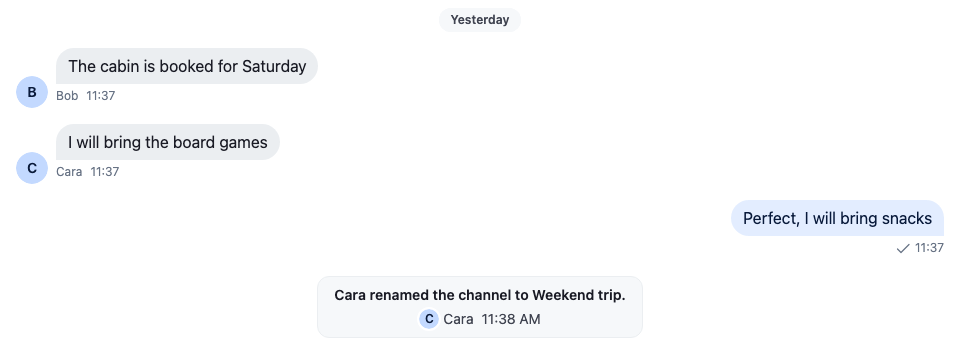
A system message is a message of type `system`. It reports an event in the channel rather than something a user wrote, for example a member joining or a moderation command. `MessageList` and `VirtualizedMessageList` render it with the `MessageSystem` override instead of the message UI. This recipe replaces it.
>
> **Note:** **What you'll build**
>
> - A system message on a quiet card
> - The event in emphasis, with who triggered it
> - The time of the event
>
---
**Preview**
---
**Approach:** Replace one part. [Choosing where to start](https://getstream.io/chat/docs/sdk/react/ui-cookbooks/overview/#choosing-where-to-start) explains the approaches.
**Starts from:** [the base app](https://getstream.io/chat/docs/sdk/react/ui-cookbooks/overview/#the-base-app). The page shows only what the recipe adds.
## Best practices
- Keep system messages visually distinct from user messages, but quieter.
- Show the message's text: it says what happened.
- Show who triggered the event only where your app's privacy rules allow it. The sender is `message.user`.
- Replace `MessageSystem` for a different layout. For a different look only, style `str-chat__message--system`.
- Test with every event your app turns into a system message, such as members being added and removed, and moderation commands.
### Default system message component
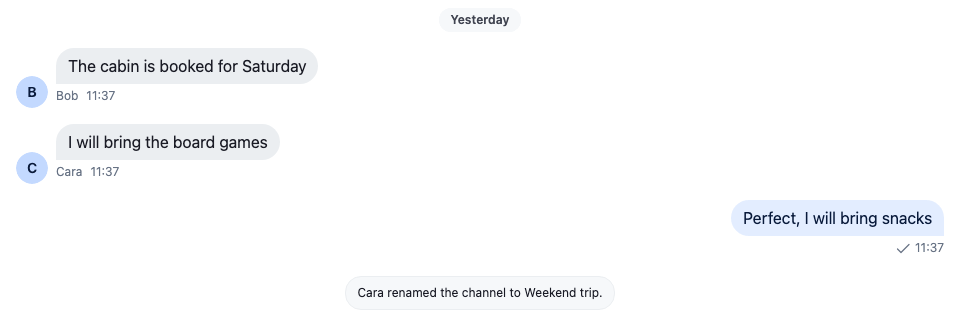
The default is ``. It renders the message's `text` in a centered line. With the list's `unsafeHTML` prop set, it renders the message's `html` instead, and falls back to the `text` when the message has no `html`:
---
**The default system message**
---
A system message comes from the server. Your backend sends one with `type: "system"`, as [System messages](https://getstream.io/chat/docs/javascript/silent-messages/#system-messages) shows, and adding or removing members can create one, as [Channel members](https://getstream.io/chat/docs/javascript/channel-members/) shows.
### Custom system message component
This component shows the text, the user who triggered the event, and the time, on a quiet card in the middle of the list:
```tsx label="React" title="src/CustomSystemMessage.tsx"
import type { PropsWithChildren } from "react";
import { convertTimestampToDate } from "stream-chat";
import type { EventComponentProps } from "stream-chat-react";
import { Avatar, WithComponents } from "stream-chat-react";
import "./CustomSystemMessage.css";
const CustomSystemMessage = ({ message }: EventComponentProps) => {
const { created_at, text, user } = message;
const date = convertTimestampToDate(created_at);
const userName = user?.name || user?.id;
return (
{text?.trim()}
{user && (
{userName}
)}
{date && (
)}
);
};
// Declared once, so WithComponents gets the same object on every render.
const overrides = { MessageSystem: CustomSystemMessage };
export const WithCustomSystemMessages = ({ children }: PropsWithChildren) => (
{children}
);
```
```css label="CSS" title="src/CustomSystemMessage.css"
@layer stream-overrides {
.cookbook-system-message {
display: flex;
flex-direction: column;
align-items: center;
gap: var(--str-chat__spacing-xxs);
width: fit-content;
max-width: 360px;
margin: var(--str-chat__spacing-xs) auto;
padding: var(--str-chat__spacing-xs) var(--str-chat__spacing-md);
border: 1px solid var(--str-chat__border-core-subtle);
border-radius: var(--str-chat__radius-lg);
background: var(--str-chat__background-core-surface-subtle);
color: var(--str-chat__chat-text-system);
font: var(--str-chat__font-caption-default);
text-align: center;
}
.cookbook-system-message__text {
color: var(--str-chat__text-primary);
font: var(--str-chat__font-caption-emphasis);
}
.cookbook-system-message__meta,
.cookbook-system-message__actor {
display: flex;
align-items: center;
gap: var(--str-chat__spacing-xs);
}
.cookbook-system-message__actor {
gap: var(--str-chat__spacing-xxs);
}
}
```
The rules sit in the `stream-overrides` layer, so they win over the SDK's own rules once the SDK's stylesheet is in an earlier layer, as [Theming → CSS layers](https://getstream.io/chat/docs/sdk/react/features/app-experience/theming/#css-layers) sets up. They take their colors, spacing and type from the SDK's tokens, so they follow your theme; the card's text uses `--str-chat__chat-text-system`, the color the SDK gives system text such as date separators.
Wrap the channel in it, so every message list inside renders system messages with `CustomSystemMessage`:
```tsx title="src/ChannelWithSystemMessages.tsx"
import type { Channel as StreamChannel } from "stream-chat";
import { Channel, MessageComposer, MessageList } from "stream-chat-react";
import { WithCustomSystemMessages } from "./CustomSystemMessage";
export const ChannelWithSystemMessages = ({
channel,
}: {
channel: StreamChannel;
}) => (
);
```
>
> **Note:** To see it, mute a user with the `/mute` command followed by an `@mention`. The command has to be enabled for the channel type in the [Dashboard](https://getstream.io/signin/?product=chat).
>
## How it works
1. The list renders `MessageSystem` for every message of type `system`, and passes the message as `message`. Unlike a message UI, it renders outside `MessageContext`, so the message comes from its props.
2. `created_at` is a nanosecond number, so `convertTimestampToDate` turns it into a date; [Data conventions](https://getstream.io/chat/docs/sdk/react/state/state-and-entities/data-conventions/#timestamps) explains why. The component shows the date's hour and minute in the user's locale, with a numeric hour, as the SDK's own message timestamps do.
3. `message.user` is the user the server sent the message as. A system message your backend sends without a user has none, so only the time is shown under the text.
When `unsafeHTML` is set on `` or ``, the list passes it to `MessageSystem` too. Without it, the prop is absent. To render a system message's `html` the way the default does, read that prop as well, and render the `text` when the message has no `html`. [Message props](https://getstream.io/chat/docs/sdk/react/component-reference/message/message/#props) says when `unsafeHTML` is safe to turn on.
## Related
- [ComponentContext](https://getstream.io/chat/docs/sdk/react/component-reference/channel/componentcontext/): the props of `MessageSystem`.
- [Message UI](https://getstream.io/chat/docs/sdk/react/ui/components/message-ui/#replacing-parts): the other parts of the message list, such as the date separators.
- [Overriding components](https://getstream.io/chat/docs/sdk/react/ui/components/overriding-components/): registering a component with `WithComponents`.
- [Data conventions](https://getstream.io/chat/docs/sdk/react/state/state-and-entities/data-conventions/#timestamps): why `created_at` needs `convertTimestampToDate`.
- [System messages](https://getstream.io/chat/docs/javascript/silent-messages/#system-messages): sending a system message from your backend.
- [Custom message](https://getstream.io/chat/docs/sdk/react/ui-cookbooks/message-list/custom-message/): replacing the message UI that renders the other messages.
---
For the most recent version of this documentation, visit [https://getstream.io/chat/docs/sdk/react/ui-cookbooks/message-list/system-message/](https://getstream.io/chat/docs/sdk/react/ui-cookbooks/message-list/system-message/).