


Starting a conversation
Starting a conversation means picking the people to talk to and opening a channel with them. This recipe adds a dialog for that, opened from the channel list header.
What you'll build
- A New conversation button in the channel list header
- A dialog to pick people and name the conversation
- Opening the existing direct conversation with one person
- A new channel, created when its first message is sent
Preview
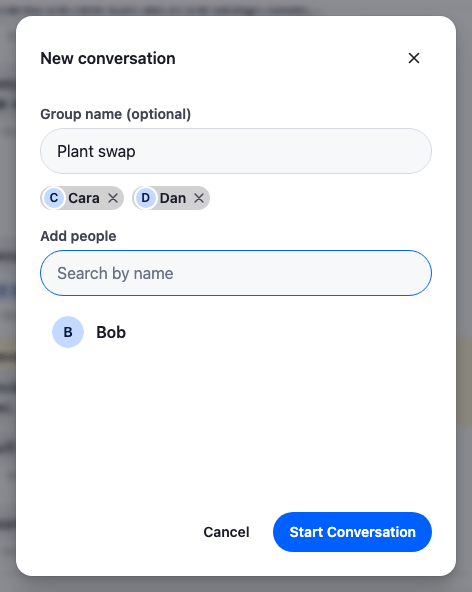
Approach: Replace one part and Change behaviour in the state layer. Choosing where to start explains the approaches.
Starts from: the base app. The page shows only what the recipe adds.
Best practices
- Look up the user's direct conversation with a person before creating one, so it opens with its history instead of as a new, empty channel.
- Create a new conversation from its members, without an id. Until the server answers, it's a provisional channel, and the server either creates it or returns the one these members already have.
- Don't rename a conversation that already exists from this dialog. Open it as it is, and tell the user why the name they typed isn't used.
- Don't create the channel when the dialog closes. Open it locally and create it on the first send, so a conversation the user never writes in never exists.
- Label the dialog with its heading, give the name field and the search input a visible label, and give each chip's remove button a name, such as "Remove Dan".
Search for people
usePeopleSearch() runs a UserSearchSource for the dialog. The source waits for a pause in typing, cancels the query of the text before, and leaves the user out of the results. With allowEmptySearchString, an empty text lists everyone, so the dialog has suggestions before the user types. How search sources work is on Search sources.
import { useEffect, useState } from "react";
import { UserSearchSource } from "stream-chat";
import type { SearchSourceState, UserResponse } from "stream-chat";
import { useChatContext, useStateStore } from "stream-chat-react";

const resultsSelector = ({
  isLoading,
  items,
  lastQueryError,
}: SearchSourceState<UserResponse>) => ({ isLoading, items, lastQueryError });

/**
 * People to start a conversation with, by name or id, sorted by name. An empty text lists everyone,
 * so the dialog has suggestions before the user types. The user isn't among the results.
 */
export const usePeopleSearch = (text: string) => {
  const { client } = useChatContext();
  const [source] = useState(
    () =>
      new UserSearchSource(client, {
        allowEmptySearchString: true,
        pageSize: 10,
        sort: [{ direction: 1, field: "name" }],
      }),
  );
  const { isLoading, items, lastQueryError } = useStateStore(
    source.state,
    resultsSelector,
  );

  useEffect(() => {
    source.activate();
    // Waits for a pause in typing, and cancels the query of the text before.
    void source.search(text.trim());
  }, [source, text]);

  // Drops the scheduled query and the one in flight when the dialog closes.
  useEffect(
    () => () => {
      source.cancelScheduledQuery();
      source.resetState();
    },
    [source],
  );

  return { failed: !!lastQueryError, isLoading, people: items ?? [] };
};
Pick people in a dialog
The dialog is a Prompt in a GlobalModal: Prompt.Header labels the dialog with its title, as Dialogs describes. The name field comes first, with a visible label: "Name (optional)" for one person, and "Group name (optional)" once more than one is picked. The search input has a label too, and takes the focus when the dialog opens, since picking people is the part the user can't skip. Each result is a button that adds the person. The people picked show as chips, each with a remove button named after the person. Every control is a native button or input, so Tab moves between them and Enter or Space presses them. After a person is added or removed, the focus goes back to the search input.
import { useId, useRef, useState } from "react";
import type { FormEvent } from "react";
import type { UserResponse } from "stream-chat";
import {
  Avatar,
  IconXmark,
  Prompt,
  useChatContext,
  useWorkspaceNavigation,
} from "stream-chat-react";
import {
  findDirectConversation,
  startLocalConversation,
} from "./startConversation";
import { usePeopleSearch } from "./usePeopleSearch";
import "./NewConversationDialog.css";

const nameOf = (user: UserResponse) => user.name ?? user.id;

// The avatar repeats the name beside it, so it's hidden from assistive technology. Avatar renders
// role="button" by default, which a chip or a result mustn't announce.
const decorative = { "aria-hidden": true, role: "presentation" } as const;

/**
 * Names the conversation, picks the people to talk to and opens the conversation with them: the
 * user's existing direct conversation for one person, otherwise a new conversation that's created,
 * with its name, on its first message.
 */
export const NewConversationDialog = ({ onClose }: { onClose: () => void }) => {
  const { channelManager, client } = useChatContext();
  const { openChannel } = useWorkspaceNavigation();
  const [text, setText] = useState("");
  const [selected, setSelected] = useState<UserResponse[]>([]);
  const [name, setName] = useState("");
  const [isOpening, setIsOpening] = useState(false);
  const [error, setError] = useState<string>();
  const { failed, isLoading, people } = usePeopleSearch(text);
  const inputRef = useRef<HTMLInputElement>(null);
  const id = useId();

  const selectedIds = new Set(selected.map((user) => user.id));
  const results: UserResponse[] = people.filter(
    (user: UserResponse) => !selectedIds.has(user.id),
  );
  const isGroup = selected.length > 1;

  // The picked result and a removed chip leave the list, so the focus goes back to the input.
  const add = (user: UserResponse) => {
    setSelected((current) => [...current, user]);
    setText("");
    inputRef.current?.focus();
  };
  const remove = (user: UserResponse) => {
    setSelected((current) => current.filter(({ id }) => id !== user.id));
    inputRef.current?.focus();
  };

  const start = async (event: FormEvent) => {
    event.preventDefault();
    if (!selected.length) return;
    setIsOpening(true);
    setError(undefined);
    try {
      const existing =
        selected.length === 1
          ? await findDirectConversation(client, selected[0].id)
          : undefined;
      if (existing) channelManager.ingestChannel(existing);
      const channel =
        existing ?? startLocalConversation(client, selected, name.trim());
      // A conversation that already exists keeps its own name, so the user learns why the typed
      // one isn't shown. The notification shows in the channel panel, where the conversation opens.
      if (!channel.isProvisional && name.trim()) {
        client.notifications.addInfo({
          message:
            "This conversation already exists, so its name was left unchanged.",
          origin: { emitter: "NewConversationDialog" },
        });
      }
      openChannel(channel);
      onClose();
    } catch {
      setError("Couldn't open the conversation. Try again.");
      setIsOpening(false);
    }
  };

  return (
    <Prompt.Root className="cookbook-new-conversation">
      <Prompt.Header close={onClose} title="New conversation" />
      <form className="cookbook-new-conversation__form" onSubmit={start}>
        <Prompt.Body className="cookbook-new-conversation__body">
          <label
            className="cookbook-new-conversation__label"
            htmlFor={`${id}-name`}
          >
            {isGroup ? "Group name (optional)" : "Name (optional)"}
          </label>
          {/* The conversation's name, not the user's, so the browser doesn't offer to fill it. */}
          <input
            autoComplete="off"
            className="cookbook-new-conversation__input"
            id={`${id}-name`}
            onChange={(event) => setName(event.target.value)}
            value={name}
          />
          {!!selected.length && (
            <ul
              aria-label="Selected people"
              className="cookbook-new-conversation__chips"
            >
              {selected.map((user) => (
                <li className="cookbook-new-conversation__chip" key={user.id}>
                  <Avatar {...decorative} size="xs" userName={nameOf(user)} />
                  {nameOf(user)}
                  <button
                    aria-label={`Remove ${nameOf(user)}`}
                    className="cookbook-new-conversation__chip-remove"
                    onClick={() => remove(user)}
                    type="button"
                  >
                    <IconXmark />
                  </button>
                </li>
              ))}
            </ul>
          )}
          <label
            className="cookbook-new-conversation__label"
            htmlFor={`${id}-search`}
          >
            Add people
          </label>
          {/* The dialog's content mounts a render after the modal opens, so the input takes the
              focus itself. */}
          <input
            aria-controls={`${id}-results`}
            autoFocus
            className="cookbook-new-conversation__input"
            id={`${id}-search`}
            onChange={(event) => setText(event.target.value)}
            placeholder="Search by name"
            ref={inputRef}
            type="search"
            value={text}
          />
          <ul
            aria-busy={isLoading}
            aria-label="People"
            className="cookbook-new-conversation__results"
            id={`${id}-results`}
          >
            {results.map((user) => (
              <li className="cookbook-new-conversation__result" key={user.id}>
                <button
                  className="cookbook-new-conversation__result-button"
                  onClick={() => add(user)}
                  type="button"
                >
                  <Avatar {...decorative} size="md" userName={nameOf(user)} />
                  {nameOf(user)}
                </button>
              </li>
            ))}
          </ul>
          {!results.length && (
            <p className="cookbook-new-conversation__status" role="status">
              {isLoading
                ? "Searching…"
                : failed
                  ? "The search failed."
                  : "No one found"}
            </p>
          )}
          {error && (
            <p className="cookbook-new-conversation__error" role="alert">
              {error}
            </p>
          )}
        </Prompt.Body>
        <Prompt.Footer>
          <Prompt.FooterControls>
            <Prompt.FooterControlsButtonSecondary
              onClick={onClose}
              type="button"
            >
              Cancel
            </Prompt.FooterControlsButtonSecondary>
            <Prompt.FooterControlsButtonPrimary
              disabled={!selected.length || isOpening}
              type="submit"
            >
              Start conversation
            </Prompt.FooterControlsButtonPrimary>
          </Prompt.FooterControls>
        </Prompt.Footer>
      </form>
    </Prompt.Root>
  );
};@layer stream-overrides {
/* A fixed size, so the dialog doesn't resize as people are picked and results change. */
.cookbook-new-conversation {
width: 440px;
max-width: calc(100vw - 2 * var(--str-chat__spacing-md));
height: 560px;
max-height: calc(100vh - 2 * var(--str-chat__spacing-xl));
}
/* The form holds the body and the footer, so it takes over the prompt's column. */
.cookbook-new-conversation__form {
display: flex;
flex: 1;
flex-direction: column;
min-height: 0;
}
.cookbook-new-conversation__chips {
display: flex;
flex-wrap: wrap;
gap: var(--str-chat__spacing-xs);
margin: 0 0 var(--str-chat__spacing-md);
padding: 0;
list-style: none;
}
.cookbook-new-conversation__chip {
display: flex;
align-items: center;
gap: var(--str-chat__spacing-xxs);
padding: var(--str-chat__spacing-xxxs) var(--str-chat__spacing-xxxs)
var(--str-chat__spacing-xxxs) var(--str-chat__spacing-xxs);
border-radius: var(--str-chat__radius-full);
background: var(--str-chat__background-utility-selected);
color: var(--str-chat__text-primary);
font: var(--str-chat__font-caption-emphasis);
}
.cookbook-new-conversation__chip-remove {
display: flex;
padding: var(--str-chat__spacing-xxxs);
border: 0;
border-radius: var(--str-chat__radius-full);
background: none;
color: var(--str-chat__text-secondary);
cursor: pointer;
}
.cookbook-new-conversation__chip-remove:hover {
background: var(--str-chat__background-utility-hover);
}
.cookbook-new-conversation__chip-remove svg {
width: 14px;
height: 14px;
}
.cookbook-new-conversation__label {
display: block;
margin-bottom: var(--str-chat__spacing-xxs);
color: var(--str-chat__text-secondary);
font: var(--str-chat__font-caption-emphasis);
}
.cookbook-new-conversation__input {
width: 100%;
margin-bottom: var(--str-chat__spacing-sm);
padding: var(--str-chat__spacing-sm) var(--str-chat__spacing-md);
border: 1px solid var(--str-chat__border-core-default);
border-radius: var(--str-chat__radius-full);
background: var(--str-chat__background-core-surface-subtle);
color: var(--str-chat__text-primary);
font: var(--str-chat__font-body-default);
}
.cookbook-new-conversation__input:focus-visible {
border-color: var(--str-chat__accent-primary);
outline: none;
}
.cookbook-new-conversation__results {
margin: 0 0 var(--str-chat__spacing-sm);
padding: 0;
list-style: none;
}
.cookbook-new-conversation__result-button {
display: flex;
align-items: center;
gap: var(--str-chat__spacing-sm);
width: 100%;
padding: var(--str-chat__spacing-xs) var(--str-chat__spacing-sm);
border: 0;
border-radius: var(--str-chat__radius-lg);
background: none;
color: var(--str-chat__text-primary);
font: var(--str-chat__font-body-emphasis);
text-align: start;
cursor: pointer;
}
.cookbook-new-conversation__result-button:hover {
background: var(--str-chat__background-utility-hover);
}
.cookbook-new-conversation__result-button:focus-visible {
outline: 2px solid var(--str-chat__accent-primary);
outline-offset: -2px;
}
.cookbook-new-conversation__status,
.cookbook-new-conversation__error {
margin: 0 0 var(--str-chat__spacing-sm);
font: var(--str-chat__font-caption-default);
}
.cookbook-new-conversation__status {
color: var(--str-chat__text-tertiary);
}
.cookbook-new-conversation__error {
color: var(--str-chat__accent-error);
}
}The rules sit in the stream-overrides layer, so they win over the SDK's own rules once the SDK's stylesheet is in an earlier layer, as Theming → CSS layers sets up. They take their colors, spacing and type from the SDK's tokens, so they follow your theme.
Start conversation calls the two functions below, from startConversation.ts: findDirectConversation() for one person, and startLocalConversation(), with the name, when there's no conversation to reuse. It then opens the channel with WorkspaceNavigation.openChannel() from useWorkspaceNavigation(), and closes the dialog.
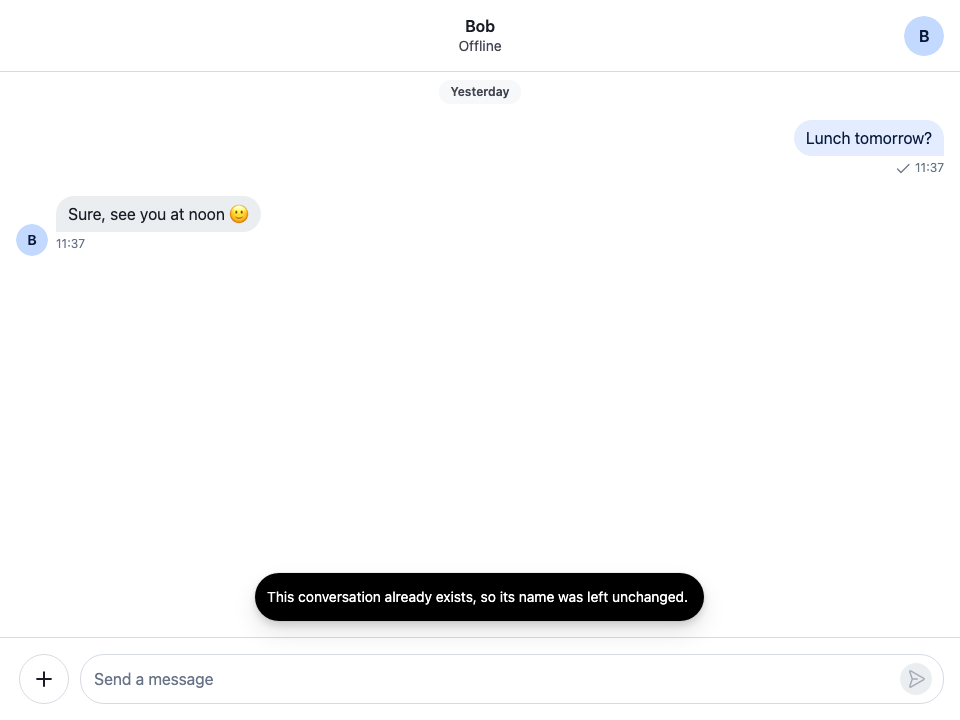
A conversation that already exists opens as it is: its name stays what it was. Channel.isProvisional is false for it, so if the user typed a name, the dialog calls NotificationManager.addInfo() on client.notifications to say the name was left unchanged. The notification carries no target: tag, so the NotificationList of the channel panel shows it, over the conversation that just opened. Routing notifications describes how a notification finds its list.
An existing conversation reopened
The dialog has no image picker. To give a conversation an image as well, upload it with client.uploadImage() and put its URL in the channel's custom data next to the name.
Reuse an existing direct conversation
A direct conversation is a channel with only the user and one other person. findDirectConversation() asks the server for the channels with exactly the two of them with one query, client.queryChannelsAndHydrate(), which reads and creates nothing, and isDirectConversation() picks the direct one among them. The query watches the channel it finds, so the conversation opens with its history and receives events, and the dialog passes it to ChannelManager.ingestChannel(), which adds it to the channel lists whose filters it matches.
import { localMessageToNewMessagePayload } from "stream-chat";
import type {
  Channel,
  ChannelMemberResponse,
  OperationRequestFn,
  StreamChat,
  UserResponse,
} from "stream-chat";

/** A two-member channel is their direct conversation if made from its members, or unnamed. */
export const isDirectConversation = (channel: Channel) =>
  !!channel.id?.startsWith("!members-") ||
  !("name" in (channel.data?.custom ?? {}));

/**
 * The user's direct conversation with another user, if they have one (see
 * `isDirectConversation()`). The query only reads: it creates nothing, and it watches what it finds,
 * so the conversation opens with its history and receives events.
 */
export const findDirectConversation = async (
  client: StreamChat,
  userId: string,
) => {
  const channels = await client.queryChannelsAndHydrate({
    // Exactly the two of them: both are members, and there are two members. The server doesn't
    // take `$eq` on `members`.
    filter_conditions: {
      $and: [
        { members: { $in: [client.userId ?? ""] } },
        { members: { $in: [userId] } },
      ],
      member_count: 2,
      type: "messaging",
    },
  });
  return channels.find(isDirectConversation);
};
isDirectConversation() accepts two kinds of channel:
- A channel created from its members, without an id, whatever its name. The server gives it an id that starts with
!members-, so a direct conversation the user named in this dialog is still found. - A channel with an id of its own and no name, such as a direct conversation your app created with an id.
A channel with an id of its own and a name, such as a group of two, isn't the direct conversation, so the user's group with the same person doesn't open in its place.
Create the channel locally
startLocalConversation() gets the channel with client.channel("messaging", { members }). A channel created from its members, without an id, is provisional: Channel.isProvisional is true until the server answers its first query, and nothing but that query can be sent for it. The SDK doesn't send typing events for it. See Provisional channels. If the client already has a loaded conversation created from exactly these members, one whose id starts with !members-, client.channel() returns that one instead, and it opens as it is.
/**
 * A conversation with `people` that exists only in this client until its first message: a channel
 * created from its members, without an id, so it's provisional (`Channel.isProvisional`). If the
 * client already has a loaded conversation created from exactly these members, `client.channel()`
 * returns that one instead.
 */
export const startLocalConversation = (
  client: StreamChat,
  people: UserResponse[],
  name: string,
): Channel => {
  const channel = client.channel("messaging", {
    // Sent with the query that creates the channel on the first send.
    ...(name ? { custom: { name } } : {}),
    members: [client.userId ?? "", ...people.map(({ id }) => id)].map(
      (user_id) => ({
        user_id,
      }),
    ),
  });
  if (!channel.isProvisional || channel.messagePaginator.hasResults)
    return channel;

  // Nothing is loaded for a channel the server doesn't have yet, so the app fills in what the
  // channel shows until then: its members, the user first, and an empty first page of messages,
  // shorter than a page, so the message list has nothing older to load. The members carry only the
  // user: the server's members replace them when the channel is created.
  const me = client.user as UserResponse;
  channel.state.members = Object.fromEntries(
    [me, ...people].map((user) => [
      user.id,
      { user, user_id: user.id } as ChannelMemberResponse,
    ]),
  );
  channel.messagePaginator.placeExternalQueryPage(
    [],
    channel.messagePaginator.pageSize,
  );
  return channel;
};
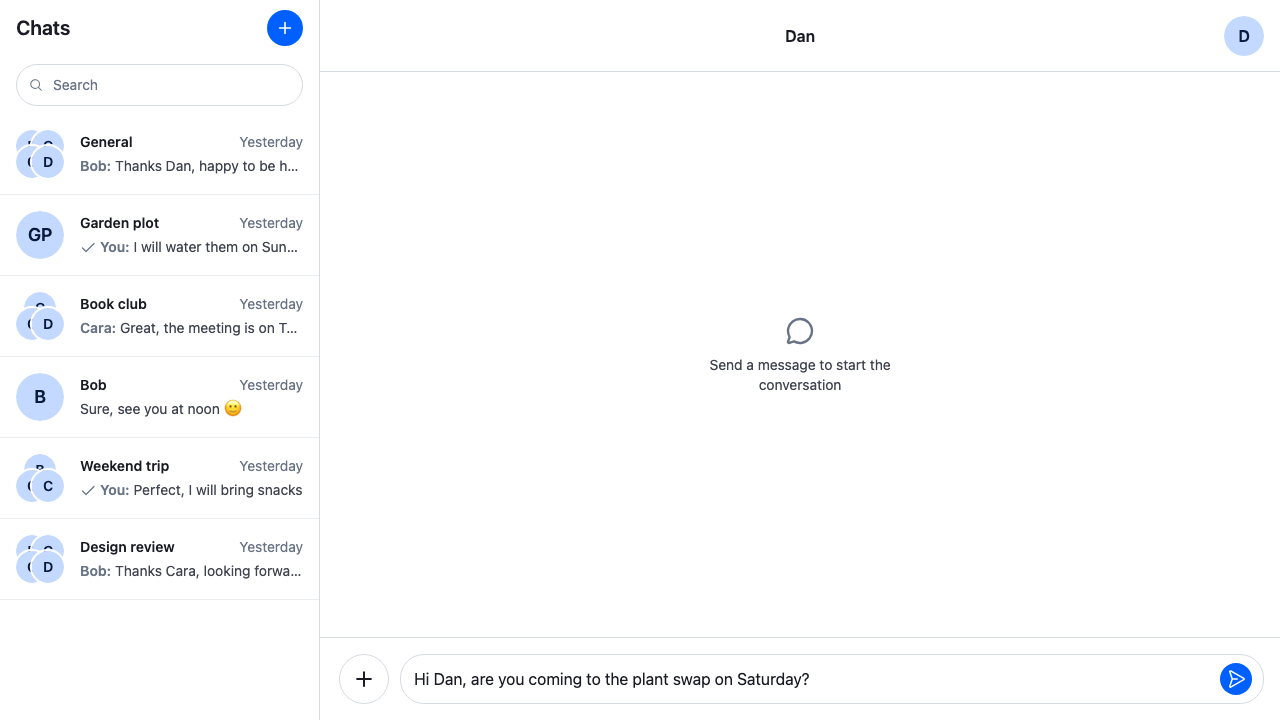
Nothing is loaded for a provisional channel, so the app fills in what it shows until it exists:
channel.state.membersgets the user and the people picked, so the header and the avatars show who's in the conversation. The members carry only their user, so they're cast toChannelMemberResponse. The server's members replace them when the channel is created.MessagePaginator.placeExternalQueryPage()places an empty first page, shorter than a page, inchannel.messagePaginator. The message list then shows its empty state, and has nothing older to load.
The name goes into the channel's custom data, for a direct conversation as for a group. It's sent with the query that creates the channel, and the channel header shows it already.
The new conversation before sending
Create it on the first send
The SDK doesn't create a provisional channel when its first message is sent, so the app does it in a request handler. createOnFirstSend() is a sendMessageRequest handler, which Message operations describes. For a provisional channel, it calls Channel.watch() first, which creates the channel on the server with its members and its custom data, then sends the message to the channel it resolves with. Every other channel sends the usual way, through the default request.
/**
 * Sends the first message of a provisional channel: `Channel.watch()` creates the channel on the
 * server, with its members and name, and resolves with the object to use from then on. That's this
 * one, or the one that superseded it when the client already had the channel under its real cid.
 * Messages in every other channel are sent the usual way.
 */
export const createOnFirstSend =
  (client: StreamChat): OperationRequestFn<"send"> =>
  async (params, defaultRequest) => {
    const channel = client.channelManager.get(params.localMessage.cid);
    if (!channel?.isProvisional) return defaultRequest(params);

    const created = await channel.watch();
    // Shows the new channel in the channel lists whose filters it matches.
    client.channelManager.ingestChannel(created);
    const { message } = await created.sendMessage({
      message:
        params.message ?? localMessageToNewMessagePayload(params.localMessage),
      ...params.options,
    });
    return { message };
  };
Channel.watch() resolves with the object to use from then on. Usually that's the same channel, now with its real cid. But if the client got the same conversation under its real cid in the meantime, for example from an event, the object it already had stays, and it supersedes this one: channel.supersededBy points to it, and it takes over the messages being sent. So the handler sends on the object Channel.watch() returns, and ChatView shows that object in place of the provisional one. See Superseded channels.
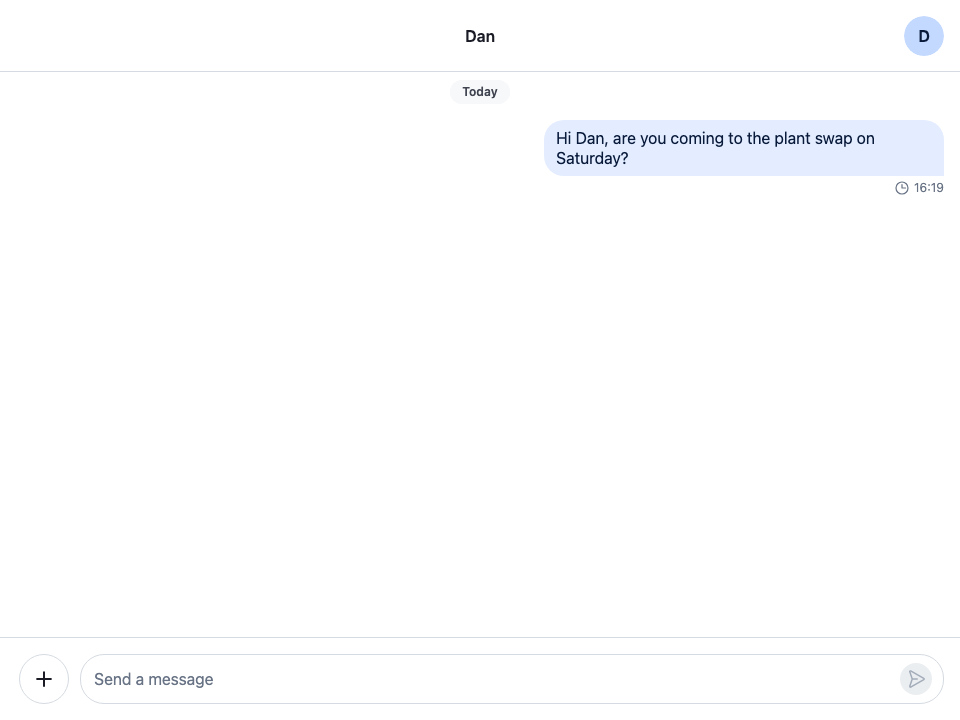
While the channel is being created and the message sent, the message shows in the list as sending:
The first message sending
Add the button to the channel list header
ChannelNavigation renders the header above the channel list under the ChannelListHeader key of ComponentContext. This header renders the default ChannelListHeader and a New conversation button beside it, and mounts the dialog in a GlobalModal while it's open. WithNewConversation registers it, and registers createOnFirstSend() as the client's sendMessageRequest handler:
import { useEffect, useState } from "react";
import type { PropsWithChildren } from "react";
import {
  Button,
  ChannelListHeader,
  GlobalModal,
  IconPlus,
  useChatContext,
  WithComponents,
} from "stream-chat-react";
import { NewConversationDialog } from "./NewConversationDialog";
import { createOnFirstSend } from "./startConversation";
import "./NewConversationButton.css";

/** The default channel list header, with a button beside it that opens the dialog. */
const ChannelListHeaderWithButton = () => {
  const [open, setOpen] = useState(false);
  const close = () => setOpen(false);

  return (
    <div className="cookbook-channel-list-header">
      <div className="cookbook-channel-list-header__title">
        <ChannelListHeader />
      </div>
      <Button
        appearance="solid"
        aria-haspopup="dialog"
        aria-label="New conversation"
        circular
        onClick={() => setOpen(true)}
        size="md"
        variant="primary"
      >
        <IconPlus />
      </Button>
      <GlobalModal onClose={close} open={open}>
        {/* Mounted only while open, so every opening starts with an empty dialog. */}
        {open && <NewConversationDialog onClose={close} />}
      </GlobalModal>
    </div>
  );
};

// Declared once, so WithComponents gets the same object on every render.
const overrides = { ChannelListHeader: ChannelListHeaderWithButton };

/**
 * Adds the New conversation button to the channel list header, and registers the send handler that
 * creates a new conversation on its first message.
 */
export const WithNewConversation = ({ children }: PropsWithChildren) => {
  const { client } = useChatContext();

  useEffect(() => {
    client.config.set({
      channel: {
        requestHandlers: { sendMessageRequest: createOnFirstSend(client) },
      },
    });
  }, [client]);

  return <WithComponents overrides={overrides}>{children}</WithComponents>;
};@layer stream-overrides {
/* The default header and the button share a row. */
.cookbook-channel-list-header {
display: flex;
align-items: center;
padding-inline-end: var(--str-chat__spacing-md);
}
.cookbook-channel-list-header__title {
flex: 1;
min-width: 0;
}
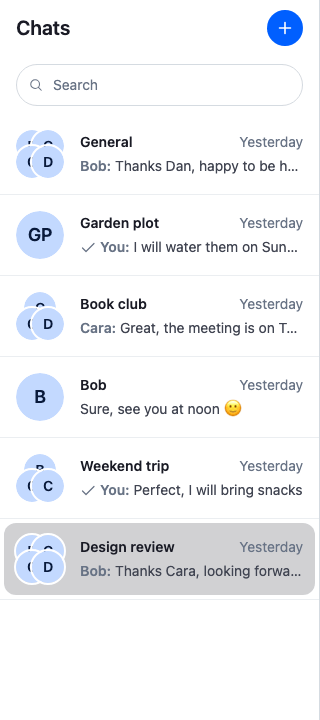
}The plus button beside Chats
Request handlers on client.config apply to every channel of the client. If your app registers a sendMessageRequest handler of its own, call createOnFirstSend()'s steps from it instead, since a later client.config.set() replaces the handler.
WithNewConversation reads the client from Chat, so it goes inside Chat. Wrap ChatView, or ChannelNavigation, in it:
import {
  ChannelHeader,
  ChannelNavigation,
  Chat,
  MessageComposer,
  MessageList,
  ThreadHeader,
} from "stream-chat-react";
import {
  ChannelSlot,
  ChatView,
  ThreadSlot,
} from "stream-chat-react/slot-layout";
import type { LayoutDescriptor } from "stream-chat-react/slot-layout";
import { WithNewConversation } from "./NewConversationButton";

const layouts: LayoutDescriptor[] = [
  { id: "channels", slots: ["channel", "thread"] },
];

const ChannelsView = () => (
  <>
    <ChannelNavigation />
    <ChannelSlot slot="channel">
      <ChannelHeader />
      <MessageList />
      <MessageComposer />
    </ChannelSlot>
    <ThreadSlot slot="thread">
      <ThreadHeader />
      <MessageList />
      <MessageComposer />
    </ThreadSlot>
  </>
);

export const App = () => (
  <Chat client={client}>
    <WithNewConversation>
      <ChatView layouts={layouts} views={{ channels: <ChannelsView /> }} />
    </WithNewConversation>
  </Chat>
);
How it works
Example
The user starts a group with Bob and Cara:
- The user presses the New conversation button. The dialog opens with a "Name (optional)" field at the top, the focus in the search input, and Bob, Cara and Dan listed.
- The user picks Bob, then types "Ca" and picks Cara. Each one shows as a chip, and with two people the name field's label reads "Group name (optional)". The user types "Weekend plans" in it.
- The user presses Start conversation. With two people, there's no direct conversation to look up, so
startLocalConversation()gets a provisional channel with the user, Bob and Cara as members and "Weekend plans" as its name, fills in its members and an empty first page, and the dialog opens it withWorkspaceNavigation.openChannel(). Nothing has been sent to the server. - The header reads "Weekend plans", the message list shows its empty state, and the composer is ready. The user types "Who's free on Saturday?" and sends.
- The message shows as sending.
createOnFirstSend()sees that the channel is provisional and callsChannel.watch(), which creates the channel with its three members and its name, and gives it its real cid. - The handler sends the message to that channel. The server's copy replaces the one marked sending, and the channel shows up in the channel list.
Had the user picked only Bob, findDirectConversation() would have found their existing direct conversation, and it would have opened with its history. Its name would have stayed as it was, and a notification would have said that the conversation already exists, so "Weekend plans" was left unchanged. For someone the user has no direct conversation with yet, such as Dan, the new conversation would have been created with the name on the first send, as above.
A conversation created from its members is the conversation of exactly these people: picking the same people again later returns the same channel. If the client hasn't loaded it, the dialog opens a provisional channel, and Channel.watch() resolves with the existing conversation on the first send. That conversation keeps its own name, so a name typed for it isn't used. For several groups with the same people, give each group an id of its own with client.channel("messaging", id, { members }). A channel with an id is never provisional, so create that one on the server with Channel.watch() before opening it.
Related
- Shared entities: provisional channels and
client.channel(). - Entity lifecycle: superseded channels.
- Message operations: request handlers on
client.config. - Search sources: how
UserSearchSourcesearches. - Dialogs:
GlobalModalandPrompt. - Publishing notifications:
client.notificationsandNotificationManager.addInfo(). - Channel list UI: the channel list header.
- Search dialog: another dialog opened from the channel list.