


Custom message
Every message in a message list is rendered by the MessageUI component. When restyling the default isn't enough, you replace it, and this recipe builds a replacement step by step.
What you'll build
- Your own message UI, with the user's messages on the right
- Bubbles beside the sender's avatar or initials
- Formatted text with Markdown, links and mentions
- Time, Edited mark and delivery status under messages
- Grouped runs of messages from one sender
Preview
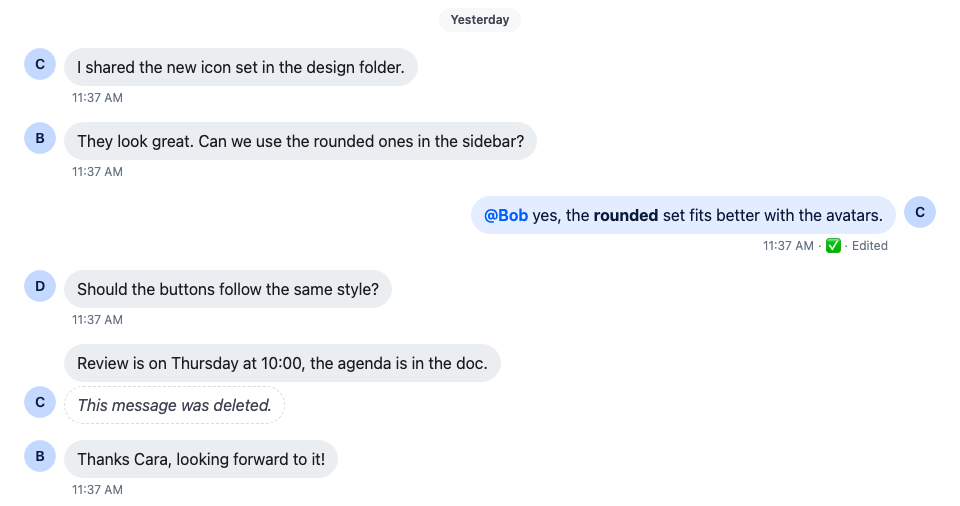
Approach: Replace one part. Choosing where to start explains the approaches.
Starts from: the base app. The page shows only what the recipe adds.
The result shows a message but offers no way to act on it. Action bar for a custom message adds actions and a reply count to it, and Reactions for a custom message adds reactions.
Best practices
- Restyle the default
MessageUIbefore replacing it. A replacement has to handle every kind of message your app shows. - Read the message and its handlers with
useMessageContext(). A customMessageUIreceives no props. - Render the text with
MessageText, so Markdown, links and mentions keep working. - Test the result with deleted, failed and edited messages, messages with attachments, and messages in a thread.
Message text and avatars
Start with the simplest message UI: the raw text.
import { useMessageContext } from "stream-chat-react";

export const CustomMessageUi = () => {
  const { message } = useMessageContext();

  return <div>{message.text}</div>;
};The message UI and every component inside it read MessageContext with useMessageContext(): the message, the handlers for its actions, and the read and delivery state.
Register it on the MessageUI key with WithComponents:
import type { PropsWithChildren } from "react";
import { WithComponents } from "stream-chat-react";
import { CustomMessageUi } from "./CustomMessageUi";

// Declared once, so WithComponents gets the same object on every render.
const overrides = { MessageUI: CustomMessageUi };

export const WithCustomMessageUi = ({ children }: PropsWithChildren) => (
  <WithComponents overrides={overrides}>{children}</WithComponents>
);
Wrap the channel in WithCustomMessageUi. Every message list below it, in the channel and in its threads, then renders messages with CustomMessageUi:
import type { Channel as StreamChannel } from "stream-chat";
import {
  Channel,
  ChannelHeader,
  MessageComposer,
  MessageList,
} from "stream-chat-react";
import { WithCustomMessageUi } from "./WithCustomMessageUi";

export const ChannelWithCustomMessages = ({
  channel,
}: {
  channel: StreamChannel;
}) => (
  <WithCustomMessageUi>
    <Channel channel={channel}>
      <ChannelHeader />
      <MessageList />
      <MessageComposer />
    </Channel>
  </WithCustomMessageUi>
);
Plain text messages
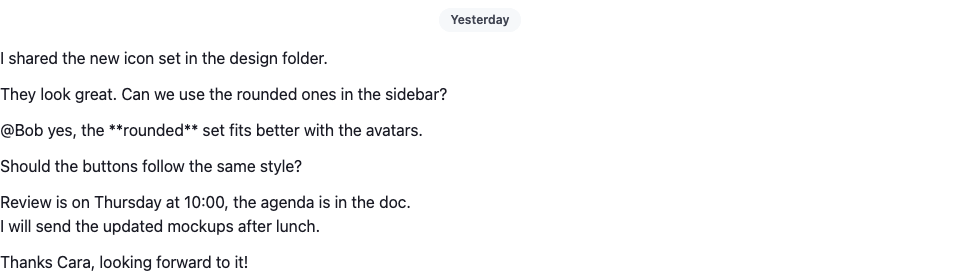
All messages now sit on one side, and you can't tell who sent them. isMyMessage() tells the user's own messages apart, and message.user holds the sender. Put the user's messages on the right and everyone else's on the left. The styles go in CustomMessageUi.css, imported from CustomMessageUi.tsx with import "./CustomMessageUi.css";:
import { useMessageContext } from "stream-chat-react";
import "./CustomMessageUi.css";

export const CustomMessageUi = () => {
  const { isMyMessage, message } = useMessageContext();

  const messageUiClassNames = ["cookbook-message-ui"];

  if (isMyMessage()) {
    messageUiClassNames.push("cookbook-message-ui--mine");
  } else {
    messageUiClassNames.push("cookbook-message-ui--other");
  }

  return (
    <div className={messageUiClassNames.join(" ")}>
      <strong className="cookbook-message-ui__name">
        {message.user?.name || message.user?.id}
      </strong>
      <span>{message.text}</span>
    </div>
  );
};@layer stream-overrides {
.cookbook-message-ui {
display: flex;
gap: var(--str-chat__spacing-xs);
padding-block: var(--str-chat__spacing-xs);
padding-inline: var(--str-chat__spacing-xl);
color: var(--str-chat__text-primary);
font: var(--str-chat__font-body-default);
}
.cookbook-message-ui__name {
display: flex;
flex-shrink: 0;
gap: var(--str-chat__spacing-xs);
color: var(--str-chat__chat-text-username);
font: var(--str-chat__font-body-emphasis);
}
.cookbook-message-ui--mine .cookbook-message-ui__name::before {
content: "<";
}
.cookbook-message-ui--other .cookbook-message-ui__name::after {
content: ">";
}
.cookbook-message-ui--mine {
flex-direction: row-reverse;
text-align: right;
}
}The rules sit in the stream-overrides layer, so they win over the SDK's own rules once the SDK's stylesheet is in an earlier layer, as Theming → CSS layers sets up. They take their colors, spacing and type from the SDK's tokens, so they follow your theme.
With sender names
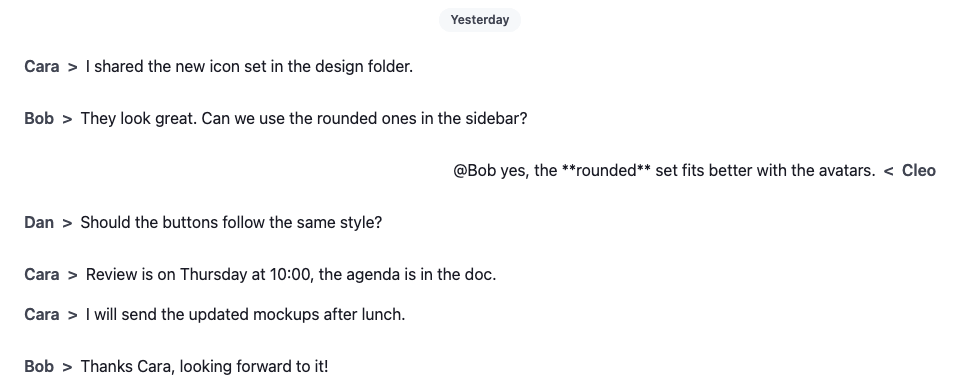
This already reads better. Next, replace the name with the SDK's Avatar, which shows the user's image, or their initials when they have none, and put the text in a bubble. The bubble takes the colors and borders the SDK's own bubbles use: --str-chat__chat-bg-incoming and --str-chat__chat-border-incoming, and their -outgoing pairs for the user's own messages:
import { Avatar, useMessageContext } from "stream-chat-react";
import "./CustomMessageUi.css";

export const CustomMessageUi = () => {
  const { isMyMessage, message } = useMessageContext();

  const messageUiClassNames = ["cookbook-message-ui"];

  if (isMyMessage()) {
    messageUiClassNames.push("cookbook-message-ui--mine");
  } else {
    messageUiClassNames.push("cookbook-message-ui--other");
  }

  return (
    <div className={messageUiClassNames.join(" ")}>
      <Avatar
        className="cookbook-message-ui__avatar"
        imageUrl={message.user?.image}
        size="md"
        userName={message.user?.name || message.user?.id}
      />
      <span className="cookbook-message-ui__text">{message.text}</span>
    </div>
  );
};@layer stream-overrides {
.cookbook-message-ui {
display: flex;
align-items: flex-end;
gap: var(--str-chat__spacing-xs);
padding-inline: var(--str-chat__spacing-xl);
font: var(--str-chat__font-body-default);
}
.cookbook-message-ui--mine {
flex-direction: row-reverse;
}
.cookbook-message-ui__avatar {
flex-shrink: 0;
}
.cookbook-message-ui__text {
max-width: 70%;
padding: var(--str-chat__spacing-xs) var(--str-chat__spacing-sm);
border: 1px solid var(--str-chat__chat-border-incoming);
border-radius: var(--str-chat__message-bubble-radius-group-bottom);
background: var(--str-chat__chat-bg-incoming);
color: var(--str-chat__chat-text-incoming);
}
.cookbook-message-ui--mine .cookbook-message-ui__text {
border-color: var(--str-chat__chat-border-outgoing);
background: var(--str-chat__chat-bg-outgoing);
color: var(--str-chat__chat-text-outgoing);
}
}Bubbles and avatars
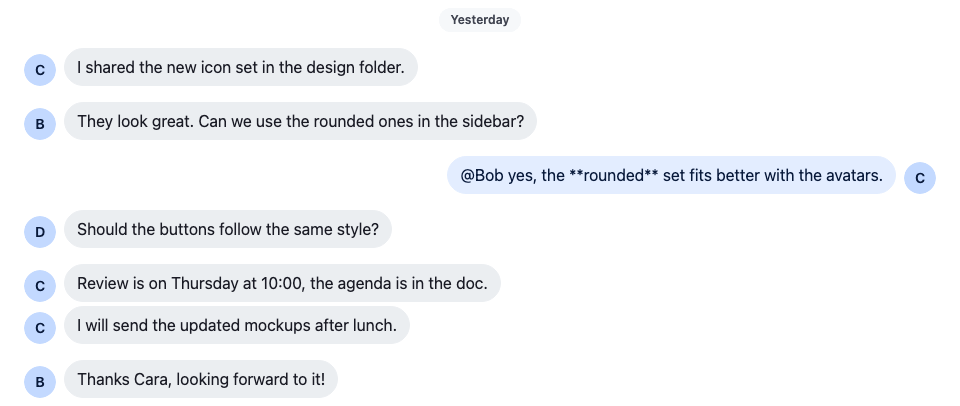
The text is still plain: links, mentions and Markdown show as typed. MessageText renders the message's text through renderText, which turns them into links, mention highlights and formatted text. It reads the message from MessageContext, so it needs no props:
import { Avatar, MessageText, useMessageContext } from "stream-chat-react";
import "./CustomMessageUi.css";

export const CustomMessageUi = () => {
  const { isMyMessage, message } = useMessageContext();

  const messageUiClassNames = ["cookbook-message-ui"];

  if (isMyMessage()) {
    messageUiClassNames.push("cookbook-message-ui--mine");
  } else {
    messageUiClassNames.push("cookbook-message-ui--other");
  }

  return (
    <div className={messageUiClassNames.join(" ")}>
      <Avatar
        className="cookbook-message-ui__avatar"
        imageUrl={message.user?.image}
        size="md"
        userName={message.user?.name || message.user?.id}
      />
      <div className="cookbook-message-ui__text">
        <MessageText />
      </div>
    </div>
  );
};@layer stream-overrides {
.cookbook-message-ui {
display: flex;
align-items: flex-end;
gap: var(--str-chat__spacing-xs);
padding-inline: var(--str-chat__spacing-xl);
font: var(--str-chat__font-body-default);
}
.cookbook-message-ui--mine {
flex-direction: row-reverse;
}
.cookbook-message-ui__avatar {
flex-shrink: 0;
}
.cookbook-message-ui__text {
max-width: 70%;
padding: var(--str-chat__spacing-xs) var(--str-chat__spacing-sm);
border: 1px solid var(--str-chat__chat-border-incoming);
border-radius: var(--str-chat__message-bubble-radius-group-bottom);
background: var(--str-chat__chat-bg-incoming);
color: var(--str-chat__chat-text-incoming);
}
.cookbook-message-ui--mine .cookbook-message-ui__text {
border-color: var(--str-chat__chat-border-outgoing);
background: var(--str-chat__chat-bg-outgoing);
color: var(--str-chat__chat-text-outgoing);
}
/* Markdown wraps the text in paragraphs; the bubble's padding already spaces it. */
.cookbook-message-ui__text p {
margin: 0;
}
}Formatted text
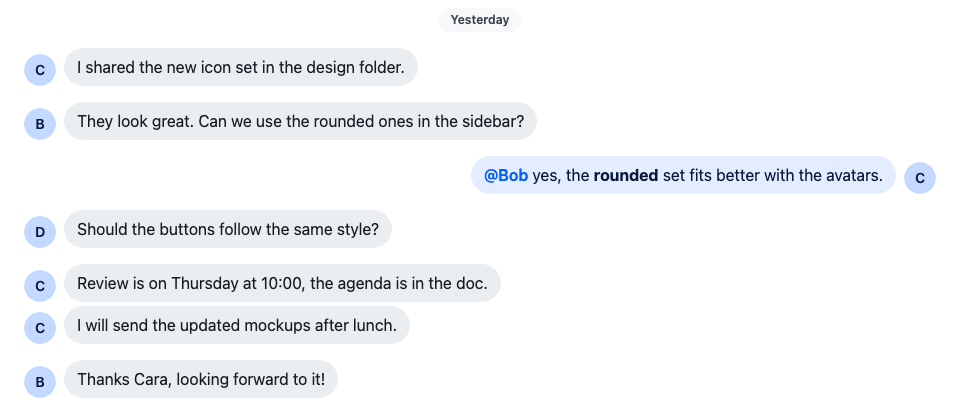
A mention is highlighted but does nothing when clicked. Mentions shows how to handle clicks on it.
Metadata
The messages still lack context. Add the time the message was sent, an "Edited" mark, and, on the user's own messages, whether they were sent, delivered or read.
The server's timestamps are nanosecond numbers, so convert them with convertTimestampToDate before formatting; Data conventions explains why. MessageContext gives the user's own message deliveredTo and readBy, the users the message reached and the users who read it. By default only the latest own message that was delivered or read gets them; returnAllReadData on the list gives them to every own message. The status shows as an icon, so it gets role="img" and an aria-label that screen readers announce instead of the emoji's name. The metadata takes the color the SDK uses for timestamps, --str-chat__chat-text-timestamp. The avatar and a new content column sit side by side, so the metadata lines up under the bubble:
import type { LocalMessage, UserResponse } from "stream-chat";
import { convertTimestampToDate } from "stream-chat";
import {
  Avatar,
  MessageText,
  useChatContext,
  useMessageContext,
  useThreadContext,
} from "stream-chat-react";
import "./CustomMessageUi.css";

const statusIconMap = {
  delivered: { icon: "✅", label: "Delivered" },
  read: { icon: "👁️", label: "Read" },
  sending: { icon: "🛫", label: "Sending" },
  sent: { icon: "✉️", label: "Sent" },
  unknown: { icon: "❓", label: "Status unknown" },
};

type MessageStatusParams = {
  deliveredTo: UserResponse[];
  message: LocalMessage;
  ownUserId: string;
  readBy: UserResponse[];
  isInThread: boolean;
};

const getMessageStatus = ({
  deliveredTo,
  message,
  ownUserId,
  readBy,
  isInThread,
}: MessageStatusParams): keyof typeof statusIconMap => {
  const [firstReader] = readBy;
  const [firstDeliveredUser] = deliveredTo;

  const justReadByMe = readBy.length === 1 && firstReader?.id === ownUserId;
  const read = readBy.length > 0 && !justReadByMe && !isInThread;

  const deliveredOnlyToMe =
    deliveredTo.length === 1 && firstDeliveredUser?.id === ownUserId;
  const delivered =
    deliveredTo.length > 0 && !deliveredOnlyToMe && !read && !isInThread;

  const sent =
    message.status === "received" && !delivered && !read && !isInThread;
  const sending = message.status === "sending";

  if (read) return "read";
  if (delivered) return "delivered";
  if (sent) return "sent";
  if (sending) return "sending";
  return "unknown";
};

const CustomMessageUiMetadata = () => {
  const {
    deliveredTo = [],
    isMyMessage,
    message,
    readBy = [],
  } = useMessageContext();
  const { client } = useChatContext();
  // Read and delivery cursors sit on channel messages, so a thread list's `readBy` / `deliveredTo`
  // say nothing about its replies, and the parent gets none. As in the SDK's `MessageStatus`, a
  // message shown in a thread is never read, delivered or sent here.
  const isInThread = !!useThreadContext();

  const createdAt = convertTimestampToDate(message.created_at);
  const editedAt = convertTimestampToDate(message.message_text_updated_at);
  const status =
    statusIconMap[
      getMessageStatus({
        deliveredTo,
        message,
        ownUserId: client.user?.id ?? "",
        readBy,
        isInThread,
      })
    ];

  return (
    <div className="cookbook-message-ui__metadata">
      <span>
        {createdAt?.toLocaleTimeString([], {
          hour: "numeric",
          minute: "2-digit",
        })}
      </span>
      {isMyMessage() && (
        <span aria-label={status.label} role="img" title={status.label}>
          {status.icon}
        </span>
      )}
      {editedAt && <span title={editedAt.toLocaleString()}>Edited</span>}
    </div>
  );
};

export const CustomMessageUi = () => {
  const { isMyMessage, message } = useMessageContext();

  const messageUiClassNames = ["cookbook-message-ui"];

  if (isMyMessage()) {
    messageUiClassNames.push("cookbook-message-ui--mine");
  } else {
    messageUiClassNames.push("cookbook-message-ui--other");
  }

  return (
    <div className={messageUiClassNames.join(" ")}>
      <Avatar
        className="cookbook-message-ui__avatar"
        imageUrl={message.user?.image}
        size="md"
        userName={message.user?.name || message.user?.id}
      />
      <div className="cookbook-message-ui__content">
        <div className="cookbook-message-ui__text">
          <MessageText />
        </div>
        <CustomMessageUiMetadata />
      </div>
    </div>
  );
};@layer stream-overrides {
.cookbook-message-ui {
display: flex;
align-items: flex-start;
gap: var(--str-chat__spacing-xs);
padding-inline: var(--str-chat__spacing-xl);
font: var(--str-chat__font-body-default);
}
.cookbook-message-ui--mine {
flex-direction: row-reverse;
}
.cookbook-message-ui__avatar {
flex-shrink: 0;
}
.cookbook-message-ui__content {
display: flex;
flex-direction: column;
align-items: flex-start;
gap: var(--str-chat__spacing-xxs);
max-width: 70%;
}
.cookbook-message-ui--mine .cookbook-message-ui__content {
align-items: flex-end;
}
.cookbook-message-ui__text {
padding: var(--str-chat__spacing-xs) var(--str-chat__spacing-sm);
border: 1px solid var(--str-chat__chat-border-incoming);
border-radius: var(--str-chat__message-bubble-radius-group-bottom);
background: var(--str-chat__chat-bg-incoming);
color: var(--str-chat__chat-text-incoming);
}
.cookbook-message-ui--mine .cookbook-message-ui__text {
border-color: var(--str-chat__chat-border-outgoing);
background: var(--str-chat__chat-bg-outgoing);
color: var(--str-chat__chat-text-outgoing);
}
/* Markdown wraps the text in paragraphs; the bubble's padding already spaces it. */
.cookbook-message-ui__text p {
margin: 0;
}
.cookbook-message-ui__metadata {
display: flex;
align-items: baseline;
gap: var(--str-chat__spacing-xxs);
padding-inline: var(--str-chat__spacing-xs);
color: var(--str-chat__chat-text-timestamp);
font: var(--str-chat__font-metadata-default);
}
.cookbook-message-ui__metadata > * + *::before {
content: "·";
margin-inline-end: var(--str-chat__spacing-xxs);
}
}Time, status and Edited mark
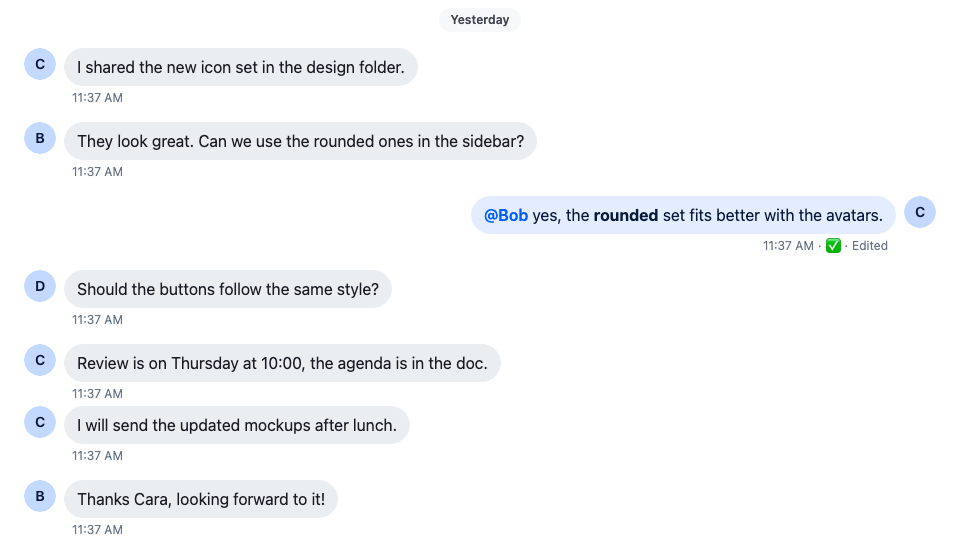
The metadata now repeats under every message. MessageList groups consecutive messages from the same sender and puts a class on the list item around each message: str-chat__li--top, --middle, --bottom or --single. Show the metadata only under the last message of a group, and the avatar only next to it:
@layer stream-overrides {
  .cookbook-message-ui__metadata {
    display: flex;
    display: none;
    align-items: baseline;
    gap: var(--str-chat__spacing-xxs);
    padding-inline: var(--str-chat__spacing-xs);
    color: var(--str-chat__chat-text-timestamp);
    font: var(--str-chat__font-metadata-default);
  }

  .str-chat__li--bottom .cookbook-message-ui__metadata,
  .str-chat__li--single .cookbook-message-ui__metadata {
    display: flex;
  }

  .str-chat__li--top .cookbook-message-ui__avatar,
  .str-chat__li--middle .cookbook-message-ui__avatar {
    visibility: hidden;
  }
}
A grouped run of messages
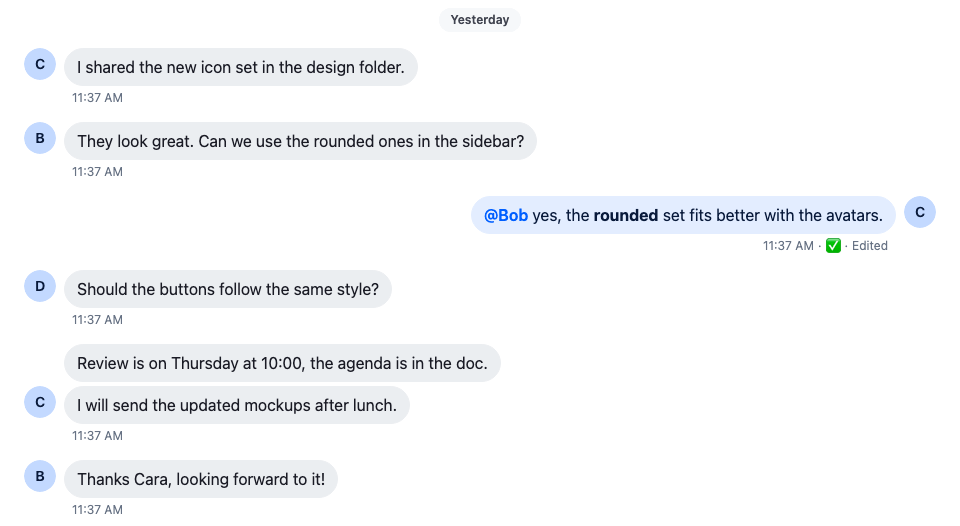
VirtualizedMessageList puts the same classes on its items, so these rules work there too. To make the same decision in code, read groupStyles from MessageContext: it holds the message's place in its group, such as ["bottom"].
The SDK's own MessageStatus and MessageTimestamp handle more cases, such as the list of readers and translated date formats, and need no props. A custom message UI can render them instead of building its own.
Deleted message
A deleted message keeps its place in the list, without its text. isMessageDeleted(message), from stream-chat-react, covers every way a message can be deleted: a soft delete, a message of type deleted, and a message deleted only for the current user. Render a placeholder instead of the content:
export const CustomMessageUi = () => {
  const { isMyMessage, message } = useMessageContext();

  const messageUiClassNames = ["cookbook-message-ui"];
  const isDeleted = isMessageDeleted(message);

  if (isMyMessage()) {
    messageUiClassNames.push("cookbook-message-ui--mine");
  } else {
    messageUiClassNames.push("cookbook-message-ui--other");
  }

  return (
    <div className={messageUiClassNames.join(" ")}>
      <Avatar
        className="cookbook-message-ui__avatar"
        imageUrl={message.user?.image}
        size="md"
        userName={message.user?.name || message.user?.id}
      />
      <div className="cookbook-message-ui__content">
        {isDeleted ? (
          <div className="cookbook-message-ui__deleted">
            This message was deleted.
          </div>
        ) : (
          <>
            <div className="cookbook-message-ui__text">
              <MessageText />
            </div>
            <CustomMessageUiMetadata />
          </>
        )}
      </div>
    </div>
  );
};@layer stream-overrides {
.cookbook-message-ui__deleted {
padding: var(--str-chat__spacing-xs) var(--str-chat__spacing-sm);
border: 1px dashed var(--str-chat__border-core-default);
border-radius: var(--str-chat__message-bubble-radius-group-bottom);
color: var(--str-chat__text-secondary);
font: var(--str-chat__font-body-default);
font-style: italic;
}
}The screenshot at the top of this page shows the result: Cara's second message is a placeholder, with no metadata under it.
Complete example
WithCustomMessageUi.tsx is the one from the first step. The whole component and its stylesheet, which Action bar for a custom message starts from:
import type { LocalMessage, UserResponse } from "stream-chat";
import { convertTimestampToDate } from "stream-chat";
import {
  Avatar,
  isMessageDeleted,
  MessageText,
  useChatContext,
  useMessageContext,
  useThreadContext,
} from "stream-chat-react";
import "./CustomMessageUi.css";

const statusIconMap = {
  delivered: { icon: "✅", label: "Delivered" },
  read: { icon: "👁️", label: "Read" },
  sending: { icon: "🛫", label: "Sending" },
  sent: { icon: "✉️", label: "Sent" },
  unknown: { icon: "❓", label: "Status unknown" },
};

type MessageStatusParams = {
  deliveredTo: UserResponse[];
  message: LocalMessage;
  ownUserId: string;
  readBy: UserResponse[];
  isInThread: boolean;
};

const getMessageStatus = ({
  deliveredTo,
  message,
  ownUserId,
  readBy,
  isInThread,
}: MessageStatusParams): keyof typeof statusIconMap => {
  const [firstReader] = readBy;
  const [firstDeliveredUser] = deliveredTo;

  const justReadByMe = readBy.length === 1 && firstReader?.id === ownUserId;
  const read = readBy.length > 0 && !justReadByMe && !isInThread;

  const deliveredOnlyToMe =
    deliveredTo.length === 1 && firstDeliveredUser?.id === ownUserId;
  const delivered =
    deliveredTo.length > 0 && !deliveredOnlyToMe && !read && !isInThread;

  const sent =
    message.status === "received" && !delivered && !read && !isInThread;
  const sending = message.status === "sending";

  if (read) return "read";
  if (delivered) return "delivered";
  if (sent) return "sent";
  if (sending) return "sending";
  return "unknown";
};

const CustomMessageUiMetadata = () => {
  const {
    deliveredTo = [],
    isMyMessage,
    message,
    readBy = [],
  } = useMessageContext();
  const { client } = useChatContext();
  // Read and delivery cursors sit on channel messages, so a thread list's `readBy` / `deliveredTo`
  // say nothing about its replies, and the parent gets none. As in the SDK's `MessageStatus`, a
  // message shown in a thread is never read, delivered or sent here.
  const isInThread = !!useThreadContext();

  const createdAt = convertTimestampToDate(message.created_at);
  const editedAt = convertTimestampToDate(message.message_text_updated_at);
  const status =
    statusIconMap[
      getMessageStatus({
        deliveredTo,
        message,
        ownUserId: client.user?.id ?? "",
        readBy,
        isInThread,
      })
    ];

  return (
    <div className="cookbook-message-ui__metadata">
      <span>
        {createdAt?.toLocaleTimeString([], {
          hour: "numeric",
          minute: "2-digit",
        })}
      </span>
      {isMyMessage() && (
        <span aria-label={status.label} role="img" title={status.label}>
          {status.icon}
        </span>
      )}
      {editedAt && <span title={editedAt.toLocaleString()}>Edited</span>}
    </div>
  );
};

export const CustomMessageUi = () => {
  const { isMyMessage, message } = useMessageContext();

  const messageUiClassNames = ["cookbook-message-ui"];
  const isDeleted = isMessageDeleted(message);

  if (isMyMessage()) {
    messageUiClassNames.push("cookbook-message-ui--mine");
  } else {
    messageUiClassNames.push("cookbook-message-ui--other");
  }

  return (
    <div className={messageUiClassNames.join(" ")}>
      <Avatar
        className="cookbook-message-ui__avatar"
        imageUrl={message.user?.image}
        size="md"
        userName={message.user?.name || message.user?.id}
      />
      <div className="cookbook-message-ui__content">
        {isDeleted ? (
          <div className="cookbook-message-ui__deleted">
            This message was deleted.
          </div>
        ) : (
          <>
            <div className="cookbook-message-ui__text">
              <MessageText />
            </div>
            <CustomMessageUiMetadata />
          </>
        )}
      </div>
    </div>
  );
};@layer stream-overrides {
.cookbook-message-ui {
display: flex;
align-items: flex-start;
gap: var(--str-chat__spacing-xs);
padding-inline: var(--str-chat__spacing-xl);
font: var(--str-chat__font-body-default);
}
.cookbook-message-ui--mine {
flex-direction: row-reverse;
}
.cookbook-message-ui__avatar {
flex-shrink: 0;
}
.cookbook-message-ui__content {
display: flex;
flex-direction: column;
align-items: flex-start;
gap: var(--str-chat__spacing-xxs);
max-width: 70%;
}
.cookbook-message-ui--mine .cookbook-message-ui__content {
align-items: flex-end;
}
.cookbook-message-ui__text {
padding: var(--str-chat__spacing-xs) var(--str-chat__spacing-sm);
border: 1px solid var(--str-chat__chat-border-incoming);
border-radius: var(--str-chat__message-bubble-radius-group-bottom);
background: var(--str-chat__chat-bg-incoming);
color: var(--str-chat__chat-text-incoming);
}
.cookbook-message-ui--mine .cookbook-message-ui__text {
border-color: var(--str-chat__chat-border-outgoing);
background: var(--str-chat__chat-bg-outgoing);
color: var(--str-chat__chat-text-outgoing);
}
/* Markdown wraps the text in paragraphs; the bubble's padding already spaces it. */
.cookbook-message-ui__text p {
margin: 0;
}
.cookbook-message-ui__metadata {
display: none;
align-items: baseline;
gap: var(--str-chat__spacing-xxs);
padding-inline: var(--str-chat__spacing-xs);
color: var(--str-chat__chat-text-timestamp);
font: var(--str-chat__font-metadata-default);
}
.cookbook-message-ui__metadata > * + *::before {
content: "·";
margin-inline-end: var(--str-chat__spacing-xxs);
}
.str-chat__li--bottom .cookbook-message-ui__metadata,
.str-chat__li--single .cookbook-message-ui__metadata {
display: flex;
}
.str-chat__li--top .cookbook-message-ui__avatar,
.str-chat__li--middle .cookbook-message-ui__avatar {
visibility: hidden;
}
.cookbook-message-ui__deleted {
padding: var(--str-chat__spacing-xs) var(--str-chat__spacing-sm);
border: 1px dashed var(--str-chat__border-core-default);
border-radius: var(--str-chat__message-bubble-radius-group-bottom);
color: var(--str-chat__text-secondary);
font: var(--str-chat__font-body-default);
font-style: italic;
}
}Attachments
This message UI shows no attachments. A custom message UI renders them with the SDK's Attachment, given the message's attachments; Custom attachments › Product card shows how, and how to render an attachment type of your own.
How it works
Example
The user opens a channel where Cara has sent two messages in a row, and the user has replied:
MessageListrenders theMessageUIoverride,CustomMessageUi, for each message. It reads the message fromMessageContextwithuseMessageContext().isMyMessage()isfalsefor Cara's messages, so they sit on the left with her avatar. The user's reply sits on the right.MessageTextrenders each message's text, with its Markdown and mentions.CustomMessageUiMetadataadds the time, an Edited mark if the text was edited, and on the user's reply the status: sending, sent, delivered or read.MessageListputsstr-chat__li--topon the list item around Cara's first message andstr-chat__li--bottomaround her second, so the stylesheet shows the metadata and the avatar only with the second.- Cara deletes her second message.
isMessageDeleted(message)is nowtrue, so the placeholder renders in place of its text and metadata.
Related
- Overriding components: how the
MessageUIoverride works. - MessageContext: the message, its handlers, and its read and delivery state.
- Component variables: restyling the default
MessageUIinstead. - Data conventions: why timestamps need
convertTimestampToDate.
The default MessageUI handles more than this recipe does:
- Actions on hover and the reply count: Action bar for a custom message.
- Reactions: Reactions for a custom message.
- Editing a message in place: Sending, editing and deleting.
- Bounced messages, which moderation rejected: Sending, editing and deleting and MessageBounceContext.
- Polls, quoted messages, failed sends and the pin, reminder and translation marks: Message UI lists every part of a message and its override key.
- The full actions menu, with the user's capabilities applied: Actions.