# Reactions for a custom message
This recipe adds reactions to the message UI from [Action bar for a custom message](https://getstream.io/chat/docs/sdk/react/ui-cookbooks/message-actions/action-bar/).
>
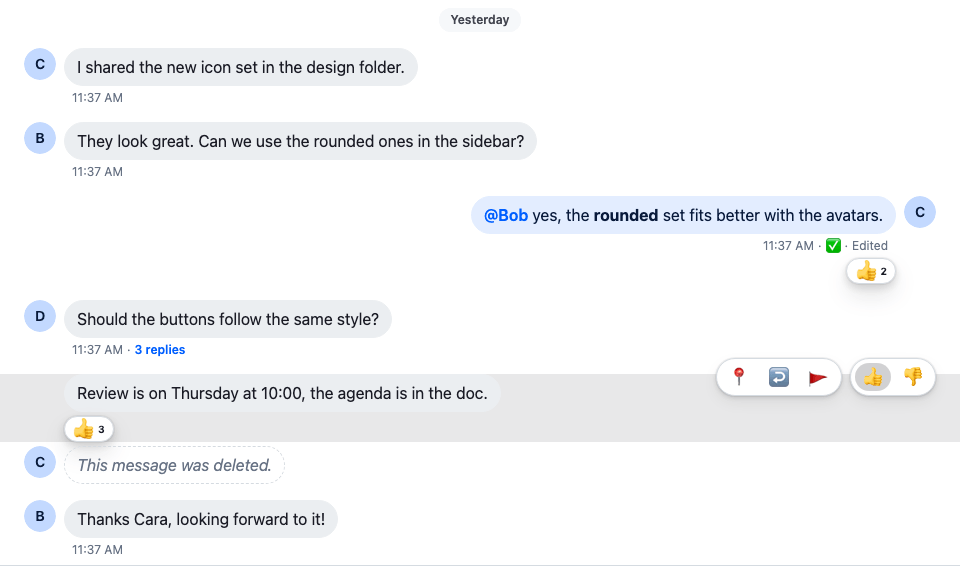
> **Note:** **What you'll build**
>
> - Thumbs-up and thumbs-down buttons in the action bar
> - A click that adds a reaction, and another that removes it
> - Reactions with their counts under each message
>
---
**Preview**
---
**Approach:** Replace one part. [Choosing where to start](https://getstream.io/chat/docs/sdk/react/ui-cookbooks/overview/#choosing-where-to-start) explains the approaches.
**Starts from:** [the base app](https://getstream.io/chat/docs/sdk/react/ui-cookbooks/overview/#the-base-app), plus [Action bar for a custom message](https://getstream.io/chat/docs/sdk/react/ui-cookbooks/message-actions/action-bar/). The page shows only what the recipe adds.
## Best practices
- Register the reactions once, as `reactionOptions` with `WithComponents`. `MessageReactions`, the reactions dialog and your own components read them from there.
- Keep the reaction types stable. Each key is the `type` stored on the server, so renaming one hides the reactions already given.
- React through `handleReaction(type, event)`. It adds or removes the reaction, and the message shows the change before the server answers.
- Show the reaction buttons only to users with the `send-reaction` capability, which `useMessagePermissions(message)` reads as `canReact`.
- Give each reaction button an `aria-label` with the reaction's name, and hide the emoji from screen readers.
## Register the reactions
The whole files are in the [complete example](#complete-example) at the end.
Define the reactions and register them as `reactionOptions` in `WithCustomMessageUi`, next to the message UI. Each key is the reaction `type` stored on the server; [Reactions](https://getstream.io/chat/docs/sdk/react/features/messaging/reactions/#the-reactions-on-offer) explains the format:
```tsx title="src/WithCustomMessageUi.tsx" add="2-3,6-19,22"
import type { PropsWithChildren } from "react";
import type { ReactionOptions } from "stream-chat-react";
import { emojiToUnicode, WithComponents } from "stream-chat-react";
import { CustomMessageUi } from "./CustomMessageUi";
const reactionOptions: ReactionOptions = {
quick: {
"+1": {
Component: () => <>👍,
name: "Thumbs up",
unicode: emojiToUnicode("👍"),
},
"-1": {
Component: () => <>👎,
name: "Thumbs down",
unicode: emojiToUnicode("👎"),
},
},
};
// Declared once, so WithComponents gets the same object on every render.
const overrides = { MessageUI: CustomMessageUi, reactionOptions };
export const WithCustomMessageUi = ({ children }: PropsWithChildren) => (
{children}
);
```
## Quick reactions
Give `CustomMessageUiActions` a button for each quick reaction, in a group of its own. It reads the registered options with `useComponentContext()`. `handleReaction(type, event)` adds the reaction, or removes it if the user already reacted with it, and the message shows the change before the server answers. `canReact` is the `send-reaction` capability. Import `useComponentContext` from `stream-chat-react`:
```tsx label="React" title="src/CustomMessageUi.tsx" add="7,13-21,67-84"
const CustomMessageUiActions = () => {
const {
handleDelete,
handleFlag,
handleOpenThread,
handlePin,
handleReaction,
message,
} = useMessageContext();
// Pinning and replying work on the channel list, so the thread's messages, the parent
// included, offer neither, as in the SDK's default message actions.
const isInThread = !!useThreadContext();
const { canDelete, canFlag, canPin, canReact, canReply } =
useMessagePermissions(message);
const { reactionOptions } = useComponentContext();
const quickReactions =
reactionOptions && "quick" in reactionOptions ? reactionOptions.quick : {};
// The reactions the user has given show as pressed; pressing one again removes it.
const ownReactionTypes = new Set(
message.own_reactions?.map(({ type }) => type),
);
return (
{Object.entries(quickReactions).map(([type, { Component, name }]) => (
))}
)}
);
};
```
```css label="CSS" title="src/CustomMessageUi.css"
@layer stream-overrides {
.cookbook-message-ui__actions-group button[aria-pressed="true"] {
background: var(--str-chat__background-utility-selected);
}
}
```
Each quick reaction button has `aria-pressed`, true when the user has already given that reaction, so a screen reader announces it as pressed. `message.own_reactions` holds the user's own reactions. The rule added to `CustomMessageUi.css` marks those buttons as selected.
## Reactions on a message
Render `MessageReactions`, imported from `stream-chat-react`, under the metadata. It reads the message from `MessageContext` and the reactions on offer from `reactionOptions`, shows each reaction with its count, and opens the reactions dialog when clicked:
```tsx title="src/CustomMessageUi.tsx" add="32"
export const CustomMessageUi = () => {
const { isMyMessage, message } = useMessageContext();
const messageUiClassNames = ["cookbook-message-ui"];
const isDeleted = isMessageDeleted(message);
if (isMyMessage()) {
messageUiClassNames.push("cookbook-message-ui--mine");
} else {
messageUiClassNames.push("cookbook-message-ui--other");
}
return (
{isDeleted ? (
This message was deleted.
) : (
<>
)}
{!isDeleted && }
);
};
```
## Complete example
`WithCustomMessageUi.tsx` is the one from [Register the reactions](#register-the-reactions). The whole component and its stylesheet:
```tsx label="React" title="src/CustomMessageUi.tsx"
import type { LocalMessage, UserResponse } from "stream-chat";
import { convertTimestampToDate } from "stream-chat";
import {
Avatar,
isMessageDeleted,
MessageReactions,
MessageText,
useChatContext,
useComponentContext,
useMessageContext,
useMessagePermissions,
useThreadContext,
} from "stream-chat-react";
import "./CustomMessageUi.css";
const statusIconMap = {
delivered: { icon: "✅", label: "Delivered" },
read: { icon: "👁️", label: "Read" },
sending: { icon: "🛫", label: "Sending" },
sent: { icon: "✉️", label: "Sent" },
unknown: { icon: "❓", label: "Status unknown" },
};
type MessageStatusParams = {
deliveredTo: UserResponse[];
message: LocalMessage;
ownUserId: string;
readBy: UserResponse[];
isInThread: boolean;
};
const getMessageStatus = ({
deliveredTo,
message,
ownUserId,
readBy,
isInThread,
}: MessageStatusParams): keyof typeof statusIconMap => {
const [firstReader] = readBy;
const [firstDeliveredUser] = deliveredTo;
const justReadByMe = readBy.length === 1 && firstReader?.id === ownUserId;
const read = readBy.length > 0 && !justReadByMe && !isInThread;
const deliveredOnlyToMe =
deliveredTo.length === 1 && firstDeliveredUser?.id === ownUserId;
const delivered =
deliveredTo.length > 0 && !deliveredOnlyToMe && !read && !isInThread;
const sent =
message.status === "received" && !delivered && !read && !isInThread;
const sending = message.status === "sending";
if (read) return "read";
if (delivered) return "delivered";
if (sent) return "sent";
if (sending) return "sending";
return "unknown";
};
const CustomMessageUiMetadata = () => {
const {
deliveredTo = [],
handleOpenThread,
isMyMessage,
message,
readBy = [],
} = useMessageContext();
const { client } = useChatContext();
// Read and delivery cursors sit on channel messages, so a thread list's `readBy` / `deliveredTo`
// say nothing about its replies, and the parent gets none. As in the SDK's `MessageStatus`, a
// message shown in a thread is never read, delivered or sent here.
const isInThread = !!useThreadContext();
const createdAt = convertTimestampToDate(message.created_at);
const editedAt = convertTimestampToDate(message.message_text_updated_at);
const status =
statusIconMap[
getMessageStatus({
deliveredTo,
message,
ownUserId: client.user?.id ?? "",
readBy,
isInThread,
})
];
return (
);
};
const CustomMessageUiActions = () => {
const {
handleDelete,
handleFlag,
handleOpenThread,
handlePin,
handleReaction,
message,
} = useMessageContext();
// Pinning and replying work on the channel list, so the thread's messages, the parent
// included, offer neither, as in the SDK's default message actions.
const isInThread = !!useThreadContext();
const { canDelete, canFlag, canPin, canReact, canReply } =
useMessagePermissions(message);
const { reactionOptions } = useComponentContext();
const quickReactions =
reactionOptions && "quick" in reactionOptions ? reactionOptions.quick : {};
// The reactions the user has given show as pressed; pressing one again removes it.
const ownReactionTypes = new Set(
message.own_reactions?.map(({ type }) => type),
);
return (
);
};
```
```css label="CSS" title="src/CustomMessageUi.css"
@layer stream-overrides {
.cookbook-message-ui {
position: relative;
display: flex;
align-items: flex-start;
gap: var(--str-chat__spacing-xs);
padding-inline: var(--str-chat__spacing-xl);
font: var(--str-chat__font-body-default);
}
.cookbook-message-ui--mine {
flex-direction: row-reverse;
}
.cookbook-message-ui__avatar {
flex-shrink: 0;
}
.cookbook-message-ui__content {
display: flex;
flex-direction: column;
align-items: flex-start;
gap: var(--str-chat__spacing-xxs);
max-width: 70%;
}
.cookbook-message-ui--mine .cookbook-message-ui__content {
align-items: flex-end;
}
.cookbook-message-ui__text {
padding: var(--str-chat__spacing-xs) var(--str-chat__spacing-sm);
border: 1px solid var(--str-chat__chat-border-incoming);
border-radius: var(--str-chat__message-bubble-radius-group-bottom);
background: var(--str-chat__chat-bg-incoming);
color: var(--str-chat__chat-text-incoming);
}
.cookbook-message-ui--mine .cookbook-message-ui__text {
border-color: var(--str-chat__chat-border-outgoing);
background: var(--str-chat__chat-bg-outgoing);
color: var(--str-chat__chat-text-outgoing);
}
/* Markdown wraps the text in paragraphs; the bubble's padding already spaces it. */
.cookbook-message-ui__text p {
margin: 0;
}
.cookbook-message-ui__metadata {
display: none;
align-items: baseline;
gap: var(--str-chat__spacing-xxs);
padding-inline: var(--str-chat__spacing-xs);
color: var(--str-chat__chat-text-timestamp);
font: var(--str-chat__font-metadata-default);
}
.cookbook-message-ui__metadata > * + *::before {
content: "·";
margin-inline-end: var(--str-chat__spacing-xxs);
}
.str-chat__li--bottom .cookbook-message-ui__metadata,
.str-chat__li--single .cookbook-message-ui__metadata {
display: flex;
}
.str-chat__li--top .cookbook-message-ui__avatar,
.str-chat__li--middle .cookbook-message-ui__avatar {
visibility: hidden;
}
.cookbook-message-ui:hover,
.cookbook-message-ui:focus-within {
background: var(--str-chat__background-utility-hover);
}
.cookbook-message-ui__actions {
position: absolute;
top: calc(-1 * var(--str-chat__spacing-md));
display: flex;
gap: var(--str-chat__spacing-xs);
/* Hidden but still in the tab order, so focusing a button shows the actions. */
opacity: 0;
pointer-events: none;
}
.cookbook-message-ui:hover .cookbook-message-ui__actions,
.cookbook-message-ui:focus-within .cookbook-message-ui__actions {
opacity: 1;
pointer-events: auto;
}
.cookbook-message-ui--mine .cookbook-message-ui__actions {
left: var(--str-chat__spacing-xl);
}
.cookbook-message-ui--other .cookbook-message-ui__actions {
right: var(--str-chat__spacing-xl);
}
.cookbook-message-ui__actions-group {
display: flex;
gap: var(--str-chat__spacing-xxs);
padding: var(--str-chat__spacing-xxs);
border: 1px solid var(--str-chat__border-core-default);
border-radius: var(--str-chat__radius-max);
background: var(--str-chat__background-core-elevation-1);
box-shadow: var(--str-chat__box-shadow-2);
}
.cookbook-message-ui__actions-group:empty {
display: none;
}
.cookbook-message-ui__actions-group button {
padding: var(--str-chat__spacing-xxs) var(--str-chat__spacing-xs);
border: 0;
border-radius: var(--str-chat__radius-max);
background: none;
font: var(--str-chat__font-body-default);
cursor: pointer;
}
.cookbook-message-ui__actions-group button:hover {
background: var(--str-chat__background-utility-hover);
}
.cookbook-message-ui__actions-group button[aria-pressed="true"] {
background: var(--str-chat__background-utility-selected);
}
.cookbook-message-ui__reply-count {
padding: 0;
border: 0;
background: none;
color: var(--str-chat__chat-text-link);
font: var(--str-chat__font-metadata-emphasis);
cursor: pointer;
}
.cookbook-message-ui__deleted {
padding: var(--str-chat__spacing-xs) var(--str-chat__spacing-sm);
border: 1px dashed var(--str-chat__border-core-default);
border-radius: var(--str-chat__message-bubble-radius-group-bottom);
color: var(--str-chat__text-tertiary);
font: var(--str-chat__font-body-default);
font-style: italic;
}
}
```
The screenshot at the top of this page shows the result: the user's message and Cara's "Review is on Thursday…" have thumbs-up reactions, and the action bar over Cara's hovered message has the two quick reactions.
## How it works
>
> **Info:** **Example**
>
> The user moves the pointer over Cara's message and reacts with thumbs up:
>
> 1. `WithCustomMessageUi` registers `reactionOptions` with two quick reactions, `+1` and `-1`, next to the `MessageUI` override.
> 2. The action bar shows. The user has the `send-reaction` capability, so `canReact` is `true`, and `CustomMessageUiActions` renders a button for each quick reaction it reads with `useComponentContext()`.
> 3. The user clicks thumbs up. `handleReaction("+1", event)` adds the reaction, and the message shows it before the server answers. `message.own_reactions` now holds `+1`, so the button's `aria-pressed` is `true` and the stylesheet marks it as selected.
> 4. `MessageReactions` under the metadata shows 👍 with its count. Clicking it opens the reactions dialog.
> 5. The user clicks thumbs up in the action bar again, and `handleReaction` removes the reaction.
>
## Related
- How reactions work, the reactions on offer and the reactions dialog: [Reactions](https://getstream.io/chat/docs/sdk/react/features/messaging/reactions/).
- The SDK's reaction components and their props: [Reaction components](https://getstream.io/chat/docs/sdk/react/component-reference/message/reaction-components/).
- `handleReaction` and the message's other handlers: [MessageContext](https://getstream.io/chat/docs/sdk/react/component-reference/message/messagecontext/).
- The message UI this recipe extends: [Custom message](https://getstream.io/chat/docs/sdk/react/ui-cookbooks/message-list/custom-message/) and [Action bar for a custom message](https://getstream.io/chat/docs/sdk/react/ui-cookbooks/message-actions/action-bar/).
---
For the most recent version of this documentation, visit [https://getstream.io/chat/docs/sdk/react/ui-cookbooks/message-actions/reactions/](https://getstream.io/chat/docs/sdk/react/ui-cookbooks/message-actions/reactions/).