# Read-receipt avatars
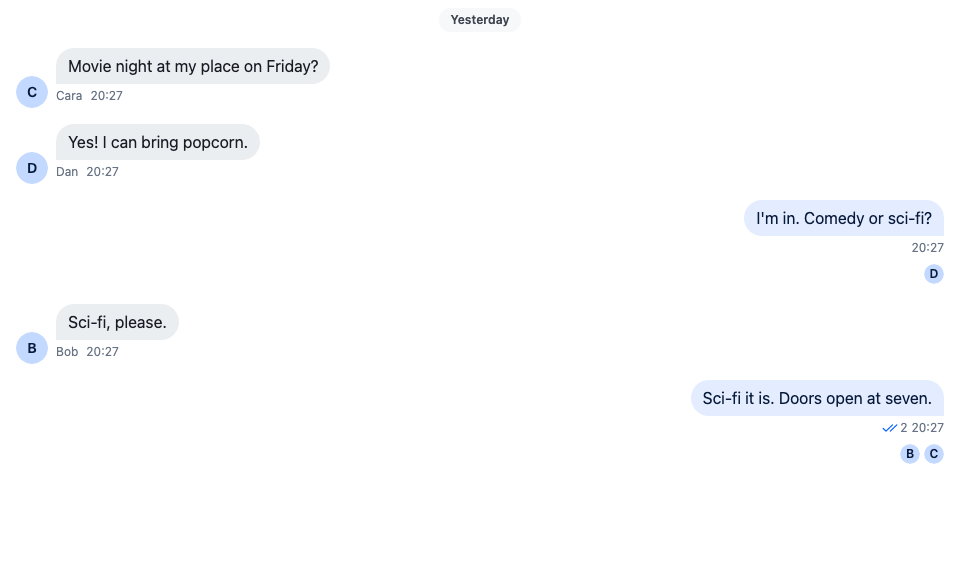
This recipe shows read receipts in the message list as member avatars.
>
> **Note:** **What you'll build**
>
> - A small avatar under each member's last read message
> - Avatars that move down as members read on
>
---
**Preview**
---
**Approach:** Compose. [Choosing where to start](https://getstream.io/chat/docs/sdk/react/ui-cookbooks/overview/#choosing-where-to-start) explains the approaches.
**Starts from:** [the base app](https://getstream.io/chat/docs/sdk/react/ui-cookbooks/overview/#the-base-app). The page shows only what the recipe adds.
## Best practices
- Read the avatars from `channel.messageReceiptsTracker.snapshotStore`. Its `readersByMessageId` already lists each member once, at the message their read position is on, which is exactly where the avatar goes.
- Don't use the message's `readBy` from `MessageContext` for this. It lists everyone who has read the message, so a member who read the newest message would show under every message above it too.
- Leave the user out. The tracker counts the user's own read position as well.
- Keep the default message UI and add the row after it, so the bubble, the actions and the status keep working as they do.
- Leave the row off thread replies. Read positions belong to channel messages. The thread's parent message is a channel message, so it keeps its row.
## Add the avatars under each message
`ReadReceiptAvatars` reads the readers of the message it renders under, and `MessageWithReadReceipts` puts it after the SDK's `MessageUI`. The `MessageUI` key of the component context then renders that pair for every message:
```tsx label="React" title="src/ReadReceiptAvatars.tsx"
import type { PropsWithChildren } from "react";
import type { MessageReceiptsSnapshot } from "stream-chat";
import {
Avatar,
MessageUI,
useChannel,
useChatContext,
useIsRenderedAsThreadParent,
useMessageContext,
useStateStore,
useThreadContext,
WithComponents,
} from "stream-chat-react";
import "./ReadReceiptAvatars.css";
// The tracker groups members by the message their read position is on.
const readersSelector = ({ readersByMessageId }: MessageReceiptsSnapshot) => ({
readersByMessageId,
});
/** The avatars of the other members whose last read message is this one. */
const ReadReceiptAvatars = () => {
const channel = useChannel();
const { client } = useChatContext();
const { message } = useMessageContext();
const isThreadParent = useIsRenderedAsThreadParent();
const isThreadReply = !!useThreadContext() && !isThreadParent;
const { readersByMessageId } = useStateStore(
channel.messageReceiptsTracker.snapshotStore,
readersSelector,
);
// Read positions belong to the channel's main list, so thread replies show none. The thread
// parent is a channel message and keeps its readers.
if (isThreadReply) return null;
const readers = (readersByMessageId[message.id] ?? []).filter(
(user) => user.id !== client.userId,
);
if (!readers.length) return null;
return (
{readers.map((user) => (
-
))}
);
};
/** The SDK's message UI, with the reader avatars under it. */
const MessageWithReadReceipts = () => (
<>
);
// Declared once, so WithComponents gets the same object on every render.
const overrides = { MessageUI: MessageWithReadReceipts };
export const WithReadReceiptAvatars = ({ children }: PropsWithChildren) => (
{children}
);
```
```css label="CSS" title="src/ReadReceiptAvatars.css"
@layer stream-overrides {
.cookbook-read-receipts {
display: flex;
justify-content: flex-end;
gap: var(--str-chat__spacing-xxs);
margin: 0;
padding-block: var(--str-chat__spacing-xxs);
padding-inline: var(--str-chat__spacing-md);
list-style: none;
}
.cookbook-read-receipts__reader {
display: flex;
}
}
```
The screenshot at the top of this page shows the result.
Wrap the channel in `WithReadReceiptAvatars`:
```tsx title="src/ReadReceiptsChannel.tsx"
import type { Channel as StreamChannel } from "stream-chat";
import { Channel, MessageComposer, MessageList } from "stream-chat-react";
import { WithReadReceiptAvatars } from "./ReadReceiptAvatars";
export const ReadReceiptsChannel = ({
channel,
}: {
channel: StreamChannel;
}) => (
);
```
## How it works
>
> **Info:** **Example**
>
> Three members have read a group chat. One of them stopped at the user's question and the other two read up to the newest message. The first member's avatar sits under the question; the other two sit under the newest message. When the first member opens the channel and reads on, their avatar moves down to the newest message.
>
1. `channel.messageReceiptsTracker` keeps every member's read position: the last message they read, built from `channel.state.read`. Its `snapshotStore` publishes `readersByMessageId`, which maps a message id to the members whose position is on that message. A member appears under one message only.
2. `ReadReceiptAvatars` subscribes to that store with `useStateStore`, so it re-renders when a member reads further. Their avatar then leaves the old message and shows under the new one.
3. `useChannel()` returns the channel the message list belongs to, and `useMessageContext()` the message being rendered. `client.userId` filters the user out, since the user's own read position is on the newest message they saw.
4. The `MessageUI` key of the component context is what `Message` renders for each message. `MessageWithReadReceipts` renders the SDK's `MessageUI` unchanged and adds the row after it, inside the same list item.
5. `useThreadContext()` returns the thread when the message renders in a thread's list. `useIsRenderedAsThreadParent()` returns `true` for the thread's parent message, which the list renders above the replies. Replies have no read positions of their own, so the row isn't rendered under them. The parent is a channel message and keeps its row.
The double check and the reader count of the default `MessageStatus` stay on the user's own messages. To show who read a message instead of where each member stopped, see [Message info](https://getstream.io/chat/docs/sdk/react/ui-cookbooks/panels/message-info/).
## Related
- [Read state, unread and receipts](https://getstream.io/chat/docs/sdk/react/features/messaging/read-state-unread-and-receipts/#receipts) explains read positions and how the SDK turns them into receipts.
- [Message receipts tracker](https://getstream.io/chat/docs/sdk/react/reference/state/message-receipts-tracker/) lists `readersByMessageId` and every method of `channel.messageReceiptsTracker`.
- [Message info](https://getstream.io/chat/docs/sdk/react/ui-cookbooks/panels/message-info/) lists who read a message and who only received it, in the side panel.
- [ComponentContext](https://getstream.io/chat/docs/sdk/react/component-reference/channel/componentcontext/) lists the `MessageUI` key and the other components you can replace.
- [Custom message](https://getstream.io/chat/docs/sdk/react/ui-cookbooks/message-list/custom-message/) replaces the whole message UI instead of adding to it.
---
For the most recent version of this documentation, visit [https://getstream.io/chat/docs/sdk/react/ui-cookbooks/message-list/read-receipt-avatars/](https://getstream.io/chat/docs/sdk/react/ui-cookbooks/message-list/read-receipt-avatars/).