


Channel invites
A channel can invite a user before they join it. This UI cookbook gives those invitations a section of their own above the channel list, with the channel, who sent the invitation, and Accept and Decline buttons. The SDK has no invitation UI. Another member invites the user with Channel.inviteMembers(), and the user answers with Channel.acceptInvite() or Channel.rejectInvite(). Channel invites explains the invite itself.
What you'll build
- Paginators that split joined channels from invitations
- An invitations section above the channel list
- Each invitation with its channel and who sent it
- Accept and Decline buttons on each invitation
Approach: Replace one part, Compose and Change behavior in the state layer. Choosing where to start explains the approaches.
Best practices
- Keep invitations apart from the channels. A channel the user hasn't joined yet doesn't belong among the conversations they're in.
- Say who sent each invitation, so the user knows whether to trust it.
- Name the channel in each button's accessible name, such as "Accept invitation to Bird walk". Several rows each have an Accept button, and a screen reader user who reaches one hears which channel it answers.
- Keep the focus on the pressed button while the request runs. Mark it busy and ignore presses instead of setting
disabled, which takes the focus away. - Show a few invitations at a time. The section sits above the channel list and takes only the height its rows need, so it holds a few and scrolls to load more.
- Take the swipe actions off the invitation rows. Pin, mute and archive apply to a channel the user has joined.
Create the paginators
A query for the user's channels, members: { $in: [userId] }, also returns the channels the user is invited to, and the ones they declined. Two paginators split them:
| Paginator | Filters added to yours | Holds |
|---|---|---|
| Channels | joined: true |
The channels the user joined, by latest message. |
| Invites | invite: "pending" |
The invitations the user hasn't answered yet. |
Query Channels explains both filters. ChannelPaginator checks them on the client too, when an event asks whether a channel still belongs in a paginator: joined is true for a member who wasn't invited or accepted the invite, and invite is the status of the user's own invite, read from channel.state.membership. Channel list paginators explains how events move channels between paginators.
Register both on client.channelManager with ChannelManager.insertPaginator(), so the manager's events keep them current:
- When the user answers an invite, the server sends
member.updatedto the clients that watch the channel. The manager routes the channel again: an accepted channel stops matching the invites and joins the channels, and a declined one stops matching the invites and joins neither. The invites query watches its channels, asChannelPaginatordoes by default. Don't query the invites withwatch: false: the client would then receive nomember.updatedfor the channel, and an accepted channel would never join the channel list. - The manager has no handler for
notification.invited, the event for a new invite. The hook adds one. It loads the channel, which the client may not have yet, and passes it toChannelManager.ingestChannel(), which routes it to the invites.
import { useEffect, useMemo } from "react";
import { ChannelPaginator } from "stream-chat";
import type { ChannelFilters, SortParamRequest } from "stream-chat";
import { useChatContext } from "stream-chat-react-native";

// The channel with the latest message first.
const byLastMessage: SortParamRequest[] = [
  { direction: -1, field: "last_message_at" },
];
// The most recently created channel first.
const byCreatedAt: SortParamRequest[] = [
  { direction: -1, field: "created_at" },
];

/**
 * Registers a paginator with the channels the user joined and one with the channels the user is
 * invited to. `filters` scope both to the user's channels; pass a stable object.
 */
export const useChannelInvites = (filters: ChannelFilters) => {
  const { client } = useChatContext();

  const paginators = useMemo(
    () => ({
      channels: new ChannelPaginator({
        client,
        filters: { ...filters, joined: true },
        id: "channels",
        sort: byLastMessage,
      }),
      invites: new ChannelPaginator({
        client,
        filters: { ...filters, invite: "pending" },
        id: "invites",
        paginatorOptions: { pageSize: 5 },
        sort: byCreatedAt,
      }),
    }),
    [client, filters],
  );

  useEffect(() => {
    const { channels, invites } = paginators;
    client.channelManager.insertPaginator({ paginator: channels });
    client.channelManager.insertPaginator({ paginator: invites });

    // A new invite arrives as `notification.invited`, which the manager doesn't route itself.
    const removeHandler = client.channelManager.addEventHandler({
      eventType: "notification.invited",
      handle: async ({ ctx: { channelManager }, event }) => {
        if (!event.channel_id || !event.channel_type) return;
        const channel = await channelManager
          .ensure({ id: event.channel_id, type: event.channel_type })
          .watch();
        channelManager.ingestChannel(channel);
      },
      id: "app:route-invited-channel",
    });

    return () => {
      removeHandler();
      client.channelManager.removePaginator(channels);
      client.channelManager.removePaginator(invites);
      channels.dispose();
      invites.dispose();
    };
  }, [client, paginators]);

  return paginators;
};
Render the invitations
Invitations renders the invites paginator in a ChannelList of its own, inside a WithComponents that applies only to it. The wrapper replaces these keys:
ChannelPreview, the row, withInvitationRow.swipeActionsEnabled={false}keeps the swipe actions off it.EmptyStateIndicator,ChannelListLoadingIndicator,LoadingErrorIndicator,ChannelListHeaderErrorIndicatorandChannelListHeaderNetworkDownIndicatorwith a component that renders nothing, so the section is empty while it loads, when there are no invitations, and when a load fails, and it doesn't repeat the banners the list that follows shows. See List states UI.
ChannelList loads the first page of its paginator when it mounts, and the next page when the user scrolls to the end of the section. The section's height is the height of its rows, up to three of them, so it takes no room without invitations.
Each row shows the channel's avatar and name, the name of the member who created the channel, channel.data.created_by.name, and the two buttons. Accept calls Channel.acceptInvite() and Decline Channel.rejectInvite(). While the request runs, both buttons stay in place and ignore presses, and the pressed one reads "Joining..." or "Declining...". When the request succeeds, the row leaves the section with ChannelPaginator.removeItem(), and useAccessibilityAnnouncer() tells screen readers "Joined Bird walk" or "Declined the invitation to Bird walk". The announcer is silent until accessibility is turned on; see Accessibility. When the request fails, the buttons work again, and the row publishes an error notification. The row sits in the invitations list, whose notification list has no room for it, so the notification names the channel list's own host instead:
import { useState } from "react";
import { Pressable, StyleSheet, Text, View } from "react-native";
import type { ChannelPaginator, ChannelPaginatorState } from "stream-chat";
import {
  ChannelAvatar,
  ChannelList,
  useAccessibilityAnnouncer,
  useChannelPreviewDisplayName,
  useChannelsContext,
  useNotificationApi,
  useStateStore,
  useTheme,
  WithComponents,
} from "stream-chat-react-native";
import type {
  ChannelPreviewViewProps,
  ComponentOverrides,
} from "stream-chat-react-native";

type Answer = "accept" | "decline";

const ROW_HEIGHT = 112;
const MAX_VISIBLE_ROWS = 3;

// The host id of the channel list that follows the section. See `ChannelListScreen`.
export const CHANNEL_LIST_HOST_ID = "channels";

const countSelector = ({ items }: ChannelPaginatorState) => ({
  count: items?.length ?? 0,
});

/**
 * One invitation: the channel, who invited the user, and Accept and Decline. Both buttons ignore
 * presses while a request runs, and keep their place so the focus stays on the one pressed.
 */
const InvitationRow = ({ channel }: ChannelPreviewViewProps) => {
  const { paginator } = useChannelsContext();
  const { addNotification } = useNotificationApi();
  const announce = useAccessibilityAnnouncer();
  const {
    theme: { semantics },
  } = useTheme();
  const name = useChannelPreviewDisplayName(channel);
  const [answering, setAnswering] = useState<Answer>();
  const inviter = channel.data?.created_by?.name;

  const answer = async (choice: Answer) => {
    if (answering) return;
    setAnswering(choice);
    try {
      if (choice === "accept") await channel.acceptInvite();
      else await channel.rejectInvite();
      // An accepted channel joins the channel list through the `member.updated` event that
      // follows, which routes it away from the invitations too if it arrives first.
      paginator.removeItem({ item: channel });
      announce(
        choice === "accept"
          ? `Joined ${name}`
          : `Declined the invitation to ${name}`,
      );
    } catch (error) {
      setAnswering(undefined);
      addNotification(
        {
          message: `Couldn't answer the invitation to ${name}`,
          options: {
            originalError: error instanceof Error ? error : undefined,
            severity: "error",
            type: "app:invitation:answer:failed",
          },
          origin: { emitter: "InvitationRow" },
        },
        { target: { hostId: CHANNEL_LIST_HOST_ID, panel: "channel-list" } },
      );
    }
  };

  return (
    <View
      style={[styles.row, { borderBottomColor: semantics.borderCoreSubtle }]}
    >
      <ChannelAvatar channel={channel} size="xl" />
      <View style={styles.body}>
        <Text style={[styles.title, { color: semantics.textPrimary }]}>
          {name}
        </Text>
        {inviter ? (
          <Text style={{ color: semantics.textSecondary }}>
            {inviter} invited you
          </Text>
        ) : null}
        <View style={styles.actions}>
          <Pressable
            accessibilityLabel={
              answering === "accept"
                ? `Joining ${name}`
                : `Accept invitation to ${name}`
            }
            accessibilityRole="button"
            accessibilityState={{
              busy: answering === "accept",
              disabled: !!answering,
            }}
            onPress={() => void answer("accept")}
            style={[
              styles.button,
              { backgroundColor: semantics.accentPrimary },
            ]}
          >
            <Text style={{ color: semantics.textOnAccent }}>
              {answering === "accept" ? "Joining..." : "Accept"}
            </Text>
          </Pressable>
          <Pressable
            accessibilityLabel={
              answering === "decline"
                ? `Declining invitation to ${name}`
                : `Decline invitation to ${name}`
            }
            accessibilityRole="button"
            accessibilityState={{
              busy: answering === "decline",
              disabled: !!answering,
            }}
            onPress={() => void answer("decline")}
            style={[
              styles.button,
              { borderColor: semantics.borderCoreDefault },
            ]}
          >
            <Text style={{ color: semantics.textPrimary }}>
              {answering === "decline" ? "Declining..." : "Decline"}
            </Text>
          </Pressable>
        </View>
      </View>
    </View>
  );
};

const Nothing = () => null;

// Declared once: WithComponents reads its overrides when it mounts.
const overrides: ComponentOverrides = {
  ChannelListHeaderErrorIndicator: Nothing,
  ChannelListHeaderNetworkDownIndicator: Nothing,
  ChannelListLoadingIndicator: Nothing,
  ChannelPreview: InvitationRow,
  EmptyStateIndicator: Nothing,
  LoadingErrorIndicator: Nothing,
};

/** The invitations the user hasn't answered yet, above the channel list. */
export const Invitations = ({ paginator }: { paginator: ChannelPaginator }) => {
  const { count } = useStateStore(paginator.state, countSelector);

  return (
    <View style={{ height: Math.min(count, MAX_VISIBLE_ROWS) * ROW_HEIGHT }}>
      <WithComponents overrides={overrides}>
        <ChannelList paginator={paginator} swipeActionsEnabled={false} />
      </WithComponents>
    </View>
  );
};

const styles = StyleSheet.create({
  actions: { flexDirection: "row", gap: 8, marginTop: 8 },
  body: { flex: 1, gap: 2 },
  button: {
    borderColor: "transparent",
    borderRadius: 20,
    borderWidth: 1,
    paddingHorizontal: 16,
    paddingVertical: 8,
  },
  row: {
    alignItems: "center",
    borderBottomWidth: 1,
    flexDirection: "row",
    gap: 12,
    height: ROW_HEIGHT,
    padding: 12,
  },
  title: { fontSize: 16, fontWeight: "600" },
});
Put the section above the channel list
The screen creates both paginators with useChannelInvites() and renders the section above the channel list. Give the channel list the host id the notifications name:
import { StyleSheet, View } from "react-native";
import type { Channel, ChannelFilters } from "stream-chat";
import { ChannelList } from "stream-chat-react-native";
import { CHANNEL_LIST_HOST_ID, Invitations } from "./Invitations";
import { useChannelInvites } from "./useChannelInvites";

const userId = "YOUR_USER_ID";

// Declared once: the hook builds its paginators from it.
const filters: ChannelFilters = {
  members: { $in: [userId] },
  type: "messaging",
};

export const ChannelListScreen = ({
  onSelect,
}: {
  onSelect: (channel: Channel) => void;
}) => {
  const { channels, invites } = useChannelInvites(filters);

  return (
    <View style={styles.screen}>
      <Invitations paginator={invites} />
      <ChannelList
        notificationHostId={CHANNEL_LIST_HOST_ID}
        onSelect={onSelect}
        paginator={channels}
      />
    </View>
  );
};

const styles = StyleSheet.create({ screen: { flex: 1 } });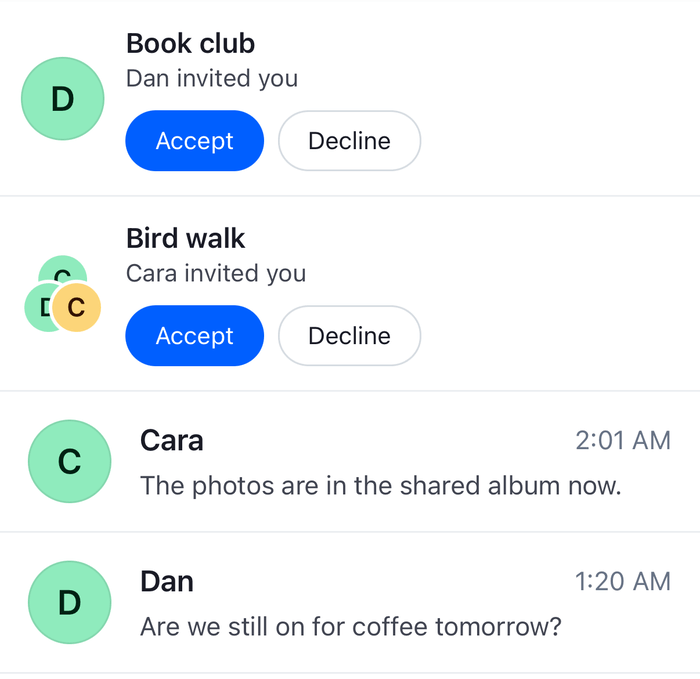 | 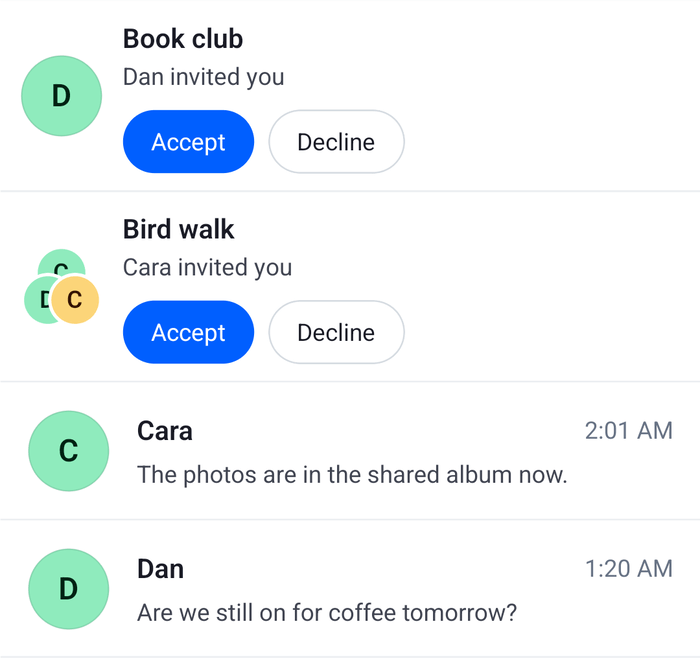 |
The channels paginator takes the place of the one your app registers for the channel list. Register no other for the same channels, so that a channel doesn't show twice.
Example
Cara invites the current user to Bird walk, and the user accepts:
- Cara calls
Channel.inviteMembers()for the user. The user is now a member of Bird walk, withinvitedset totrueon their membership. The user's client, which isn't watching Bird walk yet, receivesnotification.invited, and may also receivenotification.added_to_channel. - The handler
useChannelInvites()added fornotification.invitedloads Bird walk withChannel.watch()and callsChannelManager.ingestChannel(). The channel matches the invites paginator'sinvite: "pending", and not the channels paginator'sjoined: true, so it joins the invites only.Invitationsgrows by one row, with "Cara invited you". - The user presses Accept.
Channel.acceptInvite()sends the request, and the button reads "Joining...". - The request succeeds.
InvitationRowremoves Bird walk from the invites paginator, and screen readers hear "Joined Bird walk". With no other invitation, the section shrinks to no height. - The server sends
member.updatedto the clients watching Bird walk, withevent.member.invite_accepted_atset. The client applies it tochannel.state.membership, and the manager routes the channel again. It matchesjoined: truenow, so Bird walk joins the channel list, at its place bylast_message_at.
Declining runs the same way. Channel.rejectInvite() stores only the returned channel in channel.data. The member.updated event that follows sets channel.state.membership.invite_rejected_at, on a client that watches the channel, so the channel matches neither paginator. The user is still a member of a declined channel, which is why the channel list needs joined: true: without it, the query for the user's channels returns the declined channels too.
An invite answered on another device reaches this one as member.updated only, since this client watches the channel, and the manager moves the row away. Events lists which clients receive member.updated and which receive the notification.invite_* events. A new invite reaches it as notification.invited, and the section grows with it.
Read more
- Channel invites explains inviting users, accepting and rejecting, and querying invites by status.
- Query Channels explains the
joinedandinvitefilters. - Events lists which clients receive
member.updatedand thenotification.invite_*events. - Channel list paginators explains how events move channels between paginators.
- Channel and channel state lists
Channel.acceptInvite(),Channel.rejectInvite()andChannel.inviteMembers(). - Pinned and archived channels splits a channel list into lists, each with its own paginator.