


Message info
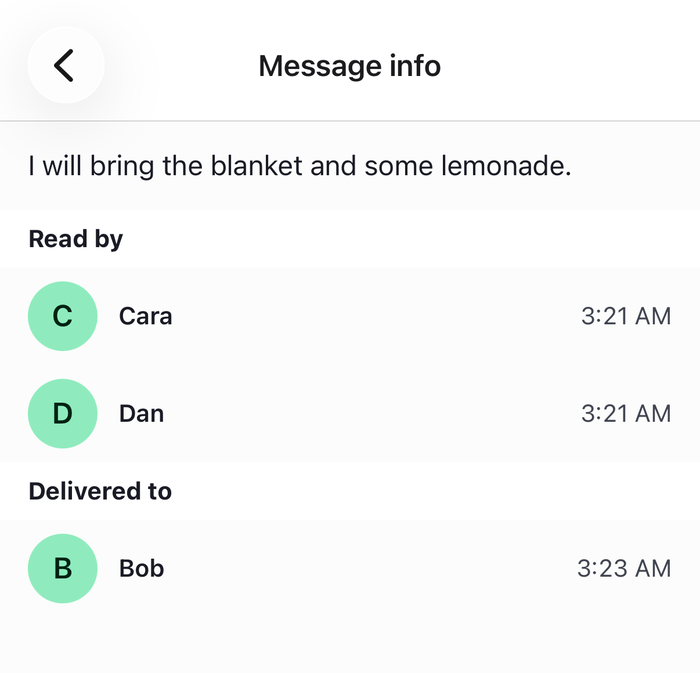
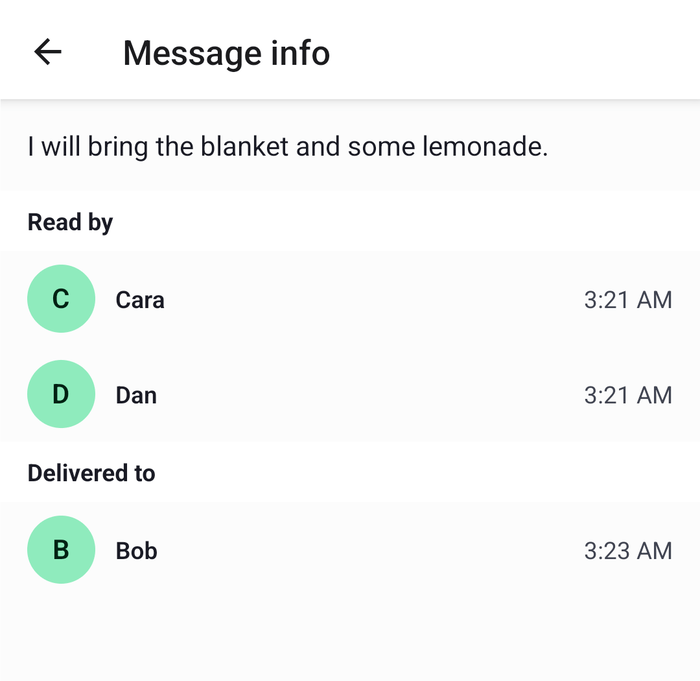
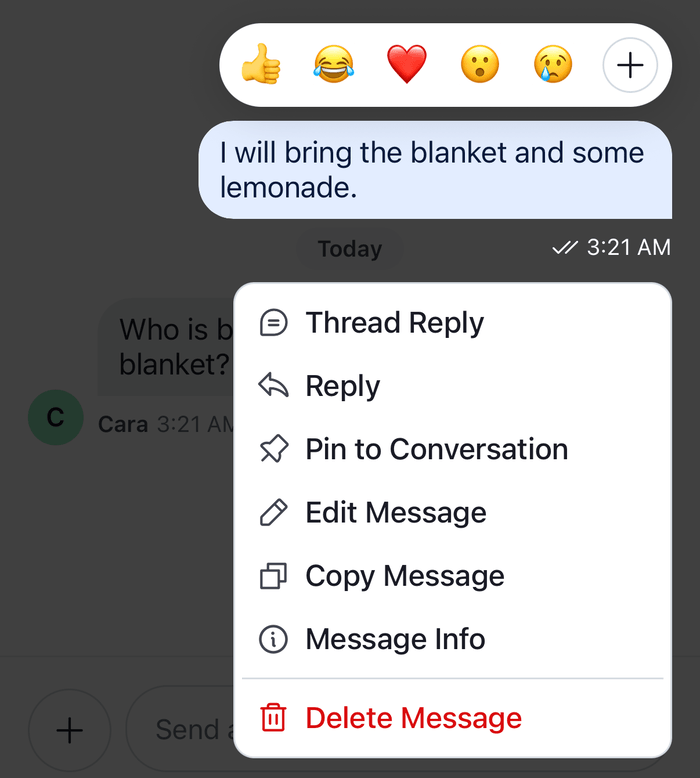
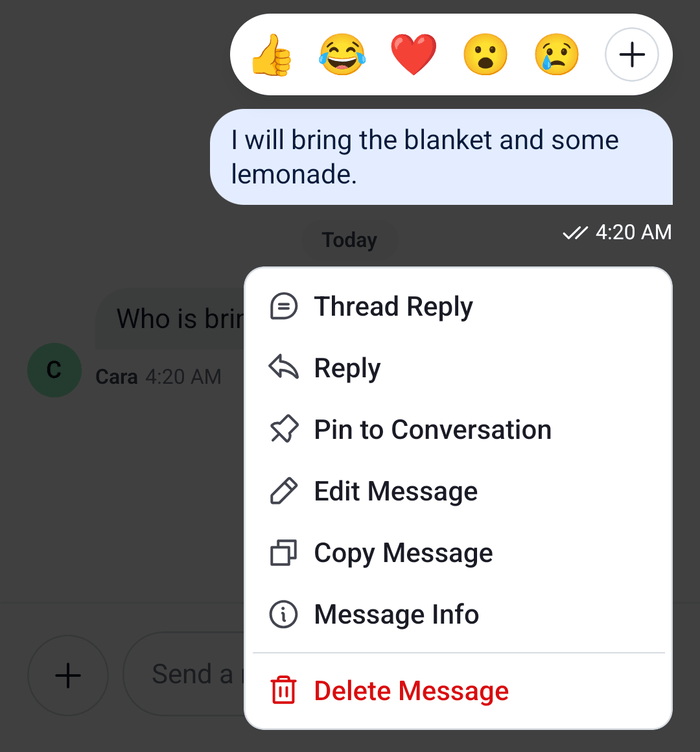
This UI cookbook builds a Message info screen. A Message Info action in the menu of the user's own messages opens a screen of your navigator that lists who has read the message and who has only received it, each with a time, and keeps the lists current while it is open. The receipts come from the channel's messageReceiptsTracker, which Read state, unread and receipts explains. The Status indicators UI cookbook builds a sheet inside Channel from the receipts hooks. This one is a screen of its own, reads the tracker directly so it needs no Channel around it, and shows when each member read or received the message.
What you'll build
- a Message info screen with the members who read and received a message
- a Message Info action in the menu of the user's own messages
Approach: Compose. Choosing where to start explains the approaches.
Best practices
- Ask
channel.messageReceiptsTrackerwho read or received a message. It turns every member's read state into answers per message, so the screen never compares timestamps itself. - Subscribe to
channel.messageReceiptsTracker.snapshotStoreand tochannel.state, so the lists and the times update while the screen is open. - Keep only the channel's
cidand the message's id in the route params, and read the message fromchannel.messagePaginator. A copy taken when the screen opens never shows an edit. - Leave the user out of both lists. The tracker counts the user's own read position too. Sending a message doesn't move it; it moves when the message list marks the channel read, so the user shows up among the readers after that.
- Offer the action only on the user's own sent messages in the channel's list, and only when the channel has read events. Threads have no tracker of their own, and delivery isn't reported for thread replies.
Build the screen
MessageInfo reads three stores of the channel, and the screen shows what they hold:
channel.messagePaginator.stateholds the loaded messages, soitems.find()returns the message as the channel holds it now.MessageReceiptsTracker.readersForMessage()returns the members who have read the message, andMessageReceiptsTracker.deliveredNotReadForMessage()the members who have received it and not read it. Both take the message's id andcreated_at.channel.stateholds each member's read state inread.last_readis the time of the Read by row andlast_delivered_atthe time of the Delivered to row. Both are nanosecond timestamps, soconvertTimestampToDate()turns them into the dategetDateString()formats, with the key the channel list uses for its rows.
The tracker publishes a snapshot to snapshotStore each time a member's read or delivery position moves. The revision the screen reads from it is a dependency of the lists, so they are worked out again then.
import { useMemo } from "react";
import { SectionList, StyleSheet, Text, View } from "react-native";
import type { SectionListData } from "react-native";
import type { NativeStackScreenProps } from "@react-navigation/native-stack";
import { convertTimestampToDate } from "stream-chat";
import type {
  Channel as StreamChannel,
  ChannelStateData,
  LocalMessage,
  MessageReceiptsSnapshot,
  PaginatorState,
  TimestampNS,
  UserResponse,
} from "stream-chat";
import {
  getDateString,
  useChatContext,
  useStateStore,
  useTheme,
  useTranslationContext,
  UserAvatar,
} from "stream-chat-react-native";

export type RootStackParamList = {
  Channel: { cid: string };
  MessageInfo: { cid: string; messageId: string };
};

// Declared at module scope, so the subscriptions aren't recreated on every render.
const revisionSelector = ({ revision }: MessageReceiptsSnapshot) => ({
  revision,
});
const readSelector = ({ read }: ChannelStateData) => ({ read });
const itemsSelector = ({ items }: PaginatorState<LocalMessage>) => ({ items });

type ReceiptSection = {
  data: UserResponse[];
  emptyText: string;
  timeOf: (userId: string) => TimestampNS | undefined;
  title: string;
};

/** Who has read the message, and who has received it and not read it yet. */
const useMessageInfo = (channel: StreamChannel, messageId: string) => {
  const { client } = useChatContext();
  // The tracker publishes a snapshot each time a member's read or delivery position moves.
  const { revision } = useStateStore(
    channel.messageReceiptsTracker.snapshotStore,
    revisionSelector,
  );
  const { read } = useStateStore(channel.state, readSelector);
  const { items } = useStateStore(
    channel.messagePaginator.state,
    itemsSelector,
  );
  // The message as the channel holds it now, so an edit shows while the screen is open.
  const message = items?.find(({ id }) => id === messageId);

  const sections = useMemo((): ReceiptSection[] => {
    if (typeof message?.created_at !== "number") return [];
    const ref = { msgId: message.id, timestamp: message.created_at };
    const { messageReceiptsTracker } = channel;
    // The tracker counts the user's own position too, so the lists leave the user out.
    const others = (users: UserResponse[]) =>
      users.filter(({ id }) => id !== client.userId);

    return [
      {
        data: others(messageReceiptsTracker.readersForMessage(ref)),
        emptyText: "No one has read it yet.",
        timeOf: (userId) => read[userId]?.last_read,
        title: "Read by",
      },
      {
        data: others(messageReceiptsTracker.deliveredNotReadForMessage(ref)),
        emptyText: "No one else has received it yet.",
        timeOf: (userId) => read[userId]?.last_delivered_at,
        title: "Delivered to",
      },
    ];
    // The tracker answers from its latest snapshot, so each new `revision` can change the lists.
  }, [channel, client, message, read, revision]);

  return { message, sections };
};

const ReceiptRow = ({
  timestamp,
  user,
}: {
  timestamp?: TimestampNS;
  user: UserResponse;
}) => {
  const { t, tDateTimeParser } = useTranslationContext();
  const {
    theme: { semantics },
  } = useTheme();
  const time = useMemo(
    () =>
      getDateString({
        messageCreatedAt: convertTimestampToDate(timestamp),
        t,
        tDateTimeParser,
        timestampTranslationKey: "timestamp.ChannelPreviewStatus",
      }),
    [timestamp, t, tDateTimeParser],
  );

  return (
    <View style={styles.row}>
      <UserAvatar size="lg" user={user} />
      <Text style={[styles.name, { color: semantics.textPrimary }]}>
        {user.name ?? user.id}
      </Text>
      <Text style={{ color: semantics.textSecondary }}>{time}</Text>
    </View>
  );
};

type SectionInfo = { section: SectionListData<UserResponse, ReceiptSection> };

const MessageInfo = ({
  channel,
  messageId,
}: {
  channel: StreamChannel;
  messageId: string;
}) => {
  const { message, sections } = useMessageInfo(channel, messageId);
  const {
    theme: { semantics },
  } = useTheme();

  if (!message) {
    return (
      <Text style={[styles.note, { color: semantics.textSecondary }]}>
        This message isn't available.
      </Text>
    );
  }

  return (
    <SectionList<UserResponse, ReceiptSection>
      ListHeaderComponent={
        <Text style={[styles.message, { color: semantics.textPrimary }]}>
          {message.text}
        </Text>
      }
      keyExtractor={(user) => user.id}
      renderItem={({ item, section }) => (
        <ReceiptRow timestamp={section.timeOf(item.id)} user={item} />
      )}
      renderSectionFooter={({ section }: SectionInfo) =>
        section.data.length ? null : (
          <Text style={[styles.note, { color: semantics.textSecondary }]}>
            {section.emptyText}
          </Text>
        )
      }
      renderSectionHeader={({ section }: SectionInfo) => (
        <Text
          style={[
            styles.heading,
            {
              backgroundColor: semantics.backgroundCoreApp,
              color: semantics.textPrimary,
            },
          ]}
        >
          {section.title}
        </Text>
      )}
      sections={sections}
    />
  );
};

export const MessageInfoScreen = ({
  route,
}: NativeStackScreenProps<RootStackParamList, "MessageInfo">) => {
  const { cid, messageId } = route.params;
  const { client } = useChatContext();
  const channel = client.channelManager.get(cid);

  if (!channel) return null;

  return <MessageInfo channel={channel} messageId={messageId} />;
};

const styles = StyleSheet.create({
  heading: { fontWeight: "700", paddingHorizontal: 16, paddingVertical: 8 },
  message: { fontSize: 16, padding: 16 },
  name: { flex: 1, fontWeight: "600" },
  note: { paddingHorizontal: 16, paddingVertical: 8 },
  row: {
    alignItems: "center",
    flexDirection: "row",
    gap: 12,
    paddingHorizontal: 16,
    paddingVertical: 8,
  },
}); |  |
Open it from the message menu
The channel screen passes messageActions to Channel. It starts from the SDK's list for the message, and adds a Message Info action that pushes the screen. When the menu opens, the SDK builds the list for that message, so the checks run only for a message the user opens the menu on. See Custom message actions for more on building actions.
import { useCallback } from "react";
import type { NativeStackScreenProps } from "@react-navigation/native-stack";
import {
  Channel,
  messageActions as defaultMessageActions,
  MessageComposer,
  MessageList,
  useChatContext,
  useComponentsContext,
  useTheme,
} from "stream-chat-react-native";
import type { MessageActionsProp } from "stream-chat-react-native";
import type { RootStackParamList } from "./MessageInfoScreen";

export const ChannelScreen = ({
  navigation,
  route,
}: NativeStackScreenProps<RootStackParamList, "Channel">) => {
  const { client } = useChatContext();
  const { icons } = useComponentsContext();
  const {
    theme: { semantics },
  } = useTheme();
  const channel = client.channelManager.get(route.params.cid);

  const messageActions = useCallback<MessageActionsProp>(
    (params) => {
      const actions = defaultMessageActions(params);
      // Receipts exist for the user's own messages that were sent, in a channel with read events.
      // Threads have no receipts of their own, so a thread's replies have no info.
      if (
        !params.isMyMessage ||
        params.isThreadMessage ||
        params.error ||
        params.message.status !== "received" ||
        !params.ownCapabilities.readEvents
      ) {
        return actions;
      }

      return [
        ...actions,
        {
          action: () =>
            navigation.navigate("MessageInfo", {
              cid: params.message.cid,
              messageId: params.message.id,
            }),
          actionType: "messageInfo",
          icon: (
            <icons.InfoTooltip
              height={20}
              stroke={semantics.textSecondary}
              width={20}
            />
          ),
          title: "Message Info",
          type: "standard",
        },
      ];
    },
    [icons, navigation, semantics.textSecondary],
  );

  if (!channel) return null;

  return (
    <Channel channel={channel} messageActions={messageActions}>
      <MessageList />
      <MessageComposer />
    </Channel>
  );
}; |  |
Register MessageInfoScreen as the MessageInfo screen of the same stack, next to the channel screen. To present it as a sheet instead of a pushed screen, give the screen presentation: "modal"; on iOS a native modal is a separate window, which Chat in modals explains.
How it works
Example
The user sends "Great, I will bring the blanket and lemonade." in Picnic plan, with Bob, Cara and Dan:
- Dan's, Bob's and Cara's apps receive the message and report it delivered. The server sends
message.delivered, which moves theirlast_delivered_atinchannel.state.read. - Bob and Cara open the channel. Their
last_readmoves past the message. - The user long-presses the message and picks Message Info. The menu closes, and the stack pushes
MessageInfowith the channel'scidand the message's id. MessageReceiptsTracker.readersForMessage()returns Bob and Cara, and the user as well if the message list has marked the channel read since the message was sent. The screen leaves the user out either way.MessageReceiptsTracker.deliveredNotReadForMessage()returns Dan.- Dan opens the channel later. His read position moves, the tracker publishes a new snapshot, and Dan moves from Delivered to into Read by while the screen is open.
- The tracker compares the message's
created_atwith each member's read and delivered positions, so a member who read a later message counts as having read this one too. - The time under Read by is
last_read: when the member last read the channel, which can be later than when they first saw this message. The server keeps one read position per member and channel, not a time per message. Delivered to showslast_delivered_atthe same way. - With delivery events off for the channel type, nobody is ever only delivered: delivered follows read, and Delivered to stays empty. Turning it on or off lists the switches.
- Only loaded messages resolve. A member's position that the server reports as a time, without a message id, counts only when a loaded message is that old. See Limits.
- The screen follows
channel.messagePaginator, so an edited text shows while it is open, and a message that leaves the loaded messages shows "This message isn't available."
Read more
- Read state, unread and receipts: how delivery and read receipts work end to end.
- Message receipts tracker: every method of
channel.messageReceiptsTrackerand its limits. - Channel and channel state: the fields of each
channel.state.readentry. - Actions: the message action set.
- Status indicators: the sent, delivered and read marks, and a Message Info sheet built from the receipts hooks.
- Custom message actions: more actions of your own.