


Editing a poll
A poll can't be edited from the SDK's UI: the creation sheet only creates, and no message action opens a poll again. The default Edit Message action is also left out of a message that carries a poll. This UI cookbook adds a way to edit the user's own polls: an Edit Poll item in the message menu, and a sheet filled from the poll, where the user changes the question, the options and two settings. stream-chat has the calls: Poll.partialUpdate() changes the poll's fields, and Poll.createOption(), Poll.updateOption() and Poll.deleteOption() change its options. How a poll is made and voted on is explained in Polls.
What you'll build
- A form filled from the poll that saves only what changed
- A sheet to change the question, the options and two settings
- An Edit Poll item on the user's own open polls
Approach: Compose. Choosing where to start explains the approaches.
Best practices
- Offer Edit Poll only on the user's own polls, and only while they're open. The SDK's End Vote button follows the same rule. A closed poll takes no more votes, so there is little left to edit.
- Send only what the user changed.
Poll.partialUpdate()changes the fields it names and leaves the rest alone, andPoll.update()replaces the whole poll. - Don't write
poll.stateyourself. Every poll request makes the server sendpoll.updated, and the client applies it to every message that shows the poll. - Ask before removing an option that has votes.
- Add the item to the action list with the same function for
ChannelandThread, so a poll can be edited from a thread too. - Declare the function and the overrides at module scope, or build them with
useCallback.
The form
The SDK's creation sheet reads and writes the composer's PollComposer, which starts from an empty poll and has no way to start from an existing one. So the sheet here keeps its own form, filled from poll.state when it opens. savePollForm() compares the form with the poll as it was when the sheet opened, and sends only the difference, so a change someone else made in the meantime isn't overwritten.
The poll has two ways to change its fields. Poll.update() sends the whole poll, and any field the request leaves out is removed or set back to its default. Poll.partialUpdate({ set, unset }) changes the fields in set and removes the fields in unset, and leaves everything else as it is. The form uses Poll.partialUpdate() for the question and the settings, and the option calls for the options. Poll.updateOption() replaces the whole option, so the form passes the option's custom data along with its new text:
import type { PartialPollUpdate, Poll, PollState } from "stream-chat";

/** One option row. `id` is the option's id on the server; a row the user added has none yet. */
export type PollFormOption = { id?: string; key: string; text: string };

/** What the sheet edits, named as in the poll. */
export type PollForm = {
  allow_answers: boolean;
  allow_user_suggested_options: boolean;
  name: string;
  options: PollFormOption[];
};

export const pollFormFromState = (state: PollState): PollForm => ({
  allow_answers: state.allow_answers,
  allow_user_suggested_options: state.allow_user_suggested_options,
  name: state.name,
  options: state.options.map(({ id, text }) => ({ id, key: id, text })),
});

let newOptionCount = 0;
export const newOption = (): PollFormOption => ({
  key: `new-${newOptionCount++}`,
  text: "",
});

/** Whether the form can be saved: a question, and options that are filled in and don't repeat. */
export const isPollFormValid = (form: PollForm) => {
  if (!form.name.trim()) return false;

  const seen = new Set<string>();
  for (const option of form.options) {
    const text = option.text.trim().toLowerCase();
    // An empty row the user added is left out on save; an existing option needs its text.
    if (!text) {
      if (option.id) return false;
      continue;
    }
    if (seen.has(text)) return false;
    seen.add(text);
  }
  return true;
};

/**
 * Sends only what the user changed since the sheet opened (`saved`, the poll's state then). The
 * settings go in one `Poll.partialUpdate()`, and each option goes through its own request. None of
 * these requests writes `poll.state`: each one makes the server send `poll.updated`, and the
 * client applies it. If one request fails, the ones before it are already saved.
 */
export const savePollForm = async (
  poll: Poll,
  saved: PollState,
  form: PollForm,
) => {
  const set: NonNullable<PartialPollUpdate["set"]> = {};
  const name = form.name.trim();
  if (name !== saved.name) set.name = name;
  if (form.allow_answers !== saved.allow_answers) {
    set.allow_answers = form.allow_answers;
  }
  if (
    form.allow_user_suggested_options !== saved.allow_user_suggested_options
  ) {
    set.allow_user_suggested_options = form.allow_user_suggested_options;
  }
  if (Object.keys(set).length) await poll.partialUpdate({ set });

  for (const option of saved.options) {
    if (!form.options.some(({ id }) => id === option.id)) {
      await poll.deleteOption(option.id);
    }
  }

  for (const { id, text } of form.options) {
    const trimmed = text.trim();
    const savedOption = saved.options.find((option) => option.id === id);
    if (savedOption && trimmed !== savedOption.text) {
      await poll.updateOption({
        custom: savedOption.custom,
        id: savedOption.id,
        text: trimmed,
      });
    }
    if (!id && trimmed) await poll.createOption({ text: trimmed });
  }
};
None of these calls writes poll.state. Each request makes the server send poll.updated with the whole poll, and the client's poll cache passes it to poll.state. Every message that shows the poll renders again from there, on this device and on everyone else's.
The sheet
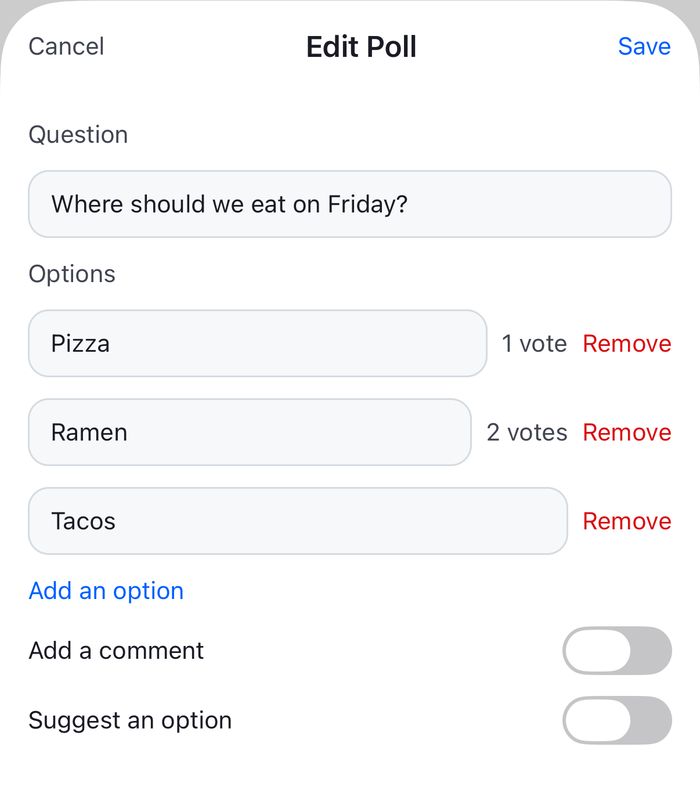
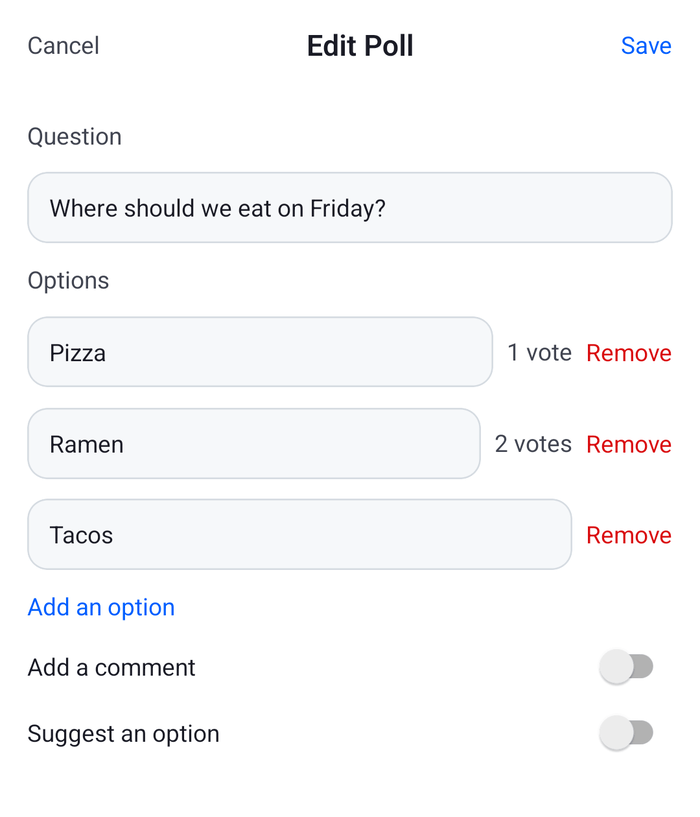
EditPollSheet renders the form in a page sheet. The question and each option are TextInputs, each option shows its vote count from poll.state.vote_counts_by_option and has a remove button, and two switches change the comments and the suggested options. Removing an option that has votes asks first, because its votes go with it. Save is off while the form is invalid or a request runs. A failed request leaves the sheet open with a message and turns Save off, because some of the requests may have gone through and the form no longer matches the poll:
import { useState } from "react";
import {
  Alert,
  Modal,
  Platform,
  Pressable,
  ScrollView,
  StatusBar,
  StyleSheet,
  Switch,
  Text,
  TextInput,
  View,
} from "react-native";
import type { Poll, PollState } from "stream-chat";
import { useStateStore, useTheme } from "stream-chat-react-native";
import type { PollForm, PollFormOption } from "./pollForm";
import {
  isPollFormValid,
  newOption,
  pollFormFromState,
  savePollForm,
} from "./pollForm";

const votesSelector = ({ vote_counts_by_option }: PollState) => ({
  vote_counts_by_option,
});

const EditPollForm = ({
  onClose,
  poll,
}: {
  onClose: () => void;
  poll: Poll;
}) => {
  const {
    theme: { semantics },
  } = useTheme();
  // The poll as it was when the sheet opened: the form starts from it, and Save sends only what
  // differs from it.
  const [saved] = useState(() => poll.data);
  const [form, setForm] = useState(() => pollFormFromState(saved));
  const [isBusy, setIsBusy] = useState(false);
  const [failed, setFailed] = useState(false);
  // Live, so the counts follow votes cast while the sheet is open.
  const { vote_counts_by_option } = useStateStore(poll.state, votesSelector);

  const update = (changes: Partial<PollForm>) =>
    setForm((previous) => ({ ...previous, ...changes }));
  const updateOption = (key: string, text: string) =>
    update({
      options: form.options.map((option) =>
        option.key === key ? { ...option, text } : option,
      ),
    });
  const removeOption = (key: string) =>
    update({ options: form.options.filter((option) => option.key !== key) });

  const askToRemove = (option: PollFormOption, votes: number) =>
    Alert.alert(
      "Remove this option?",
      `Removing it deletes its ${votes === 1 ? "vote" : `${votes} votes`}.`,
      [
        { style: "cancel", text: "Keep" },
        {
          onPress: () => removeOption(option.key),
          style: "destructive",
          text: "Remove",
        },
      ],
    );

  // After a failure some requests may have gone through, so the form no longer matches the poll.
  const canSave = isPollFormValid(form) && !isBusy && !failed;

  const save = async () => {
    setIsBusy(true);
    setFailed(false);
    try {
      await savePollForm(poll, saved, form);
      onClose();
    } catch {
      setFailed(true);
      setIsBusy(false);
    }
  };

  const textColor = { color: semantics.textPrimary };
  const inputStyle = [
    styles.input,
    {
      backgroundColor: semantics.backgroundCoreSurfaceCard,
      borderColor: semantics.borderCoreDefault,
    },
    textColor,
  ];

  return (
    <View
      style={[
        styles.sheet,
        { backgroundColor: semantics.backgroundCoreElevation1 },
      ]}
    >
      <View style={styles.header}>
        <Pressable
          accessibilityRole="button"
          disabled={isBusy}
          onPress={onClose}
        >
          <Text style={{ color: semantics.textSecondary }}>Cancel</Text>
        </Pressable>
        <Text style={[styles.title, textColor]}>Edit Poll</Text>
        <Pressable
          accessibilityRole="button"
          accessibilityState={{ disabled: !canSave }}
          disabled={!canSave}
          onPress={() => void save()}
        >
          <Text
            style={{
              color: canSave ? semantics.accentPrimary : semantics.textDisabled,
            }}
          >
            Save
          </Text>
        </Pressable>
      </View>
      <ScrollView
        contentContainerStyle={styles.body}
        keyboardShouldPersistTaps="handled"
      >
        <Text style={{ color: semantics.textSecondary }}>Question</Text>
        <TextInput
          onChangeText={(name) => update({ name })}
          style={inputStyle}
          value={form.name}
        />
        <Text style={{ color: semantics.textSecondary }}>Options</Text>
        {form.options.map((option) => {
          const votes = option.id ? (vote_counts_by_option[option.id] ?? 0) : 0;
          return (
            <View key={option.key} style={styles.optionRow}>
              <TextInput
                onChangeText={(text) => updateOption(option.key, text)}
                placeholder="Add an option"
                placeholderTextColor={semantics.textTertiary}
                style={[inputStyle, styles.optionInput]}
                value={option.text}
              />
              {votes ? (
                <Text style={{ color: semantics.textSecondary }}>
                  {votes === 1 ? "1 vote" : `${votes} votes`}
                </Text>
              ) : null}
              <Pressable
                accessibilityLabel={`Remove option ${option.text}`}
                accessibilityRole="button"
                hitSlop={8}
                onPress={() =>
                  votes ? askToRemove(option, votes) : removeOption(option.key)
                }
              >
                <Text style={{ color: semantics.accentError }}>Remove</Text>
              </Pressable>
            </View>
          );
        })}
        <Pressable
          accessibilityRole="button"
          onPress={() => update({ options: [...form.options, newOption()] })}
        >
          <Text style={{ color: semantics.accentPrimary }}>Add an option</Text>
        </Pressable>
        <View style={styles.switchRow}>
          <Text style={textColor}>Add a comment</Text>
          <Switch
            onValueChange={(allow_answers) => update({ allow_answers })}
            value={form.allow_answers}
          />
        </View>
        <View style={styles.switchRow}>
          <Text style={textColor}>Suggest an option</Text>
          <Switch
            onValueChange={(allow_user_suggested_options) =>
              update({ allow_user_suggested_options })
            }
            value={form.allow_user_suggested_options}
          />
        </View>
        {failed ? (
          <Text style={{ color: semantics.accentError }}>
            The poll couldn't be saved, and some changes may already be saved.
            Cancel to see the poll as it is.
          </Text>
        ) : null}
      </ScrollView>
    </View>
  );
};

export const EditPollSheet = ({
  onClose,
  poll,
}: {
  onClose: () => void;
  poll?: Poll;
}) => (
  <Modal
    animationType="slide"
    onRequestClose={onClose}
    presentationStyle="pageSheet"
    visible={!!poll}
  >
    {/* Mounted while the sheet is open, so every opening starts from the poll's current state. */}
    {poll ? <EditPollForm onClose={onClose} poll={poll} /> : null}
  </Modal>
);

const styles = StyleSheet.create({
  body: { gap: 12, padding: 16 },
  header: {
    alignItems: "center",
    flexDirection: "row",
    justifyContent: "space-between",
    padding: 16,
  },
  input: {
    borderRadius: 12,
    borderWidth: 1,
    paddingHorizontal: 12,
    paddingVertical: 10,
  },
  optionInput: { flex: 1 },
  optionRow: { alignItems: "center", flexDirection: "row", gap: 8 },
  // On Android the modal draws under the status bar.
  sheet: {
    flex: 1,
    paddingTop: Platform.OS === "android" ? StatusBar.currentHeight : 0,
  },
  switchRow: {
    alignItems: "center",
    flexDirection: "row",
    justifyContent: "space-between",
  },
  title: { fontSize: 17, fontWeight: "600" },
}); |  |
Anonymous voting and the vote limit aren't in the form. They go through the same set object of Poll.partialUpdate(), with unset for removing the vote limit, if your polls need them.
An Edit Poll action
The item goes into the action list that Channel and Thread take. It reads the message's poll from client.polls, the client's cache of polls, by message.poll_id, and is added only when poll.data.created_by_id is the current user and the poll isn't closed. The menu closes before an action runs, and its items unmount, so the sheet doesn't live in the menu. WithEditPoll holds it above the screens, and the action only tells it which poll to open, through a context:
import {
  createContext,
  useCallback,
  useContext,
  useMemo,
  useState,
} from "react";
import type { PropsWithChildren } from "react";
import type { Poll } from "stream-chat";
import {
  asDynamicKey,
  messageActions as defaultMessageActions,
  useChatContext,
  useComponentsContext,
  useTheme,
  useTranslationContext,
} from "stream-chat-react-native";
import type {
  MessageActionsProp,
  MessageActionType,
} from "stream-chat-react-native";
import { EditPollSheet } from "./EditPollSheet";

const OpenEditPollContext = createContext<(poll: Poll) => void>(
  () => undefined,
);

/** Renders the one sheet that Edit Poll opens, above the screens that have the action. */
export const WithEditPoll = ({ children }: PropsWithChildren) => {
  const [poll, setPoll] = useState<Poll>();

  return (
    <OpenEditPollContext.Provider value={setPoll}>
      {children}
      <EditPollSheet onClose={() => setPoll(undefined)} poll={poll} />
    </OpenEditPollContext.Provider>
  );
};

/** The default actions, and Edit Poll on the user's own open polls. */
export const useEditPollMessageActions = () => {
  const { client } = useChatContext();
  const { icons } = useComponentsContext();
  const { t } = useTranslationContext();
  const {
    theme: { semantics },
  } = useTheme();
  const openEditPoll = useContext(OpenEditPollContext);

  return useCallback<MessageActionsProp>(
    (params) => {
      const actions = defaultMessageActions(params);

      const pollId = params.message.poll_id;
      const poll = pollId ? client.polls.fromState(pollId) : undefined;
      if (!poll || params.error) return actions;

      const { created_by_id, is_closed } = poll.data;
      if (created_by_id !== client.userId || is_closed) return actions;

      const editPoll: MessageActionType = {
        action: () => openEditPoll(poll),
        actionType: "editPoll",
        icon: (
          <icons.Edit height={20} stroke={semantics.textSecondary} width={20} />
        ),
        title: t(asDynamicKey("myApp.poll.edit.label"), "Edit Poll"),
        type: "standard",
      };

      return [...actions, editPoll];
    },
    [client, icons, openEditPoll, semantics.textSecondary, t],
  );
};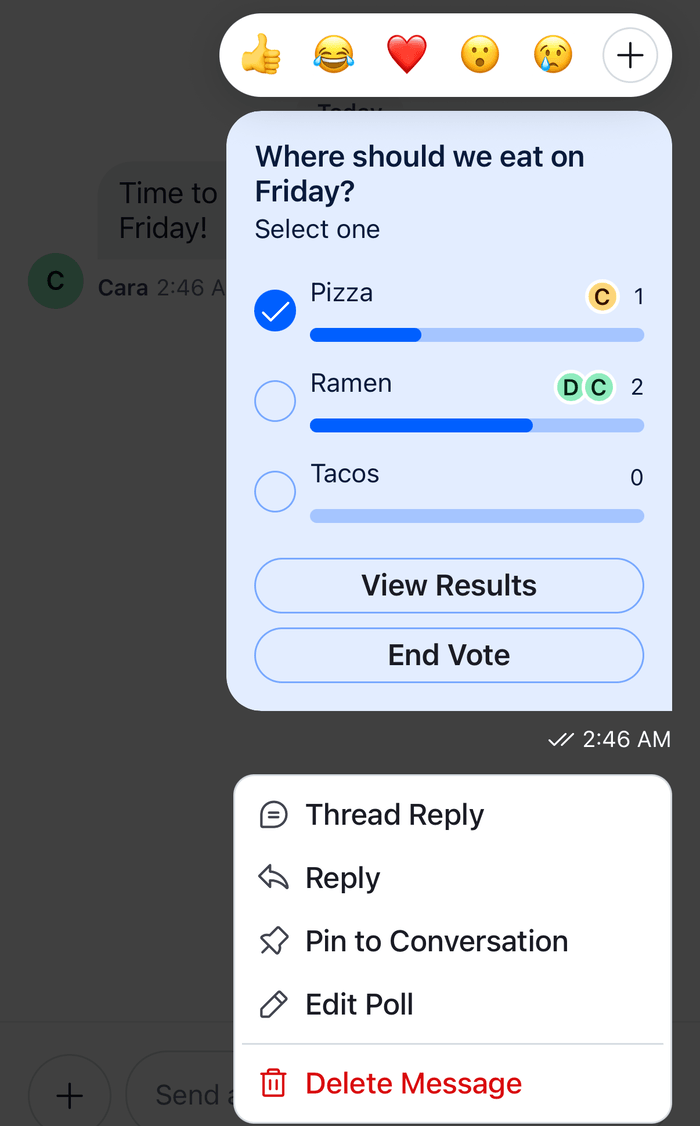 | 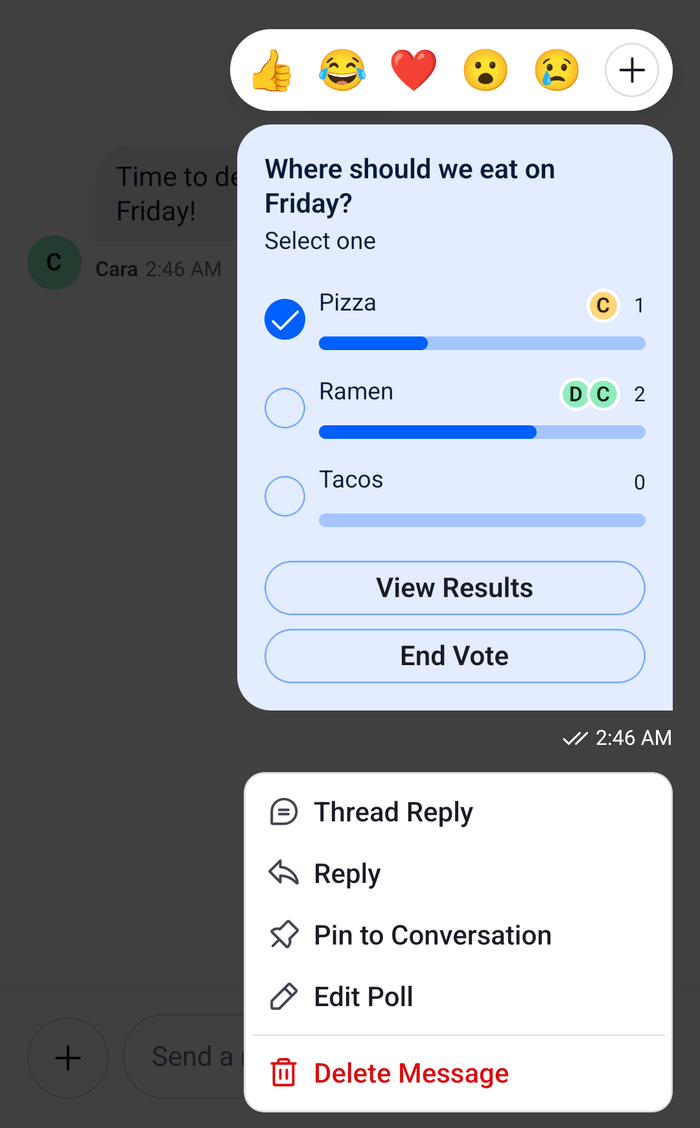 |
The item goes last in the menu of the user's own poll message. asDynamicKey lets t take a key of your own, and the second argument is the English copy until you register a translation. Localization explains both.
The Polls API lists app permissions for polls, UpdatePoll among them. It doesn't say whether the default roles may change only their own polls or anyone's, and no channel capability names them, so useOwnCapabilitiesContext() can't tell. This UI cookbook offers Edit Poll only to the poll's creator. Check what your app's roles grant, and expect a request to fail for a user without the permission: the sheet then stays open with a message.
Register it
Wrap the screens in WithEditPoll, inside Chat, and pass the function to Channel and Thread:
import type {
  Channel as StreamChannel,
  Thread as StreamThread,
} from "stream-chat";
import {
  Channel,
  MessageComposer,
  MessageList,
  Thread,
} from "stream-chat-react-native";
import { useEditPollMessageActions, WithEditPoll } from "./EditPollActions";

const ChannelWithEditPoll = ({ channel }: { channel: StreamChannel }) => {
  const messageActions = useEditPollMessageActions();

  return (
    <Channel channel={channel} messageActions={messageActions}>
      <MessageList />
      <MessageComposer />
    </Channel>
  );
};

const ThreadWithEditPoll = ({ thread }: { thread: StreamThread }) => {
  const messageActions = useEditPollMessageActions();

  return (
    <Thread messageActions={messageActions} thread={thread}>
      <MessageList />
      <MessageComposer />
    </Thread>
  );
};

export const ChannelScreen = ({ channel }: { channel: StreamChannel }) => (
  <WithEditPoll>
    <ChannelWithEditPoll channel={channel} />
  </WithEditPoll>
);

export const ThreadScreen = ({ thread }: { thread: StreamThread }) => (
  <WithEditPoll>
    <ThreadWithEditPoll thread={thread} />
  </WithEditPoll>
);
An app with one WithEditPoll above its navigator renders a single sheet for both screens.
Options that have votes
Renaming an option that has votes keeps the votes with the option. Removing an option that has votes deletes its votes too, which is why the remove button asks first. Nothing is deleted until the user presses Save.
The question and the settings go in one request, and each option change goes in a request of its own, so a failure partway leaves the earlier changes saved. The sheet says so, and Cancel closes it. The poll then shows what was saved.
Example
The user asked "Which day works for the hike?" with Saturday, Sunday and Either day. Saturday has two votes, Sunday one. They open the menu on the poll and pick Edit Poll:
useEditPollMessageActions()finds the poll inclient.polls, sees that the user created it and that it's open, and adds Edit Poll to the list. The user picks it. The menu closes, andWithEditPollopens the sheet for the poll.- The sheet copies
poll.dataintosavedand fills the form from it. Saturday shows "2 votes" and Sunday "1 vote". - The user renames Saturday to "Saturday morning", removes Sunday and confirms that its one vote goes with it, adds "Next weekend" and turns on comments.
- Save sends
Poll.partialUpdate({ set: { allow_answers: true } }), thenPoll.deleteOption()for Sunday,Poll.updateOption()for Saturday, which keeps its two votes, andPoll.createOption({ text: "Next weekend" }). - Four
poll.updatedevents follow, and the poll in the message changes after each.
Read more
- Polls: the default poll UI, from creation to voting.
- Polls state: the poll composer that the creation sheet uses.
- Custom message actions: adding an item to the message menu.
- Poll with text and attachments: a poll that goes out with the message's text.
- Polls API: the server's poll, option and permission rules.