


Mentions inbox
This UI cookbook builds a Mentions screen that lists the messages that mention the user, newest first, with a Load more button under them, and opens a mention in its channel at its message. The screen searches with a MessageSearchSource, which Search sources explains, and opens the message the way Moving between channels, threads and messages describes.
What you'll build
- A Mentions screen that lists the messages that mention the user, newest first
- A Load more button under the mentions
- Opening a mention in its channel at its message
Approach: Compose and Change behavior in the state layer. Choosing where to start explains the approaches.
Best practices
- Find the mentions with a
MessageSearchSourceand a message filter onmentioned_users.id. The source pages the results, keeps them in itsstatestore, and loads the channels they come from that the client doesn't hold yet, so the screen never callsclient.search()itself. - Give the source no search text. Set
allowEmptySearchStringso the filter alone picks the messages, anddebounceMsto0, since nothing is typed. - Load the next page from a button at the end of the list. The user decides when older mentions arrive, and the list never jumps under their finger.
- Create the source once for the screen. Activate it when the screen mounts, and cancel its queries and deactivate it when the screen unmounts, so it lets go of the channels its results kept in memory.
- Open a mention by navigating with the channel's
cidand the message'sid, and jump to the message when the channel screen opens. - Show the loading, empty and error states. The error state offers to try again.
The Mentions screen
createMentionsSource() creates a MessageSearchSource whose messageSearchFilters keep the messages with the user's id in mentioned_users. The source adds the filter that keeps the search to the channels the user is a member of, and to messages of type regular.
MessageSearchSource.search("")loads the first page, andMessageSearchSource.search()with no text loads the next one. It does nothing while a query runs or whenhasNextisfalse.state.itemsisundefineduntil the first query ends, so the screen shows its loading indicator until then. A first page that fails leaveslastQueryErrorset and no items, and the screen offers Try again. A later page that fails keeps what loaded.- Each row shows the author's avatar and name, the channel's name from
useChannelPreviewDisplayName(), the time, and the text with the user's own mention in bold. The channel comes fromclient.channelManager.get(message.cid), where the source put it. - Search returns the server's form of a message,
MessageResponse. Itscreated_atis a nanosecond timestamp, soconvertTimestampToDate()turns it into the dategetDateString()formats, with the same key the channel list uses for its rows. onOpenreceives the message. The navigator, shown after the screen, passes a function that pushes the channel screen.
import { useEffect, useMemo, useState } from "react";
import { FlatList, Pressable, StyleSheet, Text, View } from "react-native";
import { convertTimestampToDate, MessageSearchSource } from "stream-chat";
import type {
  MessageResponse,
  SearchSourceState,
  StreamChat,
} from "stream-chat";
import {
  Button,
  getDateString,
  LoadingIndicator,
  useChannelPreviewDisplayName,
  useChatContext,
  useStateStore,
  useTheme,
  useTranslationContext,
  UserAvatar,
} from "stream-chat-react-native";

// The messages that mention the user, newest first, a page at a time.
const createMentionsSource = (client: StreamChat) =>
  new MessageSearchSource(client, {
    // There is no search text: the filter alone picks the messages.
    allowEmptySearchString: true,
    // Nothing is typed, so the source queries right away.
    debounceMs: 0,
    messageSearchFilters: {
      "mentioned_users.id": { $contains: client.userId ?? "" },
    },
    pageSize: 20,
  });

// Declared at module scope, so the subscription isn't recreated on every render.
const sourceSelector = ({
  hasNext,
  isLoading,
  items,
  lastQueryError,
}: SearchSourceState<MessageResponse>) => ({
  hasNext,
  isLoading,
  items,
  lastQueryError,
});

const MentionText = ({ mention, text }: { mention: string; text: string }) => {
  const {
    theme: { semantics },
  } = useTheme();
  const parts = text.split(mention);

  return (
    <Text numberOfLines={3} style={{ color: semantics.textPrimary }}>
      {parts.map((part, index) => (
        <Text key={index}>
          {part}
          {index < parts.length - 1 ? (
            <Text style={styles.mention}>{mention}</Text>
          ) : null}
        </Text>
      ))}
    </Text>
  );
};

const MentionRow = ({
  message,
  onOpen,
}: {
  message: MessageResponse;
  onOpen: (message: MessageResponse) => void;
}) => {
  const { client } = useChatContext();
  const { t, tDateTimeParser } = useTranslationContext();
  const {
    theme: { semantics },
  } = useTheme();
  const channel = client.channelManager.get(message.cid);
  const channelName = useChannelPreviewDisplayName(channel);
  const time = useMemo(
    () =>
      getDateString({
        messageCreatedAt: convertTimestampToDate(message.created_at),
        t,
        tDateTimeParser,
        timestampTranslationKey: "timestamp.ChannelPreviewStatus",
      }),
    [message.created_at, t, tDateTimeParser],
  );
  const author = message.user;

  return (
    <Pressable
      accessibilityRole="button"
      onPress={() => onOpen(message)}
      style={[styles.row, { borderBottomColor: semantics.borderCoreSubtle }]}
    >
      {author ? <UserAvatar size="lg" user={author} /> : null}
      <View style={styles.rowText}>
        <View style={styles.rowHeader}>
          <Text
            numberOfLines={1}
            style={[styles.author, { color: semantics.textPrimary }]}
          >
            {author?.name ?? author?.id}
          </Text>
          <Text style={{ color: semantics.textTertiary }}>{time}</Text>
        </View>
        <Text numberOfLines={1} style={{ color: semantics.textSecondary }}>
          {channelName}
        </Text>
        <MentionText
          mention={`@${client.user?.name ?? client.userId}`}
          text={message.text ?? ""}
        />
      </View>
    </Pressable>
  );
};

export const MentionsInbox = ({
  onOpen,
}: {
  onOpen: (message: MessageResponse) => void;
}) => {
  const { client } = useChatContext();
  const {
    theme: { semantics },
  } = useTheme();
  const [source] = useState(() => createMentionsSource(client));
  const { hasNext, isLoading, items, lastQueryError } = useStateStore(
    source.state,
    sourceSelector,
  );

  useEffect(() => {
    source.activate();
    void source.search("");
    // Leaving the screen drops a query that is waiting or running, and lets go of the channels
    // the results held.
    return () => {
      source.cancelScheduledQuery();
      source.deactivate();
    };
  }, [source]);

  if (lastQueryError && !items?.length) {
    return (
      <View style={styles.note}>
        <Text style={{ color: semantics.textSecondary }}>
          Couldn't load your mentions.
        </Text>
        <Button
          label="Try again"
          onPress={() => void source.search("")}
          type="outline"
          variant="secondary"
        />
      </View>
    );
  }

  if (!items) return <LoadingIndicator />;

  if (!items.length) {
    return (
      <View style={styles.note}>
        <Text style={{ color: semantics.textSecondary }}>
          No one has mentioned you yet.
        </Text>
      </View>
    );
  }

  return (
    <FlatList
      data={items}
      keyExtractor={(message) => message.id}
      ListFooterComponent={
        hasNext ? (
          <View style={styles.footer}>
            <Button
              disabled={isLoading}
              label={isLoading ? "Loading..." : "Load more"}
              // Without text, `search()` loads the next page of the current search.
              onPress={() => void source.search()}
              type="outline"
              variant="secondary"
            />
          </View>
        ) : null
      }
      renderItem={({ item }) => <MentionRow message={item} onOpen={onOpen} />}
    />
  );
};

const styles = StyleSheet.create({
  author: { flex: 1, fontWeight: "600" },
  footer: { alignItems: "center", padding: 16 },
  mention: { fontWeight: "700" },
  note: { alignItems: "flex-start", gap: 12, padding: 16 },
  row: {
    borderBottomWidth: StyleSheet.hairlineWidth,
    flexDirection: "row",
    gap: 12,
    padding: 12,
  },
  rowHeader: { alignItems: "center", flexDirection: "row", gap: 8 },
  rowText: { flex: 1, gap: 2 },
});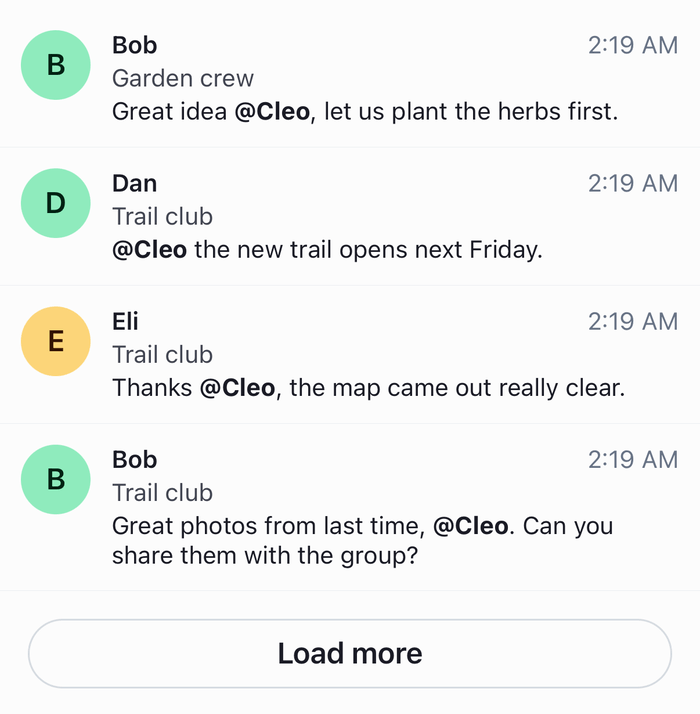 | 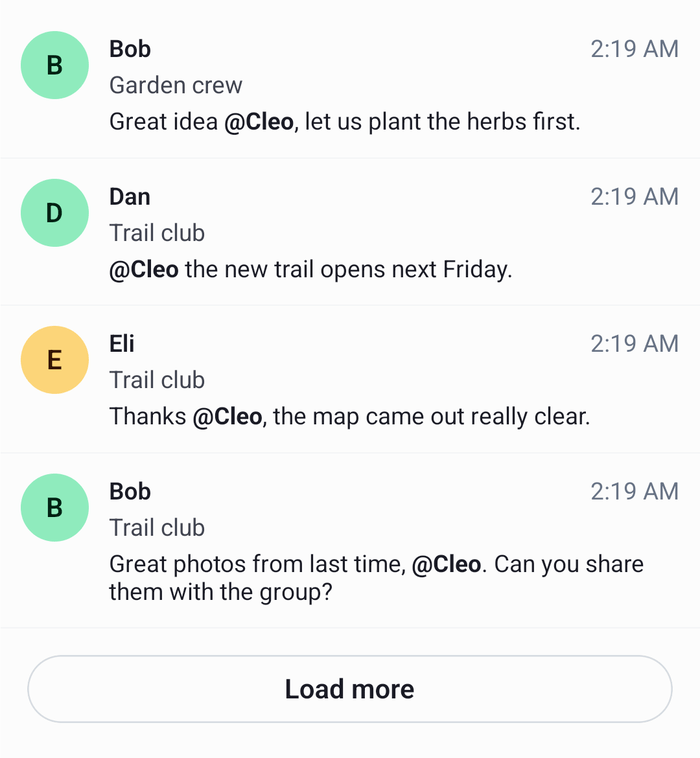 |
MentionText splits the text on @ and the user's name, which is what the composer inserts when the user picks them from its suggestions. The Load more button is disabled while a query runs, which MessageSearchSource.search() would ignore anyway.
Open a mention at its message
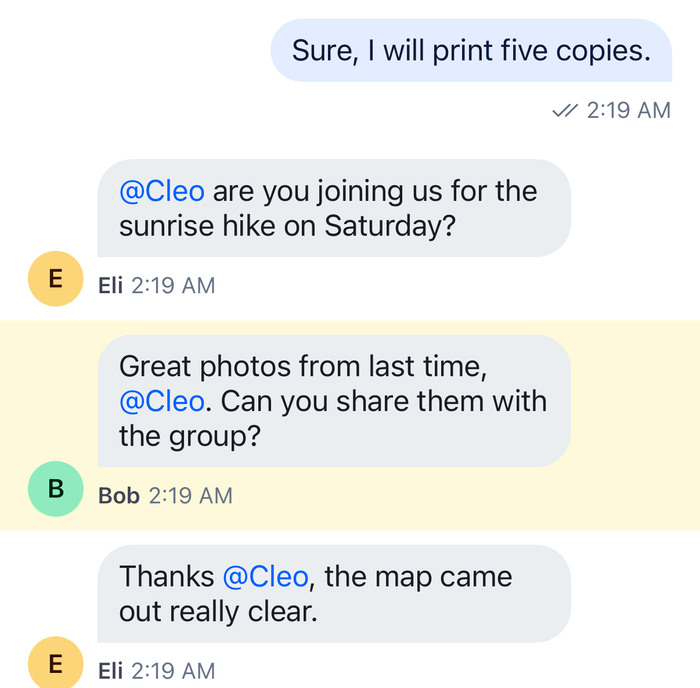
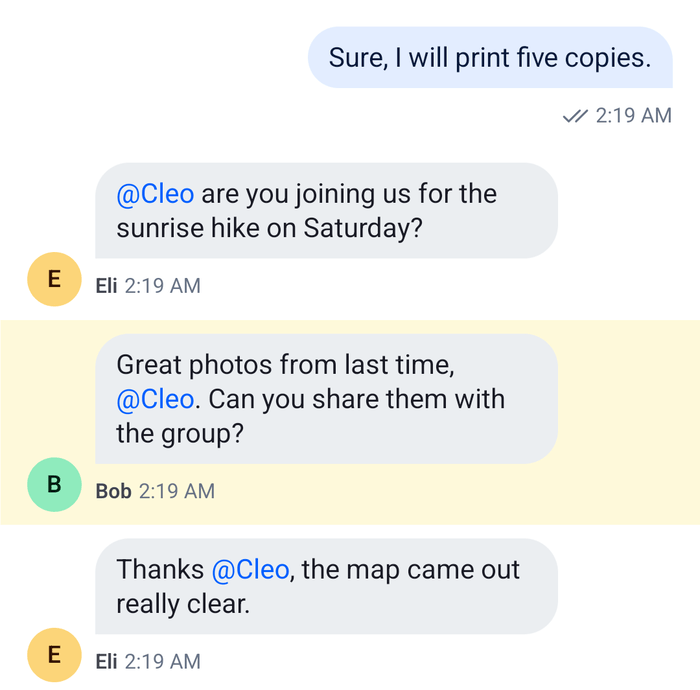
The channel screen takes the message's id in its route params and jumps to it in a layout effect, as on Jumping when a screen opens. The source loaded the message's channel into client.channelManager without watching it, and Channel watches it when it mounts. The screen turns off the jump to the first unread message for that open, so it doesn't compete with the jump to the mention:
import { useLayoutEffect } from "react";
import type { NativeStackScreenProps } from "@react-navigation/native-stack";
import {
  Channel,
  DEFAULT_HIGHLIGHT_DURATION,
  MessageComposer,
  MessageList,
  useChatContext,
} from "stream-chat-react-native";

export type RootStackParamList = {
  ChannelList: undefined;
  Channel: { cid: string; messageId?: string };
  Mentions: undefined;
};

export const ChannelScreen = ({
  route,
}: NativeStackScreenProps<RootStackParamList, "Channel">) => {
  const { cid, messageId } = route.params;
  const { client } = useChatContext();
  const channel = client.channelManager.get(cid);

  // A layout effect runs before the list picks where it starts, so the list starts at the message.
  useLayoutEffect(() => {
    if (!channel || !messageId) return;
    void channel.messagePaginator.jumpToMessage(messageId, {
      focusSignalTtlMs: DEFAULT_HIGHLIGHT_DURATION,
    });
  }, [channel, messageId]);

  if (!channel) return null;

  return (
    <Channel channel={channel} initialScrollToFirstUnreadMessage={!messageId}>
      <MessageList />
      <MessageComposer />
    </Channel>
  );
}; |  |
Channel also takes the keyboardVerticalOffset and topInset your screen needs; see Keyboard and insets.
Add the screen to the stack
The Mentions screen is a screen of the stack. A button in the channel list's header opens it, and a tap on a mention navigates to the channel screen:
import type { ComponentType } from "react";
import { Button } from "react-native";
import { createNativeStackNavigator } from "@react-navigation/native-stack";
import type { NativeStackScreenProps } from "@react-navigation/native-stack";
import { MentionsInbox } from "./MentionsInbox";
import { ChannelScreen } from "./ChannelScreen";
import type { RootStackParamList } from "./ChannelScreen";

const Stack = createNativeStackNavigator<RootStackParamList>();

const MentionsScreen = ({
  navigation,
}: NativeStackScreenProps<RootStackParamList, "Mentions">) => (
  <MentionsInbox
    onOpen={(message) =>
      navigation.navigate("Channel", {
        cid: message.cid,
        messageId: message.id,
      })
    }
  />
);

// Your channel list screen, with a ChannelList that opens the channel screen on select.
declare const ChannelListScreen: ComponentType;

export const Navigation = () => (
  <Stack.Navigator>
    <Stack.Screen
      component={ChannelListScreen}
      name="ChannelList"
      options={({ navigation }) => ({
        headerRight: () => (
          <Button
            onPress={() => navigation.navigate("Mentions")}
            title="Mentions"
          />
        ),
        title: "Chats",
      })}
    />
    <Stack.Screen component={ChannelScreen} name="Channel" />
    <Stack.Screen component={MentionsScreen} name="Mentions" />
  </Stack.Navigator>
);
Wrap Navigation in NavigationContainer, Chat and OverlayProvider, as on Navigation.
How it works
Example
Cara writes "@Cleo you were great on the music round." in Quiz night, mentioning the user, Cleo:
- The composer sends the message with Cleo's id in
mentioned_users. - Cleo taps Mentions.
MentionsInboxactivates its source and callsMessageSearchSource.search(""). The source searches the messages whosementioned_users.idcontains Cleo's id, newest first, 20 at a time, in the channels she is a member of. It then loads Quiz night and the other result channels the client doesn't hold yet, without watching them. - Cara's message is first in the list, with "@Cleo" in bold. The Load more button shows under the list while
state.hasNextistrue. - Cleo taps the mention. The stack pushes
Channelwith Quiz night'scidand the message's id.ChannelScreencallsMessagePaginator.jumpToMessage()in its layout effect, andChannelwatches the channel when it mounts. The list shows Cara's message and highlights it. The jump sends a request only when the message isn't loaded.
- The results are a snapshot. A mention that arrives while the screen is open doesn't join the list; leaving the screen and opening it again searches again.
- The source keeps to messages of type
regular, so mentions in thread replies aren't listed. Addtype: { $in: ["regular", "reply"] }tomessageSearchFiltersto list them. A reply isn't in the channel's list, so open itsparent_idin the channel, or open the thread and jump to the reply there, as Jumping when a screen opens describes. mentioned_usersholds the users the composer picked from its suggestions. Typing "@Cleo" without picking Cleo leavesmentioned_usersempty, and the message isn't a mention.@channel,@hereand the mentions of roles and user groups aren't inmentioned_users, so they aren't listed either.- Message search covers only the channel types whose
searchsetting is on; see Search.
Read more
- Search sources:
MessageSearchSource, its options and its state. - Search: where the SDK searches and what it leaves to your app.
- Mentions: how the composer records mentions and how the message list shows them.
- Moving between channels, threads and messages: jumping to a message when a screen opens.
- Search screen: searches channels, people and messages from one screen.
- Threads view: lists the user's threads on a screen of their own.