















Played by list
The label under a played message reads "Played by" and a count. This UI cookbook makes the label open a sheet that lists every member who played the message, newest first, and loads more as the user scrolls. The label and when a play counts are explained in Message marks.
What you'll build
- A "Played by" label the user can tap
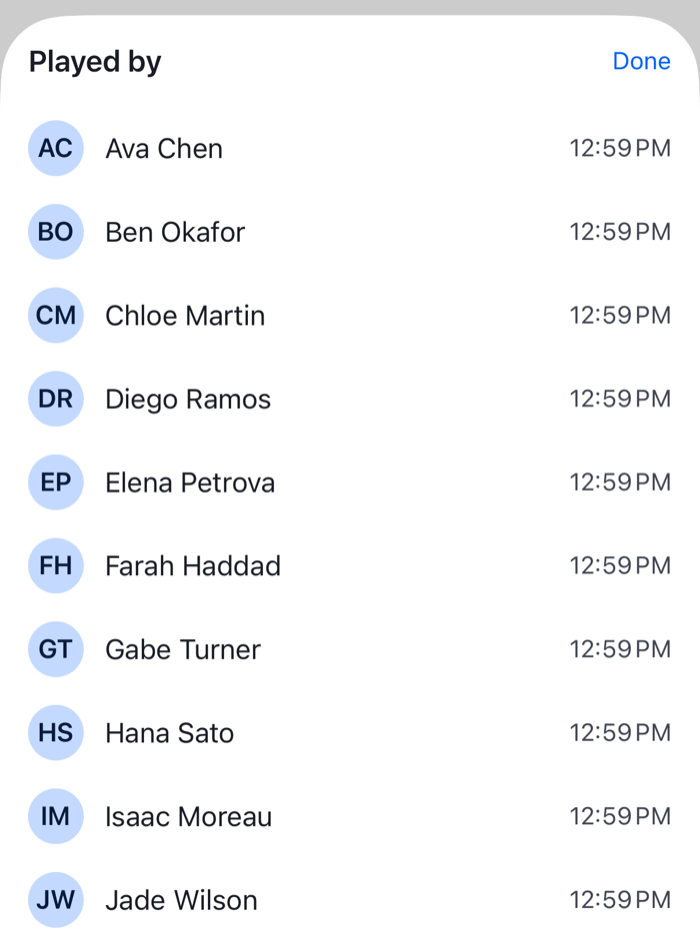
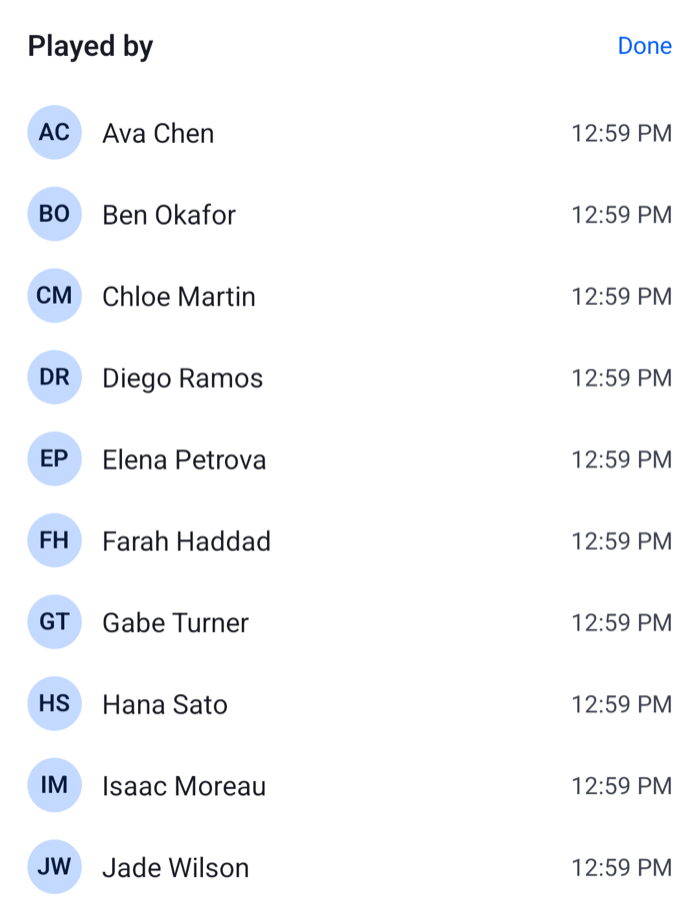
- A sheet with the avatar, the name and the time of each member who played the message
- The next page of members, loaded as the list reaches its end
- Members who play the message while the sheet is open, added at the top
- The loaded list kept for the next time the sheet opens
Approach: Replace one part. Choosing where to start explains the approaches.
Best practices
- List the members with a
MessageMarkPaginatorregistered withclient.messageMarks. The message'smark_groupshas the count of every member who played it but only the newest 100, with no user objects. The paginator fetches every mark with its user, a page at a time. - Give the paginator an
idbuilt from the message, and look it up withgetPaginatorById()before creating one. Opening the sheet again then finds the same paginator, with its pages and the marks that arrived since, and needs no request. - Activate the paginator while the sheet is mounted and release it when the sheet unmounts, so a list that went stale during a reconnect reloads when it is shown.
- Load the first page only when nothing is loaded.
toTail()on a list opened before loads its next page. - Keep the SDK's
MessageMarkinside the override, so the label keeps its text, its count and its theme. - Read the paginator's state with
useStateStoreand a selector declared at module scope. - Load the next page from
onEndReachedonly whilehasMoreTailistrueand no page is loading. - Only the message's author can list its marks. The label shows only on the user's own messages, so the sheet opens only where the call is allowed.
List the members
PlayedByList gets the paginator of one message and renders its marks. toTail() loads the first page, and each later call loads the next one:
import { useEffect, useMemo } from "react";
import {
  ActivityIndicator,
  FlatList,
  StyleSheet,
  Text,
  View,
} from "react-native";
import { MessageMarkPaginator, nsToDate } from "stream-chat";
import type { MessageMarkWithUserResponse, PaginatorState } from "stream-chat";
import {
  UserAvatar,
  useChatContext,
  useStateStore,
  useTheme,
} from "stream-chat-react-native";

// Declared once, so the subscription isn't recreated on every render.
const marksSelector = ({
  hasMoreTail,
  isLoading,
  items,
}: PaginatorState<MessageMarkWithUserResponse>) => ({
  hasMoreTail,
  isLoading,
  items,
});

/** Every member who played the message, newest first. */
export const PlayedByList = ({ messageId }: { messageId: string }) => {
  const { client } = useChatContext();
  const {
    theme: { semantics },
  } = useTheme();
  // One list per message: its id finds it again, with what it loaded before.
  const paginator = useMemo(() => {
    const id = `played-by:${messageId}`;
    return (
      client.messageMarks.getPaginatorById(id) ??
      client.messageMarks.registerPaginator({
        paginator: new MessageMarkPaginator(client, {
          filter: { type: "played" },
          id,
          messageId,
          // Enough rows to fill the sheet, so scrolling can reach the end and load more.
          paginatorOptions: { pageSize: 25 },
        }),
      })
    );
  }, [client, messageId]);
  const { hasMoreTail, isLoading, items } = useStateStore(
    paginator.state,
    marksSelector,
  );

  // Shown while mounted: a list that went stale during a reconnect reloads.
  useEffect(() => paginator.activate(), [paginator]);

  // The first page, the first time the list opens. A page that fails doesn't throw: its error is
  // in `lastQueryError`.
  useEffect(() => {
    if (!paginator.items && !paginator.isLoading) {
      paginator.toTail();
    }
  }, [paginator]);

  const loadMore = () => {
    if (hasMoreTail && !isLoading) {
      paginator.toTail();
    }
  };

  return (
    <FlatList
      data={items ?? []}
      keyExtractor={(mark) => mark.user_id}
      ListFooterComponent={
        isLoading ? <ActivityIndicator style={styles.loading} /> : undefined
      }
      onEndReached={loadMore}
      renderItem={({ item }) => (
        <View style={styles.row}>
          <UserAvatar size="md" user={item.user} />
          <Text
            numberOfLines={1}
            style={[styles.name, { color: semantics.textPrimary }]}
          >
            {item.user.name || item.user_id}
          </Text>
          <Text style={{ color: semantics.textSecondary }}>
            {nsToDate(item.created_at).toLocaleTimeString([], {
              hour: "2-digit",
              minute: "2-digit",
            })}
          </Text>
        </View>
      )}
    />
  );
};

const styles = StyleSheet.create({
  loading: { padding: 16 },
  name: { flex: 1, fontSize: 16 },
  row: {
    alignItems: "center",
    flexDirection: "row",
    gap: 12,
    paddingHorizontal: 16,
    paddingVertical: 8,
  },
});
Open it from the label
PlayedByMark renders the SDK's MessageMark inside a button that opens PlayedByList in a sheet. It reads the message from useMessageContext(), since the label's props carry only the count. The MessageMark key renders it in every message footer:
import { useState } from "react";
import type { PropsWithChildren } from "react";
import { Modal, Pressable, StyleSheet, Text, View } from "react-native";
import { SafeAreaView } from "react-native-safe-area-context";
import {
  MessageMark,
  useMessageContext,
  useTheme,
  WithComponents,
} from "stream-chat-react-native";
import type { MessageMarkProps } from "stream-chat-react-native";

import { PlayedByList } from "./PlayedByList";

/** The SDK's label, which opens the list of members who played the message. */
const PlayedByMark = (props: MessageMarkProps) => {
  const { message } = useMessageContext();
  const {
    theme: { semantics },
  } = useTheme();
  const [open, setOpen] = useState(false);
  const close = () => setOpen(false);

  return (
    <>
      <Pressable
        accessibilityRole="button"
        hitSlop={8}
        onPress={() => setOpen(true)}
      >
        <MessageMark {...props} />
      </Pressable>
      {open ? (
        <Modal
          animationType="slide"
          navigationBarTranslucent
          onRequestClose={close}
          presentationStyle="pageSheet"
          statusBarTranslucent
          visible
        >
          <SafeAreaView
            edges={["top", "bottom"]}
            style={[
              styles.sheet,
              { backgroundColor: semantics.backgroundCoreApp },
            ]}
          >
            <View style={styles.header}>
              <Text style={[styles.title, { color: semantics.textPrimary }]}>
                Played by
              </Text>
              <Pressable accessibilityRole="button" hitSlop={8} onPress={close}>
                <Text style={{ color: semantics.accentPrimary }}>Done</Text>
              </Pressable>
            </View>
            <PlayedByList messageId={message.id} />
          </SafeAreaView>
        </Modal>
      ) : null}
    </>
  );
};

// Declared once, so WithComponents gets the same object on every render.
const overrides = { MessageMark: PlayedByMark };

export const WithPlayedByList = ({ children }: PropsWithChildren) => (
  <WithComponents overrides={overrides}>{children}</WithComponents>
);

const styles = StyleSheet.create({
  header: {
    alignItems: "center",
    flexDirection: "row",
    justifyContent: "space-between",
    padding: 16,
  },
  sheet: { flex: 1 },
  title: { fontSize: 17, fontWeight: "600" },
});
Wrap the channel screen in WithPlayedByList:
import type { Channel as StreamChannel } from "stream-chat";
import {
  Channel,
  MessageComposer,
  MessageList,
} from "stream-chat-react-native";

import { WithPlayedByList } from "./PlayedByMark";

export const PlayedByChannel = ({ channel }: { channel: StreamChannel }) => (
  <WithPlayedByList>
    <Channel channel={channel}>
      <MessageList />
      <MessageComposer />
    </Channel>
  </WithPlayedByList>
); |  |
How it works
Example
Cleo sends a voice recording to a group of 40 members, and 32 of them play it. Her footer reads "Played by 32". She taps it:
- The sheet opens.
PlayedByListfinds no paginator for the recording, so it registers a new one, activates it and callstoTail(), which loads the 25 members who played it last, newest first. - The response has a cursor, so
hasMoreTailistrue. As Cleo scrolls to the end,onEndReachedcallstoTail()for the other 7. The last page has no cursor, sohasMoreTailturnsfalseand scrolling further loads nothing. - Dan plays the recording while the sheet is open. The
message.mark_addedevent adds him at the top of the list, and the label reads "Played by 33". - Cleo closes the sheet, which releases the paginator. Eva plays the recording, and the event adds her to the list all the same.
- Cleo opens the sheet again.
getPaginatorById()finds the same paginator, with all 34 members already loaded, so nothing is requested.
- After a reconnect, the client flags the list stale, since events may have been missed while it was down. If the sheet is open, the list empties and loads its first page again at once. If it is closed, that happens the next time it opens.
- The list stays registered until the user disconnects or you call
removePaginator(). The client empties and unregisters it when the message is hard-deleted, its channel is deleted or truncated past it, or the user leaves the channel, and the next open registers a new one. - Each mark carries the member's full user object, so the avatar and the name need no other request.
- The sheet lists
playedmarks only. Leavefilterout to list every mark type the channel type has. A list with a different filter needs its ownid.
Read more
- Message marks: the label, when a play counts and the other ways to customize marks.
- Listing marks: the API behind the paginator, its cursor and its errors.
- Message UI components:
MessageMarkand its props. - Playback telemetry: decide when a play counts.