


Inline message editing
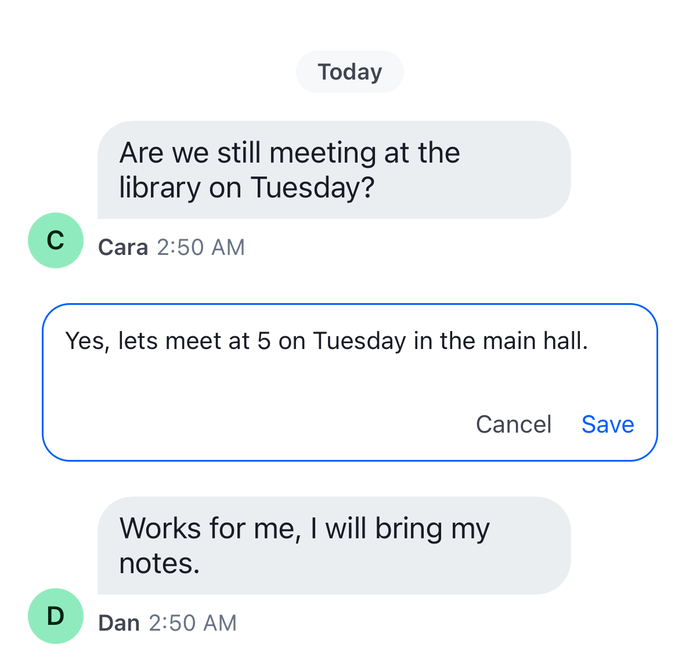
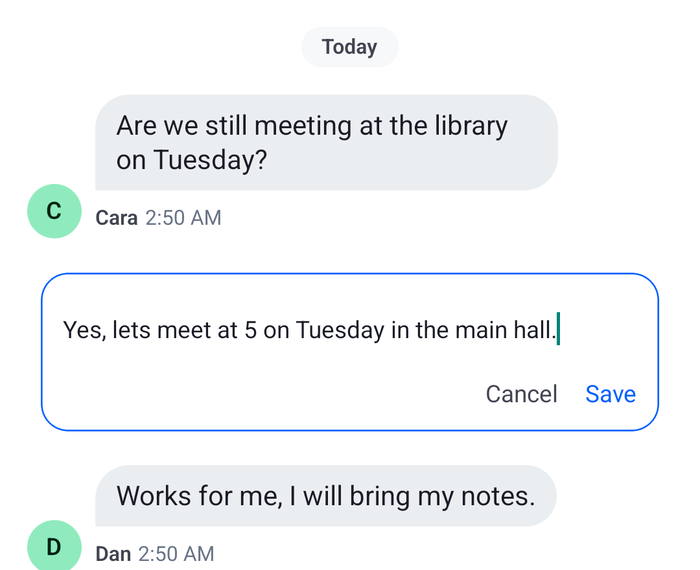
By default, Edit Message loads the message into the composer at the bottom of the screen, and the user edits it there. This UI cookbook edits a message where it sits in the message list instead: the message view turns into an editor with Cancel and Save buttons, and the composer at the bottom keeps what the user was writing. The editor runs on an edit composer of its own, a second composer whose composition context is the message, which Message composer introduces.
What you'll build
- An edit composer for the message being edited
- An Edit Message action that edits in the list
- An editor with Cancel and Save in place of the message
Approach: Replace one part, Compose and Change behavior in the state layer. Choosing where to start explains the approaches.
Best practices
- Keep the edit composer outside the message view. The message list recycles and remounts rows, and an edit held in a row would be lost with it.
- Edit one message at a time, and clear the previous edit composer when the user starts another edit.
- Replace the
actionof the defaulteditMessageaction and keep the rest, so the menu still shows Edit Message only to users who may edit the message. - Leave the default edit for a message that failed or that moderation bounced. Saving the edit of a bounced message sends it again as a new message, which
MessageComposer.update()doesn't do. - Register the edit composer's subscriptions while the editor is mounted, so a
message.updatedevent reloads it. - Save with
MessageComposer.update(), and cancel withMessageComposer.clear(). Both end the edit, because they empty the composer.
An edit composer for the message
InlineEditProvider holds the edit in progress: the message's id, the list it was opened in, and the edit composer. startEditing() creates the composer with the message as both its composition and its compositionContext. The composer then holds the message as editedMessage, and MessageComposer.update() saves it. The provider also drops the edit when the composer's editedMessage becomes null, which is what saving or cancelling does:
import {
  createContext,
  useCallback,
  useContext,
  useEffect,
  useMemo,
  useRef,
  useState,
} from "react";
import type { PropsWithChildren } from "react";
import { MessageComposer } from "stream-chat";
import type { LocalMessage, MessageComposerState } from "stream-chat";
import { useChatContext } from "stream-chat-react-native";

export type EditList = "channel" | "thread";

/** The message being edited, the list it is edited in, and the composer that holds the edit. */
export type InlineEdit = {
  composer: MessageComposer;
  list: EditList;
  messageId: string;
};

type InlineEditContextValue = {
  edit: InlineEdit | null;
  startEditing: (message: LocalMessage, list: EditList) => void;
};

const InlineEditContext = createContext<InlineEditContextValue>({
  edit: null,
  startEditing: () => undefined,
});

export const useInlineEdit = () => useContext(InlineEditContext);

const editedMessageSelector = (state: MessageComposerState) => ({
  editedMessage: state.editedMessage,
});

/** Owns the edit composer: at most one message is edited at a time. */
export const InlineEditProvider = ({ children }: PropsWithChildren) => {
  const { client } = useChatContext();
  const [edit, setEdit] = useState<InlineEdit | null>(null);
  // The edit in progress, read when a new one starts, so its composer is emptied exactly once.
  const editRef = useRef(edit);
  useEffect(() => {
    editRef.current = edit;
  }, [edit]);

  const startEditing = useCallback(
    (message: LocalMessage, list: EditList) => {
      // The composition context is the message, so this composer edits only that message.
      const composer = new MessageComposer({
        client,
        composition: message,
        compositionContext: message,
      });
      editRef.current?.composer.clear();
      setEdit({ composer, list, messageId: message.id });
    },
    [client],
  );

  // Saving or cancelling empties the composer, which ends the edit.
  useEffect(() => {
    if (!edit) return;
    return edit.composer.state.subscribeWithSelector(
      editedMessageSelector,
      ({ editedMessage }) => {
        if (!editedMessage) {
          setEdit((current) => (current === edit ? null : current));
        }
      },
    );
  }, [edit]);

  const value = useMemo(() => ({ edit, startEditing }), [edit, startEditing]);

  return (
    <InlineEditContext.Provider value={value}>
      {children}
    </InlineEditContext.Provider>
  );
};
The message must carry its cid, which tells the composer which channel it belongs to. A message of the message list does. When the message is a reply and the client holds its thread, MessageComposer.update() goes through that thread, so the thread's message list shows the new text. Otherwise it goes through the channel.
An Edit action that opens the editor
The default Edit Message action loads the message into the channel's or thread's composer. This hook returns a messageActions function that keeps the default actions and gives the editMessage action a different action, which starts the inline edit. A message that failed to send or that moderation bounced keeps the default action:
import { useCallback } from "react";
import { messageActions as defaultMessageActions } from "stream-chat-react-native";
import type { MessageActionsProp } from "stream-chat-react-native";
import type { EditList } from "./InlineEditContext";
import { useInlineEdit } from "./InlineEditContext";

export const useInlineEditMessageActions = (list: EditList) => {
  const { startEditing } = useInlineEdit();

  return useCallback<MessageActionsProp>(
    (params) =>
      defaultMessageActions(params).map((action) =>
        action.actionType === "editMessage" && !params.error
          ? { ...action, action: () => startEditing(params.message, list) }
          : action,
      ),
    [list, startEditing],
  );
};
The menu closes before an action runs, so the editor opens after the menu has gone. Custom message actions changes the action list in the same way, and passes the function to Channel and Thread.
The editor in place of the message
InlineEditor shows the edit composer's text in a TextInput, with Cancel and Save below it. TextComposer.setText() writes the text into the edit composer without running the suggestion middleware, which suits an editor with no suggestion list. The editor registers the composer's subscriptions while it's mounted and removes them when it unmounts. Save is off while the composition has nothing to send:
import { useEffect } from "react";
import { Pressable, StyleSheet, Text, TextInput, View } from "react-native";
import type { MessageComposer, TextComposerState } from "stream-chat";
import { useStateStore, useTheme } from "stream-chat-react-native";

const textSelector = ({ text }: TextComposerState) => ({ text });

export const InlineEditor = ({ composer }: { composer: MessageComposer }) => {
  const {
    theme: { semantics },
  } = useTheme();
  const { text } = useStateStore(composer.textComposer.state, textSelector);

  // Subscriptions reload the composer when the message changes on the server, and run the setup
  // function for it.
  useEffect(() => composer.registerSubscriptions(), [composer]);

  const canSave = composer.hasSendableData;

  return (
    <View
      style={[
        styles.card,
        {
          backgroundColor: semantics.backgroundCoreElevation1,
          borderColor: semantics.borderUtilityActive,
        },
      ]}
    >
      <TextInput
        accessibilityLabel="Edit message"
        autoFocus
        multiline
        onChangeText={composer.textComposer.setText}
        style={[styles.input, { color: semantics.textPrimary }]}
        value={text}
      />
      <View style={styles.buttons}>
        <Pressable
          accessibilityRole="button"
          // Empties the composer, which ends the edit. Nothing is sent.
          onPress={composer.clear}
        >
          <Text style={{ color: semantics.textSecondary }}>Cancel</Text>
        </Pressable>
        <Pressable
          accessibilityRole="button"
          accessibilityState={{ disabled: !canSave }}
          disabled={!canSave}
          // Saves the edit. `update()` never throws: a failed request marks the message failed.
          onPress={() => void composer.update()}
        >
          <Text
            style={{
              color: canSave ? semantics.accentPrimary : semantics.textDisabled,
            }}
          >
            Save
          </Text>
        </Pressable>
      </View>
    </View>
  );
};

const styles = StyleSheet.create({
  buttons: { flexDirection: "row", gap: 16, justifyContent: "flex-end" },
  card: {
    borderRadius: 16,
    borderWidth: 1,
    gap: 8,
    marginHorizontal: 8,
    marginVertical: 4,
    padding: 12,
  },
  input: { minHeight: 40, padding: 0 },
});
The SDK's own composer parts, such as AutoCompleteInput and the attachment previews, read the composer from useMessageComposer(), which returns the channel's, the thread's, or the one setEditingState() started. The SDK doesn't export a way to give them another composer, so this editor edits the text only. The message keeps its attachments, mentions and custom data, because the edit composer was started from the message, and MessageComposer.update() sends them along with the new text.
A message.updated or reaction event for the message being edited reloads the composer from the server's copy, and unsaved changes are lost. Message composer lists it.
Show the editor in the list
A replacement of MessageItemView renders the editor for the message being edited and the default view for every other message. The same message can show in a channel and in its thread, so the editor shows only in the list the edit was opened in. Inside a Thread, useThreadContext().thread is set:
import type { PropsWithChildren } from "react";
import {
  MessageItemView,
  useMessageContext,
  useThreadContext,
  WithComponents,
} from "stream-chat-react-native";
import type { ComponentOverrides } from "stream-chat-react-native";
import { InlineEditor } from "./InlineEditor";
import { InlineEditProvider, useInlineEdit } from "./InlineEditContext";

const InlineEditingMessage = () => {
  const { message } = useMessageContext();
  const { thread } = useThreadContext();
  const { edit } = useInlineEdit();

  const isEditedHere =
    edit?.messageId === message.id &&
    edit.list === (thread ? "thread" : "channel");

  return isEditedHere ? (
    <InlineEditor composer={edit.composer} />
  ) : (
    <MessageItemView />
  );
};

// Declared once, so WithComponents gets the same object on every render.
const overrides: ComponentOverrides = {
  MessageItemView: InlineEditingMessage,
};

export const WithInlineMessageEditing = ({ children }: PropsWithChildren) => (
  <InlineEditProvider>
    <WithComponents overrides={overrides}>{children}</WithComponents>
  </InlineEditProvider>
);
Wrap the screens in WithInlineMessageEditing, inside Chat, and give each of Channel and Thread the function for its list:
import type {
  Channel as StreamChannel,
  Thread as StreamThread,
} from "stream-chat";
import {
  Channel,
  MessageComposer,
  MessageList,
  Thread,
} from "stream-chat-react-native";
import { useInlineEditMessageActions } from "./useInlineEditMessageActions";

export const ChannelScreen = ({ channel }: { channel: StreamChannel }) => {
  const messageActions = useInlineEditMessageActions("channel");

  return (
    <Channel channel={channel} messageActions={messageActions}>
      <MessageList />
      <MessageComposer />
    </Channel>
  );
};

export const ThreadScreen = ({ thread }: { thread: StreamThread }) => {
  const messageActions = useInlineEditMessageActions("thread");

  return (
    <Thread messageActions={messageActions} thread={thread}>
      <MessageList />
      <MessageComposer />
    </Thread>
  );
}; |  |
Rendering WithInlineMessageEditing above the navigator lets the channel screen and the thread screen share one edit, so starting an edit in one list ends an edit in the other.
Save and cancel
The editor ends the edit the way the SDK's composer does, by emptying the edit composer:
- Save calls
MessageComposer.update(). It empties the composer before the request goes out, and the message list shows the new text at once, marked as edited.MessageComposer.update()never throws: a failed request leaves the new text on the message, marks it failed, and publishes an error notification. - Cancel calls
MessageComposer.clear(). Nothing is sent.
InlineEditProvider sees editedMessage become null and drops the edit, and the message view shows again in place of the editor.
Cleaning up the edit composer
A composer that you create is yours to clear. This one is never cached in client.messageComposerCache, so nothing else holds it. InlineEditProvider clears the previous edit composer when another edit starts, saving or cancelling empties the composer, and the provider drops it, which leaves it for garbage collection. The editor's effect removes the composer's subscriptions when it unmounts. A composer that stays registered after the editor is gone would keep reacting to the message's events.
Example
The user opens the menu on their own message in Design review, with "I will share the sidebar draft after lunch" in the composer at the bottom, and picks Edit Message:
- The menu closes. The
editMessageaction'sactioncallsstartEditing()with the message and"channel".InlineEditProvidercreates an edit composer for the message and stores it with the message's id. - The list renders the messages again.
InlineEditingMessagefinds the message being edited and rendersInlineEditorin its place, and the default view for the others. TheTextInputtakes the focus and shows the message's text. - The composer at the bottom still holds "I will share the sidebar draft after lunch", because the edit runs on its own composer.
- The user changes the text and presses Save.
MessageComposer.update()empties the edit composer and sends the update. The message shows the new text, marked as edited. InlineEditProvidersees that the edit composer is empty and drops the edit. The message view shows again, and the composer at the bottom still holds the half-written message.
Read more
- Sending, editing and deleting: the default edit, and what the checkmark does.
- Message composer: editing in the channel's composer or in an edit composer, and
MessageComposer.update(),MessageComposer.clear()andMessageComposer.restore(). - Custom message actions: changing the action list, and passing it to
ChannelandThread. - Custom message: replacing
MessageItemView. - Custom composer: a composer layout of your own.