


Poll with text and attachments
By default, creating a poll sends it at once, as a message of its own, and the text and attachments in the composer stay where they are. This UI cookbook lets the user write the message first and send the poll with it: the creation sheet adds the poll to the composer, a card above the input shows it, and one message goes out with the poll, the text and the attachments. How the poll form works is explained in Polls, and the poll UI in Polls.
What you'll build
- A creation sheet that adds the poll to the composer
- A poll card above the input with a remove button
- A message that sends the poll with its text and attachments
Approach: Replace one part and Change behavior in the state layer. Choosing where to start explains the approaches.
Best practices
- Create the poll when the user confirms the sheet, but send it only with the message.
MessageComposer.createPoll()creates the poll on the server and setsmessageComposer.pollId, and the composer then counts the poll as content, like text. - Replace only what the sheet does with the poll. The
CreatePollContentkey renders the form and its header, so wrap the default content and change the function it calls, and the question, options and settings stay as they are. - Show the poll in the composer's header, next to the other previews, and not around the composer.
MessageInputHeaderViewis where the quoted message, the attachments and the link previews render. - Remove the poll-only middleware by its exported id,
POLL_ONLY_COMPOSITION_MIDDLEWARE_ID, instead of rewriting it. - Leave
retainCompositionOnSubmitat its default. It keeps the composer's content after a send only while the poll-only middleware is installed. - Let removing the poll only detach it from the composer, without deleting it. A poll restored from a draft may already be sent, and deleting a sent poll removes its votes.
- Keep all composer setup in one function. A client has one setup function per kind of object, so a second call replaces the first.
Create the poll without sending
The poll button of the attachment picker opens the creation sheet, which renders CreatePoll, and CreatePoll renders the CreatePollContent key. The default content creates the poll and sends the message that carries it when the user presses the checkmark. It calls createAndSendPoll from useCreatePollContentContext() to do that. This content renders the default one inside a provider that gives it a createAndSendPoll that only creates the poll and closes the sheet:
import { useCallback, useMemo, useRef } from "react";
import {
  CreatePollContent,
  CreatePollContentProvider,
  useCreatePollContentContext,
  useMessageComposer,
} from "stream-chat-react-native";

/**
 * The creation sheet's content. The checkmark creates the poll and adds it to the composer, and
 * sends nothing. The message goes out when the user sends it from the composer.
 */
export const AddPollToMessageContent = () => {
  const context = useCreatePollContentContext();
  const messageComposer = useMessageComposer();
  const { closePollCreationDialog } = context;
  const isCreating = useRef(false);

  const createAndSendPoll = useCallback(async () => {
    // A second press would create a second poll.
    if (isCreating.current) return;
    isCreating.current = true;
    try {
      // Creates the poll on the server and sets `messageComposer.pollId`. A poll already waiting in
      // the composer is replaced.
      await messageComposer.createPoll();
      // Closed only once the poll is attached: a message sent from the composer while the poll
      // is still being created would go out without it.
      closePollCreationDialog?.();
    } catch {
      // `createPoll()` already published an `api:poll:create:failed` notification.
    } finally {
      isCreating.current = false;
    }
  }, [closePollCreationDialog, messageComposer]);

  const value = useMemo(
    () => ({ ...context, createAndSendPoll }),
    [context, createAndSendPoll],
  );

  return (
    <CreatePollContentProvider value={value}>
      <CreatePollContent />
    </CreatePollContentProvider>
  );
};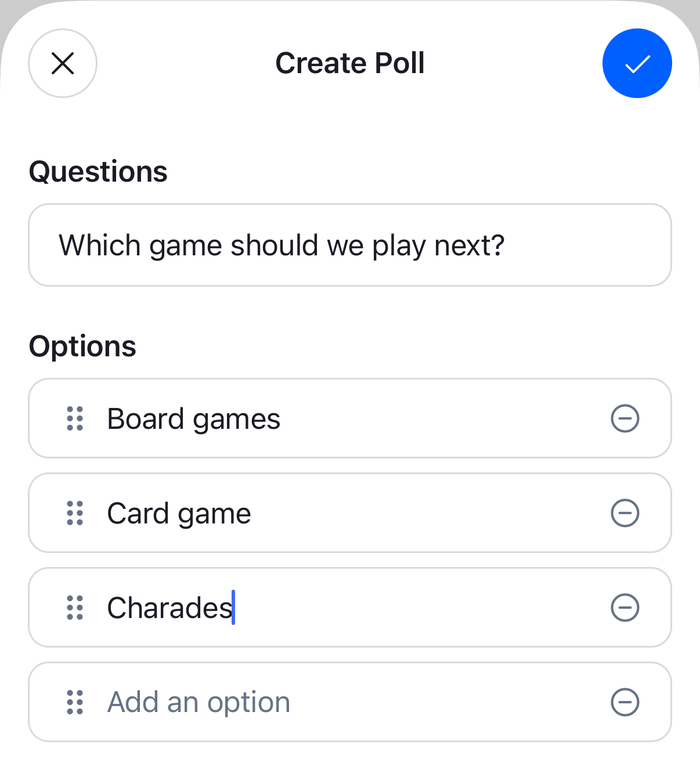 | 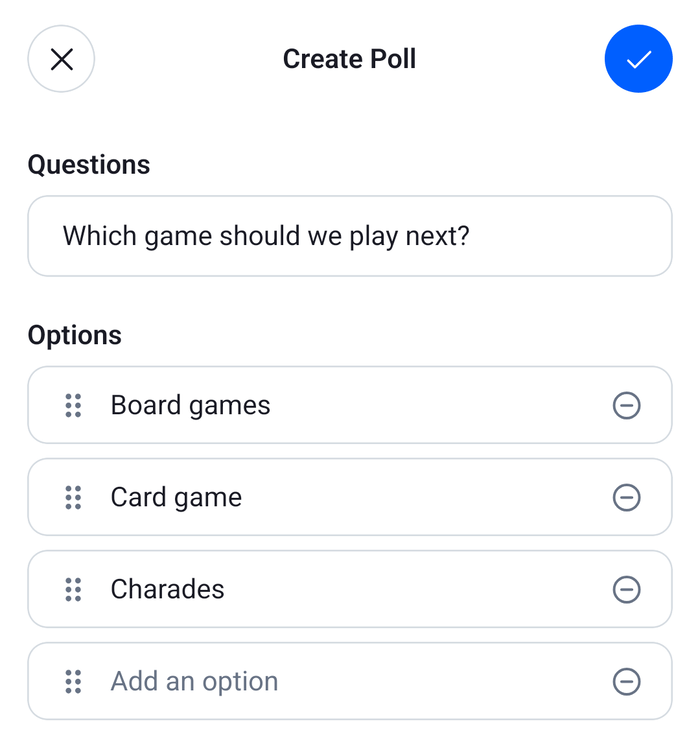 |
CreatePoll resets the poll form with PollComposer.initState() when the sheet closes, so every poll starts from an empty form. The checkmark is disabled while pollComposer.canCreatePoll is false, so MessageComposer.createPoll(), which returns without creating a poll when the form doesn't compose, runs only for a complete form. The settings of the sheet, such as anonymous voting, suggested options and comments, go into the poll with the question and the options.
The poll button shows only in a channel's composer, when polls are on and the user has the send-poll capability. When polls are on explains the rest.
The poll in the composer
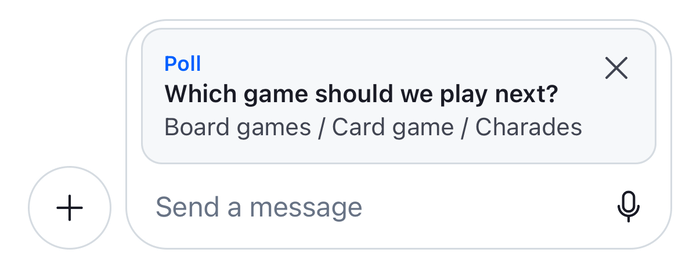
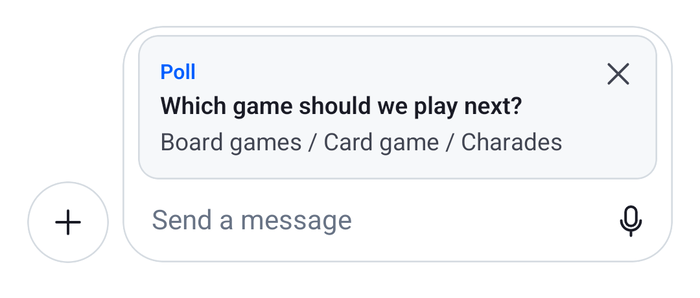
MessageInputHeaderView renders what the message carries, above the input. The override renders the default header, and a card for the poll under it. The card is visible while messageComposer.pollId is set and no message is being edited, because an edited message keeps its poll.
The poll comes from client.polls. MessageComposer.createPoll() puts the created poll there, so client.polls.fromState() finds it by its id, and poll.state holds the question and the options. A poll restored from a draft may not be in client.polls, because the draft carries only the poll's id, so usePendingPoll() loads it once with client.polls.getPoll(). Until the poll is known, or if loading it fails, the card shows only its label and the remove button, so the user can still see that the message carries a poll:
import { useEffect, useState } from "react";
import { Pressable, StyleSheet, Text, View } from "react-native";
import type { MessageComposerState, Poll, PollState } from "stream-chat";
import {
  MessageInputHeaderView,
  useChatContext,
  useComponentsContext,
  useMessageComposer,
  useStateStore,
  useTheme,
} from "stream-chat-react-native";
import { removePendingPoll } from "./removePendingPoll";

const composerPollSelector = ({ pollId }: MessageComposerState) => ({ pollId });
const pollPreviewSelector = ({ name, options }: PollState) => ({
  name,
  options,
});

/**
 * The poll `pollId` points to. `createPoll()` puts the created poll into `client.polls`. A poll
 * restored from a draft may not be there yet, so it's fetched once.
 */
const usePendingPoll = (pollId: string | null) => {
  const { client } = useChatContext();
  const cachedPoll = pollId ? client.polls.fromState(pollId) : undefined;
  const [fetchedPoll, setFetchedPoll] = useState<Poll>();

  useEffect(() => {
    if (!pollId || cachedPoll) return;
    let isCurrent = true;
    client.polls
      .getPoll(pollId)
      .then((poll) => {
        if (isCurrent) setFetchedPoll(poll);
      })
      .catch((error) => console.error("Loading the poll failed", error));
    return () => {
      isCurrent = false;
    };
  }, [cachedPoll, client, pollId]);

  return cachedPoll ?? (fetchedPoll?.id === pollId ? fetchedPoll : undefined);
};

const PollPreviewCard = ({
  onRemove,
  poll,
}: {
  onRemove: () => void;
  poll?: Poll;
}) => {
  const { icons } = useComponentsContext();
  const {
    theme: { semantics },
  } = useTheme();
  const preview = useStateStore(poll?.state, pollPreviewSelector);

  return (
    <View
      style={[
        styles.card,
        {
          backgroundColor: semantics.backgroundCoreSurfaceCard,
          borderColor: semantics.borderCoreDefault,
        },
      ]}
    >
      <View style={styles.body}>
        <Text style={[styles.label, { color: semantics.accentPrimary }]}>
          Poll
        </Text>
        {preview ? (
          <>
            <Text style={[styles.question, { color: semantics.textPrimary }]}>
              {preview.name}
            </Text>
            <Text numberOfLines={2} style={{ color: semantics.textSecondary }}>
              {preview.options.map(({ text }) => text).join(" / ")}
            </Text>
          </>
        ) : null}
      </View>
      <Pressable
        accessibilityLabel="Remove poll"
        accessibilityRole="button"
        hitSlop={8}
        onPress={onRemove}
      >
        <icons.Cross height={20} stroke={semantics.textSecondary} width={20} />
      </Pressable>
    </View>
  );
};

/** The poll waiting in the composer, while `messageComposer.pollId` is set. */
const ComposerPollPreview = () => {
  const messageComposer = useMessageComposer();
  const { pollId } = useStateStore(messageComposer.state, composerPollSelector);
  const poll = usePendingPoll(pollId);

  // An edited message keeps its poll, so the card shows only for a new message.
  if (!pollId || messageComposer.editedMessage) return null;

  return (
    <PollPreviewCard
      // Takes the poll out of the composer, without deleting it.
      onRemove={() => removePendingPoll(messageComposer)}
      poll={poll}
    />
  );
};

/** The composer's header, with the poll under the other previews. */
export const MessageInputHeaderWithPoll = () => (
  <>
    <MessageInputHeaderView />
    <ComposerPollPreview />
  </>
);

const styles = StyleSheet.create({
  body: { flex: 1, gap: 2 },
  card: {
    alignItems: "flex-start",
    borderRadius: 12,
    borderWidth: 1,
    flexDirection: "row",
    gap: 8,
    marginHorizontal: 8,
    marginTop: 4,
    padding: 12,
  },
  label: { fontSize: 12, fontWeight: "600" },
  question: { fontWeight: "600" },
}); |  |
The remove button calls removePendingPoll(), shown in Removing the poll before sending.
Send the poll with the rest of the message
By default, the second middleware of messageComposer.compositionMiddlewareExecutor, the poll-only middleware, turns any message with a poll into the poll alone. It sends only poll_id, and leaves out the text, attachments, mentions and quoted message, which stay in the composer. It leaves edits and thread replies to the rest of the chain.
setUpPollWithText is a composer setup function, and installPollWithText registers it for every composer. It removes the poll-only middleware by its id, so the default middleware build the message as for any other: the text, attachments, mentions and quoted message, and poll_id, which the composer state middleware adds while messageComposer.pollId is set:
import type { InstanceSetupFunction, StreamChat } from "stream-chat";
import {
  createPollOnlyCompositionMiddleware,
  POLL_ONLY_COMPOSITION_MIDDLEWARE_ID,
  USER_DATA_INJECTION_MIDDLEWARE_ID,
} from "stream-chat";

/**
 * Makes one composer send a poll with the text and attachments of its message. Returns a function
 * that undoes it.
 */
export const setUpPollWithText: InstanceSetupFunction<"messageComposer"> = ({
  composer,
}) => {
  const executor = composer.compositionMiddlewareExecutor;

  // Without the poll-only step, the message keeps its text and attachments, and the composer
  // empties after the send, as for any message.
  executor.remove(POLL_ONLY_COMPOSITION_MIDDLEWARE_ID);

  return () => {
    executor.insert({
      middleware: [createPollOnlyCompositionMiddleware(composer)],
      position: { after: USER_DATA_INJECTION_MIDDLEWARE_ID },
      unique: true,
    });
  };
};

/**
 * Makes every composer send a poll with the text and attachments of its message. Returns a function
 * that stops it.
 */
export const installPollWithText = (client: StreamChat) => {
  client.config.setSetupFunction("messageComposer", setUpPollWithText);
  return () => client.config.setSetupFunction("messageComposer", null);
};
The composer then empties after the send without further setup. retainCompositionOnSubmit decides whether it keeps its content after a send, and its default keeps it only while the poll-only middleware is installed, since the default poll message leaves the text and attachments out. Messages with a poll explains it.
The function the setup function returns undoes it, when the setup function is replaced or cleared. It puts a new poll-only middleware, made with createPollOnlyCompositionMiddleware(), back after the user data injection middleware, its default place.
If your app already has a composer setup function, register a single function that calls both and undoes both, in place of installPollWithText:
import type { InstanceSetupFunction, StreamChat } from "stream-chat";
import { setUpPollWithText } from "./installPollWithText";

/** A setup function of your own: no typing events in livestream channels. */
const setUpTypingEvents: InstanceSetupFunction<"messageComposer"> = ({
  composer,
}) => {
  if (composer.channel.type === "livestream") {
    composer.updateConfig({ text: { publishTypingEvents: false } });
  }
};

export const installComposerSetup = (client: StreamChat) => {
  client.config.setSetupFunction("messageComposer", (args) => {
    const undoPollWithText = setUpPollWithText(args);
    const undoTypingEvents = setUpTypingEvents(args);
    return () => {
      undoPollWithText?.();
      undoTypingEvents?.();
    };
  });
  return () => client.config.setSetupFunction("messageComposer", null);
};
Register it
Register the two overrides with WithComponents, declared once at module scope, and the setup function once the client exists. A setup function applies to the composers that already exist as well as to later ones:
import { useEffect } from "react";
import type { Channel as StreamChannel } from "stream-chat";
import {
  Channel,
  MessageComposer,
  MessageList,
  useChatContext,
  WithComponents,
} from "stream-chat-react-native";
import type { ComponentOverrides } from "stream-chat-react-native";
import { AddPollToMessageContent } from "./AddPollToMessageContent";
import { MessageInputHeaderWithPoll } from "./ComposerPollPreview";
import { installPollWithText } from "./installPollWithText";

const overrides: ComponentOverrides = {
  CreatePollContent: AddPollToMessageContent,
  MessageInputHeaderView: MessageInputHeaderWithPoll,
};

export const PollChannelScreen = ({ channel }: { channel: StreamChannel }) => {
  const { client } = useChatContext();

  useEffect(() => installPollWithText(client), [client]);

  return (
    <WithComponents overrides={overrides}>
      <Channel channel={channel}>
        <MessageList />
        <MessageComposer />
      </Channel>
    </WithComponents>
  );
}; |  |
Installing the setup function from an effect keeps it tied to the screen. An app that has one setup function for every screen registers it once after it creates the client, as in Emoji suggestions.
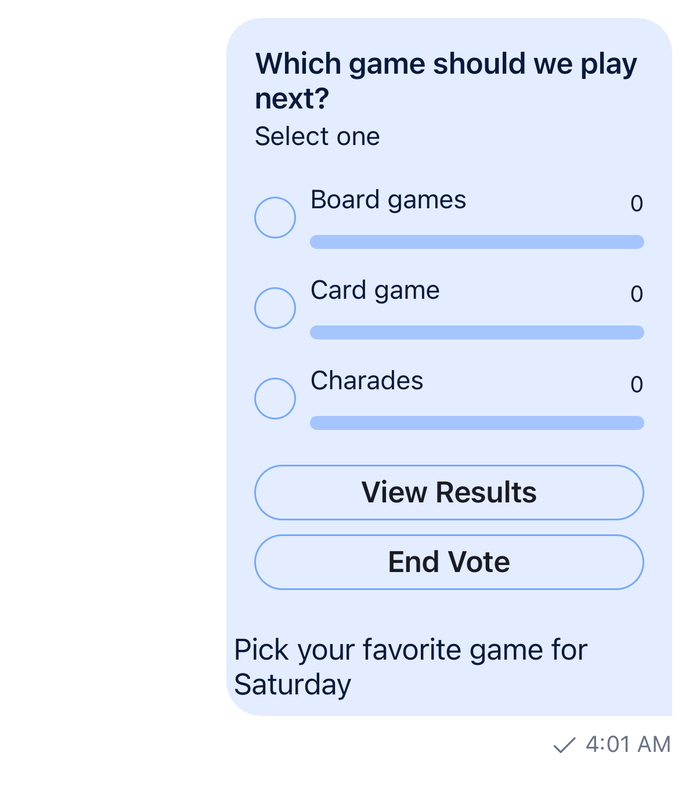
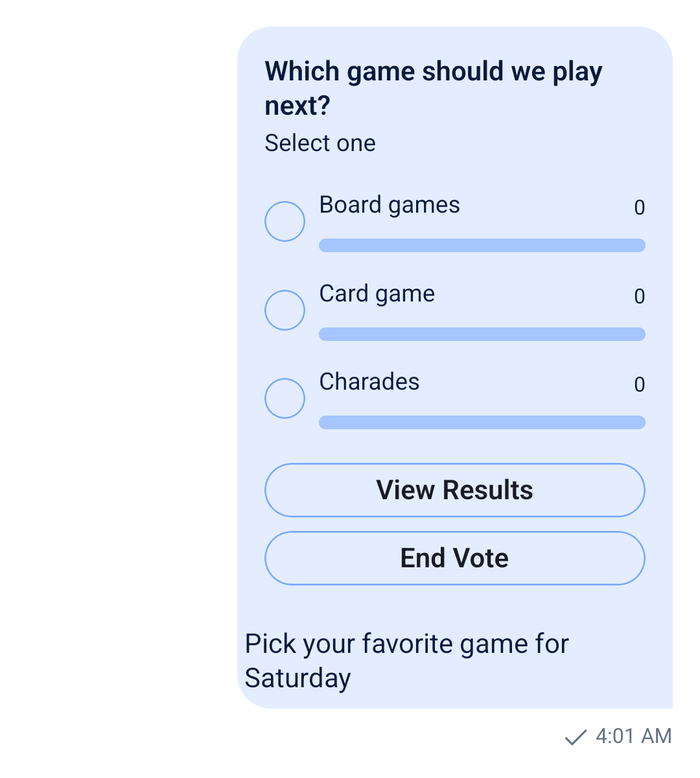
The sent message shows the images, then the files, then the poll and the text, in the order of messageContentOrder on Channel. Message renders the poll of every message with message.poll_id, and its attachments and text as for any message.
Removing the poll before sending
The card's remove button takes the poll out of the composer by setting messageComposer.pollId to null. The poll stays on the server, unused. The composer can't tell a poll it created from one restored from a draft, which may already be sent, and deleting a sent poll removes it and its votes.
import type { MessageComposer } from "stream-chat";

/**
 * Takes the poll waiting in a new message out of the composer, without deleting it. Call it when
 * the user removes the poll. A poll of an edited message belongs to that message and stays.
 */
export const removePendingPoll = (composer: MessageComposer) => {
  const { editedMessage, pollId } = composer;
  if (!pollId || editedMessage) return;
  composer.state.partialNext({ pollId: null });
};
A new poll from the sheet replaces the one waiting in the composer in the same way, and the replaced poll stays too. So does a poll the user leaves in the composer before leaving the channel. With drafts on, a saved draft keeps messageComposer.pollId, and the poll comes back with the draft. To remove polls that never reached a message, clean up outside the composer: for example, have your server keep track of the polls it sees created and the polls it sees in messages, and delete the others on its own schedule.
Attachments and other clients
Attachments need nothing extra. The attachments middleware adds them to the message, as for any other message, and poll_id goes next to them. Uploads work as they do for a message without a poll: by default, a message can't be sent while one of its uploads runs, and MessageComposer.send() publishes a warning instead. Sending attachments explains the pendingUploadsEnabled setting that changes it.
The API accepts a message with a poll, text and attachments, and returns all three. Other Stream SDKs send a poll as a message of its own, so their message views may never have been shown a poll with text and attachments. Check how your other clients display one before your users send them.
Example
The user creates a poll, attaches a photo, types a line and sends it:
- They tap the poll button in the attachment picker. The sheet opens with an empty form, and they fill in "Hike day" with three options.
- They press the checkmark.
AddPollToMessageContentcallsMessageComposer.createPoll(), which creates the poll on the server, puts it intoclient.pollsand setsmessageComposer.pollId. The sheet closes. MessageInputHeaderWithPollshows the "Hike day" card above the input. The user adds a photo and types "Which day works for you?".- They send. The composition chain has no poll-only step, so the text, the photo and
poll_idall go into one message. The composer empties, andmessageComposer.pollIdwith it.
Had the user pressed the card's remove button instead, removePendingPoll() would have taken the poll out of the composer. Had they created a second poll before sending, it would have taken the first one's place.
Read more
- Polls: the poll form, its validation, and
MessageComposer.createPoll(). - Polls feature: the default poll UI, from the sheet to voting.
- Composer middleware: what the poll-only middleware changes for your middleware.
- Custom poll flow: the poll's sheets as screens of your navigation.
- Message composer UI: the composer's header and previews.
- Attachment previews: another change to
MessageInputHeaderView.