















Preview UI
A channel list renders one row per channel. This UI cookbook replaces the look of the row and keeps everything else the SDK does for it: reading the channel's stores, the swipe actions, and calling onSelect when the user taps the row. It then shows a channel outside the list with the same helpers, and replaces the list's infinite scroll with a "Load more" button. What a row reads and which parts you can replace are explained in Channel list UI.
Best practices
- Replace
ChannelPreview, the row's content.ChannelListstill renders the row around it: it computes the channel's latest message and its muted, pinned and unread values, passes them as props, and wraps the row in the swipe actions. - Open the channel the way the default row does. Read
onSelectfromuseChannelsContext()and call it with the channel. The row's props don't carry it. - Show the
lastMessageprop, not a message you read yourself. It's translated into the user's language when the message has a translation. - Build the message line with
ChannelPreviewMessage. It shows who is typing, the user's draft, poll votes, failed messages and the delivery mark before falling back to the latest message. - Keep rows light. Each row subscribes to its own channel and re-renders when that channel changes.
Custom channel preview
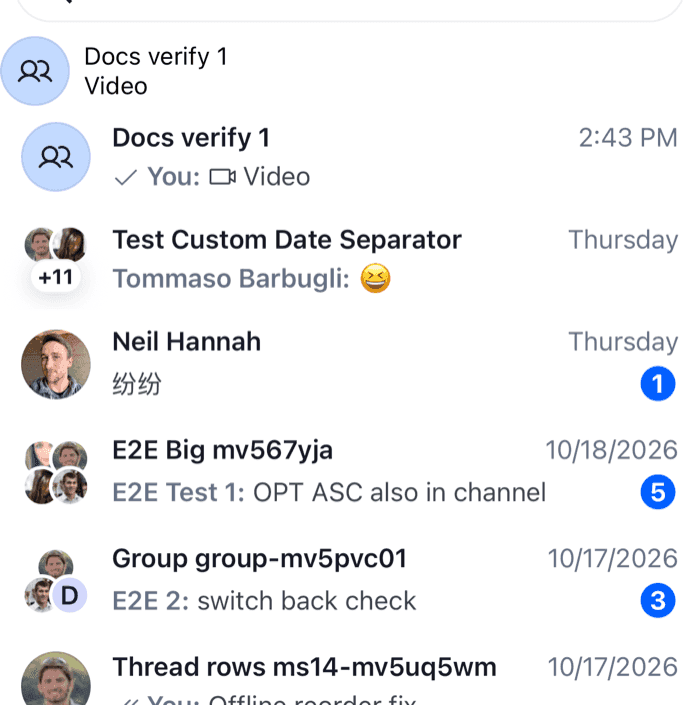
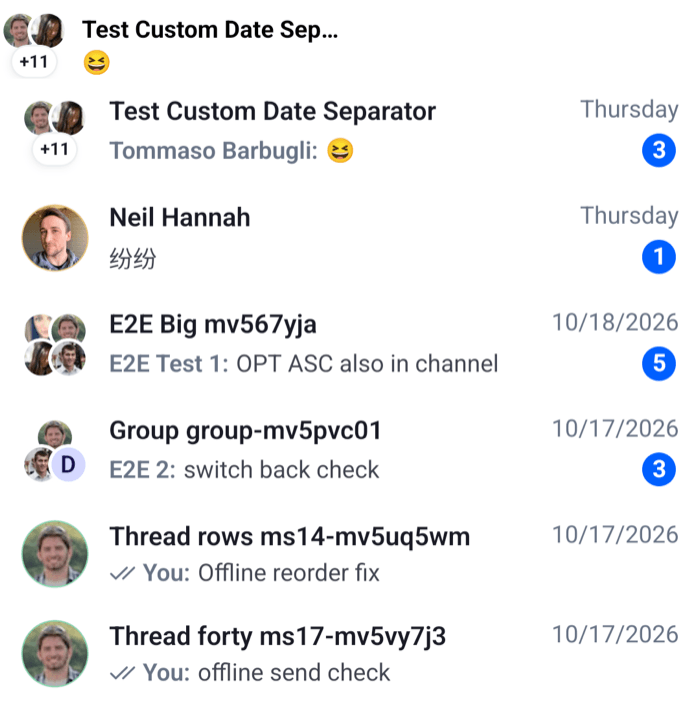
This screen shows each channel as a compact row with the avatar, the title, the pinned and muted icons, the time of the latest message, the message line and an unread badge:
import { Pressable, StyleSheet, Text, View } from "react-native";
import type { Channel, ChannelPaginator } from "stream-chat";
import {
  BadgeNotification,
  ChannelAvatar,
  ChannelList,
  ChannelPreviewMessage,
  ChannelPreviewMutedStatus,
  ChannelPreviewPinnedStatus,
  ChannelPreviewStatus,
  useChannelPreviewDisplayName,
  useChannelsContext,
  useTheme,
  WithComponents,
} from "stream-chat-react-native";
import type { ChannelPreviewViewProps } from "stream-chat-react-native";

const CompactChannelRow = ({
  channel,
  lastMessage,
  muted,
  pinned,
  unread,
}: ChannelPreviewViewProps) => {
  const { maxUnreadCount, onSelect } = useChannelsContext();
  const {
    theme: { semantics },
  } = useTheme();
  const title = useChannelPreviewDisplayName(channel);

  return (
    <Pressable
      accessibilityRole="button"
      onPress={() => onSelect?.(channel)}
      style={({ pressed }) => [
        styles.row,
        pressed
          ? { backgroundColor: semantics.backgroundUtilityPressed }
          : null,
      ]}
    >
      <ChannelAvatar channel={channel} size="lg" />
      <View style={styles.main}>
        <View style={styles.line}>
          <Text
            numberOfLines={1}
            style={[styles.title, { color: semantics.textPrimary }]}
          >
            {title}
          </Text>
          {pinned ? <ChannelPreviewPinnedStatus /> : null}
          {muted ? <ChannelPreviewMutedStatus /> : null}
          <ChannelPreviewStatus channel={channel} lastMessage={lastMessage} />
        </View>
        <View style={styles.line}>
          <View style={styles.message}>
            <ChannelPreviewMessage
              channel={channel}
              lastMessage={lastMessage}
            />
          </View>
          {unread ? (
            <BadgeNotification
              count={Math.min(unread, maxUnreadCount)}
              size="sm"
              type="primary"
            />
          ) : null}
        </View>
      </View>
    </Pressable>
  );
};

// Declared once, so WithComponents gets the same object on every render.
const overrides = { ChannelPreview: CompactChannelRow };

export const ChannelListScreen = ({
  onSelect,
  paginator,
}: {
  onSelect: (channel: Channel) => void;
  paginator: ChannelPaginator;
}) => (
  <WithComponents overrides={overrides}>
    <ChannelList onSelect={onSelect} paginator={paginator} />
  </WithComponents>
);

const styles = StyleSheet.create({
  line: { alignItems: "center", flexDirection: "row", gap: 6 },
  main: { flex: 1, gap: 2 },
  message: { flex: 1 },
  row: {
    alignItems: "center",
    flexDirection: "row",
    gap: 12,
    paddingHorizontal: 12,
    paddingVertical: 8,
  },
  title: { flex: 1, fontSize: 15, fontWeight: "600" },
}); |  |
The paginator comes from your app, registered on client.channelManager, as in Channel list paginators.
What happens for each channel:
ChannelListrenders a row for the channel. The row reads the channel's latest message fromchannel.messagePaginator.aggregateState, and its mute status, membership and read state fromchannel.state. It renders theChannelPreviewoverride,CompactChannelRow, withchannel,lastMessage,muted,pinnedandunreadas props.useChannelPreviewDisplayName(channel)gives the title: the channel's name, or the other members' names when it has none.ChannelAvatarshows the channel's image, or the other member's avatar in a direct message, or the members' avatars in a group.unreadis the user's unread count, or0while the channel is muted. The badge caps it atmaxUnreadCountfrom the list, 255 by default.ChannelPreviewStatusrenders the time oflastMessage: the time today, "Yesterday", the weekday within the last week, and the date before that.ChannelPreviewMessagerenders the message line from the samelastMessage.- Swiping the row toward the start still reveals the row's actions, because the list wraps the override in them.
A tap on the default row closes another row's open swipe actions instead of opening the channel. The registry it uses for that isn't exported, so a row of your own opens the channel on every tap.
Using display helpers
Outside a channel list there is no list to compute the props, and no useChannelsContext(). The hooks the list uses are exported, so a channel shown anywhere else can look the same. This chip shows a channel your app holds, for example in a "Recent" strip above the list:
import { Pressable, StyleSheet, Text, View } from "react-native";
import type { Channel } from "stream-chat";
import {
  ChannelAvatar,
  useChannelPreviewData,
  useChannelPreviewDisplayName,
  useChatContext,
  useMessagePreviewText,
} from "stream-chat-react-native";

export const RecentChannelChip = ({
  channel,
  onPress,
}: {
  channel: Channel;
  onPress: (channel: Channel) => void;
}) => {
  const { client } = useChatContext();
  const { lastMessage, unread } = useChannelPreviewData(channel, client);
  const title = useChannelPreviewDisplayName(channel);
  const preview = useMessagePreviewText({ message: lastMessage });

  return (
    <Pressable
      accessibilityRole="button"
      onPress={() => onPress(channel)}
      style={styles.chip}
    >
      <ChannelAvatar channel={channel} size="lg" />
      <View style={styles.text}>
        <Text numberOfLines={1} style={unread ? styles.unread : undefined}>
          {title}
        </Text>
        <Text numberOfLines={1}>{preview}</Text>
      </View>
    </Pressable>
  );
};

const styles = StyleSheet.create({
  chip: { alignItems: "center", flexDirection: "row", gap: 8, width: 200 },
  text: { flex: 1 },
  unread: { fontWeight: "700" },
});
useChannelPreviewData(channel, client)returns the four values the list passes to a row:lastMessage,muted,pinnedandunread. It subscribes to the channel's stores, so the chip updates when a message arrives or the user reads the channel. Unlike the list, it doesn't translatelastMessage.useMessagePreviewText({ message })turns the message into one line of text: "Message deleted", the poll's name, "Location", "Photo", "3 Photos", a voice message with its duration, or the message's text. Channel preview hooks lists every case, anduseMessagePreviewIconreturns an icon to go with it.
A "Load more" button instead of infinite scroll
ChannelList loads the next page when the user scrolls near the end. To load it from a button instead, replace the list's footer and turn off onEndReached through additionalFlatListProps:
import { Button } from "react-native";
import type {
  Channel,
  ChannelPaginator,
  ChannelPaginatorState,
} from "stream-chat";
import {
  ChannelList,
  useChannelsContext,
  useStateStore,
} from "stream-chat-react-native";

const loadStateSelector = ({
  hasMoreTail,
  isLoading,
  items,
}: ChannelPaginatorState) => ({
  hasMoreTail,
  isLoading,
  loaded: items !== undefined,
});

const LoadMoreButton = () => {
  const { loadNextPage, paginator } = useChannelsContext();
  const { hasMoreTail, isLoading, loaded } = useStateStore(
    paginator.state,
    loadStateSelector,
  );

  // Nothing before the first page has loaded, and nothing after the last one.
  if (!loaded || !hasMoreTail) return null;

  return (
    <Button
      disabled={isLoading}
      onPress={() => void loadNextPage()}
      title="Load more"
    />
  );
};

// Declared once: a new object on every render would re-render the FlatList.
const additionalFlatListProps = {
  ListFooterComponent: LoadMoreButton,
  onEndReached: () => undefined,
};

export const LoadMoreChannelList = ({
  onSelect,
  paginator,
}: {
  onSelect: (channel: Channel) => void;
  paginator: ChannelPaginator;
}) => (
  <ChannelList
    additionalFlatListProps={additionalFlatListProps}
    onSelect={onSelect}
    paginator={paginator}
  />
);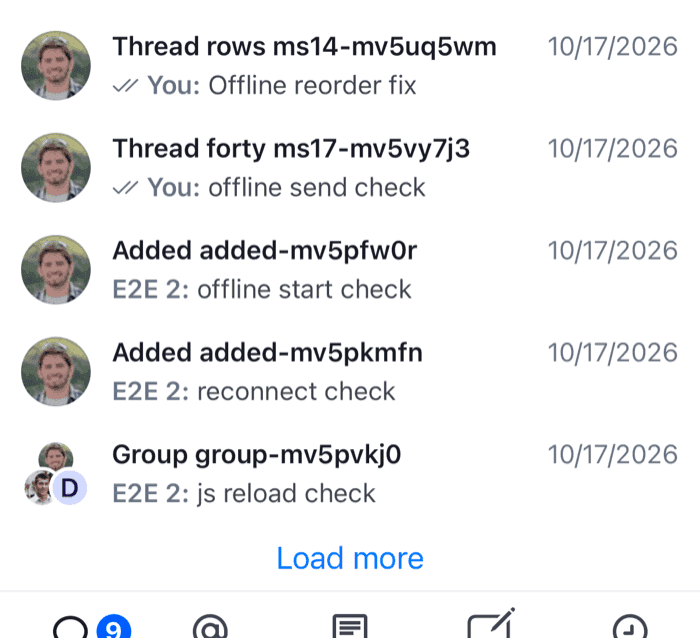 | 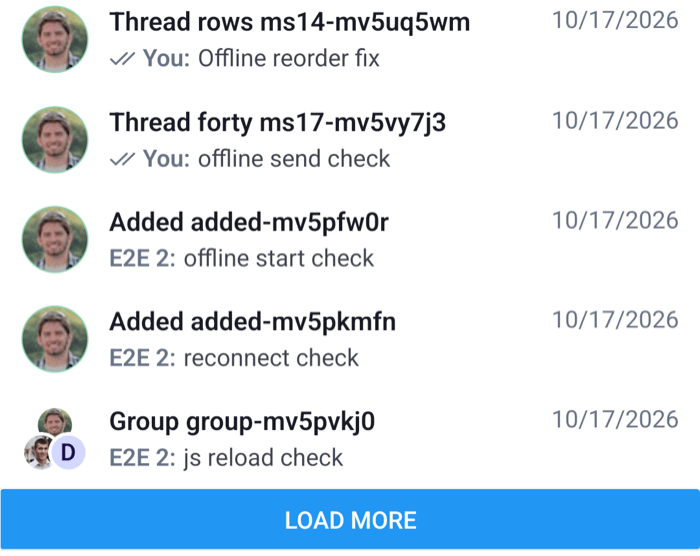 |
ChannelList spreads additionalFlatListProps over its own FlatList props, so the footer replaces the next-page spinner and the empty onEndReached replaces the one that loads. The footer renders inside the list, so useChannelsContext() gives it the paginator and loadNextPage, which loads the next page once the first one has loaded. items is undefined until the first page has loaded, and hasMoreTail is false once the server has returned the last page, so the button shows only between the two. Pull-to-refresh still loads the first page again.
Going deeper
When replacing the row's content isn't the right size of change:
- One part of the default row. Override
ChannelPreviewTitle,ChannelPreviewStatus,ChannelPreviewUnreadCount,ChannelPreviewAvatar, or the message line,ChannelPreviewMessage, and keep the rest of the row. - Only the latest message in the line. Override
ChannelPreviewLastMessage. The default message line still handles typing, drafts, polls and failed messages, and renders your component for the message itself and for the draft. - The row actions. Pass
getChannelActionItemstoChannelList; Channel actions shows how.swipeActionsEnabled={false}turns swiping off. - The empty, loading and error states. Override
EmptyStateIndicator,ChannelListLoadingIndicatorandLoadingErrorIndicator; Loading, empty and error states lists them. - When the next page loads. Set
loadMoreThresholdonChannelList. It's theFlatList'sonEndReachedThreshold, 0.1 by default. - Which loaded channels render.
channelRenderFilterFnonChannelListfilters them on every render. To change which channels the list loads, change the paginator's filters instead.
Every key is listed in Channel list UI, and the row components' props in the Channel preview reference.