















Custom channel actions
The actions section at the bottom of channel details lists what the user can do with the channel: mute it, leave it, delete it, and in a direct message channel mute or block the other person. This UI cookbook changes that list. It adds Pin and Archive actions, hides an action, replaces the list with one of its own, and leaves the screen once the channel is gone. Every channel action, with its id and when it shows, is listed in Actions.
Best practices
- Start from
defaultItemsand add, filter or replace items, rather than building the list from scratch. Items you leave alone keep their behavior. - Run the handlers on
context.actions, such aspinandarchive, instead of calling the channel yourself. They publish a success or error notification and never throw. - Take icons from
context.icons, so icon overrides apply to your items too. - Keep the ids of the default items you replace. Channel details renders
muteandmuteUseras switches, and callsonChannelDismissforleave,deleteChannelandblock. - Pass
getChannelActionItemsthrough an override ofChannelDetailsActionsSection.ChannelDetailsrenders the section without props. - Declare
getChannelActionItemsat module scope, or wrap it inuseCallback. The section builds its items again when the function changes.
Add Pin and Archive
Channel details has no pin or archive action by default. The channel list's options sheet has Pin, and neither has Archive. The handlers exist on context.actions for both, so this function adds them after the default items:
import { asDynamicKey } from "stream-chat-react-native";
import type {
  ChannelActionItem,
  GetChannelActionItems,
} from "stream-chat-react-native";

export const getChannelActionItems: GetChannelActionItems = ({
  context,
  defaultItems,
}) => {
  const { actions, icons, isArchived, isDirectChat, isPinned, t } = context;

  const pin: ChannelActionItem = {
    action: isPinned ? actions.unpin : actions.pin,
    Icon: isPinned ? icons.Unpin : icons.Pin,
    id: "pin",
    label: isPinned
      ? isDirectChat
        ? t("channel.unpinChat.label", "Unpin Chat")
        : t("channel.unpinGroup.label", "Unpin Group")
      : isDirectChat
        ? t("channel.pinChat.label", "Pin Chat")
        : t("channel.pinGroup.label", "Pin Group"),
    placement: "sheet",
    type: "standard",
  };

  const archive: ChannelActionItem = {
    action: isArchived ? actions.unarchive : actions.archive,
    Icon: icons.Folder,
    id: "archive",
    label: isArchived
      ? t(asDynamicKey("myApp.channel.unarchive.label"), "Unarchive")
      : t(asDynamicKey("myApp.channel.archive.label"), "Archive"),
    placement: "sheet",
    type: "standard",
  };

  return [...defaultItems, pin, archive];
};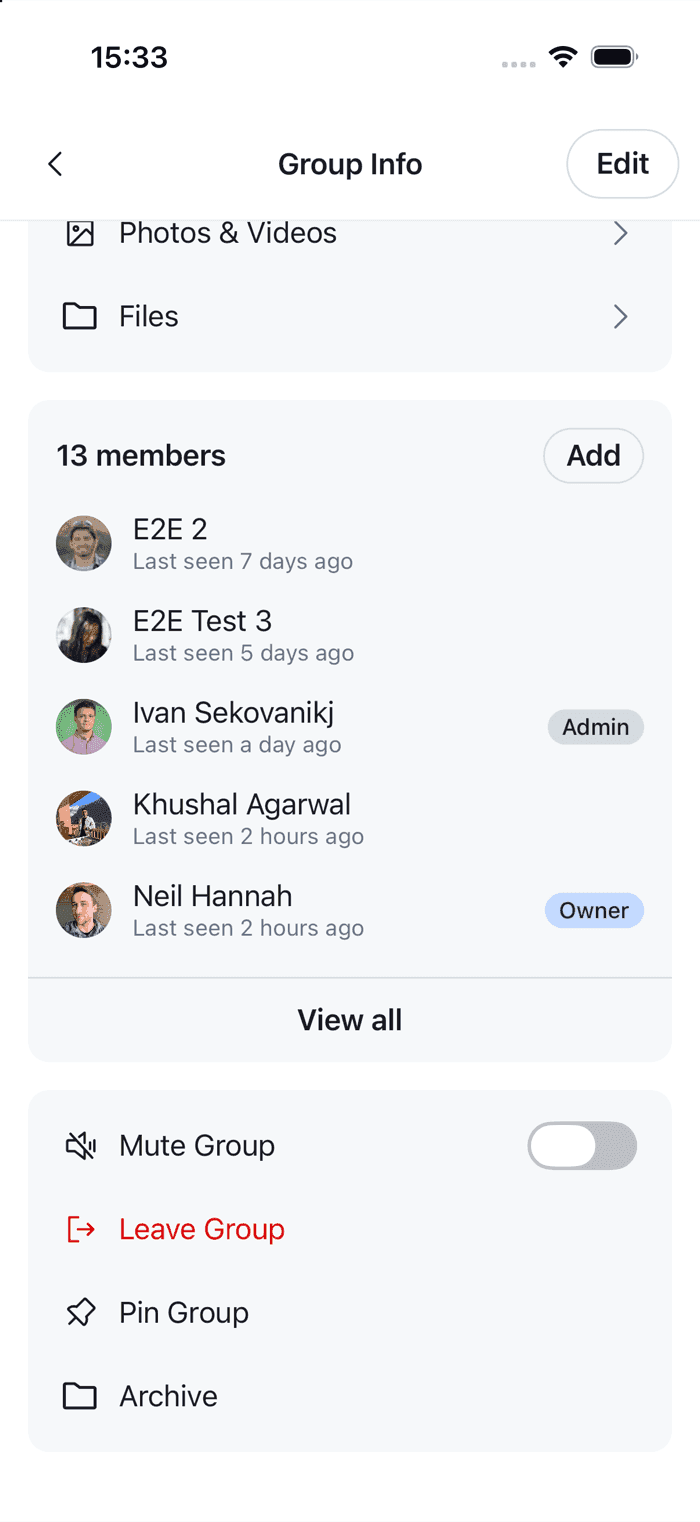 | 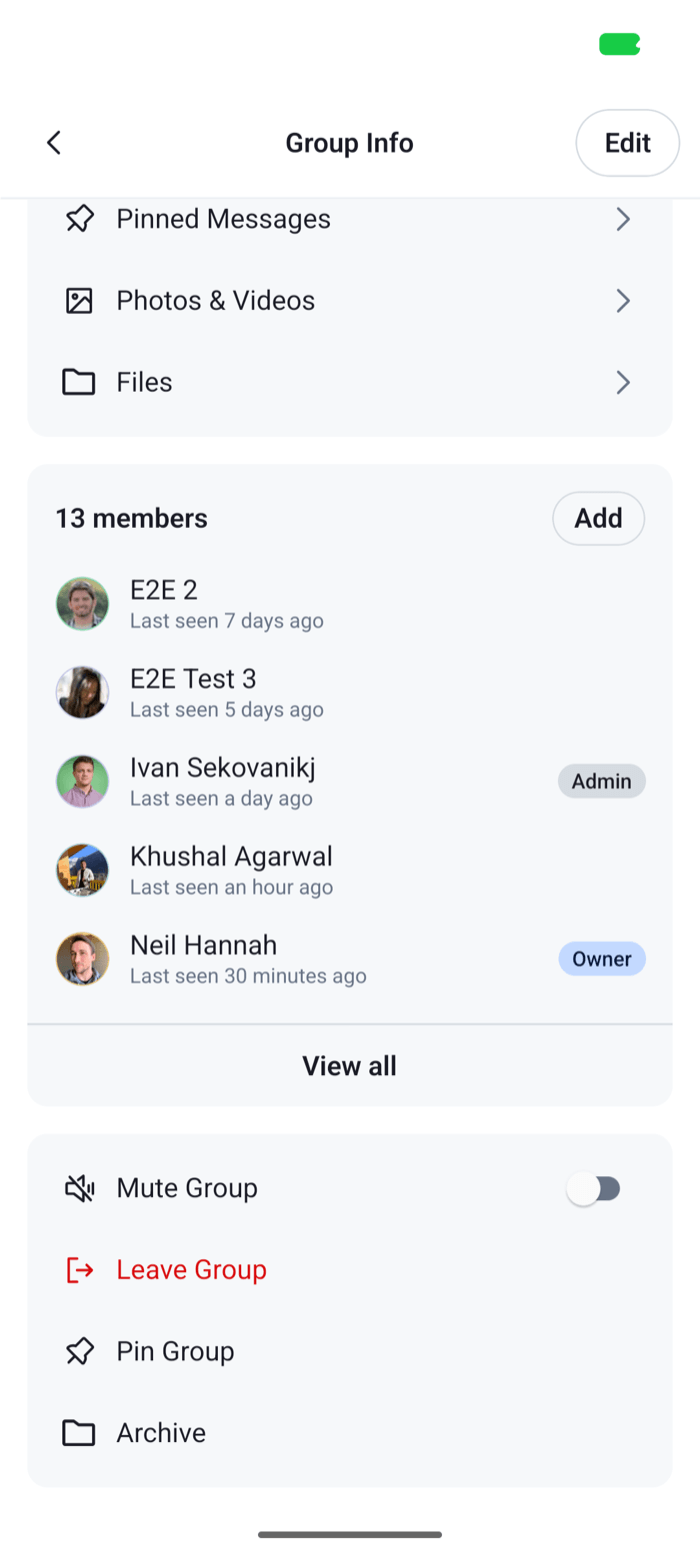 |
The context holds what the defaults were built from. isPinned and isArchived are the channel's state for the current user, and the section builds its items again when they change, so each item shows the right label after the user taps it. The SDK's catalog has the pin labels, so the item reuses their keys. It has no archive label, so the item uses keys of your own with asDynamicKey and English copy. The other fields of context are listed in Actions.
An item has an action, an Icon, an id, a label, a type, standard or destructive, and a placement. Channel details ignores placement, which only places items in the channel list. Pinning and archiving apply to the current user only. They update the user's membership of the channel, and don't change the channel for anyone else.
Register it and leave the screen
ChannelDetailsActionsSection takes the function, and onChannelDismiss, which it calls after leave, deleteChannel or block succeeds. After those, the channel is gone for the user, so close its screens:
import type { NativeStackScreenProps } from "@react-navigation/native-stack";
import { useNavigation } from "@react-navigation/native";
import type { NativeStackNavigationProp } from "@react-navigation/native-stack";
import {
  ChannelDetails,
  ChannelDetailsActionsSection,
  ChannelDetailsContextProvider,
  useChatContext,
  WithComponents,
} from "stream-chat-react-native";
import type {
  ChannelDetailsActionsSectionProps,
  ComponentOverrides,
} from "stream-chat-react-native";
import { getChannelActionItems } from "./channelActionItems";

type RootStackParamList = {
  ChannelList: undefined;
  ChannelDetails: { cid: string };
};

const ActionsSection = (props: ChannelDetailsActionsSectionProps) => {
  const navigation =
    useNavigation<NativeStackNavigationProp<RootStackParamList>>();

  return (
    <ChannelDetailsActionsSection
      {...props}
      getChannelActionItems={getChannelActionItems}
      onChannelDismiss={() => navigation.popTo("ChannelList")}
    />
  );
};

const overrides: ComponentOverrides = {
  ChannelDetailsActionsSection: ActionsSection,
};

export const ChannelDetailsScreen = ({
  navigation,
  route,
}: NativeStackScreenProps<RootStackParamList, "ChannelDetails">) => {
  const { client } = useChatContext();
  const channel = client.channelManager.get(route.params.cid);

  if (!channel) return null;

  return (
    <ChannelDetailsContextProvider channel={channel}>
      <WithComponents overrides={overrides}>
        <ChannelDetails onBack={() => navigation.goBack()} />
      </WithComponents>
    </ChannelDetailsContextProvider>
  );
};
popTo("ChannelList") goes back to the channel list and closes the channel screen and the details screen above it. The section wraps the action of the items with the ids leave, deleteChannel and block to call onChannelDismiss when they succeed, after your function returns the items. Leaving, deleting and blocking ask the user to confirm first, so the screen closes only after the user confirms and the request succeeds. In a direct message channel whose other member is blocked, the block item unblocks them instead, and the section calls onChannelDismiss after a successful unblock too, because it matches the item by its id.
The same function works for the channel list's swipe actions and options sheet, as getChannelActionItems on ChannelList. Check context.surface, 'list' or 'details', to return different items in each place. In the list, the placement of each item decides where it shows.
Hide an action
Filter defaultItems by id. The ids are mute, pin (in the channel list only), muteUser, block, leave and deleteChannel. This one leaves out the switch that mutes the channel:
import type { GetChannelActionItems } from "stream-chat-react-native";

export const getChannelActionItems: GetChannelActionItems = ({
  defaultItems,
}) => defaultItems.filter((item) => item.id !== "mute");
The default items don't check the user's capabilities. A user without the leave-channel capability sees Leave, and the request fails with an error notification. Filter by the user's capabilities where your app's permissions need it. They're in channel.data.own_capabilities, which context.channel gives you.
Replace the list
To decide the whole list yourself, return items of your own instead of defaultItems. This list has Pin and Delete only:
import type {
  ChannelActionItem,
  GetChannelActionItems,
} from "stream-chat-react-native";

export const getChannelActionItems: GetChannelActionItems = ({
  context,
  defaultItems,
}) => {
  const { actions, icons, isPinned, t } = context;
  const pin: ChannelActionItem = {
    action: isPinned ? actions.unpin : actions.pin,
    Icon: isPinned ? icons.Unpin : icons.Pin,
    id: "pin",
    label: isPinned
      ? t("channel.unpinGroup.label", "Unpin Group")
      : t("channel.pinGroup.label", "Pin Group"),
    placement: "sheet",
    type: "standard",
  };
  const deleteChannel = defaultItems.find(({ id }) => id === "deleteChannel");

  return deleteChannel ? [pin, deleteChannel] : [pin];
};
Delete comes from defaultItems, so it keeps what the default item does: it shows only to the user who created the channel, and asks the user to confirm before it deletes. The handlers on context.actions don't ask, so an item of your own that calls actions.deleteChannel, actions.leave or actions.blockUser acts at once. An item with the deleteChannel, leave or block id still makes the section call onChannelDismiss after it succeeds.
Use the handlers on context.actions for items of your own, so they publish their success and error notifications. To run the same actions from a button outside channel details, use useChannelActions(channel), as Running channel and user actions shows.