















Incoming and outgoing styles
Most chat apps color the user's own messages differently from everyone else's. The SDK does it too: by default, outgoing messages have a tinted bubble and incoming ones a neutral one, and the surfaces inside a bubble follow its side, including attachments, link previews, quoted replies, poll bars and the thread connector. This UI cookbook gives the outgoing side an orange palette in two steps: first with semantic tokens, then with myMessageTheme for what the tokens can't reach. How the theme works is explained in Theming.
Best practices
- Start with the semantic tokens. One value recolors every component that reads it, so most palette changes need no other change.
- Set light and dark values separately. Several of these tokens differ between the schemes.
- Keep the theme objects stable by declaring them at module scope, or building them with
useMemo. - Use
myMessageThemefor what has no outgoing token, and for global tokens you want to change on the user's own messages only. - Pass the same
myMessageThemetoChannelandThread.
How a message picks its side
A message is outgoing when the current user sent it. MessageItemView colors the bubble with chatBgOutgoing or chatBgIncoming by that, whatever side the message is aligned to. The surfaces inside the bubble follow the same rule: each one reads a pair of tokens, chat*Outgoing for the user's own messages and chat*Incoming for everyone else's.
| Surface | Outgoing token | Incoming token |
|---|---|---|
| The bubble | chatBgOutgoing |
chatBgIncoming |
| The text | chatTextOutgoing |
chatTextIncoming |
| Attachments, link previews and Giphy inside the bubble | chatBgAttachmentOutgoing |
chatBgAttachmentIncoming |
| The bar of a quoted reply | chatReplyIndicatorOutgoing |
chatReplyIndicatorIncoming |
| Borders of attachments and poll parts | chatBorderOnChatOutgoing |
chatBorderOnChatIncoming |
| Poll result bars | chatPollProgressFillOutgoing, chatPollProgressTrackOutgoing |
chatPollProgressFillIncoming, chatPollProgressTrackIncoming |
| The connector to the replies of a thread | chatThreadConnectorOutgoing |
chatThreadConnectorIncoming |
Each token's default is on Design tokens.
Step 1: semantic tokens
Set the outgoing tokens in the theme you pass to OverlayProvider and Chat, with values for each color scheme:
import type { PropsWithChildren } from "react";
import { useColorScheme } from "react-native";
import type { StreamChat } from "stream-chat";
import { Chat, OverlayProvider } from "stream-chat-react-native";
import type { DeepPartial, Theme } from "stream-chat-react-native";

const lightTheme: DeepPartial<Theme> = {
  semantics: {
    accentPrimary: "#FF9800",
    chatBgAttachmentOutgoing: "#FFB74D",
    chatBgOutgoing: "#FFE0B2",
    chatBorderOnChatOutgoing: "#FF9800",
    chatPollProgressFillOutgoing: "#FF9800",
    chatPollProgressTrackOutgoing: "#FFCC80",
    chatReplyIndicatorOutgoing: "#FF9800",
    chatThreadConnectorOutgoing: "#FFE0B2",
    textLink: "#E65100",
  },
};

const darkTheme: DeepPartial<Theme> = {
  semantics: {
    accentPrimary: "#FFA726",
    chatBgAttachmentOutgoing: "#6D3C00",
    chatBgOutgoing: "#3E2200",
    chatBorderOnChatOutgoing: "#FFA726",
    chatPollProgressFillOutgoing: "#FFA726",
    chatPollProgressTrackOutgoing: "#7A4A00",
    chatReplyIndicatorOutgoing: "#FF9800",
    chatThreadConnectorOutgoing: "#6D3C00",
    textLink: "#FFB74D",
  },
};

export const App = ({
  children,
  client,
}: PropsWithChildren<{ client: StreamChat }>) => {
  const scheme = useColorScheme();
  const theme = scheme === "dark" ? darkTheme : lightTheme;

  return (
    <OverlayProvider value={{ style: theme }}>
      <Chat client={client} style={theme}>
        {children}
      </Chat>
    </OverlayProvider>
  );
};
Every own-message surface is now orange, in both schemes, with no component replaced. Incoming messages keep their defaults, because the theme sets no *Incoming token.
accentPrimary and textLink aren't per side. Here they change both sides: the read receipts and other accents turn orange everywhere, and so do links in every message. To change them on the user's own messages only, set them in myMessageTheme, as the next step does.
Step 2: a dark outgoing bubble
This step runs the outgoing side against the scheme: a dark bubble with light text in light mode, and a light bubble with dark text in dark mode. Incoming messages keep their defaults in both.
Different text colors
chatTextOutgoing is the text color of the user's own messages. Add it to both themes, with the new bubble colors:
const lightTheme: DeepPartial<Theme> = {
  semantics: {
    accentPrimary: "#FF9800",
    chatBgAttachmentOutgoing: "#A34200",
    chatBgOutgoing: "#C75000",
    chatBorderOnChatOutgoing: "#FFB74D",
    chatPollProgressFillOutgoing: "#FFB74D",
    chatPollProgressTrackOutgoing: "#8A3A00",
    chatReplyIndicatorOutgoing: "#FFB74D",
    chatTextOutgoing: "#FFFFFF",
    chatThreadConnectorOutgoing: "#A34200",
  },
};

const darkTheme: DeepPartial<Theme> = {
  semantics: {
    accentPrimary: "#FFA726",
    chatBgAttachmentOutgoing: "#FFCC80",
    chatBgOutgoing: "#FFE0B2",
    chatBorderOnChatOutgoing: "#C75000",
    chatPollProgressFillOutgoing: "#C75000",
    chatPollProgressTrackOutgoing: "#FFCC80",
    chatReplyIndicatorOutgoing: "#C75000",
    chatTextOutgoing: "#3E2200",
    chatThreadConnectorOutgoing: "#FFCC80",
  },
};
textLink is gone from both, because a link on a dark outgoing bubble needs a different color than a link on an incoming one, and a global token can't give it that. Some text on the outgoing bubble still has the scheme's colors: links, secondary text such as file sizes, the play button and waveform of voice recordings, and the poll buttons. The next part fixes them.
A theme for the user's own messages
myMessageTheme on Channel and Thread is a partial theme that the message list merges over the app's theme for the current user's messages only. It's where colors go that have no outgoing token:
import { useMemo } from "react";
import { useColorScheme } from "react-native";
import type { Channel as StreamChannel } from "stream-chat";
import {
  Channel,
  MessageComposer,
  MessageList,
} from "stream-chat-react-native";
import type { DeepPartial, Theme } from "stream-chat-react-native";

export const ChannelScreen = ({ channel }: { channel: StreamChannel }) => {
  const scheme = useColorScheme();

  const myMessageTheme = useMemo<DeepPartial<Theme>>(() => {
    const onDarkBubble = scheme !== "dark";

    return {
      messageItemView: {
        file: {
          fileSize: { color: onDarkBubble ? "#FFFFFF" : "#3E2200" },
          title: { color: onDarkBubble ? "#FFFFFF" : "#3E2200" },
        },
        replies: {
          messageRepliesText: { color: onDarkBubble ? "#C75000" : "#FFB74D" },
        },
      },
      semantics: {
        buttonSecondaryText: onDarkBubble ? "#FFFFFF" : "#3E2200",
        chatWaveformBar: onDarkBubble
          ? "rgba(255, 255, 255, 0.35)"
          : "rgba(26, 27, 37, 0.25)",
        chatWaveformBarPlaying: onDarkBubble ? "#FFFFFF" : "#C75000",
        controlPlaybackToggleText: onDarkBubble ? "#FFFFFF" : "#3E2200",
        textLink: onDarkBubble ? "#FFFFFF" : "#3E2200",
        textSecondary: onDarkBubble ? "#FFE9D9" : "#7A4A00",
      },
    };
  }, [scheme]);

  return (
    <Channel channel={channel} myMessageTheme={myMessageTheme}>
      <MessageList />
      <MessageComposer />
    </Channel>
  );
}; |  |
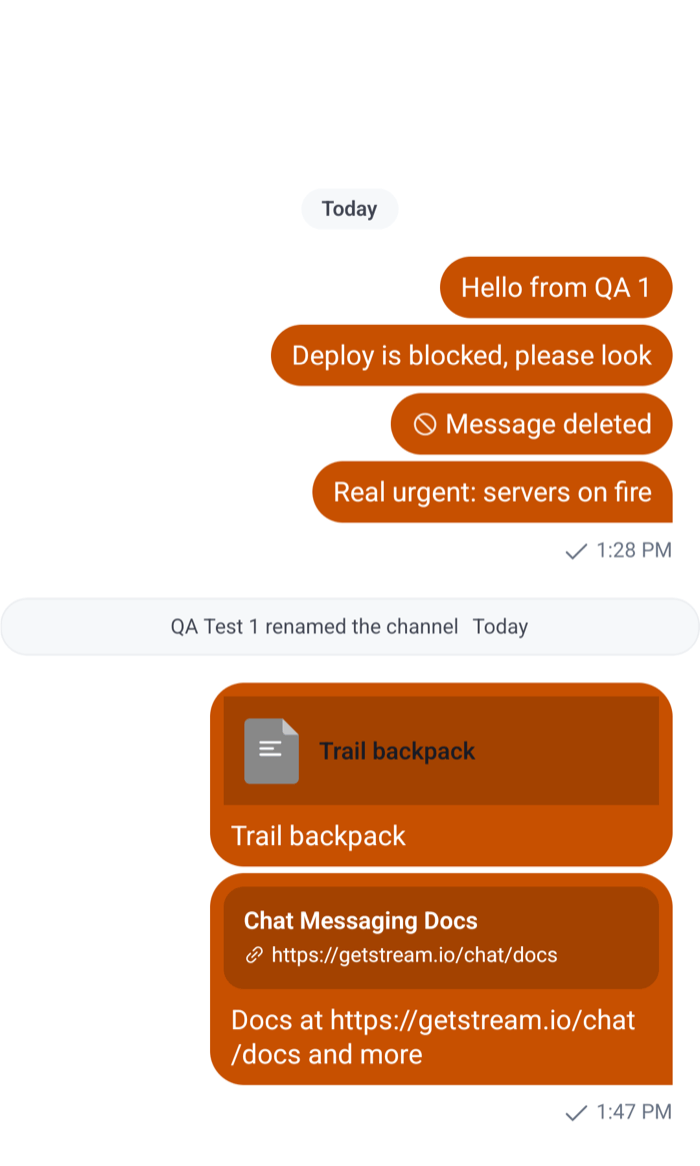 | 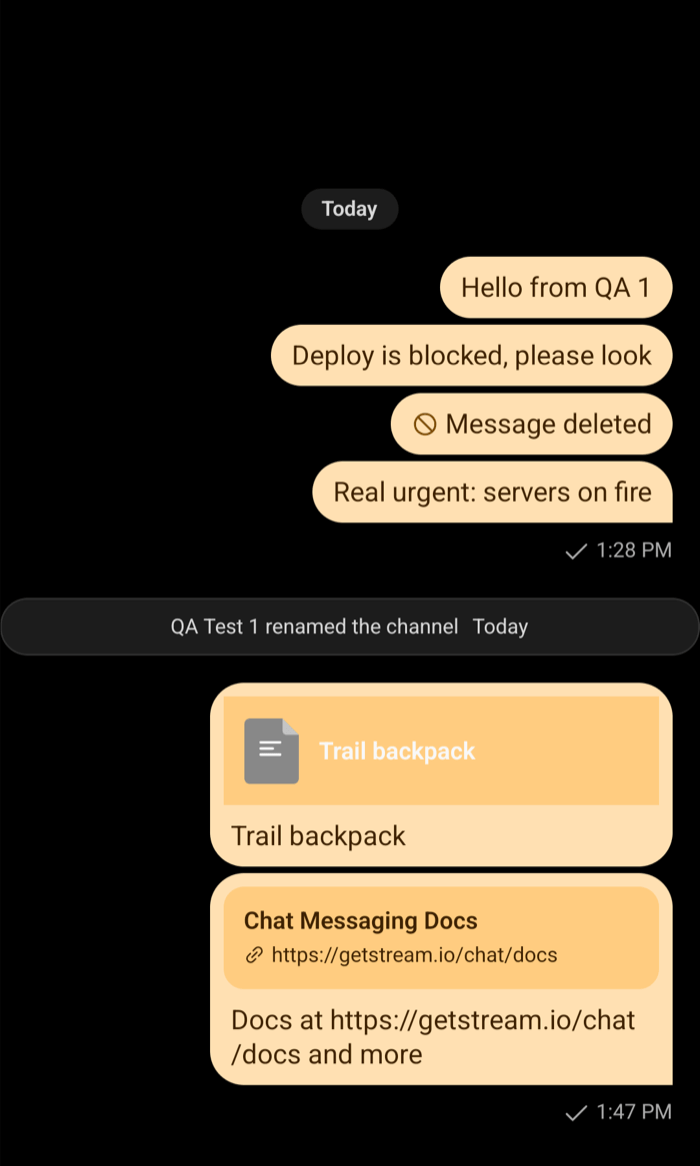 |
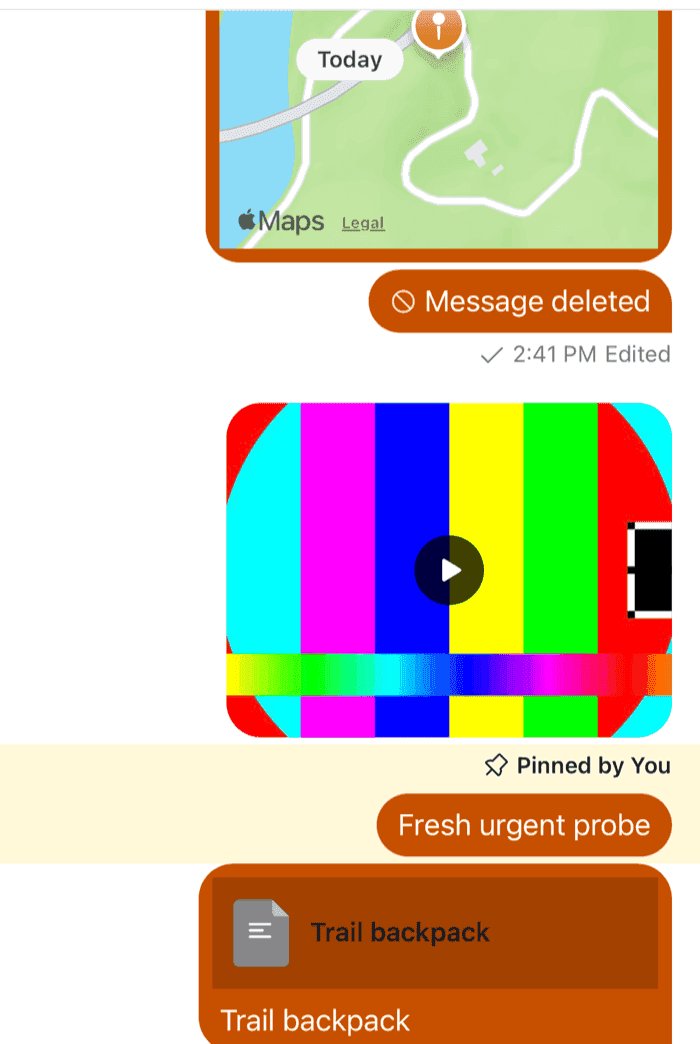
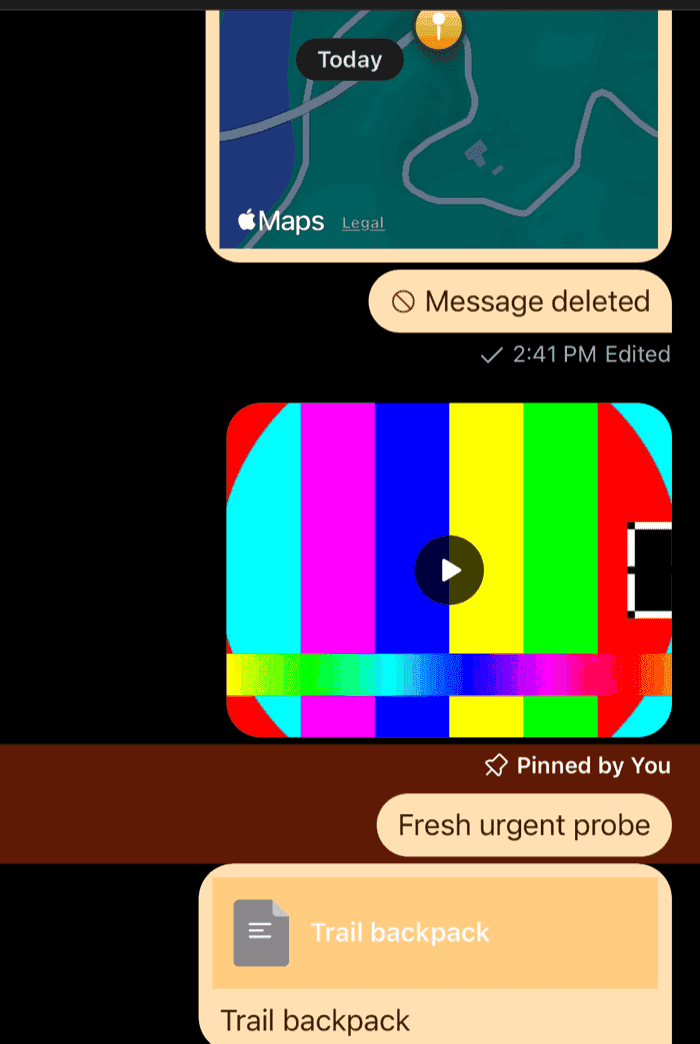
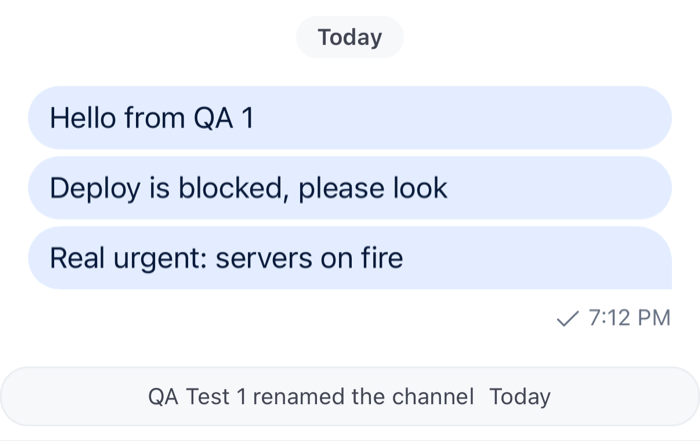
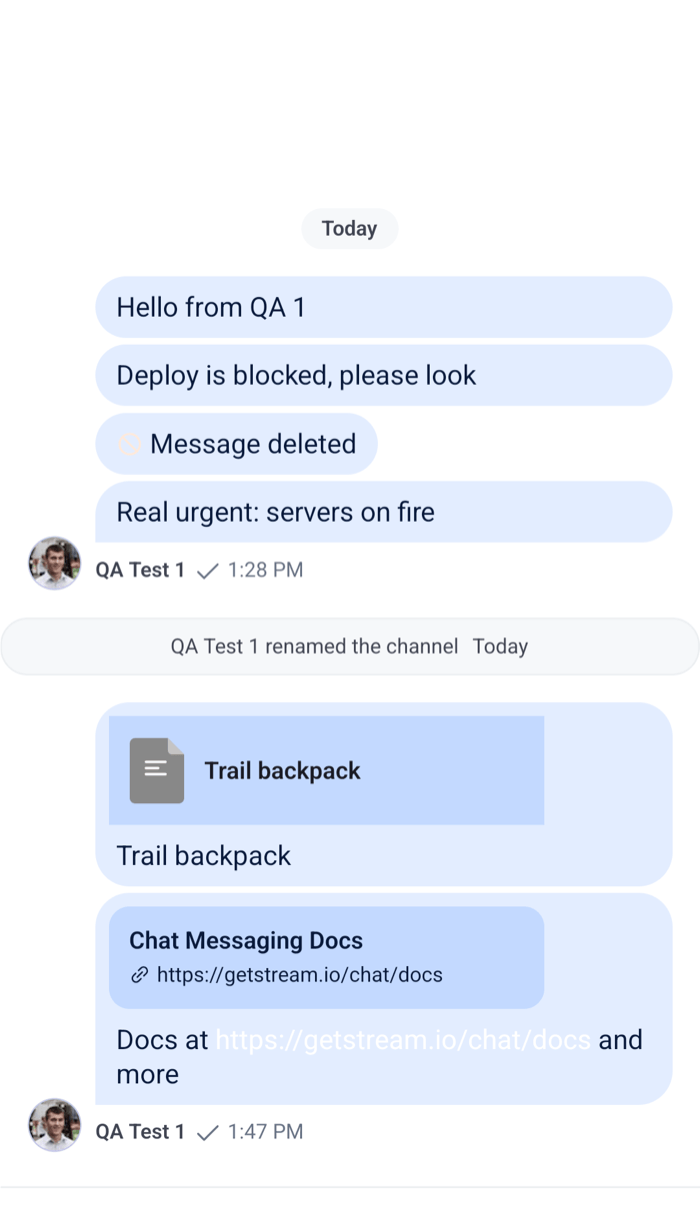
Both schemes now read correctly, with the outgoing side running against each one:
textLinkandtextSecondarychange only inside the user's own messages, so links and secondary text on incoming messages keep the scheme's colors.buttonSecondaryTextrecolors the poll buttons, andcontrolPlaybackToggleText,chatWaveformBarandchatWaveformBarPlayingthe voice recording player.messageItemView.fileandmessageItemView.repliesare component styles. The reply count is colored withtextLink, but it sits below the bubble, on the list's background, so it gets a color that reads on that background, rather than the link color meant for the bubble.
How it applies:
- The list merges
myMessageThemeonce, and again when its content, the scheme or the app's theme changes, so a new object with the same content costs nothing.useMemokeeps the object stable anyway. - The merged theme wraps the whole row of an own message, so the date separator above a user's own message gets it too.
- Like any theme, the values are used as written. A
$-reference such as"$brand500"isn't resolved. Threaddoesn't inherit it fromChannel. Pass the same object to both.
Everything on one side
By default, the user's own messages are aligned to the right and everyone else's to the left. forceAlignMessages on Channel and Thread puts every message on one side, as many team chats do:
<Channel channel={channel} forceAlignMessages="left">The alignment changes, but the colors still follow the sender, so the user's own messages stay orange on the left. To make every bubble look the same, set the outgoing bubble and text tokens to the incoming ones' values.
A full-width bubble
A bubble is as wide as its content, and the text in it is at most 256 points wide. These component styles stretch every bubble across the width the avatar leaves, and let the text use all of it:
import type { DeepPartial, Theme } from "stream-chat-react-native";

// Pass the same object to OverlayProvider (value.style) and Chat (style).
export const fullWidthTheme: DeepPartial<Theme> = {
  messageItemView: {
    // The column that holds the bubble takes the rest of the row.
    contentContainer: { flex: 1 },
    // The bubble stretches across that column.
    bubbleWrapper: { alignSelf: "stretch" },
    bubbleContentContainer: { alignSelf: "stretch" },
    content: {
      // The text container's own style caps it at 256 points.
      textContainer: { maxWidth: "100%" },
    },
  },
}; |  |
contentContaineris the column next to the avatar that holds the bubble, the replies button, the reactions and the footer.bubbleWrapperandbubbleContentContainerwrap the bubble in it, and align it to the message's side by default.- Attachments keep their own widths inside the wider bubble. Image galleries take theirs from
messageItemView.gallery.maxWidthandgridWidth, both 256 by default, which a theme can raise. - A deleted message renders in its own component, which reads none of these keys, so it keeps its width.
Read more
- Theming: the tiers of tokens, component styles and dark mode.
- Theme object: every component key and its parts.
- Custom message: when a different look needs a different structure.