















Pin indicator
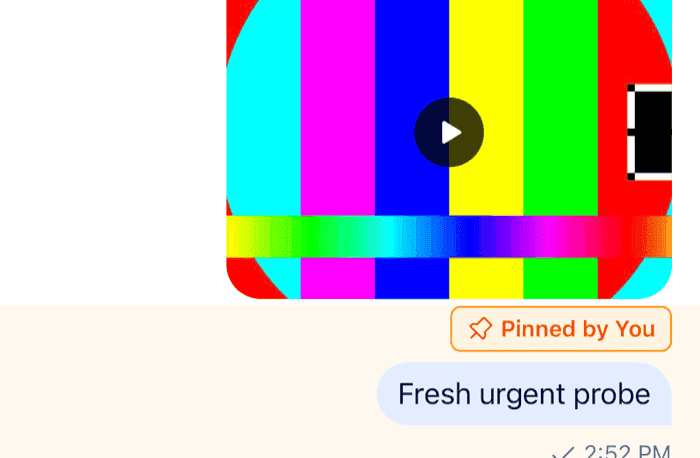
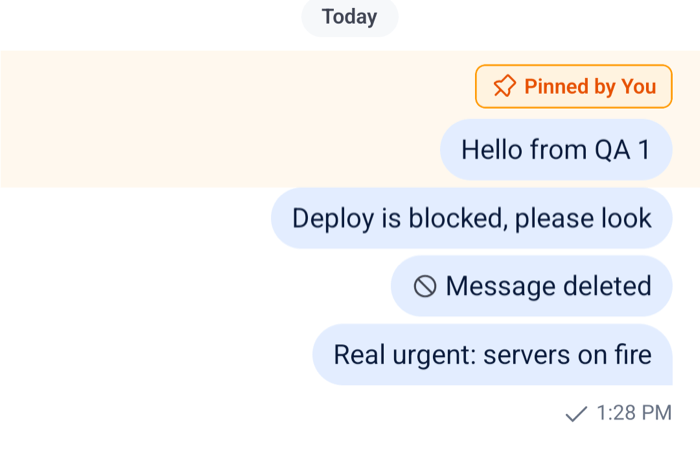
A pinned message shows a line with a pin icon above its bubble, "Pinned by" and the name of who pinned it, and its row in the list is highlighted. This UI cookbook changes how a pin looks, first with the theme, then with a component of your own that shows when the message was pinned and when the pin expires, and lets the user unpin it. How pinning works, and the list of a channel's pinned messages, are on Pinned messages.
Best practices
- Restyle the default indicator through the theme when only its look changes.
messageItemView.pinnedHeaderstyles the line, andbackgroundCoreHighlightcolors the row. - Replace
MessagePinnedHeaderwhen the indicator needs more data or an action. It renders inside the message, so it reads the message fromuseMessageContext(). - Give the indicator a background of its own when you change its colors. The message menu shows the message, with its indicator, over a dimmed backdrop.
- Offer Unpin only to users with the
pin-messagecapability. The pin handler doesn't check it, and the server rejects the request from a user without it. - Keep the indicator to one short line, so it doesn't push the message content around.
Restyling the default indicator
The default indicator is a row with the Pin icon and a label. messageItemView.pinnedHeader.container styles the row, and messageItemView.pinnedHeader.label the label. This theme turns the indicator into an orange chip, and tints the highlight of the row to match, with values for each color scheme:
import type { PropsWithChildren } from "react";
import { useColorScheme } from "react-native";
import type { StreamChat } from "stream-chat";
import { Chat, OverlayProvider } from "stream-chat-react-native";
import type { DeepPartial, Theme } from "stream-chat-react-native";

const lightTheme: DeepPartial<Theme> = {
  messageItemView: {
    pinnedHeader: {
      container: {
        backgroundColor: "#FFF3E0",
        borderColor: "#FF9800",
        borderRadius: 6,
        borderWidth: 1,
        marginBottom: 2,
        paddingHorizontal: 8,
      },
      label: { color: "#E65100" },
    },
  },
  semantics: { backgroundCoreHighlight: "#FFF8EE" },
};

const darkTheme: DeepPartial<Theme> = {
  messageItemView: {
    pinnedHeader: {
      container: {
        backgroundColor: "#3E2200",
        borderColor: "#FFA726",
        borderRadius: 6,
        borderWidth: 1,
        marginBottom: 2,
        paddingHorizontal: 8,
      },
      label: { color: "#FFB74D" },
    },
  },
  semantics: { backgroundCoreHighlight: "#2A1A05" },
};

export const App = ({
  children,
  client,
}: PropsWithChildren<{ client: StreamChat }>) => {
  const scheme = useColorScheme();
  const theme = scheme === "dark" ? darkTheme : lightTheme;

  return (
    <OverlayProvider value={{ style: theme }}>
      <Chat client={client} style={theme}>
        {children}
      </Chat>
    </OverlayProvider>
  );
}; |  |
- Each style is spread over the default one, so the properties you leave out keep their defaults.
MessageHeaderaligns the indicator to the side of the message, so the chip is as wide as its content. - The icon takes the label's color.
- The default label is
textPrimary, andtextOnAccentwhile the message menu shows the message. A color inpinnedHeader.labelwins over both, so the chip's background keeps it readable over the menu's backdrop too.
How the theme is passed, and how to switch it with the color scheme, is explained in Theming.
The highlighted row
Message paints backgroundCoreHighlight behind the whole row of a pinned message, and spreads messageItemView.targetedMessageContainer over it. The message the list jumps to gets the same highlight for 3 seconds, so both keys change that highlight too. No theme key applies to pinned rows only. Setting targetedMessageContainer to { backgroundColor: "transparent" } removes the highlight from pinned rows and from jumped-to messages alike.
A pinned message that has been deleted gets neither the highlight nor the indicator.
A custom pin indicator
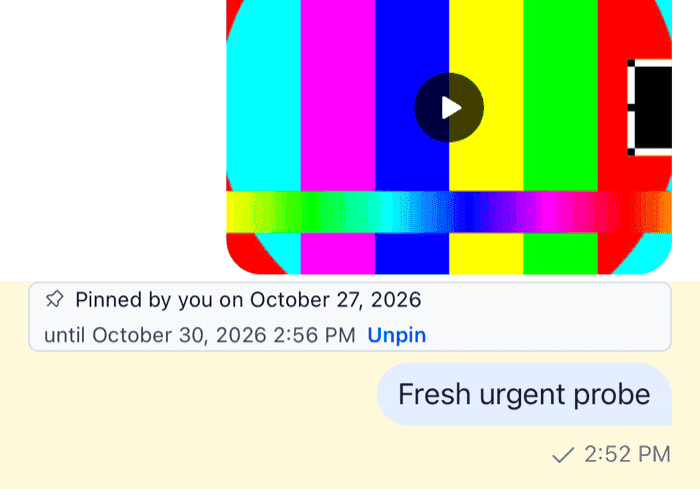
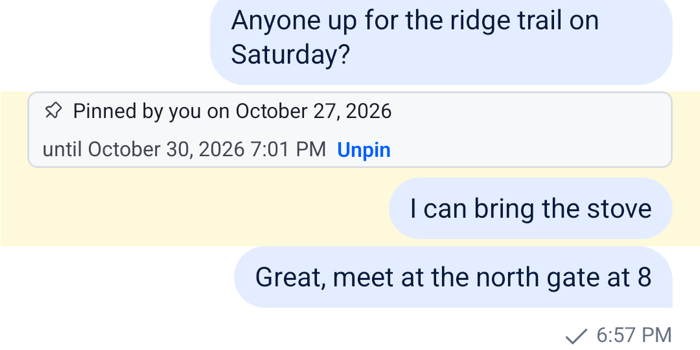
The theme can't add information. This indicator says who pinned the message and on which day, shows when the pin expires, and has an Unpin button:
import { Pressable, StyleSheet, Text, View } from "react-native";
import { convertTimestampToDate } from "stream-chat";
import {
  getDateString,
  useChatContext,
  useComponentsContext,
  useMessageActionHandlers,
  useMessageContext,
  useOwnCapabilitiesContext,
  useTheme,
  useTranslationContext,
} from "stream-chat-react-native";
import type { ComponentOverrides } from "stream-chat-react-native";

const PinnedByIndicator = () => {
  const { client } = useChatContext();
  const { message } = useMessageContext();
  const { handleTogglePinMessage } = useMessageActionHandlers();
  const { pinMessage } = useOwnCapabilitiesContext();
  const { icons } = useComponentsContext();
  const { tDateTimeParser } = useTranslationContext();
  const {
    theme: { semantics },
  } = useTheme();

  if (!message.pinned) return null;

  const pinnedBy = message.pinned_by;
  const pinnedByName =
    pinnedBy?.id === client.userId
      ? "you"
      : (pinnedBy?.name ?? pinnedBy?.id ?? "someone");
  const pinnedOn = getDateString({
    format: "LL",
    messageCreatedAt: convertTimestampToDate(message.pinned_at),
    tDateTimeParser,
  });
  const expiresAt = getDateString({
    format: "LLL",
    messageCreatedAt: convertTimestampToDate(message.pin_expires),
    tDateTimeParser,
  });

  return (
    <View
      style={[
        styles.chip,
        {
          backgroundColor: semantics.backgroundCoreSurfaceSubtle,
          borderColor: semantics.borderCoreDefault,
        },
      ]}
    >
      <icons.Pin height={12} stroke={semantics.textSecondary} width={12} />
      <Text style={[styles.text, { color: semantics.textPrimary }]}>
        Pinned by {pinnedByName}
        {pinnedOn ? ` on ${pinnedOn}` : null}
      </Text>
      {expiresAt ? (
        <Text style={[styles.text, { color: semantics.textSecondary }]}>
          until {expiresAt}
        </Text>
      ) : null}
      {pinMessage ? (
        <Pressable
          accessibilityLabel="Unpin message"
          accessibilityRole="button"
          hitSlop={8}
          onPress={() => void handleTogglePinMessage()}
        >
          <Text
            style={[styles.text, styles.unpin, { color: semantics.textLink }]}
          >
            Unpin
          </Text>
        </Pressable>
      ) : null}
    </View>
  );
};

export const pinOverrides: ComponentOverrides = {
  MessagePinnedHeader: PinnedByIndicator,
};

const styles = StyleSheet.create({
  chip: {
    alignItems: "center",
    borderRadius: 6,
    borderWidth: 1,
    flexDirection: "row",
    flexWrap: "wrap",
    gap: 6,
    marginBottom: 2,
    paddingHorizontal: 8,
    paddingVertical: 2,
  },
  text: { fontSize: 12 },
  unpin: { fontWeight: "600" },
}); |  |
Pass pinOverrides to a WithComponents around Channel and Thread. How it works:
- The default
MessageItemViewrendersMessageHeaderabove the bubble, andMessageHeaderrenders theMessagePinnedHeaderkey for a message withmessage.pinned. It passes the message asmessage, butPinnedByIndicatorreads it fromuseMessageContext(), which has the message after every update. pinned_by,pinned_atandpin_expiresare on the message. The timestamps are nanosecond numbers, soconvertTimestampToDate()turns them into dates; Data conventions explains why. It returnsundefinedfor a pin without an expiry, andgetDateString()returnsnullthen, so the "until" part isn't rendered.formatis a Day.js format, rendered in the user's language:LLis the date, such as "October 26, 2026", andLLLadds the time. The formatting syntax lists the tokens.pinMessagefromuseOwnCapabilitiesContext()is the user'spin-messagecapability in the channel, after anyoverrideOwnCapabilitiesonChannel. Without it, the button isn't rendered.- Pressing Unpin calls
handleTogglePinMessage()fromuseMessageActionHandlers(), the handler behind the menu's Pin and Unpin actions. It unpins a pinned message and shows a "Message unpinned" notification, or an error notification when the request fails. The request changes no local state, so the indicator stays until themessage.updatedevent brings the message back withpinned: false.
The chip has its own background, so it reads the same while the message menu shows the message over its dimmed backdrop.
The indicator only renders where MessageHeader does. The default MessageItemView leaves it out of a deleted message, and a custom message view renders whatever it wants for a pinned message, MessageHeader included. The row highlight comes from Message, so it stays with any message view.
Read more
- Pinned messages: hiding the Pin action from users who can pin.
- Actions: the other handlers
useMessageActionHandlers()returns. - Message UI components:
MessageHeaderand the other marks it renders above the bubble. - Permissions reference: the
pin-messagecapability and the roles that have it.