















Custom member actions
Tapping a member in channel details opens a sheet with the member's actions: Mute User, Block User, and Remove User for users who can change the channel's members. This UI cookbook adds a Send Direct Message action that opens a screen of your app, hides an action, and makes a tap on a member open a profile screen instead of the sheet. The default actions, with their ids and when they show, are listed in Member actions.
Best practices
- Start from
defaultItemsand add or filter items. Items you leave alone keep their behavior, confirmations included. - Check
context.isCurrentUserbefore you add an action that only makes sense for someone else, such as a direct message. - Call
closeModals()fromuseChannelDetailsContext()before you navigate away. It closes the full member list and the other modals channel details opened, so they don't stay on top of your screen. - Pass
getChannelMemberActionItemsthrough an override ofChannelMemberActionsSheet. The member section and the full member list both render the sheet from that key, so one override covers both. - Declare the override at module scope and read the navigation and
closeModalsinside it through hooks.WithComponentsreads its overrides once.
Add a Send Direct Message action
A member action item has an action, an Icon that receives IconProps, an id, a label and a type, standard or destructive. Pressing it runs action and closes the sheet. This one opens the app's new-message screen with the member's user:
import { useCallback } from "react";
import { useNavigation } from "@react-navigation/native";
import type { NativeStackNavigationProp } from "@react-navigation/native-stack";
import {
  asDynamicKey,
  ChannelMemberActionsSheet,
  useChannelDetailsContext,
} from "stream-chat-react-native";
import type {
  ChannelMemberActionsSheetProps,
  GetChannelMemberActionItems,
} from "stream-chat-react-native";

export type RootStackParamList = {
  NewDirectMessage: { userId: string };
  MemberProfile: { userId: string };
};

export const MemberActionsSheet = (props: ChannelMemberActionsSheetProps) => {
  const navigation =
    useNavigation<NativeStackNavigationProp<RootStackParamList>>();
  const { closeModals } = useChannelDetailsContext();

  const getChannelMemberActionItems = useCallback<GetChannelMemberActionItems>(
    ({ context, defaultItems }) => {
      const userId = context.member.user?.id;
      if (context.isCurrentUser || !userId) return defaultItems;

      return [
        {
          action: () => {
            closeModals();
            navigation.navigate("NewDirectMessage", { userId });
          },
          Icon: context.icons.MessageBubbleEmpty,
          id: "sendDirectMessage",
          label: context.t(
            asDynamicKey("myApp.channelDetails.sendDirectMessage.label"),
            "Send Direct Message",
          ),
          type: "standard",
        },
        ...defaultItems,
      ];
    },
    [closeModals, navigation],
  );

  return (
    <ChannelMemberActionsSheet
      {...props}
      getChannelMemberActionItems={getChannelMemberActionItems}
    />
  );
};
context holds what the default items were built from: the channel and the member, isCurrentUser, the member's isBlocked and userMuteActive state, ownCapabilities, the current user's capabilities in the channel, the handlers in channelActions and userActions, icons and t. The new item goes first, so it shows above the defaults. The screen it opens is your app's, and it creates or finds the direct message channel with the user.
Register it
Register the override with WithComponents inside ChannelDetailsContextProvider, and declare the overrides once:
import type { Channel as StreamChannel } from "stream-chat";
import {
  ChannelDetails,
  ChannelDetailsContextProvider,
  WithComponents,
} from "stream-chat-react-native";
import type { ComponentOverrides } from "stream-chat-react-native";
import { MemberActionsSheet } from "./MemberActionsSheet";

const overrides: ComponentOverrides = {
  ChannelMemberActionsSheet: MemberActionsSheet,
};

export const ChannelDetailsScreen = ({
  channel,
  onBack,
}: {
  channel: StreamChannel;
  onBack: () => void;
}) => (
  <ChannelDetailsContextProvider channel={channel}>
    <WithComponents overrides={overrides}>
      <ChannelDetails onBack={onBack} />
    </WithComponents>
  </ChannelDetailsContextProvider>
);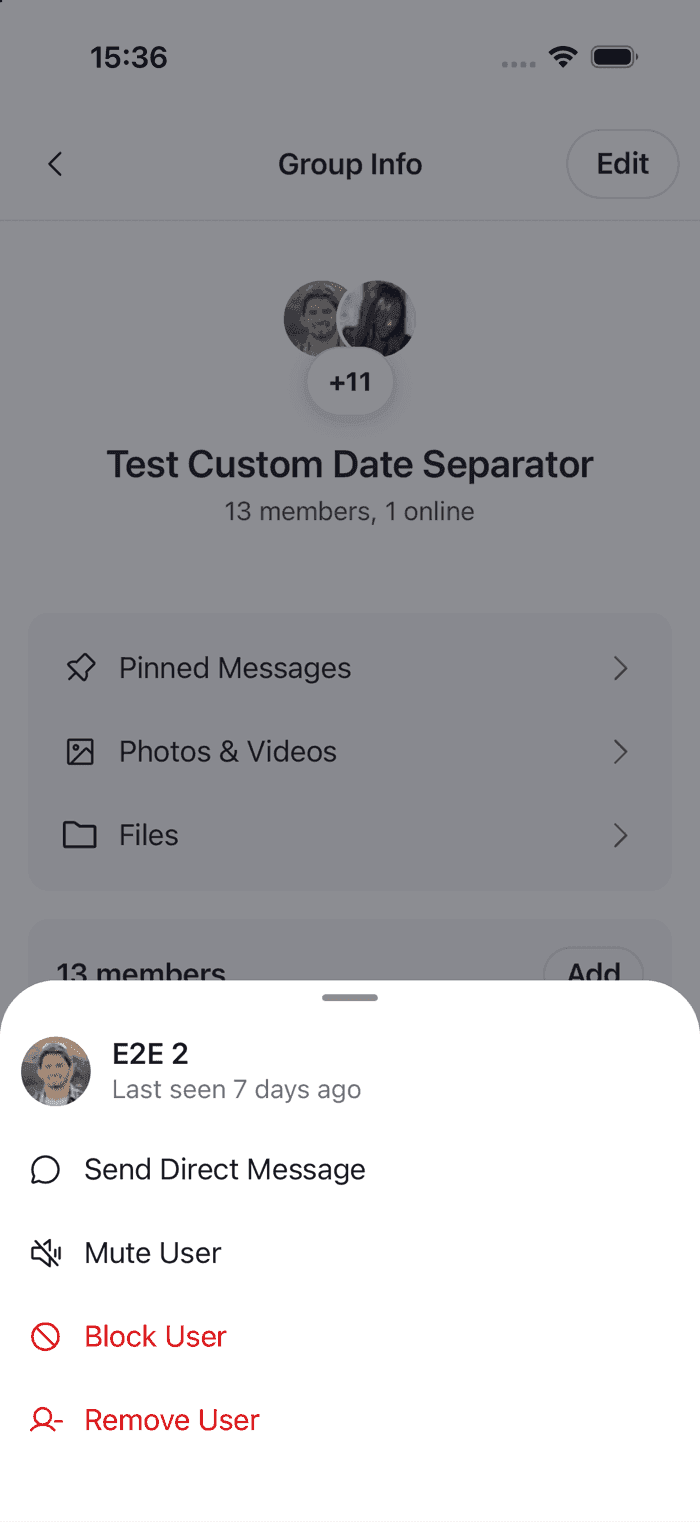 | 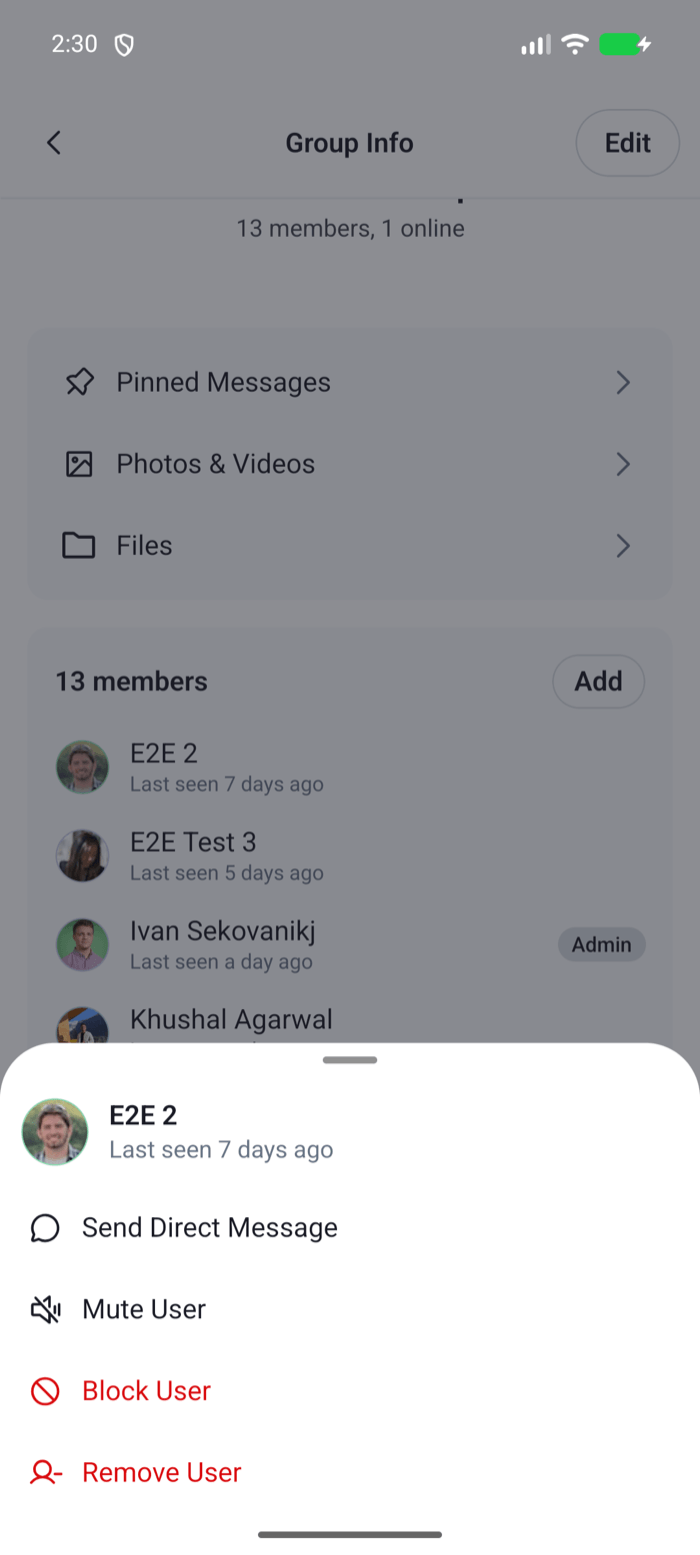 |
The sheet now shows Send Direct Message above the default actions for every member but the current user. Direct message channels have no members section, so the sheet opens only in group channels.
Hide an action
Filter defaultItems by id. The ids are muteUser, block and removeMember. This one leaves out Block User:
import type { GetChannelMemberActionItems } from "stream-chat-react-native";

export const getChannelMemberActionItems: GetChannelMemberActionItems = ({
  defaultItems,
}) => defaultItems.filter(({ id }) => id !== "block");
Pass it to ChannelMemberActionsSheet in the override, as above. An action list that ends up empty still opens the sheet, with the member and no actions.
Open a profile instead of the sheet
To open a screen when a member is tapped, override ChannelMemberItem, the member row, and replace its onPress. The member section and the full member list pass onPress to open the sheet, so a new onPress replaces the sheet in both places:
import { useNavigation } from "@react-navigation/native";
import type { NativeStackNavigationProp } from "@react-navigation/native-stack";
import {
  ChannelMemberItem,
  useChannelDetailsContext,
} from "stream-chat-react-native";
import type {
  ChannelMemberItemProps,
  ComponentOverrides,
} from "stream-chat-react-native";
import type { RootStackParamList } from "./MemberActionsSheet";

const MemberItem = (props: ChannelMemberItemProps) => {
  const navigation =
    useNavigation<NativeStackNavigationProp<RootStackParamList>>();
  const { closeModals } = useChannelDetailsContext();

  return (
    <ChannelMemberItem
      {...props}
      onPress={
        props.onPress
          ? (member) => {
              const userId = member.user?.id;
              if (!userId) return;
              closeModals();
              navigation.navigate("MemberProfile", { userId });
            }
          : undefined
      }
    />
  );
};

export const memberItemOverrides: ComponentOverrides = {
  ChannelMemberItem: MemberItem,
};
The override replaces onPress only when the row got one. The member sheet renders the same key at its top, without onPress, and that row stays a plain row. A row without onPress isn't pressable. Add ChannelMemberItem: MemberItem to the overrides of ChannelDetailsScreen.
With this override the sheet never opens, so its actions, mute, block and remove, are no longer reachable from channel details. Offer them on the profile screen if your app needs them, with useUserActions(user) for mute and block, and useChannelActions(channel).removeMembers to remove the member. Running channel and user actions describes both hooks.