















Quoted replies
What users get
A quoted reply answers a specific message without leaving the conversation: the reply carries a copy of the message it answers.
- Quoting. Reply in a message's menu, or swiping the message sideways, shows the message above the composer's input, titled "Reply to Ben", or "You" for the user's own message. The close button on the preview removes the quote. With a screen reader on, Reply also moves the focus to the input.
- The sent reply. The quoted message appears at the top of the reply's bubble, with its author, its text, and a thumbnail or icon for its attachments.
- Jumping. Tapping the quoted message jumps to the original in the list and highlights it, loading older messages when it isn't loaded.
- Staying current. If the quoted message is edited while the user is writing, the preview updates. If it's deleted, the quote is removed.
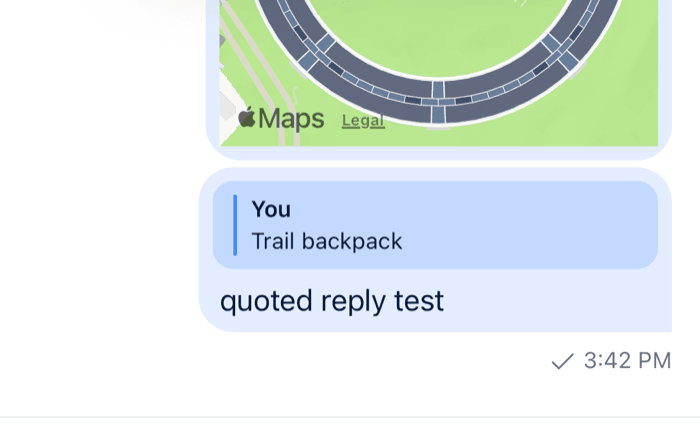 | 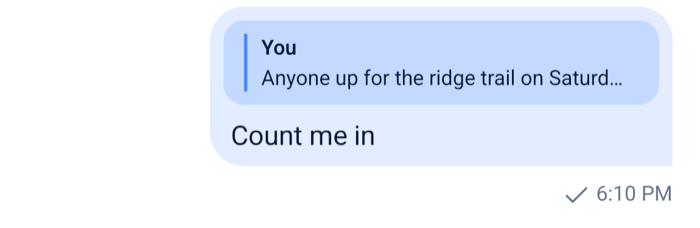 |
How it works across the layers
The user wants to answer Ben's question from earlier in "Design":
- They pick Reply on Ben's message. The action calls
setQuotedMessage(message)fromuseMessageComposerAPIContext(), which callsMessageComposer.setQuotedMessage(message)on the composer they type in: the channel's, or the thread's inside aThread. Swiping the message does the same throughsetQuotedMessagefrom the message context. - The composer keeps the message in its state as
quotedMessage.MessageInputHeaderViewreads it and rendersReplywithmode='reply'above the input. - The user sends their reply. The composer adds
quoted_message_idto the request, and a copy of the quoted message to the local message, so the reply shows the quote while it's sending. - In the message list,
MessageContentrendersReplyformessage.quoted_message. Tapping it callsgoToMessage(id), which callsMessagePaginator.jumpToMessage()on the list's message paginator.
While a message is quoted, commands of the moderation set are disabled in the composer. A draft keeps its quote, and restoring the draft brings it back. Removing the quote is MessageComposer.setQuotedMessage(null). While the user edits a message, the composer shows the edit preview instead of the quote.
The composer's state and its parts are on Message composer, and the composer's previews on Message composer UI. How the list jumps to a message is on Message paginators.
Turning it on or off
Quoted replies are always available. Three things decide who can use them, and where:
- The
quote-messagecapability. Without it, the message menu leaves out Reply. The server derives it from the user's role and the channel type's settings, which includequotes. - Threads. The default menu leaves out Reply inside a
Thread, and on a thread reply shown in the channel. - Swiping. Swipe to reply is on by default, on every message except a deleted one, and doesn't check the capability. Turn it off with
enableSwipeToReply={false}onChannelandThread.
To hide quoting from users who have the capability, pass overrideOwnCapabilities={{ quoteMessage: false }} and enableSwipeToReply={false}.
Customizing
Quoting from your own control
Any component inside a Channel or Thread can quote a message through the composer:
import { Pressable, Text } from "react-native";
import type { LocalMessage } from "stream-chat";
import { useMessageComposer } from "stream-chat-react-native";

export const QuoteButton = ({ message }: { message: LocalMessage }) => {
  const composer = useMessageComposer();

  return (
    <Pressable onPress={() => composer.setQuotedMessage(message)}>
      <Text>Quote</Text>
    </Pressable>
  );
};
To put it in the message menu, add an action to the message actions; see Message actions.
Changing the swipe
customMessageSwipeActiononChannelandThreadreplaces what a swipe does. It receives{ channel, message }.messageSwipeToReplyHitSlopsets the area that starts the swipe.MessageSwipeContentis the override key for what shows beside the message while it's swiped, a reply icon by default.
Replacing the preview in the composer
Reply is an override key. It renders the composer's preview, with mode='reply' for a quote and mode='edit' for an edit, and the quote inside a sent message. Only the composer's preview receives onDismiss. This replacement keeps the default everywhere except the composer's quote:
import { Pressable, StyleSheet, Text, View } from "react-native";
import type { MessageComposerState } from "stream-chat";
import type { ReplyProps } from "stream-chat-react-native";
import {
  Reply,
  useMessageComposer,
  useStateStore,
  WithComponents,
} from "stream-chat-react-native";

const quoteSelector = (state: MessageComposerState) => ({
  quotedMessage: state.quotedMessage,
});

const CompactReply = (props: ReplyProps) => {
  const composer = useMessageComposer();
  const { quotedMessage } = useStateStore(composer.state, quoteSelector);

  if (props.mode !== "reply" || !props.onDismiss) return <Reply {...props} />;
  if (!quotedMessage) return null;

  return (
    <View style={styles.row}>
      <Text numberOfLines={1} style={styles.title}>
        Replying to {quotedMessage.user?.name ?? "a message"}
      </Text>
      <Pressable onPress={props.onDismiss}>
        <Text>Cancel</Text>
      </Pressable>
    </View>
  );
};

const styles = StyleSheet.create({
  row: { flexDirection: "row", gap: 8, padding: 8 },
  title: { flex: 1 },
});

export const App = () => (
  <WithComponents overrides={{ Reply: CompactReply }}>
    {/* the rest of the app */}
  </WithComponents>
);
Replacing the quote in a message
Inside a message, a Reply replacement reads the message from useMessageContext(). Its quoted_message is the quote, and goToMessage jumps to the original in the list the message is in, the channel's or the thread's:
import { Pressable, Text } from "react-native";
import type { ReplyProps } from "stream-chat-react-native";
import {
  Reply,
  useMessageContext,
  WithComponents,
} from "stream-chat-react-native";

const QuoteLine = (props: ReplyProps) => {
  const { goToMessage, message } = useMessageContext();
  const quoted = message?.quoted_message;

  // Outside a message, this is the composer's preview: keep the default.
  if (!message) return <Reply {...props} />;
  if (!quoted) return null;

  return (
    <Pressable onPress={() => goToMessage?.(quoted.id)}>
      <Text numberOfLines={1}>
        {quoted.user?.name}: {quoted.text}
      </Text>
    </Pressable>
  );
};

export const App = () => (
  <WithComponents overrides={{ Reply: QuoteLine }}>
    {/* the rest of the app */}
  </WithComponents>
);
The default bubble makes the quote pressable around Reply, so a replacement that renders its own Pressable handles the tap first. The jump itself is explained on Message paginators.
Reference
- State: Message composer and the MessageComposer API.
- UI: Message composer UI, Message list UI and Overriding components.
- Props: Channel, Composer UI components and Message UI components.
- Hooks: Composer hooks.