















Polls
A poll is a question with options that members of a channel vote on. This page covers creating a poll in the composer, how votes reach every client, and the components that render a poll in a message.
What users get
The user opens the attachment picker and taps the poll button. A sheet asks for the question and the options, which they can drag to reorder. They can also allow more than one vote (with a maximum), make the voting anonymous, let others suggest options, and let them add comments. They tap the send button in the sheet's header, and the poll appears in the channel as a message.
Bob taps the circle next to an option. His vote shows at once, with the number of votes and the avatars of the latest voters next to each option, and a bar under it. Below the options, everyone sees View Results. As the poll's creator, the user also sees End Vote. Everyone sees the actions the user allowed while the poll is open, Suggest an option and Add a comment, and View 2 comments once there are comments. A poll with more than five options shows the first five and a "+3 More Options" button that opens the full list. The buttons other than End Vote open their screens in a modal.
In the channel list, and in a reply that quotes it, a poll message shows the poll's question.
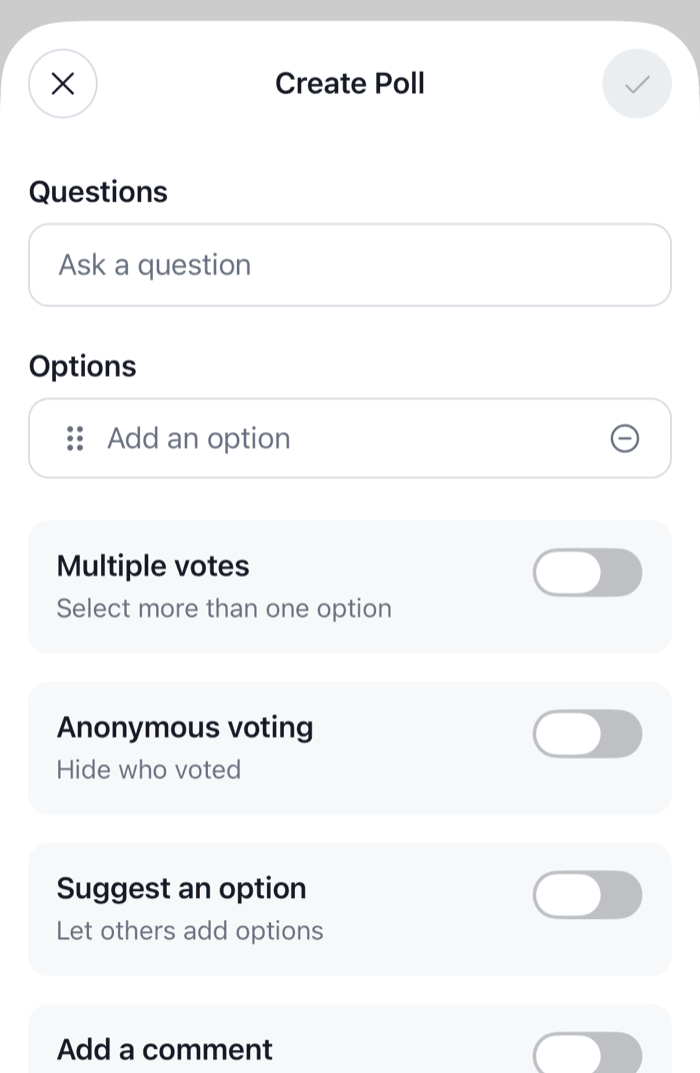 | 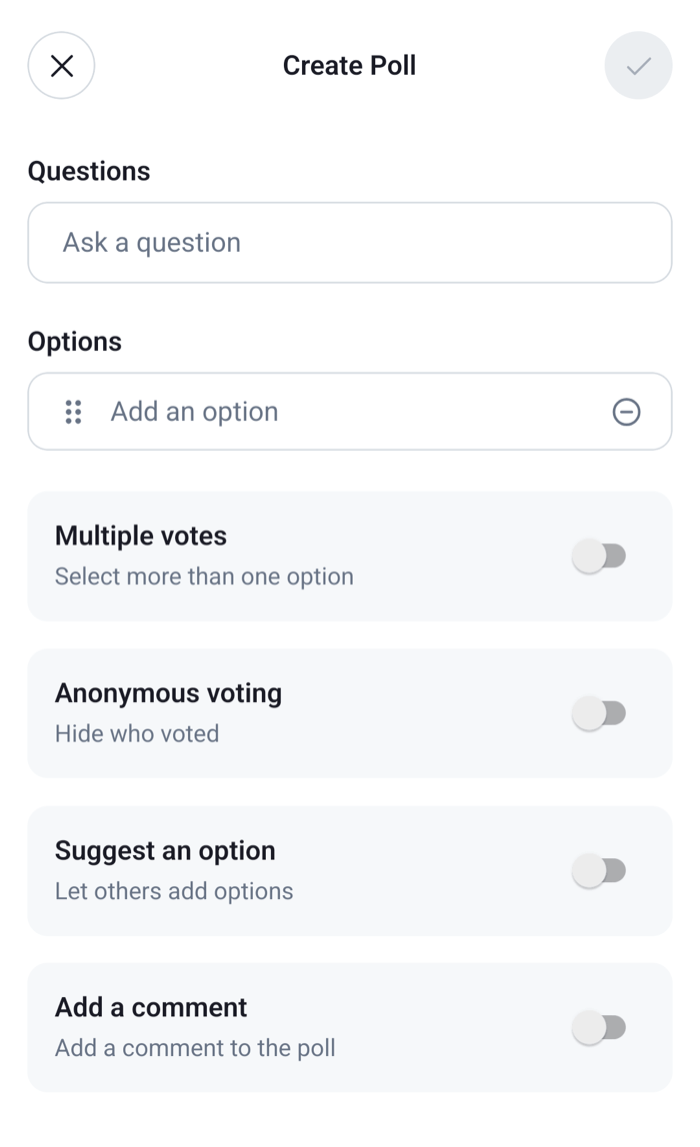 |
How it works across the layers
- State. The composer's
pollComposerholds the poll being created. Once created, the poll is aPollobject kept inclient.polls, one per poll, with its data inpoll.state. The message only refers to it, throughmessage.poll_id. - UI. The poll button of the attachment picker opens
CreatePoll. Each message with a poll rendersPoll, which renders the question, the options and the buttons. - Layout. Not involved.
Creating a poll
- Tapping the poll button opens the creation sheet,
CreatePollin aPollModal. Each field writes tomessageComposer.pollComposerwithPollComposer.updateFields(), which validates the fields as the user types: the question is required, options can't be empty or repeat each other, and the maximum number of votes is a number from 2 to 10. - The send button in the header is enabled when
pollComposer.canCreatePollistrue. - Sending calls
MessageComposer.createPoll(), which creates the poll on the server throughclient.polls.createPoll()and sets the composer'spollId. - Then the composer sends a message that carries only the poll. Text the user typed in the composer stays there for their next message.
MessageComposer.createPoll() publishes an api:poll:create:failed notification when the request fails, and throws, so nothing is sent and the sheet stays open. Closing the sheet resets pollComposer. Message composer shows the same two steps in code.
Voting and keeping the poll current
client.polls keeps one Poll for each poll id. It fills from every loaded message that carries a poll, and from new ones as they arrive. Poll events (poll.updated, poll.closed, poll.vote_casted, poll.vote_changed, poll.vote_removed) update the matching Poll, so every message that shows it re-renders.
Tapping an option toggles Bob's vote: Poll.castVote(optionId, messageId), or Poll.removeVote(voteId, messageId) when he has voted for it already. The vote shows in poll.state before the server answers, and is undone if the request fails. Poll.close() works the same way. When Bob has reached max_votes_allowed, Poll.castVote() publishes a notification instead of voting. What's optimistic and what isn't has the details.
poll.state holds the poll's data, such as vote_counts_by_option, and a few values derived from it: ownVotesByOptionId (Bob's votes), ownAnswer (his comment) and maxVotedOptionIds (the leading options). Read it from there, not from message.poll, which is only the copy that came with the message.
Rendering a poll
MessageContent reads the poll with client.polls.fromState(message.poll_id) and renders <Poll message={message} poll={poll} />. Poll provides PollContext and renders PollContent:
PollHeader: the question, and how many options can be chosen, or "Poll has ended".- A
PollOptionfor each of the first five options, with itsVoteButton, the vote count, the latest voters and a bar.ShowAllOptionsButtonopens the full list,PollAllOptionsContent, when there are more. PollButtons:ViewResultsButton,EndVoteButton,SuggestOptionButton,AddCommentButtonandShowAllCommentsButton. Each one other thanEndVoteButtonopens its screen in aPollModal:PollResultsContent,PollAnswersListContent, or a dialog for a new option or a comment. In the results, an option with more than five votes has a Show All button, which opensPollOptionFullResultsContent.
Each button shows only when it applies. Voting needs the cast-poll-vote capability and an open poll. End Vote is for the poll's creator while the poll is open. Suggest an option and Add a comment need an open poll that allows them. View Results always shows.
Turning it on or off
Polls are on by default. Two sides decide:
- The client:
messageComposer.polls.enabled,trueby default. - The server: the channel type's
pollssetting. Creating a poll also needs the user'ssend-pollcapability.
To turn poll creation off in every composer:
client.config.set({
  messageComposer: { polls: { enabled: false } },
});
hasCreatePoll={false} on Channel hides the poll button for that channel only. Messages that already carry a poll still render it. The attachment picker offers polls only in channels, not in threads. Until the channel's server settings arrive, the button follows the client setting alone. Configuration lists every setting both sides decide.
Customizing
Replace part of the poll
The poll's parts are override keys: PollContent, which has no default, PollHeader, PollButtons, PollAllOptionsContent, PollResultsContent, PollAnswersListContent, PollOptionFullResultsContent and CreatePollContent. A replacement reads the poll from usePollContext() and the state with usePollState(), or subscribes to poll.state itself. This header shows the question and the number of votes:
import { StyleSheet, Text, View } from "react-native";
import type { PollState } from "stream-chat";
import { usePollContext, useStateStore } from "stream-chat-react-native";
import type { ComponentOverrides } from "stream-chat-react-native";

const headerSelector = ({ name, vote_count }: PollState) => ({
  name,
  voteCount: vote_count,
});

const PollHeaderWithVotes = () => {
  const { poll } = usePollContext();
  const { name, voteCount } = useStateStore(poll.state, headerSelector);

  return (
    <View style={styles.header}>
      <Text style={styles.name}>{name}</Text>
      <Text>{voteCount} votes</Text>
    </View>
  );
};

// Pass to `WithComponents`, declared once at module scope.
export const overrides: ComponentOverrides = {
  PollHeader: PollHeaderWithVotes,
};

const styles = StyleSheet.create({
  header: { gap: 2 },
  name: { fontWeight: "600" },
});
Change the buttons
PollButtons renders the buttons below the options. Each button is exported, and each one other than EndVoteButton takes onPress, which replaces opening its screen and receives { message, poll }. This replacement keeps View Results and End Vote, and opens the results on a screen of your own:
import { StyleSheet, View } from "react-native";
import type { LocalMessage, Poll } from "stream-chat";
import { EndVoteButton, ViewResultsButton } from "stream-chat-react-native";

export const makePollButtons =
  (openResults: (params: { message: LocalMessage; poll: Poll }) => void) =>
  () => (
    <View style={styles.buttons}>
      <ViewResultsButton onPress={openResults} />
      <EndVoteButton />
    </View>
  );

const styles = StyleSheet.create({
  buttons: { gap: 8 },
});
Create the component once, for example with your navigation's navigate call, and register it as the PollButtons override. ShowAllOptionsButton, SuggestOptionButton, AddCommentButton and ShowAllCommentsButton take onPress the same way. A screen of your own renders the SDK's PollResults with the message and poll it receives, inside the same Channel so its contexts are there. The Custom poll flow UI cookbook moves every poll screen into a navigation stack.
Create polls from your own UI
openPollCreationDialog on Channel replaces the creation sheet. The poll button calls it with { sendMessage }. Your UI fills the composer's pollComposer, creates the poll, and sends it. MessageComposer.createPoll() throws when the request fails, and returns without creating a poll when the form isn't valid, so send only once pollId is set. Otherwise MessageComposer.send() sends whatever text is in the composer, without the poll:
import type { MessageComposer } from "stream-chat";

export const createAndSendPoll = async (
  composer: MessageComposer,
  question: string,
  answers: string[],
) => {
  await composer.pollComposer.updateFields({
    data: {
      name: question,
      options: answers.map((text, index) => ({ id: `option-${index}`, text })),
    },
  });
  if (!composer.pollComposer.canCreatePoll) return false;

  try {
    await composer.createPoll();
  } catch {
    // The composer has published `api:poll:create:failed`.
    return false;
  }
  if (!composer.pollId) return false;

  await composer.send();
  return true;
};
Pass it the composer the poll button belongs to: channel.messageComposer, or useMessageComposer() inside the channel's screen. To keep the SDK's sheet and change only its form, override CreatePollContent. useCreatePollContentContext() gives it createAndSendPoll() and closePollCreationDialog(). Of the default form's parts, the SDK exports CreatePollOptions and MultipleVotesSettings, and the question field and the header aren't exported.
Validate the fields
The poll composer's state middleware checks the question, the options and the maximum number of votes as the user types and leaves each field. To add a check of your own or change a built-in one, replace that middleware with one built by createPollComposerStateMiddleware({ processors, validators }), as Poll validators and processors shows.
Text and translations
The poll's copy has keys under poll, such as poll.viewResults.label and poll.endVote.label, and the creation sheet's under poll.createPoll. Validation errors are keyed by their POLL_COMPOSER_VALIDATION_CODE. See Localization.
Reference
- Poll components:
Poll, its parts, the creation sheet andPollContext. - Poll hooks:
usePollContext,usePollStateand the other poll hooks. - MessageComposer API:
pollComposer,createPoll()andsend(). - Configuration tree:
messageComposer.polls. - Attachments and uploads: the attachment picker that opens the creation sheet.
- Custom poll flow: the poll's screens in a navigation stack.