















Custom poll flow
The SDK opens a poll's screens, its results, its comments and the creation form, in modals of its own. This UI cookbook moves them into your navigation: each one becomes a screen of a stack, so it has the app's transitions and the back button and gestures of the platform. What a poll is made of, and its override keys, are explained in Polls.
Best practices
- Keep the poll screens inside the channel's
Channel. The results read the user's capabilities from it, and the creation form writes to the channel's composer, so a screen outside it throws. - Pass ids in the route params, the message's and the poll's, and look the objects up on the screen. Navigation state stays serializable.
- Replace only the buttons that open a screen.
ViewResultsButton,ShowAllCommentsButtonand the other buttons takeonPress, which replaces opening the modal and receives themessageand thepoll. - Reuse the SDK's screen contents:
PollResults,PollAnswersList,CreatePollandPollModalHeaderrender what the modals render. - Polls must be on for the channel type; see Turning it on or off.
Where the poll screens go
Channel has to be around every poll screen, and the poll screens have to be screens of a navigator. So the channel screen holds a stack of its own, and Channel wraps that stack through the navigator's layout prop:
flowchart TD
  App["App stack: Channel screen"] --> ChannelComponent["Channel (the stack's layout)"]
  ChannelComponent --> Messages["Messages: MessageList and MessageComposer"]
  ChannelComponent --> Results["PollResults"]
  ChannelComponent --> Comments["PollComments"]
  ChannelComponent --> Create["CreatePoll"]
layout renders around the screens of the stack, and receives the stack's own navigation. Channel gets it there, so its openPollCreationDialog can push the creation screen.
The channel screen with its poll screens
import { useEffect } from "react";
import { StyleSheet, View } from "react-native";
import { useHeaderHeight } from "@react-navigation/elements";
import { useNavigation } from "@react-navigation/native";
import {
  createNativeStackNavigator,
  type NativeStackNavigationProp,
  type NativeStackScreenProps,
} from "@react-navigation/native-stack";
import type { LocalMessage, Poll } from "stream-chat";
import {
  AddCommentButton,
  Channel,
  CreatePoll,
  EndVoteButton,
  MessageComposer,
  MessageList,
  PollAnswersList,
  PollModalHeader,
  PollResults,
  ShowAllCommentsButton,
  SuggestOptionButton,
  useChannel,
  useChatContext,
  useMessageInputContext,
  useTranslationContext,
  ViewResultsButton,
  WithComponents,
} from "stream-chat-react-native";
import type { ComponentOverrides } from "stream-chat-react-native";

export type RootStackParamList = {
  Channel: { cid: string };
};

type PollParams = { messageId: string; pollId: string };

type ChannelStackParamList = {
  CreatePoll: undefined;
  Messages: undefined;
  PollComments: PollParams;
  PollResults: PollParams;
};

const ChannelStack = createNativeStackNavigator<ChannelStackParamList>();

// The buttons under every poll: results and comments open screens of the stack.
const PollButtonsWithScreens = () => {
  const navigation =
    useNavigation<NativeStackNavigationProp<ChannelStackParamList>>();
  const toParams = ({
    message,
    poll,
  }: {
    message: LocalMessage;
    poll: Poll;
  }) => ({
    messageId: message.id,
    pollId: poll.id,
  });

  return (
    <View style={styles.buttons}>
      <ViewResultsButton
        onPress={(target) =>
          navigation.navigate("PollResults", toParams(target))
        }
      />
      <EndVoteButton />
      <SuggestOptionButton />
      <AddCommentButton />
      <ShowAllCommentsButton
        onPress={(target) =>
          navigation.navigate("PollComments", toParams(target))
        }
      />
    </View>
  );
};

// Declared once: WithComponents reads its overrides when it mounts.
const overrides: ComponentOverrides = { PollButtons: PollButtonsWithScreens };

// The poll's message and poll, looked up from the route's ids.
const usePollFromParams = ({ messageId, pollId }: PollParams) => {
  const { client } = useChatContext();
  const channel = useChannel();

  return {
    message: channel.messagePaginator.getItem(messageId),
    poll: client.polls.fromState(pollId),
  };
};

const MessagesScreen = () => (
  <>
    <MessageList />
    <MessageComposer />
  </>
);

const PollResultsScreen = ({
  navigation,
  route,
}: NativeStackScreenProps<ChannelStackParamList, "PollResults">) => {
  const { t } = useTranslationContext();
  const { message, poll } = usePollFromParams(route.params);

  if (!message || !poll) return null;

  return (
    <View style={styles.screen}>
      <PollModalHeader
        onPress={() => navigation.goBack()}
        title={t("poll.results.title", "Poll Results")}
      />
      <PollResults message={message} poll={poll} />
    </View>
  );
};

const PollCommentsScreen = ({
  navigation,
  route,
}: NativeStackScreenProps<ChannelStackParamList, "PollComments">) => {
  const { t } = useTranslationContext();
  const { message, poll } = usePollFromParams(route.params);

  if (!message || !poll) return null;

  return (
    <View style={styles.screen}>
      <PollModalHeader
        onPress={() => navigation.goBack()}
        title={t("poll.comments.title", "Poll Comments")}
      />
      <PollAnswersList message={message} poll={poll} />
    </View>
  );
};

const CreatePollScreen = ({
  navigation,
}: NativeStackScreenProps<ChannelStackParamList, "CreatePoll">) => {
  const { closeAttachmentPicker, sendMessage } = useMessageInputContext();

  // The poll button sits in the attachment picker, which stays open otherwise.
  useEffect(() => {
    closeAttachmentPicker();
  }, [closeAttachmentPicker]);

  return (
    <View style={styles.screen}>
      <CreatePoll
        closePollCreationDialog={() => navigation.goBack()}
        sendMessage={sendMessage}
      />
    </View>
  );
};

export const ChannelScreen = ({
  route,
}: NativeStackScreenProps<RootStackParamList, "Channel">) => {
  const { client } = useChatContext();
  const headerHeight = useHeaderHeight();
  const channel = client.channelManager.get(route.params.cid);

  if (!channel) return null;

  return (
    <WithComponents overrides={overrides}>
      <ChannelStack.Navigator
        layout={({ children, navigation }) => (
          <Channel
            channel={channel}
            keyboardVerticalOffset={headerHeight}
            openPollCreationDialog={() => navigation.navigate("CreatePoll")}
            topInset={headerHeight}
          >
            {children}
          </Channel>
        )}
        screenOptions={{ headerShown: false }}
      >
        <ChannelStack.Screen component={MessagesScreen} name="Messages" />
        <ChannelStack.Screen component={PollResultsScreen} name="PollResults" />
        <ChannelStack.Screen
          component={PollCommentsScreen}
          name="PollComments"
        />
        <ChannelStack.Screen component={CreatePollScreen} name="CreatePoll" />
      </ChannelStack.Navigator>
    </WithComponents>
  );
};

const styles = StyleSheet.create({
  buttons: { gap: 8 },
  screen: { flex: 1 },
}); |  |
Register ChannelScreen in the app's stack as the channel screen. Its native header stays above every screen of the inner stack, so Channel gets the header's height as keyboardVerticalOffset and topInset, as on Keyboard and insets.
What happens
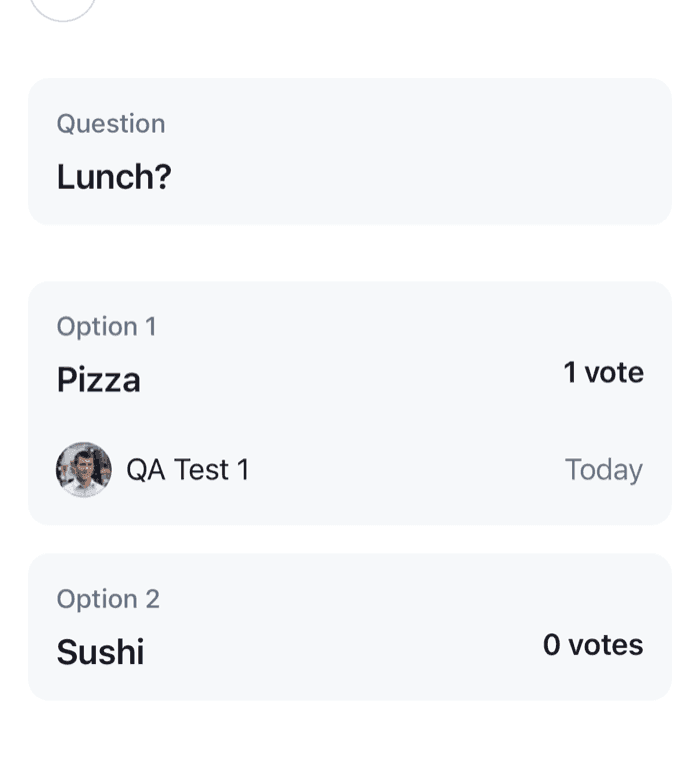
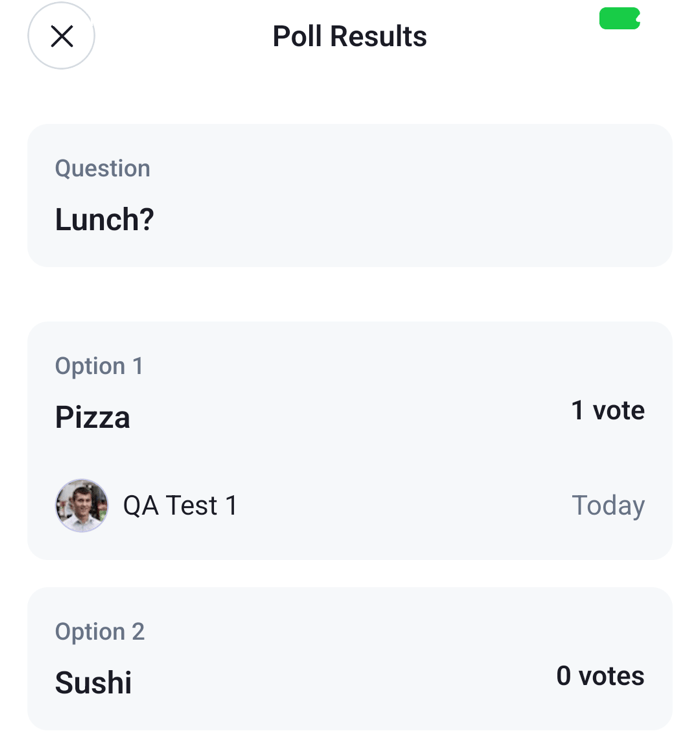
Viewing the results. The user taps View Results under a poll. PollButtonsWithScreens renders inside the message, which is inside the Messages screen, so useNavigation() returns the inner stack. The button calls its onPress with the poll's message and poll, and the stack pushes PollResults with their ids. The screen looks the message up in the channel's messagePaginator and the poll in client.polls, and renders PollResults. It follows poll.state, so new votes show while the screen is open. The back button of PollModalHeader, the system back gesture and the Android back button go back to the messages.
Reading the comments. View 2 comments works the same way, with PollAnswersList, which loads the comments page by page as the user scrolls.
Creating a poll. The user taps the poll button in the attachment picker. It calls openPollCreationDialog, which Channel received in the layout, and the stack pushes CreatePoll. The screen closes the attachment picker and renders the SDK's creation form with the sendMessage of the channel's composer. When they send, the form creates the poll, sends the message that carries it, and calls closePollCreationDialog, which goes back to the messages.
The buttons left as they are. End Vote, Suggest an option and Add a comment don't open a screen, so they keep their default behavior. ShowAllOptionsButton, under a poll with more than five options, isn't part of PollButtons; give it onPress through a PollContent of your own to move it too.
PollButtonsWithScreens replaces the buttons of every poll below the WithComponents, so it's registered around the stack that has the poll screens. A poll shown anywhere else, such as in a thread screen, needs a navigator with the same screens, or the default buttons.
To present the creation form as a sheet, give its screen presentation: "modal". On iOS, a native modal is a separate window; Chat in modals explains what that means for the SDK's overlays.
Going further
- A title of your own on the results. Replace the
PollResultsContentkey, which renders the results insidePollResults. It reads the poll withusePollState(), so the poll's name is at hand. The same key changes the results in the default modal. - The comments as a list of your own. Replace
PollAnswersListContent, and load the comments withusePollAnswersPagination(), which returnspollAnswers,loadMore,hasNextPageandloading. - The creation form as a form of your own. Replace
CreatePollContent, or skipCreatePolland fill the composer'spollComposeryourself, as Create polls from your own UI shows. - The look. The poll's parts have theme keys under
poll; see Theme object.