















Members and online status
This UI cookbook renders the members of the open channel with their online status, in a row of avatars above the message list. The row stays current as members come online, go offline, join or leave.
Best practices
- Read members from
channel.statewithuseChannelMembersState(channel). It subscribes to the store, so the component re-renders when the members change. - Pass
useChannelMembersStateapickfunction, declared at module scope, that returns the member fields you show. The members then update only when one of those fields changes, or when members join or leave. - Load the channel with presence, so the server sends presence changes. Without it,
onlineshows the value from when the channel loaded. - Don't add your own
user.presence.changedlistener. The client already writes each presence change into the members it holds. - Expect only some members in a large channel. A channel loads a limited number of members with its query. The member list of Channel details and members queries all of them.
Implementation
1. The members row
The component reads the channel from Channel with useChannel(), and its members with useChannelMembersState:
import { FlatList, StyleSheet, Text, View } from "react-native";
import type { ChannelMemberResponse } from "stream-chat";
import {
  useChannel,
  useChannelMembersState,
  UserAvatar,
  useTheme,
} from "stream-chat-react-native";
import type { ChannelMemberPick } from "stream-chat-react-native";

// The fields the row shows. Other changes to a member don't re-render it.
const pickShownFields: ChannelMemberPick = ({ user }) => ({
  image: user?.image,
  name: user?.name,
  online: user?.online,
});

const keyExtractor = (member: ChannelMemberResponse) =>
  member.user?.id ?? member.user_id ?? "";

const MemberItem = ({ member }: { member: ChannelMemberResponse }) => {
  const {
    theme: { semantics },
  } = useTheme();
  const { user } = member;
  if (!user) return null;

  const name = user.name ?? user.id;

  return (
    <View
      accessible
      accessibilityLabel={`${name}, ${user.online ? "online" : "offline"}`}
      style={styles.item}
    >
      <UserAvatar showOnlineIndicator={user.online} size="lg" user={user} />
      <Text
        numberOfLines={1}
        style={[styles.name, { color: semantics.textSecondary }]}
      >
        {name}
      </Text>
    </View>
  );
};

export const ChannelMembers = () => {
  const channel = useChannel();
  const members = useChannelMembersState(channel, pickShownFields);
  const {
    theme: { semantics },
  } = useTheme();

  return (
    <FlatList
      contentContainerStyle={styles.content}
      data={Object.values(members)}
      horizontal
      keyExtractor={keyExtractor}
      renderItem={({ item }) => <MemberItem member={item} />}
      showsHorizontalScrollIndicator={false}
      style={[styles.list, { borderBottomColor: semantics.borderCoreSubtle }]}
    />
  );
};

const styles = StyleSheet.create({
  content: { gap: 12, paddingHorizontal: 16, paddingVertical: 8 },
  item: { alignItems: "center", gap: 4, width: 56 },
  list: { borderBottomWidth: 1, flexGrow: 0 },
  name: { fontSize: 12 },
});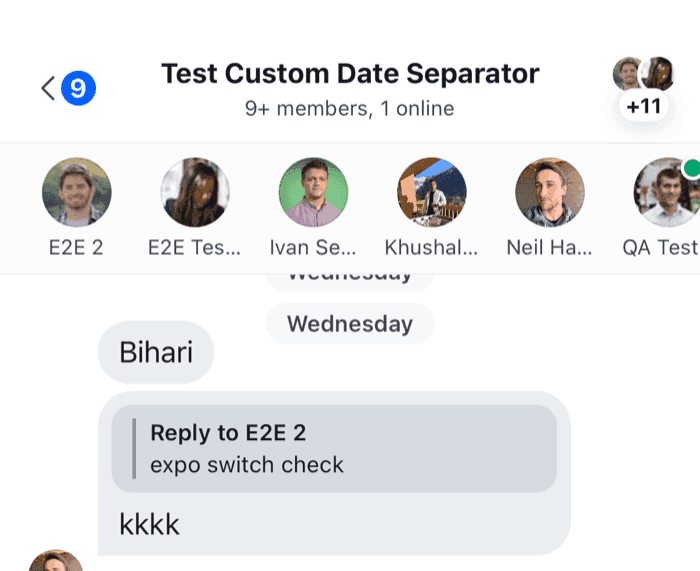 | 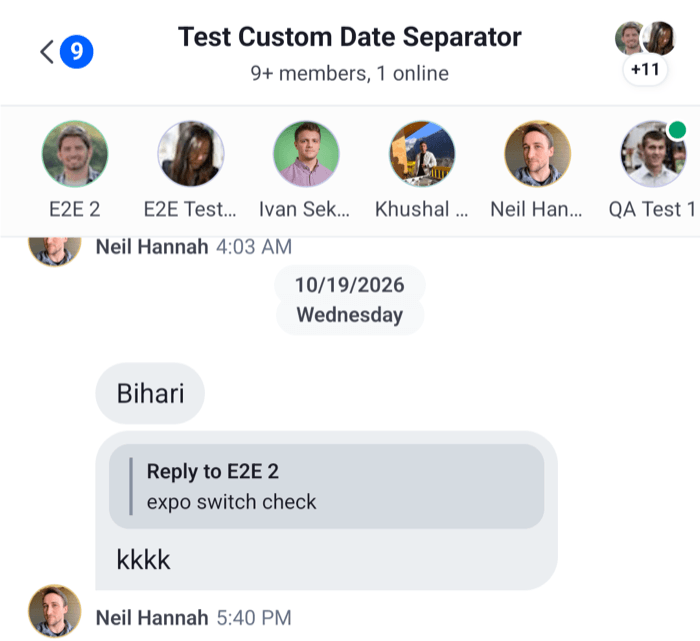 |
UserAvatar shows the user's image, or their initials, and with showOnlineIndicator the online dot the SDK's own avatars use. It draws no dot for a member who is offline. flexGrow: 0 keeps the horizontal list at the height of its row, so the message list below it takes the rest of the screen.
channel.state.members holds the loaded members by user id. Each member carries its user, with name, image, online and last_active. What channels and threads hold lists the rest of channel.state. For a status line such as "Last seen 10 minutes ago", useUserActivityStatus(user) returns the text the channel details screen shows.
2. Render it in the channel
Render it inside Channel, above the message list:
import type { Channel as StreamChannel } from "stream-chat";
import {
  Channel,
  MessageComposer,
  MessageList,
} from "stream-chat-react-native";
import { ChannelMembers } from "./ChannelMembers";

export const ChannelScreen = ({ channel }: { channel: StreamChannel }) => (
  <Channel channel={channel}>
    <ChannelMembers />
    <MessageList />
    <MessageComposer />
  </Channel>
);
Pass Channel the keyboardVerticalOffset and topInset your screen needs, as Keyboard and insets explains. The row is part of the screen's views, so it changes neither.
Real-time updates
The row updates by itself.
Example
Cleo, a member of the open channel, comes online:
- The server sends
user.presence.changedwith Cleo's user, because the client loaded a channel she's in with presence. - The client puts the new user object into Cleo's member in
channel.stateof every channel it holds with her. channel.statenotifies its subscribers.onlineis one of the picked fields, souseChannelMembersStatere-rendersChannelMemberswith Cleo online.
A member who joins, leaves or is updated changes the same store, through member.added, member.removed and member.updated, so the row follows those too.
The server sends presence changes only for channels loaded with presence. Ask for it where the channel is loaded:
import { ChannelPaginator } from "stream-chat";
import type { StreamChat } from "stream-chat";

export const watchWithPresence = async (client: StreamChat, userId: string) => {
  // A channel list: every channel it loads is watched with presence.
  const teamChannels = new ChannelPaginator({
    client,
    filters: { members: { $in: [userId] }, type: "team" },
    id: "team",
    requestOptions: { presence: true },
  });

  // A channel you watch yourself.
  const support = await client
    .channel("messaging", "support")
    .watch({ presence: true });

  return { support, teamChannels };
};
Channel.watch() sends nothing for a channel that's watched and loaded when it gets no options, or the same options as the last Channel.watch() that succeeded during the current watch. A channel list's query isn't such a call, so Channel.watch({ presence: true }) sends a request even for a channel a list already watches. Later calls with the same options send nothing while the watch lasts. Channel list paginators explains requestOptions, and User presence covers presence on the server.
A reconnect ends every watch. Connection recovery queries each registered channel list again with its own requestOptions, so a list with presence: true gets presence back. It reloads an open channel without presence, so for a channel no such list loads, run your Channel.watch({ presence: true }) again on connection.recovered; Connection lists what recovery reloads.
The SDK's member lists
The channel details screen shows members in two places, and they differ from this row:
- The members section shows the first five members from
channel.state.members, throughuseChannelMembersState, so it follows presence like this row. - The full member list, View all, queries every member from the server with a
ChannelMemberSearchSource, and searches them by name. It shows each member's status as the query returned it, and queries its first page again only when the member count changes.
Channel details and members explains both, and ChannelMemberItem, the row they render, is an override key.
Read more
- Channel details and members: the SDK's members section and member list.
- Channel header: the member and online counts in a header.
- Reading state in components:
useStateStoreand the hooks that wrap it.