















Location sharing
This UI cookbook adds location sharing to a chat app: a location tab in the attachment picker that shares the user's position once or live for a while, and a full-screen map that opens when a location in the list is tapped and follows a live location as it moves. The SDK sends the locations and keeps live ones current, but it doesn't read the device's position or render a map. What it provides, and what your app adds, is explained in Location sharing.
Best practices
- Ask for the location permission when the user wants to share, and say why. Handle a refusal with a message and a way to the system settings.
- Offer a few fixed durations for a live location, and show until when it runs. A live location is valid only for at least a minute.
- Give the sender a way to stop a live location early, on the map and in the message.
- Render
LiveLocationManagerProvideronce the user is connected. Without it, a live location is created but its position never changes. - Leave location sharing out of threads. The composer of a thread doesn't send locations.
Prerequisites
You need a working client and a channel screen with MessageList and MessageComposer, as in the Quick start. The examples use React Navigation; the Sample App and the Expo Messaging app have a full implementation.
Setup
Installing the packages
yarn add @react-native-community/geolocation react-native-maps@react-native-community/geolocationreads the device's position, once and as it changes.react-native-mapsrenders maps: Apple Maps on iOS and Google Maps on Android.
npx expo install expo-location react-native-mapsexpo-locationreads the device's position, once and as it changes.react-native-mapsrenders maps: Apple Maps on iOS and Google Maps on Android.
Permissions and the Google Maps key
On iOS, add NSLocationWhenInUseUsageDescription to Info.plist, with the reason the app shows the user. Add NSLocationAlwaysAndWhenInUseUsageDescription too if live locations should keep updating in the background.
On Android, add the permissions to android/app/src/main/AndroidManifest.xml:
<uses-permission android:name="android.permission.ACCESS_FINE_LOCATION" />
<uses-permission android:name="android.permission.ACCESS_COARSE_LOCATION" />
Google Maps on Android needs an API key for the Maps SDK for Android. Add it inside <application> in the same file:
<meta-data
  android:name="com.google.android.geo.API_KEY"
  android:value="YOUR_GOOGLE_MAPS_API_KEY" />
iOS uses Apple Maps and needs no key.
Configure the permission text with the expo-location config plugin, and the Google Maps key for Android, in app.json:
{
  "expo": {
    "plugins": [
      [
        "expo-location",
        {
          "locationWhenInUsePermission": "Allow $(PRODUCT_NAME) to share your location in chats."
        }
      ]
    ],
    "android": {
      "config": {
        "googleMaps": { "apiKey": "YOUR_GOOGLE_MAPS_API_KEY" }
      }
    }
  }
}
Rebuild the app after changing app.json. The expo-location docs list the plugin's options, including background location.
Keeping live locations current
Render LiveLocationManagerProvider inside Chat, once the user is connected, with a watchLocation function that reports the device's position. Live locations need the manager has the provider for both packages. While the user shares a live location, the manager sends this device's new positions to it, even when the share was started on another of the user's devices.
A location tab in the attachment picker
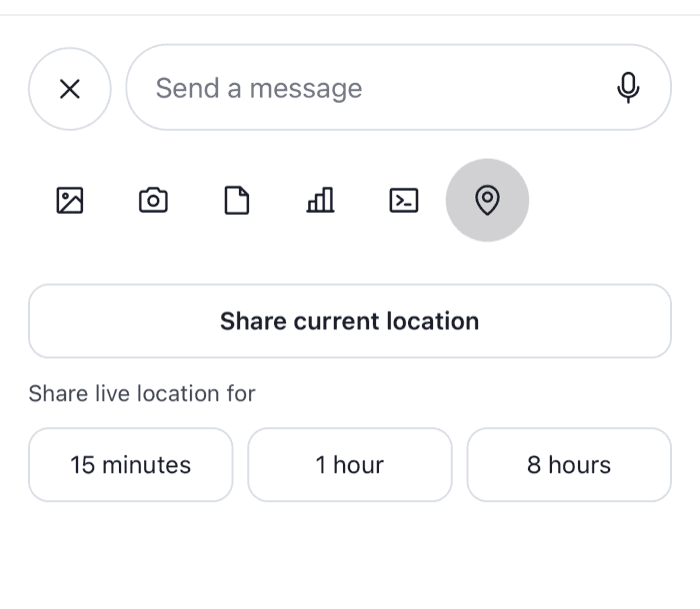
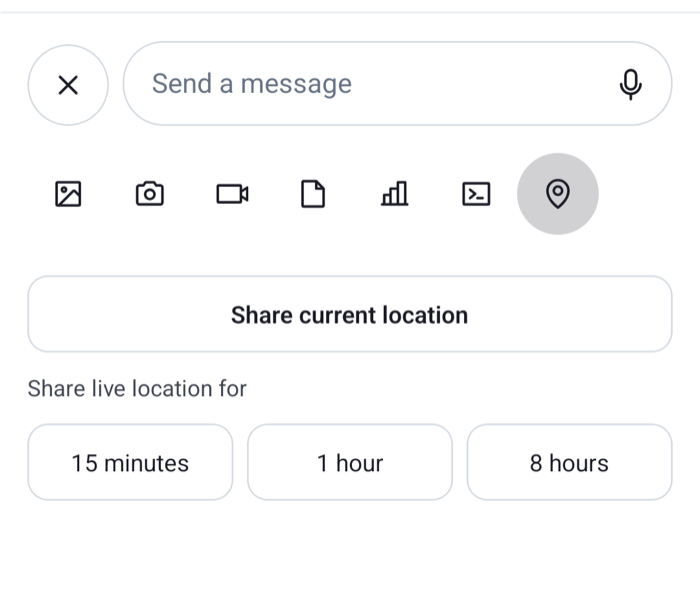
The attachment picker has a bar of buttons at its top and, below it, the content of the selected button. The AttachmentPickerSelectionBar key replaces the bar, and the AttachmentPickerContent key replaces the content. This sample adds a location button to the bar, and a content for it with three ways to share:
import { useRef, useState } from "react";
import { Linking, Pressable, StyleSheet, Text, View } from "react-native";
import Geolocation from "@react-native-community/geolocation";
import {
  AttachmentPickerContent,
  AttachmentTypePickerButton,
  CameraPickerButton,
  CommandsPickerButton,
  FilePickerButton,
  MediaPickerButton,
  PollPickerButton,
  useAttachmentPickerContext,
  useAttachmentPickerState,
  useComponentsContext,
  useMessageComposer,
  useMessageInputContext,
  useTheme,
  useThreadContext,
} from "stream-chat-react-native";
import type {
  AttachmentPickerContentProps,
  ComponentOverrides,
} from "stream-chat-react-native";

const LOCATION_PICKER = "location";

type Coords = { latitude: number; longitude: number };

// Asks for the permission the first time, then reads the position once.
const getCurrentCoords = () =>
  new Promise<Coords>((resolve, reject) =>
    Geolocation.getCurrentPosition(
      ({ coords }) =>
        resolve({ latitude: coords.latitude, longitude: coords.longitude }),
      reject,
      { enableHighAccuracy: true, timeout: 15000 },
    ),
  );

const LIVE_DURATIONS = [
  { label: "15 minutes", ms: 15 * 60 * 1000 },
  { label: "1 hour", ms: 60 * 60 * 1000 },
  { label: "8 hours", ms: 8 * 60 * 60 * 1000 },
];

const LocationPickerButton = () => {
  const { attachmentPickerStore } = useAttachmentPickerContext();
  const { selectedPicker } = useAttachmentPickerState();
  const { icons } = useComponentsContext();
  const { thread } = useThreadContext();

  // A thread's composer doesn't send locations.
  if (thread) return null;

  return (
    <AttachmentTypePickerButton
      Icon={icons.MapPin}
      onPress={() => attachmentPickerStore.setSelectedPicker(LOCATION_PICKER)}
      selected={selectedPicker === LOCATION_PICKER}
    />
  );
};

const SelectionBarWithLocation = () => {
  const {
    theme: { semantics },
  } = useTheme();

  return (
    <View
      style={[
        styles.bar,
        { backgroundColor: semantics.backgroundCoreElevation1 },
      ]}
    >
      <MediaPickerButton />
      <CameraPickerButton />
      <FilePickerButton />
      <PollPickerButton />
      <CommandsPickerButton />
      <LocationPickerButton />
    </View>
  );
};

const ShareLocationContent = ({ height }: AttachmentPickerContentProps) => {
  const messageComposer = useMessageComposer();
  const { closeAttachmentPicker } = useMessageInputContext();
  const {
    theme: { semantics },
  } = useTheme();
  const [sharing, setSharing] = useState(false);
  const [failed, setFailed] = useState(false);

  // Without `durationMs` the location is shared once; with it, it's live for that long.
  const share = async (durationMs?: number) => {
    setSharing(true);
    setFailed(false);
    try {
      const coords = await getCurrentCoords();
      messageComposer.locationComposer.setData({ ...coords, durationMs });
      await messageComposer.sendLocation();
      closeAttachmentPicker();
    } catch {
      setFailed(true);
    } finally {
      setSharing(false);
    }
  };

  const textColor = { color: semantics.textPrimary };

  return (
    <View
      style={[
        styles.content,
        { backgroundColor: semantics.backgroundCoreElevation1, height },
      ]}
    >
      <Pressable
        accessibilityRole="button"
        disabled={sharing}
        onPress={() => void share()}
        style={[styles.option, { borderColor: semantics.borderCoreDefault }]}
      >
        <Text style={[styles.optionTitle, textColor]}>
          Share current location
        </Text>
      </Pressable>
      <Text style={[styles.heading, { color: semantics.textSecondary }]}>
        Share live location for
      </Text>
      <View style={styles.durations}>
        {LIVE_DURATIONS.map(({ label, ms }) => (
          <Pressable
            accessibilityRole="button"
            disabled={sharing}
            key={label}
            onPress={() => void share(ms)}
            style={[
              styles.option,
              styles.duration,
              { borderColor: semantics.borderCoreDefault },
            ]}
          >
            <Text style={textColor}>{label}</Text>
          </Pressable>
        ))}
      </View>
      {failed ? (
        <Pressable
          accessibilityRole="button"
          onPress={() => void Linking.openSettings()}
        >
          <Text style={{ color: semantics.accentError }}>
            Your location couldn't be shared. Check that the app may use it in
            Settings.
          </Text>
        </Pressable>
      ) : null}
    </View>
  );
};

const PickerContentWithLocation = (props: AttachmentPickerContentProps) => {
  const { selectedPicker } = useAttachmentPickerState();

  // While the picker closes, no picker is selected: keep showing the last one.
  const lastPickerRef = useRef(selectedPicker);
  if (selectedPicker) lastPickerRef.current = selectedPicker;

  if (lastPickerRef.current === LOCATION_PICKER) {
    return <ShareLocationContent {...props} />;
  }

  return <AttachmentPickerContent {...props} />;
};

// Pass to WithComponents, declared once at module scope.
export const locationPickerOverrides: ComponentOverrides = {
  AttachmentPickerContent: PickerContentWithLocation,
  AttachmentPickerSelectionBar: SelectionBarWithLocation,
};

const styles = StyleSheet.create({
  bar: {
    alignItems: "center",
    flexDirection: "row",
    paddingBottom: 8,
    paddingHorizontal: 16,
  },
  content: { gap: 12, padding: 16 },
  duration: { flex: 1 },
  durations: { flexDirection: "row", gap: 8 },
  heading: { fontSize: 13 },
  option: {
    alignItems: "center",
    borderRadius: 12,
    borderWidth: 1,
    padding: 12,
  },
  optionTitle: { fontWeight: "600" },
}); |  |
Example
What happens when the user shares their location for an hour:
- They open the attachment picker and tap the pin button. It sets the picker's selected type to
"location", a type of your own;setSelectedPickertakes any string. PickerContentWithLocationsees the type and rendersShareLocationContent. For every other type it renders the SDK's content.- They tap "1 hour". The first time,
getCurrentPositionasks for the permission. Then it reads their position. LocationComposer.setData()stores the position and the duration in the channel's composer, andMessageComposer.sendLocation()sends a message that carries only the location, throughChannel.sendSharedLocation(). Text they typed in the composer stays there.- The picker closes. The message appears in the channel, and the
LiveLocationManagerstarts sending their new positions to it.
When the permission is refused, the position can't be read or the request fails, the content says so, and tapping the text opens the app's settings. A failed request also publishes a "Failed to share location" notification, which the channel's snackbar shows.
The location button works only in the attachment picker. With disableAttachmentPicker on Channel, the bar's buttons open the system pickers directly, and there is no content area for the location tab.
With Expo, read the position with expo-location instead, and keep the rest of the file:
import * as Location from "expo-location";

export const getCurrentCoords = async () => {
  const { status } = await Location.requestForegroundPermissionsAsync();
  if (status !== "granted") throw new Error("Location permission not granted");

  const { coords } = await Location.getCurrentPositionAsync({
    accuracy: Location.Accuracy.High,
  });
  return { latitude: coords.latitude, longitude: coords.longitude };
};
The location in a message
A message with a location renders the MessageLocation key, which has no default. Without one, the message shows nothing for the location. Show a location in a message has a map with react-native-maps, with "Live until" and a Stop sharing button for a live location. Register it with the overrides above:
<WithComponents overrides={{ ...locationPickerOverrides, ...messageLocationOverrides }}>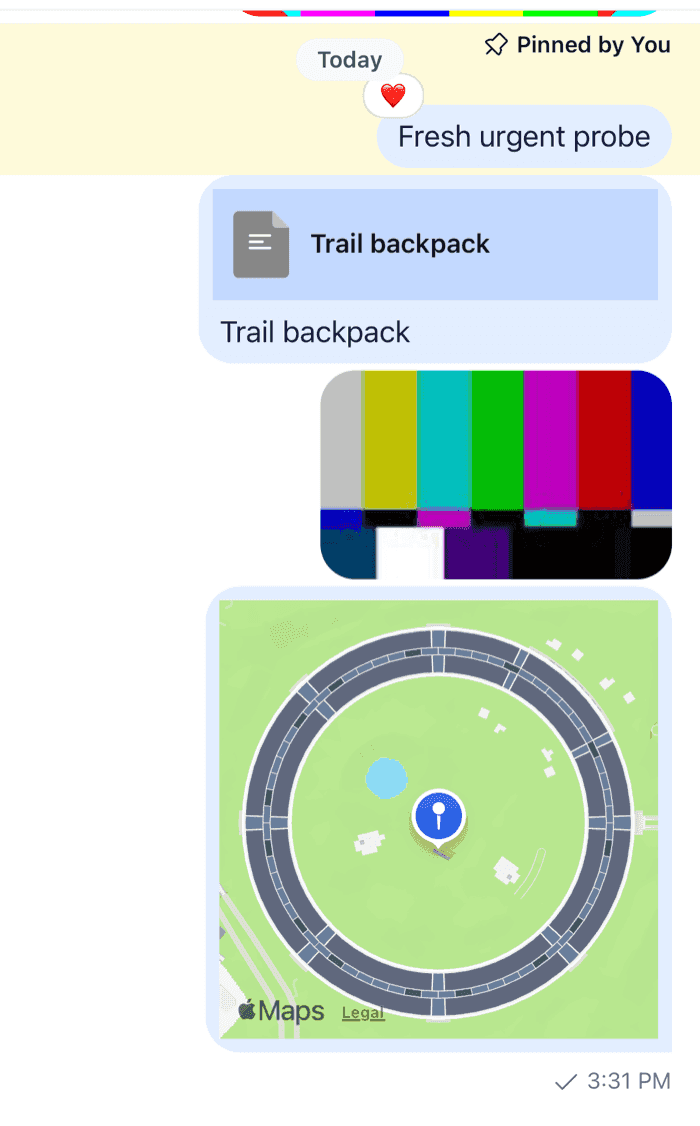 | 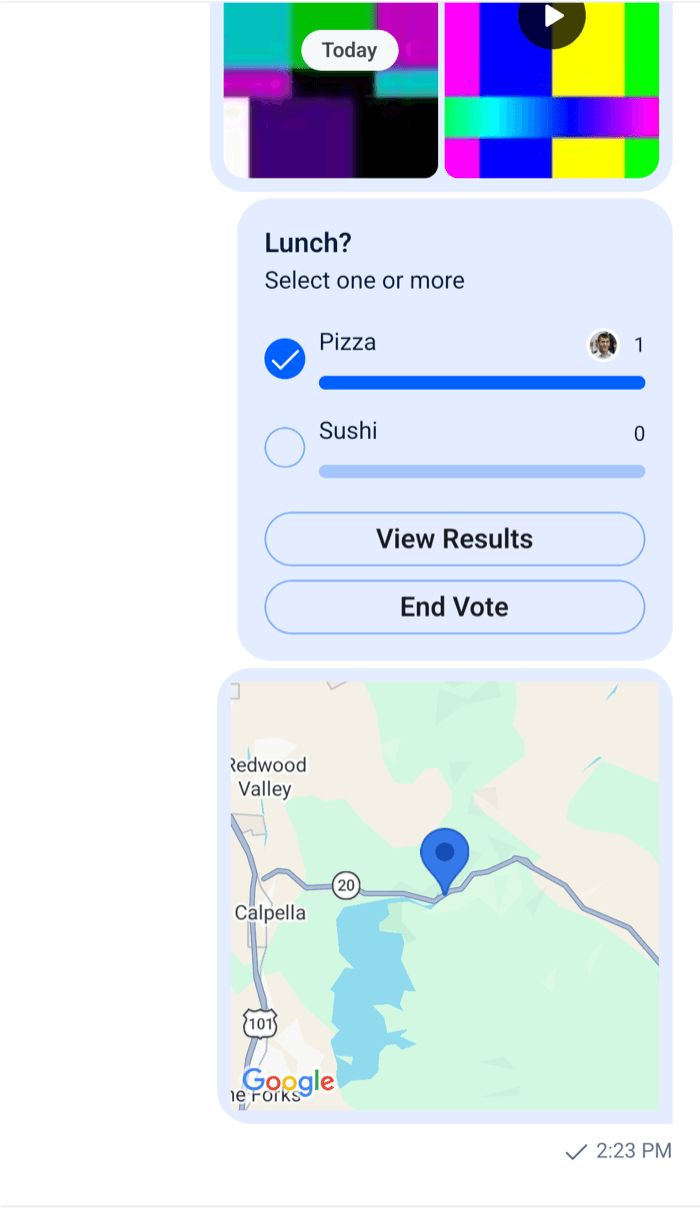 |
Declare the merged object once, at module scope, as Overriding components explains.
A full-screen map
Tapping a location opens a screen with a large map. onPressMessage on Channel gets every press on a message, and a press on its content has the emitter messageContent. The map screen follows a live location with useHandleLiveLocationEvents:
import { useHeaderHeight } from "@react-navigation/elements";
import type { NativeStackScreenProps } from "@react-navigation/native-stack";
import { Pressable, StyleSheet, Text, View } from "react-native";
import MapView, { Marker } from "react-native-maps";
import { convertTimestampToDate, nowNs } from "stream-chat";
import type {
  Channel as StreamChannel,
  SharedLocationResponse,
  SharedLocationResponseData,
} from "stream-chat";
import {
  Channel,
  MessageComposer,
  MessageList,
  useChatContext,
  useHandleLiveLocationEvents,
} from "stream-chat-react-native";

export type StackParamList = {
  Channel: { cid: string };
  Map: { cid: string; messageId: string };
};

export const ChannelScreen = ({
  navigation,
  route,
}: NativeStackScreenProps<StackParamList, "Channel">) => {
  const { client } = useChatContext();
  const headerHeight = useHeaderHeight();
  const channel = client.channelManager.get(route.params.cid);

  if (!channel) return null;

  return (
    <Channel
      channel={channel}
      keyboardVerticalOffset={headerHeight}
      onPressMessage={({ defaultHandler, emitter, message }) => {
        if (emitter === "messageContent" && message?.shared_location) {
          navigation.navigate("Map", {
            cid: channel.cid,
            messageId: message.id,
          });
          return;
        }
        defaultHandler?.();
      }}
      topInset={headerHeight}
    >
      <MessageList />
      <MessageComposer />
    </Channel>
  );
};

type SharedLocation = SharedLocationResponse | SharedLocationResponseData;

const LiveMap = ({
  channel,
  initialLocation,
}: {
  channel: StreamChannel;
  initialLocation: SharedLocation;
}) => {
  const { client } = useChatContext();
  // Each message.updated event of the message brings its new position.
  const { isLiveLocationStopped, locationResponse } =
    useHandleLiveLocationEvents({
      channel,
      messageId: initialLocation.message_id,
    });

  const location: SharedLocation = locationResponse ?? initialLocation;
  const { end_at, latitude, longitude, message_id, user_id } = location;
  const isLive = !isLiveLocationStopped && end_at != null && end_at > nowNs();
  const isOwn = user_id === client.userId;
  const endTime = convertTimestampToDate(end_at)?.toLocaleTimeString();

  return (
    <View style={styles.screen}>
      <MapView
        region={{
          latitude,
          latitudeDelta: 0.01,
          longitude,
          longitudeDelta: 0.01,
        }}
        style={styles.screen}
      >
        <Marker coordinate={{ latitude, longitude }} />
      </MapView>
      {end_at == null ? null : (
        <View style={styles.footer}>
          <Text>
            {isLive ? `Live until ${endTime}` : "Location sharing has ended"}
          </Text>
          {isLive && isOwn ? (
            <Pressable
              accessibilityRole="button"
              onPress={() =>
                void channel.stopLiveLocationSharing({ message_id })
              }
            >
              <Text style={styles.stop}>Stop sharing</Text>
            </Pressable>
          ) : null}
        </View>
      )}
    </View>
  );
};

export const MapScreen = ({
  route,
}: NativeStackScreenProps<StackParamList, "Map">) => {
  const { client } = useChatContext();
  const channel = client.channelManager.get(route.params.cid);
  const message = channel?.messagePaginator.getItem(route.params.messageId);
  const initialLocation = message?.shared_location;

  if (!channel || !initialLocation) return null;

  return <LiveMap channel={channel} initialLocation={initialLocation} />;
};

const styles = StyleSheet.create({
  footer: { alignItems: "center", gap: 8, padding: 16 },
  screen: { flex: 1 },
  stop: { color: "#d92f26", fontWeight: "600" },
});
Register MapScreen as Map in the same stack as the channel screen.
onPressMessagereplaces what a press on a message does. The payload carries themessage, so a location message navigates with its id, and every other press runsdefaultHandler, the SDK's own behavior.- The map screen looks the message up in the channel's
messagePaginator. The message list has it loaded, because the user just tapped it. useHandleLiveLocationEventslistens to the channel'smessage.updatedevents for that message.locationResponseis the latest location, andisLiveLocationStoppedturnstruewhen an update arrives whose end time has passed. A share that ended before the screen opened sends no update, so the screen also comparesend_atwithnowNs()itself.end_atis a timestamp in nanoseconds.convertTimestampToDate()turns it into aDatefor display.Channel.stopLiveLocationSharing({ message_id })ends the share now. The server'smessage.updatedevent brings the end time, and the screen and the message both show that sharing has ended.MapViewis controlled throughregion, so it centers on each new position. PassinitialRegioninstead to let the user move the map freely.