# Location sharing

> **Info:** This is release candidate documentation for **Stream Chat React Native SDK v10**. For the latest stable version, see the [latest version (v9)](https://getstream.io/chat/docs/sdk/react-native/).

This UI cookbook adds location sharing to a chat app: a location tab in the attachment picker that shares the user's position once or live for a while, and a full-screen map that opens when a location in the list is tapped and follows a live location as it moves. The SDK sends the locations and keeps live ones current, but it doesn't read the device's position or render a map. What it provides, and what your app adds, is explained in [Location sharing](https://getstream.io/chat/docs/sdk/react-native/v10/features/rich-content/location-sharing/).

## Best practices

- Ask for the location permission when the user wants to share, and say why. Handle a refusal with a message and a way to the system settings.
- Offer a few fixed durations for a live location, and show until when it runs. A live location is valid only for at least a minute.
- Give the sender a way to stop a live location early, on the map and in the message.
- Render `LiveLocationManagerProvider` once the user is connected. Without it, a live location is created but its position never changes.
- Leave location sharing out of threads. The composer of a thread doesn't send locations.

## Prerequisites

You need a working client and a channel screen with `MessageList` and `MessageComposer`, as in the [Quick start](https://getstream.io/chat/docs/sdk/react-native/v10/getting-started/quick-start/). The examples use React Navigation; the [Sample App](https://github.com/GetStream/stream-chat-react-native/tree/develop/examples/SampleApp) and the [Expo Messaging app](https://github.com/GetStream/stream-chat-react-native/tree/develop/examples/ExpoMessaging) have a full implementation.

## Setup

### Installing the packages

**RN CLI**

```bash
yarn add @react-native-community/geolocation react-native-maps
```

- `@react-native-community/geolocation` reads the device's position, once and as it changes.
- `react-native-maps` renders maps: Apple Maps on iOS and Google Maps on Android.

**Expo**

```bash
npx expo install expo-location react-native-maps
```

- `expo-location` reads the device's position, once and as it changes.
- `react-native-maps` renders maps: Apple Maps on iOS and Google Maps on Android.

### Permissions and the Google Maps key

**RN CLI**

On iOS, add `NSLocationWhenInUseUsageDescription` to `Info.plist`, with the reason the app shows the user. Add `NSLocationAlwaysAndWhenInUseUsageDescription` too if live locations should keep updating in the background.

On Android, add the permissions to `android/app/src/main/AndroidManifest.xml`:

```xml
<uses-permission android:name="android.permission.ACCESS_FINE_LOCATION" />
<uses-permission android:name="android.permission.ACCESS_COARSE_LOCATION" />
```

Google Maps on Android needs an [API key for the Maps SDK for Android](https://developers.google.com/maps/documentation/android-sdk/get-api-key). Add it inside `<application>` in the same file:

```xml
<meta-data
  android:name="com.google.android.geo.API_KEY"
  android:value="YOUR_GOOGLE_MAPS_API_KEY" />
```

iOS uses Apple Maps and needs no key.

**Expo**

Configure the permission text with the `expo-location` config plugin, and the Google Maps key for Android, in `app.json`:

```json
{
  "expo": {
    "plugins": [
      [
        "expo-location",
        {
          "locationWhenInUsePermission": "Allow $(PRODUCT_NAME) to share your location in chats."
        }
      ]
    ],
    "android": {
      "config": {
        "googleMaps": { "apiKey": "YOUR_GOOGLE_MAPS_API_KEY" }
      }
    }
  }
}
```

Rebuild the app after changing `app.json`. The [`expo-location` docs](https://docs.expo.dev/versions/latest/sdk/location/) list the plugin's options, including background location.

### Keeping live locations current

Render `LiveLocationManagerProvider` inside `Chat`, once the user is connected, with a `watchLocation` function that reports the device's position. [Live locations need the manager](https://getstream.io/chat/docs/sdk/react-native/v10/features/rich-content/location-sharing/#live-locations-need-the-manager) has the provider for both packages. While the user shares a live location, the manager sends this device's new positions to it, even when the share was started on another of the user's devices.

## A location tab in the attachment picker

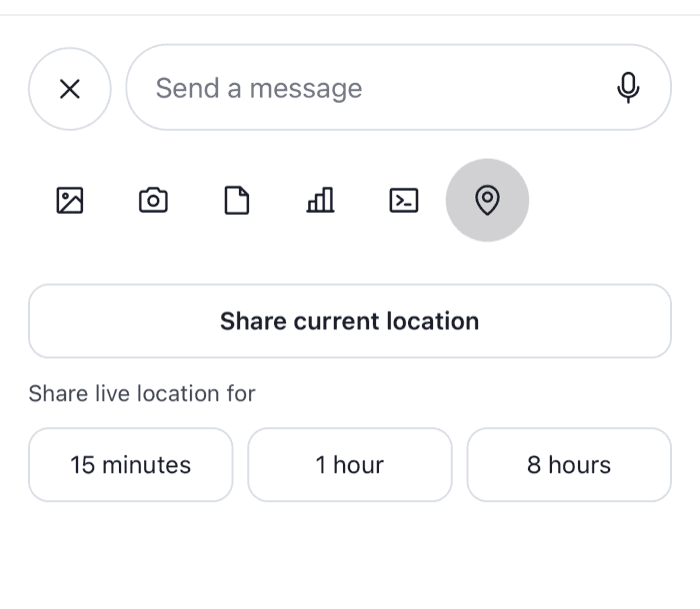
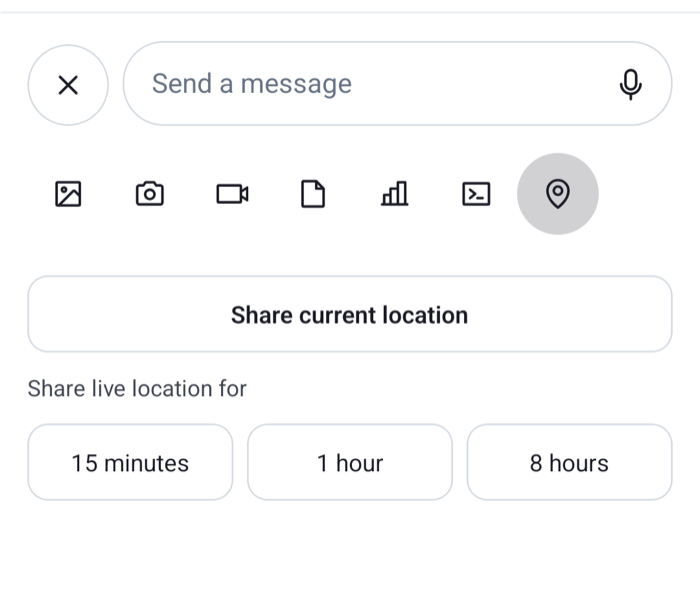
The attachment picker has a bar of buttons at its top and, below it, the content of the selected button. The `AttachmentPickerSelectionBar` key replaces the bar, and the `AttachmentPickerContent` key replaces the content. This sample adds a location button to the bar, and a content for it with three ways to share:

```tsx title="src/LocationPicker.tsx"
import { useRef, useState } from "react";
import { Linking, Pressable, StyleSheet, Text, View } from "react-native";
import Geolocation from "@react-native-community/geolocation";
import {
  AttachmentPickerContent,
  AttachmentTypePickerButton,
  CameraPickerButton,
  CommandsPickerButton,
  FilePickerButton,
  MediaPickerButton,
  PollPickerButton,
  useAttachmentPickerContext,
  useAttachmentPickerState,
  useComponentsContext,
  useMessageComposer,
  useMessageInputContext,
  useTheme,
  useThreadContext,
} from "stream-chat-react-native";
import type {
  AttachmentPickerContentProps,
  ComponentOverrides,
} from "stream-chat-react-native";

const LOCATION_PICKER = "location";

type Coords = { latitude: number; longitude: number };

// Asks for the permission the first time, then reads the position once.
const getCurrentCoords = () =>
  new Promise<Coords>((resolve, reject) =>
    Geolocation.getCurrentPosition(
      ({ coords }) =>
        resolve({ latitude: coords.latitude, longitude: coords.longitude }),
      reject,
      { enableHighAccuracy: true, timeout: 15000 },
    ),
  );

const LIVE_DURATIONS = [
  { label: "15 minutes", ms: 15 * 60 * 1000 },
  { label: "1 hour", ms: 60 * 60 * 1000 },
  { label: "8 hours", ms: 8 * 60 * 60 * 1000 },
];

const LocationPickerButton = () => {
  const { attachmentPickerStore } = useAttachmentPickerContext();
  const { selectedPicker } = useAttachmentPickerState();
  const { icons } = useComponentsContext();
  const { thread } = useThreadContext();

  // A thread's composer doesn't send locations.
  if (thread) return null;

  return (
    <AttachmentTypePickerButton
      Icon={icons.MapPin}
      onPress={() => attachmentPickerStore.setSelectedPicker(LOCATION_PICKER)}
      selected={selectedPicker === LOCATION_PICKER}
    />
  );
};

const SelectionBarWithLocation = () => {
  const {
    theme: { semantics },
  } = useTheme();

  return (
    <View
      style={[
        styles.bar,
        { backgroundColor: semantics.backgroundCoreElevation1 },
      ]}
    >
      <MediaPickerButton />
      <CameraPickerButton />
      <FilePickerButton />
      <PollPickerButton />
      <CommandsPickerButton />
      <LocationPickerButton />
    </View>
  );
};

const ShareLocationContent = ({ height }: AttachmentPickerContentProps) => {
  const messageComposer = useMessageComposer();
  const { closeAttachmentPicker } = useMessageInputContext();
  const {
    theme: { semantics },
  } = useTheme();
  const [sharing, setSharing] = useState(false);
  const [failed, setFailed] = useState(false);

  // Without `durationMs` the location is shared once; with it, it's live for that long.
  const share = async (durationMs?: number) => {
    setSharing(true);
    setFailed(false);
    try {
      const coords = await getCurrentCoords();
      messageComposer.locationComposer.setData({ ...coords, durationMs });
      await messageComposer.sendLocation();
      closeAttachmentPicker();
    } catch {
      setFailed(true);
    } finally {
      setSharing(false);
    }
  };

  const textColor = { color: semantics.textPrimary };

  return (
    <View
      style={[
        styles.content,
        { backgroundColor: semantics.backgroundCoreElevation1, height },
      ]}
    >
      <Pressable
        accessibilityRole="button"
        disabled={sharing}
        onPress={() => void share()}
        style={[styles.option, { borderColor: semantics.borderCoreDefault }]}
      >
        <Text style={[styles.optionTitle, textColor]}>
          Share current location
        </Text>
      </Pressable>
      <Text style={[styles.heading, { color: semantics.textSecondary }]}>
        Share live location for
      </Text>
      <View style={styles.durations}>
        {LIVE_DURATIONS.map(({ label, ms }) => (
          <Pressable
            accessibilityRole="button"
            disabled={sharing}
            key={label}
            onPress={() => void share(ms)}
            style={[
              styles.option,
              styles.duration,
              { borderColor: semantics.borderCoreDefault },
            ]}
          >
            <Text style={textColor}>{label}</Text>
          </Pressable>
        ))}
      </View>
      {failed ? (
        <Pressable
          accessibilityRole="button"
          onPress={() => void Linking.openSettings()}
        >
          <Text style={{ color: semantics.accentError }}>
            Your location couldn't be shared. Check that the app may use it in
            Settings.
          </Text>
        </Pressable>
      ) : null}
    </View>
  );
};

const PickerContentWithLocation = (props: AttachmentPickerContentProps) => {
  const { selectedPicker } = useAttachmentPickerState();

  // While the picker closes, no picker is selected: keep showing the last one.
  const lastPickerRef = useRef(selectedPicker);
  if (selectedPicker) lastPickerRef.current = selectedPicker;

  if (lastPickerRef.current === LOCATION_PICKER) {
    return <ShareLocationContent {...props} />;
  }

  return <AttachmentPickerContent {...props} />;
};

// Pass to WithComponents, declared once at module scope.
export const locationPickerOverrides: ComponentOverrides = {
  AttachmentPickerContent: PickerContentWithLocation,
  AttachmentPickerSelectionBar: SelectionBarWithLocation,
};

const styles = StyleSheet.create({
  bar: {
    alignItems: "center",
    flexDirection: "row",
    paddingBottom: 8,
    paddingHorizontal: 16,
  },
  content: { gap: 12, padding: 16 },
  duration: { flex: 1 },
  durations: { flexDirection: "row", gap: 8 },
  heading: { fontSize: 13 },
  option: {
    alignItems: "center",
    borderRadius: 12,
    borderWidth: 1,
    padding: 12,
  },
  optionTitle: { fontWeight: "600" },
});
```

<table>
  <tr>
  <td align='center' width='50%'>

![The attachment picker with a location tab offering to share the current location or a live location on iOS](https://getstream.io/docs-assets/images/2b61f5ae8b18.png)

  </td>
  <td align='center' width='50%'>

![The attachment picker with a location tab offering to share the current location or a live location on Android](https://getstream.io/docs-assets/images/59dfa3bc56cc.png)

  </td>
  </tr>
</table>

>
> **Info:** **Example**
>
> What happens when the user shares their location for an hour:
>
> 1. They open the attachment picker and tap the pin button. It sets the picker's selected type to `"location"`, a type of your own; `setSelectedPicker` takes any string.
> 2. `PickerContentWithLocation` sees the type and renders `ShareLocationContent`. For every other type it renders the SDK's content.
> 3. They tap "1 hour". The first time, `getCurrentPosition` asks for the permission. Then it reads their position.
> 4. `LocationComposer.setData()` stores the position and the duration in the channel's composer, and `MessageComposer.sendLocation()` sends a message that carries only the location, through `Channel.sendSharedLocation()`. Text they typed in the composer stays there.
> 5. The picker closes. The message appears in the channel, and the `LiveLocationManager` starts sending their new positions to it.
>

When the permission is refused, the position can't be read or the request fails, the content says so, and tapping the text opens the app's settings. A failed request also publishes a "Failed to share location" notification, which the channel's snackbar shows.

The location button works only in the attachment picker. With `disableAttachmentPicker` on `Channel`, the bar's buttons open the system pickers directly, and there is no content area for the location tab.

With Expo, read the position with `expo-location` instead, and keep the rest of the file:

```ts title="src/getCurrentCoords.ts"
import * as Location from "expo-location";

export const getCurrentCoords = async () => {
  const { status } = await Location.requestForegroundPermissionsAsync();
  if (status !== "granted") throw new Error("Location permission not granted");

  const { coords } = await Location.getCurrentPositionAsync({
    accuracy: Location.Accuracy.High,
  });
  return { latitude: coords.latitude, longitude: coords.longitude };
};
```

## The location in a message

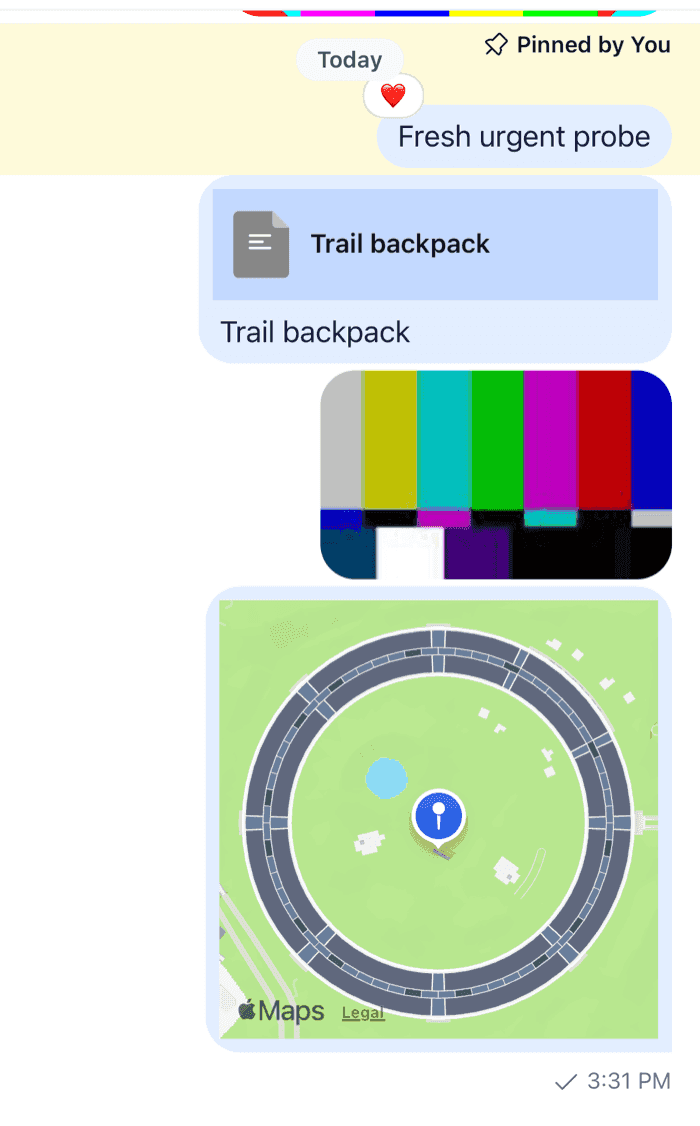
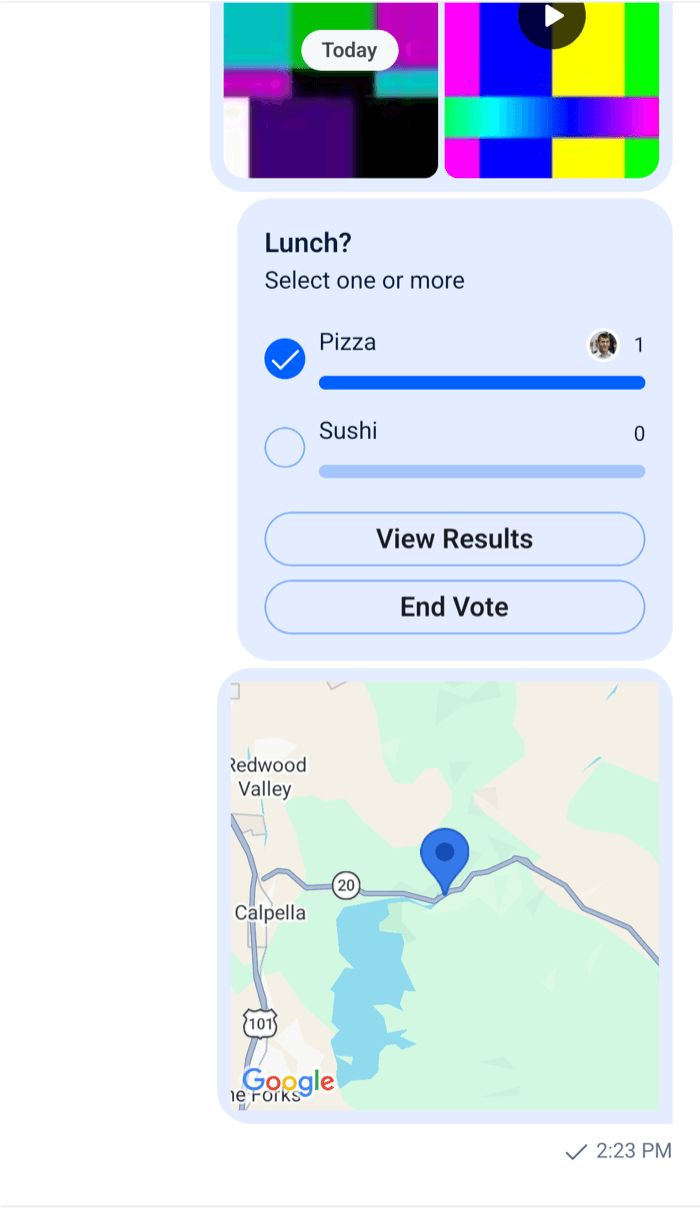
A message with a location renders the `MessageLocation` key, which has no default. Without one, the message shows nothing for the location. [Show a location in a message](https://getstream.io/chat/docs/sdk/react-native/v10/features/rich-content/location-sharing/#show-a-location-in-a-message) has a map with `react-native-maps`, with "Live until" and a Stop sharing button for a live location. Register it with the overrides above:

```tsx
<WithComponents overrides={{ ...locationPickerOverrides, ...messageLocationOverrides }}>
```

<table>
  <tr>
  <td align='center' width='50%'>

![A message showing a map with a marker on iOS](https://getstream.io/docs-assets/images/236d95036dfb.png)

  </td>
  <td align='center' width='50%'>

![A message showing a map with a marker on Android](https://getstream.io/docs-assets/images/c9b55eff2e4f.png)

  </td>
  </tr>
</table>

Declare the merged object once, at module scope, as [Overriding components](https://getstream.io/chat/docs/sdk/react-native/v10/ui/customizing/overriding-components/) explains.

## A full-screen map

Tapping a location opens a screen with a large map. `onPressMessage` on `Channel` gets every press on a message, and a press on its content has the emitter `messageContent`. The map screen follows a live location with `useHandleLiveLocationEvents`:

```tsx title="src/MapScreens.tsx"
import { useHeaderHeight } from "@react-navigation/elements";
import type { NativeStackScreenProps } from "@react-navigation/native-stack";
import { Pressable, StyleSheet, Text, View } from "react-native";
import MapView, { Marker } from "react-native-maps";
import { convertTimestampToDate, nowNs } from "stream-chat";
import type {
  Channel as StreamChannel,
  SharedLocationResponse,
  SharedLocationResponseData,
} from "stream-chat";
import {
  Channel,
  MessageComposer,
  MessageList,
  useChatContext,
  useHandleLiveLocationEvents,
} from "stream-chat-react-native";

export type StackParamList = {
  Channel: { cid: string };
  Map: { cid: string; messageId: string };
};

export const ChannelScreen = ({
  navigation,
  route,
}: NativeStackScreenProps<StackParamList, "Channel">) => {
  const { client } = useChatContext();
  const headerHeight = useHeaderHeight();
  const channel = client.channelManager.get(route.params.cid);

  if (!channel) return null;

  return (
    <Channel
      channel={channel}
      keyboardVerticalOffset={headerHeight}
      onPressMessage={({ defaultHandler, emitter, message }) => {
        if (emitter === "messageContent" && message?.shared_location) {
          navigation.navigate("Map", {
            cid: channel.cid,
            messageId: message.id,
          });
          return;
        }
        defaultHandler?.();
      }}
      topInset={headerHeight}
    >
      <MessageList />
      <MessageComposer />
    </Channel>
  );
};

type SharedLocation = SharedLocationResponse | SharedLocationResponseData;

const LiveMap = ({
  channel,
  initialLocation,
}: {
  channel: StreamChannel;
  initialLocation: SharedLocation;
}) => {
  const { client } = useChatContext();
  // Each message.updated event of the message brings its new position.
  const { isLiveLocationStopped, locationResponse } =
    useHandleLiveLocationEvents({
      channel,
      messageId: initialLocation.message_id,
    });

  const location: SharedLocation = locationResponse ?? initialLocation;
  const { end_at, latitude, longitude, message_id, user_id } = location;
  const isLive = !isLiveLocationStopped && end_at != null && end_at > nowNs();
  const isOwn = user_id === client.userId;
  const endTime = convertTimestampToDate(end_at)?.toLocaleTimeString();

  return (
    <View style={styles.screen}>
      <MapView
        region={{
          latitude,
          latitudeDelta: 0.01,
          longitude,
          longitudeDelta: 0.01,
        }}
        style={styles.screen}
      >
        <Marker coordinate={{ latitude, longitude }} />
      </MapView>
      {end_at == null ? null : (
        <View style={styles.footer}>
          <Text>
            {isLive ? `Live until ${endTime}` : "Location sharing has ended"}
          </Text>
          {isLive && isOwn ? (
            <Pressable
              accessibilityRole="button"
              onPress={() =>
                void channel.stopLiveLocationSharing({ message_id })
              }
            >
              <Text style={styles.stop}>Stop sharing</Text>
            </Pressable>
          ) : null}
        </View>
      )}
    </View>
  );
};

export const MapScreen = ({
  route,
}: NativeStackScreenProps<StackParamList, "Map">) => {
  const { client } = useChatContext();
  const channel = client.channelManager.get(route.params.cid);
  const message = channel?.messagePaginator.getItem(route.params.messageId);
  const initialLocation = message?.shared_location;

  if (!channel || !initialLocation) return null;

  return <LiveMap channel={channel} initialLocation={initialLocation} />;
};

const styles = StyleSheet.create({
  footer: { alignItems: "center", gap: 8, padding: 16 },
  screen: { flex: 1 },
  stop: { color: "#d92f26", fontWeight: "600" },
});
```

Register `MapScreen` as `Map` in the same stack as the channel screen.

- `onPressMessage` replaces what a press on a message does. The payload carries the `message`, so a location message navigates with its id, and every other press runs `defaultHandler`, the SDK's own behavior.
- The map screen looks the message up in the channel's `messagePaginator`. The message list has it loaded, because the user just tapped it.
- `useHandleLiveLocationEvents` listens to the channel's `message.updated` events for that message. `locationResponse` is the latest location, and `isLiveLocationStopped` turns `true` when an update arrives whose end time has passed. A share that ended before the screen opened sends no update, so the screen also compares `end_at` with `nowNs()` itself.
- `end_at` is a timestamp in nanoseconds. `convertTimestampToDate()` turns it into a `Date` for display.
- `Channel.stopLiveLocationSharing({ message_id })` ends the share now. The server's `message.updated` event brings the end time, and the screen and the message both show that sharing has ended.
- `MapView` is controlled through `region`, so it centers on each new position. Pass `initialRegion` instead to let the user move the map freely.

---

For the most recent version of this documentation, visit [https://getstream.io/chat/docs/sdk/react-native/v10/ui-cookbook/app/location-sharing/](https://getstream.io/chat/docs/sdk/react-native/v10/ui-cookbook/app/location-sharing/).