















Typing indicators
Typing indicators show who is writing a message right now. This page covers the typing events behind them, when they are sent, and how to change the indicator.
What users get
Bob starts typing in a channel. On the user's screen, his avatar and three animated dots appear at the bottom of the message list. With more people typing, up to three avatars show. In a thread, the indicator shows who is typing a reply in that thread.
The channel list shows typing too: the row of a channel with a name reads "Bob is typing", "Bob and Cleo are typing", or "3 people are typing", in place of the last message. The row of a channel without a name, such as a one-to-one conversation, reads "Typing".
Nobody sees their own typing.
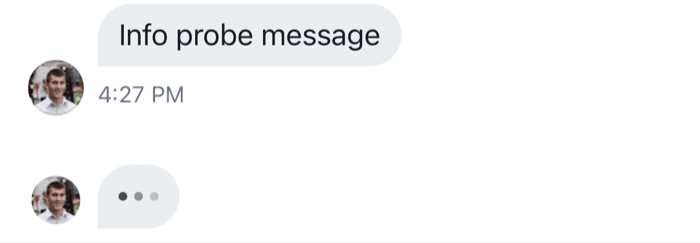 | 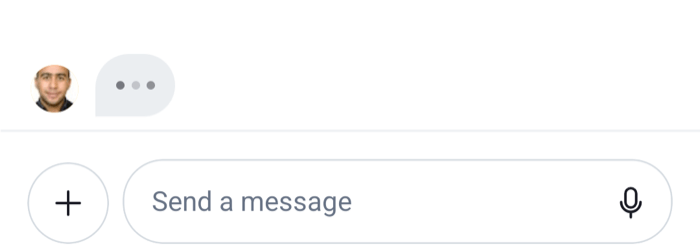 |
How it works across the layers
- State.
Channel.keystroke()andChannel.stopTyping()sendtyping.startandtyping.stopevents. When another member's event arrives, the channel stores it inchannel.state.typing, keyed by user id. That map is the only place typing lives. - UI. The text composer calls
Channel.keystroke()as the user types.MessageListandMessageFlashListrenderTypingIndicatorinsideTypingIndicatorContainerat the newest end of the list. Both readchannel.state.typing, filtered to the list they're in: events without aparent_idin a channel, and the thread's own events inside aThread.ChannelPreviewrendersChannelPreviewTypingIndicatorfrom the channel's own events. - Navigation. Not involved.
The SDK has no channel header. For a header of your own, useTypingString() returns "Bob is typing" or "Bob and 2 more are typing" for the list the component is in, see Customizing.
What channels and threads hold explains the rest of channel.state. Channel UI shows where the indicators sit.
Typing events
A typing event belongs to a channel. One sent from a thread carries the thread's id as parent_id, so the same event can show in the channel or in one of its threads.
Sending typing events
Example
The user types "Hello" in the composer:
- Their first keystroke calls
Channel.keystroke(), which sendstyping.start. - Their next keystrokes call it again, but it sends nothing until two seconds have passed since the last
typing.start. - They stop typing. A second later, the client sends
typing.stopby itself. - If they send the message instead, message operations send
typing.stopbefore the message.
In a thread, the composer calls Channel.keystroke(thread.id) and the events carry parent_id. The typing.stop the client sends by itself after a pause carries no parent_id; the channel removes the user's entry either way.
When the app goes to the background while the user is typing, Channel and Thread send typing.stop for the channel or thread they render.
A custom input that writes through messageComposer.textComposer sends typing events the same way. An input that doesn't use the composer calls the channel directly:
// On every change of the input: sends typing.start at most every two seconds
await channel.keystroke();

// When the user sends or abandons the message
await channel.stopTyping();

// The same for a thread
await channel.keystroke(thread.id);
await channel.stopTyping(thread.id);
Timing
typing.startgoes out at most once every two seconds while the user keeps typing.typing.stopgoes out when the user hasn't typed for more than a second, and before a message is sent. The client checks every half second.- Another member's entry is dropped from
channel.state.typingseven seconds after their lasttyping.startarrived, in case theirtyping.stopnever comes. The client then raises a localtyping.stopevent. - The indicators follow the map: they show while someone is in it, and hide as soon as nobody is.
When typing events are suppressed
Channel.keystroke() and Channel.stopTyping() send nothing when:
- typing events are off for the channel, by the client configuration or by the channel type, see Turning it on or off;
- the user's
privacy_settings.typing_indicators.enabledisfalse; - the WebSocket connection isn't healthy;
- the channel has no id from the server yet.
The composer also skips Channel.keystroke() when the text is empty, and when its text.publishTypingEvents setting is false.
Turning it on or off
Typing events are on when both of these allow them:
- the channel type's
typing_eventssetting on the server, see Typing indicators in the JavaScript client docs; channel.typingEvents.enabledin the client configuration, which defaults totrue.
A server "no" wins. The resolved value is channel.config.typingEvents.enabled. When it's false, nothing is sent, so no indicator shows.
To turn typing events off in the client for every channel:
client.config.set({ channel: { typingEvents: { enabled: false } } });To keep showing others' typing but stop sending it from some composers, change text.publishTypingEvents on those composers. This setup function turns it off for thread composers:
client.config.setSetupFunction("messageComposer", ({ composer }) => {
  if (composer.threadId) {
    composer.updateConfig({ text: { publishTypingEvents: false } });
  }
});
There is one setup function per kind, so this one replaces any other messageComposer setup function, such as one that calls setupCommandUIMiddlewares or replaces the mention search. Do all composer setup in one function.
To hide the indicator in a message list and keep the events, pass disableTypingIndicator to Channel and Thread.
A user can also stop sharing their typing. With privacy_settings.typing_indicators.enabled: false on their user, the client sends no typing events and the server drops any that reach it:
import { useCreateChatClient } from "stream-chat-react-native";

const apiKey = "YOUR_API_KEY";
const userId = "YOUR_USER_ID";
const userToken = "YOUR_USER_TOKEN";

export const useClientWithoutTypingEvents = () =>
  useCreateChatClient({
    apiKey,
    tokenOrProvider: userToken,
    userData: {
      id: userId,
      privacy_settings: { typing_indicators: { enabled: false } },
    },
  });
Configuration explains client.config and setup functions.
Customizing
The indicator in the list
Replace the list's indicator through the TypingIndicator override key. TypingIndicatorContainer renders it only while someone other than the user is typing in that list, so the replacement doesn't need to check. This one shows text instead of avatars:
import { Text } from "react-native";
import { useTypingString, WithComponents } from "stream-chat-react-native";

const TypingText = () => {
  const typingString = useTypingString();

  return <Text>{typingString}...</Text>;
};

export const App = () => (
  <WithComponents overrides={{ TypingIndicator: TypingText }}>
    {/* the rest of the app */}
  </WithComponents>
);
TypingIndicatorContainer is an override key too, for the space around the indicator. A HeaderComponent passed to MessageList replaces the list's newest-end header, including the typing indicator.
Typing in a header
useTypingString() works anywhere inside Channel or Thread. This header subtitle shows who is typing, and the channel's display name otherwise:
import { Text } from "react-native";
import {
  useChannel,
  useChannelPreviewDisplayName,
  useTypingString,
} from "stream-chat-react-native";

export const HeaderSubtitle = () => {
  const channel = useChannel();
  const displayName = useChannelPreviewDisplayName(channel);
  const typingString = useTypingString();

  return <Text numberOfLines={1}>{typingString || displayName}</Text>;
};
The Channel header UI cookbook builds a header around it.
The channel list row
ChannelPreviewTypingIndicator is an override key. It receives the channel and usersTyping, the users typing in the channel itself.
Texts
The texts come from translation keys: messageList.typing.withMoreUsers.label and channelPreview.typing.withUser.label for useTypingString(), and the other channelPreview.typing.* keys for the channel list. See Localization.
Reference
- Typing indicator:
TypingIndicatorandTypingIndicatorContainer. - ComponentsContext: the
TypingIndicator,TypingIndicatorContainerandChannelPreviewTypingIndicatoroverride keys. - Channel and channel state:
channel.state.typing,keystrokeandstopTyping. - Configuration tree:
channel.typingEventsandmessageComposer.text.publishTypingEvents.