# Typing indicators

> **Info:** This is release candidate documentation for **Stream Chat React Native SDK v10**. For the latest stable version, see the [latest version (v9)](https://getstream.io/chat/docs/sdk/react-native/).

Typing indicators show who is writing a message right now. This page covers the typing events behind them, when they are sent, and how to change the indicator.

## What users get

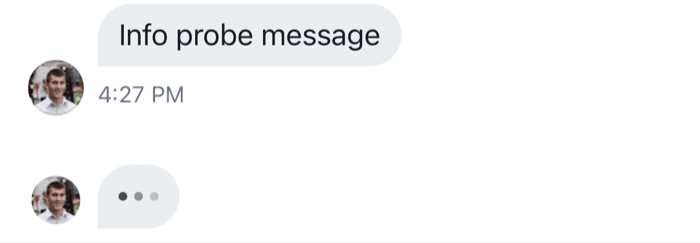
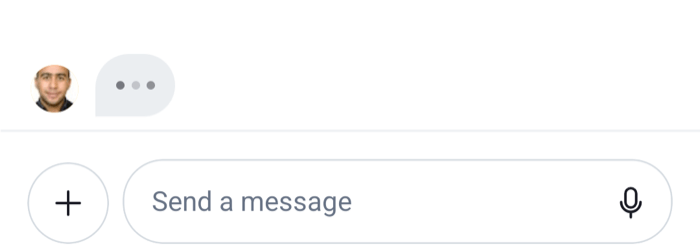
Bob starts typing in a channel. On the user's screen, his avatar and three animated dots appear at the bottom of the message list. With more people typing, up to three avatars show. In a thread, the indicator shows who is typing a reply in that thread.

The channel list shows typing too: the row of a channel with a name reads "Bob is typing", "Bob and Cleo are typing", or "3 people are typing", in place of the last message. The row of a channel without a name, such as a one-to-one conversation, reads "Typing".

Nobody sees their own typing.

<table>
  <tr>
  <td align='center' width='50%'>

![The bottom of a message list with the typing indicator, the avatar of the person typing and three dots on iOS](https://getstream.io/docs-assets/images/0ee2b286bedc.png)

  </td>
  <td align='center' width='50%'>

![The bottom of a message list with the typing indicator, the avatar of the person typing and three dots on Android](https://getstream.io/docs-assets/images/740da9b080c3.png)

  </td>
  </tr>
</table>

## How it works across the layers

- **State.** `Channel.keystroke()` and `Channel.stopTyping()` send `typing.start` and `typing.stop` events. When another member's event arrives, the channel stores it in `channel.state.typing`, keyed by user id. That map is the only place typing lives.
- **UI.** The text composer calls `Channel.keystroke()` as the user types. `MessageList` and `MessageFlashList` render `TypingIndicator` inside `TypingIndicatorContainer` at the newest end of the list. Both read `channel.state.typing`, filtered to the list they're in: events without a `parent_id` in a channel, and the thread's own events inside a `Thread`. `ChannelPreview` renders `ChannelPreviewTypingIndicator` from the channel's own events.
- **Navigation.** Not involved.

The SDK has no channel header. For a header of your own, `useTypingString()` returns "Bob is typing" or "Bob and 2 more are typing" for the list the component is in, see [Customizing](#customizing).

[What channels and threads hold](https://getstream.io/chat/docs/sdk/react-native/v10/state/channels-and-threads/what-channels-and-threads-hold/) explains the rest of `channel.state`. [Channel UI](https://getstream.io/chat/docs/sdk/react-native/v10/ui/components/channel-ui/) shows where the indicators sit.

### Typing events

A typing event belongs to a channel. One sent from a thread carries the thread's id as `parent_id`, so the same event can show in the channel or in one of its threads.

#### Sending typing events

>
> **Info:** **Example**
>
> The user types "Hello" in the composer:
>
> 1. Their first keystroke calls `Channel.keystroke()`, which sends `typing.start`.
> 2. Their next keystrokes call it again, but it sends nothing until two seconds have passed since the last `typing.start`.
> 3. They stop typing. A second later, the client sends `typing.stop` by itself.
> 4. If they send the message instead, message operations send `typing.stop` before the message.
>

In a thread, the composer calls `Channel.keystroke(thread.id)` and the events carry `parent_id`. The `typing.stop` the client sends by itself after a pause carries no `parent_id`; the channel removes the user's entry either way.

When the app goes to the background while the user is typing, `Channel` and `Thread` send `typing.stop` for the channel or thread they render.

A custom input that writes through `messageComposer.textComposer` sends typing events the same way. An input that doesn't use the composer calls the channel directly:

```ts
// On every change of the input: sends typing.start at most every two seconds
await channel.keystroke();

// When the user sends or abandons the message
await channel.stopTyping();

// The same for a thread
await channel.keystroke(thread.id);
await channel.stopTyping(thread.id);
```

#### Timing

- `typing.start` goes out at most once every two seconds while the user keeps typing.
- `typing.stop` goes out when the user hasn't typed for more than a second, and before a message is sent. The client checks every half second.
- Another member's entry is dropped from `channel.state.typing` seven seconds after their last `typing.start` arrived, in case their `typing.stop` never comes. The client then raises a local `typing.stop` event.
- The indicators follow the map: they show while someone is in it, and hide as soon as nobody is.

#### When typing events are suppressed

`Channel.keystroke()` and `Channel.stopTyping()` send nothing when:

- typing events are off for the channel, by the client configuration or by the channel type, see [Turning it on or off](#turning-it-on-or-off);
- the user's `privacy_settings.typing_indicators.enabled` is `false`;
- the WebSocket connection isn't healthy;
- the channel has no id from the server yet.

The composer also skips `Channel.keystroke()` when the text is empty, and when its `text.publishTypingEvents` setting is `false`.

## Turning it on or off

Typing events are on when both of these allow them:

- the channel type's `typing_events` setting on the server, see [Typing indicators](https://getstream.io/chat/docs/javascript/typing-indicators/) in the JavaScript client docs;
- `channel.typingEvents.enabled` in the client configuration, which defaults to `true`.

A server "no" wins. The resolved value is `channel.config.typingEvents.enabled`. When it's `false`, nothing is sent, so no indicator shows.

To turn typing events off in the client for every channel:

```ts
client.config.set({ channel: { typingEvents: { enabled: false } } });
```

To keep showing others' typing but stop sending it from some composers, change `text.publishTypingEvents` on those composers. This setup function turns it off for thread composers:

```ts
client.config.setSetupFunction("messageComposer", ({ composer }) => {
  if (composer.threadId) {
    composer.updateConfig({ text: { publishTypingEvents: false } });
  }
});
```

There is one setup function per kind, so this one replaces any other `messageComposer` setup function, such as one that calls `setupCommandUIMiddlewares` or replaces the mention search. Do all composer setup in one function.

To hide the indicator in a message list and keep the events, pass `disableTypingIndicator` to `Channel` and `Thread`.

A user can also stop sharing their typing. With `privacy_settings.typing_indicators.enabled: false` on their user, the client sends no typing events and the server drops any that reach it:

```tsx
import { useCreateChatClient } from "stream-chat-react-native";

const apiKey = "YOUR_API_KEY";
const userId = "YOUR_USER_ID";
const userToken = "YOUR_USER_TOKEN";

export const useClientWithoutTypingEvents = () =>
  useCreateChatClient({
    apiKey,
    tokenOrProvider: userToken,
    userData: {
      id: userId,
      privacy_settings: { typing_indicators: { enabled: false } },
    },
  });
```

[Configuration](https://getstream.io/chat/docs/sdk/react-native/v10/state/state-and-entities/configuration/) explains `client.config` and setup functions.

## Customizing

### The indicator in the list

Replace the list's indicator through the `TypingIndicator` override key. `TypingIndicatorContainer` renders it only while someone other than the user is typing in that list, so the replacement doesn't need to check. This one shows text instead of avatars:

```tsx
import { Text } from "react-native";
import { useTypingString, WithComponents } from "stream-chat-react-native";

const TypingText = () => {
  const typingString = useTypingString();

  return <Text>{typingString}...</Text>;
};

export const App = () => (
  <WithComponents overrides={{ TypingIndicator: TypingText }}>
    {/* the rest of the app */}
  </WithComponents>
);
```

`TypingIndicatorContainer` is an override key too, for the space around the indicator. A `HeaderComponent` passed to `MessageList` replaces the list's newest-end header, including the typing indicator.

### Typing in a header

`useTypingString()` works anywhere inside `Channel` or `Thread`. This header subtitle shows who is typing, and the channel's display name otherwise:

```tsx
import { Text } from "react-native";
import {
  useChannel,
  useChannelPreviewDisplayName,
  useTypingString,
} from "stream-chat-react-native";

export const HeaderSubtitle = () => {
  const channel = useChannel();
  const displayName = useChannelPreviewDisplayName(channel);
  const typingString = useTypingString();

  return <Text numberOfLines={1}>{typingString || displayName}</Text>;
};
```

The [Channel header](https://getstream.io/chat/docs/sdk/react-native/v10/ui-cookbook/headers/channel-header/) UI cookbook builds a header around it.

### The channel list row

`ChannelPreviewTypingIndicator` is an override key. It receives the `channel` and `usersTyping`, the users typing in the channel itself.

### Texts

The texts come from translation keys: `messageList.typing.withMoreUsers.label` and `channelPreview.typing.withUser.label` for `useTypingString()`, and the other `channelPreview.typing.*` keys for the channel list. See [Localization](https://getstream.io/chat/docs/sdk/react-native/v10/ui/customizing/localization/).

## Reference

- [Typing indicator](https://getstream.io/chat/docs/sdk/react-native/v10/component-reference/message-list/typing-indicator/): `TypingIndicator` and `TypingIndicatorContainer`.
- [ComponentsContext](https://getstream.io/chat/docs/sdk/react-native/v10/component-reference/channel/componentscontext/): the `TypingIndicator`, `TypingIndicatorContainer` and `ChannelPreviewTypingIndicator` override keys.
- [Channel and channel state](https://getstream.io/chat/docs/sdk/react-native/v10/reference/state/channel-and-channel-state/): `channel.state.typing`, `keystroke` and `stopTyping`.
- [Configuration tree](https://getstream.io/chat/docs/sdk/react-native/v10/reference/state/configuration-tree/): `channel.typingEvents` and `messageComposer.text.publishTypingEvents`.

---

For the most recent version of this documentation, visit [https://getstream.io/chat/docs/sdk/react-native/v10/features/messaging/typing-indicators/](https://getstream.io/chat/docs/sdk/react-native/v10/features/messaging/typing-indicators/).