















System message
A system message is a message of type system. It reports something that happened in the channel rather than something a user wrote, for example members being added. MessageList and MessageFlashList render it with the MessageSystem key in place of Message. This UI cookbook restyles the default system message, then replaces it. Where it sits among the list's other parts is explained in Message list UI.
Best practices
- Keep system messages visually distinct from user messages, but quieter.
- Show the message's text, which says what happened.
- Show who triggered the event only where your app's privacy rules allow it. The sender is
message.user. - Restyle the default through the theme when only its look changes, and replace
MessageSystemfor a different layout. - Read the message from the component's props.
MessageSystemrenders outsideMessageContext. - Test with every event your app turns into a system message, such as members being added and removed.
The default system message
MessageSystem renders the message's text and its time side by side, in a box with a border and rounded corners. The time comes from the timestamp.MessageSystem translation key, a calendar date like the date separators' one; Changing a format shows how to change it.
A system message comes from the server. Your backend sends one with type: "system", as System messages shows, and Channel.addMembers(), Channel.removeMembers() and Channel.inviteMembers() take a message to send with the change, as Channel members shows.
The list treats a system message differently from other messages:
- It gets no date separator, unless
allowDateSeparatorForSystemMessagesis set onChannelorThread. Date separators explains the rule. - It breaks the grouping of messages. The message above it ends a group, and the message below it starts a new one.
- It has no message menu, reactions or swipe to reply, because it doesn't render
Message. myMessageThemedoesn't apply to it, even when the current user sent it.
Restyling the default
MessageSystem styles its box with messageItemView.messageBlocked.container and both texts with messageItemView.messageBlocked.text, and adds messageList.messageSystem.dateText to the time. MessageBlocked, which renders a message blocked by moderation, reads the same two messageBlocked keys, so a change to them restyles both:
import type { DeepPartial, Theme } from "stream-chat-react-native";

export const theme: DeepPartial<Theme> = {
  messageItemView: {
    messageBlocked: {
      container: { borderRadius: 4, borderWidth: 0 },
      text: { fontStyle: "italic" },
    },
  },
  messageList: {
    messageSystem: { dateText: { fontWeight: "600" } },
  },
};
The colors come from the semantic tokens chatTextSystem for the text, backgroundCoreSurfaceSubtle for the background and borderCoreSubtle for the border. Other components read them too: chatTextSystem, for example, also colors the date separators and the unread separator. The list passes messageList.messageContainer as the component's style, and the same style wraps every other message. The other keys under messageList.messageSystem, container, line, text and textContainer, and messageList.systemMessageContainer, aren't read by any component.
A custom system message
This component shows the text, the time and the user who triggered the event, on a card:
import { useMemo } from "react";
import { StyleSheet, Text, View } from "react-native";
import { convertTimestampToDate } from "stream-chat";
import {
  getDateString,
  UserAvatar,
  useTheme,
  useTranslationContext,
} from "stream-chat-react-native";
import type {
  ComponentOverrides,
  MessageSystemProps,
} from "stream-chat-react-native";

const CustomSystemMessage = ({ message, style }: MessageSystemProps) => {
  const { created_at, text, user } = message;
  const { t, tDateTimeParser } = useTranslationContext();
  const {
    theme: { semantics },
  } = useTheme();

  const time = useMemo(
    () =>
      getDateString({
        messageCreatedAt: convertTimestampToDate(created_at),
        t,
        tDateTimeParser,
        timestampTranslationKey: "timestamp.MessageSystem",
      }),
    [created_at, t, tDateTimeParser],
  );

  return (
    <View style={[styles.row, style]}>
      <View
        style={[
          styles.card,
          {
            backgroundColor: semantics.backgroundCoreSurfaceSubtle,
            borderColor: semantics.accentPrimary,
          },
        ]}
      >
        <Text style={[styles.text, { color: semantics.textPrimary }]}>
          {text?.trim()}
        </Text>
        {time ? (
          <Text style={[styles.meta, { color: semantics.textSecondary }]}>
            {time}
          </Text>
        ) : null}
        {user ? (
          <View style={styles.actor}>
            <UserAvatar size="xs" user={user} />
            <Text style={[styles.meta, { color: semantics.textSecondary }]}>
              {user.name || user.id}
            </Text>
          </View>
        ) : null}
      </View>
    </View>
  );
};

export const systemMessageOverrides: ComponentOverrides = {
  MessageSystem: CustomSystemMessage,
};

const styles = StyleSheet.create({
  actor: { alignItems: "center", flexDirection: "row", gap: 6 },
  card: {
    alignItems: "center",
    borderLeftWidth: 3,
    borderRadius: 8,
    gap: 4,
    maxWidth: 320,
    paddingHorizontal: 12,
    paddingVertical: 8,
  },
  meta: { fontSize: 12 },
  row: { alignItems: "center", paddingHorizontal: 16, paddingVertical: 4 },
  text: { fontSize: 13, fontWeight: "600", textAlign: "center" },
});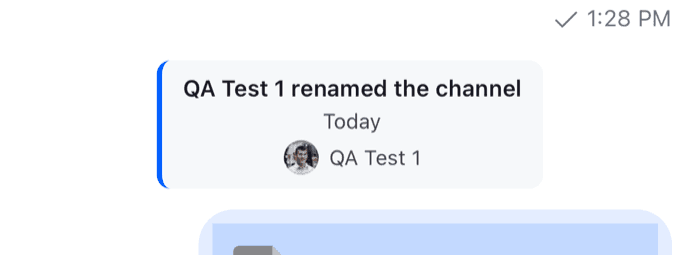 | 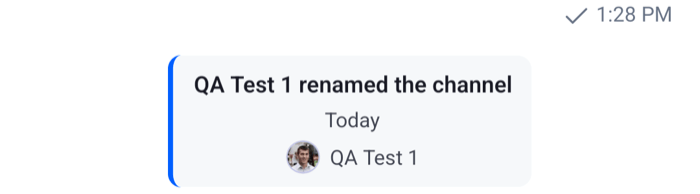 |
Pass systemMessageOverrides to a WithComponents around Channel and Thread, so every message list inside renders system messages with CustomSystemMessage. How it works:
- The list renders the
MessageSystemkey for every message whosetypeissystem, and passes the message asmessageand themessageList.messageContainertheme style asstyle. It renders outsideMessageContext, souseMessageContext()has no message there, and the message comes from the props. created_atis a nanosecond number, soconvertTimestampToDate()turns it into a date; Data conventions explains why.getDateString()formats it with the same translation key as the default, so a format registered fortimestamp.MessageSystemapplies to both.message.useris the user the server sent the message as.UserAvatarrenders their image, and falls back to their initials, or an icon for a user without a name. When the message has no user, the actor row is left out.
The text renders as plain text, without Markdown or mentions. The other parts of the message list, such as the date separators, are listed in Message list UI.
Read more
- Message UI components: the props of
MessageSystem. - Date separators: separators above system messages, and days that hold nothing but system messages.
- Avatars:
UserAvatarand its sizes. - Theme object: every theme key, those of
messageListandmessageItemViewincluded.