















Channel backgrounds
A background image, or wallpaper, behind a channel's messages makes each conversation look like its own place. This UI cookbook puts an image behind the message list, then lets the user pick one for each channel on a screen of its own and keeps the choice on the device. It ends with the same for the channel list. How the theme works is explained in Theming.
Best practices
- Make only the message list transparent, and only on the screens that draw a background. A transparent list on a screen without one shows whatever is behind the screen.
- Pick images that keep the messages readable. The bubbles, the dates and the system messages keep backgrounds of their own, but the sender's name, the time and the read status under each message sit on the background itself.
- Size the images for the screen. A large image decodes every time the channel opens.
- Show a default image while the saved choice loads, and when there is none.
- Keep the user's choice on the device when it's theirs alone. Channel data is shared with every member, so a background stored there changes for everyone.
A background behind the messages
MessageList fills its container with the theme's messageList.container style, which has the app's background color by default. Make that style transparent and render the list on an ImageBackground:
import type { PropsWithChildren } from "react";
import { ImageBackground, StyleSheet } from "react-native";
import type { Channel as StreamChannel } from "stream-chat";
import {
  Channel,
  MessageComposer,
  MessageList,
  ThemeProvider,
  useTheme,
} from "stream-chat-react-native";
import type { DeepPartial, Theme } from "stream-chat-react-native";

const BACKGROUND_URI =
  "https://images.unsplash.com/photo-1549125764-91425ca48850?auto=format&fit=crop&w=800&q=60";

// Declared once, so the theme isn't merged again on every render.
const transparentList: DeepPartial<Theme> = {
  messageList: { container: { backgroundColor: "transparent" } },
};

// Builds on the app's theme, so everything else below it keeps the app's look.
const TransparentMessageList = ({ children }: PropsWithChildren) => {
  const { theme } = useTheme();

  return (
    <ThemeProvider style={transparentList} theme={theme}>
      {children}
    </ThemeProvider>
  );
};

export const ChannelWithBackground = ({
  channel,
}: {
  channel: StreamChannel;
}) => (
  <Channel channel={channel}>
    <ImageBackground source={{ uri: BACKGROUND_URI }} style={styles.background}>
      <TransparentMessageList>
        <MessageList />
      </TransparentMessageList>
      <MessageComposer />
    </ImageBackground>
  </Channel>
);

const styles = StyleSheet.create({
  background: { flex: 1 },
});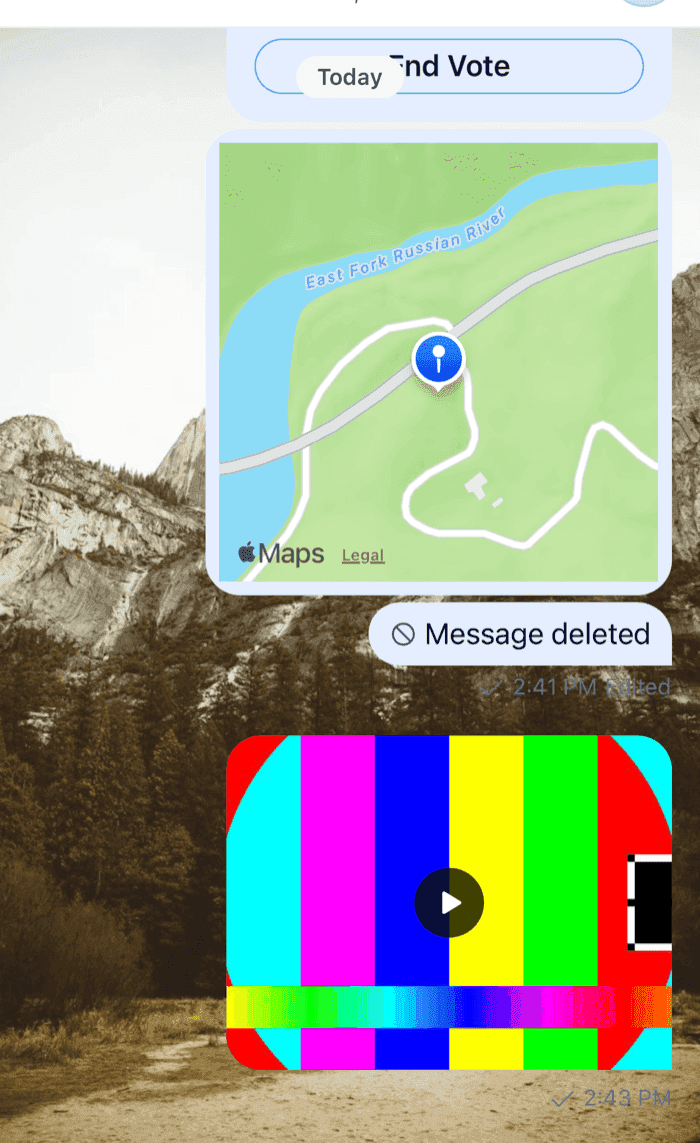 | 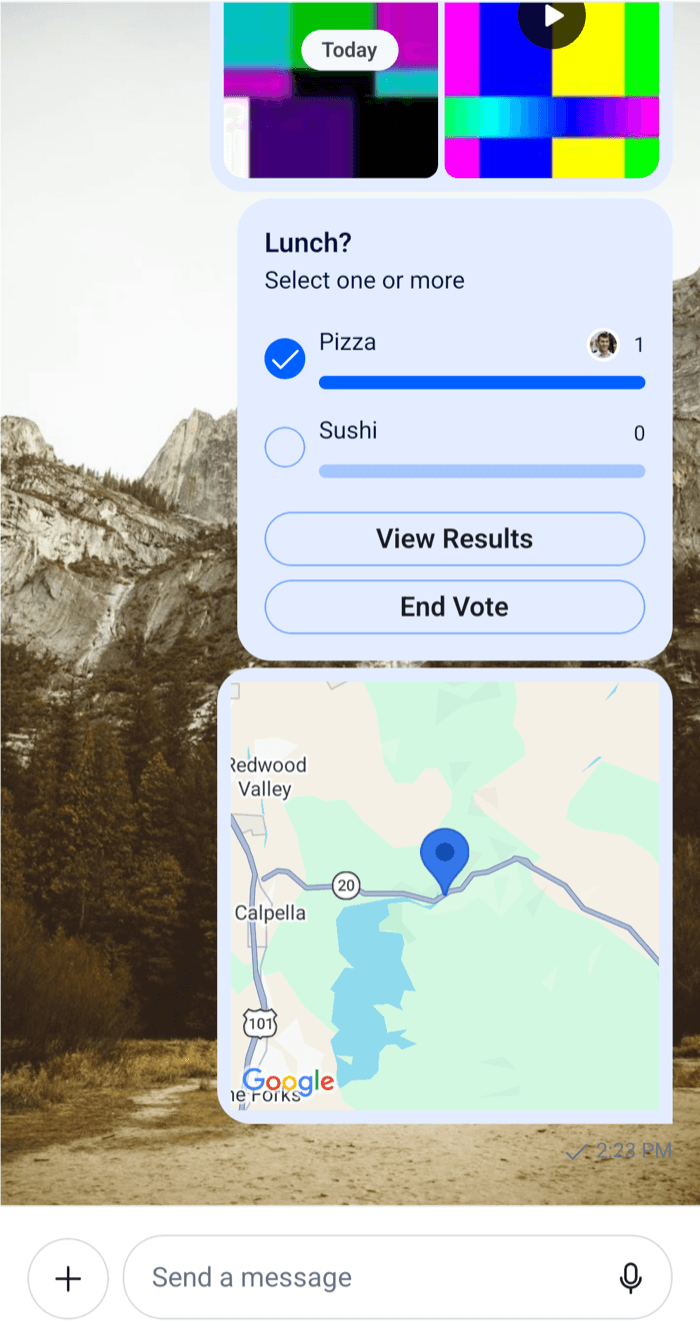 |
Channelrenders its children, so the image can wrap the list and the composer.ThemeProviderwiththememergesstyleover the theme it's given, here the app's theme fromuseTheme(). Withouttheme, it merges over the SDK's default, and the list would lose the app's colors. Only the components below it see the transparent list. Theme object explainsThemeProvider.- The composer keeps its own background, a bar at the bottom of the screen. Pass
messageInputFloatingtoChannelto float the input over the list instead, with the image around it.
While the channel has no messages, the list shows its empty state on the app's background color, so the image shows from the first message on.
To set the background for every message list in the app instead, put messageList.container in the theme you pass to OverlayProvider and Chat, and give every screen with a message list, the thread screen included, a background of its own.
A background the user picks for each channel
The user picks an image on a screen of their own, and the channel shows it from then on. The choice is kept in @react-native-async-storage/async-storage, keyed by the channel's cid, so it stays on the device:
yarn add @react-native-async-storage/async-storageThe channel screen reads the saved image each time it comes into focus, and its header has a button that opens the picker:
import { useCallback, useLayoutEffect, useState } from "react";
import type { PropsWithChildren } from "react";
import {
  Button,
  FlatList,
  Image,
  ImageBackground,
  Pressable,
  StyleSheet,
} from "react-native";
import AsyncStorage from "@react-native-async-storage/async-storage";
import { useHeaderHeight } from "@react-navigation/elements";
import { useFocusEffect } from "@react-navigation/native";
import type { NativeStackScreenProps } from "@react-navigation/native-stack";
import {
  Channel,
  MessageComposer,
  MessageList,
  ThemeProvider,
  useChatContext,
  useTheme,
} from "stream-chat-react-native";
import type { DeepPartial, Theme } from "stream-chat-react-native";

export type StackParamList = {
  Channel: { cid: string };
  Wallpaper: { cid: string };
};

const WALLPAPERS = [
  "https://images.unsplash.com/photo-1549125764-91425ca48850?auto=format&fit=crop&w=800&q=60",
  "https://images.unsplash.com/photo-1549241520-425e3dfc01cb?auto=format&fit=crop&w=800&q=60",
  "https://images.unsplash.com/photo-1554226321-24fdcddd5a55?auto=format&fit=crop&w=800&q=60",
  "https://images.unsplash.com/photo-1550006490-9f0656b79e9d?auto=format&fit=crop&w=800&q=60",
  "https://images.unsplash.com/photo-1551506448-074afa034c05?auto=format&fit=crop&w=800&q=60",
  "https://images.unsplash.com/photo-1553114835-6f7674d3c2c0?auto=format&fit=crop&w=800&q=60",
];

const DEFAULT_WALLPAPER = WALLPAPERS[0];

const wallpaperKey = (cid: string) => `wallpaper:${cid}`;

// Reads the saved wallpaper whenever the screen comes into focus, such as back from the picker.
const useWallpaper = (cid: string) => {
  const [uri, setUri] = useState<string | null>(null);

  useFocusEffect(
    useCallback(() => {
      let active = true;
      AsyncStorage.getItem(wallpaperKey(cid))
        .then((saved) => {
          if (active) setUri(saved);
        })
        .catch(() => undefined);
      return () => {
        active = false;
      };
    }, [cid]),
  );

  return uri ?? DEFAULT_WALLPAPER;
};

const transparentList: DeepPartial<Theme> = {
  messageList: { container: { backgroundColor: "transparent" } },
};

const TransparentMessageList = ({ children }: PropsWithChildren) => {
  const { theme } = useTheme();

  return (
    <ThemeProvider style={transparentList} theme={theme}>
      {children}
    </ThemeProvider>
  );
};

export const ChannelScreen = ({
  navigation,
  route,
}: NativeStackScreenProps<StackParamList, "Channel">) => {
  const { cid } = route.params;
  const { client } = useChatContext();
  const headerHeight = useHeaderHeight();
  const wallpaper = useWallpaper(cid);
  const channel = client.channelManager.get(cid);

  useLayoutEffect(() => {
    navigation.setOptions({
      headerRight: () => (
        <Button
          onPress={() => navigation.navigate("Wallpaper", { cid })}
          title="Wallpaper"
        />
      ),
    });
  }, [cid, navigation]);

  if (!channel) return null;

  return (
    <Channel
      channel={channel}
      keyboardVerticalOffset={headerHeight}
      topInset={headerHeight}
    >
      <ImageBackground source={{ uri: wallpaper }} style={styles.fill}>
        <TransparentMessageList>
          <MessageList />
        </TransparentMessageList>
        <MessageComposer />
      </ImageBackground>
    </Channel>
  );
};

export const WallpaperScreen = ({
  navigation,
  route,
}: NativeStackScreenProps<StackParamList, "Wallpaper">) => {
  const { cid } = route.params;

  const choose = async (uri: string) => {
    await AsyncStorage.setItem(wallpaperKey(cid), uri);
    navigation.goBack();
  };

  return (
    <FlatList
      contentContainerStyle={styles.grid}
      data={WALLPAPERS}
      keyExtractor={(uri) => uri}
      numColumns={3}
      renderItem={({ index, item }) => (
        <Pressable
          accessibilityLabel={`Wallpaper ${index + 1}`}
          accessibilityRole="button"
          onPress={() => void choose(item)}
          style={styles.cell}
        >
          <Image source={{ uri: item }} style={styles.fill} />
        </Pressable>
      )}
    />
  );
};

const styles = StyleSheet.create({
  cell: { aspectRatio: 9 / 16, flex: 1 / 3, padding: 2 },
  fill: { flex: 1 },
  grid: { padding: 4 },
});
Register both screens in the same native stack as the channel list:
<Stack.Screen component={ChannelScreen} name="Channel" />
<Stack.Screen
  component={WallpaperScreen}
  name="Wallpaper"
  options={{ title: "Choose a wallpaper" }}
/>
What happens:
- The channel screen looks the channel up by its
cid, as on Navigation, and shows the default wallpaper whileuseWallpaperreads the saved one. - The header's Wallpaper button opens the picker with the same
cid. The channel screen stays mounted below it. - A tap on an image saves it under
wallpaper:<cid>and goes back. - The channel screen comes into focus again,
useFocusEffectreads the saved image, and the background changes. - Opening the channel again, after a restart too, shows the saved image.
The navigation header sits above the screen's views, so its height goes to keyboardVerticalOffset and topInset. See Keyboard and insets.
To keep the background the same on every device the user signs in on, store it on the server instead, for example in the user's custom data. Channel custom data would show the same background to every member.
A background behind the channel list
The channel list paints its background in two theme styles, channelListView.flatList and channelListView.flatListContent. The rows have no background of their own until they're pressed. Make both styles transparent and render the list on an image:
import type { PropsWithChildren } from "react";
import { ImageBackground, StyleSheet } from "react-native";
import type { Channel, ChannelPaginator } from "stream-chat";
import { ChannelList, ThemeProvider, useTheme } from "stream-chat-react-native";
import type { DeepPartial, Theme } from "stream-chat-react-native";

const BACKGROUND_URI =
  "https://images.unsplash.com/photo-1554226321-24fdcddd5a55?auto=format&fit=crop&w=800&q=60";

const transparentChannelList: DeepPartial<Theme> = {
  channelListView: {
    flatList: { backgroundColor: "transparent" },
    flatListContent: { backgroundColor: "transparent" },
  },
};

const TransparentChannelList = ({ children }: PropsWithChildren) => {
  const { theme } = useTheme();

  return (
    <ThemeProvider style={transparentChannelList} theme={theme}>
      {children}
    </ThemeProvider>
  );
};

export const ChannelListWithBackground = ({
  onSelect,
  paginator,
}: {
  onSelect: (channel: Channel) => void;
  paginator: ChannelPaginator;
}) => (
  <ImageBackground source={{ uri: BACKGROUND_URI }} style={styles.background}>
    <TransparentChannelList>
      <ChannelList onSelect={onSelect} paginator={paginator} />
    </TransparentChannelList>
  </ImageBackground>
);

const styles = StyleSheet.create({
  background: { flex: 1 },
});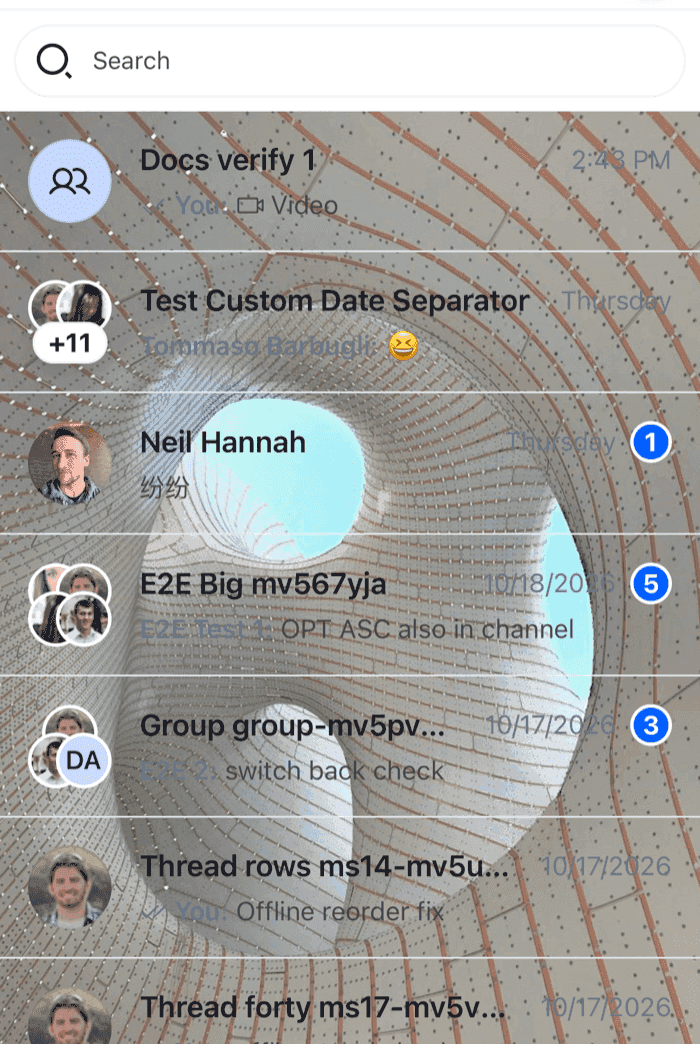 | 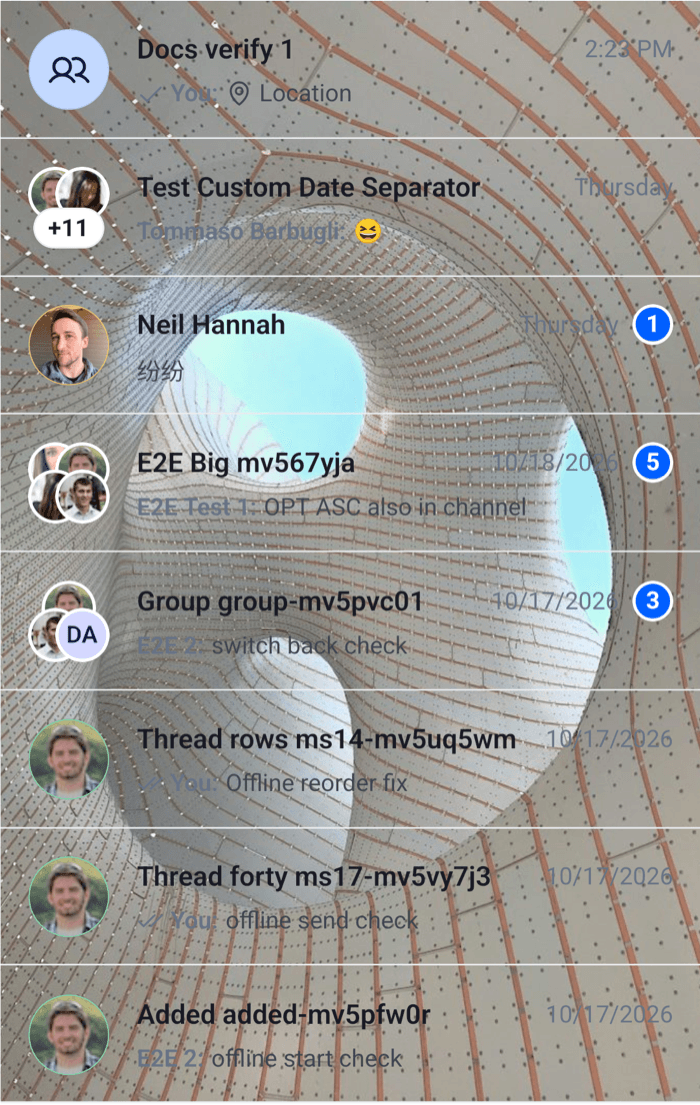 |
The swipe actions stay hidden behind a resting row: their buttons have no width until the row is swiped. The rows' text keeps the theme's colors, so pick an image they read well on, or change channelPreview.title and the other row styles in the same theme.