















Drafts
What users get
A message the user started but didn't send can be kept as a draft on the server. The user types half a message in "Design" and leaves the channel. The next time the app loads "Design", on this device or another one, the text is back in the composer.
- Each channel has its own draft, and so does each thread.
- A draft keeps the text and mentions, uploaded attachments, link previews, the quoted message and a poll.
- Sending the message, or clearing the composer, deletes the draft.
- A draft saved on another device appears in the composer while the channel is open.
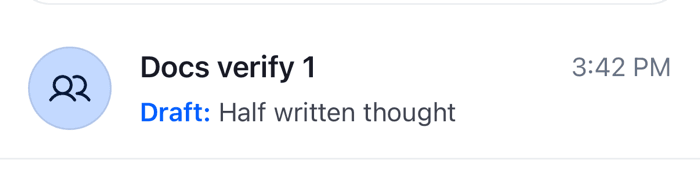
- The channel list and the thread list show "Draft:" and the unsent text in place of the last message.
 |  |
How it works across the layers
Drafts belong to the composer, in the state layer. The UI decides when to save one, and in React Native that is your app's call: the SDK's components never save a draft by themselves.
What stays on the device
A channel's composer, channel.messageComposer, lives as long as the channel object. MessageComposer doesn't clear it when it unmounts, so a user who leaves a channel and comes back in the same session finds the text where they left it, with or without drafts.
ChannelPreview and ThreadListItem read that composer. While it holds text or attachments, the row shows "Draft:" and its content, through useChannelPreviewDraftMessage() for a channel. This needs no server draft, and works with drafts off.
Saving
Saving puts the draft on the server, so it survives an app restart and reaches the user's other devices.
- Your app calls
MessageComposer.createDraft(), for example when the user leaves the channel's screen. See Saving when the user leaves. MessageComposer.createDraft()builds the draft through the composer's draft middleware and saves it withChannel.createDraft(): for the channel, or for a thread when the composer belongs to one. With offline support, it writes the draft to the local database first.- Nothing is saved when the composer is empty, or when nothing changed since the draft was loaded.
Edits are never saved as drafts, and neither are messages in a channel that the server hasn't created yet.
Restoring
- Channels. The server returns a channel's draft with the channel, whenever the channel is queried or watched: when a channel list loads or reloads, and after a reconnect. The composer loads the draft into its state.
- Threads. A thread from the thread list carries its draft. When
MessageComposermounts inside aThread, it fetches the thread's draft withMessageComposer.getDraft(): from the offline database first when there is one, then from the server. - Other devices. While drafts are on, the composer listens for
draft.updatedanddraft.deleted. It loads an updated draft, and clears itself when its draft is deleted elsewhere. It ignores both while the user is editing a message.ChannelPreviewandThreadListItemsubscribe the composers of their rows too, so the lists follow drafts made on other devices.
Deleting
When the composer becomes empty, MessageComposer.deleteDraft() deletes the saved draft. Sending empties the composer, so a sent message takes its draft with it.
Draft operations change local state first and send the request after; see What's optimistic and what isn't. The composer's side is on Message composer.
Limitations
- The SDK saves no draft unless your app calls
MessageComposer.createDraft(). Text typed before the app is closed, or before the user signs out, is lost unless you save it. - Custom data sent with the draft isn't restored into the composer.
- A thread draft saves the "Also send to channel" choice, but restoring the draft leaves the checkbox off.
Turning it on or off
Drafts are off by default. Turn them on with messageComposer.drafts.enabled:
client.config.set({ messageComposer: { drafts: { enabled: true } } });Or pass the same settings to useCreateChatClient as options. The setting is client only: there is no server switch. It reaches every composer, in channels and threads alike. While drafts are off, MessageComposer.createDraft(), MessageComposer.getDraft() and MessageComposer.deleteDraft() do nothing.
Customizing
Saving when the user leaves
Save the draft when the screen is removed from the navigation stack, and when the app goes to the background. Render this component inside the Channel or Thread whose draft it saves, on a React Navigation screen:
import { useEffect } from "react";
import { AppState } from "react-native";
import { useNavigation } from "@react-navigation/native";
import { useChannel, useThreadContext } from "stream-chat-react-native";

export const SaveDraftOnLeave = () => {
  const navigation = useNavigation();
  const channel = useChannel();
  const { thread } = useThreadContext();
  // The channel's or thread's own composer, also while the user edits a message
  const composer = thread?.messageComposer ?? channel.messageComposer;

  useEffect(() => {
    const saveDraft = () => void composer.createDraft();

    const unsubscribe = navigation.addListener("beforeRemove", saveDraft);
    const subscription = AppState.addEventListener("change", (state) => {
      if (state === "background") saveDraft();
    });

    return () => {
      unsubscribe();
      subscription.remove();
    };
  }, [composer, navigation]);

  return null;
};
MessageComposer.createDraft() does nothing while drafts are off, and when there is nothing new to save.
Listing a user's drafts
client.queryDrafts() returns the current user's drafts across channels, for a "Drafts" screen. Each draft has its channel's channel_cid, a parent_id for a thread draft, and the draft message:
const { drafts } = await client.queryDrafts({
  limit: 20,
  sort: [{ direction: -1, field: "created_at" }],
});

for (const draft of drafts) {
  console.log(draft.channel_cid, draft.parent_id, draft.message.text);
}
It's a one-off query: nothing keeps the result current. See Paginators vs one-off queries. The SampleApp's Drafts tab (examples/SampleApp/src/components/DraftsList.tsx) builds a list that follows draft.updated and draft.deleted events, and opens the channel or thread of a draft when it's pressed.
Changing what a draft holds
Drafts are built by their own middleware chain. To add or drop data, add middleware to it; see Composer middleware.
Reference
- State: Message composer, the MessageComposer API and the configuration tree.
- UI: Message composer UI, Channel list UI and Navigation.
- Props: MessageComposer and Channel preview.
- Hooks: Composer hooks and Channel preview hooks.