















Emoji suggestions
This UI cookbook turns on emoji suggestions in the composer, end to end. When the user types : and a few letters, a list suggests matching emoji, each with its shortcode, and picking one inserts it. The suggestions come from emoji-mart's search index, with a few emoji of your app's own added in front. What the feature does and how the middleware works is explained in Emoji.
Best practices
- Initialize emoji-mart once, at module scope, not inside a component.
- Create the emoji middleware inside the composer setup function, so each composer gets its own search source.
- Insert it before the mentions middleware, with
unique: true, and remove it in the teardown. - Keep all composer setup in one function. A client has one setup function per kind of object, so a second call replaces the first.
- Keep the search index fast. It runs on every keystroke after the trigger.
- Keep the
:trigger unless you also replace the suggestion list. The SDK's list renders emoji rows for:only.
Install emoji-mart
emoji-mart and its data are optional packages. Nothing in the SDK imports them:
yarn add emoji-mart @emoji-mart/datanpx expo install emoji-mart @emoji-mart/dataBuild the search index
createTextComposerEmojiMiddleware searches an EmojiSearchIndex: any object with a search(query) method that returns emoji, or a promise of them. emoji-mart's SearchIndex is one. This index puts the app's own emoji in front of emoji-mart's results:
import data from "@emoji-mart/data";
import { init, SearchIndex } from "emoji-mart";
import type { Emoji, EmojiSearchIndex } from "stream-chat-react-native";

void init({ data });

const teamEmoji: Emoji[] = [
  { id: "shipit", name: "Ship it", native: "\u{1F680}", skins: [] },
  { id: "lgtm", name: "Looks good to me", native: "\u{2705}", skins: [] },
];

export const emojiSearchIndex: EmojiSearchIndex = {
  search: async (query) => {
    const lowerCaseQuery = query.toLowerCase();
    const ownMatches = teamEmoji.filter(
      ({ id, name }) =>
        id.includes(lowerCaseQuery) ||
        name.toLowerCase().includes(lowerCaseQuery),
    );
    const emojiMartMatches: Emoji[] = (await SearchIndex.search(query)) ?? [];

    return [...ownMatches, ...emojiMartMatches];
  },
};
An emoji has an id, which is its shortcode, a name and skins, a list of { native }, and optionally native, emoticons and keywords. The middleware inserts native, or the first skin's native when it has none, and leaves out an emoji with neither. It shows the first seven results, so the app's emoji come first.
Emoticons go through the same index. When the word before the cursor follows the trigger, such as :), the middleware searches the index for that word, and replaces it with the first of the seven results whose emoticons list it. emoji-mart's index finds emoji by their emoticons. The app's emoji above have none, so they never replace one.
Install the middleware
Insert the middleware in the composer setup function. This one also installs the command middleware from the Commands UI cookbook, because both share the client's one composer setup function:
import type { StreamChat, TextComposerMiddleware } from "stream-chat";
import {
  createTextComposerEmojiMiddleware,
  setupCommandUIMiddlewares,
} from "stream-chat-react-native";
import { emojiSearchIndex } from "./emojiSearchIndex";

export const setUpComposers = (client: StreamChat) =>
  client.config.setSetupFunction("messageComposer", ({ composer }) => {
    const emojiMiddleware = createTextComposerEmojiMiddleware({
      emojiSearchIndex,
    }) as TextComposerMiddleware;

    composer.textComposer.middlewareExecutor.insert({
      middleware: [emojiMiddleware],
      position: { before: "stream-io/text-composer/mentions-middleware" },
      unique: true,
    });
    setupCommandUIMiddlewares(composer);

    return () => {
      composer.textComposer.middlewareExecutor.remove([
        emojiMiddleware.id,
        "stream-io/text-composer/active-command-guard",
        "stream-io/text-composer/command-string-extraction",
      ]);
      composer.compositionMiddlewareExecutor.remove(
        "stream-io/message-composer-middleware/command-string-injection",
      );
      composer.draftCompositionMiddlewareExecutor.remove(
        "stream-io/message-composer-middleware/draft-command-string-injection",
      );
    };
  });
Call setUpComposers(client) once the client exists, before any Channel renders, as the Commands UI cookbook does. The setup function runs for the composers that exist and every one created later, so emoji suggestions work in channels, threads and while editing.
createTextComposerEmojiMiddleware returns a middleware typed for emoji suggestions, so it's cast to TextComposerMiddleware to go into the text composer's chain. Its id is stream-io/react-native-sdk/emoji-middleware. Inserting it before the mentions middleware runs it first, and while its list is open it completes the chain, so the mentions and commands middleware don't run for that change.
The function also takes options: trigger, : by default, and minChars, the shortest :query that opens suggestions, counting the colon, 1 by default. minChars also applies to emoticons, so minChars: 3 stops :) from being replaced. The options are merged into defaults that the module shares, so pass the same options on every call.
Show the shortcode in each row
The default emoji row shows the emoji and its name. Each suggestion also carries tokenizedDisplayName, its id split around the typed text, which TokenizedSuggestionParts renders with the typed part in bold. This row shows the emoji and :shortcode:. Emoji rows have no override key of their own, so it replaces AutoCompleteSuggestionItem, presses included, and keeps the default for the other triggers:
import { Pressable, StyleSheet, Text } from "react-native";
import type { TextComposerSuggestion, TokenizationPayload } from "stream-chat";
import {
  AutoCompleteSuggestionItem,
  TokenizedSuggestionParts,
  useMessageComposer,
  useTheme,
} from "stream-chat-react-native";
import type {
  AutoCompleteSuggestionItemProps,
  EmojiSuggestion,
} from "stream-chat-react-native";

type TokenizedEmoji = EmojiSuggestion & Partial<TokenizationPayload>;

const isEmoji = (item: TextComposerSuggestion): item is TokenizedEmoji =>
  "native" in item && "name" in item;

export const EmojiShortcodeItem = (props: AutoCompleteSuggestionItemProps) => {
  const { itemProps, triggerType } = props;
  const { textComposer } = useMessageComposer();
  const {
    theme: { semantics },
  } = useTheme();

  if (triggerType !== "emoji" || !isEmoji(itemProps)) {
    return <AutoCompleteSuggestionItem {...props} />;
  }

  return (
    <Pressable
      accessibilityLabel={itemProps.name}
      accessibilityRole="button"
      onPress={() => void textComposer.handleSelect(itemProps)}
      style={styles.row}
    >
      <Text style={styles.emoji}>{itemProps.native}</Text>
      <Text style={{ color: semantics.textSecondary }}>:</Text>
      <TokenizedSuggestionParts
        fallback={itemProps.id}
        style={{ color: semantics.textSecondary }}
        tokenizedDisplayName={itemProps.tokenizedDisplayName}
      />
      <Text style={{ color: semantics.textSecondary }}>:</Text>
    </Pressable>
  );
};

const styles = StyleSheet.create({
  emoji: { fontSize: 22, marginRight: 8 },
  row: {
    alignItems: "center",
    flexDirection: "row",
    paddingHorizontal: 16,
    paddingVertical: 8,
  },
});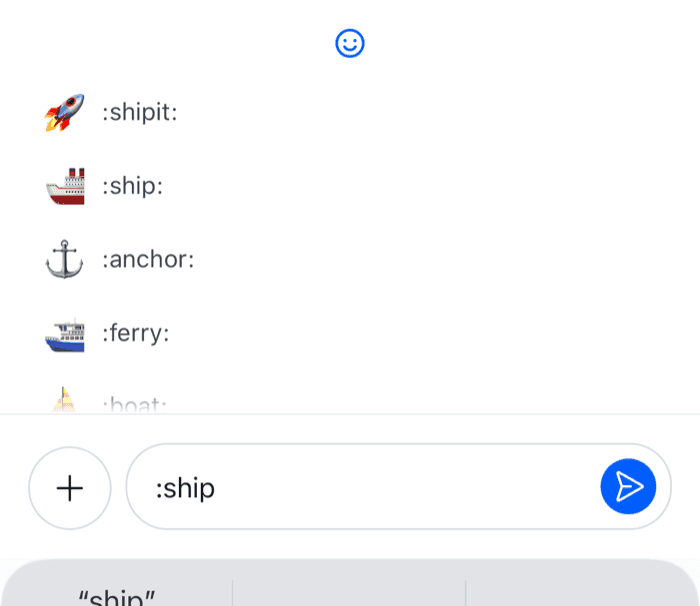 | 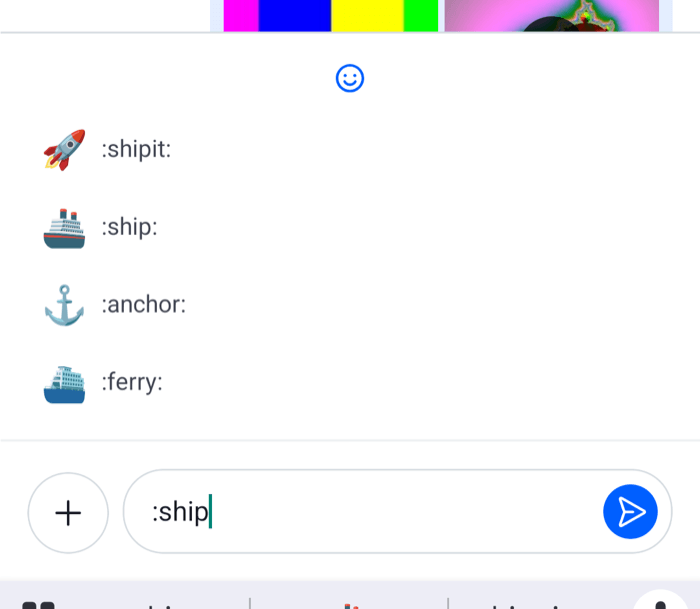 |
Register it under the AutoCompleteSuggestionItem key, declared once:
import type { Channel as StreamChannel } from "stream-chat";
import {
  Channel,
  MessageComposer,
  MessageList,
  WithComponents,
} from "stream-chat-react-native";
import type { ComponentOverrides } from "stream-chat-react-native";
import { EmojiShortcodeItem } from "./EmojiShortcodeItem";

const overrides: ComponentOverrides = {
  AutoCompleteSuggestionItem: EmojiShortcodeItem,
};

export const ChannelScreen = ({ channel }: { channel: StreamChannel }) => (
  <WithComponents overrides={overrides}>
    <Channel channel={channel}>
      <MessageList />
      <MessageComposer />
    </Channel>
  </WithComponents>
);
AutoCompleteSuggestionItem renders the rows of every trigger. If you also replace the command rows, as the Custom suggestions UI cookbook does, handle both triggers in one component. The header above the rows reads Emoji matching "<query>", which isn't a translation key. Replace AutoCompleteSuggestionHeader to change it, as that UI cookbook shows.
A trigger other than :
With options: { trigger: "$" }, the middleware opens suggestions after $, but the SDK's AutoCompleteSuggestionList renders nothing for a trigger other than @, / and :. Replace the list too, and render emoji rows when suggestions.trigger is your trigger, as Rows for a trigger of your own does for #.